
MS112 - Network switch ROLLS - Free user manual and instructions
Find the device manual for free MS112 ROLLS in PDF.


| Product Type | Network Switch |
| Brand | Rolls |
| Model | MS112 |
| Number of Ports | 8 |
| Port Speed | 10/100 Mbps |
| Dimensions (Approx.) | 10.5 x 7.2 x 2.5 cm |
| Weight (Approx.) | 200 g |
| Power Supply | External AC adapter, 5V DC, 1A |
| Standards | IEEE 802.3, 802.3u |
| Switching Capacity | 1.6 Gbps |
| MAC Address Table | 1K entries |
| Operating Mode | Unmanaged, Plug and Play |
| LED Indicators | Power, Link/Activity per port |
| Enclosure Material | Metal |
| Mounting | Desktop or wall-mountable |
| Operating Temperature | 0°C to 40°C |
| Storage Temperature | -10°C to 70°C |
| Humidity | 10% to 90% non-condensing |
| Compliance | FCC, CE, RoHS |
| Included Accessories | Power adapter, user manual |
| Cleaning Instructions | Wipe with a soft, dry cloth. Do not use liquids. |
| Safety Precautions | Keep away from water and heat sources. Ensure proper ventilation. |
| Spare Parts Availability | Not available; replace unit if defective under warranty. |
| Intended Use | Home or small office network expansion |
Frequently Asked Questions - MS112 ROLLS
User questions about MS112 ROLLS
0 question about this device. Answer the ones you know or ask your own.
Ask a new question about this device
Download the instructions for your Network switch in PDF format for free! Find your manual MS112 - ROLLS and take your electronic device back in hand. On this page are published all the documents necessary for the use of your device. MS112 by ROLLS.
USER MANUAL MS112 ROLLS
1 - Made in USA MS112
1 - This owners manual
1 - Rolls PS27s Power supply
Thank you for purchasing the MS112. We sincerely appreciate the opportunity to build a product for you and participate in your love of quality music and sound. We love what we do and we're happy to help. Rolls products are hand built in Salt Lake City, Utah by people who care about high quality audio.
ROLLS
MS112
Push to talk
XLR A-B switch
MS112 XLR A-B switch
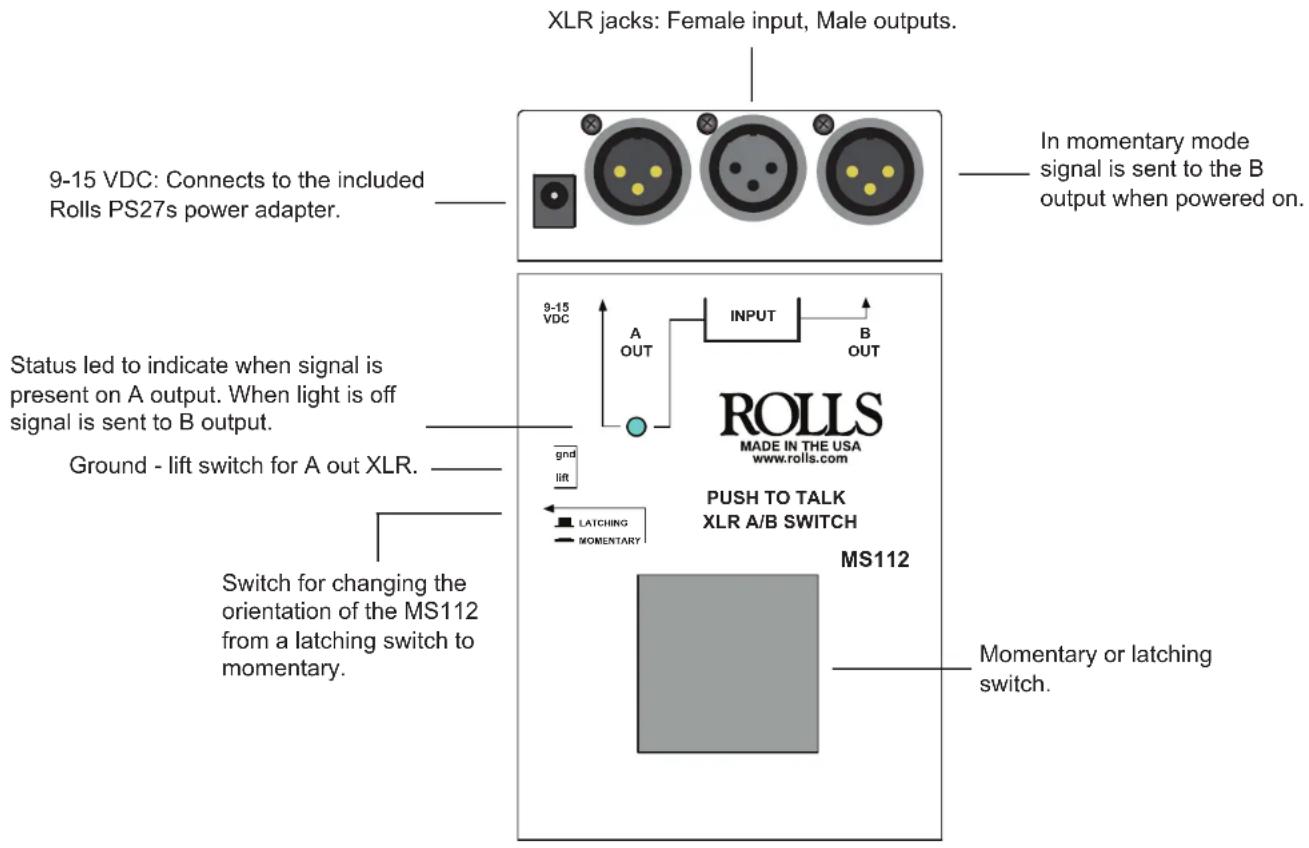
- XLR female input and XLR male output jacks
- Selectable Momentary or latching
- Status indicator to let you see what output is active
- Bottom panel screw holes for convenient mounting
This device momentarily mutes (or talks) a microphone or XLR signal between the A or B XLR outputs. This function is very handy in the event of a sneeze, cough, or other possible distracting noise. Or when you need to control when a mic is active for announcing or paging.
Or when switching between two different outputs.
All this and it is 100% Handcrafted in Salt Lake City, UT.
ROLLS
Rolls Corporation
Salt Lake City, UT
9/19
SPECIFICATIONS:
IN Connectors: XLR
OUT Connectors: XLR
Size: 3.75"w x 5"d x 1.5"h
Thick powder coated steel chassis..
100% Handcrafted in Salt Lake City, UT.
OPERATION: To mute or send a microphone signal, connect the balanced XLR cable to the female input jack on the MS112. Connect the male XLR output jacks to your next devices. Press and hold the switch for the amount of time you want the signal sent to the A output. To hear the mic signal again on the B output, release the switch. The MS112 can be configured to "push for momentary" or "Push for latching" by selecting the internal switch. The switch can be accessed from the side of the MS112.
Brand : ROLLS
Model : MS112
Category : Network switch