GV-I/O Box 4E - Video recorder Geovision - Free user manual and instructions
Find the device manual for free GV-I/O Box 4E Geovision in PDF.


| Product Type | I/O Box (Input/Output Interface) |
| Inputs | 4 inputs, Dry Contact, NO/NC |
| Outputs | 4 relay outputs (DC 30V, 3A; 110-250V AC, 3A) |
| Power Supply | 12V DC, 3A / PoE+ (IEEE 802.3at, up to 25.5W) |
| Network Interface | RJ-45, 10/100 Mbps |
| RS-485 Connection | 1 RS-485 interface, up to 600 m (1968.5 ft) with 24 AWG |
| Wiegand Interface | 2 Wiegand interfaces, 26-64 bit, 12V DC, 200 mA |
| Dimensions (with case) | 111.4 x 27.5 x 101 mm (4.39 x 1.08 x 3.98 in) |
| Weight (with case) | 235 g (0.52 lb) |
| Operating Temperature | 0°C to 65°C (32°F to 149°F) |
| Operating Humidity | 5% to 95% RH (non-condensing) |
| Ingress Protection | IP54 |
| Regulatory Approvals | CE, FCC, RoHS |
| Compatible Software | GV-DVR/NVR/VMS, GV-ASManager, GV-Control Center, GV-Center V2 |
| Supported OS | Windows 7/8/8.1/10, Server 2008/2012 (32/64-bit) |
| Maximum Daisy-Chain Units | Up to 9 units of GV-I/O Box 4/8/16 |
| Maximum Software Connections per Unit | Up to 16 connections |
| Mobile App Support | GV-IoT for Android and iOS |
| Ethernet Cable Requirement | CAT-5e, TIA/EIA-568-B, max DC resistance 9.38 ohms/100m |
| Warranty | Refer to included warranty card |
Frequently Asked Questions - GV-I/O Box 4E Geovision
User questions about GV-I/O Box 4E Geovision
0 question about this device. Answer the ones you know or ask your own.
Ask a new question about this device
Download the instructions for your Video recorder in PDF format for free! Find your manual GV-I/O Box 4E - Geovision and take your electronic device back in hand. On this page are published all the documents necessary for the use of your device. GV-I/O Box 4E by Geovision.
USER MANUAL GV-I/O Box 4E Geovision
natural_image
Exterior view of a GeoVision networking device with ports and connectors (no readable text or symbols beyond branding)Introduction
A small but capable device, GV-I/O Box 4E provides 4 inputs and 4 relay outputs. It provides both DC and AC output voltages, PoE, TCP / IP and RS-485 port for PC connection. GV-I/O Box 4E also supports GV-IoT app for remote management via mobile devices.
Features
• 4 inputs and 4 outputs
• TCP / IP and RS-485 ports for PC connection
• DC 12V, 3A / PoE+ (IEEE 802.3at)
• Connectivity of up to 9 units of GV-I/O Box 4 / 8 /16 ports
• Up to 16 connections from GeoVision software to control one GV-I/O Box
• Support for GV-IoT mobile app for remote management
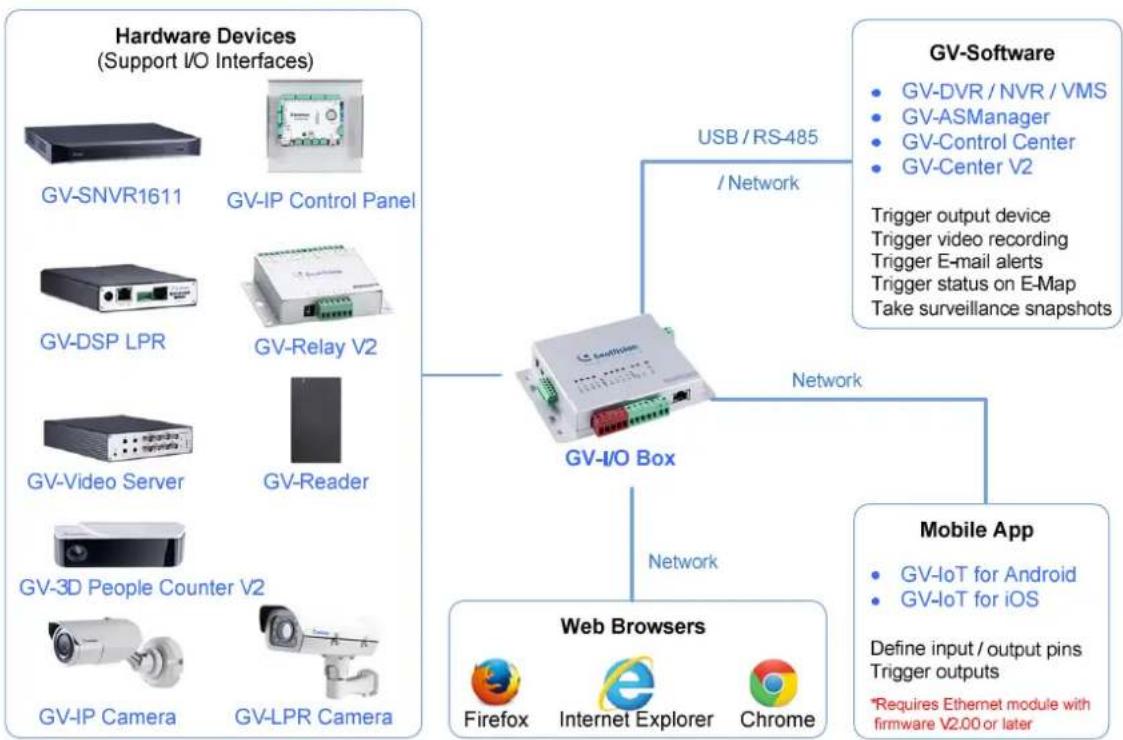
flowchart
graph TD
    A["Hardware Devices (Support I/O Interfaces)"] --> B["GV-SNVR1611"]
    A --> C["GV-IP Control Panel"]
    A --> D["GV-DSP LPR"]
    A --> E["GV-Relay V2"]
    A --> F["GV-Video Server"]
    A --> G["GV-Reader"]
    A --> H["GV-3D People Counter V2"]
    A --> I["GV-IP Camera"]
    A --> J["GV-LPR Camera"]
    K["GV-Software"] --> L["GV-DVR/NVR/VMS"]
    K --> M["GV-ASManager"]
    K --> N["GV-Control Center"]
    K --> O["GV-Center V2"]
    P["Mobile App"] --> Q["GV-IoT for Android"]
    P --> R["GV-IoT for iOS"]
    S["Network"] --> T["GV-I/O Box"]
    U["Web Browsers"] --> V["Firefox"]
    U --> W["Internet Explorer"]
    U --> X["Chrome"]
    Y["USB / RS-485 / Network"] --> K
    Z["Trigger output device"] --> K
    AA["Trigger video recording"] --> K
    AB["Trigger E-mail alerts"] --> K
    AC["Trigger status on E-Map"] --> K
    AD["Take surveillance snapshots"] --> K
    AE["*Requires Ethernet module with firmware V2.00 or later"] --> P
Note: Firefox browser is not supported currently.
Specifications
| OS Supported | 32-bit | Windows 7 / 8 / 8.1 / 10 / Server 2008 |
| 64-bit | Windows 7 / 8 / 8.1 / 10 / Server 2008 R2 / Server 2012 R2 | |
| Compatible S/W | GV-DVR / NVR / VMS, GV-ASManager, GV-Control Center, GV-Center V2*GV-ASManager and GV-Control Center only accept network connection from GV-IO Box. | |
| Wiegand Interface | 2 Wiegand interfaces, 26 ~ 64 bit format | |
| 12V DC power supply, 200 mA | ||
| RS-485 Connection | 1 RS-485 interface for 9 GV-I/O Box connections, Distance 600 m (1968.5 ft), 24 AWG | |
| Input | 4 inputs, Dry Contact, NO / NC | |
| Output | 4 relay outputs (DC 30V, 3A; 110V AC ~ 250V AC, 3A) | |
| Ethernet | RJ-45, 10 / 100 Mbps | |
| Power | 12V DC, 3A / PoE+ (IEEE 802.3at, provides up to 25.5W) | |
| Operating Temperature | 0°C ~65°C / 32°F ~ 149°F | |
| Operating Humidity | 5% ~ 95% RH (Non-Condensing) | |
| Dimensions | 111.4 x 27.5 x 101 mm / 4.39 x 1.08 x 3.98 in (case included) | |
| Weight | 235 g / 0.52 lb (case included) | |
| Ingress Protection | IP54 | |
| Regulatory | CE, FCC, RoHS | |
Note:
- The Wiegand Interface does not have any function in Firmware V1.01 or earlier.
- GV-I/O Box 4E can only be connected using CAT-5e cables, TIA / EIA-568-B, with the maximum DC resistance of 9.38 ohms / 100 m.
- All specifications are subject to change without notice.
Packing List
- GV-I/O Box 4E
- Warranty Card
- Download Guide

Brand : Geovision
Model : GV-I/O Box 4E
Category : Video recorder