
CO-3-Kit - Microphone Point Source Audio - Free user manual and instructions
Find the device manual for free CO-3-Kit Point Source Audio in PDF.


| Product Type | Earworn Microphone (Headset) |
| Model | CO-3-Kit |
| Brand | Point Source Audio |
| Ear Placement | Pre-fitted for left ear wearing |
| Adjustability | Earhook and boom adjustable; headband (R-DMC) adjustable for fit |
| Headband Option | Included with CO-3-Kit (R-DMC) for dual-ear secure fit |
| Cable Management | Cable clip included to secure near neck; cable junction nestles behind ear |
| Power Requirement | Phantom power (typical for professional microphones) |
| Connector | Not specified; likely standard 3-pin XLR or similar |
| Polar Pattern | Not specified; typically cardioid or omnidirectional for earworn |
| Frequency Response | Not specified; suitable for speech |
| Weight | Lightweight (approx. <5g without cable) |
| Cable Length | Not specified; typical 1-2m |
| Intended Use | Professional audio, live performance, broadcast, presentation |
| Maintenance | Coil cable flat for storage; avoid wrapping around body pack or creating sharp bends |
| Safety Precautions | Do not bend or force earhook or boom; improper use may void warranty |
| Warranty Registration | Register at point-sourceaudio.com/support |
| Accessories Included | Earhook, headband (R-DMC), cable clip, microphone with cable |
| Compatibility | Compatible with standard wireless body packs (via appropriate connector) |
| Cleaning | Not specified; use dry cloth if necessary. Avoid moisture |
Frequently Asked Questions - CO-3-Kit Point Source Audio
User questions about CO-3-Kit Point Source Audio
0 question about this device. Answer the ones you know or ask your own.
Ask a new question about this device
Download the instructions for your Microphone in PDF format for free! Find your manual CO-3-Kit - Point Source Audio and take your electronic device back in hand. On this page are published all the documents necessary for the use of your device. CO-3-Kit by Point Source Audio.
USER MANUAL CO-3-Kit Point Source Audio
natural_image
Profile view of a person wearing a medical ear cap and ear, head tilted slightly (no text or symbols visible)NOTE: Products pictured are for illustrative purposes and may not exactly represent the product you have purchased.
Model # CO-3 KIT

natural_image
Profile view of a person wearing a medical headgear device (no visible text or symbols)
Failure to observe proper use of this product could result in voiding your warranty.
© 2019 Point Source Audio. All rights reserved. The Point Source Audio logo is a registered trademark of Point Source Audio.
CO-3
EARWORN MICROPHONE
USER GUIDE
natural_image
Close-up of a person's ear with a medical device attached, showing ear and neck (no text or symbols visible)1
Conveniently pre-fi tted for left ear wearing.
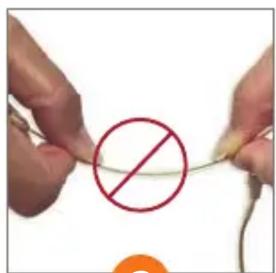
2
Do not bend or force any part of the earhook or boom.
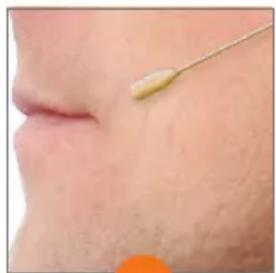
natural_image
Close-up of a human face showing a small yellow object near the mouth (no text or symbols visible)3
Mount the earhook from the top and shift to adjust fi t.
natural_image
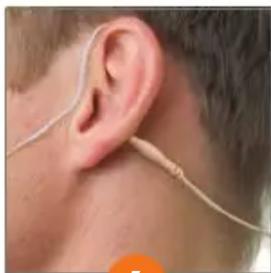
Close-up of a person's ear with a medical or electronic device attached, showing ear and neck (no text or symbols visible)4
Nestle the cable junction behind the ear to secure placement.

natural_image
Close-up of a medical device with a black probe inserted into a white catheter on a beige surface (no visible text or symbols)5
Attach cable to the clip and secure to an area near the neck.
ADDING THE R-DMC (Model # CO-3-KIT)
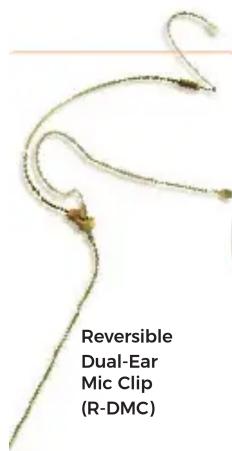
natural_image
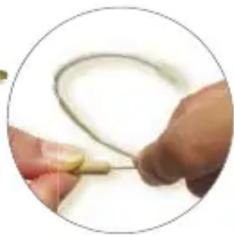
Close-up of hands holding a thin wire with a yellow clip, no visible text or symbolsGently pull ear hook from the headband about 1/8" to unlock. Turn ear hook into upright position. Release to lock into place.
natural_image
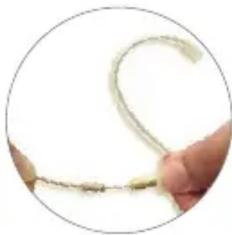
Close-up of a finger holding a thin, curved wire or filament against a white background (no text or symbols visible)Slide the headband on both sides to adjust evenly for a proper fi t.

natural_image
Close-up of a mechanical clamp or tool with a circular outline (no visible text or symbols)Slide the microphone into the mic clip. Adjust to secure the proper position.
CABLE CARE
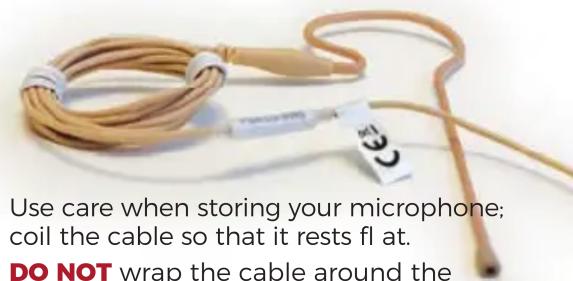
Use care when storing your microphone; coil the cable so that it rests flat.
DO NOT wrap the cable around the body pack or coil the cable in any way that creates serious bends or strain on the cable.
Register Your Warranty: POINT-SOURCEAUDIO.COM/SUPPORT
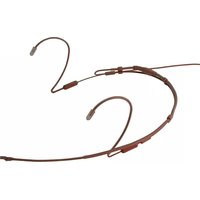
Brand : Point Source Audio
Model : CO-3-Kit
Category : Microphone