
IAEBT270 - Earphones iLive - Free user manual and instructions
Find the device manual for free IAEBT270 iLive in PDF.


| Product Type | Wireless Earbuds |
| Brand | iLive |
| Model | IAEBT270 |
| Connectivity | Bluetooth |
| Bluetooth Version | 5.0 |
| Battery Life (Music Playback) | Up to 5 hours |
| Charging Time | Approximately 1-2 hours |
| Charging Case Battery | Yes, included |
| Driver Size | 10mm |
| Frequency Response | 20Hz - 20kHz |
| Impedance | 32 ohms |
| Weight (per earbud) | Approximately 5g |
| Water Resistance Level | IPX5 (sweat and splash resistant) |
| Control Type | Touch controls |
| Built-in Microphone | Yes |
| Compatibility | iOS and Android devices |
| Included Accessories | Charging case, USB charging cable, silicone ear tips (S/M/L) |
| Charging Case Dimensions | 60 x 40 x 25 mm (approximate) |
| Color | Black |
| Warranty | 1 year |
| Care & Cleaning | Clean with a soft, dry cloth. Avoid moisture and heat. |
| Safety Precautions | Do not use at high volume for extended periods. Keep away from water and children. |
| Repairability | Not user-serviceable. Contact iLive support for assistance. |
Frequently Asked Questions - IAEBT270 iLive
User questions about IAEBT270 iLive
0 question about this device. Answer the ones you know or ask your own.
Ask a new question about this device
Download the instructions for your Earphones in PDF format for free! Find your manual IAEBT270 - iLive and take your electronic device back in hand. On this page are published all the documents necessary for the use of your device. IAEBT270 by iLive.
USER MANUAL IAEBT270 iLive
Truly Wire-Free Earbuds
User's Guide for Model IAEBT270 v2470-01
Features
• True Wireless Stereo
- Sweat proof
• Bluetooth Wireless: range 49 ft.
• Built-in microphone
• Voice prompts announce earbud operations
• Digital volume control
• Built-in rechargeable battery: approximately 5 hrs playtime at 50%
• USB-C port for battery recharge
Includes
• 3 pairs of eartips: 1 small, 1 medium, 1 large
- Charging case
• USB-C to USB charging cable
- User's Manual
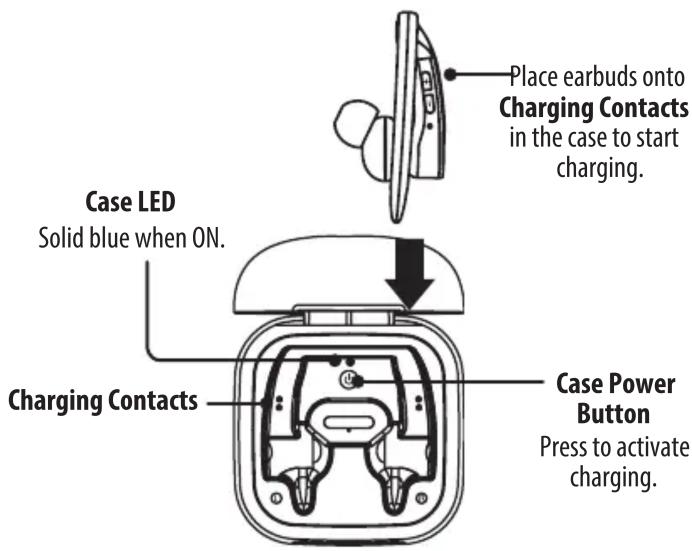
Orientation & Controls
Controls are the same on both earbuds.
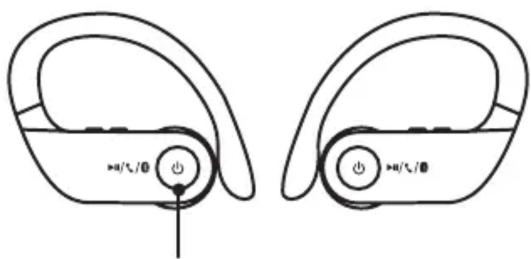
Function Button
Press and hold to power ON or OFF.
Press to play or pause audio.
Press to answer incoming phone call. Press quickly 2 times to manually pair.
LED Indicator
Flashing red and blue= Ready to pair Solid red= Charging
Note: When fully charged the light will changetoblueforafewseconds and then turn off.

Volume/Skip
Press to adjust volume. Press and hold to skip ahead or back.
natural_image
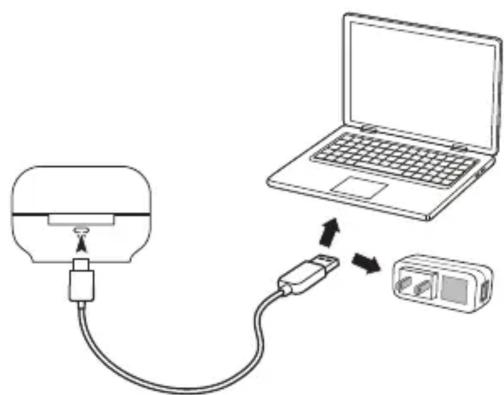
Diagram showing a device connected to a laptop and a separate device (no text or symbols present)Charging the Case
Note: Placing the earbuds in the case will automatically power them OFF.
- Using a USB-C to USB cable, connect to the USB port of a powered on computer or USB power adaptor (Not included).
- Initial charge time is approximately 2 hours. Charge fully before use.
- While the case is charging, the Case LED will display a blinking red light. When the unit is fully charged it will display a solid red light.
Initial Linking of Earbuds & Pairing to a Bluetooth Device
To link the earbuds:
Removing the earbuds from the case will automatically POWER them ON and link them after a few seconds. If not, each earbud must be powered ON separately if they were manually powered OFF and they will automatically link to each other after a few seconds. A prompt will also announce the link. Once earbuds are linked, powering OFF one earbud will power OFF both earbuds.
- With the earbuds linked, you can now connect to your Bluetooth device. The LED Indicator on one of the earbuds will begin flashing blue and red, indicating it is ready to pair to a Bluetooth device.
- On your Bluetooth device, access Bluetooth Settings and search for nearby devices. Select IAEBT270 when it is discovered. When successfully connected to your Bluetooth device, the LED indicator will slowly flash blue and a voice prompt will announce the connection.
- Audio played through the connected Bluetooth device will now be heard through both earbuds. Use the controls on the connected device or earbuds to play audio and adjust volume.
PLEASE NOTE: Due to the nature of truly wireless earbuds, you may experience slight interruptions with your audio in areas with multiple 2.4Ghz bands or in high wireless traffic areas.
Speakerphone
- To accept a call, press the Function button, or use the controls on the connected phone.
- To end a call, press the Function button, or use the controls on the connected phone.
Previously Connected Devices
- Once the earbuds have been linked and connected to a device, the earbuds will auto power ON, link and connect to the last Bluetooth device whenever removed from the case.
- To manually pair to another device, press the Function button quickly two times. The earbuds will enter pairing mode and can connect to a new device.
- To re-connect to a different device, turn off Bluetooth on unwanted devices, then access the Bluetooth settings menu on the device you wish to use and select IAEBT270.
Troubleshooting
If the earbuds experience any static, delay or cutting out of sound follow these steps.
- Make sure the earbuds are fully charged.
- Power the earbuds OFF, then ON again. Let them reconnect automatically and try playing audio again. Repeat if needed.
If the earbuds should become unpaired or will not connect normally, open your device's Bluetooth Settings Menu and follow these steps:
- Disconnect, then reconnect to the earbuds.
- If the problem persists, delete the earbuds from the list of available devices("Forget This Device").
- Turn Bluetooth OFF then ON again, and repeat the Initial Bluetooth Connection steps.
Customer Support
Customer Service: 1-888-999-4215 | Email Support: prodinfo@dpiinc.com | Email Parts: partsinfo@dpiinc.com
For Warranty Information and the most up-to-date version of this User's Guide, go to www.iLiveElectronics.com
To download this User's Guide in English, Spanish, or French, or to get answers to frequently asked questions, visit the support section at: www.iLiveElectronics.com
Copyright © 2020 Digital Products International (DPI, Inc.) All other trademarks appearing herein are the property of their respective owners. Specifications are subject to change without notice.
FCC Warnings
WARNING: Changes or modifications to this unit not extaply approved by the party responsible for compliance could void the user's authority to operate the equipment. NOTE: This equipment has been tested and found to comply with the limits for a Class B digital device, pursuant to Part 15 of the FCC Rules. These limits are designed to provide reasonable protection against harmful interference in a residential installation. This equipment generates, uses, and can radiate radio frequency energy and, if not installed and used in accordance with the instructions, may cause harmful interference to radio communications. However, there is no guarantee that interference will not occur in a particular installation. If this equipment does cause harmful interference to radio or television reception, which can be determined by turning the equipment off and on, the user is encouraged to try to correct the interference by one or more of the following measures:
- Reorient or relocate the receiving antenna.
- Increase the separation between the equipment and receiver.
- Connect the equipment into an outlet on a circuit different from that to which the receiver is connected.
- Consult the dealer or an experienced radio/TV technician for help.
Additional Warnings
- WARNING: To prevent fire or shock hazards, do not expose this unit to rain or moisture.
- WARNING : Where the mains plug or appliance coupler is used as the disconnect device, such disconnect device shall remain readily operable.
- Lithium batteries, like all rechargeable batteries, are recyclable and should be recycled or disposed of according to state and local guidelines. They should never be disposed of in normal household waste, and they should never be incinerated, as they might explode. Contact your local government for disposal or recycling practices in your area.
- To avoid hearing damage, make sure that the volume on your music player is turned down before connecting your headphones. After placing headphones in/on your ears, gradually turn up the volume until you reach a comfortable listening level.

WARNING : This product can expose you to chemicals including lead, which is known to the State of California to cause cancer and birth defects or other reproductive harm. For more information go to www.P65Warnings.ca.gov. This product meets and complies with all Federal regulations.
- Truly Wire-Free Earbuds
- User's Guide for Model IAEBT270 v2470-01
- Features
- Includes
- Orientation & Controls
- Charging the Case
- Initial Linking of Earbuds & Pairing to a Bluetooth Device
- To link the earbuds:
- Speakerphone
- Previously Connected Devices
- Troubleshooting
- Customer Support
- FCC Warnings
- Additional Warnings
Brand : iLive
Model : IAEBT270
Category : Earphones