I4DF545X - Fridge InAlto - Free user manual and instructions
Find the device manual for free I4DF545X InAlto in PDF.


| Product Type | Freestanding Refrigerator-Freezer |
| Brand | InAlto |
| Model | I4DF545X |
| Total Net Capacity | 355 L (approx.) |
| Refrigerator Capacity | 255 L (approx.) |
| Freezer Capacity | 100 L (approx.) |
| Energy Efficiency Class | E (EU 2019) |
| Annual Energy Consumption | 220 kWh/year (approx.) |
| Noise Level | 39 dB (approx.) |
| Climate Class | SN-ST |
| Dimensions (H x W x D) | 185 x 60 x 65 cm (approx.) |
| Weight | 70 kg (approx.) |
| Voltage / Frequency | 220-240 V / 50 Hz |
| Star Rating (Freezer) | 4 stars |
| Freezing Capacity | 4.5 kg/24h (approx.) |
| Automatic Defrost | Yes (Refrigerator), Manual (Freezer) |
| Cooling Technology | Static with automatic defrost |
| Interior Lighting | LED |
| Door Reversibility | Yes, user-reversible |
| Shelves Material | Glass shelves |
| Water Dispenser | No |
| Ice Maker | No |
| Color | Stainless steel (silver) |
| Repairability Index | 6.5/10 (approx.) |
Frequently Asked Questions - I4DF545X InAlto
User questions about I4DF545X InAlto
0 question about this device. Answer the ones you know or ask your own.
Ask a new question about this device
Download the instructions for your Fridge in PDF format for free! Find your manual I4DF545X - InAlto and take your electronic device back in hand. On this page are published all the documents necessary for the use of your device. I4DF545X by InAlto.
USER MANUAL I4DF545X InAlto
natural_image
Abstract geometric pattern with horizontal stripes and a circular element (no text or symbols)Dear Customer, Congratulations on purchasing your refrigerator. The
InAlto brand is proudly distributed within Australia by Residentia Group Pty Ltd.
Please refer to the warranty card at the rear of this manual for information regarding your product's parts and labour warranty, or visit us online at www.residentiagroup.com.au.
At Residentia Group, we are customer obsessed and our Support Team are there to ensure you get the most out of your appliance. Should you want to learn more about the various oven functions our Support Team are here to help.
You can use our online Support Centre at anytime by visiting http://support.residentiagroup.com.au, or you can contact us via phone by dialling: 1300 11 HELP (4357).
It is important that you read through the following use and care manual thoroughly to familiarise yourself with the installation and operation requirements of your appliance to ensure optimum performance.
Again, thank you for choosing an InAlto appliance and we look forward to being of service to you.
Kind Regards, The Residentia Team

CONTENTS
■ Safety warnings
Safety warnings 001
■ Installation Instruction
Placement Start 005
Human-Machine Interface and Button Operation 006
■ Refrigerator Features
Names of components 009
Refrigerating chamber 009
Freezing chamber 009
■ Maintenance of refrigerators
Cleaning 010
Defrost 010
Stop using 010
■ Frequently asked questions 011
Safety warnings
This chapter describes the important security matters to prevent users from injury or property damage. Please understand fully the following text (logo, icon) and comply with the safety warnings.
| DANGER | Indicates a hazardous situation which, if not avoided, will result in death or serious injury |
| CAUTION | Indicates a hazardous situation which, if not avoided, could result in death or serious injury |
| WARNING | Indicates a hazardous situation which, if not avoided, could result in minor or moderate injury. |
| Prohibition symbols | The symbols indicate prohibited matters, and those behaviors are forbidden. Non-compliance with the instructions may result in product damages or endanger the personal safety of users. |
| Warning symbols | The symbols indicate matters that must be followed, and those behaviors must be strictly executed in line with the operation requirements. Non-compliance with the instructions may result in product damages or endanger the personal safety of users. |
| Note symbols | The symbols indicate matters to pay attention to, and these behaviors shall be specially noted. Due precautions are needed or minor or moderate injuries or damages of the product will be caused. |
WARNING
--- Keep ventilation openings, in the appliance enclosure or in the built-in structure, clear of obstruction.
--- Do not use mechanical devices or other means to accelerate the defrosting process, other than those recommended by the manufacturer.
--- Do not damage the refrigerant circuit.
--- Do not use electrical appliances inside the food storage compartments of the appliance, unless they are of the type recommended by the manufacturer.
--- The appliance has to be unplugged after use and before carrying out user maintenance on the appliance.
--- This appliance is not intended for use by persons (including children) with reduced physical, sensory or mental capabilities, or lack of experience and knowledge, unless they have been given supervision or instruction concerning use of the appliance by a person responsible for their safety.
--- Children should be supervised to ensure that they do not play with the appliance.
--- If the supply cord is damaged, it must be replaced by the manufacturer, its service agent or similarly qualified persons in order to avoid a hazard.
--- Please abandon the refrigerator according to local regulators for it use flammable blowing gas and refrigerant.
--- Please according to local regulations regarding disposal of the appliance for its flammable refrigerant and blowing gas. Before you scrap the appliance, please take off the doors to prevent children trapped.
--- This appliance is intended to be used in household and similar applications such as
-staff kitchen areas in shops, offices and other working environments;
-farm houses and by clients in hotels, motels and other residential type environments;
-bed and breakfast type environments;
-catering and similar non-retail applications.
--- Do not store explosive substances such as aerosol cans with a flammable propellant in this appliance.
Safety warnings
This chapter describes the important security matters to prevent users from injury or property damage. Please understand fully the following text (logo, icon) and comply with the safety warnings.
Electricity related warnings
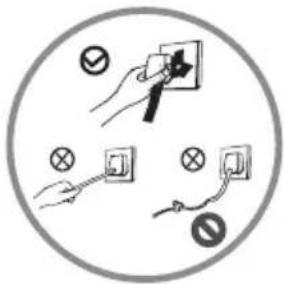
- Do not pull the power cord when pulling the power plug of the refrigerator. Please firmly grasp the plug and pull out it from the socket directly.
- Do not damage the power cord under any condition so as to ensure safety use, do not use when the power cord is damaged or the plug is worn.
- Worn or damaged power cord shall be replaced in manufacture-authorized maintenance stations.
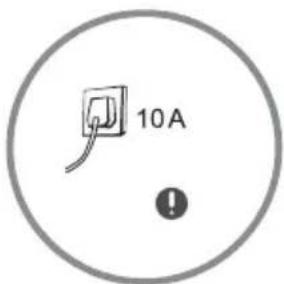
- Please use a dedicated three-hole power socket which is 10A or more and the power socket shall not be shared with other electrical appliances.
- The power cord should be firmly contacted with the socket or else fires might be caused. Please ensure that the grounding electrode of the power socket is equipped with a reliable grounding line.
natural_image
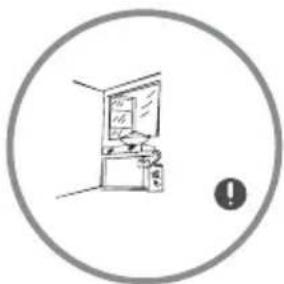
Simple line drawing of a room interior with a monitor and cabinet, enclosed in a circle (no text or symbols)- The refrigerator adopts 220-240V/50Hz AC power, voltage fluctuations over the range of 220-240±10%V will cause malfunction or even damage, so a 750 W automatic voltage regulator must be installed in concert with the AC power.
- Please turn off the valve of the leaking gas and then open the doors and windows in case of leakage of gas and other flammable gases. Do not unplug the refrigerator and other electrical appliances considering that spark may cause a fire.
natural_image
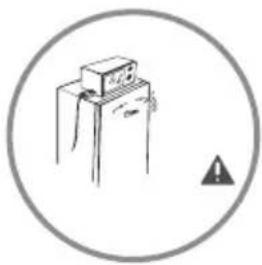
Simple line drawing of a cabinet with an explosion symbol (no text or labels)- To ensure safety, it is not recommended that to place regulators, rice cookers, microwave ovens and other appliances at the top of the refrigerator, those recommended by the manufacture are not included. Do not use electrical appliances in the food pantry.
Safety warnings
This chapter describes the important security matters to prevent users from injury or property damage. Please understand fully the following text (logo, icon) and comply with the safety warnings.
Related warnings for use
natural_image
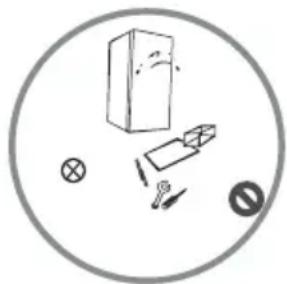
Simple line drawing of a box, pencil, cross, and magnifying glass inside a circle (no text or symbols)- Authorized demolition or renovation of the refrigerator is not prohibited. It is forbidden to damage the refrigerant lines and the repair and maintenance of the refrigerator must be carried out by professionals.
- Damaged power cord must be replaced by the manufacturer, its maintenance department or related professionals in order to avoid danger.
natural_image
Simple line drawing of a hand holding a vertical object with a starburst effect, enclosed in a circle (no text or symbols)- The surrounding of the appliances around or the embedded structure shall not be obstructed while good ventilation shall be maintained.
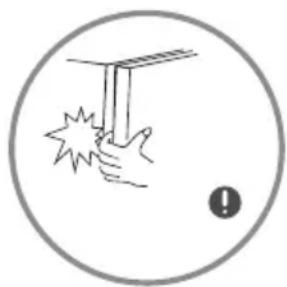
- The gaps between refrigerator doors and between doors and refrigerator body are small, be noted not to put your hand in these areas to prevent squeezing the finger. Please be gentle when switching off the refrigerator door to avoid falling articles.
- Do not pick foods or containers in the freezing chamber when the refrigerator is running, especially metal containers in order to avoid frostbite.
natural_image
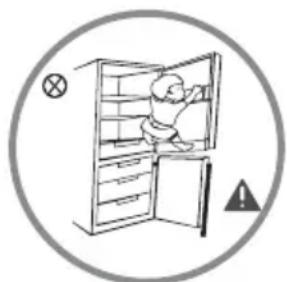
Illustration of a person inside an open refrigerator with warning symbols (no text or labels)- Do not allow children to enter or climb the refrigerator to prevent that children are sealed in the refrigerator or children are injured by the falling refrigerator.
- Do not spray or wash the refrigerator; do not put the refrigerator in moist places easy to be splashed with water so as not to affect the electrical insulation properties of the refrigerator.
natural_image
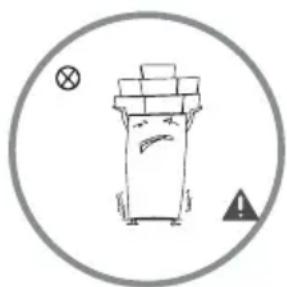
Simple line drawing of a trash bin with a warning symbol (no text or labels)- Do not place heavy objects on the top of the refrigerator considering that objectives may fall when switching the door, and accidental injuries might be caused.
- Please pull of the plug in case of power failure or cleaning. Do not connect the freezer to power supply within five minutes to prevent damages to the compressor due to successive starts.
Safety warnings
This chapter describes the important security matters to prevent users from injury or property damage. Please understand fully the following text (logo, icon) and comply with the safety warnings.
Warnings related to placing items
natural_image
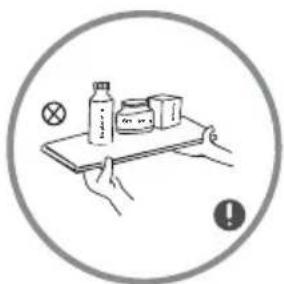
Illustration of hands holding a tray with a bottle, milk carton, and a cross symbol (no text or labels)- Do not put flammable, explosive, volatile and highly corrosive items in the refrigerator to prevent damages to the product or fire accidents.
- Do not place flammable items near the refrigerator to avoid fires.
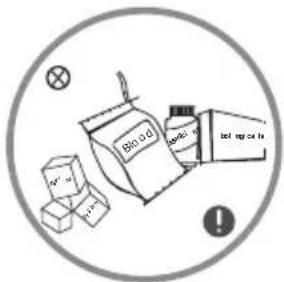
- This product is household refrigerators and shall be only suitable for the storage of foods. According to national standards, household refrigerators shall not be used for other purposes, such as storage of blood, drugs or biological products.
- Do not store or place dry ice in the refrigerator.
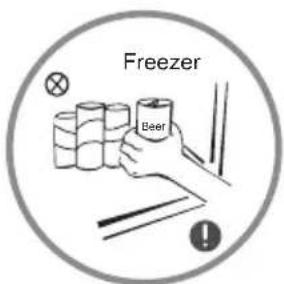
- Do not place items such as bottled or sealed container of fluid such as bottled beers and beverages in the freezer to prevent bursts and other losses.
Warnings related to disposal

The refrigerator's R600a refrigerant and cyclopentane foam materials are combustible materials and discarded refrigerators should be isolated from fire sources and can not be burned.
Please transfer the freezer to qualified professional recycling companies for processing to avoid damages to the environment or other hazards.

Please remove the door of the refrigerator and shelves which shall be properly placed to avoid accidents of children entering and playing in the refrigerator.
Installation Instruction
Placement
Start
Placement
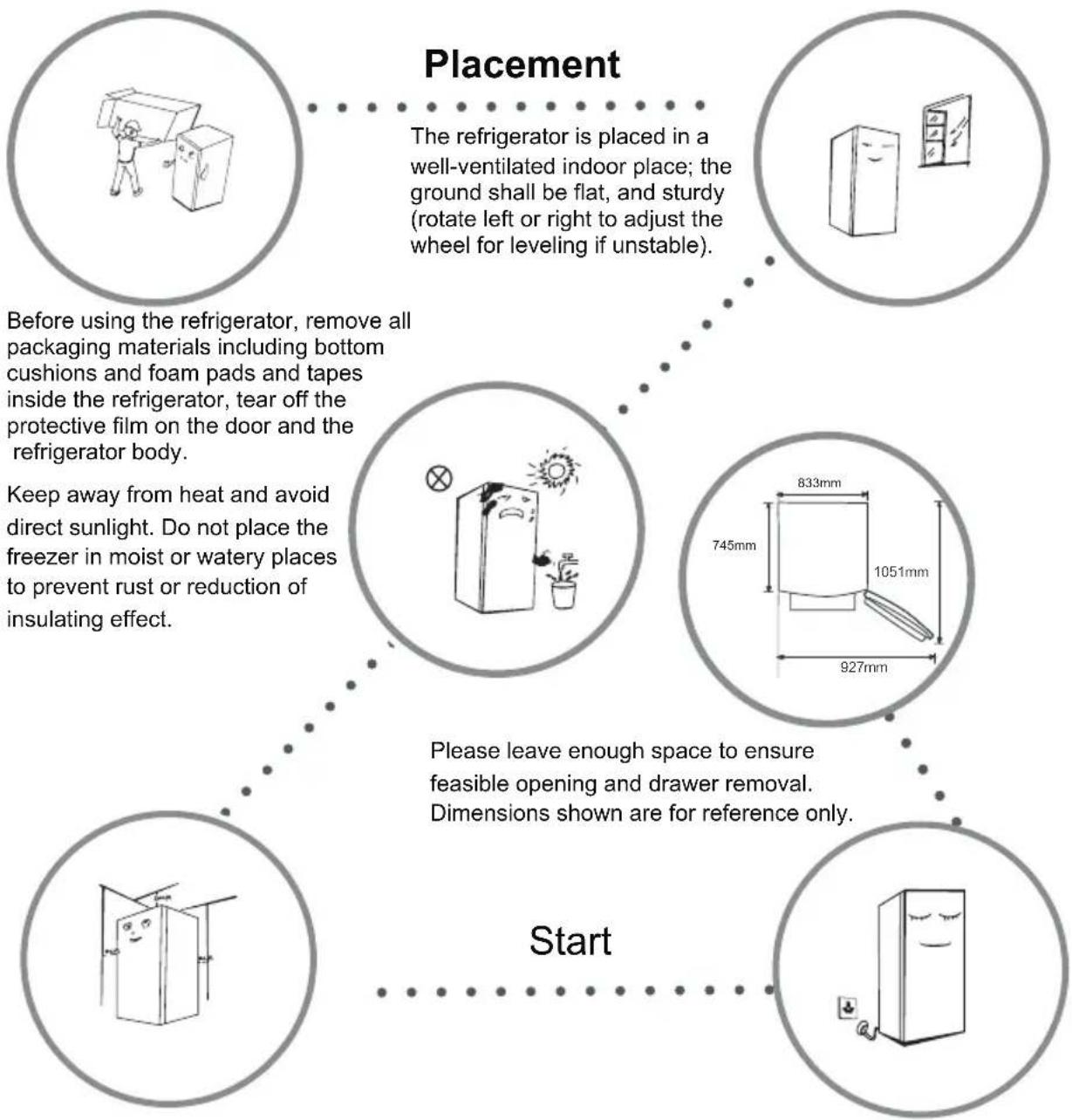
The refrigerator is placed in a well-ventilated indoor place; the ground shall be flat, and sturdy (rotate left or right to adjust the wheel for leveling if unstable).
Before using the refrigerator, remove all packaging materials including bottom cushions and foam pads and tapes inside the refrigerator, tear off the protective film on the door and the refrigerator body.
Keep away from heat and avoid direct sunlight. Do not place the freezer in moist or watery places to prevent rust or reduction of insulating effect.
Please leave enough space to ensure feasible opening and drawer removal. Dimensions shown are for reference only.
Start
The top space of the refrigerator shall be greater than 30cm, and the distances from both sides and backside shall be more than 10 cm to facilitate the opening and closing and heat dissipation. Wipe the refrigerator inside and outside with warm moist rag (add a small amount of detergent in the warm water and wipe clean finally with clean water).
The refrigerator shall stay for half an hour before connecting 220-240V/50Hz power when it is firstly started. The refrigerator shall run 2 to 3 hours before loading fresh or frozen foods; the refrigerator shall run for more than 4 hours in summer in advance considering that the ambient temperature is high.
Human-Machine Interface and Button Operation
Display screen
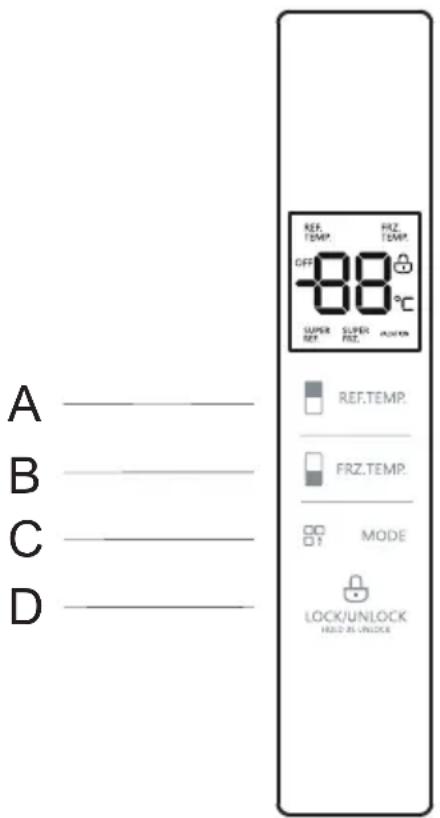
For the first power-on, the full display lasts 3s while the start-up tone rings; then, the panel displays normally (The setting temperature of refrigerating chamber and freezing chamber is 5^ C and -18^ C, respectively, upon the first power-on).
Display of normal running
Display a fault code (loop display) when a failure occurs; display the setting temperature of refrigerating chamber when no failure occurs;
Display control
In normal cases, the display screen will display LOCK without door opening and key operations for 30s, and then die out after 30s under the locking state; when the display screen is off, it will light up normally with key operations; when a failure to the category of "Visible Fault Code", the display screen turns on and then dies out after 30s;
Lock/Unlock
Hold the key "LOCK/UNLOCK" for 2s under the unlocking state, the system enters the locking state and gives a buzzing sound of locking.
Hold the key "LOCK/UNLOCK" for 2s under the locking state, the system enters the unlocking state and gives a buzzing sound of unlocking.
The system enters the locking state automatically without any key operation for 30s.
Except that door opening alarm and fault alarm can be relieved under the locking state as well, the following key operations must be operated under the unlocking state. For any operation under the locking state, a buzzing sound of wrong operation will ring.
Settings of refrigerating chamber
Temperature setting of refrigerating chamber
Press the key REF.TEMP to select the area of refrigerating temperature and then press the key REF.TEMP to adjust the temperature of refrigerating chamber; the temperature drops 1°C for pressing the key REF.TEMP once; press the key REF.TEMP again after the temperature reaches 2°C, the refrigerating chamber is set to 8°C. The temperature setting of refrigerating chamber varies between 2\~8°C, which will be effective upon locking.
Settings of freezing chamber
Temperature setting of freezing chamber
Press the key FRZ.TEMP to select the freezing temperature area and then press the key FRZ.TEMP to adjust the temperature of freezing chamber; the temperature drops 1°C for pressing the key FRZ.TEMP once; press the key FRZ.TEMP again after the temperature reaches -24°C, the freezing chamber is set to -16°C and the temperature setting varies between -24 \~ -16°C, which will be effective upon locking.
Mode setting
Press the key “MODE”, the corresponding modes will be circulated as below: When the refrigerating chamber is on, cycle settings SUPER COOL→SUPER FRZ→SUPER COOL/SUPER FRZ→VACATION→NONE→SUPER COOL...
When the refrigerating chamber is off, cycle settings SUPER FRZ→VACATION →NONE→SUPER FRZ...
Under the SUPER COOL mode, the refrigerating chamber defaults to 2°C automatically; upon exiting the SUPER COOL mode, the setting temperature of refrigerating chamber will restore to that before the SUPER COOL mode. Under the SUPER FRZ mode, the freezing chamber defaults to -24°C automatically; upon exiting the SUPER FRZ mode, the setting temperature of freezing chamber will restore to that before the SUPER FRZ mode. Under the VACATION mode, the refrigerating chamber defaults to closed while the freezing chamber defaults to -18°C automatically;
Upon exiting the VACATION mode, the setting temperature of refrigerating chamber and freezing chamber will both be restored to those before the VACATION mode.
List of Fault Codes
| Error Code | Description |
| E1 | Temperature sensor failure of refrigerating chamber |
| E2 | Temperature sensor failure of freezing chamber |
| E4 | Failure of defrosting sensor in refrigerating chamber |
| E5 | Failure of freezing & defrosting sensor |
| E6 | Communication Failure |
| E7 | Failure of circulating temperature |
| EH | Humidity sensor failure |
Refrigerator Features
Names of components
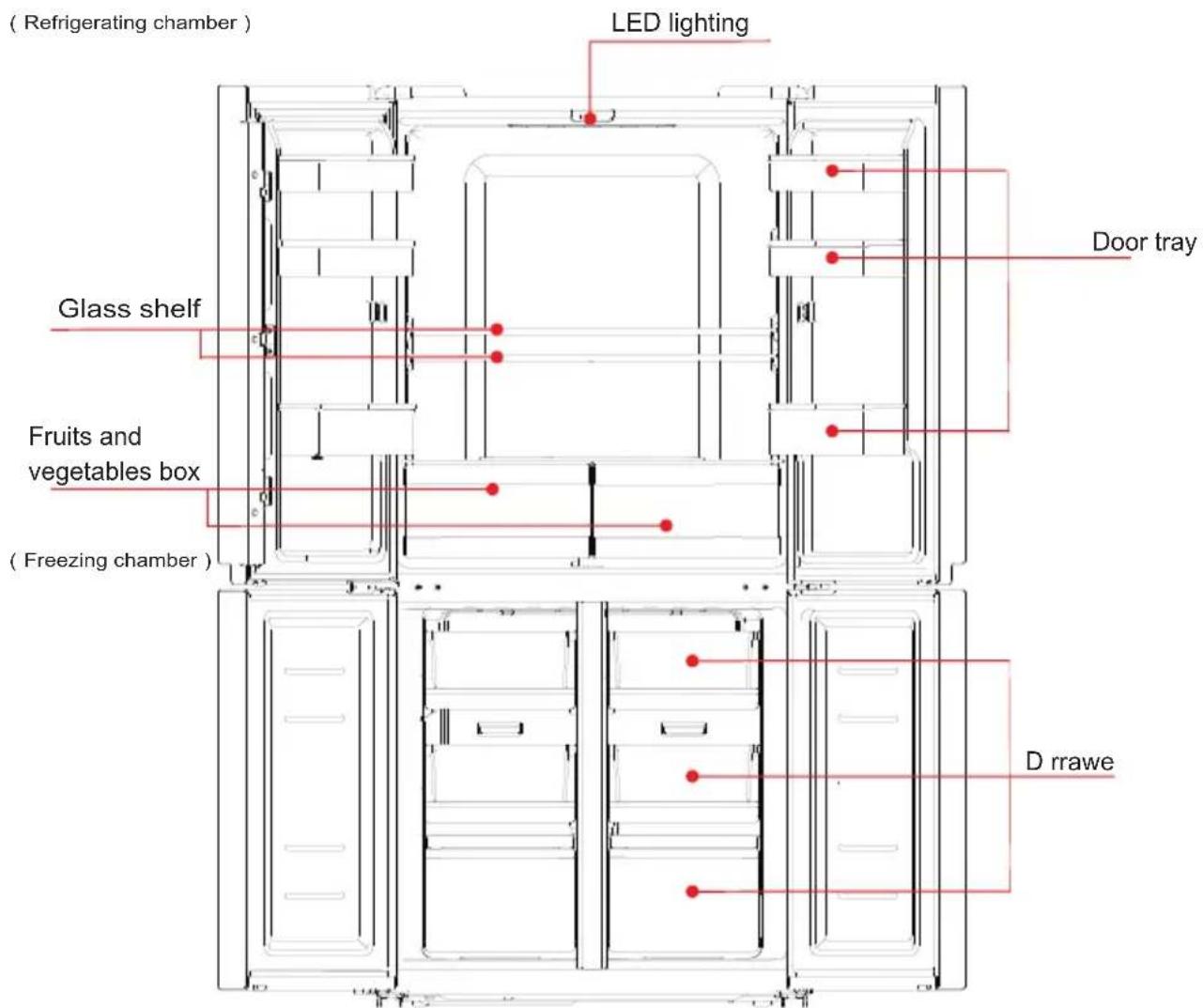
Refrigerating chamber
- The Refrigerated Storage of a variety of fruits,
vegetables, beverages and other food consumed in the short term. - Cooking foods shall not be put in the refrigerating chamber until cooled to room temperature.
3.Foods are recommended to be sealed up before putting into the refrigerator. The glass shelves can be adjusted up or down for a reasonable amount of storage space and easy use.
Freezing chamber
- The low temperature freezing chamber may keep food fresh for a long time and it is mainly used to store frozen foods and making ice.
- The freezing chamber is suitable for storage of meat, fish, rice balls and other foods not to be consumed in short term.
- Chunks of meat are preferably to be divided into small pieces for easy access. Please be noted food shall be consumed within the shelf time.
Maintenance of refrigerators
Cleaning
- Dusts behind the refrigerator and on the ground shall be timely cleaned to improve the cooling effect and energy saving. The interior of the refrigerator should be cleaned regularly to avoid odor. Soft towels or sponge dipped in water and non-corrosive neutral detergents are suggested for cleaning. The freezer of shall be finally cleaned with clean water and dry cloth. Open the door for natural drying before the power is turned on.
natural_image
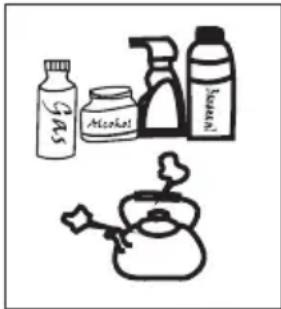
Illustration of various household items including a glass, alcohol spray bottle, and a kettle (no text or symbols)- Do not use hard brushes, clean steel balls, wire brushes, abrasives, such as toothpastes, organic solvents (such as alcohol, acetone, banana oil, etc.), boiling water, acid or alkaline items clean refrigerator considering that this may damage the fridge surface and interior.
- Do not rinse with water so as not to affect the electrical insulation properties. Please use a dry cloth when cleaning lighting lamps, temperature control knob and electrical components.
Please unplug the refrigerator for defrost and cleaning.
Defrost
- The refrigerator is made based on the air-cooling principle and thus has automatic defrosting function. Frost formed due to change of season or temperature may also be manually removed by disconnection of the appliance from power supply or by wiping with a dry towel.
Do not use metal utensils or electric heater for defrost so as not to damage the appliance. Please remove the food and put in a cool place when defrosting before removing drawers and other accessories.
Stop using
- Foods can be preserved for a couple of hours even in summer in case of power failure; it is recommended to reduce the frequency of opening door and do not put fresh foods into the freezer.
- Please unplug the refrigerator left unused for a long time for cleaning. Keep the door open to avoid the bad odor.
- Before moving the refrigerator, please emove all items in the refrigerator and fasten the glass partitions, fruit and vegetable boxes, freezer drawers with taps lest the door opens during displacement; Do not turn upside, horizontally place or vibrate the refrigerator, the carrying angle can not be greater than 45 °C.

Continuous operation is recommended when the refrigerator is started. Please do not move the refrigerator under normal circumstances so as not to affect the refrigerator's service life.
Frequently asked questions
The following simple issues can be handled by the user. Please call the after-sale service department if the issues are not settled.
| Inoperation | Whether the freezer is plugged and connected to power;Low voltage;Failure power or tripping circuit |
| Odor | Odorous foods should closely wrapped;Whether foods are rotten;Whether the interior shall be cleaned. |
| Foods in the refrigerating chamber are frozen | Whether the thermostat is over adjusted;Whether foods containing water is put in inside the glass partition. |
| Long-term operation of compressor | It is normal that refrigerator operates for longer time in summer when the ambient temperature is higher;Do not put too much food in the freezer at one time;Do not put foods until they are cooled;Frequent opening of refrigerator door.Thick frost layer (defrost is needed) |
| The refrigerator door can not be properly closed. | The freezer door is stuck by food packages;Too much food;Tilt refrigerator. |
| Loud noises | Whether the food is leveled, whether the refrigerator is balanced;Whether the refrigerator parts are properly placed. |
Warm tips:
◆The refrigerator enclosure may emit heat during operation specially in summer, this is caused by the radiation of the condenser, and it is a normal phenomenon.
◆Condensation: condensation phenomenon will be detected on the exterior surface and door seals of the freezer when the ambient humidity is large, this is a normal phenomenon, and the condensation can be wiped away with a dry towel.
◆Airflow sound: Refrigerants circulating in the refrigerant lines will produce eruption of sound and grunts which is normal does not affect the cooling effect.
◆Buzz: Buzz will be generated by running compressor specially when starting up or shutting down.
◆Clatter: The solenoid valve or electric switch valve will clatter which is a normal phenomenon and does not affect the operation.
◆The refrigerating chamber will periodically frost and defrost (water drops will be generated on the backside of the refrigerating chamber when defrosting) which are normal.
Warranty Information
WARRANTY TERMS & CONDITIONS DISHWASHERS (FREESTANDING, INTEGRATED)
This document sets out the terms and conditions of the product warranties for Residentia Group Appliances. It is an important document. Please keep it with your proof of purchase documents in a safe place for future reference should you require service for your Appliance.
1. In this warranty
(a) 'acceptable quality' as referred to in clause 10 of this warranty has the same meaning referred to in the ACL;
(b) 'ACL' means Trade Practices Amendment (Australian Consumer Law) Act (No.2) 2010;
(c) 'Appliance' means any Residentia Group product purchased by you accompanied by this document;
(d) 'ASR' means Residentia Group authorised service representative;
(e) 'Residentia Group' means Residentia Group Pty Ltd of 118 Campbell Street Collingwood 3066, ACN 600 546 656 in respect of Appliances purchased in Australia;
(f) ‘major failure’ as referred to in clause 10 of this warranty has the same meaning referred to in the ACL and includes a situation when an Appliance cannot be repaired or it is uneconomic for Residentia Group, at its discretion, to repair an Appliance during the Warranty Period;
(g) 'Warranty Period' means: (i) where the Appliance is used for personal, domestic or household use (i.e. normal single family use) as set out in the instruction manual, the Appliance is warranted against manufacturing defects for 24 months, following the date of original purchase of the Appliance;
(h) 'you' means the purchaser of the Appliance not having purchased the Appliance for re-sale, and 'your' has a corresponding meaning.
- This warranty only applies to Appliances purchased and used in Australia and is in addition to (and does not exclude, restrict, or modify in any way) any non-excludable statutory warranties in Australia.
- During the Warranty Period Residentia Group or its ASR will, at no extra charge if your Appliance is readily accessible for service, without special equipment and subject to these terms and conditions, repair or replace any parts which it considers to be defective. Residentia Group or its ASR may use remanufactured parts to repair your Appliance. You agree that any replaced Appliances or parts become the property of Residentia Group. This warranty does not apply to light globes, batteries, filters or similar perishable parts.
-
Parts and Appliances not supplied by Residentia Group are not covered by this warranty.
-
You will bear the cost of transportation, travel and delivery of the Appliance to and from Residentia Group or its ASR. If you reside outside of the service area, you will bear the cost of:
(a) travel of an authorised representative;
(b) transportation and delivery of the Appliance to and from Residentia Group or its ASR, in all instances, unless the Appliance is transported by Residentia Group or its ASR, the Appliance is transported at the owner's cost and risk while in transit to and from Residentia Group or its ASR.
-
Proof of purchase is required before you can make a claim under this warranty.
-
You may not make a claim under this warranty unless the defect claimed is due to faulty or defective parts or workmanship. Residentia Group is not liable in the following situations (which are not exhaustive):
(a) the Appliance is damaged by:
(i) accident
(ii) misuse or abuse, including failure to properly maintain or service
(iii) normal wear and tear
(iv) power surges, electrical storm damage or incorrect power supply
(v) incomplete or improper installation
(vi) incorrect, improper or inappropriate operation
(vii) insect or vermin infestation
(viii) failure to comply with any additional instructions supplied with the Appliance;
(b) the Appliance is modified without authority from Residentia Group in writing;
(c) the Appliance's serial number or warranty seal has been removed or defaced;
(d) the Appliance was serviced or repaired by anyone other than Residentia Group, an authorised repairer or ASR.
-
This warranty, the contract to which it relates and the relationship between you and Residentia Group are governed by the law applicable where the Appliance was purchased.
-
To the extent permitted by law, Residentia Group excludes all warranties and liabilities (other than as contained in this document) including liability for any loss or damage whether direct or indirect arising from your purchase, use or non use of the Appliance.
-
For Appliances and services provided by Residentia Group in Australia, the Appliances come with a guarantee by Residentia Group that cannot be excluded under the Australian Consumer Law. You are entitled to a replacement or refund for a major failure and for compensation for any other reasonably foreseeable loss or damage. You are also entitled to have the Appliance repaired or replaced if the Appliance fails to be of acceptable quality and the failure does not amount to a major failure. The benefits to you given by this warranty are in addition to your other rights and remedies under a law in relation to the Appliances or services to which the warranty relates.
-
At all times during the Warranty Period, Residentia Group shall, at its discretion, determine whether repair, replacement or refund will apply if an Appliance has a valid warranty claim applicable to it.
-
To enquire about claiming under this warranty, please follow these steps:
(a) carefully check the operating instructions, user manual and the terms of this warranty;
(b) have the model and serial number of the Appliance available;
(c) have the proof of purchase (e.g. an invoice) available;
(d) telephone the numbers shown below.
- You accept that if you make a warranty claim, Residentia Group and its ASR may exchange information in relation to you to enable Residentia Group to meet its obligations under this warranty.
IMPORTANT
Before calling for service, please ensure that the steps in point 12 have been followed.
Telephone contacts
▶ Service: Please call 1300 11 HELP (4357)
▶ Spare Parts: Please call 1300 11 SPARE (7727)
Purchase Details
For your records, please record details of your purchase below and staple your receipt to this page.
STORE DETAILS
STORE NAME
ADDRESS
TELEPHONE
PURCHASE DATE
PRODUCT DETAILS
MODEL NO.
SERIAL NO.*
- CONTENTS
- ■ Safety warnings
- ■ Installation Instruction
- ■ Refrigerator Features
- ■ Maintenance of refrigerators
- ■ Frequently asked questions 011
- Safety warnings
- WARNING
- Electricity related warnings
- Related warnings for use
- Warnings related to placing items
- Warnings related to disposal
- Installation Instruction
- Placement
- Start
- Human-Machine Interface and Button Operation
- Display screen
- Display control
- Lock/Unlock
- Settings of refrigerating chamber
- Temperature setting of refrigerating chamber
- Settings of freezing chamber
- Temperature setting of freezing chamber
- Mode setting
- List of Fault Codes
- Refrigerator Features
- Names of components
- Refrigerating chamber
- Freezing chamber
- Maintenance of refrigerators
- Cleaning
- Defrost
- Stop using
- Frequently asked questions
- Warm tips:
- Warranty Information
- WARRANTY TERMS & CONDITIONS DISHWASHERS (FREESTANDING, INTEGRATED)
- In this warranty
- IMPORTANT
- Purchase Details
- STORE DETAILS
- PRODUCT DETAILS
Brand : InAlto
Model : I4DF545X
Category : Fridge