
SEN-AUD - Hi-Fi System UNIVERSAL REMOTE CONTROL - Free user manual and instructions
Find the device manual for free SEN-AUD UNIVERSAL REMOTE CONTROL in PDF.


| Product Type | Universal Remote Control |
| Brand | Universal Remote Control |
| Model | SEN-AUD |
| Compatible Devices | Hi-Fi Systems, Audio Receivers |
| Power Source | 2x AAA Batteries (1.5V each) |
| Battery Life | Approximately 12 months with normal use |
| Dimensions (L x W x H) | 200 mm x 50 mm x 25 mm |
| Weight | 120 g (including batteries) |
| Materials | ABS Plastic |
| Color | Black |
| Infrared Range | Up to 10 meters |
| Number of Keys | 40 keys |
| Key Functions | Volume, Mute, Source Selection, Play/Pause, Skip, Power |
| Learning Capability | Yes (can learn commands from original remotes) |
| Pre-programmed Codes | Built-in code library for major brands |
| Programming Method | Direct code entry or auto-search |
| Cleaning Instructions | Wipe with a soft, dry cloth; avoid liquids |
| Storage Conditions | Keep in a dry place away from direct sunlight |
| Safety Precautions | Remove batteries if not used for extended periods; keep away from children |
| Spare Parts Available | Batteries only (standard AAA) |
| Repairability | Limited; battery compartment accessible |
| Certifications | CE, RoHS |
| Warranty | 1 year limited warranty |
| Manual Languages | English (EN) – PDF available for download |
Frequently Asked Questions - SEN-AUD UNIVERSAL REMOTE CONTROL
User questions about SEN-AUD UNIVERSAL REMOTE CONTROL
0 question about this device. Answer the ones you know or ask your own.
Ask a new question about this device
Download the instructions for your Hi-Fi System in PDF format for free! Find your manual SEN-AUD - UNIVERSAL REMOTE CONTROL and take your electronic device back in hand. On this page are published all the documents necessary for the use of your device. SEN-AUD by UNIVERSAL REMOTE CONTROL.
USER MANUAL SEN-AUD UNIVERSAL REMOTE CONTROL
for use with MRX units containing sensor ports
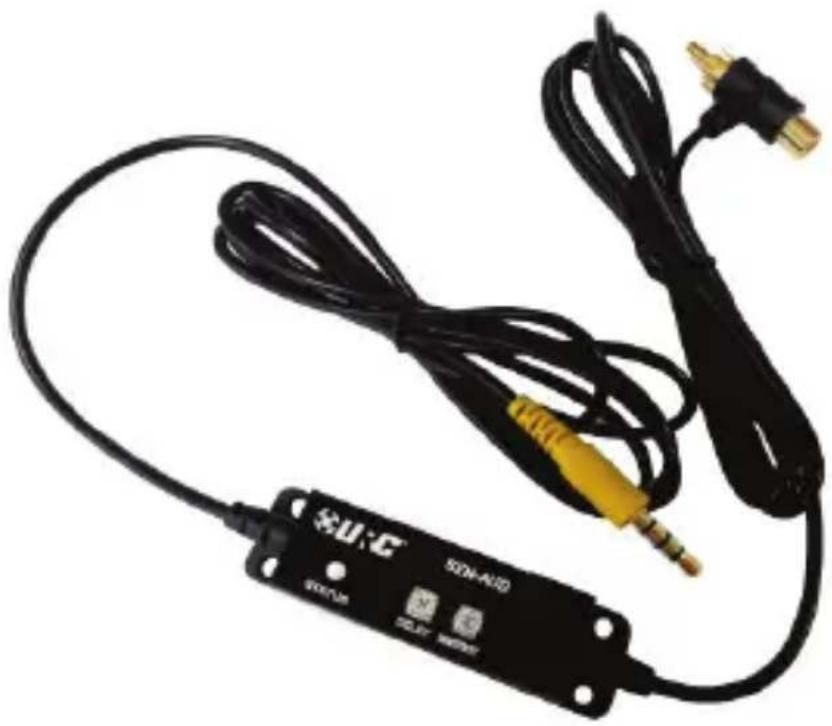
natural_image
Close-up of a black audio recording device with coiled cable, connectors, and power cord (no visible text or symbols)

URC Audio Sensor SEN-AUD ©2014 Universal Remote Control, Inc.
The information in this Owner's Manual is copyright protected. No part of this manual may be copied or reproduced in any form without prior written consent from Universal Remote Control, Inc.
Universal Remote Control, INC. shall not be liable for operational, technical or editorial errors/omissions made in this manual.
The information in this Owner's Manual may be subject to change without prior notice.
URC - Control the Experience is a registered trademark of Universal Remote Control, Inc.
Complete Control is a registered trademark of Universal Remote Control, Inc.
Total Control is a registered trademark of Universal Remote Control, Inc.
All other brand or product names are trademarks or registered trademarks of their respective companies or organizations.
Introduction
Thank you for purchasing URC's Audio Sensor (SEN-AUD) made for use with URC devices with sensor ports such as the MRX-1, MRX-2, MRX-4SEN, MRX-10 etc. The audio sensor detects an active audio signal and can trigger an event such as dimming lights, turning on music etc.
Features & Benefits
Detects audio signals
Senses an audio signal from components such as a satellite receiver, DVD player etc. and transmits a control signal to the MRX unit with sensor ports to trigger an event.
Complete Control Compatible
Works with any MRX unit with a sensor port to detect the condition of the sensor when queried.
Total Control Compatible
Pre-programmed by your Custom Installer, an activation signal transmits to the MRX unit with sensor ports, which triggers an event (series of commands).
Parts Guide
The Audio Sensor package includes:
1 - Audio Sensor
1 - Owner's Manual
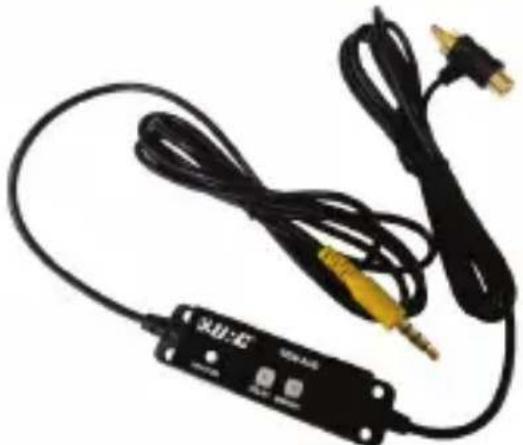
Audio Sensor Descriptions
natural_image
Black audio amplifier cable with attached microphone and connector (no visible text or symbols)Audio input sensor: Acts as a pass-through from the source device to other AV devices like an amplifier or receiver.
Status LED: Glows green while connected and glows amber when detecting an audio signal.
Delay: Adjust counter-clockwise to reduce the amount of time before the sensor turns off once the audio signal is no longer present.
Sensitivity: Adjust counter-clockwise to reduce the sensitivity level; the lower the sensitivity, the harder the sensor is to trigger. Increasing the sensitivity makes it easier to trigger.
3.5mm plug: Connect the 3.5mm plug to a sensor input of an MRX unit such as a MRX-10, MRX-4SEN, MRX-1, MRX-2 etc.
- Tip: Voltage Trigger Output
• Ring 2: 5VDC Power Input
• Ring 3: NC (Not connected) - Ring 4: Ground.
Note: The sensor can be extended up to 120ft with two-conductor cable.
URC AUDIO SENSOR
Installation Diagram
① Connect the 3.5mm plug to a sensor port on the MRX unit.
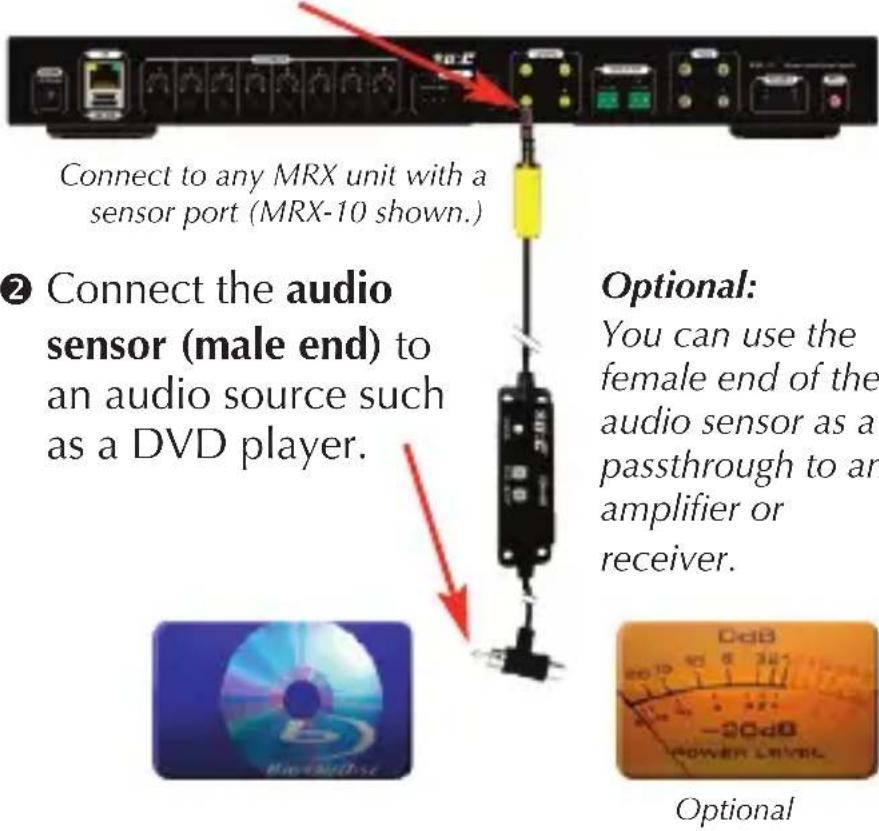
③ Adjust the sensitivity and delay of the sensor.
1. Limited Warranty and Disclaimers
Universal Remote Control, Inc. ("URC") warrants that the URC equipment shall be free from defects in material and workmanship under normal usage for two (2) years from purchase when such is purchased from URC. This limited warranty is valid only in the United States of America. URC warrants that the software will substantially conform in any material respect to its functional specifications at the time of delivery. URC SHALL NOT BE LIABLE FOR OPERATIONAL, TECHNICAL OR EDITORIAL ERRORS AND/OR OMISSIONS MADE IN THE URC DOCUMENTATION. URC DOES NOT WARRANT THAT THE URC SOFTWARE IS BUG-FREE OR ERROR FREE OR THAT THERE ARE NO ERRORS/BUGS IN THE URC SOFTWARE.
URC warrants that at the time of purchase the URC equipment and the URC software complied with all applicable regulations and policies of the Federal Communications Commissions (“FCC”) regarding electromagnetic interference caused by electronic/computing devices and to the extent that the URC equipment and/or the URC software fails to so comply, URC shall, at its own expense, take all reasonable measures to promptly cause such to comply.
URC equipment purchases from other than an authorized URC dealer or distributor are without warranty.
THIS LIMITED WARRANTY DOES NOT COVER TECHNICAL ASSISTANCE FOR HARDWARE OR SOFTWARE USAGE EXCEPT AS EXPRESSLY PROVIDED FOR HEREIN, THE EQUIPMENT, SOFTWARE AND DOCUMENTATION OF URC ARE SUPPLIED "AS IS" WITHOUT ANY WARRANTY, EXPRESS, STATUTORY OR IMPLIED, OF ANY KIND. TO THE MAXIMUM EXTENT PERMITTED BY APPLICABLE LAW, URC EXPRESSLY DISCLAIMS ALL WARRANTIES, EXPRESS, STATUTORY OR IMPLIED, INCLUDING BUT NOT LIMITED TO THE WARRANTIES OF MERCHANTABILITY AND FITNESS FOR A PARTICULAR PURPOSE. URC DOES NOT WARRANT, GUARANTEE, OR MAKE ANY REPRESENTATIONS REGARDING THE USE OF, OR THE RESULTS OF THE USE OF, THE EQUIPMENT, SOFTWARE OR DOCUMENTATION IN TERMS OF CORRECTNESS, ACCURACY, RELIABILITY OR OTHERWISE.
EXCEPT AS EXPRESSLY PROVIDED FOR HEREIN,
TECHNICAL SERVICES ARE SUPPLIED "AS IS", WITHOUT ANY WARRANTY, EXPRESS, STATUTORY OR IMPLIED, OF ANY KIND. TO THE MAXIMUM EXTENT PERMITTED BY APPLICABLE LAW, URC EXPRESSLY DISCLAIMS ALL WARRANTIES, EXPRESS, STATUTORY OR IMPLIED, INCLUDING BUT NOT LIMITED TO THE WARRANTIES OF QUALITY OR REASONABLE SKILL AND CARE, OR OUTCOME OR RESULTS.
WITHOUT IN ANY WAY LIMITING THE GENERALITY OF THE OTHER PROVISIONS HEREIN, WARRANTY DOES NOT COVER: (I) DAMAGE FROM MISUSE, NEGLECT OR ACTS OR NATURE, (II) MODIFICATIONS, (III) INTEGRATION WITH THIRD PARTY CONTENT (IV) BEYOND THE WARRANTY PERIOD AND/ OR FAILURE TO FOLLOW URC WARRANTY CLAIM PROCEDURE.
The warranty limitations and warranty disclaimers may not apply to end user in whole or in part, where such are restricted or excluded by applicable law and such shall apply to the maximum extent permitted by applicable law.
In the event of any warranty claim, URC will, at its sole option, repair the URC equipment using new or comparable rebuilt parts, or exchange the URC equipment for new or rebuilt equipment. In the event of a defect, these are the end user's exclusive remedies.
All the URC equipment returned for service, exchange or repair require an RGA number. To obtain an RGA number, you must complete a Return Request Form which you may obtain by calling (914) 835-4484 or contacting URC at returnrequest@universalremote.com. To obtain warranty service, end user must deliver the URC equipment, freight prepaid, in its original packaging or packaging affording adequate protection to URC at 420 Columbus Avenue, Valhalla, NY 10595. It is end user's responsibility to backup any macro programming, artwork, software or other materials that may have been programmed into the unit. It is likely that such data, software, or other materials will be lost during service and URC will not be responsible for any such damage or loss. A dated purchase receipt, bill of sale, installation contract or other verifiable proof of purchase is required. For the URC equipment support and other important information, please visit URC's website available at
www.universalremote.com or call the Customer Service Center at (914) 835-4484.
This limited warranty only covers the URC equipment issues caused by defects in material or workmanship during ordinary consumer use. It does not cover product issues caused by any other reason, including but not limited to product issues due to commercial use, acts of God, third-party installation, misuse, limitations of technology, or modification of or to any part of the URC equipment. This limited warranty does not cover the URC equipment sold as used, as is, refurbished, so called "B stock" or consumables (such as batteries). This limited warranty is invalid if the factory applied serial number has been altered or removed from the URC equipment. This limited warranty specifically excludes the URC equipment sold by unauthorized resellers.
With the exception of URC's IR-only, broad-based consumer remotes, none of URC's PC programmable remotes or any of our Total Control® whole-house equipment are authorized for online internet sales. Buying URC's PC programmable remotes or any of our Total Control® whole-house equipment online means buying equipment that does not have a URC's limited warranty. Such equipment is not eligible for URC tech support or software support, either.
2. URC'S Limitations of Liability
IN NO EVENT SHALL URC BE LIABLE FOR INDIRECT, SPECIAL, INCIDENTAL, EXEMPLARY, PUNITIVE OR CONSEQUENTIAL DAMAGES OF ANY KIND OR LOSS OF PROFITS OR BUSINESS OPPORTUNITY, EVEN IF URC IS ADVISED OF THE POSSIBILITY OF SUCH DAMAGES.
IN NO EVENT SHALL URC BE LIABLE FOR LOSS OF OR DAMAGE TO DATA, COMPUTER SYSTEMS OR COMPUTER PROGRAMS.
URC'S LIABILITY, IF ANY, FOR DIRECT DAMAGES OF ANY FORM SHALL BE LIMITED TO ACTUAL DAMAGES, NOT IN EXCESS OF AMOUNTS PAID BY END USER FOR THE URC EQUIPMENT.
IN NO EVENT SHALL URC BE LIABLE FOR ANY EVENTS BEYOND ITS CONTROL, INCLUDING ANY INSTANCE OF FORCE MAJEURE.
IN NO EVENT SHALL URC BE LIABLE FOR THE ACTS OR OMISSIONS OF END USER OR ANY THIRD PARTY.
THE LIMITATIONS OF LIABILITY MAY NOT APPLY TO END USER IN WHOLE OR IN PART, WHERE SUCH ARE RESTRICTED LIMITED OR EXCLUDED BY APPLICABLE LAW
AND SUCH SHALL APPLY TO THE MAXIMUM EXTENT PERMITTED BY APPLICABLE LAW.
URC SHALL NOT BE HELD RESPONSIBLE FOR THE STATEMENTS MADE BY OTHERS.
SOME STATES OR JURISDICTIONS DO NOT ALLOW THE EXCLUSION OR LIMITATION OF INCIDENTAL OR CONSEQUENTIAL DAMAGES, OR ALLOW LIMITATIONS ON HOW LONG AN IMPLIED WARRANTY LASTS, SO THE ABOVE LIMITATIONS OR EXCLUSIONS MAY NOT APPLY TO END USER. THIS LIMITED WARRANTY GIVES END USER SPECIFIC LEGAL RIGHTS AND END USER MAY HAVE OTHER RIGHTS WHICH VARY FROM STATE TO STATE OR JURISDICTION TO JURISDICTION.
End User Agreement
The terms and conditions of the End User Agreement available at www.universalremote.com/eua.php shall apply.

Control the Experience.
500 Mamaroneck Avenue, Harrison, NY 10528
Phone: (914) 835-4484 Fax: (914) 835-4532
www.universalremote.com

OCE-0132F Rev 01
- Introduction
- Features & Benefits
- Detects audio signals
- Complete Control Compatible
- Total Control Compatible
- Parts Guide
- Audio Sensor Descriptions
- URC AUDIO SENSOR
- Installation Diagram
- Limited Warranty and Disclaimers
- URC equipment purchases from other than an authorized URC dealer or distributor are without warranty.
- URC'S Limitations of Liability
- End User Agreement
Brand : UNIVERSAL REMOTE CONTROL
Model : SEN-AUD
Category : Hi-Fi System