
Ethno World 6 - Audio software Best Service - Free user manual and instructions
Find the device manual for free Ethno World 6 Best Service in PDF.


| Product Type | Audio Software (Sample Library) |
| Version | Ethno World 6 Complete |
| Producer | Marcel Barsotti |
| Release Year | 2017 |
| Total Instruments | Over 200 (80 new in v6) |
| Sample Data Size | 13 GB (new content), total library accumulated over 16 years |
| Platform | Kontakt Player (full version required for some features) |
| Sample Formats | DFD (HD Streaming), Time Machine, Beat Machine, Normal, KEY |
| Main Pages | Quick Edit, Effects, Group Edit, Microtuning, Performance, IDB Info |
| Quick Edit Parameters | Speed, Tune, Sample Start, Legato On/Off, Volume, Pan, Attack, Release, Velocity, Pitch Bend Range, High/Low Pass Filter, Reverb |
| Effects Section | Compressor, Saturation, Equalizer, Delay, Chorus, Phaser (per instrument) |
| Group Edit Features | Volume, Velocity, ADSR envelopes, LFO (volume & pitch), Filter (High/Low Pass) with envelope and LFO |
| Microtuning | Custom per-key fine tuning, preset tunings (e.g., China, Pelog, Slendro) |
| Performance Controls | Legato Mode (with Start Offset, X-Fade, Glide Time), Humanize (Tune & EQ), Harmonize (add note with tuning) |
| IDB Info | Information Data Base with pictures and details for each instrument |
| Instrument Categories | Bowed Instruments, Construction Sets, Gamelan Orchestra, Gongs/Bells/Metals, Kalimbas, Key Instruments, Stringed Instruments, Woodwinds & Brass, World Drums, World Percussion, Voices |
| Voice Categories | North America, South America, Europe, Africa, West Asia, East Asia |
| License | For use in music, multimedia, and film productions; no unauthorized copying or distribution |
| Support | Email: support@bestservice.de, Website: www.bestservice.de |
Frequently Asked Questions - Ethno World 6 Best Service
User questions about Ethno World 6 Best Service
0 question about this device. Answer the ones you know or ask your own.
Ask a new question about this device
Download the instructions for your Audio software in PDF format for free! Find your manual Ethno World 6 - Best Service and take your electronic device back in hand. On this page are published all the documents necessary for the use of your device. Ethno World 6 by Best Service.
USER MANUAL Ethno World 6 Best Service
ETHNO WORLD 6
THE ULTIMATE SAMPLE-LIBRARY FOR ETHNIC INSTRUMENTS AND VOICES FROM ALL OVER THE WORLD
PRODUCED BY MARCEL BARSOTTI
QUICK START MANUAL
Never before was there such a comprehensive and high-quality library of ethnic instruments and voices. Awarded film-composer Marcel Barsotti (e.g. Pope Joan, The Miracle of Bern) has gathered a gigantic selection of instruments from all over the word and has additionally recorded a wide choice of solo-voices and choirs from widely varying cultures. ETHNO WORLD 6 Complete is the summit of a library that has continuously grown and been improved over a period of 16 years. In this sixth edition, 80 new instruments and voices with a volume of 13 gigabytes have been added to the library.
OPERATION
To load a new instrument simply double-click on its name in the Kontakt Library Browser or click and drag it into the Rack.
The EW6 instruments will always be loaded with the Quick Edit Page visible. For most users, this page will hold all the basic parameters needed.
To fine tune fader or knob values simply hold down the shift-key while moving the control. A Cmd-Click (MAC) or Ctrl-Click (PC) will reset a control to its default value.
The value display over the tune-fader has two arrows to allow transposition in semitone steps. By double-clicking you can manually enter a value.
To get a description of the fader functions just activate the INFO button in the display-menu of the top bar. This displays helpful information in the bottom bar during mouse-over.
It is also recommended to activate the keyboard-view in Kontakt to see where the sample keys (coloured) and the key switches (pink-lower keys) are located.
You can change to a smaller view of the instruments by clicking on the Ethno World 6 Icon (EW6).
THE INSTRUMENTS
There are various types of instruments which becomes apparent in the layout of the Quick Edit Page:
- TM SYNC: musical phrases and licks are synced to the tempo automatically. Be mindful that extreme deviation from the original file may lead to distortion of the audio signal. The more overtones and polyphony a signal has, the sooner the distortion occurs.
- TM: The TM-Patches also have Time-machine, but all samples play in original tempo and tuning. However you can edit every note or sample separately.
- BM: The Beat-machine-patches have the advantage that the loops automatically sync to the tempo but the samples are sliced, meaning they are cut into fragments. The Speed-fader displays the BM-Sound lengths in quarters. If you divide these, for example the loop doubles in speed.
- The “Normal”-patches without prefix mostly use the DFD-Mode (HD Streaming) and load very fast and use up the least resources.
- KEY-Patches: With the lower keys of your master-keyboard (usually E0) you can select variations of the instrument. The description of the variation is displayed on the Quick Edit Page in “Active Keyswitch”.
With instruments that contain Licks or Loops, every note is assigned to its individual group, so that every phrase can be edited in Group-Edit and Sample Start Parameters.
GONGS, BELLS & METALS
Since metal instruments sound especially interesting when tuned down, there are patches where the samples cover a wide range called LOW or WIDE RANGE..
Voices, Bowed Instruments,
WOOD AND BRASS
There are also many TM and TM SYNC Sounds,
but also Pad- and Solo Sounds. To play Solo Sounds authentically you should try the Legato Function and also with the sustain pedal the Glide-Effect. The Legato-Function enables very real note transitions, because it skips the attack- phase of the following samples to elegantly lead into the next note.
With many VOICES there come Pad-Sounds or Play-back Tracks in the lower range of the keyboard to add musical context to the sung phrases.
WODRUS
AND WORLD PERCUSSION
In World Drums and World Percussion most of the patches are a mix of loops, rolls, flams and single hits. Whereby most of the loops were programmed as Beat-machine Sounds (sliced). Many rolls and flams however are Time-machine-Sounds identifiable by the 100 (middle setting) of the Speed-Fader. With this you can easily sync turnarounds and breaks to your song-tempo or integrate these sounds into your loops. With single hits the Speed-Fader is useless.
Tipp: Try playing several loops at once, but vary them in panorama, tuning and filter settings. By doing this you can create very interesting and individual rhythms.
THE ETHNO WORLD 6 INSTRUMENT INTERFACE
QUICK EDIT PAGE

This page gives you easy access to the most impor-
tant parameters of your instrument.
There are slightly different layouts of the Quick Edit Page, depending if it's a TM, BM, or KEY Instrument.
SPEED
Controls the speed in Timemachine-Mode (TM) or Beatmachine-Mode (BM).
ACTIVE KEYSWITCH (KEY-INSTRUMENTS)
Shows the selected keyswitch-articulation. In „KEY“-Instruments you can switch between various playing styles or variations with the lower keys, mostly starting on E0.
TUNE
Sets the tuning in semitones. For exact settings and fine-tuning use the data-entry field. Just double-click and enter your data or use the mouse (high resolution with shift).
SAESTART
(TM, TM SYNC, BM INSTRUMENTS)
Sets the point where the sample begins to play. With the Sample Start Range, you can adjust a wider range of this slider.
The waveform display shows the new start position.
SAESTAR RACE
(TM, TM SYNC, BM INSTRUMENTS)
Here you can adjust a wider range of the Sample Start slider.
LEGATO ON/OFF SWITCH
(NON-PERCUSSIVE KEY INSTRUMENTS)
Enables the Legato Effect. You can find more Legato-Controls in the Performance Section.
VOLUE
Sets the volume of the selected group or the entire instrument, depending on the EDIT ALL button status.
PAN
Sets the panning of the selected group or the entire instrument, depending on the EDIT ALL button status.
Attack
Sets the attack time of the selected group or the entire instrument, depending on the EDIT ALL button status.
RELEASE
Sets the release time of the selected group or the entire instrument, depending on the EDIT ALL button status.
VELOCITY
Adjusts the amount that the velocity changes the volume of the selected group or the entire instrument, depending on the EDIT ALL button status.
PICH B. RANGE
Sets the pitch bend range in semitones of the selected group or the entire instrument, depending on the EDIT ALL button status.
HIGH PASS / LOW PASS ON/OFF SWITCH
Enables Low Pass or Hi Pass Filter.
High Pass SR
Sets the High Pass Filter Frequency of the selected group or the entire instrument, depending on the EDIT ALL button status.
LowPass JR
Sets the Low Pass Filter Frequency of the selected group or the entire instrument, depending on the EDIT ALL button status.
TUNE
Sets the tuning of the additional note. With the arrows on the right side of the field you can adjust the tuning in semitones.
REVERB ON/OFF SWITH
Enables the Convolution-Reverb effect.
REVERB LEVEL
Sets the output level of the Convolution Reverb Effect. This effect concerns the whole instrument.
REVERB SVCH
Opens The Reverb Editor.

Inside the opened Reverb Editor:
PREDEAY
Sets the Pre Delay Time of the Convolution Reverb Effect. This effect concerns the whole instrument.
S匠
Sets the impulse response file size of the Convolution Reverb Effect. This effect concerns the whole instrument.
DROWN LISTS
Let you easily load different reverb settings by opening the lists or alternatively just by clicking the forward/backward arrows.
EoAll BuON
This button is as powerful as it is dangerous. Not for your life or your studio – but for the settings of your instruments.
If the Edit All button is enabled, all changes you make are applied to all groups, keyswitches or loops that are part of the instrument. That includes Time-and Beatmachine, filter, volume and tune settings. No matter what group you have been working on before, the settings are applied to all parts of the instrument.
If the Edit All button is disabled, the changes are only applied to the currently selected group, loop or phrase. In KEY-Instruments, this is the active Keygroup, in the other instruments, the selected group is the last played note or sound.
Effects from the effects- and the performance section are always affecting the whole instrument and are not affected by the Edit All button. And if you really get stuck, you can always reload your instrument.
EffEctS PaGE

This is the section where you can enable and adjust effects for the whole instrument.
The effects are Compressor, Saturation, Equalizer, Delay, Chorus and Phaser. With the new LED On/Off switches you get an easy overview of the active effects.
cOMPrESSOr
The compressor reduces the dynamic range of your instrument. Reducing volume-peaks gives you the possibility to raise the overall volume of the instrument. This can help you to bring out an instrument in the mix. Saturation makes the sound ‘thicker.
SaturatOr
Saturation makes the sound ‘thicker’. It allows you to recreate the effect of tape saturation, which causes an increase of high-level energy in your signal.
EQualizEr
The EQ enables you to change the sound of your instrument subtly or drastically.
dElay
In conjunction with reverb, the delay can produce nice echoes or room effects. The drop down list shows note length values for tempo-synced settings.
cHOruS
The Chorus is a modulation effect used to create a richer, thicker sound and add subtle movement. The effect roughly simulates the slight variations in pitch and timing that occur when multiple performers sing or play the same part.
PHaSEr
A Phaser is a modulation effect used to impose a resonant, swirling sound.
Phasers are a common guitar pedal effect that gives a clean electric guitar a „shimmering“ quality. Phasers are also widely used on acoustic guitar, electric piano, clavinet, strings, and synth pads.
GrOuP Edit PaGE
In this section you can adjust volume, tuning, filter and envelopes for each group or playing style.
You can find everything to manipulate the tone and response of your instrument.
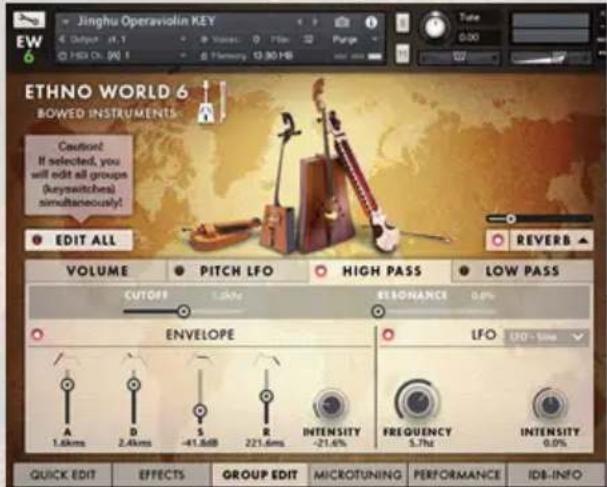
VOluME
VTE
Sets the volume of the selected group or the entire instrument.
V elOctiy
Adjusts the amount that the velocity changes the volume.
ak
Determines how fast the Attack effect reaches its maximum volume after you hit the key.
d
Determines how fast the Attack effect's volume drops to sustain level.
S
Adjusts the volume level the sample should reach after the decay phase.
RELEASE
Sets the time the Attack-sample continues to sound after you release the key.
V_BLO > A .
Sets the amount of the Velocity to Attack Time modulation.
LFO ON/OFF BUTTON
Enables the Low Frequency Oscillator.
LFO DRPOW
Here you can select the Volume LFO waveform.
LFO IN
Sets the intensity of the Volume LFO effect.
LFO FREQUENCY
Sets the frequency of the Volume LFO effect.
PITCH LFO
LFO ON/OFF BUTTON
Enables the Low Frequency Oscillator.
LFO DRPOW
Here you can select the Pitch LFO waveform.
LFO IN
Sets the intensity of the Pitch LFO effect.
LFO FREQUENCY
Sets the frequency of the Pitch-LFO, and therefore the speed of the pitch modulation.
HIGH PASS / LOW PASS FILTER
By using the Low Pass / High Pass filter you can manipulate your instrument's sound drastically.
Low Pass cuts all the high frequencies, whereas High Pass cuts the low frequencies.
C
This knob sets the cutoff frequency. It determines the point from which either the high frequencies or the low frequencies get cut.
REDADE
Boosts the frequencies around the cutoff frequency.
ENVELOPE ON/OFF LED-BUTTON
Enables the Filter Envelope
Attack
Determines how long it will take the filter to reach the cutoff frequency after you hit a key.
DEAY
Sets the time the filter will take to drop to sustain level.
SUSAN
Sets the level the filter reaches after the decay phase.
RELEASE
Adjusts the time the filter takes to stop affecting the sound after you have released the key.
IN
Determines how much the ADSR curve affects the Filter.
LFO ON/OFF LED-BUTTON
Enables the Low Frequency Oscillator. In this section it is used to modulate the cutoff frequency.
LFO DRDOWN
Here you can select the Filter-LFO Waveform.
LFO IN
Controls the intensity of the Filter-Modulation.
LFO FREQUENCY
Sets the frequency of the LFO, and therefore the speed of the Filter-Modulation.
MICROTUNING PAGE
This section enables to you to fine tune individual keys of an octave. You can find tunings from different epochs and can even create your own tunings.

You can draw the fine-tuning with your mouse.
KEY
Select the root note of the scale.
PRESET
Select a microtuning preset.
USER
Save your own tuning. The saved user-tunings are not available in other instruments due to Kontakt's scripting - architecture.
PERFORMANCE PAGE
This section contains specific playing options that can alter your performance: Legato Mode, Humanize and Harmonize. These effects apply to the complete instrument.
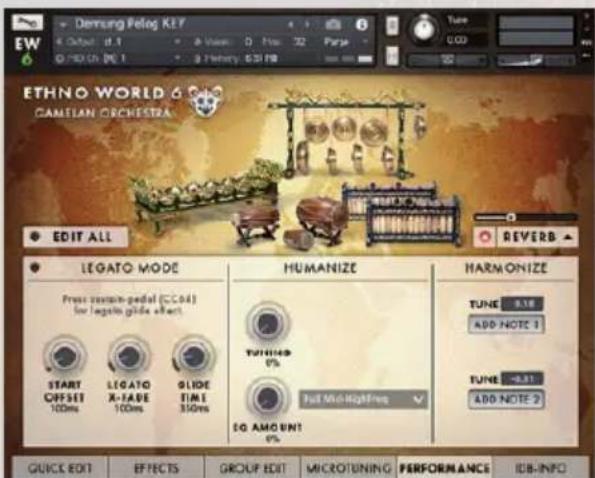
LEGATO
LEDON/OFF SWEH
Enables the Legato function. If Legato is on, the Harmonize function can't be used and the instrument is set to a monophonic Solo-Mode.
START OFFSET
Sets the Sample Start Offset of the legato played notes. This effect concerns the whole instrument. For Instruments in DFD mode (disk streaming) like drums and percussions, the offset is not working.
LEDX-FAE
Sets the Crossfade Time of the legato played notes. This has no effect when you play with the Legato Glide Effect while pressing the sustain pedal (CC64). This effect concerns the whole instrument.
GDE TAE
Sets the Legato Glide Time of the legato played notes. Press the sustain pedal (CC64) to hear the effect. This effect applies the the complete instrument.
HUMANIZE
TUNG
Randomly detunes each note. If set to 100%, the maximum detune value is 100 cents in both directions.
EQ AMOT
Sets the amount of the EQ Humanizing. Each note gets a slightly altered 1-band EQ-setting, depending on the chosen Humanize Setting. This very subtle effect applies to the complete instrument
HUMANIZE SETTING DROPDOWN
Select the EQ setting for the EQ Humanizing.
HARMONIZE
ADN
If pressed, one additional note is created. Adjust it's tuning with the tune data-entry below. This effect concerns the whole instrument and is not working in combination with Legato..
TUNE
Sets the tuning of the additional note. With the arrows on the right side of the field you can adjust the tuning in semitones. Fine-tuning with shift-click creates a “detuned” or chorused sound.
IDB INFO PAGE

A new feature in Ethno World 6 is the Information Data Base which shows specific pictures and information's about each Instrument or Voice.
LICENSE AGREEMENT
The samples and software contained in this library are licensed to you for use in music, multimedia and film productions only.
Only the purchaser of this product is authorized to use the sounds. Unauthorized copying, reproduction (including conversion and reproduction in other data formats) hire, rental, public performance, broad casting and distribution is expressly prohibited.
Best Service constantly monitors other soundware releases to check for copyright infringements, and will prosecute all piracy and copyright violations to full extent of the law.
© 2017 best service. All rights reserved.
For technical support please contact support@bestservice.de
For additional information and updates, please visit: www.bestservice.de
1) INSTRUMENTS
Instrument Name
EW Vol Nr.
Musical Style
BOWED INSTRUMENTS Bowed Psaltery 6 Medieval, Europe
Dilruba 4 India
Egyptian Fiddle 2 Africa
Erhu 2 China
Esraj 4 India
Folk Violin 6 Medieval, Folk
Gaohu 2 China
Hurdy-Gurdy
6 Medieval, Europe
Ih Khuur Bass
4 Mongolia, Various
Jinghu Operaviolin
2 China
Morin Khuur Strings Ensemble
4 Mongolia
Morin Khuur Violin
4 Mongolia
Small Morin Khuur
2 Mongolia
Western Fiddle Licks
3 North America
CONSTRUCTION SETS
China Set 100
3 China
China Set 120
3 China
China Set 140
3 China
China Set 120-140
3 China
Gamelan Bali Set 100
6 Gamelan
Gamelan Bali Set 120
6 Gamelan
Gamelan Java Set 110
6 Gamelan
Mid East Set 100
3 Mid East
Mid East Set 120
3 Mid East
Mid East Set 140
3 Mid East
Mid East Set 80 3 Mid East
GAMELAN ORCHESTRA
| Bali | Calung | 6 Gamelan |
| Jegogan | 6 Gamelan | |
| Kantilan | 6 Gamelan | |
| Pemade | 6 Gamelan | |
| Reyong | 6 Gamelan | |
| Suling Flute | 6 Gamelan | |
| Balinese Gamelan Gongs | 6 Gamelan | |
| Ceng Ceng Cymbals + Loops | 6 Gamelan | |
| Ceng-Ceng + Loops | 6 Gamelan | |
| Gentorak Bells | 6 Gamelan | |
| Kemong + Kempli | 6 Gamelan | |
| Kendang + Loops | 6 Gamelan |
Java Bonang Barung 6 Gamelan
Bonang Panerus 6 Gamelan
Demung 6 Gamelan
Gambang 6 Gamelan
Gender 6 Gamelan
Kempul 6 Gamelan
Kenong 6 Gamelan
Peking 6 Gamelan
Siter 6 Gamelan
Saron 6 Gamelan
Slenthem 6 Gamelan
Gongs Ageng 6 Gamelan
Kecer Small Cymbals 6 Gamelan
Kendhang Drums 6 Gamelan
Kethuk & Kempiang 6 Gamelan
GONGS, BELLS & METALS
| Bells & Chimes | Belltree 3 Various | |
| Bhutan Bells | 2 Asia, Various | |
| China Finger Cymbals | 1 China | |
| Dream Catcher | 1 North America, Various | |
| Iran Fingercymbals | 3 Mid East, Various | |
| Mini Bells | 2 Various | |
| Small Burma Bells | 1 Asia, Various | |
| Small Tubular Bells | 1 Various | |
| Tibetan Cymbals | 1 Tibet, Various | |
| Various Bells | 6 Various | |
| Vietnam Bells | 2 Vietnam, Various | |
| Windbells | 3 Various | |
| Windchimes Ethno World | 5 Various | |
| Bowls | Big Rako Bowls | 2 Japan |
| Big Tibetan Singing Bowls | 2 Tibet | |
| Rin Singing Bowls | 2 Japan | |
| Tibetan Singing Bowls | 1 Tibet | |
| Cymbals | Crash, Ride & Splash Cymbals | 5 Various |
| Hand Cymbals | 1 Various | |
| Military Cymbals | 2 Various | |
| Gongs | Big Feng Gong | 5 China |
| Gong Besar 18" | 1 Indonesia | |
| Java Gong | 2 Indonesia | |
| Mongolian Gong | 4 Mongolia | |
| Tam Tam Besar 2 Indonesia | ||
| Thai Gong 14" | 1 Asia | |
| Various Gongs | 6 China | |
| Wuhan Tam Tam | 2 China |
Kalimbas Bass Kalimba 2 Africa
Kalimba 15 1 Africa
Kalimba 5 1 Africa
Kalimba Hugh Tracey 3 Africa
Metals Gamelan Crash Bells 1 Gamelan
Jews Harp 4 Various
Metal Squares 1 Various
Mongolian Jews Harp 4 Mongolia
Waterphone 6
Melallophones
Glockenspiel
Metallophon
Saron Gamelan
Bamboo Vibraphone
1 Europe, Various
1 Europe, Various
1 Indonesia
North America, Various, Melodic!
1 Indonesia
KEY INSTRUMENTS
Dallape Accordion
Harmonium 6 Medieval, Europe + India
Melodica
Scale Changer Harmonium
Shanghai Baby Piano
Shruti Box
2 Medieval, Europe + India
1 China
6 Medieval, Europe + India
6 Alpine Folk
6 Europe, Various
STRINGED INSTRUMENTS
Alpine Dulcimer
Alpine Raffele
Alpine Zither
Autoharp
Balalaika
Bandura
Banjo 5-String
Banjo Framus
Banjolin
Big Erhu Plectrum
Bouzouki Sakis
Ceylon Guitar
Charango
Contra Bass Guitar 1 Alpine Folk
Cora
Cümbüs 3 Mid East
Domra
Dra-Ngen
Grand Monochord
Joochin Dulcimer 4 Mongolia
Kantele
Acoustic Bass Vester
6 Alpine Folk
6 Alpine Folk
6 Alpine Folk
6 Folk, Alpine Folk
2 Russia
5 Ukraine, Russia
6 North America
1 North America
2 North America
1 China
2 Europe, Greece
1 China
6 South America
2 Africa
2 Europe, Various
2 Bhutan, Asia
3 Europe, Various
1 Russia, Various
2 Europe, Various
Koto 6 Japan
Mandolin Truxa 1 North America, Europe
Mandolin Key 6 North America, Europe
Nylon Guitar Hanika 6 Alpine Folk, various
Oud 2 Mid East
Oud Licks 3 Mid East
Renaissance Lute 6 Medieval, Europe
Resonator Guitar 2 North America
Santoor Saberi 2 Mid East
Turkey Saz 1 Mid East
Saz Licks 3 Mid East
Sitar 2 India
Small Erhu Plectrum 1 China
Small Kantele 1 Europe, Various
Steel String Guitar Falcon 1 Various
Tampura 2 India
Tanbur 3 Mid East
Timple 2 South Europe, Various
Ukulele 2 North America
Zheng Harp 2 China
Zsoura Sakis 2 Europe, Greece
WOODWINDS & BRASS Alphorn 6 Alpine Folk
Alpine Flugelhorn 6 Alpine Folk
Alpine Trombone 6 Alpine Folk
Alpine Tumpet 6 Alpine Folk
Alpine Tuba 6 Alpine Folk
Alpine Clarinets 6 Alpine Folk
Bamboo Flute 1 Indonesia
Bansuri 6 India
Bawu 2 China
Ceylon Snake Charmer 1 India
Ciaramella 4 Europe, Italy
Dagoba Flute 1 India
Didgeridoo 4 Australia
Duduk 4 Mid East
Dung Dkar Conch Trumpets 2 Tibet, Asia
Dvojacka Doubletone Flute 4,6 Europe, Slovakia
Fujara Flute 3,4 Europe, Slovakia
Hawaiian Shellhorn 2 North America
Hotchiku 4 Japan
Hulusi 2 China
Indian Snake Charmer 1 India
Irish Traverse Flute 4,6 Europe, Celtic, Medieval
Irish Low Whistle 1 Europe, Celtic, Medieval
Low Whistle licks 3 Europe, Celtic, Medieval
Overtton Whistles 3 Europe, Celtic, Medieval
Susato Whistle 1 Europe, Celtic, Medieval
Tin Whistle licks 4 Europe, Celtic, Medieval
Kena 2 South America
Krumhorn 4 Medieval, Europe
Launeddas 4,6 Europe, Italy
Mancosedda 4,6 Europe, Italy
Mexican Piccolo Flute 1 North America, Various
Moceno Bassflute 2 South America
Native American Flute 6 North America
Ney Flute 5 Mid East
Tenor + Sopran Ocarinas 4 Europe, Italy
Italian Ocarina 1 Europe, Italy
Peruvian Ocarinas 2 South America
Panflute 2 South America
Panflute Canira 5 South America, Romania, Greece
Pinkillo Flute 4 South America
Pivana Flutes 5 Europe, Corsica
Rag Dun Horns 2 Tibet
Recorder 1 Medieval, Europe, Alpine Folk
Tenor Recorder 2 Medieval, Europe, Alpine Folk
Schwegel Flute 6 Medieval, Europe
Shakuhachi 4 Japan
Shawn 6 Medieval, Europe
Shenai 2 Medieval, Europe + India
Sheng 2 China
Shiva Flute 2 India
Uilleann Pipes 3 Medieval, Europe
Various Flute FX 1 Various
Zukra Bagpipe 2 Medieval, Europe + Tunesia
WORLD DRUMS African Donn Donn 1 Africa
Bass Cajon 2 South America
Bass Skin Udu 2 Africa
Bendir Framedrum 2 Africa
Big Ethnic Tom Drums 5 Various
Big Hand Drum 1 Europe, Various
Ceremony Drum 1 Indonesia
Darabuka 1 Africa
Derbuka 1 Africa
Djembe 2 Africa
Dolek 3 South Asia
Flat Udu 3 Africa
Gon Bops Cuica Drum 2 South America
Gran Military Cassa 2 Europe, Various
Indian Tablas 1 India
Iran Bongos 1 Mid East
Kanjira 3 India
Madal Drum 1 South Asia
Military Snaredrums 1 Europe, Various
Mongolian Framedrum 4 Mongolia
Mongolian Hengereg Drum 4 Mongolia
Moroccan Conga 2 Africa
Oceandrum 3 North America
Pitched Timbales 1 Various
Small Cassa 1 Europe, Various
Small Derbuka 1 Mid East
Surdo 3 South America
Taiko Drums 5 Japan
Talking Drum 3 Africa
Tamborcito 2 South America
Traditional Bongos 1 Various
Tunis Ceremony Drum 2 Africa
Yambu 2 South America
WORLD PERCUSSION
| Various | Angklung Gamelan | 1 Indonesia |
| Chi Gong Balls | 1 China | |
| Drum Pots | 1 Various | |
| Glasses | 1 Various | |
| Gon Bops Cuica | 2 South America | |
| Gopichand | 2 Africa | |
| Log drum | 2 Africa | |
| Spring Drums | 3 Various, FX | |
| Waterdrums | 3 Africa | |
| Traditional Cowbells | 1 Various, Alpine Folk | |
| Shakers | African Rice Shaker | 1 Africa |
| Afuche Cabasa | 1 Various | |
| Baobab Shaker | 3 Africa | |
| Chicken Eggs | 1 Various | |
| Cola Shaker 3 Various | ||
| Metal Guiro Shaker | 3 Various | |
| Mongolian Bones Shaker | 4 Mongolia | |
| Oceandrum Shaker | 3 Various | |
| Rainmakers | 1 Various | |
| Rattle Shaker | 3 Various | |
| Shaker Sets | 3 Various | |
| Shell Shekere | 2 Various |
Small Chickeneggs 3 Various
Small Maracas 3 Various
Various Maracas 1 Various
Wood Shaker 3 Various
Tambourines Headless Tambourine 1 Various
Tambourine Drum 1 Various
Tunis Tambourine 2 Africa
Wrist Jingles 2 Various
Wood Percussion American Woodblocks 1 Various
Bamboo Windchimes 1 Various
Castanets 1 Spain
Gamelan Wooden Cowbell 1 Various
Mixed Wood Percussion 3 Various
Wooden Bells 2 Various
Woodstick 2 Various
Xylophones African Xylophone 2 Africa
Balafon 2 Africa
2) VOICES
- North America Native American Grandma Songs 5
Native American Man Solo Songs 5
Native American Old Man Songs 5
Native American Tribal Chants 5
Native American Style Chants 5
Native American Style Chants 5
- South America Jamaican Reggae Licks 6
Peruvian Male Voices 5
Peruvian Huayno Phrases 5
Peruvian Quechua Phrases 5
Peruvian Spanish Pop Phrases 5
- Europe Alpine Jodeling Female 6
Alpine Jodeling Male 6
Boy Solo Voices 5
Bulgarian Female Voices 5
European Chamber Choir 5
European Ethnic Choir 5
Fouxi European Ethnic Voices 5
Gregorian Chants 5
Human Whistling 5
Lipa European Ethnic Voices 5
Nanina European Ethnic Voices 5
Paulo European Ethnic Voices 5
Ukrainian Traditional Songs 5
4. Africa African Children's Choir 6
African Mixed Choir 6
African Man Solo Voice 6
African Women's Choir 6
Algerian Solo Voice 6
Cameroon Male Voices 5
Guinean Male Voices 5
Malawian Men Solo Voices 6
Malawian Women Solo Voices 6
5. West Asia Arabic Style Licks 5
Neda Arabic Voices 5
Neda Iranian Voices 5
Indian Wedding Women 6
Indian Folk Women 6
Indian Young Men Solo 6
Indian Prayer Men Solo 6
Indian Folk Men Solo 6
Turkish Male Voices 5
Turkish Female Voices 6
6. East Asia Balinese Voices 6
Chinese Traditional Female Voices 5
Chinese Traditional Male Voices 5
Chinese Opera Style Female 5
Chinese Opera Style Male 5
Chinese Duet 5
Mongolian Female Solo Voices 4
Mongolian Male Khoomii Overtone Voices 4
Mongolian Male Solo Voices 4
Mongolian Male Subtone Voices 4
Mongolian Vocal Ensemble 4
- ETHNO WORLD 6
- THE ULTIMATE SAMPLE-LIBRARY FOR ETHNIC INSTRUMENTS AND VOICES FROM ALL OVER THE WORLD
- PRODUCED BY MARCEL BARSOTTI
- QUICK START MANUAL
- OPERATION
- THE INSTRUMENTS
- GONGS, BELLS & METALS
- WODRUS
- AND WORLD PERCUSSION
- THE ETHNO WORLD 6 INSTRUMENT INTERFACE
- SPEED
- ACTIVE KEYSWITCH (KEY-INSTRUMENTS)
- TUNE
- SAESTART
- (TM, TM SYNC, BM INSTRUMENTS)
- SAESTAR RACE
- LEGATO ON/OFF SWITCH
- (NON-PERCUSSIVE KEY INSTRUMENTS)
- VOLUE
- PAN
- Attack
- RELEASE
- VELOCITY
- PICH B. RANGE
- HIGH PASS / LOW PASS ON/OFF SWITCH
- High Pass SR
- LowPass JR
- REVERB ON/OFF SWITH
- REVERB LEVEL
- REVERB SVCH
- PREDEAY
- S匠
- DROWN LISTS
- EoAll BuON
- EffEctS PaGE
- cOMPrESSOr
- SaturatOr
- EQualizEr
- dElay
- cHOruS
- PHaSEr
- GrOuP Edit PaGE
- VOluME
- VTE
- V elOctiy
- ak
- d
- S
- V_BLO > A .
- LFO ON/OFF BUTTON
- LFO DRPOW
- LFO IN
- LFO FREQUENCY
- PITCH LFO
- HIGH PASS / LOW PASS FILTER
- C
- REDADE
- ENVELOPE ON/OFF LED-BUTTON
- DEAY
- SUSAN
- IN
- LFO ON/OFF LED-BUTTON
- LFO DRDOWN
- MICROTUNING PAGE
- KEY
- PRESET
- USER
- PERFORMANCE PAGE
- LEGATO
- LEDON/OFF SWEH
- START OFFSET
- LEDX-FAE
- GDE TAE
- HUMANIZE
- TUNG
- EQ AMOT
- HUMANIZE SETTING DROPDOWN
- HARMONIZE
- ADN
- IDB INFO PAGE
- LICENSE AGREEMENT
- 1) INSTRUMENTS
- 2) VOICES
- Africa African Children's Choir 6
- West Asia Arabic Style Licks 5
- East Asia Balinese Voices 6
Brand : Best Service
Model : Ethno World 6
Category : Audio software