
Jr Metal Detector - Detector ExploreOne - Free user manual and instructions
Find the device manual for free Jr Metal Detector ExploreOne in PDF.


| Product Type | Metal Detector for Kids and Beginners |
| Brand | ExploreOne |
| Model | Jr Metal Detector (Item #88-20001) |
| Power Source (Detector) | 1 x 9V alkaline battery (not included) |
| Power Source (LED Light) | 3 x AAA batteries (not included) |
| Adjustable Shaft Length | From hand-held to full-size, approx. 24-42 inches (61-107 cm) |
| Weight | Approximately 1.5 lbs (0.68 kg) with batteries |
| Search Coil | Water-resistant, can be used in shallow water; not fully submersible |
| Detection Modes | Single tone with increasing volume and speed; LED light indicator for strong signals |
| Calibration | Self-calibrating, no user adjustment needed |
| LED Light | Optional built-in light for low-light conditions (if equipped) |
| Recommended Search Height | 1-2 inches (2.5-5 cm) above ground |
| Battery Safety | Follow polarity; do not mix old/new or different battery types; remove if not used for extended periods |
| Cleaning Instructions | Wipe with a damp cloth using mild cleaning solution; dry at room temperature |
| Safety Warnings | Adult supervision required for children; do not disassemble; keep packaging away from children |
| Regulatory Compliance | FCC Part 15 compliant |
| Intended Use | Private recreational treasure hunting |
| Warranty | Contact customer service for defects; do not attempt repair |
| Package Contents | Metal detector (assembled), instruction manual; batteries not included |
Frequently Asked Questions - Jr Metal Detector ExploreOne
User questions about Jr Metal Detector ExploreOne
0 question about this device. Answer the ones you know or ask your own.
Ask a new question about this device
Download the instructions for your Detector in PDF format for free! Find your manual Jr Metal Detector - ExploreOne and take your electronic device back in hand. On this page are published all the documents necessary for the use of your device. Jr Metal Detector by ExploreOne.
USER MANUAL Jr Metal Detector ExploreOne
natural_image
Exterior view of a metal detector with UZ0 branding and a circular base (no text or symbols on the device itself)Getting started with your m

flowchart
graph TD
    A["Device"] --> B["Lock"]
    B --> C["Lock Switch"]
    C --> D["Lock Component"]
    D --> E["Unlock"]
Battery Requirements 9-Volt Alkaline Battery for Metal Detector and 3"AAA" for Light. (Not Included)
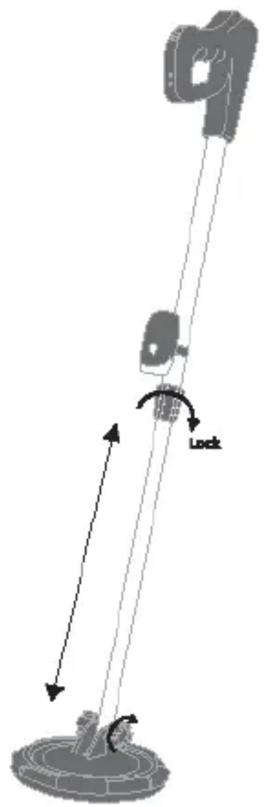
- Your metal detector comes completely assembled. You only need to install batteries(not included) in the metal detector and its light.
- The metal detector can be used as a full-size metal detector or adjusted to a hand held unit.
- Turn the locking ring located on the shaft of the metal detector counter-clockwise.
- Adjust to desired length and position the coil to be flat to the ground while in use.
- Turn the locking ring clockwise to lock the length of the shaft to desired position.
- To adjust to a hand held unit loosen the locking rings and position the head close to the handle.
Fun with metal detectors:
You don't have to sail the high seas or come across an ancient map to find buried treasure. In fact, all around us precious metals are located just beneath the surface waiting to be found. All you need to start hunting is a metal detector!
Metal detecting is a great hobby for adventurers of all ages. With one of these devices, you can unearth coins, jewelry and even antique pieces. Depending on what you find, you can then turn your treasure into cash, clean it up and keep it or use these items as clues to learn more about the history of the area you're searching.
- For instance, did you dig up a horseshoe?
Discoveries like this can give us a glimpse into the past. The soil you're searching could be the former site of a farm or even a civil war camp.
• Did you find a coin?
When you unearth a coin, the first thing you'll want to do is check to see the date on it. If the dates go back far enough, someone's lost pocket change might be worth more than face value. For example, any U.S. dime, quarter, half dollar or dollar coin that is dated 1964 or earlier is made up of 90 percent silver – which means it is worth more!
• Did you discover a piece of jewelry?
It can be difficult to determine the value of a piece of jewelry at a glance, but researching just what you've found can be rewarding both financially and mentally. Whether it is a ring, an earring or a necklace, every piece of jewelry has a story and imagining what that is can be lots of fun.
These scenarios show that the more objects you find the more you will learn and maybe even earn.
What will you discover?
When to use your metal detector:
Did you know that a great time to go metal detecting is right after a heavy rain, when the ground is soft? Wet ground is a better conductor than dry ground so you will have a better chance of locating objects that could be buried deeper than you would in dry ground.
The detection coil is water resistant, and can be used in shallow water after a rain. It is recommended that the unit is not detection coil is not fully submerged for extended time periods.
Places to search:
- The beach, which is a great place to begin because you will get fewer competing signals on a sandy beach and it will be easier to dig there
- Under trees where people may have sat to rest
- At the homes of your relatives — especially those that live in older homes
- Your own front and back yards.
- Areas where historic battles occurred (Be sure to ask permission first because you may not be able to remove objects from these locations)
Rules of metal detecting and digging:
- Some parks and public land prohibit metal detecting and digging. Always check first.
- Always ask for permission from the property owner before entering private property.
- Be responsible and cover the holes that you dig.
Using your metal detector:
First make sure your unit has power. This can be done by removing the battery door with a screwdriver. Insert a 9 volt battery in the battery compartment by following the polarity (+)(-) on the inside of the fitted battery compartment. Do not force the battery into place with the polarity reversed because this can damage the item. Replace the battery door and tighten the door with a screwdriver.
Before powering on the device position the metal detector so the search coil is away from any metal objects. Then turn the unit on by moving the toggle on the device away from you. You will see a green LED light showing the power is turned on.
Your unit is self-calibrated and needs no further adjustment.
Your metal detector is ready to be used in the most sensitive detection setting.
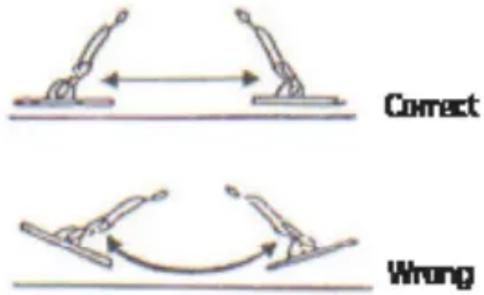
To search for metal objects, swing the metal detector back and forth slowly while keeping the search coil level and 34 inches above the ground.
When your metal detector locates a metal object it will start to emit a tone. The more solid and louder the tone, the stronger the signal, which indicates how close the object is to the coil. Your unit also has an LED light that will illuminate when the signal strength is strong. By using both the LED light and the tone you will be able to discover many amazing articles just below ground.
Optional LED light unit (If so equipped):
The LED light can aid you in your discovery. Install 3 (AAA)(not included) batteries in the light unit. This can be done by removing the battery door with a screwdriver. Insert 3 (AAA)(not included) batteries following the polarity (+)(-) inside the fitted battery compartment. Do not force battery into place with the polarity reversed because this can damage the item. Replace the battery door and tighten the door with a screwdriver.
Now that you have installed your batteries in your LED light, you may power the unit on by pressing the light switch. With the light on, you will be able to work your way into darker places to find your treasures. The light can also be handy early in the morning and into the early evening.
We thank you for your purchase and wish you happy findings.
From your friends at Explore Scientific.
Battery safety guidelines:
- To prevent battery leakage, be sure to insert batteries correctly
- Batteries should be replaced by an adult
- Never dispose of batteries in a fire they may explode
- Do not mix old and new batteries (replace all batteries at the same time)
- Do not mix alkaline, standard (carbon zinc) or rechargeable batteries only batteries of the same or equivalent type as recommended to be used
- Do not attempt to recharge a non-rechargeable battery
• Always remove exhausted or dead batteries from the product - Remove batteries from the product before extended storage to prevent leaking
- The battery terminals are not to be short circuited
- Make sure the battery compartment is secure
- Do not immerse the battery compartment in water
• The device complies with part 15 of the FCC Rules.
Operation is subject to the following conditions:
(1) This device may not cause harmful interference.
(2) This device must accept interference received, including interference that cause undesired operation
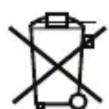
Dispose the batteries properly.
EXPLORE ONE
Jr Metal Detector Instruction Manual
Item Number: 88-20001
EXPLORE SCIENTIFIC
621 Madison Street Springdale, AR 72762
www.exploreone.com 866.252.3811

RISK to your child!
Children should only use this device under adult supervision. Keep packaging materials (plastic bags, etc.) away from children. There is a risk of SUFFOCATION!
RISK of material damage!
Never take the device apart. Please consult Customer Service if there are any defects. Do not subject the device to temperatures exceeding 140°F (60 °C).
TIPS on cleaning
Dampen a cleaning cloth (not supplied) with cleaning solution (not supplied). Gently wipe the item until the item is clean.
Protect the device against dirt and dust. Leave it to dry properly after use at room temperature.
RESPECT Privacy!
This device is meant for private use. Respect others' privacy – do not use the device to look into other people's homes, for example.
DISPOSAL


Dispose of the packaging materials as legally required. Consult your local council on the matter if necessary.