
ARC-102CS - Air conditioner Whynter - Free user manual and instructions
Find the device manual for free ARC-102CS Whynter in PDF.


| Type | Portable Air Conditioner |
| Brand | Whynter |
| Model | ARC-102CS |
| Cooling Capacity (BTU) | 10,000 BTU |
| EER (Energy Efficiency Ratio) | 10.8 |
| Cooling Area | Up to 350 sq. ft. |
| Dehumidification Capacity | 50 pints per day |
| Air Flow | 200 CFM |
| Voltage | 115 V / 60 Hz |
| Power Consumption | 12 Amps |
| Dimensions (H x W x D) | 29.5 x 15.5 x 17.5 inches |
| Weight | 67 lbs |
| Noise Level | 52 dB (medium speed) |
| Remote Control | Yes |
| Auto Restart | Yes |
| Washable Filter | Yes, easy access |
| Window Kit Included | Yes |
| Refrigerant | R-410A |
| Caster Wheels | Yes |
| Maintenance | Clean filter every 2 weeks; drain condensate as needed |
| Safety Features | Overheat protection, auto shut-off |
| Certifications | ETL listed |
Frequently Asked Questions - ARC-102CS Whynter
User questions about ARC-102CS Whynter
0 question about this device. Answer the ones you know or ask your own.
Ask a new question about this device
Download the instructions for your Air conditioner in PDF format for free! Find your manual ARC-102CS - Whynter and take your electronic device back in hand. On this page are published all the documents necessary for the use of your device. ARC-102CS by Whynter.
USER MANUAL ARC-102CS Whynter
Whynter 10,000 BTU Portable Air Conditioner Compact Size
Model #: ARC-102CS
INSTRUCTION MANUAL

natural_image
White industrial air conditioner unit with control panel and blue logo (no visible text or symbols)Congratulations on your new Whynter product. To ensure proper operation, please read this Instruction Manual carefully before using this product. Keep this manual in a safe place for future reference.
Table of Contents
Safety Precautions
Safety Precautions . 03
Installation Instructions
Preparation....10
Design Notice....10
Ambient Temperature Range For Unit Operating....11
Exhaust Hose Installation....11
Choosing The Right Location....11
Energy Rating Information 11
Tools Needed....13
Accessories....13
Window Installation Kit....14
Installation....16
Operating Instructions
Control Panel Features....14
Operation Instructions....18
Other features....19
Maintenance
Safety Precautions....21
Air Filter Cleaning 21
Unit Cleaning 21
Store the unit when not in use 21
Troubleshooting Tips
Troubleshooting Tips 22 - 23
Safety Precautions
Read Safety Precautions Before Operation and Installation
To prevent death or injury to the user or other people and property damage, the following instructions must be followed. Incorrect operation due to ignoring of instructions may cause death, harm or damage.

WARNING
This symbol indicates the possibility of personnel injury or loss of life.

CAUTION
This symbol indicates the possibility of property damage or serious consequences.

WARNING
- Installation must be performed according to the installation instructions. Improper installation can cause water leakage, electrical shock, or fire.
- Use only the included accessories and parts, and specified tools for the installation. Using non-standard parts can cause water leakage, electrical shock, fire, and injury or property damage.
- Make sure that the outlet you are using is grounded and has the appropriate voltage.
The power cord is equipped with a three-prong grounding plug to protect against shock. Voltage information can be found on the nameplate of the unit.
- Your unit must be used in a properly grounded wall receptacle. If the wall receptacle you intend to use is not adequately grounded or protected by a time delay fuse or circuit breaker (the fuse or circuit breaker needed is determined by the maximum current of the unit. The maximum current is indicated on the nameplate located on unit), have a qualified electrician install the proper receptacle.
- Install the unit on a flat, sturdy surface. Failure to do so could result in damage or excessive noise and vibration.
- The unit must be kept free from obstruction to ensure proper function and to mitigate safety hazards.
- Do not modify the length of the power cord or use an extension cord to power the unit.
- Do not share a single outlet with other electrical appliances. Improper power supply can cause fire or electrical shock.
- Do not install your air conditioner in a wet room such as a bathroom or laundry room. Too much exposure to water can cause electrical components to short circuit.
- Do not install the unit in a location that may be exposed to combustible gas, as this could cause fire.
The unit has wheels to facilitate moving. Make sure not to use the wheels on thick carpet or to roll over objects, as these could cause tipping.
- Do not operate a unit that it has been dropped or damaged.
- The appliance with electric heater shall have at least 3 feet of space to the combustible materials.
- Do not touch the unit with wet or damp hands or when barefoot.
-
If the air conditioner is knocked over during use, turn off the unit and unplug it from the main power supply immediately. Visually inspect the unit to ensure there is no damage. If you suspect the unit has been damaged, contact a technician or customer service for assistance.
-
In a thunderstorm, the power must be cut off to avoid damage to the machine due to lightning.
- Your air conditioner should be used in such a way that it is protected from moisture.
e.g. condensation, splashed water, etc. Do not place or store your air conditioner where it can fall or be pulled into water or any other liquid. Unplug immediately if it occurs. - All wiring must be performed strictly in accordance with the wiring diagram located inside of the unit.
- The unit's circuit board(PCB) is designed with a fuse to provide overcurrent protection. The specifications of the fuse are printed on the circuit board, such as: T 3.15A/250V, etc.
- When the water drainage function is not in use, keep the upper and the lower drain plug firmly plugged into to the unit to prevent choking.

CAUTION
- This appliance is not intended for use by persons (including children) with reduced physical, sensory or mental capabilities or lack of experience and knowledge, unless they have been given supervision or instruction concerning use of the appliance by a person responsible for their safety. Children should be supervised to ensure that they do not play with the appliance. Children must be supervised around the unit at all times.
- If the supply cord is damaged, it must be replaced by the manufacturer, its service agent or similarly qualified persons in order to avoid a hazard.
- Prior to cleaning or other maintenance, the appliance must be disconnected from the supply mains.
- Do not remove any fixed covers. Never use this appliance if it is not working properly, or if it has been dropped or damaged.
- Do not run cord under carpeting. Do not cover cord with throw rugs, runners, or similar coverings. Do not route cord under furniture or appliances. Arrange cord away from traffic area and where it will not be tripped over.
- Do not operate unit with a damaged cord, plug, power fuse or circuit breaker. Return to an authorized service facility for examination and/or repair.
• To reduce the risk of fire or electric shock, do not use this fan with any solid-state speed control device. - The appliance shall be installed in accordance with national wiring regulations.
- Contact the manufacturer or authorized service technician for repair or maintenance information of this unit.
- Contact the manufacturer or authorized installer for installation questions of this unit.
- Do not cover or obstruct the inlet or outlet grilles.
- Do not use this product for functions other than those described in this instruction manual.
- Before cleaning, turn off the power and unplug the unit.
- Disconnect the power if strange sounds, smell, or smoke comes from it and contact the manufacturer or authorized service technician for assistance.
- Do not press the buttons on the control panel with anything other than your fingers.
- Do not remove any fixed covers. Contact the manufacturer or authorized service technician if this unit if it is not working properly, or if it has been dropped or damaged.
-
Do not operate or stop the unit by inserting or pulling out the power cord plug.
-
Do not use hazardous chemicals to clean or come into contact with the unit. Do not use the unit in the presence of inflammable substances or vapour such as alcohol, insecticides, petrol, etc.
- Always transport your air conditioner in a vertical position and stand on a stable, level surface during use.
- Always contact the manufacturer or authorized service technician a qualified person to carry out repairs using parts recommended or obtained by the manufacturer.
- Hold the plug by the head of the power plug when taking it out.
- Turn off the product when not in use.

WARNING
- Do not use means to accelerate the defrosting process or to clean, other than those recommended by the manufacturer.
- The appliance shall be stored in a room without continuously operating ignition sources (for example: open flames, an operating gas appliance or an operating electric heater).
- Do not pierce or burn.
- Be aware that the refrigerants may not contain an odor.
- The appliance should be installed, operated and stored in a room with a floor area according to the amount of refrigerant to be charged. For specific information on the type of refrigerant and the amount, please refer to the relevant label on the unit itself. When there are differences between the label and the manual on the Min. room area description, the description on label shall prevail.
SAFETY COMPLIANCE
- Compliance with national gas regulations shall be observed.
- Keep ventilation openings clear of obstruction.
- The appliance shall be stored so as to prevent mechanical damage from occurring.
- A warning that the appliance shall be stored in a well-ventilated area where the room size corresponds to the room area as specified for operation.
- Any person who is involved with working on or breaking into a refrigerant circuit should hold a current valid certificate from an industry-accredited assessment authority, which authorizes their competence to handle refrigerants safely in accordance with an industry recognized assessment specification.
- Servicing shall only be performed as recommended by the equipment manufacturer. Maintenance and repair requiring the assistance of other skilled personnel shall be carried out under the supervision of the person competent in the use of flammable refrigerants.
- Please follow the instructions carefully to handle, install, clear, and service the air conditioner to avoid any damage or hazard. Flammable Refrigerant R32 is used within air conditioner. When maintaining or disposing the air conditioner, the refrigerant (R32) shall be recovered properly and shall not discharge to air directly.
- No any open fire or device like switch which may generate spark/arcing shall be around air conditioner to avoid causing ignition of the flammable refrigerant used.
- Please follow the instruction carefully to store or maintain the air conditioner to prevent mechanical damage from occurring.
- Flammable refrigerant -R32 is used in air conditioner. Please follow the instruction carefully to avoid any hazard. For specific information on the type of gas and the amount, please to the relevant label on the unit itself.

Caution: Risk of fire/flammable materials
Explanation of symbols displayed on the unit(For the unit adopts R32/R290 Refrigerant only):
 | WARNING | This symbol shows that this appliance used a flammable refrigerant. If the refrigerant is leaked and exposed to an external ignition source, there is a risk of fire. |
 | CAUTION | This symbol shows that the operation manual should be read carefully. |
 | CAUTION | This symbol shows that a service personnel should be handling this equipment with reference to the installation manual. |
 | CAUTION | This symbol shows that information is available such as the operating manual or installation manual. |
- Transport of equipment containing flammable refrigerants.
See transport regulations
- Marking of equipment using signs.
See local regulations
- Disposal of equipment using flammable refrigerants.
See national regulations.
- Storage of equipment/appliances.
The storage of the equipment should be in accordance with the manufacturer's instructions.
- Storage of packed (unsold) equipment.
Storage package protection should be constructed such that mechanical damage to the equipment inside the package will not cause a leak of the refrigerant charge. The maximum number of pieces of equipment permitted to be stored together will be determined by local regulations.
- Information on servicing.
1) Checks to the area Prior to beginning work on systems containing flammable refrigerants, safety checks are necessary to ensure that the risk of ignition is minimized. For repair to the refrigerating system, the following precautions shall be complied with prior to conducting work on the system.
2) Work procedure
Work shall be undertaken under a controlled procedure so as to minimize the risk of a flammable gas or vapor being present while the work is being performed.
3) General work area
All maintenance staff and others working in the local area shall be instructed on the nature of work being carried out. Work in confined spaces shall be avoided. The area around the workspace shall be sectioned off. Ensure that the conditions within the area have been made safe by control of flammable material.
4) Checking for presence of refrigerant
The area shall be checked with an appropriate refrigerant detector prior to and during work, to ensure the technician is aware of potentially flammable atmospheres. Ensure that the leak detection equipment being used is suitable for use with flammable refrigerants, i.e. non-sparking, adequately sealed or intrinsically safe.
5) Presence of fire extinguisher
If any hot work is to be conducted on the refrigeration equipment or any associated parts, appropriate fire extinguishing equipment shall be available to hand. Have a dry powder or CO2 fire extinguisher adjacent to the charging area.
6) No ignition sources
No person carrying out work in relation to a refrigeration system which involves exposing any pipe work that contains or has contained flammable refrigerant shall use any sources of ignition in such a manner that it may lead to the risk of fire or explosion. All possible ignition sources, including cigarette smoking, should be kept sufficiently far away from the site of installation, repairing, removing and disposal, during which flammable refrigerant can possibly be released to the surrounding space. Prior to work taking place, the area around the equipment is to be surveyed to make sure that there are no flammable hazards or ignition risks. No Smoking signs shall be displayed.
7) Ventilated area
Ensure that the area is in the open or that it is adequately ventilated before breaking into the system or conducting any hot work. A degree of ventilation shall continue during the period that the work is carried out. The ventilation should safely disperse any released refrigerant and preferably expel it externally into the atmosphere.
8) Checks to the refrigeration equipment
Where electrical components are being changed, they shall be fit for the purpose and to the correct specification. At all times the manufacturer's maintenance and service guidelines shall be followed. If in doubt consult the manufacturer's technical department for assistance. The following checks shall be applied to installations using flammable refrigerants:
The charge size is in accordance with the room size within which the refrigerant containing parts are installed;
The ventilation machinery and outlets are operating adequately and are not obstructed;
If an indirect refrigerating circuit is being used, the secondary circuit shall be checked for the presence of refrigerant; Marking to the equipment continues to be visible and legible. Markings and signs that are illegible shall be corrected;
Refrigeration pipe or components are installed in a position where they are unlikely to be exposed to any substance which may corrode refrigerant containing components, unless the components are constructed of materials which are inherently resistant to being corroded or are suitably protected against being so corroded.
9) Checks to electrical devices
Repair and maintenance to electrical components shall include initial safety checks and component inspection procedures. If a fault exists that could compromise safety, then no electrical supply shall be connected to the circuit until it is satisfactorily dealt with. If the fault cannot be corrected immediately but it is necessary to continue operation, an adequate temporary solution shall be used. This shall be reported to the owner of the equipment so all parties are advised.
Initial safety checks shall include:
That capacitors are discharged: this shall be done in a safe manner to avoid possibility of sparking;
That there no live electrical components and wiring are exposed while charging, recovering or purging the system; That there is continuity of earth bonding.
- Repairs to sealed components
1) During repairs to sealed components, all electrical supplies shall be disconnected from the equipment
being worked upon prior to any removal of sealed covers, etc. If it is absolutely necessary to have an electrical supply to equipment during servicing, then a permanently operating form of leak detection shall be located at the most critical point to warn of a potentially hazardous situation.
2) Particular attention shall be paid to the following to ensure that by working on electrical components, the casing is not altered in such a way that the level of protection is affected. This shall include damage to cables, excessive number of connections, terminals not made to original specification, damage to seals, incorrect fitting of glands, etc. Ensure that apparatus is mounted securely. Ensure that seals or sealing materials have not degraded such that they no longer serve the purpose of preventing the ingress of flammable atmospheres. Replacement parts shall be in accordance with the manufacturer's specifications.
NOTE: The use of silicon sealant may inhibit the effectiveness of some types of leak detection equipment. Intrinsically safe components do not have to be isolated prior to working on them.
8. Repair to intrinsically safe components
Do not apply any permanent inductive or capacitance loads to the circuit without ensuring that this will not exceed the permissible voltage and current permitted for the equipment in use. Intrinsically safe components are the only types that can be worked on while live in the presence of a flammable atmosphere. The test apparatus shall be at the correct rating. Replace components only with parts specified by the manufacturer. Other parts may result in the ignition of refrigerant in the atmosphere from a leak.
9. Cabling
Check that cabling will not be subject to wear, corrosion, excessive pressure, vibration, sharp edges or any other adverse environmental effects. The check shall also take into account the effects of aging or continual vibration from sources such as compressors or fans.
10. Detection of flammable refrigerants
Under no circumstances shall potential sources of ignition be used in the searching for or detection of refrigerant leaks. A halide torch (or any other detector using a naked flame) shall not be used.
11. Leak detection methods
The following leak detection methods are deemed acceptable for systems containing flammable refrigerants. Electronic leak detectors shall be used to detect flammable refrigerants, but the sensitivity may not be adequate, or may need re-calibration. (Detection equipment shall be calibrated in a refrigerant-free area.) Ensure that the detector is not a potential source of ignition and is suitable for the refrigerant used. Leak detection equipment shall be set at a percentage of the LFL of the refrigerant and shall be calibrated to the refrigerant employed and the appropriate percentage of gas (25 % maximum) is confirmed. Leak detection fluids are suitable for use with most refrigerants but the use of detergents containing chlorine shall be avoided as the chlorine may react with the refrigerant and corrode the copper pipe-work. If a leak is suspected, all naked flames shall be removed/ extinguished. If a leakage of refrigerant is found which requires brazing, all of the refrigerant shall be recovered from the system, or isolated (by means of shut off valves) in a part of the system remote from the leak. Oxygen free nitrogen (OFN) shall then be purged through the system both before and during the brazing process.
12. Removal and evacuation
When breaking into the refrigerant circuit to make repairs or for any other purpose conventional procedures shall be used. However, it is important that best practice is followed since flammability is a consideration. The following procedure shall be adhered to:
Remove refrigerant; Purge the circuit with inert gas; Evacuate; Purge again with inert gas; Open the circuit by cutting or brazing.
The refrigerant charge shall be recovered into the correct recovery cylinders. The system shall be flushed with OFN to render the unit safe. This process may need to be repeated several times. Compressed air or
oxygen shall not be used for this task. Flushing shall be achieved by breaking the vacuum in the system with OFN and continuing to fill until the working pressure is achieved, then venting to atmosphere, and finally pulling down to a vacuum. This process shall be repeated until no refrigerant is within the system. When the final OFN charge is used, the system shall be vented down to atmospheric pressure to enable work to take place. This operation is absolutely vital if brazing operations on the pipe-work are to take place. Ensure that the outlet for the vacuum pump is not close to any ignition sources and there is ventilation available.
13. Charging procedures
In addition to conventional charging procedures, the following requirements shall be followed. Ensure that contamination of different refrigerants does not occur when using charging equipment. Hoses or lines shall be as short as possible to minimise the amount of refrigerant contained in them.
Cylinders shall be kept upright.
Ensure that the refrigeration system is earthed prior to charging the system with refrigerant.
Label the system when charging is complete (if not already).
Extreme care shall be taken not to overfill the refrigeration system. Prior to recharging the system it shall be pressure tested with OFN. The system shall be leak tested on completion of charging but prior to commissioning. A follow up leak test shall be carried out prior to leaving the site.
14. Decommissioning
Before carrying out this procedure, it is essential that the technician is completely familiar with the equipment and all its detail. It is recommended good practice that all refrigerants are recovered safely. Prior to the task being carried out, an oil and refrigerant sample shall be taken in case analysis is required prior to re-use of reclaimed refrigerant. It is essential that electrical power is available before the task is commenced.
a) Become familiar with the equipment and its operation. b) Isolate system electrically. c) Before attempting the procedure ensure that: Mechanical handling equipment is available, if required, for handling refrigerant cylinders; All personal protective equipment is available and being used correctly; The recovery process is supervised at all times by a competent person; Recovery equipment and cylinders conform to the appropriate standards. d) Pump down refrigerant system, if possible. e) If a vacuum is not possible, make a manifold so that refrigerant can be removed from various parts of the system. f) Make sure that cylinder is situated on the scales before recovery takes place. g) Start the recovery machine and operate in accordance with manufacturer's instructions. h) Do not overfill cylinders. (No more than 80 % volume liquid charge). i) Do not exceed the maximum working pressure of the cylinder, even temporarily. j) When the cylinders have been filled correctly and the process completed, make sure that the cylinders and the equipment are removed from site promptly and all isolation valves on the equipment are closed off. k) Recovered refrigerant shall not be charged into another refrigeration system unless it has been cleaned and checked.
15. Labelling
Equipment shall be labelled stating that it has been decommissioned and emptied of refrigerant. The label shall be dated and signed. Ensure that there are labels on the equipment stating the equipment contains flammable refrigerant.
16.Recovery
When removing refrigerant from a system, either for servicing or decommissioning, it is recommended good practice that all refrigerants are removed safely. When transferring refrigerant into cylinders, ensure that only appropriate refrigerant recovery cylinders are employed. Ensure that the correct number of cylinders for holding the total system charge is available. All cylinders to be used are designated for the recovered refrigerant and labelled for that refrigerant (i.e. special cylinders for the recovery of refrigerant). Cylinders shall be complete with pressure relief valve and associated shut-off valves in good working order. Empty recovery cylinders are evacuated and, if possible, cooled before
recovery occurs. The recovery equipment shall be in good working order with a set of instructions concerning the equipment that is at hand and shall be suitable for the recovery of flammable refrigerants. In addition, a set of calibrated weighing scales shall be available and in good working order. Hoses shall be complete with leak-free disconnect couplings and in good condition. Before using the recovery machine, check that it is in satisfactory working order, has been properly maintained and that any associated electrical components are sealed to prevent ignition in the event of a refrigerant release. The recovered refrigerant shall be returned to the refrigerant supplier in the correct recovery cylinder, and the relevant Waste Transfer Note arranged. Do not mix refrigerants in recovery units and especially not in cylinders. If compressors or compressor oils are to be removed, ensure that they have been evacuated to an acceptable level to make certain that flammable refrigerant does not remain within the lubricant. The evacuation process shall be carried out prior to returning the compressor to the suppliers. Only electric heating to the compressor body shall be employed to accelerate this process. When oil is drained from a system, it shall be carried out safely.
Installation Instructions
Preparation
NOTE:
All the illustrations in the manual are for explanation purpose only. Your machine may be slightly different. The actual shape shall prevail. The unit can be controlled by the unit control panel alone or with the remote controller.


Design Notice
In order to ensure the optimal performance of our products, the design specifications of the unit and remote control are subject to change without prior notice.
Recommended Ambient Temperature Range For Unit Operating
MODE Temperature Range
Cool 17-35°C (62-95°F)
Dry 13-35°C (55-95°F)
Exhaust Hose Installation
The exhaust hose and adapter must be installed or removed in accordance with the usage mode. For COOL or AUTO mode, the adapter and exhaust must be installed. For FAN or DRY mode, the adapter and exhaust can optionally be removed.
Choosing The Right Location
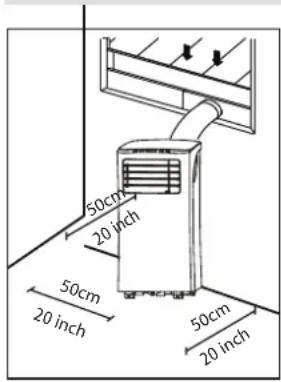
Your installation location should meet the following requirements:
-Make sure that you install your unit on an even surface to minimize noise and vibration.
-The unit must be installed near a grounded plug, and the Collection Tray Drain (found on the back of the unit) must be accessible.
-The unit should be located at least 20" from the nearest wall to ensure proper air conditioning. The horizontal louver blade should be at least 20" away from obstacles.
-DO NOT cover the Intakes, Outlets or Remote Signal Receptor of the unit, as this could cause damage to the unit.
Recommend Installation

Energy Rating Information
We recommend that operating the unit at a room temperature below 95^ F with the exhaust hose extended to the shortest length possible and ensuring the exhaust hose diameter is not blocked or covered. Extending the exhaust hose greater than 9' or blocking the exhaust hose diameter or any of the vents on the unit will reduce its efficiency.
How to Stay Cool with a New Portable Air Conditioner
Because of a new federal test procedure for Portable Air Conditioners, you may notice that the cooling capacity claims on portable air conditioner packaging are significantly lower than that of models produced prior to 2017. This is due to changes in the test procedure, not to the portable air conditioners themselves.
What should I look for first when purchasing a portable air conditioner?
The right air conditioner helps you cool a room efficiently. An undersized unit won't cool adequately while one that's too large will not remove enough humidity, leaving the air feeling damp. To find the proper air conditioner, determine the square footage of the room you want to cool by multiplying the room length by its width. You also need to know the air conditioner's BTU (British Thermal Unit) rating, which indicates the amount of heat it can remove from a room. A higher Why is the cooling capacity lower on newer models than on older units? number means more cooling power for a larger room. (Be sure you are comparing only newer models to each other- older models may appear to have a higher capacity, but are actually the same). Be sure to "size up" if your portable air conditioner will be placed in a very sunny room, in a kitchen, or in a room with high ceilings. After you've found the right cooling capacity for your room, you can look at other features.
Why is the cooling capacity lower on newer models than on older units?
Federal regulations require manufacturers to calculate cooling capacity based on a specific test procedure, which was changed just this year. Models manufactured before 2017 were tested under a different procedure and cooling capacity is measured differently than in prior years' models. So, while the BTUs may be lower, the actual cooling capacity of the air conditioners has not changed.
What is SACC?
SACC is the representative value of Seasonally Adjusted Cooling Capacity, in Btu/h, as determined in accordance with the DOE test procedure at title 10 Code of Federal Regulations (CFR) 430, subpart B, appendix CC and applicable sampling plans.
| TECHNICAL DATA | |
| Model: ARC-102CS | |
| Operational Modes: | Air conditioner, Fan or Dehumidifier |
| Cooling Capacity (SACC): 7000 BTU | |
| Coverage Area: | 300 sq. ft. |
| Dehumidifying Capacity: 68 pints / day | |
| Fan Speed: | 2 Fan Speeds (High, Low) |
| Filters: | Activated Carbon Filter and washable pre-filter |
| Thermostat Control Range: 62° - 86°F | |
| Timer: 24 hour programmable timer | |
| Noise Level: <51 dBA | |
| Extendable Hose: 59" | |
| Window Kit Length: | Minimum: 26.5"Maximum: 48" |
| Refrigerant: | R32 |
| Air Flow (at high speed): | 350 m3/h / 206 CFM |
| Maximum Power Consumption: 1110W/ 9.8A | |
| Power Supply: 115 V / 60Hz | |
| CEER | EER: | 6.9 | 9.55 |
| Unit Dimensions: 14" W x 14" D x 28" H | |
| Package Dimensions: 15" W x16" D x35" H | |
| Net Weight: 53 lbs | |
| Gross Weight: 62 lbs | |
| Exhaust Hose: | 6.0" diameter |
| Hose Connectors: | 6.0" diameter |
| Window Kit: | 6.5" W x 26.75" (min)/ 48" (max) L |
Tools Needed
-Medium Philips screwdriver; -Tape measure or ruler; -Knife or scissors;
-Saw (optional, to shorten window adapter for narrow windows)
| ACCESSORY IMAGE ACCESSORY DESCRIPTION | DESCRIPTION | QUANTITY | |
 | Exhaust hose adapter to the unit | 1 piece | |
 | Exhaust hose | 1 piece | |
 | Exhaust hose adapter to the window | 1 piece | |
 | Window slider kit 1 set | ||
 | Clear plastic plug (plug is in the upper corner of the plastic bag that holds the user manual) | 1 piece | |
A  B B  C C  | Foam seal A (Adhesive) Foam sealB (Adhesive) Foam seal C (Non-adhesive) | 2 pieces2 pieces1 piece | |
 | Security bracket with 2 screws 1 set | ||
| Drain hose 1 piece | |||
 | Activated Carbon Filter | 1 piece | |
 | Remote control | 1 piece | |
Control Panel
MODE
CONSTANT FAN(Press 3s)

Cool
Fan ●
Dry ●

● Constant Fan


Power Button
Press to turn the air conditioner on and off

Mode Button
Press to change mode
- Controls the 3 function modes: COOL, FAN, and DRY.
MODE
● Constant Fan
Note: In Cooling or Dry mode, press the Mode for 3 seconds to turn the Constant Fan function on or off. When the function is turned on, the Constant Fan light will illuminate, identifying the fan will run continually. When the function is turned off, the Constant Fan light will not illuminate, identifying the fan will run only when the compressor is running.
Up (+) and Down (-) Buttons
Adjusts set temperature (1°C/2°F increments) or timer hours (0 – 24 hours).
- This unit is capable of displaying set temperature in Fahrenheit or in Celsius. To convert from one to the other, press and hold the Up and Down buttons for 3 seconds.

LED Display
- In Cool mode: shows set temperature in ^ or ^ and AUTO timer setting. - In DRY and FAN only modes: shows room temperature.
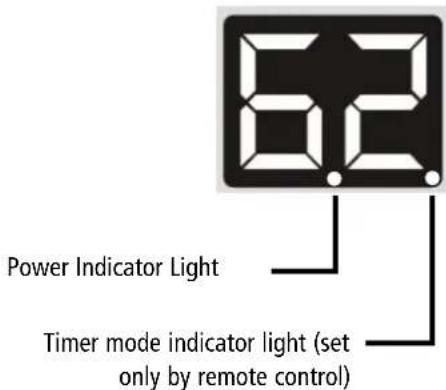
Error Codes:
• E1 - Room temperature sensor error
- Unplug unit and restart in 5 minutes
• E2 - Evaporator sensor error
- Unplug unit and restart in 5 minutes
• E3 - Condenser sensor error
- Unplug unit and restart in 5 minutes
• E4 - Display panel sensor error
- Unplug unit and restart in 5 minutes
• P1 - Water reservoir full
- Drain water from the unit
WARNING: NEVER OPERATE THE AIR CONDITIONER WITHOUT THE AIR FILTER
AIR FILTERS
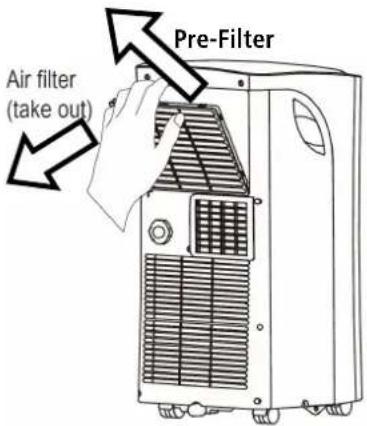
- Pre-Filter
This portable air conditioner comes with a Pre-Filter which removes large particles such as dust, pet hair and dander. This pre-filter can be removed for cleaning by pulling the filter frame back and out. This pre-filter washable and does not need to be replaced.
- Activated Carbon Filter (Supplied)
This portable air conditioner comes with an Activated Carbon Filter, which removes smoke and other odors. This filter should be replaced every 2-3 months depending on usage. Please contact support@whynter.com for retail sales information.
WATER DRAINAGE
The dehumidifying capacity of this unit is 68 pints per day. The patented self-evaporating function of the ARC-102CS unit fully exhausts all condensation automatically in most environments when humidity is less than 70%. Areas with more than 70% humidity, the self-evaporating function can still ex-haust about 98% of the moisture and the remaining 2% of moisture will be collected in the water tank of the air conditioner.
When the water reservoir reaches its maximum level, the unit will beep 8 times and the digital display will show P1. When the unit displays P1, all operation modes will be disabled temporarily, while the fan continuously running. The P1 code will disappear when the water is completely drained.
• Continuous drainage (Fig. 1a)
Remove the upper drain plug from the back of the unit and install the drain hose. Place the open end of the hose to a drain area in a downward direction with gravity. This method is recommended if uninterrupted operation is desired.
• Manual drainage (Fig. 1b)
Carefully move the unit to a drain location, remove the bot-tom drain plug and let the water drain. Replace the drain plug and plug in unit to resume operation.
Fig. 1a

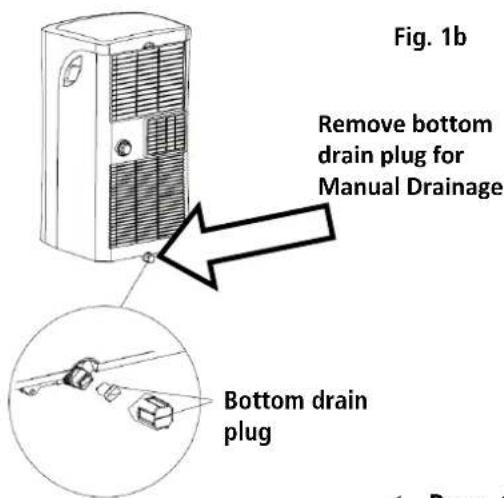
LOCATION
The air conditioner should be placed on a hard and level surface strong enough to support the unit. The unit has casters and it should only be rolled on smooth, flat surfaces. Use caution when rolling on carpet surfaces. Do not attempt to roll the unit over objects. Never place any obstacles around the air inlet or outlet and allow at least 20" of clearance for efficient air conditioning.
EXHAUST HOSE INSTALLATION
When you use this air conditioner unit, hot air must be exhausted out of the room to complete the air exchange of the condenser. When the unit is operating in DRY or FAN only mode, installation of the exhaust hose is optional.
- Snap the hose connector to the unit onto one end of the exhaust hose and then snap the hose connector to the window onto the other end of the exhaust hose. See Fig. 1
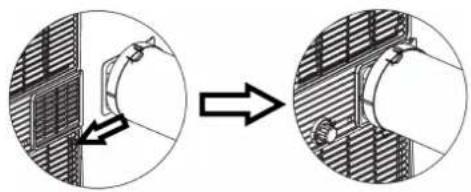
- Line-up the hose connector tab onto the back of the unit and slide in to install. See Fig. 2
- Only extend the hose to the necessary length.
Fig. 1

natural_image
Diagram of a cylindrical object with two side flanges and directional arrows indicating movement or force (no text or symbols)Fig. 2
natural_image
Diagram showing a mechanical assembly before and after transformation, with no visible text or symbols.WINDOW KIT INSTALLATION
When you use this air conditioner unit, hot air must be exhausted out of the room to complete the air exchange of the condenser. When the unit is operating in fan-only mode, installation of the exhaust hose is optional.
Your window kit has been designed to fit most standard vertical and horizontal windows.
However, it may be necessary for you to modify the installation procedures for your window. Please refer to Fig. 3a and Fig. 3b. If your window opening is less than the mentioned minimum length of the window slider kit, cut the slide bar with holes to fit window opening. Never cut out the holes on the window slide bar.
NOTE: When using the window kit on a window or sliding door it will cause the window or sliding door not to be properly closed and locked. Additional security measurements maybe needed.
The window slide bars can be fixed with the clear plastic plug. Fig. 4.

WINDOW KIT INSTALLATION IN A DOUBLE-HUNG WINDOW
- Open window or sliding door for approximately 5"
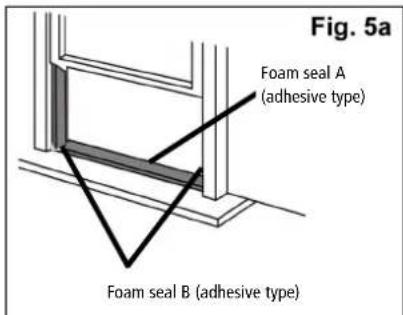
- Cut the foam seal A and B (adhesive type) to the proper length and attach it to the bottom of the window. Fig. 5a.
- Adjust the length of the window bars to the same length and width of the opening of the window. Cut the window piece if necessary to fit the length of your window. Fig. 5b.
- Close the window on the window slide
bars. For long term installation, you may screw the window kit into your window frame using the security bracket. Fig. 5c.
- Cut the foam seal C (non-adhesive) to the length and seal the open gap between the top window sash and outer window sash. Shown in Fig. 5d.


WINDOW KIT INSTALLATION IN A SLIDING WINDOW/DOOR
- Open window or sliding door for approximately 5"
- Cut the foam seal (adhesive type) to the proper length and attach it to the bot-tom of the door / window. Fig. 6a.
- Adjust the length of the window bars to the same length and width of the opening of the window. Cut the window piece if necessary to fit the length of your window. Fig. 6b.
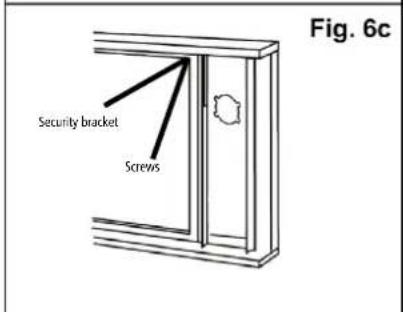
- Close the door/ window on the window slide bars. For long term installation, you may screw the window kit into your window frame using the security bracket. Fig. 6c.
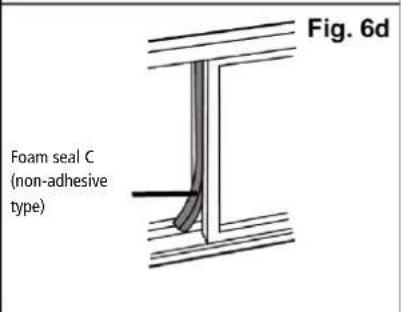
- Cut the foam seal C (non-adhesive) to the length and seal the open gap between the top window sash and outer window sash. Show in Fig. 6d.


EXHAUST INSTALLATION TO THE WINDOW KIT WINDOW/DOOR
- Make sure that window slider kit is securely installed.
- Move the unit to the window, extend the hose, align the hose connector and snap them into the window kit.
BEFORE USING YOUR APPLIANCE
- Remove the exterior and interior packing
- Before connecting the appliance to the power source, let it stand upright for approximately 4 hours. This will reduce the possibility of a malfunction in the cooling system from handling during transportation
SWITCHING ON/OFF THE AIR CONDITIONER
The appliance can be switched ON or OFF by pressing the POWER button on the control panel or the ON/OFF button on the remote control
COOLING MODE
In this mode, the air conditioner cools and dehumidifies the room. To activate this function mode, press the MODE button until the COOL indicator light comes on. When the cooling mode is set, the compressor will start in approximately 3 minutes. In cooling mode, hot air is exhausted from the outdoor exhaust port and the exhaust hose must be connected to exhaust out the hot air.
The temperature setting range of this air conditioner is from 62^ F / 17^ C to 86^ F / 30^ C. To set the temperature, press the + or - buttons. This air conditioner has a 5^ F temperature cushion which if the set temperature is within 5^ F of the ambient temperature, the unit runs on fan only mode. This saves energy and prolongs the life of the compressor of the air conditioner.
To set the fan speed, press the FAN button on the remote. In cooling mode, the difference in noise level between the 2 fan speeds is not very noticeable when the compressor is on.
In this mode, the air conditioner only dehumidifies the room, the compressor will activate intermittently depending on the ambient temperature and the fan speed is set to LOW. To activate this function mode, press the MODE button until the DRY indicator light is displayed. Please note that when switching function mode, there will be an approximately 3 minute transition time. In dehumidifying mode, the exhaust hose does not need to be vented. If the exhaust hose is vented, the room will be cooled as it dehumidifies. To prevent cooling, remove the exhaust hose from the window kit and allow the warm air from the rear to be re-circulated into the room. If room temperature is higher than 77^ F, the fan speed can be adjusted. If room temperature is lower than 77^ F, the fan speed is set at Low.
NOTE: When using dehumidifying mode, venting the exhaust hose to the outside is not required. If vented, the warm air is exhausted to the outside and cooling within the room may occur. Additionally, if the exhaust hose is not vented, the unit may require more frequent draining. Also, the air conditioner does not have a humidistat in which a specific humidity level can be set.
FAN ONLY MODE
In this mode, only the fan of the air conditioner runs and circulates the air in the room. To activate this function mode, press the MODE button until the FAN indicator light comes on. In this function mode, the temperature cannot be set. Changing the fan speed requires the use of the remote control.
Fan Only mode does not require the use of the exhaust hose.
TIMER (DELAYED SWITCH ON / OFF) FUNCTION
This function mode enables a delayed switch ON or delayed switch OFF of the air conditioner. The time (hours) de-lay can be set, enabled and disabled.
SETTING SWITCH OFF TIMER
With the air conditioner operating in any function mode, press the TIMER button. The TIMER OFF light will come on. Then set the desired time delay OFF hours by pressing the UP and DOW N buttons. The time increments are at 0.5 hour to up to 10 hours, followed by 1 hour increment up to 24 hours. When the delay time set has elapsed, the air conditioner switches off. To cancel the delayed switch off function, turn off the air conditioner or adjust the time set-ting to 0.0.
SETTING DELAYED SWITCH ON TIMER
With the air conditioner is off, press the TIMER button. The TIMER ON light will come on. Then set the desired time delay ON hours by pressing the UP and DOW N buttons. The time increments are at 0.5 hour to up to 10 hours, followed by 1 hour increment up to 24 hours. When the delay time set has elapsed, the air conditioner switches on. To cancel the delayed switch on function, turn on the air conditioner or adjust the time setting to 0.0.
SLEEP MODE
In this mode, the air conditioner gradually increases the set temperature in cooling mode, decreases the noise level and conserves energy. In Sleep and cooling mode, the set temperature is increased by 1^ C/2°F in the first 30 minutes. The temperature will then increase by another 1^ C/2°F after an additional 30 minutes. This new tempera-ture will remain the same for 7 hours. To activate this function mode, press the SLEEP button until the SLEEP indicator light comes on.
AUTO RESTART
In the event of a power outage, the air conditioner restarts at the previously set function mode and settings when power is restored.
CONTROLLING THE AIR FLOW DIRECTION
The louvers can be controlled in a fixed direction. To set the louvers in a fixed angle or direction, manually adjust the louvers to you desired angle.
NOISE LEVEL
Portable air conditioners may make sounds that are not familiar to you. The sounds listed below are normal. Noise reflecting off hard surfaces such as a floor or wall can make the sounds seem louder than they actually are.
• The compressor may make a pulsating or high-pitched sound
• Water running from the evaporator to the water tank may make a splashing sound
• Refrigerant flowing may make a gurgling sound
• Fan sound may come from front and back air vents
COMPRESSOR LOCK OUT
This portable air conditioner is optimized to operate in an ambient temperature of 64^ F – 90^ F. The compressor cir-cuit has an automatic 3 minute time delayed start if the unit is turned off and on quickly. This prevents over-heating of the compressor and possible circuit breaker tripping.
SHORTCUT FUNCTION
Push this button when remote controller is on, the system will automatically revert back to the previous settings in-cluding operating mode, setting temperature, fan speed level and sleep feature (if activated). If shortcut button is pushed for more than 2 seconds, the system will automatically store the current operation settings including operat-ing mode, setting temperature, fan speed level and sleep feature (if activated).
- Other appliances in the same room controlled by a remote control (TV, radio, stereo, etc.), may cause interferences
- Electronic and fluorescent lamps may interfere with the signal transmissions between the remote control and the air conditioner
- Remove the batteries if the remote control is not used for long periods
INSTALLING BATTERIES
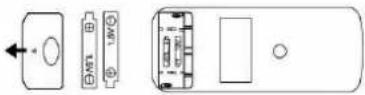
To insert the batteries, open the flap on the back of the remote control by sliding if off. Strictly adhere to the polarity signs on the bottom of the battery housing, close the flap once the batteries have been inserted.
- Only use two dry LR03 AAA 1.5V Batteries (included) in the remote control
• Always change both batteries at the same time
| INDICATOR FUNCTION | |
| 1 - Mode Indicator | Displays the current selected mode (Auto, Cool, Dry, or Fan) |
| 2 - Transmission Indi- cator | Displays when remote sends signal to unit |
| 3 - ON/OFF Display | Displays when the unit is turned on, and disappears when it is turned off |
| 4 - Timer On Indicator Displays when TIMER ON is set | |
| 5 - Timer Off Indicator | Displays when TIMER OFF is set |
| 6 - Battery Indicator | Displays battery life status |
| 7 - Temperature/Timer display | Displays the set temperature by default, or timer setting when using TIMER ON/OFF functions |
| 8 - Sleep Display | Displays when SLEEP function is activat-ed |
| 9 - Display Window Displays all active settings | |
| 10 - Fan Speed Dis-play | Displays selected Fan speed. This dis-play is blank when set to AUTO speed. |
| BUTTONS FUNCTION | |
| 11 - On/Off Button | Turns the unit On and Off |
| 12 - Mode Button | Controls the 4 function modes: Auto, Cool, Dry, & Fan |
| 13 - Fan Speed Button | Controls the fan speeds: High, Low |
| 14 - Sleep Button | Enables Sleep mode |
| 15 - LED Display But-ton | Turns on and off the display light |
| 16 - Up Button | Increases set temperature/time |
| 17 - Down Button | Decreases set temperature/time |
| 18 - Shortcut Button | Restore the current settings or resume previous settings |
| 19 - Timer On Button | Enables the Timer On |
| 20 - Timer Off Button | Enables the Timer Off |
Maintenance
Safety Precautions
· Always unplug the unit before cleaning or servicing.
· DO NOT use flammable liquids or chemicals to clean the unit.
· DO NOT wash the unit under running water. Doing so causes electrical danger.
· DO NOT operate the machine if the power supply was damaged during cleaning. A damaged power cord must be replaced with a new cord from the manufacturer.
Air Filter Cleaning
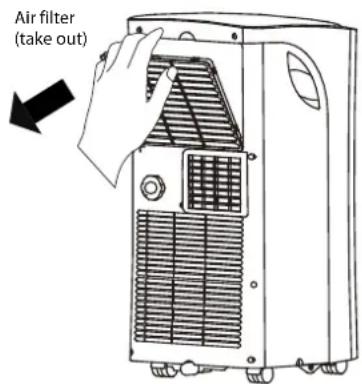
Remove the air filter
CAUTION
DO NOT operate the unit without filter because dirt and lint will clog it and reduce performance.
Maintenance Tips
- Be sure to clean the air filter every 2 weeks for optimal performance.
- The water collection tray should be drained immediately after P1 error occurs, and before storage to prevent mold.
· In households with animals, you will have to periodically wipe down the grill to prevent blocked airflow due to animal hair.
Unit Cleaning
Clean the unit using a damp, lint-free cloth and mild detergent. Dry the unit with a dry, lint-free cloth.
Store the unit when not in use
- Drain the unit's water collection tray according to the instructions in the following section.
- Run the appliance on FAN mode for 12 hours in a warm room to dry it and prevent mold.
- Turn off the appliance and unplug it.
- Clean the air filter according to the instructions in the previous section. Reinstall the clean, dry filter before storing.
- Remove the batteries from the remote control.
NOTE: Be sure to store the unit in a cool, dark place. Exposure to direct sunshine or extreme heat can shorten the lifespan of the unit.
NOTE: The cabinet and front may be dusted with an oil-free cloth or washed with a cloth dampened in a solution of warm water and mild liquid dishwashing detergent. Rinse thoroughly and wipe dry. Never use harsh cleansers, wax or polish on the cabinet front. Be sure to wring excess water from the cloth before wiping around the controls. Excess water in or around the controls may cause damage to the unit.
Troubleshooting Tips
Many common portable air conditioner problems are easily resolved. Try the troubleshooting suggestions below to see if the problems can be resolved before having to contact the service department.
| Problem Possible | Causes Solutions | |
| The portable air conditioner does not turn on | Power failure / outageThe automatic switch, line fuse, or breaker has been trippedThe power supply voltage is too lowThe power cord is damagedThe L.C.D.I. power plug for the unit is trippedThe internal water reservoir is full and 'P1" appears on display | Restore the power supplyFlip the switch / change the fuse / turn the breaker back on. Also note that you may have too many appliances drawing power on one circuit, you may need to move the other appliances to another circuitMove the unit onto another circuit with the correct voltageCall for service. Only authorized personnel should replace damaged power cord or power plugPress the Reset button on the L.C.D.I. power plugDrain water from the air conditionerPossible loose internal connection. Please contact Whynter for service |
| The unit turns on but the compressor does not turn on (the fan runs but the unit is not cooling) | The room temperature is outside of the operational tolerances of the unitThe Cooling mode is not onThe compressor has not turned on yet because of its time delayThe set temperature is too highThe internal water reservoir is full and 'P1" appears on display | This unit is designed to work in ambient temperatures of 63°F to 90°FPress the MODE button until the COOL light is shown on the displayGive the compressor 3 minutes to turn on after the Cooling mode has been selectedSet the air conditioner to a lower temperature. It is recommended to set the temperature to at least 5°F of the ambient temperatureEither manually drain the water by removing the drain plug or allow the unit to exhaust the water itself by running the fan only mode. Then cooling will resumePossible loose internal connection. Please contact Whynter for service |
| The air coming out of the unit is not very cold, or the airflow volume is weak | The filters are dirty or obstructedThe air intake or exhaust is obstructedThe unit is set in DRY or FAN modeThe unit is set to low fan speed | Clean the air filtersMake sure there is at least 20" of clearance from the air intake. Make the length of the exhaust hose is as short as possibleSet the unit to the cooling modeSet the unit to a higher fan speed |
Troubleshooting Tips
Many common portable air conditioner problems are easily resolved. Try the troubleshooting suggestions below to see if the problems can be resolved before having to contact the service department.
| Problem Possible Causes Solutions | ||
| The unit has worked for a long time, but the room is not cold enough | ·Windows or doors are open·There are too many people in the room·There is direct sunshine into the room·The room is a kitchen or with many heat-producing appliances·There is a server in the room·The room is too large | ·Close all windows and doors·You may need additional cooling or another air conditioner·Close curtains or blinds and try to minimize the amount of direct sunlight into the room·You may need additional cooling or another air conditioner |
| The unit is very noisy | ·The unit is not level·The surface underneath the unit is uneven·Low power voltage | ·Make sure the unit is on hard, level and stable surface·Move the unit to a location with a level and hard floor·Make sure the wall outlet and support the required power consumption of the air conditioner and do not use an ex-tension cord |
| The unit leaks water | ·The unit is tilted or not leveled·The water tank is full | ·Make use the unit is leveled·Drain water from the drain plug at the back of the air conditioner |
| Fan speed cannot be changed ·Fan | speed differences are not very noticeable | ·The fan speed difference is not very noticeable when the compressor is on. Try setting the unit to Fan only mode, you should be able to hear the differ-ence between high and low fan speed settings. |
The design and specifications are subject to change without prior notice for product improvement. Consult with the sales agency or manufacturer for details. Any updates to the manual will be uploaded to the service website, please check for the latest version.
ONE YEAR LIMITED WARRANTY & THREE YEAR WARRANTY ON COMPRESSOR
This WHYNTER product is warranted to the original owner, purchased from an authorized Whynter dealer within the 48 U.S. continental states, for one year from the original purchase date against defects in material and workmanship under normal residential usage. Should your WHYNTER product prove defective within one year from the date of purchase, contact Whynter's Customer Support team with the serial number and proof of purchase to make a warranty claim. A Return Authorization number must be issued before returning any parts or products.
Parts or products received without a Whynter issued Return Authorization number will be refused. Under this warranty, Whynter will repair or replace any parts found defective with new or remanufactured parts or exchange the defective product with a new, refurbished, or remanufactured product at our discretion. All defective products and parts covered by this warranty will be repaired or replaced on a mail-in basis to Whynter's Service Center.
This warranty is not transferable. After the expiration of the warranty, the cost of labor and parts will be the responsibility of the original owner.
The compressor of portable air conditioners is warranted for an additional two years after the one year limited warranty expires from the date of purchase.
Return freight is prepaid by Whynter within two months of purchase. After two months to one year, the customer will be responsible for the return freight cost to Whynter's Service Center. Please package the product carefully in its original packaging to avoid damage in transit. Whynter is not responsible for damage resulting from shipper mishandling or improper packaging. Please retain the original box and packaging materials.
THIS WARRANTY DOES NOT COVER:
- Acts of God, such as fire, flood, hurricanes, earthquakes and tornadoes.
- Improper power supply such as power surge, low voltage, defective household wiring or inadequate fuses.
• Use in commercial or industrial applications. - Damage, accidental or otherwise, to the product while in the possession of a consumer not caused by a defect in material or workmanship.
- Damage caused by consumer misuse, tampering, lack of maintenance or failure to follow the care and special handling provisions in the instructions.
- Damage to the finish of the case, or other appearance parts caused by wear.
- Damage caused by repairs or alterations to the product by anyone other than authorized by the manufacturer.
- Removal, Replacement Packaging, Freight and Insurance cost for the warranty service.
- Products sold AS IS or from an unauthorized reseller.
- Products that have had their serial numbers removed or defaced.
DISCLAIMER OF IMPLIED WARRANTIES; LIMITATION OF REMEDIES
CUSTOMER'S SOLE AND EXCLUSIVE REMEDY UNDER THIS LIMITED WARRANTY SHALL BE PRODUCT REPAIR OR REPLACEMENT AS PROVIDED HEREIN. CLAIMS BASED ON IMPLIED WARRANTIES, INCLUDING WARRANTIES OF MERCHANTABILITY OR FITNESS FOR A PARTICULAR PURPOSE, ARE LIMITED TO ONE YEAR OR THE SHORTEST PERIOD ALLOWED BY LAW, BUT NOT LESS THAN ONE YEAR. WHYNTER SHALL NOT BE LIABLE FOR CONSEQUENTIAL OR INCIDENTAL DAMAGES SUCH AS PROPERTY DAMAGE AND INCIDENTAL EXPENSES RESULTING FROM ANY BREACH OF THIS WRITTEN LIMITED WARRANTY OR ANY IMPLIED WARRANTY. SOME STATES AND PROVINCES DO NOT ALLOW THE EXCLUSION OR LIMITATION OF INCIDENTAL OR CONSEQUENTIAL DAMAGES, OR LIMITATIONS ON THE DURATION OF IMPLIED WARRANTIES, SO THESE LIMITATIONS OR EXCLUSIONS MAY NOT APPLY TO YOU. THIS WRITTEN WARRANTY GIVES YOU SPECIFIC LEGAL RIGHTS. YOU MAY ALSO HAVE OTHER RIGHTS THAT VARY FROM STATE TO STATE.
The warranty, product contents and specifications are subject to change at any time without notice; please refer to www.whynter.com for the most current information.
To register your warranty, please visit www.whynter.com and fill out the online Warranty Registration form. Please be sure to include a copy of your purchase invoice.
To obtain service or information, contact Whynter LLC via email at support@whynter.com or call 866-WHYNTER (866-949-6837).
Product contents and specifications may change without notice.
Copyright © 2023 Whynter LLC
WWW.WHYNTER.COM
- Whynter 10,000 BTU Portable Air Conditioner Compact Size
- INSTRUCTION MANUAL
- Table of Contents
- Safety Precautions
- Installation Instructions
- Operating Instructions
- Maintenance
- Troubleshooting Tips
- WARNING
- CAUTION
- SAFETY COMPLIANCE
- Repair to intrinsically safe components
- Cabling
- Detection of flammable refrigerants
- Leak detection methods
- Removal and evacuation
- Charging procedures
- Decommissioning
- Labelling
- 16.Recovery
- Preparation
- NOTE:
- Design Notice
- Recommended Ambient Temperature Range For Unit Operating
- MODE Temperature Range
- Exhaust Hose Installation
- Choosing The Right Location
- Recommend Installation
- Energy Rating Information
- How to Stay Cool with a New Portable Air Conditioner
- What should I look for first when purchasing a portable air conditioner?
- Why is the cooling capacity lower on newer models than on older units?
- What is SACC?
- Tools Needed
- Control Panel
- MODE
- Power Button
- Mode Button
- Up (+) and Down (-) Buttons
- LED Display
- Error Codes:
- WARNING: NEVER OPERATE THE AIR CONDITIONER WITHOUT THE AIR FILTER
- AIR FILTERS
- - Pre-Filter
- - Activated Carbon Filter (Supplied)
- WATER DRAINAGE
- • Continuous drainage (Fig. 1a)
- • Manual drainage (Fig. 1b)
- LOCATION
- WINDOW KIT INSTALLATION
- WINDOW KIT INSTALLATION IN A DOUBLE-HUNG WINDOW
- WINDOW KIT INSTALLATION IN A SLIDING WINDOW/DOOR
- EXHAUST INSTALLATION TO THE WINDOW KIT WINDOW/DOOR
- BEFORE USING YOUR APPLIANCE
- SWITCHING ON/OFF THE AIR CONDITIONER
- COOLING MODE
- FAN ONLY MODE
- TIMER (DELAYED SWITCH ON / OFF) FUNCTION
- SETTING SWITCH OFF TIMER
- SETTING DELAYED SWITCH ON TIMER
- SLEEP MODE
- AUTO RESTART
- CONTROLLING THE AIR FLOW DIRECTION
- NOISE LEVEL
- COMPRESSOR LOCK OUT
- SHORTCUT FUNCTION
- INSTALLING BATTERIES
- Air Filter Cleaning
- Maintenance Tips
- Unit Cleaning
- Store the unit when not in use
- ONE YEAR LIMITED WARRANTY & THREE YEAR WARRANTY ON COMPRESSOR
- THIS WARRANTY DOES NOT COVER:
- DISCLAIMER OF IMPLIED WARRANTIES; LIMITATION OF REMEDIES
Brand : Whynter
Model : ARC-102CS
Category : Air conditioner