CP-RC01 - Controller AMX - Free user manual and instructions
Find the device manual for free CP-RC01 AMX in PDF.


| Product Type | Controller |
| Brand | AMX |
| Model | CP-RC01 |
| Dimensions (HxWxD) | 1.7 x 4.2 x 0.9 in (43 x 107 x 23 mm) |
| Weight | 0.2 lb (90 g) |
| Power Supply | 2 x AAA batteries (not included) |
| Battery Life | Approximately 6 months (typical use) |
| Communication | Infrared (IR) |
| IR Range | Up to 30 ft (9 m) |
| IR Carrier Frequency | 38 kHz |
| Number of Buttons | 10 |
| Compatible Devices | AMX control systems |
| Programming | Pre-configured, no user programming required |
| Material | ABS plastic |
| Operating Temperature | 32°F to 104°F (0°C to 40°C) |
| Storage Temperature | -4°F to 140°F (-20°C to 60°C) |
| Cleaning | Wipe with a soft, dry cloth. Do not use liquids or cleaners. |
| Safety | Keep away from moisture and heat sources. Use only specified batteries. |
| Reparability | No user-serviceable parts. Contact AMX support for repairs. |
| Warranty | 1 year limited warranty |
Frequently Asked Questions - CP-RC01 AMX
User questions about CP-RC01 AMX
0 question about this device. Answer the ones you know or ask your own.
Ask a new question about this device
Download the instructions for your Controller in PDF format for free! Find your manual CP-RC01 - AMX and take your electronic device back in hand. On this page are published all the documents necessary for the use of your device. CP-RC01 by AMX.
USER MANUAL CP-RC01 AMX
FIG.1CP-RC01 IR Remote
Product Specifications
| CP-RC01 IR Remote | |
| Dimensions(HWD):8"x2"x1"(20cmx5.5cmx2.8cm) | |
| Weight:Withoutbatteries:0.208lbs(94.34g) | |
| Battery:2AAABatteries | |
| PowerConsumption:Approximately50mAatlIRtransmit | |
| IRTransmitFrequency: | 38KHz |
| Range:20-30ft(6-9m)StandardNote:RangecanbeaffectedbyfactorssuchasangleofincidenceandLEDgraphbrightness. | |
| OperatingEnvironment: | •Storagetemperaturerange:-40°-158°F(-40°-70°C)•Operatingtemperaturerange:41°-104°F(5°-40°C)•Relativehumidity:10%to90%,non-condensing |
Button Functions
YoucancreateaCP-3000scriptforeachbuttonontheremotetoperforma specifictaskwhenpressed. ThebuttonscanbeprogrammedbyusingAMX DCSsoftwaretoprogramavirtualbutton. EachbuttonhasacorrespondingIR remotecode.SeetheIRRemoteCodessectionforalistofIRremotecodes.
Toprogramabuttonfunction, writeascriptforavirtualbuttonnumberedwith thecorrespondingIRremotecodeforthebuttonontheremoteplus100. For example, ifyouwanttoprogramthePowerbuttonontheremote,youshould writeascriptforvirtualbutton109(9+100). SelectthevirtualbuttonfromtheButtonNummenuintheButtonEventareaoftheAMXDCSwindow.
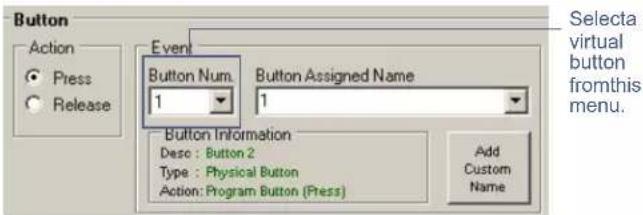
FIG.2 Button Event area of the AMX DCS window
FormoreinformationaboutscriptingandusingAMXDCS,consulttheNOVARA 3000-SeriesControlPadsOperation/ReferenceGuide.
IR Remote Codes
The following table lists the IR codes for the CP-RC01 remote.
| IR Remote Codes | ||||
| ButtonCodeButtonCode | ||||
| Mute26Record8 | ||||
| Power9Pause2 | ||||
| PC30Stop | 3 | |||
| STB31VolumeUp | 24 | |||
| Disc32VolumeDown | 25 | |||
| Aux | 33PageUp | 106 | ||
| Red | 71PageDown | 107 | ||
| Green | 72ChannelUp | 22 | ||
| Yellow | 73ChannelDown | 23 | ||
| Blue | 741 | 11 | ||
| Exit | 502 | 12 | ||
| Info | 101 | 3 | 13 | |
| Up | 454 | 14 | ||
| Down | 465 | 15 | ||
| Left | 476 | 16 | ||
| Right | 487 | 17 | ||
| OK | 498 | 18 | ||
| Guide | 105 | 9 | 19 | |
| Menu | 440 | 10 | ||
| Rewind5Subtitle | 100 | |||
| Play1Prev | 81 | |||
| FastForward | 4 | |||
Brand : AMX
Model : CP-RC01
Category : Controller