DTE200 - Cassette player Emerson - Free user manual and instructions
Find the device manual for free DTE200 Emerson in PDF.


| Type | Cassette Player with FM Radio |
| Brand | Emerson |
| Model | DTE200 |
| Power Source | 4 x "C" batteries (not included) or 6V 300mA AC adapter (sold separately) |
| Battery Type | 4 "C" cells (alkaline recommended) |
| AC Adapter | 6V, 300mA, center positive (not included) |
| Functions | Play, Fast Forward, Stop, Automatic Stop |
| Radio Band | FM |
| Tuning | Manual rotary tuning control |
| Volume Control | Rotary volume knob |
| Headphone Jack | 3.5mm, 32 ohm impedance |
| Antenna | Built-in FM antenna (rotate unit for best reception) |
| Cassette Loading | Top-loading cassette door |
| Recommended Tape | High quality tapes; avoid C-90 and C-120 |
| Cleaning | Clean tape head, capstan, pinch roller with alcohol swab |
| Safety Notes | Battery polarity, do not mix old/new or different types, remove if not used |
| Warranty | 90 days limited warranty |
| Customer Service | 1-800-898-9020 (USA) |
| Country of Origin | China |
Frequently Asked Questions - DTE200 Emerson
User questions about DTE200 Emerson
0 question about this device. Answer the ones you know or ask your own.
Ask a new question about this device
Download the instructions for your Cassette player in PDF format for free! Find your manual DTE200 - Emerson and take your electronic device back in hand. On this page are published all the documents necessary for the use of your device. DTE200 by Emerson.
USER MANUAL DTE200 Emerson
CASSETTE PLAYER WITH FM RADIO
OWNER'S MANUAL
DTE200
Copyright 2004 Viacom International Inc. All Rights Reserved. Nickelodeon, Dora the Explorer and all related titles, logos and characters are trademarks of Viacom International Inc.
LOCATION OF CONTROLS
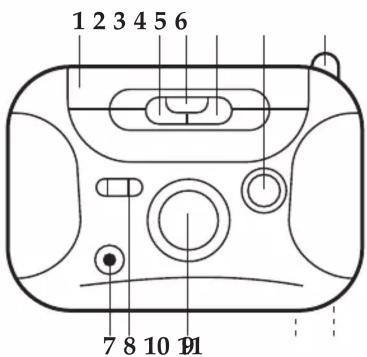
- Cassette Compartment
- FAST FORWARD Button
- PLAY ▶ Button
- STOP ■ Button
- VOLUME Control
- FM Antenna
- Earphone Jack
- Function (TAPE/RADIO) Switch
- TUNING Control
- Battery Compartment (Rear of Unit)
- DC 6V Jack (Rear of Unit)
POWER SOURCES
AC OPERATION
To operate the unit using AC power, connect a 6V, 300mA - + AC adapter (not included) to an AC outlet having 120V, 60Hz AC only. Plug the small end into the DC 6V jack on the rear of the unit and connect the other end into the AC outlet. The batteries are automatically disconnected when the AC adapter is used.
CAUTION: When not using AC power, disconnect the AC adapter from the wall outlet by pulling the plug (not the cord). Do not touch the AC adapter with wet hands. Fully insert the plug without exposing any part of the blade.
NOTE: AC adapter sold separately.
BATTERY PRECAUTIONS
Follow these precautions when using batteries in this device:
- Use only the size and type of batteries specified.
- Be sure to follow the correct polarity when installing the batteries as indicated in the battery compartment. Reversed batteries may cause damage to the device.
- Do not mix different types of batteries together (e.g. Alkaline and Carbon-zinc) or old batteries with fresh ones.
- If the device is not to be used for a long period of time, remove the batteries to prevent damage or injury from possible battery leakage.
- Do not try to recharge batteries not intended to be recharged; they can overheat and rupture. (Follow battery manufacturer's directions.)
Emerson Radio Corp. has produced this audio product under license from Nickelodeon. We have taken great care to make sure your unit was in perfect working order when it left our factory.
It has been designed to give you many years of enjoyment and trouble free operation. Read this manual before operating this unit to become familiar with its features. In the event you require technical assistance, please contact the Emerson Radio Customer Service hotline at 1-800-898-9020. Retain this manual for future reference.
NOTES:
- Please avoid using this unit in places of high temperature or humidity over prolonged periods of time as damage may occur.
- Exposure to direct sunlight in places such as car interiors may cause the unit to become warped and/or lead to malfunctioning.
- Avoid using or storing this unit in dusty or sandy locations.
For future reference, record the serial number in the space provided.
Model No: DTE200
Serial Number
1
POWER SOURCES (CONTINUED)
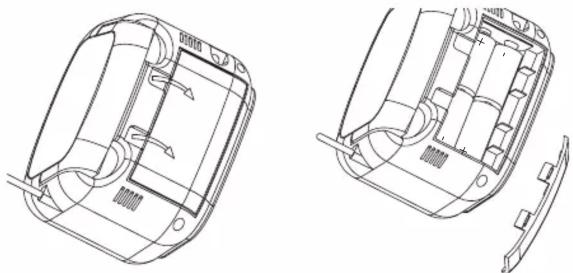
Remove the battery cover on the rear of the unit and insert four (4) "C" cell batteries (not included), observing the battery polarity indicated in the compartment. Replace the Battery Compartment cover.
OPERATION
HEADPHONES JACK
For private listening, connect low impedance 3.5mm (32 ohm) headphones (not included) to this jack.
TO LISTEN TO THE FM RADIO

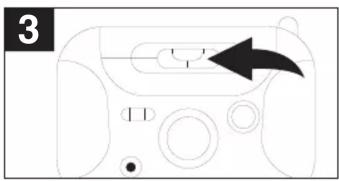
Slide the Function switch to the RADIO position.
Tune a station by turning the TUNING control ①. Adjust the VOLUME control ② as desired.
Antennas
FM: Turn the unit for best FM reception.
OPERATION (CONTINUED)
TO PLAY A TAPE

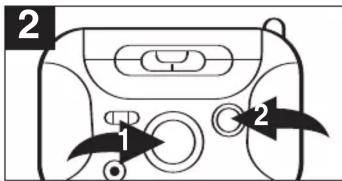
Lift up the cassette door and insert a prerecorded tape. Close the cassette door. Set the Function switch to the TAPE position.

Push the PLAY button ① to start playback and adjust the VOLUME control ② as desired.
To stop the tape before it reaches the end, push the STOP button.
AUTOMATIC STOP
This cassette player has a built-in Automatic Stop System that stops the tape when it reaches the end in the Play mode.
TO FAST FORWARD A TAPE

TO FAST FORWARD A TAPE
To rapidly advance the tape, push the Fast Forward button ①. To rapidly advance the tape while in the play mode, push the STOP button ② before pressing the Fast Forward button ①
4
TROUBLESHOOTING GUIDE
Should this unit develop a problem, check the following before seeking service.
| SYMPTOM | POSSIBLE POSSIBLE CAUSE | SOLUTION |
| GENERAL | ||
| Power does not come on. | Batteries are weak, dead or not inserted correctly. | Insert batteries properly or replace with fresh batteries. |
| RADIO | ||
| No sound. | Function switch not set to RADIO position. | Set Function switch to RADIO position. |
| VOLUME control at minimum position. | Turn the VOLUME control up. | |
| Noise or sound distorted. | FM-Interference. | Turn the unit for best reception. |
| CASSETTE | ||
| No sound. | Function switch not set to TAPE position. | Set Function switch to TAPE position. |
| VOLUME control at minimum position. | Turn the VOLUME control up. | |
| Sound distorted. | Dirty head. | Clean head. |

6
CARE AND MAINTENANCE
CASSETTE TAPE USAGE
Longer length tapes of 45 (C-90) and 60 (C-120) minutes of playing time on each side are not recommended. These tapes use thinner material and have a greater chance for malfunction such as tape spillage from the cassette, internal binding and tape tearing. Use only high quality tapes. If there is any slack in the tape, remove it before inserting the cassette. To do so, place a rotate it until the slack is taken up.

CARE AND MAINTENANCE
Clean the tape head, capstan and pinch roller using a cotton swab slightly moistened with alcohol. Avoid scratching the head surface. To clean the unit housing, use a soft cloth slightly dampened with water and wipe dry.

CAUTION: Never use chemicals such as benzene or paint thinner for cleaning, otherwise the case may become deformed or discolored.
5
LIMITED WARRANTY
Emerson Radio Corp. warrants manufacturing defects in original material, including original parts and workmanship, under normal use and conditions, for a period of ninety (90) days from the date of original purchase in the U.S. With your dated proof of purchase, we will provide repair service at no charge for labor and parts at an authorized Depot Repair Facility, or replace the product in our discretion. For repair or replacement, pack your unit in a padded box, enclose your check or money order payable to Emerson Radio Corp. in the amount of \$5.00 (not required by California residents) to cover shipping and handling costs, and enclose a copy of your proof of purchase. Send your unit to:
Emerson Radio Corp.
5101 Statesman Drive,
Irving, TX 75063.
This warranty does not cover damage from negligence; misuse; abuse; accident; failure to follow operating instructions; commercial use; rental; repairs by an unauthorized facility; or products purchased, used, serviced or damaged outside of the United States.
THIS WARRANTY GIVES YOU SPECIFIC LEGAL RIGHTS, AND YOU MAY ALSO HAVE OTHER RIGHTS WHICH VARY FROM STATE TO STATE.
AU898H
EMERSON
PART NO.: 21-2058
607-02
Printed in China
- CASSETTE PLAYER WITH FM RADIO
- OWNER'S MANUAL
- DTE200
- POWER SOURCES
- AC OPERATION
- BATTERY PRECAUTIONS
- NOTES
- POWER SOURCES (CONTINUED)
- OPERATION
- HEADPHONES JACK
- ANTENNAS
- OPERATION (CONTINUED)
- AUTOMATIC STOP
- TO FAST FORWARD A TAPE
- TROUBLESHOOTING GUIDE
- CARE AND MAINTENANCE
- CASSETTE TAPE USAGE
- LIMITED WARRANTY
Brand : Emerson
Model : DTE200
Category : Cassette player