
EH-ST63 - Facial Cleansing Device PANASONIC - Free user manual and instructions
Find the device manual for free EH-ST63 PANASONIC in PDF.


| Product Type | Ionic Cleansing and Toning Device |
| Brand | Panasonic |
| Model | EH-ST63 |
| Power Supply | AC adaptor (Model RE6-37), automatic voltage conversion |
| Charging Time | Approximately 1 hour |
| Battery Type | Built-in rechargeable lithium-ion battery |
| Battery Life | Approximately 3 years (number of charges may vary) |
| Operating Modes | CLEANSE, MOISTURIZE, BRIGHTEN, Warm Rhythm |
| Ion Levels | LOW, MED, HIGH |
| Temperature Settings | OFF, LOW, HIGH (and LOW+HIGH combined) |
| Skin Detection | Automatic vibration when triangular head contacts skin via ion induction area |
| Prewarming Function | Heats cotton pad to comfortable temperature (approx. 1 minute) |
| Triangular Head Material | Titanium alloy |
| Accessories Included | AC adaptor, protective cover, cotton ring |
| Dimensions (Approx.) | 7.2 x 4.5 x 2.1 inches (183 x 114 x 53 mm) |
| Weight (Approx.) | 5.6 oz (160 g) without adaptor |
| Safety Features | Auto power-off (20 sec no skin contact, 3 min per mode), overheat protection, child safety warnings |
| Maintenance | Wipe triangular head with tissue; wash cotton ring and protective cover with water; do not immerse main unit |
| Spare Parts Availability | Cotton rings, protective cover, AC adaptor available; battery replacement by authorized service only |
| Intended Use | Household facial skin care (face, chest, neck; avoid eyes and throat) |
Frequently Asked Questions - EH-ST63 PANASONIC
User questions about EH-ST63 PANASONIC
0 question about this device. Answer the ones you know or ask your own.
Ask a new question about this device
Download the instructions for your Facial Cleansing Device in PDF format for free! Find your manual EH-ST63 - PANASONIC and take your electronic device back in hand. On this page are published all the documents necessary for the use of your device. EH-ST63 by PANASONIC.
USER MANUAL EH-ST63 PANASONIC
natural_image
Illustration of a handheld electronic device with a curved handle and two circular ports (no text or symbols)Panasonic®
Operating Instructions
(Household) Ionic Cleansing and Toning Device
Model No. EH-ST63
Contents
Safety precautions 2
Intended use....7
Parts identification....8
Skin care procedure ....10
Charging....11
Before use....12
How to use....13
After use....16
Q&A 17
Troubleshooting....18
Battery life....21
Remove the built-in rechargeable battery
before disposing of the appliance......21
Specifications 22
Thank you for purchasing this Panasonic product.
Before operating this unit, please read these instructions completely and save them for future use.
Safety precautions
To reduce the risk of injury, loss of life, electric shock, fire, and damage to property, always observe the following safety precautions.
Explanation of symbols
The following symbols are used to classify and describe the level of hazard, injury, and property damage caused when the denotation is disregarded and improper use is performed.
| !DANGER | Denotes a potential hazard that will result in serious injury or death. |
| !WARNING | Denotes a potential hazard that could result in serious injury or death. |
| !CAUTION | Denotes a hazard that could result in minor injury or property damage. |
The following symbols are used to classify and describe the type of instructions to be observed.
| This symbol is used to alert users to a specific operating procedure that must not be performed. | |
| This symbol is used to alert users to a specific operating procedure that must be followed in order to operate the unit safely. |
The illustration in the manual may differ from the real product.

DANGER
▶ To avoid problems
Never use this appliance near electronic medical devices or home electrical therapy devices such as the following:

• Pacemakers and other electronic medical devices implanted in the body
• Heart-lung machines and other life-supporting electronic medical devices
- Wearable electronic medical devices, such as electrocardiographs and intravenous drip equipment
- Doing so may cause incorrect operation of electronic medical devices and home electrical therapy devices, resulting in accidents or causing patients to feel unwell.

WARNING
▶ To prevent skin or health problems
The following persons should not use this appliance:

• Persons with allergies
• Persons with skin diseases or eczema
- Persons with sensitive skin
- Doing so may cause problems with the skin or body.

WARNING
• Individuals with heart disease
- Individuals with a nervous disorder in their face
• Individuals with diabetes
- Individuals with hemorrhagic disease, hemophilia or other blood disorder
- Individuals with high blood pressure
- Individuals undergoing treatment on their teeth
- Individuals with a detached retina, or who once had a detached retina
- Individuals with severe nearsightedness (-6D or higher)
- Individuals with metal, silicon or plastic implants in their face due to bone fracture or plastic surgery, etc.
- Babies, toddlers or other child in the growth stage, or other individual who cannot indicate intent
- Individuals without sense of heat
- Individuals with head or eye aftereffect condition due to a traffic accident, etc.
- Individuals who have had eye surgery (Individuals who have had LASIK surgery should consult with their physician prior to use)
- Doing so may cause accidents, illness or blindness.


Menstruating or pregnant women, or within one month of childbirth.
- Doing so may cause skin troubles due to hormonal imbalance.

Do not use this appliance in the following body area or following cases.
- When you do not feel well
• After drinking alcohol or taking medicine, or when you are very tired - Areas with skin damage, eczema or swelling
- When there are abnormalities on the skin such as dermatitis or extreme sunburns
• Body parts where epilation was performed on the same day
• where cosmetic surgery has been performed
• Upper eye lids or throat - Doing so may cause problems with the skin or body. In the worst case, blindness may result.

The following individuals must consult a physician prior to use:
- Individuals with serious or acute disease
- Individuals with a febrile and contagious disease
- Individuals with malignant tumors
- Failure to do so may cause the accident physical discomfort.

If you feel pain or abnormality on your skin or other part of your body, immediately stop using this product.
- Failure to do so may cause accidents or skin/physical trouble.

WARNING

This appliance is not intended for use by people (including children) with reduced physical,
sensory or mental capabilities, or lack of experience and knowledge, unless they have been given supervision or instruction concerning use of the appliance by a person responsible for their safety.
Children should be supervised to ensure that they do not play with the appliance.
- Failure to do so may cause an accident or injury.
▶ Power supply

Do not connect the adaptor to, or disconnect from, a household outlet with a wet hand.
- Doing so may cause electric shock or injury.

Do not immerse the main unit and AC adaptor in water or wash with water.
Do not place or store the appliance at places adjacent to a sink with water in it, or highly humid places containing any liquid.
Keep the appliance dry.
- Doing so may cause electric shock or fire.

Never use the appliance if the AC adaptor is damaged or if the power plug fits loosely in a household outlet.
- Doing so may cause electric shock or fire due to short circuit.

Do not damage, modify, forcefully bend, pull, twist, or bundle the cord. Also, do not place anything heavy on or pinch the cord.
- Doing so may cause electric shock or fire due to short circuit.

Do not use in a way exceeding the rating of the household outlet or the wiring.
- Exceeding the rating by connecting too many plugs to one household outlet may cause fire due to overheating.

Do not use anything other than the supplied AC adaptor (see Page 8.) for any purpose.
Beside, do not use the attached power adaptor to charge other products.
- Doing so may cause scalding or lead to a fire due to short circuit.

Always ensure the appliance is operated on an electric power source matched to the rated voltage indicated on the AC adaptor. Fully insert the adaptor or appliance plug.
- Failure to do so may cause fire or electric shock.

Always unplug the adaptor from a household outlet when cleaning.
- Failure to do so may cause electric shock or injury.

Regularly clean the power plug and the appliance plug to prevent dust from accumulating.
- Failure to do so may cause fire due to insulation failure caused by humidity.
→Disconnect the adaptor and wipe with a dry cloth.

WARNING

The supply cord cannot be replaced. If the cord is damaged, the AC adaptor should be scrapped.
- Failure to do so may cause an accident or injury.
This product

This product has a built-in rechargeable battery. Do not throw into fire, apply heat, or charge, use, or leave in a high temperature environment.
- Doing so may cause overheating, ignition, or explosion.

Do not store within reach of children or infants. Do not let them use it or come in contact with it.
- Otherwise, small parts may be accidentally swallowed, thus causing accidents or injuries.

Do not modify or repair.
- Doing so may cause fire, electric shock, or injury.
→Contact Panasonic authorized service center for repair (battery change etc.).

Never disassemble except when disposing of the product.
- Doing so may cause fire, electric shock, or injury.
▶ In case of an abnormality or malfunction
Immediately stop using and remove the adaptor if there is an abnormality or malfunction.
- Using it in such conditions may cause fire, electric shock or injury.
- The main unit, adaptor or cord is deformed or abnormally hot
- The main unit, adaptor or cord smells of burning
- There is abnormal sound during use or charging of the main unit, adaptor or cord
→ Immediately contact the store where you purchased the product or a service center authorized by Panasonic for repair.

CAUTION
▶ Power supply

Do not allow pins or trash to adhere to the power plug or the appliance plug.
- Doing so may cause electric shock or fire due to a short circuit.

Do not wrap the cord around the adaptor when storing.
- Doing so may cause the wire in the cord to break with the load, and may cause fire due to a short circuit.

CAUTION

Disconnect the adaptor or the appliance plug by holding onto the adaptor or the appliance plug instead of the cord.
- Doing so may cause electric shock or injury.

Disconnect the adaptor from the household outlet when not charging.
- Failure to do so may cause electric shock or fire due to electrical leakage resulting from insulation deterioration.
▶Note the following precautions

Do not drop or subject to shock.
- Doing so may cause injury.

Do not use continuously for an extended period on the same area.
- Doing so may cause injury to the skin, infection, inflammation, bleeding, pigmentation or other trouble, or worsening of such symptoms.

Before using, check that the triangular head is free from cracks, chips, deformities, and other damage.
- Failure to do so may cause injury to the skin.

Use only for care of the face, chest and neck (excluding the arm used for a patch test).
- Failure to do so may cause injury or inflammation of the skin.

Always clean the appliance after use to prevent oil and other residues from accumulating.
- Failure to do so may cause problems with the skin or body.
Handling of the removed battery when disposing

DANGER
- The rechargeable battery is exclusively for use with this appliance. Do not use the battery with other products.
- Do not charge the battery after it has been removed from the product.
- Do not throw into fire or apply heat.
- Do not hit, disassemble, modify, or puncture with a nail.
- Do not let the positive and negative terminals of the battery get in contact with each other through metallic objects.
- Do not carry or store the battery together with metallic jewellery such as necklaces and hairpins.
- Do not use or leave the battery where it will be exposed to high temperatures, such as under direct sunlight or near other sources of heat.
- Never peel off the tube.
- Doing so may cause overheating, ignition, or explosion.

WARNING

After removing the rechargeable battery, do not keep it within reach of children and infants.
- The battery will harm the body if accidentally swallowed. If this happens, consult a physician immediately.

If the battery fluid leaks out and comes in contact with the eyes, do not rub the eyes, and thoroughly rinse with clean water, such as tap water.
- Failure to do so may cause eye injury. Consult a physician immediately.

CAUTION

If the battery fluid leaks out and comes in contact with the skin or clothes, rinse off with clean water, such as tap water.
Failure to do so may cause inflammation.
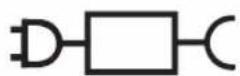
- The following symbol indicates that a specific detachable power supply unit is required for connecting the electrical appliance to the supply mains. The type reference of power supply unit is marked near the symbol.
Intended use
Carefully read through the following items prior to use:
• Perform a skin (allergy) test for the safe use.
• People who use the product for the first time or have sensitive skin must confirm the skin conditions before use.
- When having abnormal sensation on skin, stop using the product immediately and consult a physician.
- Use the product for skin care once a day. Spend 3 minutes on each of the three steps, 9 minutes in total.
Step 1 CLEANSE 3 min
Step 2 MOISTURIZE/ BRIGHTEN 3 min
Step 3 BRIGHTEN/Warm Rhythm 3 min
- Use this product before making up.
- If you wear makeup, please use a makeup remover to take off your makeup first.
- Use a cotton pad available in stores. Cotton pads that are too small or thick cannot be installed.
- Before using the product, remove any jewelry such as earrings and necklaces.
Select the desired lon level and temperature according to your skin conditions and personal preferences. When using the product for the first time or if any skin discomfort occurs, you are advised to adjust the lon level to "LOW" and the temperature to "LOW".
Parts identification
A
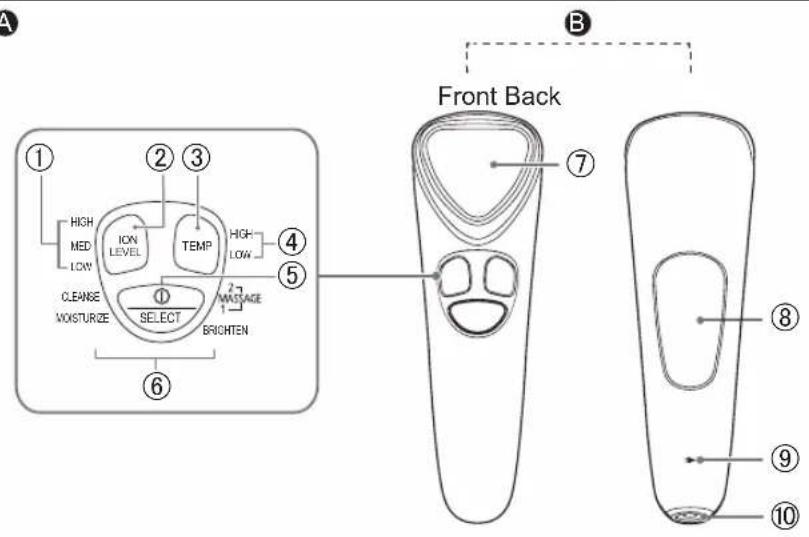
©
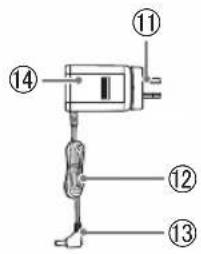
D
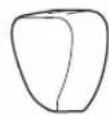
E
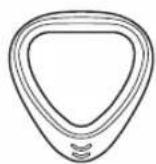
A Operation display panel
① ION LEVEL indicator (blue)
② ION LEVEL switch
③ TEMP switch
④ Temperature indicator (blue)
⑤ POWER/SELECT switch
⑥ Mode indicator (blue)
B Main body
⑦ Triangular head (Titanium alloy)
⑧ Ion induction area (Titanium alloy) (After your hand comes into contact with the induction area, the triangular head will vibrate when touching your skin.)
⑨ Charging indication/notification lamp (Red)
⑩ Appliance socket
© AC adaptor (RE6-37)
⑪ Power plug
⑫ Cord
⑬ Appliance plug
⑭ Adaptor
D Protective cover
E Cotton ring
Indication of buttons and indicators on the operation display panel
POWER/SELECT switch
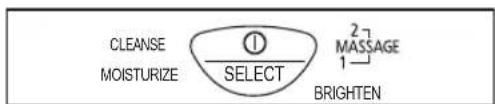
Each press on the power switch switches to the next mode in the following order:

flowchart
graph LR
    A["Off CLEANSE MOISTURIZE BRIGHTEN"] --> B["→1→2"]
    B --> C["Warm Rhythm"]
- The product turns on at the [CLEANSE] mode by default.
• The indicator of the selected mode turns on.
(The indicator keeps blinking during warm-up period.)
• You can also turn it off by a long press.
ION LEVEL switch
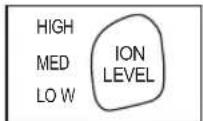
Each press switches to the next lon level.

• The indicator of the selected lon level turns on.
TEMP switch
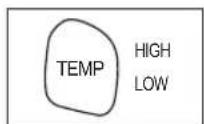
Each press switches to the next temperature.

• The indicator of the selected temperature turns on.
Memory function
The product records the last lon level and temperature settings. Resetting is not required for using the previous settings.
(Non-memory mode)
When the product has not been used for a long period of time or the battery has reached the end of its life, the memory function will be reset.
Skin care procedure
- In each mode, you can select the lon level and temperature as you wish.
- You can also choose to use any desired mode separately.
After taking off makeup and cleaning face (9 min a day)
Step 1 [CLEANSE] mode
![PANASONIC EH-ST63 - Step 1 [CLEANSE] mode - 1](/content/2026/05/956335/images/fafc674861a8aedc77350772f49e3b17cb7dd5d74f45bafa0bbdb0da20e7350d.jpg)
Used together with lotion or toner. A cotton pad is needed.
→Applicable skin care regimen:
- Lotion
- Toner(recommended)
![PANASONIC EH-ST63 - Step 1 [CLEANSE] mode - 2](/content/2026/05/956335/images/35b17df7411874c20d85a722a19a0d91501f0f9d394958a27db0e7bf113d89c5.jpg)
Step 2 [MOISTURIZE] / [BRIGHTEN\*]mode
![PANASONIC EH-ST63 - Step 2 [MOISTURIZE] / [BRIGHTEN\*]mode - 1](/content/2026/05/956335/images/ca6b0cc98e4af0a94b76a26304ad5204f8495e630f9889604dae667e5c825835.jpg)
Used together with lotion.
A new cotton pad is needed.
→Applicable skin care regimen:
- Lotion
• Facial mask (Cotton pad not required)
![PANASONIC EH-ST63 - Step 2 [MOISTURIZE] / [BRIGHTEN\*]mode - 2](/content/2026/05/956335/images/3139dc8019c47e784926487a09375a3089bb416fcf0d298329c09e244f16ab9c.jpg)
Step 3 [BRIGHTEN\*] / [Warm Rhythm] mode
![PANASONIC EH-ST63 - Step 3 [BRIGHTEN\*] / [Warm Rhythm] mode - 1](/content/2026/05/956335/images/d70f6be2ed905cba9d5949c15d9feddef6f95b484a2030692fd21c060f4918d9.jpg)
Used together with facial cream, serum or eye cream. A cotton pad is not required.
→ Applicable skin care regimen:
- Glutinous lotion
- Emulsion
- Jelly and gel types
• Serum (recommended)
• Massage cream (recommended) - Facial cream
- Eye cream (recommended)
![PANASONIC EH-ST63 - Step 3 [BRIGHTEN\*] / [Warm Rhythm] mode - 2](/content/2026/05/956335/images/2c9bd81a9082ebcb0d0415e835e0559264cca2277e8d40dfb8ec58fe23725795.jpg)
* Please use with cosmetics with vitamin C or vitamin C derivative in [BRIGNTEN] mode.
→ Ingredients List
Vitamin C, Vitamin C derivative, Vitamin C ethyl, L-ascorbic acid 2-glucoside, 2-O-ethyl-L-ascorbic acid, 3-O-ethyl ascorbic acid, Ascorbyl phosphate Mg, Vitamin C 2-glucoside, Vitamin C phosphate Mg, Ascorbyl phosphate 3Na, Glyceryl ascorbic acid, Palmitic acid ascorbyl phosphate 3Na, Active C, Isostearyl ascorbyl phosphate 2Na etc.
Charging
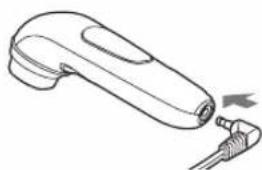
- Insert the appliance plug into the appliance socket.
- Attach the protective cap when charging.
natural_image
Line drawing of a handheld electric shaver with a probe inserted (no text or symbols)- Insert the AC adaptor into a household outlet.
- Check that the charging indication/notification lamp turns on.
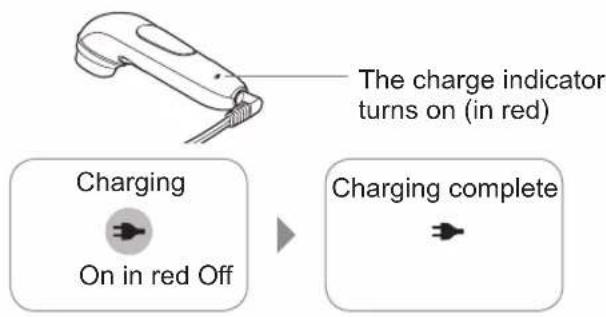
Charging is completed in about 1 hour
- The charging time may differ with the charging capacity.
To check if charging is completed
Press the POWER/SELECT switch while the AC adaptor is connected.
The charging indication/notification lamp turns on and then off after about 5 seconds.
- Remove the AC adaptor from the household outlet after charging is complete.
(This can ensure safety and save energy.)
• Even if the charging time exceeds 1 hour, the product will not be damaged.
Precautions for charging
Note:
The charging time may differ when the appliance is being used for the first time, or if it has not been used for half a year or more.
The charging indication/notification lamp may not glow during the first few minutes after starting charge the product. Please charge the product continuously and the charging indication/notification lamp will illuminate shortly.
• After charging for approximately 1 hour, the product can be used for approximately 3 times (9 minutes per usage). This will differ depending on the temperature.
- The recommended charging temperature range is 15^ 35^ . It may take longer to charge or the battery may fail to charge properly in extremely high or low temperatures.
- If there is noise from the radio or other sources while using or charging the appliance, move to a different location to use the appliance.
When the charging indication/notification lamp blinks:
Charging notification

Once per second.
Abnormal charging

Twice per second.
• The battery level is low.
Charge the appliance.
- Charge the appliance within the recommended ambient temperature (15 °C\~35 °C). If the indicator blinks frequently, immediately contact the store where you purchased the product or a service center authorized by Panasonic for repair.
Tips
The product comes with a built-in lithium battery.
• Even if the product is charged before each use, the battery life is not affected.
- Recycle the lithium battery when you dispose of the product.
Before use
Skin (Allergy) test procedure
This is a simple test, used to check whether any adverse reactions will be caused to the skin in advance.
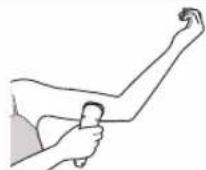
To avoid any adverse reaction with your skin, be sure to check the compatibility of your skin care regimen with the product.
① Clean the test area (inner arm) with soap and water, and dry it with a towel.
② Select the [MOISTURIZE] / [BRIGHTEN] mode. Perform the test by following:
Steps 1 to 3 in "How to use" on Page 13.
③ Hold the triangular head against the test area for about 10 seconds.
④ Wait for 48 hours later, and check if any reaction occurs in the skin.
- If any adverse reaction is found in the allergy test, immediately stop using this skin care product together with the product.
Skin perception (after power-on)
Hold the main body tightly so that your palm fully comes into contact with the ion induction area on its back. When the triangular head senses contact with your skin, it will automatically vibrate.
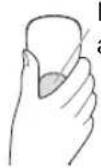
Ion induction area
- There may be a slight noise (chatter) when the head vibrates, but this is not a malfunction.
- While the triangular head is kept against your skin, none of the switches will be available.
- If the triangular head does not vibrate, the ionic function is not active.
- If the ion induction area on the back or the triangular head is kept apart from the skin for over 20 seconds, the product will turn off automatically.
How to use
Notes
• The unit will not turn on when the AC adaptor is connected.
You must disconnect the AC adaptor to use this unit.
- Please remove the protective cover before use.
- Do not use the product on your upper eyelid and throat.
[CLEANSE] / [MOISTURIZE] / [BRIGHTEN\*] mode
* When using lotion containing vitamin C
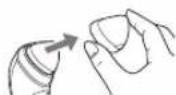
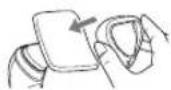
1. Attach a cotton pad into the triangular head.
• Fix it with the cotton ring.
2. Soak the cotton pad with lotion till it is fully saturated.
• Make sure that lotion fully penetrates into the inner side of the cotton pad.
3. To cleanse
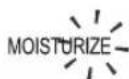
Press the ①SELECT switch, and select the [CLEANSE] mode.
To moisturize
Press the Ⓗ select switch, and select the [MOISTURIZE] mode.
To Brighten
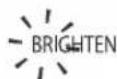
Press the switch, and select the [BRIGHTEN] mode.

Tips
- In the [CLEANSE] / [MOISTURIZE] / [BRIGHTEN] mode, the cotton pad is warmed with the prewarming function. The mode indicator blinks in the prewarming period and then stays solid on in about 1 minute after prewarming is completed.
-
In the prewarming period, the triangular head can be kept against the skin for use. In this case, prewarming ends automatically.
-
Press the switch, and select an lon level.
Each press switches to the next HIGH
Ion level in the sequence of MED
→LOW→MED→HIGH . LOW
- Press the (TEMP) switch, and select a proper temperature.
Each press switches to the next temperature in the sequence of HIGH
→ LOW+HIGH Off → LOW
- Hold the main body tightly so that palm fully comes into contact with the ion induction area on its back, and move the cotton pad along your skin in the sequence of ① - ⑥ as shown below.
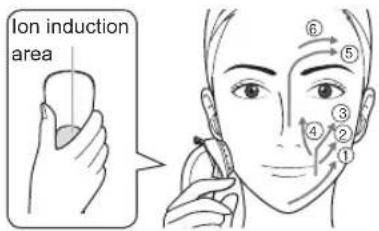
- Do not apply much force to the triangular head, but move it on your face slowly like stroking.
• After moisture in the cotton pad is used up, it is hard to move the triangular head or implement the skin detection function. In this case, replenish lotion at once.
Notes
- The appliance may not warm up in an ambient temperature approximately 15 °C or lower. Warming may fail when the ambient temperature goes beyond the recommended range.
- The product will be automatically powered off in 3 minutes after prewarming is complete. You can also turn it off by a long press of the POWER/SELECT switch.
7. Remove the cotton pad when the procedure is complete.
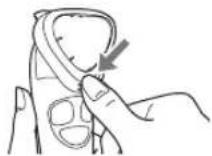
Press the mark under the cotton ring, and remove the cotton pad.
- Do not reuse the used cotton pad. Doing so may result in skin discomfort.
[BRIGHTEN ^* ] / [Warm Rhythm] mode
* When using with products that contain vitamin C such as massage cream, serum or eye cream This mode does not requiring any cotton pad or the cotton ring.
1. Smear your skin care product on sites including the forehead cheeks and the chin.
- Wipe off the remaining skin care product that sticks to your hands during the smearing process.
2. For Brightening
Press the ①/SELECT switch, and select "BRIGHTEN".
For warm rhythmic care
Press the ①SELECT switch, and select your desired vibration rhythm.
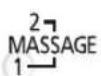
- Two modes are available.
• After selecting a mode, keep the triangular head against your skin and check that the rhythm is proper. - The product cannot memorize the vibration rhythm, so vibration starts from "1" each time.
• To change the vibration rhythm, move the triangular head away from your face.
3. Press the ION LEVEL switch, and select an Ion level.
• Each press switches to the next lon level in the sequence of →LOW→MED→HIGH HIGH MED LOW
4. Press the TEMP switch, and select a proper
temperature.
• Each press switches to the next temperature in the sequence of → LOW+HIGH Off→ HIGH LOW
- Hold the main body tightly so that palm fully comes into contact with the ion induction area on its back, and move the triangular head along with your skin in the sequence as shown below.
- When using massage cream - When using serum
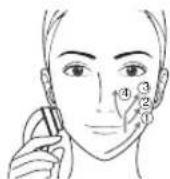
Push and press the triangular head along your facial line in the sequence of ① to ② as shown in the figure; move the triangular head in the sequence of ③ and ④. (The operation method is the same for both cheeks.)
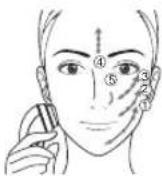
Move the triangular head on your facial skin using the point pressing mode and in the sequence of ① to ⑤ so that the serum can be smeared evenly. (The operation method is the same for both cheeks.)
- When using eye cream
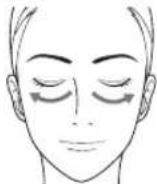
Do not apply too much force to avoid burden on your eyes and skin.
- Please end these actions before the serum or eye cream has been fully absorbed.
- After selecting a vibration rhythm, you can use the product for 3 minutes until it powers off automatically. If you change the vibration rhythm during use, the total operating time remains at 3 minutes. You can also power it off by a long press of the POWER/SELECT switch.
After use
1. Wipe the triangular head clean with tissue.
Please wash the cotton ring and protective cap in water. When it is dirty
- Use a cloth soaked with soapy water to wipe the dirt. Wring out the cloth before wiping.
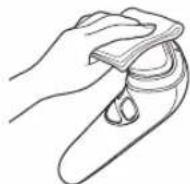
Notes
- Do not rinse the product with water.
-
Please do not use alcohol, nail polish remover or detergent (hand soap type) etc. Doing so may damage the product or result in part cracks or discoloration.
-
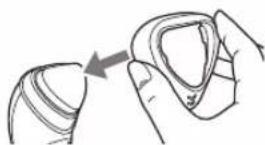
Attach a cotton ring onto the triangular head.
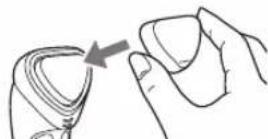
- Attach the protective cover.
Q&A
| Question Answer | |
| Can I use the product more frequently than once a day? | The product can be used once a day for 3 minutes on each of the three steps, 9 minutes in total. |
| Does the effect increase with the pressing strength? | Do not apply too much force to the triangular head.Keep the triangular head held slightly against your skin and move it gently to avoid burden on your skin. |
| Can I use the product in a bathtub? | It cannot be used in a bathtub.Do not use or store it in places with high humidity or where it is likely to be splashed with water. |
| Can I use it together with an emulsion or jelly skin care regimen? | You can use them under the [BRIGHTEN] / [Warm Rhythm] mode that does not require a cotton pad. |
| Can I use the [CLEANSE] mode to take off my makeup? | It is not designed to take off your makeup.Please take off your makeup and clean your face before use. |
| I cannot install the cotton pad. | Cotton pads differ in size, thickness and shape and some are not applicable.In this case, replace it with a proper fitting cotton pad. |
| Can I use a facial mask? | You can use a facial mask in the [MOISTURIZE] / [BRIGHTEN] mode. (Cotton pad is not required.)Please observe the instructions during use. The total operating time cannot exceed 9 minutes each day. |
| Why my skin is irritated? | You may feel some irritation due to using a little cosmetics.Add extra cosmetics, or switch the ion level to “Low”. |
Troubleshooting
| Problem Possible Cause Action | ||
| The product does not work even after the POWER/SELECT switch is pressed. | The main unit and AC adaptor are connected to a household outlet. | Remove the AC adaptor from the main unit. |
| The battery is low. | Charge the product using the AC adaptor. (See Page 11.) | |
| The charging indication/notification lamp does not turn on/stays off. | This charging indication/notification lamp turns off after charging is complete. (See Page 11.) | |
| The AC adaptor is not properly inserted into the household outlet. | Properly insert the AC adaptor into the household outlet. | |
| The appliance plug is not firmly inserted into the appliance socket. | Firmly insert the appliance plug into the appliance socket. | |
| The [MOISTURIZE] mode indicator, the "HIGH" Ion level indicator, or the "HIGH" temperature indicator blink quickly. | The self-protection function of the main unit was stopped abnormally. | Turn off the power and restart the unit. If the problem persists, immediately contact the store where you purchased the product or a service center authorized by Panasonic for repair. |
| Problem Possible | Cause Action | |
| The product stops during operation. | After the mode indicator goes on, the power will be automatically turned off in 3 minutes.This does not indicate a problem. | |
| The battery is low. | Charge the product using the AC adaptor. (See Page 11.) | |
| If skin is not detected, the power will be automatically turned off after about 20 seconds. This does not indicate a problem. | Reselect a mode, and use the product against your skin.(See Page 13,15) | |
| During operation, the POWER/SELECT switch is pressed by mistake to cut off the power supply. | Press the POWER/SELECT switch again to restart the product. | |
| The product can be used only for a few minutes even after being fully charged. | The battery has reached the end of its life (about 3 years). | Consult a retailer or a service center authorized by Panasonic.(Do not change the battery by yourself. Doing so may damage the product.) |
| The triangular head does not warm up. | The product may not function if the ambient temperature goes beyond the recommended range. | Use it within the recommended range of 15 °C to 35 °C . |
| The battery is low. | Charge the product using the AC adaptor. (See Page 11.) | |
| The temperature mode is set to "Off". | Press the TEMP button, and select "LOW" or "HIGH". | |
| The triangular head does not vibrate. | Your hand does not come into contact with the ion induction area and the skin perception function is not enabled. | To fully come into contact with the ion induction area, hold the main body tightly so that the triangular head is pressed against your skin. |
| There is not sufficient lotion in the cotton pad. | Please use sufficient lotion and make it penetrate into the inner side of the cotton pad. | |
If the problems still cannot be solved, contact the store where you purchased the unit or a service center authorized by Panasonic for repair.
Battery life
The battery service life is about three years. The battery in this appliance is not intended to be replaced by consumers. Contact the authorized service center to replace the battery.
Remove the built-in rechargeable battery before disposing of the appliance
The battery must be disposed of safely. Please make sure that the battery is disposed of at an officially designated location if there is one.
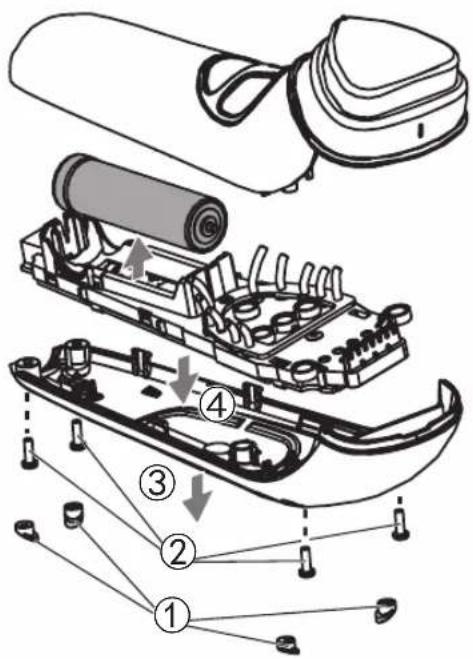
This figure must only be used when disposing of the appliance, and must not be used to repair it. If you dismantle the appliance yourself, it may cause malfunction.
- Remove the appliance from the AC adaptor.
- Use the battery until it fully discharges if there is any charge remaining.
- Follow the procedure below, using a screwdriver to disassemble the appliance.
- Perform steps ① to ④ and lift the battery, and then remove it.
• Take care not to short circuit the positive and negative terminals of the removed battery, and insulate the terminals by applying tape to them.
For environmental protection and recycling of materials
This appliance contains a Li-ion battery.
Please make sure that the battery is disposed of at an officially assigned location, if there is one in your country.
Specifications
| Power supply | See the name plate on the AC adaptor. (Automatic voltage conversion) |
| Charging time | Approx. 1 hour |
This product is intended for household use only.
MEMO
Panasonic Corporation
http://www.panasonic.com
© Panasonic Corporation 2018
© EN
Printed in China
EH9700ST631541 Y0518-0
- Panasonic®
- Operating Instructions
- Contents
- Safety precautions 2
- Safety precautions
- Explanation of symbols
- DANGER
- ▶ To avoid problems
- WARNING
- ▶ To prevent skin or health problems
- ▶ Power supply
- This product
- ▶ In case of an abnormality or malfunction
- CAUTION
- Handling of the removed battery when disposing
- Intended use
- Parts identification
- A Operation display panel
- B Main body
- © AC adaptor (RE6-37)
- D Protective cover
- E Cotton ring
- Indication of buttons and indicators on the operation display panel
- POWER/SELECT switch
- ION LEVEL switch
- TEMP switch
- Memory function
- Skin care procedure
- After taking off makeup and cleaning face (9 min a day)
- Step 1 [CLEANSE] mode
- Step 2 [MOISTURIZE] / [BRIGHTEN\*]mode
- Step 3 [BRIGHTEN\*] / [Warm Rhythm] mode
- Charging
- Charging is completed in about 1 hour
- To check if charging is completed
- Precautions for charging
- Note:
- When the charging indication/notification lamp blinks:
- Charging notification
- Abnormal charging
- Tips
- Before use
- Skin (Allergy) test procedure
- Skin perception (after power-on)
- How to use
- Notes
- [CLEANSE] / [MOISTURIZE] / [BRIGHTEN\*] mode
- Attach a cotton pad into the triangular head.
- Soak the cotton pad with lotion till it is fully saturated.
- To cleanse
- To moisturize
- To Brighten
- Remove the cotton pad when the procedure is complete.
- [BRIGHTEN * ] / [Warm Rhythm] mode
- Smear your skin care product on sites including the forehead cheeks and the chin.
- For Brightening
- For warm rhythmic care
- Press the ION LEVEL switch, and select an Ion level.
- Press the TEMP switch, and select a proper
- After use
- Wipe the triangular head clean with tissue.
- Q&A
- Battery life
- Remove the built-in rechargeable battery before disposing of the appliance
- For environmental protection and recycling of materials
Brand : PANASONIC
Model : EH-ST63
Category : Facial Cleansing Device