
H24WCB - Wine cellar HONEYWELL - Free user manual and instructions
Find the device manual for free H24WCB HONEYWELL in PDF.


| Type | Wine Cellar |
| Brand | Honeywell |
| Model | H24WCB |
| Temperature Range | 41°F to 64.4°F (5°C to 18°C) |
| Display Type | LED with touch controls |
| Interior Lighting | LED light with on/off switch |
| Lock Function | Key lock to prevent accidental temperature changes |
| Temperature Units | Switchable between Celsius and Fahrenheit |
| Memory Function | Retains settings after power loss |
| Error Codes | E1 (temperature sensor fault), E4 (defrosting sensor fault) |
| Installation Clearance | 30 cm above, 10 cm on sides and back |
| Door Type | Three-pane glass door |
| Shelving Material | Wooden wine racks |
| Adjustable Legs | Yes, for leveling |
| Cleaning Interior | Use baking soda solution; do not use harsh chemicals |
| Defrost Method | Manual; unplug for 24 hours to clear sensor errors |
| Refrigerant Type | Flammable (R600a or similar) |
| Power Supply | 120V AC (standard US) |
| Energy Saving Tips | Place in well-ventilated area, avoid direct sunlight, minimize door openings |
| Customer Service | 1-800-604-0295; support@honeywellcoolingappliances.com |
Frequently Asked Questions - H24WCB HONEYWELL
User questions about H24WCB HONEYWELL
0 question about this device. Answer the ones you know or ask your own.
Ask a new question about this device
Download the instructions for your Wine cellar in PDF format for free! Find your manual H24WCB - HONEYWELL and take your electronic device back in hand. On this page are published all the documents necessary for the use of your device. H24WCB by HONEYWELL.
USER MANUAL H24WCB HONEYWELL
Read and save these instructions before use
natural_image
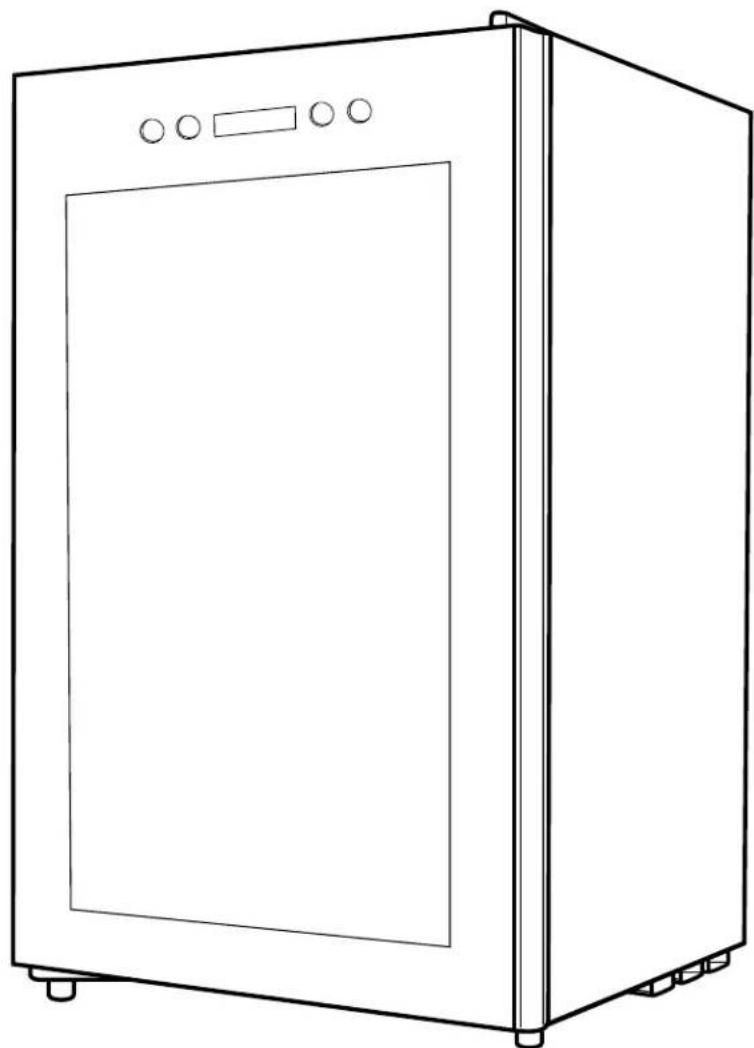
Line drawing of a simple kitchen appliance with front panel and side legs (no text or symbols)H24WCB
CONTENTS
1 Safety Warnings
1.1 Warning 1-2
1.2 Electricity related warnings 3
1.3 Related warnings for use .... 3
1.4 Warnings related to placing items 4
1.5 Warnings for energy....4
1.6 Warnings related to disposal......4
2 Proper Use of the Cooler
2.1 Names of components....5
2.2 Display control....6
2.3 Locking and Unlocking 6
2.4 Functions 6-7
2.5 Placement 8
2.6 Start to Use 8
2.7 Energy Saving Tips 8
2.8 Arrangement of Bottles 9
3 Maintenance of the Cooler
3.1 Disconnecting....10
3.2 Stop using....10
3.3 Cleaning....10
4 Troubleshooting 11
DEAR CUSTOMER:
Thank you for buying this cooler. To ensure that you get the best results from your new cooler, please take time to read through the simple instructions in this booklet. Please ensure that the packing material is disposed of in accordance with the current environmental requirements. When disposing of any beverage cooler equipment please contact your local waste disposal department for advice on safe disposal. This appliance must be only used for its intended purpose.
1 SAFETY WARNINGS
1.1 Warning

WARNING: risk of fire / flammable materials
This appliance is intended to be used in household, non-retail applications.
This appliance is not intended for use by persons (including children) with reduced physical, sensory or mental capabilities unless they have been given supervision or instruction concerning use of the appliance by a person responsible for their safety. Children should be supervised to ensure that they do not play with the appliance.
If the supply cord is damaged, it must be replaced by the manufacturer, its service agent or similarly qualified persons in order to avoid a hazard.
The appliance has to be unplugged after use and before carrying out user maintenance.
DO NOT store explosive substances such as aerosol cans in this appliance.
DO NOT use extension cords or ungrounded (two prong) adapters.
WARNING: Keep ventilation openings, in the appliance enclosure or in the built-in structure, clear of obstruction.
WARNING: Do not use mechanical devices or other means to accelerate the defrosting process, other than those recommended by the manufacturer.
WARNING: Do not damage the refrigerant circuit.
WARNING: Do not use electrical appliances inside the food storage compartments of the appliance, unless they are the type recommended by the manufacturer.
WARNING: This cooler uses flammable blowing gas and refrigerant. Please dispose of according to local regulators.
WARNING: When positioning the appliance, ensure the supply cord is not trapped or damaged.
WARNING: Do not locate multiple portable socket-outlets or portable power supplies at the rear of the appliance.
DANGER: Risk of child entrapment. Before disposing your old cooler:
• Take off the doors.
- Leave the shelves in place so that children may not easily climb inside.
The cooler must be disconnected from the source of electrical supply before attempting the installation of accessory.
Refrigerant and cyclopentane foaming material used for the appliance are flammable. To prevent damage to the environment or any other harm, when the appliance is scrapped, it shall be kept away from any fire source and be recovered by a recovering company with corresponding qualification.
Children should be supervised to ensure that they do not play with the appliance.
WARNING: To avoid a hazard due to instability of the appliance, it must be fixed in accordance with the instructions.
1.2 Electricity Related Warnings
- Do not pull the power cord when unplugging the cooler. Please firmly grasp the plug and pull out it from the socket directly.
- Do not damage the power cord under any condition, do not use when the power cord is damaged or the plug is worn.
- Replace worn or damaged power cord in manufacturer-authorized maintenance stations.
- To prevent a fire, the power plug should be firmly contacted with the socket. Please ensure that the grounding electrode of the power socket is equipped with a reliable grounding line.
- In case of a gas leak, please turn off the valve of the leaking gas and then open the doors and windows. Do not unplug the cooler and other electrical appliances since that spark may cause a fire.
- To ensure safety, it is not recommended to place regulators, rice cookers, microwave ovens and other appliances on the top of the cooler, unless recommended by the manufacturer.
1.3 Related Warnings for Use
- Do not arbitrarily disassemble or reconstruct the cooler, nor damage the refrigerant circuit. Maintenance of the appliance must be conducted by a specialist.
- Damaged power cord must be replaced by the manufacturer, its maintenance department, or related professionals in order to avoid danger.
- To prevent injury, do not to put your hand between the cooler doors and body. Please be gentle when opening the door to avoid falling items.
- Do not allow children to enter or climb the cooler to prevent entrapment or injury.
- Do not spray, wash, or put the cooler in moist places or places where it can be easily splashed with water to protect the electrical insulation properties.
- Do not place heavy objects on the top of the appliance. Objects may fall when opening the door, and may cause accidental injury.
- Please pull out the plug in case of power failure or cleaning. Do not connect the cooler to power supply within five minutes to prevent damages to the compressor due to successive starts.
1.4 Warnings Related to Placing Items
- Do not put flammable, explosive, volatile, and highly corrosive items in the cooler to prevent damages to the product or fires.
- Do not place flammable items near the cooler to avoid fires.
1.5 Warnings for Energy
- The cooler might not operate consistently when sited for an extended period of time below the range of temperatures that it is designed to withstand.
- Do not exceed the storage time recommended by the manufacturers for any kind of beverage.
- A rise in temperature of the beverages during maintenance or cleaning could shorten the storage life.
- The keys should be kept out of the reach of children and the vicinity of the appliance, in order to prevent children from being locked inside.
1.6 Warnings Related to Disposal
Refrigerant and cyclopentane foaming material used for the cooler are flammable. Therefore, when the cooler is scrapped, it shall be kept away from any fire source and be recovered by a recovering company with corresponding qualification other than be disposed of by combustion, so as to prevent damage to the environment or any other harm.
When the cooler is scrapped, disassemble the doors, and remove gasket of door and shelves; put the doors and shelves in a proper place, so as to prevent trapping of any child.
Correct Disposal of this product:
This marking indicates that this product should not be disposed with other household wastes. To prevent possible harm to the environment or human health from uncontrolled waste disposal, recycle it responsibly to promote the sustainable reuse of material resources. To return your used device, please use the return and collection systems or contact the retailer where the product was purchased. They can take this product for environmental safe recycling.
2 PROPER USE OF THE COOLER
2.1 Names of Components
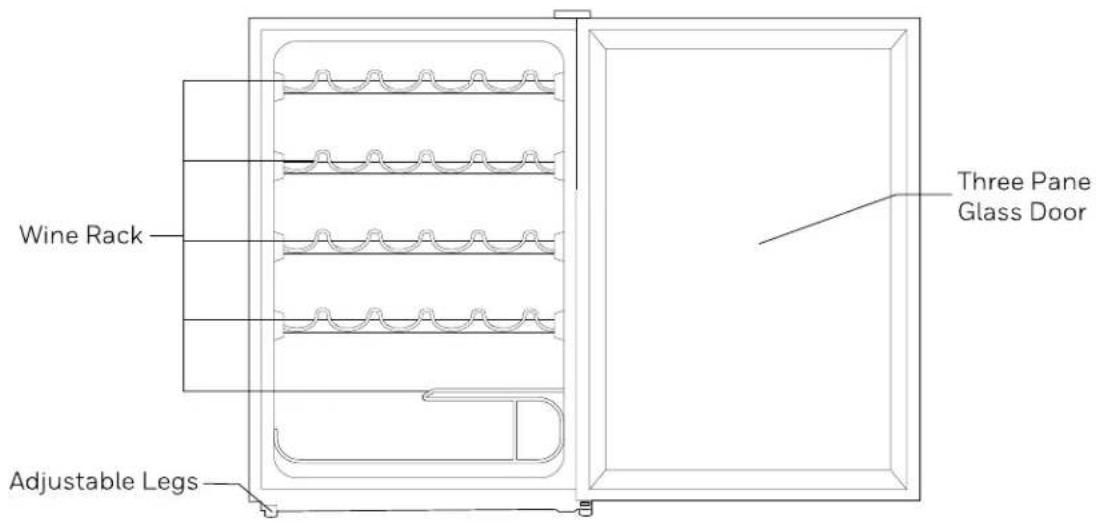
- The temperature in the cooler is 41^ - 64.4^ Temp Range
- Do not place food in the cooler in order to prevent bacterial contamination.
• The interior of the appliance should be kept dry
2.2 Display Control
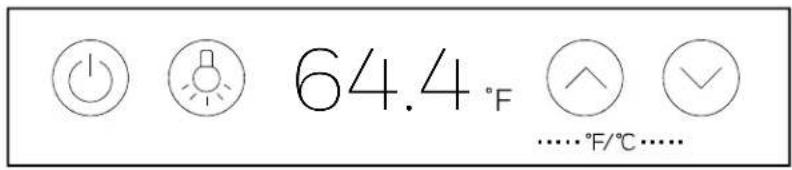
When powering on the cooler for the first time, the display screen will display in full for 3 seconds and the start-up tone will ring, and then the display will enter a normal running state.
- When locked, the display screen will turn off if untouched for 30 seconds. The display screen will return to normal when any key is pressed.

Avoid scratching the display panel with sharp objects and keep it away from high magnetic fields and high humidity. Otherwise, normal settings and operation of the cooler may be affected.
2.3 Locking and Unlocking
To unlock the temperature, hold the lock key down for 3 seconds. The display area will blink and the temperature will unlock.
To lock the temperature, hold the lock key down for 3 seconds, the display area will blink and the temperature will lock.
2.4 Functions
Except for the lighting function, the following functions must be carried out when the display panel is unlocked
Lighting
Press the light switch key to turn off or on the light.
Switching Temperature Units
Press the temperature-rise key and the temperature-drop key at the same time to switch between Celsius and Fahrenheit units. The display area will show whether the temperature is in Fahrenheit or Celsius.
Temperature Setting
Press the temperature-rise key and the temperature will increase 1 °C (or °F). After locking, the cooler will run according to the setting value. Press the temperature-drop key and the temperature will decrease by 1 °C (or °F). After locking, the cooler will run according to the setting value.

- Setting range of the Celsius temperature: 5^ - 18^ .
- Setting range of the Fahrenheit temperature: 41^ - 64.4^
Memory Function
The cooler has the power-off memory function. If the power supply is reconnected, the cooler will run under the temperature set before power-off.
Error Code
If the following error codes appear on the LED display, please unplug the unit for 24 hours to allow the sensors to completely defrost and restart. If there is still an error when turning the unit back on, please contact the manufacturer.
| Error Code | Description |
| E1 | Fault of temperature sensor |
| E4 | Fault of defrosting sensor |
2.5 Placement
- Before using the cooler, remove all packaging materials including bottom cushions, foam pads and tape inside, tear off the protective film on the door and the cooler body.
- The cooler should be placed in a well-ventilated indoor place on ground that is flat and sturdy. (Rotate left or right to adjust the wheel for leveling, if unstable)
- Keep away from heat and avoid direct sunlight. Do not place the cooler in moist or watery places to prevent rust or reduction of insulation.
- Please leave at least 30 cm of space above the cooler, and 10 cm from both sides and backside to facilitate heat dissipation.
2.6 Start to Use
- The cooler must stand upright for half an hour before connecting power when it is first started.
- Clean the interior before using for the first time.
- Do not connect the cooler to electronic energy saving plugs and converters that can convert DC into AC (e.g.: solar energy system, ship grid).
- When the compressor is running, there may be water drops or frost on the backside of the cooler. Wiping out frost or water drops is not needed as the water will be collected into drain tank, then inflow into water disposal pan above the compressor and vaporized.
2.7 Energy Saving Tips
- The cooler should be placed in a dry and well-ventilated room. The cooler should not be placed in direct sunlight or next to a heat source (such as a radiator, stove, etc.), and a suitable insulation board should be applied if necessary.
- Do not keep the cooler door open for too long.
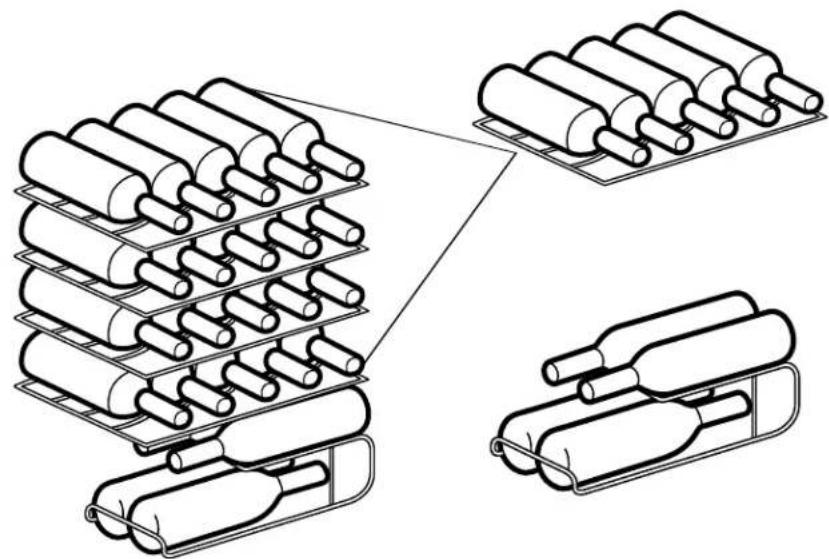
2.8 Arrangement of Bottles
- Do not let the bottles touch the back side of the cooler in order to maintain proper air circulation within the cooler.
- The capacity for bottle storage within the wine cabinet is based upon the following marked bottle size. Oversized bottles may impact the number of bottles that can be stored inside the beverage cabinet.
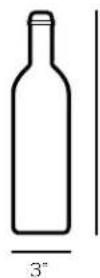
11.8"
natural_image
Diagram showing three cylindrical storage containers with different internal structures, no text or symbols present.Unplug the power plug to disconnect the cooler.
3.2 Stop Using
- If the cooler is left unused for a long time please:
- Unplug the cooler.
- Clean the cooler.
- Keep the cooler door open.
3.3 Cleaning
- Clean dust behind the cooler and on the ground to improve the cooling effect and energy saving.
- Check the door gasket regularly to make sure there is no debris. Clean the door gasket with a soft cloth dampened with soapy water or diluted detergent.
- Clean the interior of the cooler regularly to avoid odor.
- Please turn off the power before cleaning interior, remove all food, shelves, drawers, etc.
- Use a soft cloth or sponge to clean the inside of the cooler, with two tablespoons of baking soda and a quart of warm water. Then rinse with water and wipe clean. After cleaning, open the door and let it dry naturally before turning on the power.
- For areas that are difficult to clean (such as narrow gaps or corners), it is recommended to wipe them regularly with a soft rag, soft brush, etc. to ensure no contaminants or bacteria accumulate in these areas.
- Do not use soap, detergent, scrub powder, spray cleaner, etc., as these may cause odors in the interior of the cooler or contaminate food.
- Clean the bottle frame, shelves and drawers with a soft cloth dampened with soapy water or diluted detergent. Dry with a soft cloth or dry naturally.
- The wooden wine rack should be cleaned with a dry cloth. The rack should not be directly immersed in liquid to prevent cracking or mold from moisture.
- Wipe the outer surface of the cooler with a soft cloth dampened with soapy water, detergent, etc., and then wipe dry.
- Do not use hard brushes, clean steel balls, wire brushes, abrasives (such as toothpastes), organic solvents (such as alcohol, acetone, banana oil, etc.), boiling water, acid or alkaline items, which may damage the cooler surface and interior. Boiling water and organic solvents such as benzene may deform or damage plastic parts.
- Do not rinse directly with water or other liquids during cleaning to avoid short circuits or damage to the electrical insulation.

Do not use detergent and solvent with sand or acid.

Please unplug the cooler for defrost and cleaning.
4 TROUBLESHOOTING
| Inoperation | Ensure the cooler is plugged in and connected to powerCheck that the voltage is not lowCheck whether there is a power failure or partial circuits have tripped. |
| Long-term operation of compressor | Do not overload the coolersDo not open the doors too frequentlyNote that it is normal that the cooler operates for a longer time in summer when the ambient temperature is higher |
| Light is out | Check whether the cooler is connected to power supply and whether the indicator light is damaged. |
| Loud noises | Ensure that the cooler is sitting on a flat and stable surfaceEnsure that the cooler accessories are properly placed |
| Cooler enclosure heat condensation | The cooler enclosure may emit heat during operation, especially in summer, caused by the radiation of the condenser; this is normal.Condensation may be detected on the exterior surface and door seals of the cooler when humidity is high; this is normal. |
| Airflow sound (Buzz / Clatter) | The compressor may cause a buzzing sound when starting up or shutting down.The solenoid valve or electric switch valve may create a clattering sound which is normal and does not affect the operation. |
If you want to return or replace the product, please contact the store where it was purchased (remember to bring the purchase invoice). If your product needs repair, please contact us via email or phone.
BHRS Group, LLC
585 Prospect St.
Lakewood, NJ 08701
Customer Service Tel: 1-800-604-0295
Customer Service Email: support@honeywellcoolingappliances.com
Website: honeywellcoolingappliances.com
©2021 BHRS Group, LLC. All Rights Reserved.
The Honeywell Trademark is used under license from
Honeywell International Inc. Honeywell International
Inc. makes no representations or warranties with respect
to this product. This product is manufactured by BHRS
Group, LLC.
MADE IN CHINA
- CONTENTS
- Safety Warnings
- Proper Use of the Cooler
- Energy Saving Tips 8
- Maintenance of the Cooler
- Troubleshooting 11
- DEAR CUSTOMER:
- Warning
- Electricity Related Warnings
- Related Warnings for Use
- Warnings Related to Placing Items
- Warnings for Energy
- Warnings Related to Disposal
- Names of Components
- Display Control
- Locking and Unlocking
- Functions
- Lighting
- Switching Temperature Units
- Temperature Setting
- Memory Function
- Error Code
- Placement
- Start to Use
- Energy Saving Tips
- Arrangement of Bottles
- Stop Using
- Cleaning
- TROUBLESHOOTING
Brand : HONEYWELL
Model : H24WCB
Category : Wine cellar