
McBoost - Microphone Radial Engineering - Free user manual and instructions
Find the device manual for free McBoost Radial Engineering in PDF.


| Product Type | Dynamic & Ribbon Mic Enhancer (Signal Booster) |
| Power Requirement | 48V phantom power (from mixer or preamp) |
| Circuit Type | Class-A discrete J-FET |
| Maximum Boost | +25 dB |
| Gain Adjustment | Variable from +4 dB to +25 dB |
| Input Impedance | 3-position switch: Low, Medium, High |
| Output Level Control | 3-position switch: Full (100%), Half (50%), Variable (rotary knob) |
| Frequency Response | 3 Hz to 30 kHz |
| Phase Shift | < 1° at 20 Hz |
| Total Harmonic Distortion | 0.001% at -30 dBu |
| Noise Floor | -100 dB |
| Input Connector | Balanced female XLR |
| Output Connector | Balanced male XLR |
| Enclosure | Steel I-Beam book-end design |
| Dimensions (W x H x D) | 2.75" x 4.25" x 1.75" (70 mm x 108 mm x 44 mm) |
| Isolation Pad | Non-slip pad with electrical isolation |
| PCB | Military-grade double-sided, plated through-holes, bolted to steel standoffs |
| Warranty | 3-year transferable limited warranty |
| Country of Manufacture | Canada |
| Cleaning | Wipe with dry cloth; avoid moisture |
| Compatible Microphones | Dynamic and ribbon microphones (low-output) |
Frequently Asked Questions - McBoost Radial Engineering
User questions about McBoost Radial Engineering
0 question about this device. Answer the ones you know or ask your own.
Ask a new question about this device
Download the instructions for your Microphone in PDF format for free! Find your manual McBoost - Radial Engineering and take your electronic device back in hand. On this page are published all the documents necessary for the use of your device. McBoost by Radial Engineering.
USER MANUAL McBoost Radial Engineering
Dynamic & Ribbon Mic Enhancer

User Guide
Radial Engineering Ltd.
1845 Kingsway Ave., Port Coquitlam BC, V3C 1S9, Canada
tel: 604-942-1001 • fax: 604-942-1010
info@radialeng.com
Made in Canada

FEATURES
-
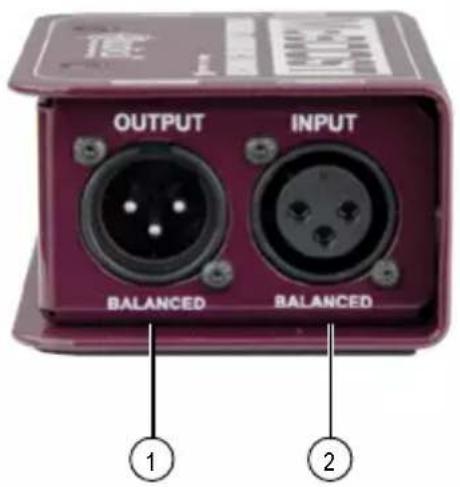
OUTPUT: Balanced male XLR output – used to connect to your mixer or preamp and supply power to the McBoost from standard 48V phantom.
-
INPUT: Balanced XLR female input used to connect your dynamic or ribbon mic.
-
LOAD: 3-position switch lets you adjust the impedance to optimize the signal transfer from your microphone.
-
LEVEL: 3-position lets you select your output level. FULL for 100% gain, HALF for 50% gain or VARI to control the gain with the rotary level control.
-
GAIN: Variable control lets you boost the gain of your microphone from +4dB to +25dB.
-
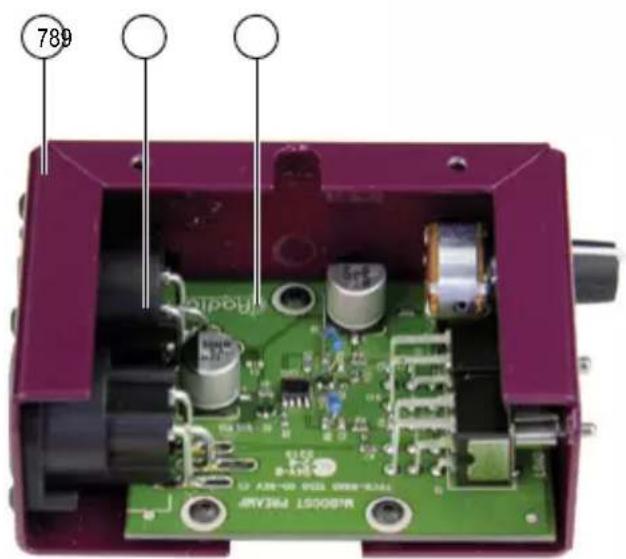
NO SLIP PAD: This provides electrical isolation and plenty of 'stayput' friction to keep the McBoost in one place.
-
BOOK END DESIGN: Steel I-Beam enclosure protects the connectors and switches for added durability.
-
HEAVY DUTY XLRs: Glass filled nylon construction with extra large nickel-silver pin contacts.
-
MILITARY-GRADE PCB: Double-sided PCB with plated through-holes is bolted to welded steel standoffs.

INTRODUCTION
Thank you for purchasing the Radial® McBoost™ microphone signal booster. We are confident that once you plug it in, you will discover that the McBoost will elegantly increase the output of your dynamic and ribbon mics without introducing noise, distortion or unwanted coloration.
Although the McBoost is ‘plug & play’ easy to use, we suggest you take a few minutes to read the manual in order to fully maximize its potential. After you have done so, if you find yourself looking for additional insight, please visit the FAQ page on our website. This is where we post questions from users and updates on product development. If you still find yourself in need of more info, feel free to send an email to info@radialeng.com and we will do our very best to reply in short order.
Now get ready to elevate your mics to the highest summit!
OVERVIEW
The McBoost is a specially designed amplifier expressly made to increase the signal level of low output microphones. The McBoost uses standard 48 volt phantom for powering. The magic lays in the ultra-efficient circuit and subsequent effort in hand-selecting each individual part so that the device meets our demands.
Once connected, you will have plenty of gain available to boost your microphone so that you can enjoy the following benefits:
1. Improved signal to noise
When driving long cables, low output microphones are significantly more susceptible to noise from power cables, transformers and dimmers than line level signals. Boosting the signal near the mic will improve the signal-to-noise ratio and deliver greater clarity.
2. More reach
Dynamic mics are less sensitive than condensers. This generally makes them less appealing for low output sources. On the other hand, dynamic mics introduce character that can be quite appealing. By boosting the signal without noise, you can elevate your favorite dynamic mics to a new level.
3. Higher output
Low output devices such as vintage ribbon microphones, old dynamics and even early passive direct boxes do not produce sufficient level for many preamps and mixers. Pre-boosting the signal enables you to use regular studio gear with these finicky devices.
Once you start using the McBoost, you will quickly become addicted. So try to control yourself!
MAKING CONNECTIONS
Before making connections, make sure all levels are turned down in order to prevent power-on and connection transients from damaging more sensitive components such as tweeters.
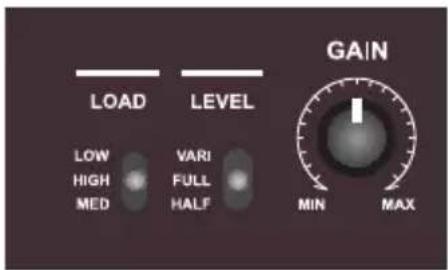
Set both 3-position switches to their middle position. This will disengage the GAIN control and provide maximum boost to your mic signal, while setting the load to a good starting point for experimenting.
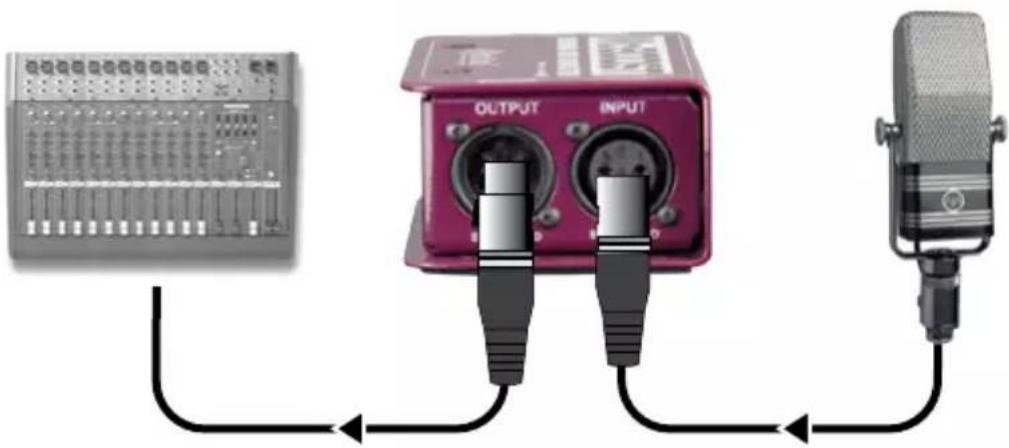
Connect your mic to the McBoost input using a standard XLR cable. The McBoost is wired to the AES standard with pin-1 ground, pin-2 (+) and pin-3 (-). Connect the output to your mixer or preamp using a second cable. The McBoost derives its power from the 48 volt phantom power in your mixer or preamp. Turn the phantom power ON before turning up the volume. Slowly increase the volume on your input channel to test. It is a good idea to keep the volume at a low listening level during testing. This way, should a cable not be fully inserted, you will not encounter a loud pop when you assert the connection.
natural_image
Three connected audio equipment setups: a multi-user mixing console, a red audio jack labeled OUTPUT and INPUT, and a microphone (no visible text or symbols)
SETTING THE LOAD
The McBoost is equipped with a 3-position load switch. This lets you experiment by changing the input impedance on various mics to see how they react. To get the lowest noise, the input impedance is usually set higher than the mic's characteristic impedance. Lowering the impedance will often roll off the bass response. Since there are hundreds of types of microphones, there are no set rules. So have fun and experiment.
SETTING THE GAIN
The 3-position gain switch on the Mc-Boost allows you to select between two set amounts or a fully variable setting. The FULL and HALF settings will provide 100% and 50% gain respectively, and the level knob will not have any effect when either of these settings are chosen. The VARI setting will engage the level control to allow you to choose precisely how much gain is applied to the signal.
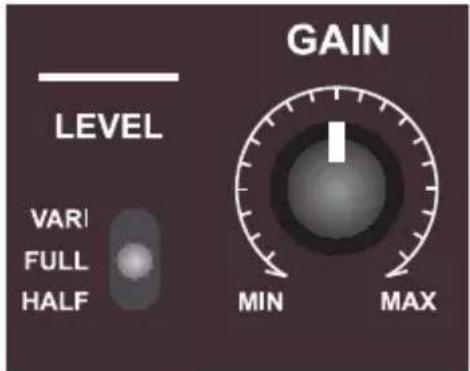
VARI - Engages gain control FULL - Maximum gain HALF - 50% gain
APPLICATIONS
With all the flexibility the McBoost has, it is simple to use for both live and studio recording. The reinforced steel enclosure will keep it safe on the road, while performing well every time in the studio.
Recording studio with a ribbon mic
Use the McBoost to increase the gain of your vintage ribbon mic to maximize headroom and minimize noise. The ultra-clean Class-A J-FET circuit amplifies without adding distortion or noise.
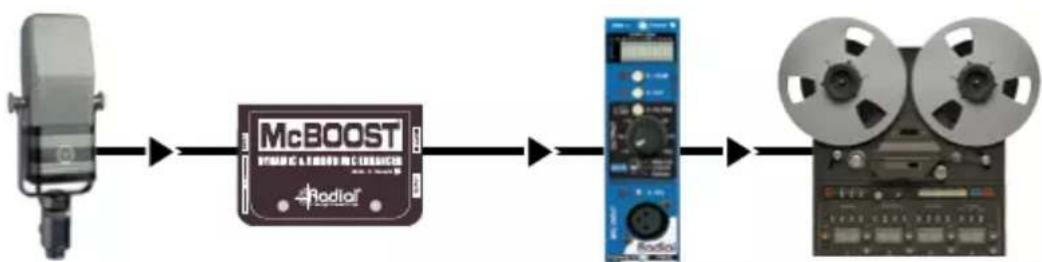
flowchart
graph LR
    A["Speaker"] --> B["McBOOST"]
    B --> C["Radioiser"]
    C --> D["Video Roll"]
Live Stage with a dynamic mic
Clean up the signal from long cable runs or noisy mixers and capture more detail than ever before. The McBoost works great on any dynamic mic to accentuate the signal.

flowchart
graph LR
    A["Speaker"] --> B["McBOOST"]
    B --> C["SS"]
    C --> D["Long Cable"]
SPECIFICATIONS
Power 48V phantom
Circuit type ...... Class-A discrete J-FET
Maximum boost 25dB
Gain adjustment ....Variable from +4dB to +25dB
Frequency response ...... From 3Hz to 30kHz
Phase shift .... Less than 1° at 20Hz
Distortion 0.001% at -30dBu
Noise -100dB
Variable level 3-position switch
Variable impedance .... 3-position switch
Construction Steel
Size (W, H, D) 2.75" x 4.25" x 1.75" (70mm x 108mm x 44mm)
RADIAL ENGINEERING 3 YEAR TRANSFERABLE LIMITED WARRANTY
RADIAL ENGINEERING LTD. ("Radial") warrants this product to be free from defects in material and workmanship and will remedy any such defects free of charge according to the terms of this warranty. Radial will repair or replace (at its option) any defective component(s) of this product (excluding finish and wear and tear on components under normal use) for a period of three (3) years from the original date of purchase. In the event that a particular product is no longer available, Radial reserves the right to replace the product with a similar product of equal or greater value. In the unlikely event that a defect is uncovered, please call 604-942-1001 or email service@radialeng.com to obtain an RA number (Return Authorization number) before the 3 year warranty period expires. The product must be returned prepaid in the original shipping container (or equivalent) to Radial or to an authorized Radial repair center and you must assume the risk of loss or damage. A copy of the original invoice showing date of purchase and the dealer name must accompany any request for work to be performed under this limited and transferable warranty. This warranty shall not apply if the product has been damaged due to abuse, misuse, misapplication, accident or as a result of service or modification by any other than an authorized Radial repair center.
THERE ARE NO EXPRESSED WARRANTIES OTHER THAN THOSE ON THE FACE HEREOF AND DESCRIBED ABOVE. NO WARRANTIES WHETHER EXPRESSED OR IMPLIED, INCLUDING BUT NOT LIMITED TO, ANY IMPLIED WARRANTIES OF MERCHANTABILITY OR FITNESS FOR A PARTICULAR PURPOSE SHALL EXTEND BEYOND THE RESPECTIVE WARRANTY PERIOD DESCRIBED ABOVE OF THREE YEARS. RADIAL SHALL NOT BE RESPONSIBLE OR LIABLE FOR ANY SPECIAL, INCIDENTAL OR CONSEQUENTIAL DAMAGES OR LOSS ARISING FROM THE USE OF THIS PRODUCT. THIS WARRANTY GIVES YOU SPECIFIC LEGAL RIGHTS, AND YOU MAY ALSO HAVE OTHER RIGHTS, WHICH MAY VARY DEPENDING ON WHERE YOU LIVE AND WHERE THE PRODUCT WAS PURCHASED.
- Dynamic & Ribbon Mic Enhancer
- User Guide
- FEATURES
- INTRODUCTION
- OVERVIEW
- Improved signal to noise
- More reach
- Higher output
- MAKING CONNECTIONS
- SETTING THE LOAD
- SETTING THE GAIN
- APPLICATIONS
- Recording studio with a ribbon mic
- Live Stage with a dynamic mic
- SPECIFICATIONS
- RADIAL ENGINEERING 3 YEAR TRANSFERABLE LIMITED WARRANTY
Brand : Radial Engineering
Model : McBoost
Category : Microphone