
TDP43HE - Printer Panduit - Free user manual and instructions
Find the device manual for free TDP43HE Panduit in PDF.


| Product Type | Thermal Transfer / Direct Thermal Label Printer |
| Brand | Panduit |
| Model | TDP43HE |
| Category | Printer |
| Connectivity | USB |
| Sensor Types | Gap, Continuous, Black mark |
| Printhead Pressure Settings | Adjustable (Left and Right settings per liner width) |
| Post-Print Options | None, Batch, Peel off, Tear off, Cut (with Partial cut and Cut on last element options) |
| Software Compatibility | Easy-Mark labeling software (Print Features button) |
| Ribbon Types Supported | Resin and Hybrid (e.g., RHER4BL, RHEH4BL) |
| Print Speed Range | 2 to 4 (depending on media type) |
| Print Darkness Range | 4 to 15 (depending on media type) |
| Supported Media Types | Arc Flash Labels, Component Labels (Paper, Polyester, Polyimide, Raised Panel, Super-Tack, Tamper-Evident, Tedlar, Vinyl Cloth), Continuous Tape (Photoluminescent, Polyolefin, Reflective, Standard Polyester, Super-Tack, Vinyl), Heat Shrink (1-sided Military grade, 2-sided Fluid Resistant, 2-sided Halogen Free, 2-sided Military Grade), Marker Plates (Flame Retardant, Standard), Wire Labels (Flag, Non-Laminated, Self-Laminating, Turn-Tell) |
| Additional Features | Adjustable Feed Offset and Label Offset, Manual Gap Calibration option |
| Technical Support (US) | Panduit Corp. ID Products Division, Cumming, GA. Tel: 800-777-3300, Fax: 708-532-1811 |
| Technical Support (Europe) | Panduit Europe, EMEA Service Center, Almelo, Netherlands. Tel: +31-546-580-452, Fax: +31-546-580-441 |
Frequently Asked Questions - TDP43HE Panduit
User questions about TDP43HE Panduit
0 question about this device. Answer the ones you know or ask your own.
Ask a new question about this device
Download the instructions for your Printer in PDF format for free! Find your manual TDP43HE - Panduit and take your electronic device back in hand. On this page are published all the documents necessary for the use of your device. TDP43HE by Panduit.
USER MANUAL TDP43HE Panduit
1) When preparing to print, click on "Properties", to view the printer settings.
2) NOTE: Click on the ABOUT tab to retrieve current driver version.
3) In the OPTIONS tab, set SPEED and DARKNESS, according to the following Table.
| Media Type | Suggested Ribbon Type | Suggested Ribbon Part Number | Printer Speed | Printer Darkness |
| Arc Flash Labels & Tape | Resin | RHER4BL | 3 | 10 |
| Component Labels, Non-adhesive Polyester | Resin | RHER4BL | 4 | 10 |
| Component Labels, Paper | Hybrid | RHEH4BL | 3 | 10 |
| Component Labels, Polyimide, Gloss White | Resin | RHER4BL | 3 | 10 |
| Component Labels, Polyimide, Matte Tan | Hybrid | RHEH4BL | 4 | 12 |
| Component Labels, Raised Panel | Resin RHER4BL 4 12 | |||
| Resin RHER4WH 4 12 | ||||
| Component Labels, Standard Polyester | Resin | RHER4BL | 4 | 10 |
| Component labels, Super-Tack Polyester | Resin RHER4BL 4 12 | |||
| Resin RHER4WH 4 12 | ||||
| Component labels, Tamper-Evident Polyester | Resin | RHER4BL | 2 | 12 |
| Component Labels, Tedlar | Resin | RHER4BL | 4 | 12 |
| Component Labels, Vinyl Cloth | Hybrid | RHEH4BL | 4 | 9 |
| Continuous Tape, Photoluminescent Polyester | Resin | RHER4BL | 4 | 12 |
| Continuous Tape, Polyolefin | Resin | RHER4BL | 3 | 8 |
| Continuous Tape, Reflective | Resin | RHER4BL | 4 | 4 |
| Continuous Tape, Standard Polyester | Resin | RHER4BL | 4 | 10 |
| Continuous Tape, Super-Tack Polyester | Resin | RHER4BL | 4 | 8 |
| Continuous Tape, Vinyl | Resin RHER4BL 4 8 | |||
| Resin RHER4WH 4 12 | ||||
| Heat Shrink, 1-sided Military grade | Hybrid RHEH4BL 4 4 | |||
| Resin RHER4WH 3 10 | ||||
| Heat Shrink, 2-sided Fluid Resistant | Resin | RHER4BL-C | 4 | 10 |
| Heat Shrink, 2-sided Halogen Free | Hybrid | RHEH4BL | 4 | 10 |
| Heat Shrink, 2-sided Military Grade | Hybrid | RHEH4BL | 4 | 8 |
| Marker Plates, Flame Retardant, Halogen Free | Resin | RHER4BL | 4 | 12 |
| Marker Plates, Flame Retardant, High Temp | Resin | RHER4BL-A | 2 | 15 |
| Marker Plates, Standard | Resin | RHER4BL | 4 | 11 |
| Wire Labels, Flag | Resin | RHER4BL | 3 | 10 |
| Wire Labels, Non-Laminated, Nylon Cloth | Resin | RHER4BL | 4 | 8 |
| Wire Labels, Non-Laminated, Vinyl Cloth | Hybrid | RHEH4BL | 4 | 8 |
| Wire Labels, Self-Laminating, PVDF | Hybrid | RHEH4BL | 4 | 12 |
| Wire Labels, Self-Laminating, Vinyl | Hybrid RHEH4BL 4 10 | |||
| Resin RHER4WH 2 12 | ||||
| Wire Labels, Turn-Tell | Hybrid | RHEH4BL | 4 | 10 |
NOTES:
1) For most media types, the recommended Printhead Pressure Settings (see User Manual, Section 2.7.1) are as follows:
Liner width greater than 2" ----> Left = 1 Right = 1 Liner width less than 2" ----> Left = 5 Right = 1
2) With Black Single-sided Heat Shrink, the "MANUAL" Gap Calibration option (on-printer menus) must be used. See User Manual, Section 3.1.3-2, for detailed instructions.
3) For some print jobs, the user might wish to fine tune the placement of the print, on the actual label. For these occasions, we recommend the use of the "Features" button, located in the Easy-Mark print window (see below). In the "Print Offsets" section, a positive "Top" offset will shift the print down, and a negative offset will shift the print up. A positive "Left" offset will shift the print right, and a negative offset will shift the print left.
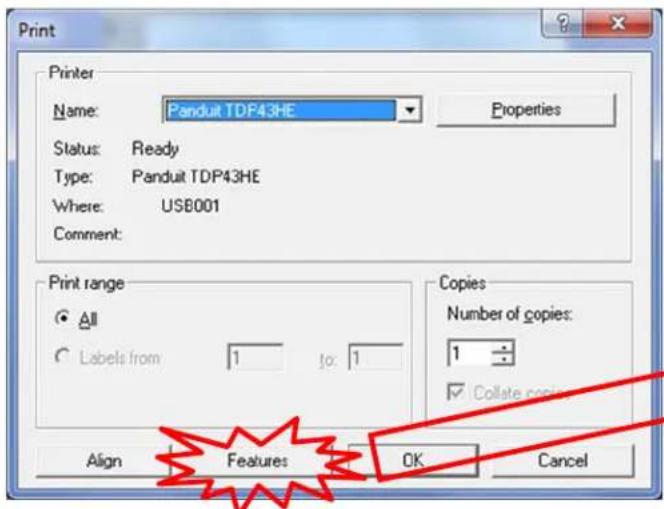
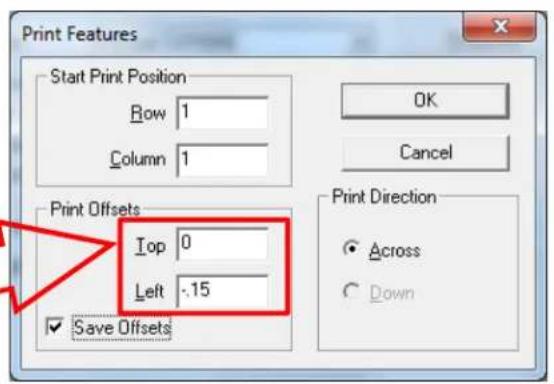
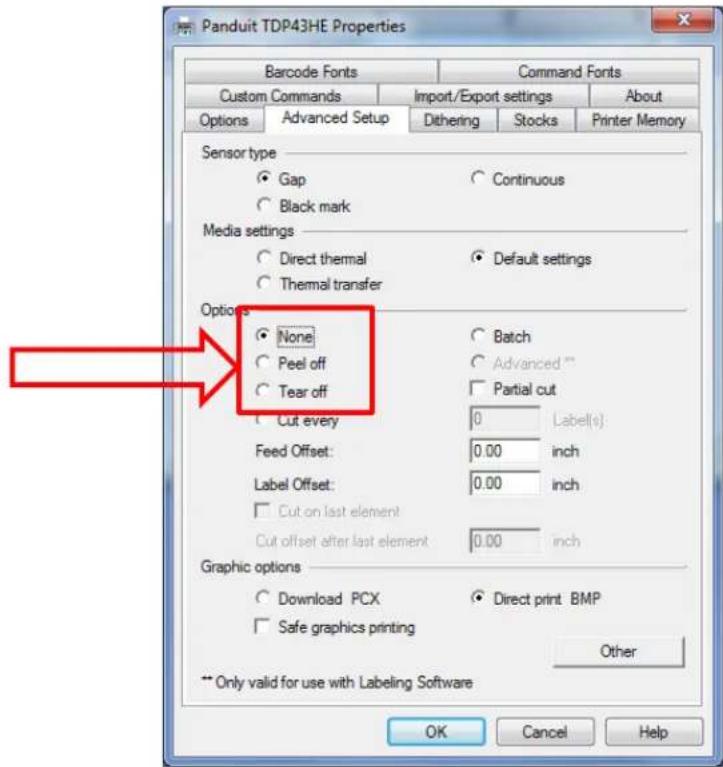
If the "Top" offset is not able to move the print far enough, vertically, there is another option. Instead, the user can adjust the "Label Offset" value, within the "Advanced Setup" tab of the printer "Properties":
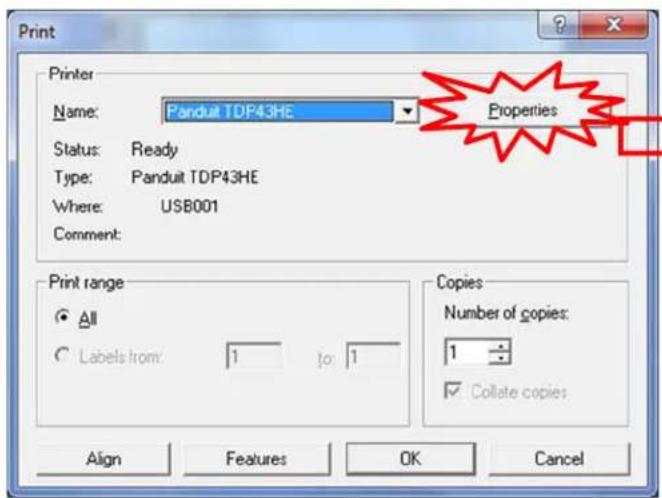
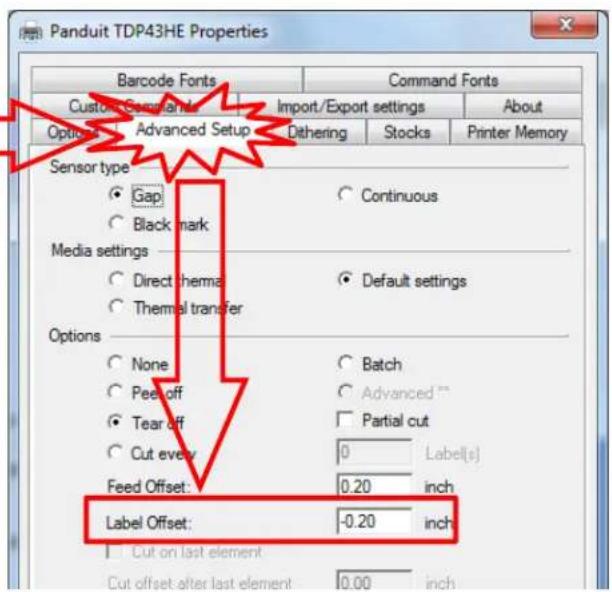
4) Raised Panel labels, with a height less than 1", will cause a misprint (legend too low) on the first label of a print job. To correct this issue, the user can disable the post-print action (select "None" instead of "Tear off") within the Advanced Setup tab of the printer "Properties".
Website: www.panduit.com
Email: id-support@panduit.com
EU Website:
www.panduit.com/emea
EU Email:
emeatoolservicecenter
@panduit.com

Technical Support:
Panduit Corp. • ID Products Division
Cumming, GA
Tel: 800-777-3300 · Fax: 708-532-1811
Panduit Europe • EMEA Service Center
Almelo, Netherlands
Tel: +31-546-580-452 · Fax: +31-546-580-441
Panduit Europe • West World Headquarters
Westgate, London
England Tel: 208-601-7200 · Fax: 208-601-7319
Brand : Panduit
Model : TDP43HE
Category : Printer