AC-2102 - Air purifier SPT - Free user manual and instructions
Find the device manual for free AC-2102 SPT in PDF.


| Product Type | Air Purifier |
| Brand | SPT |
| Model | AC-2102 |
| Coverage Area | Up to 200 sq. ft. |
| Filtration Stages | Pre-filter, Activated Carbon Filter, HEPA-like Filter |
| Fan Speeds | 3 Speeds (Low, Medium, High) |
| Airflow Rate (CFM) | Approximately 100 CFM |
| Noise Level | 25-50 dB |
| Power Supply | 120V / 60Hz |
| Power Consumption | 60 Watts (Max) |
| Dimensions (W x D x H) | 10.5 x 6.5 x 16.5 inches |
| Weight | 5.5 lbs |
| Control Type | Rotary Knob |
| Timer Function | Not Available |
| Ionizer | Optional (Turn On/Off) |
| Filter Replacement Indicator | No |
| Filter Life | 6-12 Months (depending on usage) |
| Cleaning | Pre-filter washable; HEPA/charcoal filter replaceable |
| Safety Features | Overheat Protection, Tip-Over Switch |
| Certifications | ETL Listed |
| Warranty | 1 Year Limited |
| Intended Use | Home, Bedroom, Office |
Frequently Asked Questions - AC-2102 SPT
User questions about AC-2102 SPT
0 question about this device. Answer the ones you know or ask your own.
Ask a new question about this device
Download the instructions for your Air purifier in PDF format for free! Find your manual AC-2102 - SPT and take your electronic device back in hand. On this page are published all the documents necessary for the use of your device. AC-2102 by SPT.
USER MANUAL AC-2102 SPT
natural_image
Line drawing of a SPT air purifier with digital display and ventilation slots (no text or symbols)AIR CLEANER AC-2102
user manual

Intertek
Thank you for your purchase of this new SUNPENTOWN product. Please read thoroughly and retain this manual for future references.
CAUTION:
- This appliance is intended for household only.
- Never operate this unit if the cord is damaged. In case of damage, the cord must be replaced by the manufacturer, an authorized service agency or a similarly qualified electrician.
- Close supervision is necessary when this item is used by or near children.
- The appliance is not intended for use by persons (including children) with reduced physical, sensory or mental capabilities, or lack of experience and knowledge, unless they have been given supervision or instruction concerning use of appliance by a person responsible for their safety.
1 IMPORTANT SAFETY INSTRUCTIONS
Please read all instructions before using this product. Save these instructions for easy reference. When using electrical appliances basic precautions should always be followed to reduce breakage, risk of fire, electric shock and injury to persons including the following:
- Read all instructions before operating the air cleaner.
- Place the air cleaner where it is not easily knocked over by persons in the household.
- ALWAYS unplug air cleaner when not in use.
- DO NOT use any product with a damaged cord or plug, or if product malfunctions, is dropped or damaged in any manner.
- Keep the power cord away from heated surfaces.
• DO NOT use air cleaner outdoors. - NEVER use the air cleaner unless it is fully assembled.
- DO NOT run power cord under carpets and DO NOT cover with throw rugs. Arrange cord so it will not be tripped over.
- DO NOT use air cleaner where combustible gases or vapors are present.
- DO NOT expose the air cleaner to rain, or use near water, in a bathroom, laundry area or other damp locations.
- To disconnect air cleaner, first press Power Button to turn air cleaner OFF and remove plug from outlet.
- DO NOT allow foreign objects to enter ventilation or exhaust opening, as this may cause electric shock or damage to the air cleaner.
- Place air cleaner near a power outlet and avoid using an extension cord.
• DO NOT block air outlets or intakes. - The air cleaner has a polarized plug (one blade is wider than the other). To reduce the risk of shock, this plug is intended to fit in a polarized outlet only one way. If the plug does not fit fully in the outlet, reverse the plug. If it still does not fit, contact qualified personnel to install the proper outlet. DO NOT try to alter the plug in any way.
- A loose fit between the plug and the AC outlet (receptacle) may cause overheating and distortion of the plug. Contact a qualified electrician to replace loose or worn receptacles.
- DO NOT sit, stand on, or place heavy objects on the air cleaner.
- ALWAYS disconnect power supply before servicing.
WARNING! To reduce the risk of fire or electric shock, DO NOT use this product with any solid-state speed control device.
2 PART LIST
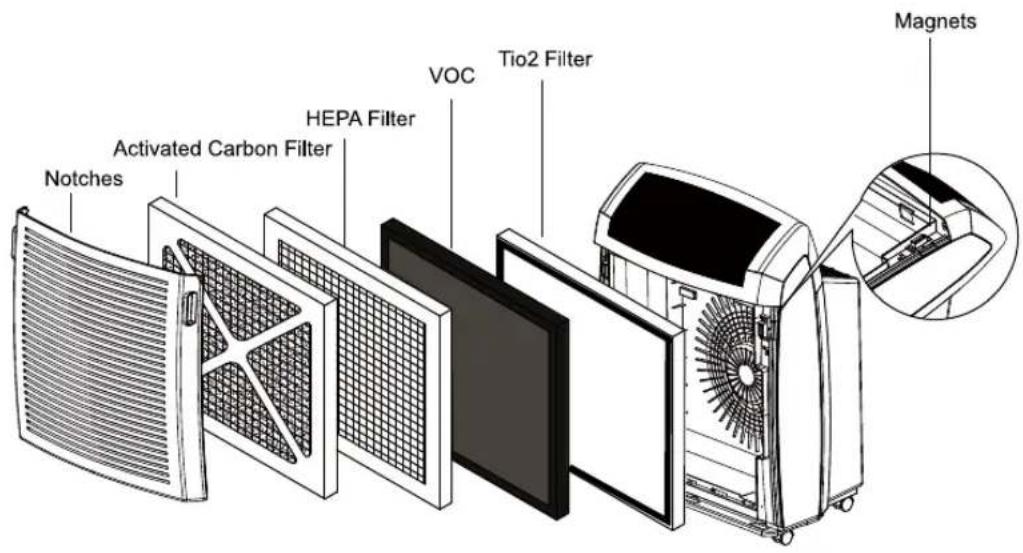
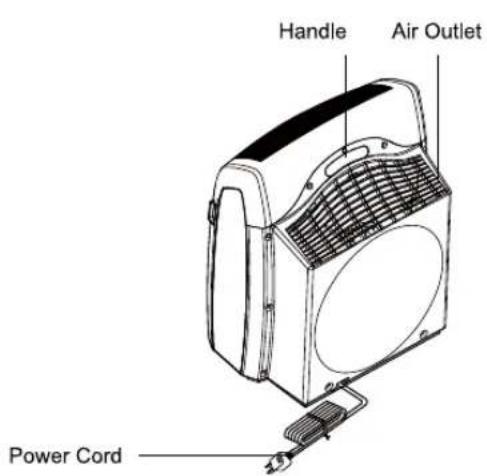
3 OPERATION
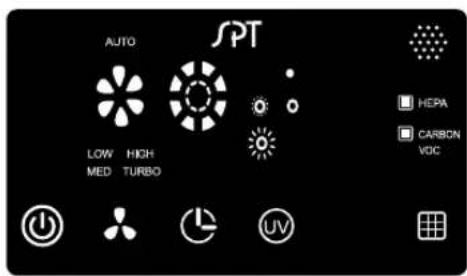
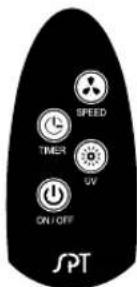
Connect the plug to a 120V power outlet and the air cleaner will be on "stand by" status.
Control Panel:
- ⏻ Press the button to turn on the air cleaner. To turn off the air cleaner, press the button again.
- Press the button to select the fan speeds: LOW, MED (medium), HI (high), Turbo and Auto. Note: When the "Auto" mode is selected, it takes two minutes for the air sensor to warm up. During warm up period, the indicator light flashes. Two minutes later, the indicator light stops flashing and the sensor starts functioning. The air sensor will detect the air quality and set the fan speeds automatically.
- When the air cleaner is running, press the button to set up the "off" timer. The timer can be set from one to eight hours. Every indicator light represents one hour. When the set time is up, the air cleaner will turn off automatically.
- UV Press the button to turn on the UV light function.
- ☐ Hold this button till the indicator light is off to reset the filter replacement reminder.
- At "stand by" status, press the button to set the "on" timer. The timer can be set from one to eight hours. Every indicator light represents one hour. When the set time is up, the air cleaner will turn on automatically. Note: the air cleaner will turn on at the LOW fan speed only.
Remote control:
- ⏻ Press the button to turn on the air cleaner. To turn off the air cleaner, press the button again.
- Press the button to select the fan speeds: LOW, MED (medium), HI (high), Turbo and Auto. Note: When the "Auto" mode is selected, it takes two minutes for the air sensor to warm up. During warm up period, the indicator light flashes. Two minutes later, the indicator light stops flashing and the sensor starts functioning. The air sensor will detect the air quality and set the fan speeds automatically.
- When the air cleaner is running, press the button to set up the "off" timer. The timer can be set from one to eight hours. Every indicator light represents one hour. When the set time is up, the air cleaner will turn off automatically.
- UV Press the button to turn on the UV light function.
Built-in re-start IC:
The air cleaner is equipped with Restart IC. When the air cleaner experiences power blackout, it will automatically turn back on at the previous setting when power returns.
4 REPLACING FILTERS
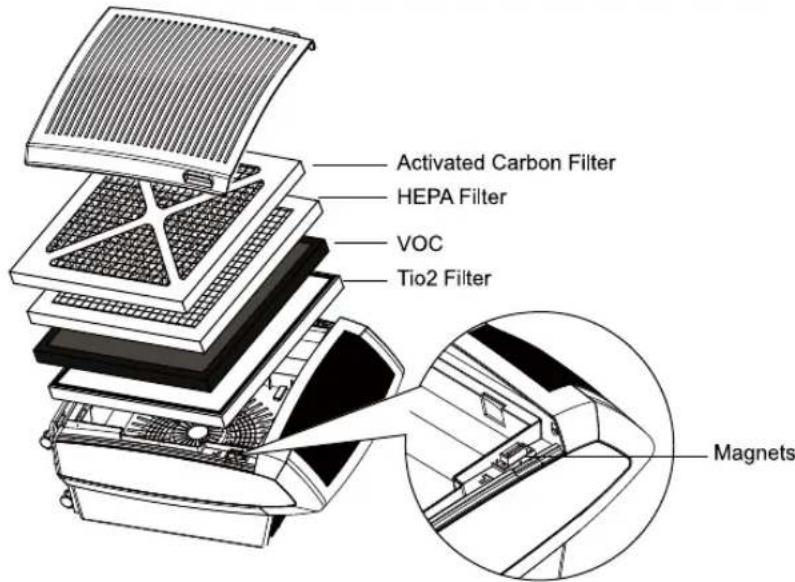
When the "HEPA" indicator lights up, it means the HEPA Filter has been used for 8000 hours and needs to be replaced.
When the "Carbon" and "VOC" indicator lights up, it means the Activated Carbon Filter and VOC Filter have both been used for 2000 hours and need to be replaced.
The steps to replace the filters:
- Turn off the air cleaner by pressing the power button. Then unplug the unit from the electrical outlet.
- Firmly grasp the notches on both sides of the front grill and pull the grill outward to remove.
- Replace the old HEPA Filter (or Activated Carbon Filter and VOC Filter) with a new one. Note: place the side with arrow marks facing the machine and the side with pull tab facing you.
4.Reposition the front grill. - Press and hold the filter replacement reminder button till the indicator light is off. The reminder is reset.
If you want to replace the filter(s) before the indicators light up, follow the steps below:
- Repeat the first to fourth steps above.
- Press the filter replacement reminder button and the indicator will flash in turn. Select the filter you have just replaced and hold the reminder button till the indicator stops flashing.
- The selected reminder(s) are reset and recalculates the working time.
Note:
- Make sure to turn off the power and unplug the unit before replacing the filters.
- Either HEPA Filter or Activated Carbon Filter is not washable.
- If used properly, the Tio2 filter doesn't have to be replace. If there is dust, use a vacuum machine to clean it.
5 SPECIFICATION
• Power Input : AC120V / 60Hz
• Power Consumption : 182w
6 REPLACEMENT FILTER
• HEPA Filter : 2102-HEPA
• Activated Carbon Filter : 2102-CBN
• VOC Filter : 2102-VOC
• TiO2 Filter : 2102-TiO2
7 YOUR GUARANTEE
If this product is found to be faulty as a result of faulty materials or workmanship within one year from date of purchase, it will be repaired free of charge.
This guarantee is subject to the following terms:
- Sunpentown must be notified of the fault.
- Proof of purchase must be presented to Sunpentown's nominated representative.
- The warranty will be void if the product is modified, misused or repaired by an unauthorized person.
- The warranty after repair will not be extended beyond the original one-year period.
- All replacement parts will be new or reconditioned.
- Parts, which are replaced, become the property of Sunpentown.
• The warranty applies for the use of the product in the USA only.
What is NOT COVERED:
• Warranty does not include freight charges.
- Incidental or consequential damage caused by possible defects with this product.
- Damage to product caused by improper power supply voltage, accident, fire, floods or acts of nature.
- Failure of product resulting from unauthorized modifications to the product.
- Improper installation or failure to perform the necessary maintenance.
This GUARANTEE is in addition to your Statutory Rights
SUNPENTOWN INTERNATIONAL INC.
14625 Clark Ave, City of Industry, CA 91745
Tel: 1-800-330-0388
service@sunpentown.com
www.sunpentown.com
Brand : SPT
Model : AC-2102
Category : Air purifier