
Studio-Jnr - Guitar amplifier Ashdown Engineering - Free user manual and instructions
Find the device manual for free Studio-Jnr Ashdown Engineering in PDF.


| Product Type | Guitar Amplifier |
| Brand | Ashdown Engineering |
| Model | Studio-Jnr |
| Power Output | 60 Watts RMS |
| Speaker | 1 x 10" Ashdown Custom |
| Channels | 2 (Clean and Overdrive) |
| Controls | Gain, Bass, Middle, Treble, Volume, Master Volume, Reverb |
| Inputs | 1 x 1/4" Instrument Input, 1 x 1/8" Aux Input |
| Outputs | 1 x 1/4" Headphone Output, 1 x 1/4" Line Out |
| Footswitch | Compatible with optional 2-button footswitch (Channel & Reverb) |
| Dimensions (W x D x H) | 16.5 x 9.8 x 16.9 inches (420 x 250 x 430 mm) |
| Weight | 27.5 lbs (12.5 kg) |
| Power Supply | AC 120V/60Hz (US) or 230V/50Hz (EU), Detachable IEC Cord |
| Construction | Lightweight Plywood Cabinet with Black Tolex Covering |
| Reverb | Built-in Digital Reverb |
| Effects Loop | Series Effects Loop (Send/Return) |
| Protection | Short-circuit and Thermal Overload Protection |
| Accessories Included | Power Cord, User Manual |
| Recommended Use | Studio, Practice, Small Gigs |
| Warranty | 2 Years Limited Warranty |
Frequently Asked Questions - Studio-Jnr Ashdown Engineering
User questions about Studio-Jnr Ashdown Engineering
0 question about this device. Answer the ones you know or ask your own.
Ask a new question about this device
Download the instructions for your Guitar amplifier in PDF format for free! Find your manual Studio-Jnr - Ashdown Engineering and take your electronic device back in hand. On this page are published all the documents necessary for the use of your device. Studio-Jnr by Ashdown Engineering.
USER MANUAL Studio-Jnr Ashdown Engineering
THE Studio RANGE
USER MANUAL

THANK YOU!
FOR PURCHASING YOUR NEW STUDIO BASS COMBO
REGISTER ONLINE
Please register this product online so we can make sure we give you years of customer support through our friendly in-house service centre.
Here is where you need to visit to register your product:
http://www.ashdownmusic.com/pages/register
WWW.ASHDOWNMUSIC.COM
INTRODUCTION
The all-new designs feature a new light-weight design using responsibly sourced poplar-ply wood, providing a light but strong structure for our new combo enclosures.
Today people require our products to be portable yet practical, which in essence is a task of its own. When designing our new studio line we discussed a number of different ideas, but the key point what they needed to sound as good as they look...
So going back to basics we leaned upon one our tried and tested EQ sections by way of the 5 BAND EQ featured across our Rootmaster and OriginAL ranges, this EQ opens up everything you need to establish a great tone straight out of the box, with everything at 12 O'clock the NEW Ashdown Studio Range sounds as you would expect from a bass guitar warm yet articulate.
PAGE
- Input - a 1/4" Jack Socket for use with your instrument
- Volume - A rotary control to adjust the overall output of the amp.
- Bass - A rotary control to adjust the amount of Bass (freq) +/- 15dB.
- Middle - A rotary control to adjust the amount of Middle (freq) +/- 15dB.
- Treble - A rotary control to adjust the amount of Treble (freq) +/- 15dB.
- Headphones - 1/4" Headphone Jack Output (this actively mutes the speaker for silent practice).
- Line In - For use with a line level
instrument or audio device such as an MP3 player
- On - light indicates the amplifier is powered.
- Power Switch - Turn your amp on or off

- IEC Power input - a fused IEC power inlet for use with the supplied cable
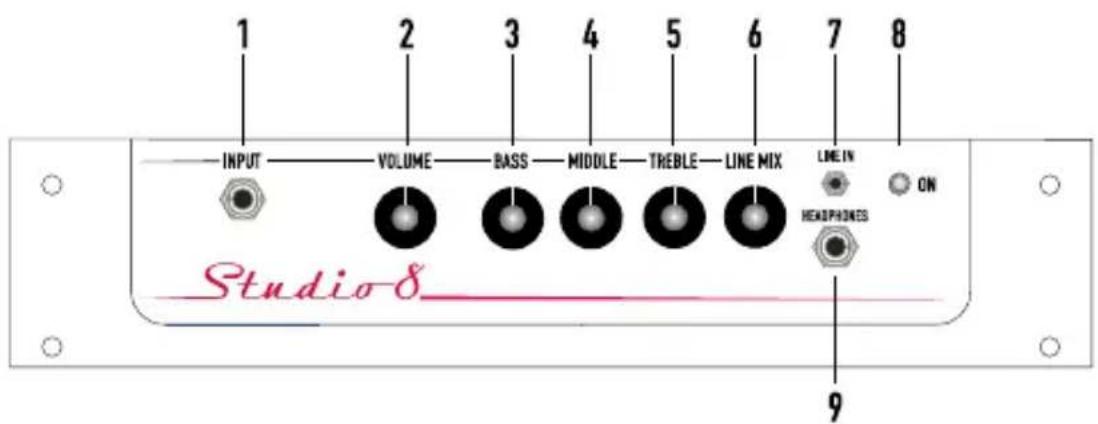
FEATURES
- Input - a 1/4" Jack Socket for use with your instrument
- Volume - A rotary control to adjust the overall output of the amp.
- Bass - A rotary control to adjust the amount of Bass (freq) +/- 15dB.
- Middle - A rotary control to adjust the amount of Middle (freq) +/- 15dB.
- Treble - A rotary control to adjust the amount of Treble (freq) +/- 15dB.
-
Line Mix - A rotary control to mix the line level signal with your instrument
-
Line In - For use with a line level instrument or audio device such as an MP3 player
- On - light indicates the amplifier is powered.
- Headphones - Mini Headphone Jack Output.

- IEC Power input - a fused IEC power inlet for use with the supplied cable
- Power Switch - Turn your amp on or off
- Speaker Mute - To mute the speaker for use with headphones

FEATURES
-
On - light indicates the amplifier is powered.
-
Shape - A switchable pre-shape EQ.
-
Pre-Gain - A rotary control to set the input sensitivity of the amp in conjunction with your instrument.
-
Drive - A rotary control to adjust the amount of tube emulated overdrive.
-
Bass - A rotary control to adjust the amount of Bass (freq) +/- 15dB.
-
Lo-Mid - A rotary control to adjust the amount of Lo-Mid (freq) +/- 15dB.
-
Middle - A rotary control to adjust the amount of Middle (freq) +/- 15dB.
-
Hi-Mid - A rotary control to adjust the amount of Hi-Mid (freq) +/- 15dB.
-
Treble - A rotary control to adjust the amount of Treble (freq) +/- 15dB.
-
Volume - A rotary control to adjust the overall output of the amp.
-
Headphones - 1/4" Headphone Jack Output (this actively mutes the speaker for silent practice).
-
Line In - For use with a line level instrument or audio device such as an MP3 player
-
Passive/Active - A -15dB input pad for use with active instruments
-
Input - a 1/4" Jack Socket for use with your instrument

- Power Switch - Turn your amp on or off
- IEC Power input - a fused IEC power inlet for use with the supplied cable
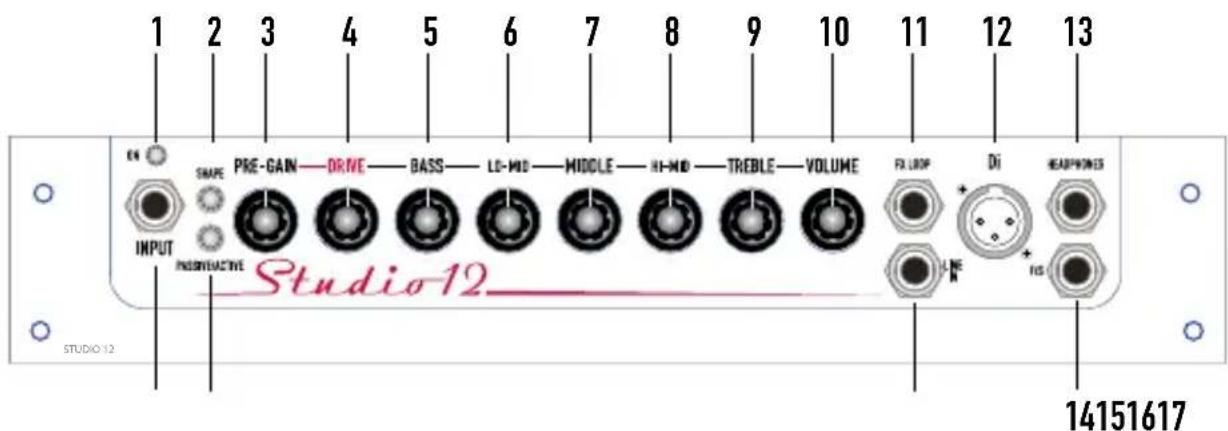
FEATURES
- On - light indicates the amplifier is powered.
- Shape - A switchable pre-shape EQ.
- Pre-Gain - A rotary control to set the input sensitivity of the amp in conjunction with your instrument.
- Drive - A rotary control to adjust the amount of tube emulated overdrive.
- Bass - A rotary control to adjust the amount of Bass (freq) +/- 15dB.
- Lo-Mid - A rotary control to adjust the amount of Lo-Mid (freq) +/- 15dB.
- Middle - A rotary control to adjust the amount of Middle (freq) +/- 15dB.
- Hi-Mid - A rotary control to adjust the amount of Hi-Mid (freq) +/- 15dB.
-
Treble - A rotary control to adjust the amount of Treble (freq) +/- 15dB.
-
Volume - A rotary control to adjust the overall output of the amp.
- FX Loop - a TSR Jack is provided for use with a Y cable (tip send ring return).
- Di - A balanced XLR Di Output.
- Headphones - 1/4" Headphone Jack Output (this actively mutes the speaker for silent practice).
- F/S - Footswitch out for use with an FS-1 single latching footswitch (sold separately) to control the Drive in/out.
- Line In - For use with a line level instrument or audio device such as an MP3 player
- Passive/Active - A -15dB input pad for use with active instruments
- Input - a 1/4" Jack Socket for use with your instrument

- Power Switch - Turn your amp on or off
- IEC Power input - a fused IEC power inlet for use with the supplied cable

FEATURES
- On - light indicates the amplifier is powered.
- Shape - A switchable pre-shape EQ.
- Pre-Gain - A rotary control to set the input sensitivity of the amp in conjunction with your instrument.
- Drive - A rotary control to adjust the amount of tube emulated overdrive.
- Bass - A rotary control to adjust the amount of Bass (freq) +/- 15dB.
- Lo-Mid - A rotary control to adjust the amount of Lo-Mid (freq) +/- 15dB.
- Middle - A rotary control to adjust the amount of Middle (freq) +/- 15dB.
- Hi-Mid - A rotary control to adjust the amount of Hi-Mid (freq) +/- 15dB.
-
Treble - A rotary control to adjust the amount of Treble (freq) +/- 15dB.
-
Volume - A rotary control to adjust the overall output of the amp.
- FX Loop - a TSR Jack is provided for use with a Y cable (tip send ring return).
- Di - A balanced XLR Di Output.
- Headphones - 1/4" Headphone Jack Output (this actively mutes the speaker for silent practice).
- F/S - Footswitch out for use with an FS-1 single latching footswitch (sold separately) to control the Drive in/out.
- Line In - For use with a line level instrument or audio device such as an MP3 player
- Passive/Active - A -15dB input pad for use with active instruments
- Input - a 1/4" Jack Socket for use with your instrument
- Power Switch - Turn your amp on or off

- IEC Power input - a fused IEC power inlet for use with the supplied cable
- Tweeter Mute - a simple on/off switch to engage/defeat the on board HF tweeter
SPECIFICATION:
Studio Jnr
Output Power 15watts rms into 8 ohms
Speaker Unit 1 x 6" Ashdown Driver
Input Impedance 1 Meg ohm
Input Signal Range 100Mv to 10v
E.Q. Passive Bass, Middle, Treble.
Dimensions H: W: D:
Weight 6Kgs 13.1Lbs
Studio 8
Output Power 30watts rms into 8 ohms
Speaker Unit 1 x 8" Ashdown Driver
Input Impedance 1 Meg ohm
Input Signal Range 100Mv to 10v
E.Q. Passive Bass, Middle, Treble.
Dimensions H: W: D:
Weight 6.1Kgs 13.4Lbs
Studio 10
Output Power 60watts rms into 8 ohms
Speaker Unit 1 x 10" Ashdown Driver
Input Impedance 1 Meg ohm
Input Signal Range 100Mv to 10v
E.Q. Passive Bass, Middle, Treble.
Dimensions H: W: D:
Weight 7Kgs 15.4Lbs
Studio 12
Output Power 100watts rms into 8 ohms
Speaker Unit 1 x 12" Ashdown Driver
Input Impedance 1 Meg ohm
Input Signal Range 100Mv to 10v
E.Q. Bass, Hi-Mid, Middle, Lo-Mid, Treble
Dimensions H: W: D:
Weight 10.3Kgs 22.7Lbs
Studio 15
Output Power 300watts rms into 8 ohms
Speaker Unit 1 x 15" Ashdown Driver & Tweeter
Input Impedance 1 Meg ohm
Input Signal Range 100Mv to 10v
E.Q. Bass, Hi-Mid, Middle, Lo-Mid, Treble
Dimensions H: W: D:
Weight 11.2Kgs 24.6Lbs
THE Studio RANGE
WWW.ASHDOWNMUSIC.COM



Brand : Ashdown Engineering
Model : Studio-Jnr
Category : Guitar amplifier