
Cybertrack 510 - Document camera Adesso - Free user manual and instructions
Find the device manual for free Cybertrack 510 Adesso in PDF.


| Product Type | Document Camera |
| Brand | Adesso |
| Model | Cybertrack 510 |
| Image Sensor | 5 Megapixel CMOS |
| Maximum Resolution | 2592 x 1944 pixels |
| Optical Zoom | 8x (digital) |
| Frame Rate | 30 fps (full HD) |
| Connectivity | USB 2.0, VGA output |
| Light Source | Built-in LED |
| Dimensions (L x W x H) | 14.1 x 3.5 x 2.6 in (35.8 x 8.9 x 6.6 cm) |
| Weight | 2.1 lbs (0.95 kg) |
| Power Supply | USB powered (5V) |
| Compatible Operating Systems | Windows, macOS, Chrome OS |
| Captured Area | Up to 11 x 8.5 in (A4) |
| Supported Image Formats | JPEG, BMP, PNG, TIFF |
| Supported Video Formats | AVI, MP4 |
| Main Functions | Real-time projection, image capture, video recording, annotation, split-screen comparison |
| Maintenance | Clean lens with soft, dry cloth; avoid solvents; store in dry place |
| Safety | Do not expose to water or extreme temperatures; comply with local electrical regulations |
| Spare Parts / Repairability | Contact Adesso support; no user-serviceable parts inside |
| Warranty | 1 year limited warranty |
| Package Contents | Document camera, USB cable, VGA cable, user manual |
Frequently Asked Questions - Cybertrack 510 Adesso
User questions about Cybertrack 510 Adesso
0 question about this device. Answer the ones you know or ask your own.
Ask a new question about this device
Download the instructions for your Document camera in PDF format for free! Find your manual Cybertrack 510 - Adesso and take your electronic device back in hand. On this page are published all the documents necessary for the use of your device. Cybertrack 510 by Adesso.
USER MANUAL Cybertrack 510 Adesso
Document Camera
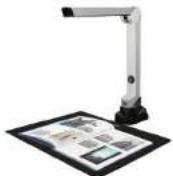
QuickGuide
English
www.adesso.com
Hardware Installation
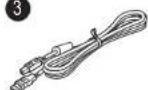
- Plug the supplied USB cable to the back of the cybertrack 510 and connect other end into an available USB port on your computer.
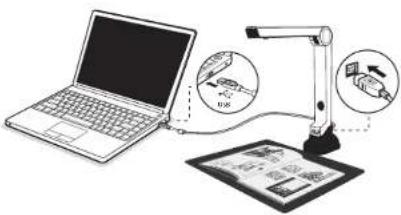
- Adesso Cybertrack 510 will connect automatically to your computer. (Adesso Cybertrack 510 is a driverless device used with Windows 10, 8.7, Vista or XP operating systems. Your computer will recognize the device under the Cameras in the Windows Device Manager menu.)
④
LIMITED WARRANTY
ADESSO provides one year limited warranty for the quality of all its products in materials and workmanship.
During this period, ADESSO will repair or replace all merchandise, which proved to be defective. However, ADESSO will not warranty any product which has been subjected to improper freight Handling, shipping abuse, neglect or unauthorized repair or installation. The warranty also will not cover products installed with Non-ADESSO components and product with broken sealed and assembly trace. After replacement of RMA, ADESSO reserves the right to request the total cost of the replacement products with broken seals or assembly trace.
If you discover a defect, Adesso will, at its option, repair or replace the product at no charge to you, provided you return it during the warranty period with transportation charges pre paid to Adesso. You must contact Adesso at support@adesso.com for a Return Merchandise Authorization number (RMA) prior to returning any product. For each product returned for warranty service, please include your name, shipping address (no PC Box), telephone number, copy of the bill of sale as proof of purchase and have the package clearly marked with your RMA number.
SUPPORT MORE LANGUAGES
FAQ's: http://www.adesso.com/faqs
Email Support: support@adesso.com
Telephone Support:
Toll Free: (800) 195-6766 9:00AM to 5:00PM PST Monday - Friday

Getting Started
-
Scan QR code or use below link to download the Adesso Document Studio. https://www.adesso.com/download/Adesso_Document_Studio.zip
-
To start the program, please double click on the Adesso Document Studio Software icon on the desktop or click Start Menu Windows icon then [All apps] to select Adesso Document Studio Software.
-
Place a document on the position pad and align to position mark.
-
Select one of the function to scan your material from the main menu. You can make changes for your preferences in the settings menu and then click [Scan] button for scan a document.
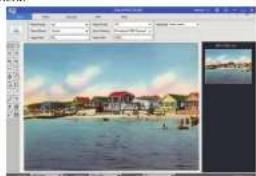
natural_image
Scenic coastal town with houses and boats under a clear sky (no visible text or symbols)Overview
Before use, make sure the following items are included in the package. If anything is missing, contact the retailer where you purchased the Cybertrack 510 product.
1
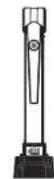
2

3
4

③
Software Functions
| Name of Media | Description |
| Wise | The "Cross media" being the second edition and past to a first version that will be seen. PC's complete information is the extension of the next version. |
| Video | The video format using the video content and past to be seen. PC's first to work with a video content. |
| Document | The document uses the same format for each version. English or Spanish text on PC's first page. |
| CDR | The CDR format uses the second version. The CDR also uses the video content. |
| CDR | The CDR model uses the second version. PC's first to work with a CDR text through the CDR. |
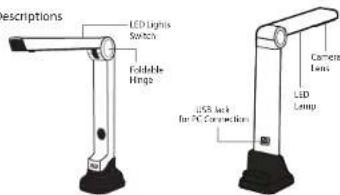
Parts Descriptions
6
Cybertrack-510-ENGLISH-12-10-2020
Brand : Adesso
Model : Cybertrack 510
Category : Document camera