RedSight Pro SL-33 - Flash Carson - Free user manual and instructions
Find the device manual for free RedSight Pro SL-33 Carson in PDF.


| Product Type | Flashlight |
| Brand | Carson |
| Model | RedSight Pro SL-33 |
| Illumination Source | LED |
| Light Color | Red (preserves night vision) |
| Number of LEDs | 1 |
| Battery Type | Alkaline AAA (3 required) |
| Battery Quantity | 3 |
| Weight | 0.15 lbs (68 g) |
| Dimensions (L x W x H) | 3.8 x 1.2 x 1.2 in (9.7 x 3.0 x 3.0 cm) |
| Body Material | Aluminum with metallic handle |
| Grip Material | Glow-in-the-dark rubber |
| Light Modes | High, Low, Off (press rubber end sequentially) |
| Switch Type | Push button (rubber end) |
| Included Accessories | Carabiner clip |
| Water Resistance | Not rated |
| Special Features | Red light preserves night vision; glow-in-the-dark grip charges in direct light |
| Warranty | Visit www.carson.com/warrant for details |
| Customer Service Email | info@carson.com |
| UK Support Email | uksupport@carson.com |
| EU Support Email | eusupport@carson.com |
Frequently Asked Questions - RedSight Pro SL-33 Carson
User questions about RedSight Pro SL-33 Carson
0 question about this device. Answer the ones you know or ask your own.
Ask a new question about this device
Download the instructions for your Flash in PDF format for free! Find your manual RedSight Pro SL-33 - Carson and take your electronic device back in hand. On this page are published all the documents necessary for the use of your device. RedSight Pro SL-33 by Carson.
USER MANUAL RedSight Pro SL-33 Carson
Red Light Preserves Your Night Vision
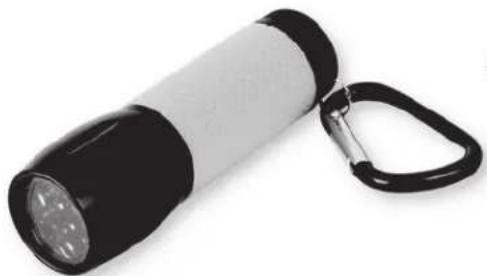
natural_image
Black and white flashlight with a black strap and metallic handle, isolated on white background (no text or symbols visible)SL-33
Congratulations on selecting your new RedSight LightPro! In order to achieve optimum performance, please follow instructions for proper use and care.
PRODUCT SPECIFICATION:
| Illumination: | LED |
| Batteries: | 3 AAA (not included) |
| Weight: | 0.15 lbs |
| Dimensions: | 1.2" x 1.2" x 3.8" |
| Accessory: | Carabiner Clip |
INSTALLING BATTERIES:
- Twist off top of Flashlight (in a counterclockwise motion).
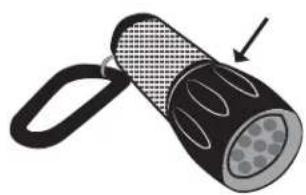
natural_image
Illustration of a flashlight with a handle and patterned grip, no text or symbols present- Pull out battery holder to insert 3 new AAA batteries in correct polarity.
- Return battery holder to flashlight and replace top of flashlight (in a clockwise motion).
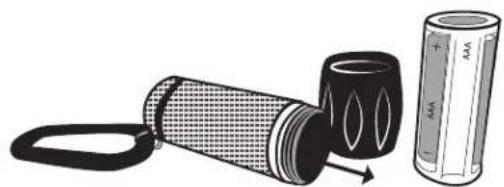
natural_image
Illustration of a flashlight being handled with a battery, showing internal components and motion (no text or symbols)WARNING:
Use only alkaline batteries. Mixing old and new, different brands or types within brands may cause batteries to leak, overheat or explode. Keep away from fire or excessive heat. Inspect batteries for corrosion or leakage. Insert in direction indicated. Rechargeable batteries not recommended.
- For brightest setting, press rubber end once.
- For low light, press rubber end again.
- Pressing a third time will turn Flashlight off.
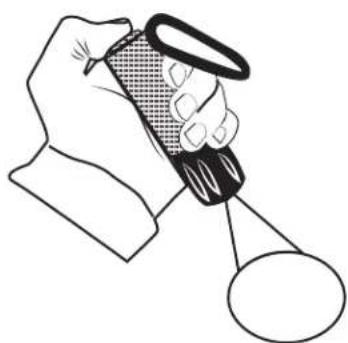
natural_image
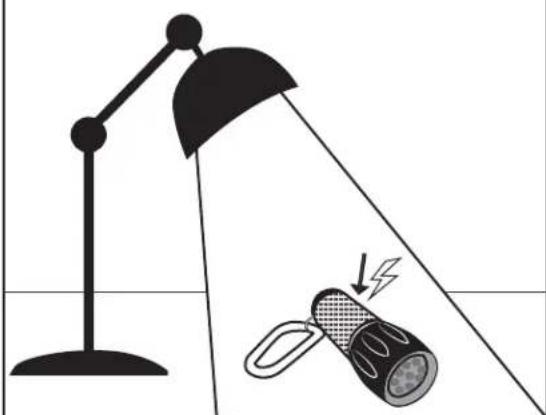
Illustration of a hand holding a magnifying glass over a circular object (no text or symbols)- To charge Glow-in-the-Dark Rubber Grip, place in direct light for 5-10 minutes.
natural_image
Illustration of a desk lamp illuminating a flashlight with a lightning bolt, no text or symbols presentCustomer Service:
If you experience any difficulties please contact us and we will be happy to help you.
Email: info@carson.com

Email: uksupport@carson.com
Email: eusupport@carson.com
For war ranty information, visit www.carson.com/warrant
www.carson.com
Carson Optical 2070 5th Avenue, Ronkonkoma, NY 11779 Tel: 631-963-5000
Brand : Carson
Model : RedSight Pro SL-33
Category : Flash