
JR1M - Keyboard Radial Engineering - Free user manual and instructions
Find the device manual for free JR1M Radial Engineering in PDF.


| Product Type | Momentary Footswitch for controlling Radial devices and standard footswitch applications |
| Model | JR·1M (Momentary) |
| Footswitch Type | Momentary (press and hold to activate, release to deactivate) |
| Compatible Devices | Radial Relay Xo and other compatible devices with 1/4" or XLR footswitch jack |
| Connectors | Combo connector (1/4" TRS or XLR-male), Alternate XLR-male connector |
| Operation Modes | Active (for Radial devices, powers from remote) and Passive (standard footswitch, no LED) |
| Power Source | Derived from the controlled device via connected cable (no local power supply or batteries) |
| LED Indicators | Two LEDs (A/B) for status indication in Active mode |
| Construction | Yellow top for visibility on dark stages, black casing |
| Dimensions (Approx.) | Estimated 4.5" x 3" x 1.5" (114 x 76 x 38 mm) |
| Weight (Approx.) | 0.5 lb (0.23 kg) |
| Warranty | 3-year transferable limited warranty from Radial Engineering |
| Country of Manufacture | Canada |
| Maintenance & Cleaning | Wipe with dry cloth. Avoid liquids and abrasives. Keep connectors clean. |
| Safety | Use only with compatible devices. Do not immerse in water. Contains chemicals known to cause cancer (California Prop 65). |
| Spare Parts & Repairability | Contact Radial or authorized repair center for service. Do not attempt internal repairs. |
Frequently Asked Questions - JR1M Radial Engineering
User questions about JR1M Radial Engineering
0 question about this device. Answer the ones you know or ask your own.
Ask a new question about this device
Download the instructions for your Keyboard in PDF format for free! Find your manual JR1M - Radial Engineering and take your electronic device back in hand. On this page are published all the documents necessary for the use of your device. JR1M by Radial Engineering.
USER MANUAL JR1M Radial Engineering
Radial Engineering Ltd.
1845 Kingsway Ave., Port Coquitlam, BC V3C 1S9, Canada
Tel: 604-942-1001 • Fax: 604-942-1010
info@radialeng.com
Made in Canada

FEATURES
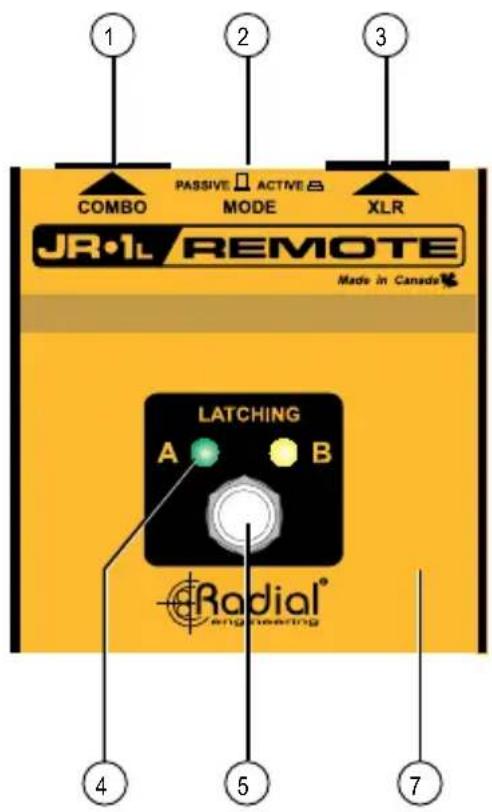
- COMBO: Used to connect to remote device, provides locking connection for 14 " TRS or XLR-male terminated cable.
- ACTIVE/PASSIVE: Selects active mode for use with Radial devices or passive mode for standard footswitch operation.
- XLR-M: Used to connect to remote device, provides alternate connection for XLR-female cable.
- A/B LED: Provides local visual status of the remotely controlled device.
- LATCHING: The JR•1L is equipped with a latching footswitch that will change states each time it is pressed.
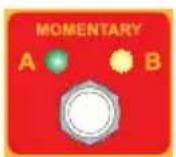
- MOMENTARY: The JR•1M is equipped with a momentary footswitch that will change states only when held down.
- YELLOW & BLACK: Yellow top is highly visible on dark stages while black casing is 'invisible' from the audience perspective.

INTRODUCTION
Thank you for purchasing the Radial JR•1 footswitch. Please take a few moments to read this short manual and familiarize yourself with the various functions. This will help you get the most out of the JR•1 as you explore its uses. Should you have a question that is not covered in this manual, we invite you to send us an email at info@radialeng.com and we will do our very best to reply in short order.
OVERVIEW
The Radial JR•1 is a remote footswitch equipped with either a latching footswitch (JR•1L) or momentary footswitch (JR•1M) depending which model you have purchased. The JR•1 controls various Radial devices, such as the Relay Xo stereo switcher, and derives its power from the device under control, thus eliminating the need for a local power supply or batteries.
LATCHING: The JR•1L is equipped with a latching footswitch that will change states each time it is pressed. Press the switch once to toggle from A to B and press again to change back to A. The latching footswitch is a good option when switching effects that stay on for the duration of a song.


flowchart
graph TD
    A["JR-1L"] --> B["RELAY Xo"]
    B --> C["EFFECTS"]
    C --> D["MIXERVOCAL MIC"]
    E["MR"] --> B
    F["Radio"] --> B
    G["Radio"] --> C
    H["Radio"] --> D
MOMENTARY: The JR•1M is equipped with a momentary footswitch that will change states only when held down. Press and hold the switch to toggle from A to B and release the switch to change back to A. The momentary footswitch is well suited for 'push-to-talk' uses like toggling to an intercom system to speak with stage technicians.

flowchart
graph TD
    A["JR-1M"] --> B["RELAY Xo"]
    B --> C["PA SYSTEMVOCAL MIC"]
    C --> D["INTERCOM"]
    D --> E["Headphones"]
    B --> F["Microphone"]
    style A fill:#f9f,stroke:#333
    style B fill:#ccf,stroke:#333
    style C fill:#cfc,stroke:#333
    style D fill:#fcc,stroke:#333
    style E fill:#cff,stroke:#333
MAKING CONNECTIONS
Connecting the JR•1 is done using 14 " guitar cables or XLR mic lines depending on the device you are connecting to. The rear panel features a combo connector that accepts 14 " or XLR connectors and an alternate XLR connector is provided for fl exibility.
Only one remote output connector should be used at a time as using two concurrently could cause a control system conflict.
CONNECTING WITH 1/4" GUITAR CABLES
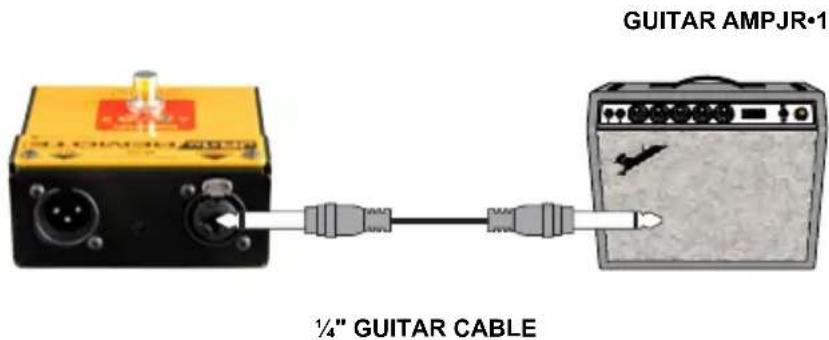
Standard coaxial guitar and instrument cable may be used to connect the JR•1 to the remote device.

CONNECTING WITH XLR MIC LINES
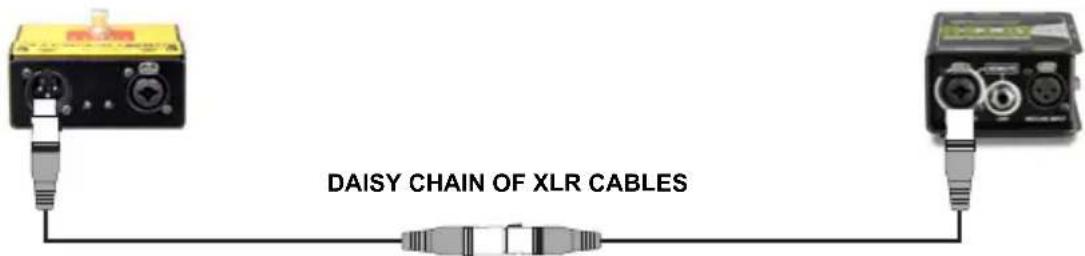
Any standard XLR mic cable may be used. The locking XLR connectors are beneficial on busy stages as it reduces the opportunity for a connection to come lose during a performance. Press the metal tab above the connector to release the cable.

Another advantage is that XLR cables can be dasiy-chained together to make a longer cable. This means you won't have to depend on a specific custom built cable to connect your remote device.
ACTIVE MODE
On the rear panel you will find a switch labeled ACTIVE/PASSIVE. This is recessed to prevent accidentally changing settings during use. Use a small screwdriver to access the ACTIVE/PASSIVE switche during setup. Once you are done, you will likely leave it alone.

Set the switch to ‘active’ (inward position) when the JR•1 is controlling a Radial device such as the Relay Xo stereo switcher. When set to active, the JR•1 sources its power from the remote device and the LED indicators work.
PASSIVE MODE
A passive mode may be engaged that allows the JR•1 to function as a standard footswitch for any device with a compatible 14 " footswitch jack. Use passive mode with non-Radial devices such as guitar amplifiers to change amp channels or electronic keyboard to turn on the sustain.
To use like a standard footswitch, set the ACTIVE/PASSIVE switch to 'passive' (outward position). The A/B status LEDs will not illuminate when the JR•1 is operating in passive mode. Connection is done the same way with 14 " guitar cable. Connect one end to the JR•1 and the other to a compatible footswitch jack.
WIRING DIAGRAMS

RADIAL ENGINEERING 3 YEAR TRANSFERABLE LIMITED WARRANTY
RADIAL ENGINEERING LTD. ("Radial") warrants this product to be free from defects in material and workmanship and will remedy any such defects free of charge according to the terms of this warranty. Radial will repair or replace (at its option) any defective component(s) of this product (excluding finish and wear and tear on components under normal use) for a period of three (3) years from the original date of purchase. In the event that a particular product is no longer available, Radial reserves the right to replace the product with a similar product of equal or greater value. In the unlikely event that a defect is uncovered, please call 604-942-1001 or email service@radialeng.com to obtain an RA number (Return Authorization number) before the 3 year warranty period expires. The product must be returned prepaid in the original shipping container (or equivalent) to Radial or to an authorized Radial repair center and you must assume the risk of loss or damage. A copy of the original invoice showing date of purchase and the dealer name must accompany any request for work to be performed under this limited and transferable warranty. This warranty shall not apply if the product has been damaged due to abuse, misuse, misapplication, accident or as a result of service or modification by any other than an authorized Radial repair center.
THERE ARE NO EXPRESSED WARRANTIES OTHER THAN THOSE ON THE FACE HEREOF AND DESCRIBED ABOVE. NO WARRANTIES WHETHER EXPRESSED OR IMPLIED, INCLUDING BUT NOT LIMITED TO, ANY IMPLIED WARRANTIES OF MERCHANTABILITY OR FITNESS FOR A PARTICULAR PURPOSE SHALL EXTEND BEYOND THE RESPECTIVE WARRANTY PERIOD DESCRIBED ABOVE OF THREE YEARS. RADIAL SHALL NOT BE RESPONSIBLE OR LIABLE FOR ANY SPECIAL, INCIDENTAL OR CONSEQUENTIAL DAMAGES OR LOSS ARISING FROM THE USE OF THIS PRODUCT. THIS WARRANTY GIVES YOU SPECIFIC LEGAL RIGHTS, AND YOU MAY ALSO HAVE OTHER RIGHTS, WHICH MAY VARY DEPENDING ON WHERE YOU LIVE AND WHERE THE PRODUCT WAS PURCHASED.
To meet the requirements of California Proposition 65, it is our responsibility to inform you of the following: WARNING: This product contains chemicals known to the State of California to cause cancer, birth defects or other reproductive harm.
Please take proper care when handling and consult local government regulations before discarding.

Brand : Radial Engineering
Model : JR1M
Category : Keyboard