
CJAKTCS30 - Uncategorized COYOTE - Free user manual and instructions
Find the device manual for free CJAKTCS30 COYOTE in PDF.


| Product Type | Dash Camera / Radar Detector |
| Dimensions (H x W x D) | 8.5 x 5.2 x 3.0 cm |
| Weight | 120 g |
| Power Source | 12V vehicle power adapter |
| Display | 2.4 inch TFT LCD |
| Camera Resolution | 1080p Full HD |
| Field of View | 170 degrees |
| Recording Modes | Loop recording, G-sensor automatic recording |
| Radar Detection | K, Ka, Ku, X bands |
| GPS | Built-in GPS for speed and location data |
| Storage | MicroSD card up to 128 GB (not included) |
| Connectivity | USB 2.0, AV output |
| Operating Temperature | -10°C to 60°C |
| Mounting | Suction cup mount for windshield |
| Battery | Li-ion 200 mAh (backup) |
| Maintenance | Clean lens with microfiber cloth; format SD card regularly |
| Safety Certifications | CE, FCC |
| Repairability | Manufacturer service center recommended; spare parts available via support |
| Warranty | 1 year limited warranty |
Frequently Asked Questions - CJAKTCS30 COYOTE
User questions about CJAKTCS30 COYOTE
0 question about this device. Answer the ones you know or ask your own.
Ask a new question about this device
Download the instructions for your Uncategorized in PDF format for free! Find your manual CJAKTCS30 - COYOTE and take your electronic device back in hand. On this page are published all the documents necessary for the use of your device. CJAKTCS30 by COYOTE.
USER MANUAL CJAKTCS30 COYOTE
C2SL30 INSTALL GUIDE
DIMENSIONAL RENDERINGS
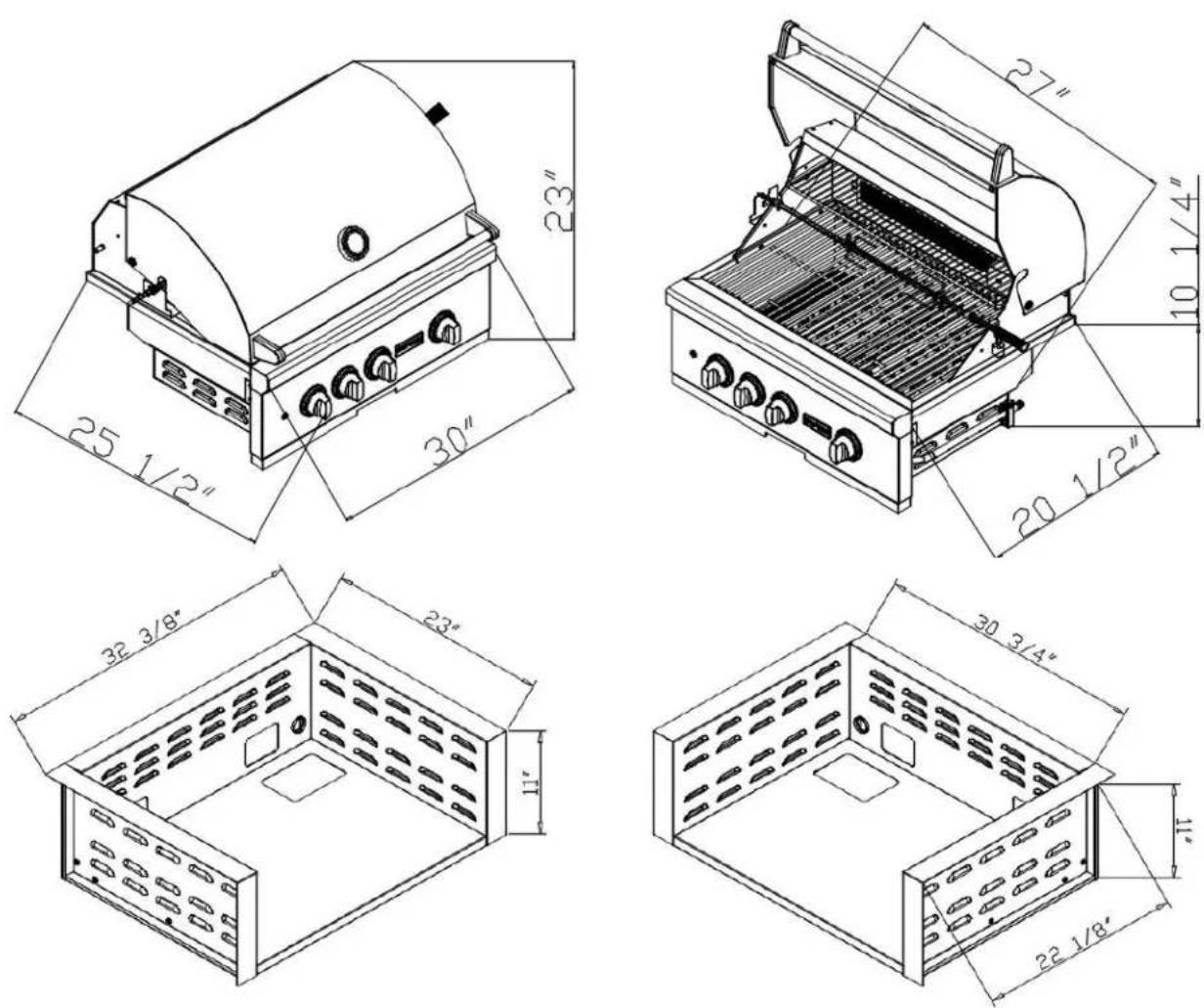
| Overall Product Dimensions | |||
| Model No. | Height | Width | Depth |
| C2SL30 | 23" | 30" | 25 1/2" |
| CJAKTCS30 | 11" | 32 3/8" | 23" |
| Cutout Dimensions for Island | |||
| Model No. | Height Width | Depth | |
| C2SL30 | 10 1/4" | 27" | 20 1/2" |
| CJAKTCS30 | 11" | 30 3/4" | 22 1/8" |
√ When using a Coyote insulated jacket, you will want to build your island to the jackets Cutout and Overall Dimensions listed above. Once the jacket is installed, the grill will rest on/inside the insulated jacket
| Model No. | Gas Supply BTU | 'S Regula | tor WCPgasstore Max | PSMElectrical Requirements | Electrical Requirements |
| C2SL30LP | Propane | 70,000 | 20 lb Tank Regulator | 11".5 PS | Qty 1 - 120 VAC 60 Hz Grounded Plug |
| C2SL30NG | Natural Gas | 70,000 | 1/2" Female Pipe | 4".5 PS | Qty 1 - 120 VAC 60 Hz Grounded Plug |
Important Note to Installer: This file is not intended to replace your Owners' Manual which contains specific safety requirements and consumer guidelines. Please refer to your Owners' Manual prior to installing or operating your built-in grill.
C2SL30 INSTALL GUIDE
NON-COMBUSTIBLE CONSTRUCTION
Insulated Jacket NOT Required
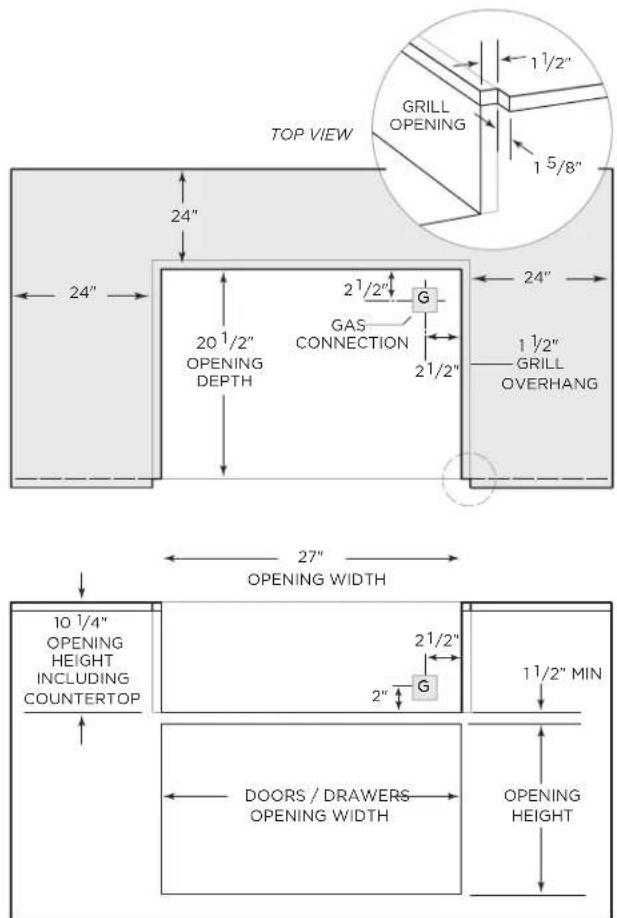
FRONT VIEW
√ Combustible material can not be within 24" of the grills frame
√ This applies to all directions - horizontal & vertical
√ Shaded area above on "TOP VIEW" illustrates the 24" minimum requirement (not to scale for rendering purposes)
√ The grill is designed to hang from the counter top with no support underneath
√ Minimum rear clearance for the hood to open is 2"
√ If you have a wall/partition behind the grill, the minimum rear clearance to that wall should be at least 7" to allow for ventilation of the exhaust
COMBUSTIBLE CONSTRUCTION
Insulated Jacket Required - Model # CJAKTCS30
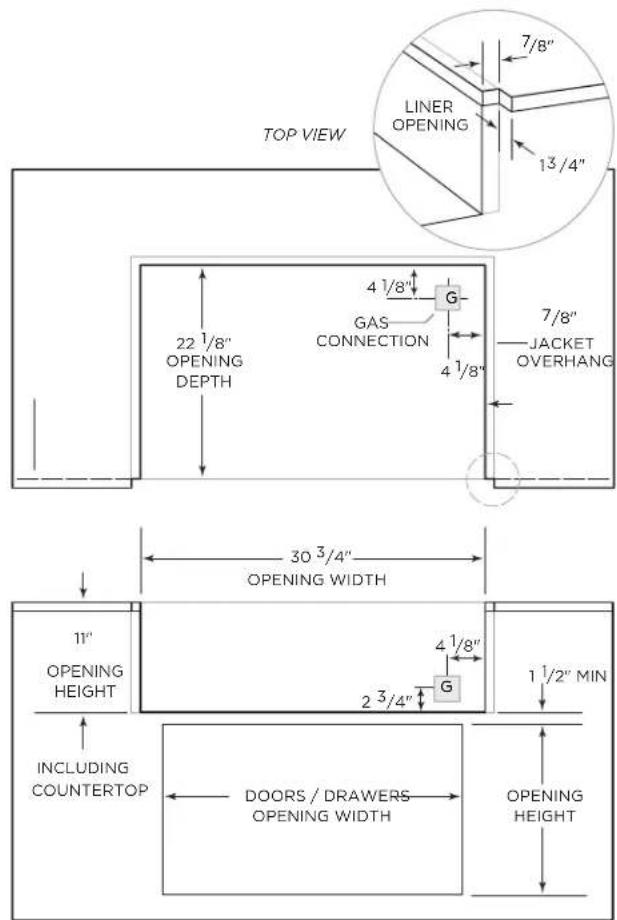
FRONT VIEW
√ If using combustible material within 24" of the grill frame, you MUST use the corresponding Coyote Insulated Jacket
√ Using a insulated jacket, does not waive any other standard installation procedure (ventilation, connections, etc)
√ The jacket is designed to hang from the counter top with no support underneath
√ Minimum clearance for hood to open is 2"
√ If you have a wall/partition behind the grill, the minimum rear clearance to that wall should be at least 7" to allow for ventilation of the exhaust
Ventilation Requirements:
√ Regardless if you are using a combustible or non-combustible building material, you must include at least two vents within the island.
√ These vents must be at least 20 sq. in. each and allow fresh air to move from the grill cabinet to the exterior environment.
√ For a propane setup, the vents should be installed lower as propane is heavier than air.
√ For a natural gas setup, the vents should be located higher in the island, as natural gas is lighter than air.
√ Do not locate the two vents on the same wall of the island. Cross ventilation is key to allow any excess heat or trapped gas to dissipate.
Important Note to Installer: This file is not intended to replace your Owners' Manual which contains specific safety requirements and consumer guidelines. Please refer to your Owners' Manual prior to installing or operating your built-in grill.
Brand : COYOTE
Model : CJAKTCS30
Category : Uncategorized