
KML-10 - Scale CUISINART - Free user manual and instructions
Find the device manual for free KML-10 CUISINART in PDF.


| Product Type | Kitchen Scale |
| Brand | Cuisinart |
| Model | KML-10 |
| Maximum Weight Capacity | 11 lb (5 kg) |
| Weight Increments | 1 g |
| Power Source | 3-volt lithium battery or 2 AAA batteries |
| Display Type | Jumbo LCD screen |
| Material | Stainless steel cover |
| Functions | Weighing, Tare, Add and Weigh, Mode change (kg/g to lbs/oz) |
| Auto Shut-Off | After 1 minute of inactivity |
| Cleaning Instructions | Wipe with damp cloth; stainless steel cover is dishwasher safe. Do not immerse. |
| Warranty | Limited Lifetime Warranty |
Frequently Asked Questions - KML-10 CUISINART
User questions about KML-10 CUISINART
0 question about this device. Answer the ones you know or ask your own.
Ask a new question about this device
Download the instructions for your Scale in PDF format for free! Find your manual KML-10 - CUISINART and take your electronic device back in hand. On this page are published all the documents necessary for the use of your device. KML-10 by CUISINART.
USER MANUAL KML-10 CUISINART
■ CLEANING AND MAINTENANCE INSTRUCTIONS
Treating your scale with care will ensure proper use and years of excellent service. Wipe down the scale surface and touchpad buttons with a damp cloth. Do not put any water or dishwashing soap directly over the electronic parts of the scale as this may cause the scale to malfunction or weigh ingredients improperly. Stainless steel cover is dishwasher safe. Display your scale on the countertop along with your other Cuisinart® products, store in a cabinet, or on a kitchen shelf.
ESSENTIAL PRECAUTIONS
- Do not immerse in water or place under running tap water.
- Do not put hot objects on scale.
- Do not use abrasive cleaners.
- Do not store anything on scale.
LIMITED LIFETIME WARRANTY
Your Cuisinart ^8 Kitchen Scale is warranted to be free of defects in material and workmanship under normal home use from the date of original purchase throughout the original purchaser's lifetime. If your scale should prove to be defective within your lifetime, we will repair it (or, if we think it necessary, replace it) without charge to you, except for shipping and handling. To obtain warranty service, please call our Consumer Service Center toll-free at 1-800-726-0190, or write to Consumer Service Center, Cuisinart, 150 Milford Road, East Windsor, NJ 08520.
To facilitate the speed and accuracy of your return, please also enclose: \$7.00 for shipping and handling of the product. Please also be sure to include a return address, description of the product problem, phone number, and any other information pertinent to the product's return. Please pay by check or money order.
This warranty excludes damage caused by accident, misuse or abuse, including damage caused by overheating, and it does not apply to scratches, stains, discoloration or other damage to external or internal surfaces which does not impair the functional utility of the scale.
This warranty also expressly excludes all incidental or consequential damages. Some states do not allow the exclusion or limitation of incidental or consequential damages, so the foregoing limitation or exclusion may not apply to you.
This warranty gives you specific legal rights, and you may also have other rights which vary from state to state.
CALIFORNIA RESIDENTS ONLY
California residents need only supply proof of purchase and should call 1-800-726-0190 for shipping instructions. California law provides that for In-Warranty Service, California residents have the option of returning a nonconforming product (a) to the store where it was purchased or (b) to another retail store which sells Cuisinart® products of the same type. The retail store shall then, according to its preference, either repair the product, refer the consumer to an independent repair facility, replace the product, or refund the purchase price less the amount directly attributable to the consumer's prior usage of the product. If the above two options do not result in the appropriate relief to the consumer, the consumer may then take the product to an independent repair facility if service or repair can be economically accomplished. * Cuisinart, and not the consumer, will be responsible for the reasonable cost of such service, repair, replacement or refund for nonconforming products under warranty.
*California residents may also, according to their preference, return nonconforming products directly to Cuisinart for repair, or if necessary, replacement, by calling our Customer Service Center toll-free at 1-800-726-0190. Cuisinart will be responsible for the cost of the repair, replacement, and shipping and handling for such nonconforming products under warranty.
©2008 Cuisinart®
Cuisinart® is a registered trademark of Cuisinart,
150 Milford Road, East Windsor, NJ 08520
Printed in China 08CUC100
*Any trademarks or service marks of third parties used herein are the trademarks or service marks of their respective owners.
Cuisinart® Kitchen Scales

natural_image
Close-up of a raw salmon fillet on a cutting board, with blurred green vegetables in the background (no text or symbols visible)
Kitchen Scales
Use and Care Guide
KITCHEN SCALES INSTRUCTION MANUAL
Weighing is the quickest and most accurate way to measure most dry and solid ingredients such as sugar, flour and shortening for consistently reliable results. With your new Cuisinart® Kitchen Scale, weighing is simple and easy. Designed to meet all your household measuring needs, your scale will provide precise, consistent weighing of cooking/baking ingredients for the best results. Use your scale to weigh food portions specified in your dieting guides. You can even weigh oversized letters and packages to ensure you have the right amount of postage.
The Cuisinart ^® Kitchen Scale is compact, light and convenient to store. Operation and cleanup are fast and easy. It weighs in 18 -ounce increments up to a maximum of 11 pounds. This scale converts from ounces to grams at the touch of a button and weighs in gram increments up to a maximum of 5 kilograms.
OPERATING INSTRUCTIONS
Remove any labels or clear protective films from the scale before first use.
INSTALLING THE BATTERY
Your scale includes either a 3-volt lithium battery or 2 AAA batteries. Insert batteries into the battery compartment situated underneath the scale.
NOTE: When "Lo" appears on the display screen, the batteries must be replaced.
WEIGHING ITEMS
- Place the scale on a level, hard surface.
2a. Choose whether you want to weigh directly on the platform or on the stainless cover.
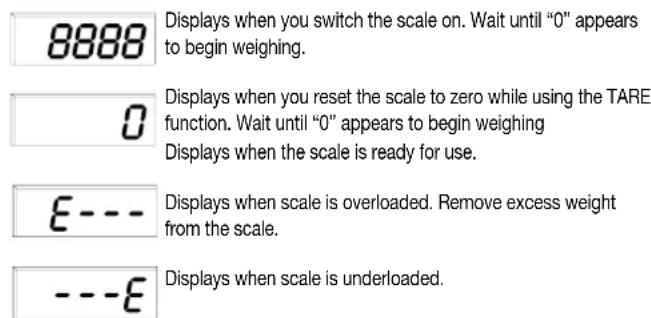
2b. If weighing with the stainless cover place the cover on the scale before you turn the scale on. - Press the ON/OFF button to turn the scale on. "8888" first appears on the display followed by "0" g, indicating the scale is ready for use.
- Place the object/food item to be weighed on the platform and read the weight on the jumbo LCD screen.
NOTES: Weights are displayed in 1 g increments. The scale will read up to 5.2kg, after which E is displayed on the left hand side of the screen followed by 3 dashes (E---). If 3 dashes appear followed by E from left to right (---E) this means the scale is underloaded. Do not touch any parts of the scale with your hands while weighing is in progress. The scale is very sensitive and may pick up extra readings.
CHANGING MODES
To change from metric (kg/g) to imperial (lbs/oz) mode at anytime during use press the MODE/TARE button once.
TARE FUNCTION
WEIGHING WITH A BOWL
You may want to weigh ingredients in a bowl or other container. The tare option offsets the weight of the bowl so that you are only
weighing the ingredient. If you remove the bowl from the scale, a minus weight (weight of bowl) appears in the display.
- Place a bowl on the scale platform.
- Press the ON/OFF button on the front panel. At first "8888" will appear. Wait until "0" appears on the display screen.
- To tare, press and hold the MODE/TARE button for two seconds. "0" will appear. Place the ingredient into the bowl. The weight of the added ingredient appears.
ADD AND WEIGH FEATURE
If you want to reach a desired weight (i.e., 300g flour) – you can use the add and weigh procedure.
- Place your scale on a stable, level surface.
- Press the ON/OFF button. Wait until "0" appears on the display.
- Place an empty bowl to hold the ingredients on the scale.
- Zero out the weight of the empty bowl by pressing and holding the MODE/TARE button for 2 seconds. Wait until "0" appears on the scale. This will ensure that the weight of the empty bowl is subtracted from the total weight of the bowl and ingredients.
- You are now ready to weigh your first ingredient. Place the ingredient into the bowl until the desired weight appears on the display.
- You are now ready to weigh the next ingredient(s). Place additional ingredient in the bowl until the desired weight appears on the display.
NOTE: If you want to view the weight of individual ingredients as they are added to the bowl, then tare each time you add a new ingredient.
AUTOMATIC SWITCH OFF
To conserve battery power, the scale automatically shuts off if left unused for approximately one minute. To turn the scale off manually press and hold the ON/OFF button for two seconds.
■ DISPLAY MESSAGES
The Cuisinart ^® Kitchen Scale provides the following display messages to simplify operation.
- ■ CLEANING AND MAINTENANCE INSTRUCTIONS
- ESSENTIAL PRECAUTIONS
- LIMITED LIFETIME WARRANTY
- CALIFORNIA RESIDENTS ONLY
- Cuisinart® Kitchen Scales
- Kitchen Scales
- KITCHEN SCALES INSTRUCTION MANUAL
- OPERATING INSTRUCTIONS
- INSTALLING THE BATTERY
- WEIGHING ITEMS
- CHANGING MODES
- TARE FUNCTION
- WEIGHING WITH A BOWL
- ADD AND WEIGH FEATURE
- AUTOMATIC SWITCH OFF
- ■ DISPLAY MESSAGES
Brand : CUISINART
Model : KML-10
Category : Scale