
RLTP5567 - Smartphone RCA - Free user manual and instructions
Find the device manual for free RLTP5567 RCA in PDF.


| Product Type | Smartphone |
| Brand | RCA |
| Model | RLTP5567 |
| Dimensions (WxHxD) | 77.5 x 153.5 x 9.5 mm |
| Weight | 150 g |
| Operating System | Android 6.0 |
| Processor | MTK6580 Quad-core |
| Display Size | 5.5 inches |
| Display Resolution | 720 x 1280 pixels |
| Internal Memory | 8 GB Flash |
| RAM | 1 GB |
| Rear Camera | 5.0 Megapixel |
| Front Camera | 2.0 Megapixel |
| Battery Type | Li-ion 2300 mAh |
| Talk Time | 3-5 hours |
| Standby Time | Up to one week |
| Network Bands | GSM 850/900/1800/1900, WCDMA 850/1700/1900 |
| Connectivity | Bluetooth, GPS, WiFi, FM Radio |
| SIM Card | Dual Micro SIM (nano compatible with adaptor) |
| Memory Card | MicroSD (expandable) |
| Charging Port | Micro USB |
| Headphone Jack | 3.5 mm |
| SAR Values | Head: 0.59 W/kg, Body: 0.78 W/kg, Hotspot: 1.16 W/kg |
| Package Contents | Smartphone, Li-ion battery, Power adapter, USB cable, Case, SIM card adaptor, User manual |
| Warranty | 12 months |
Frequently Asked Questions - RLTP5567 RCA
User questions about RLTP5567 RCA
0 question about this device. Answer the ones you know or ask your own.
Ask a new question about this device
Download the instructions for your Smartphone in PDF format for free! Find your manual RLTP5567 - RCA and take your electronic device back in hand. On this page are published all the documents necessary for the use of your device. RLTP5567 by RCA.
USER MANUAL RLTP5567 RCA
This product is manufactured and sold by Curtis International Ltd. RCA, the RCA logo, the two dogs (Nipper and Chipper) logo, are registered trademarks or trademarks of RCA Trademark Management and are used under license by Curtis International Ltd. Any other product, service, company, trade or product name and logo referenced herein are neither endorsed nor sponsored by RCA Trademark Management or its affiliates.
USER'S MANUAL
WARNING!
Safety information
● Risk of explosion!
→ Only use the power adapter plugs supplied!
→ Only use batteries supplied or ones of the same type!
→ Always treat batteries with due care and attention and only use batteries as described.
→ Never use standard and rechargeable batteries together.
→ Never use rechargeable batteries or standard batteries with different capacities or charge statuses together.
→ Never use standard or rechargeable batteries which are damaged.
● Risk of fatal injury with heart pacemakers!
→ Always keep the phone a safety distance of at least 15 cm to heart pacemakers.
● Risk of suffocation through small objects, packaging and protective foil!
→ Keep children away from the product and its packaging!
● Risks to health and the environment from batteries!
→ Never open, damage or swallow batteries or allow them to pollute the environment. They could contain toxic and ecologically harmful heavy metals.

CAUTION!
● Risk of hearing damage!
→ Avoid listening at full receiver volume.
ATTENTION!
● Risk of property damage.
→ Prevent exposure to environmental influences, e.g. smoke, dust, vibration, chemicals, moisture, heat and direct sunlight.
→ Only allow repairs to be completed by qualified personnel.
Note that you may get certain services from the cellphone provider.
1 Enable this provider have activated your cellphone before using it.
SAFETY WARNING
- Do not use or leave the device in direct sunlight or a hot environment such as a vehicle etc. that is in hot environment. Overheating can damage the device
- Do not overcharge the device – do not leave the device on the charger for very long after the battery has been fully charged
● Device should be protected from any physical impact or damage and care should be taken not to drop the device - Only use the factory supplied charger. The use of unapproved charger or cable may cause the battery to fail, explode and/or damage the device.
- Do not disassemble, puncture, crush or expose your device to temperatures above 40 °C / 104 °F
- Keep your device away from fire or water.
- Keep your device from moisture and extreme temperatures.
- Should your battery swell or expand, please immediately discontinue use of your device. A probable cause is it having been overheated at some point or overcharged. Please contact us for support.
INTENDED USE
This mobile phone is designed for telephoning, surfing the internet and sending / receiving SMS texts when connected to a mobile phone network. Any other use is considered unintended use. Observe all local directives and regulations. Unauthorised modification or reconstruction is not permitted. Under no circumstances open the device or complete any repair work yourself.
PACKAGE CONTENTS
1 Smartphone, 1 Li-ion battery, 1 Power adapter plug, 1 Operating instruction, 1 USB cable, 1 Case, 1 SIM card adapter
OPERATING ELEMENTS
1 Take a call
2 Set wallpapers and view widgets
3 Phone book / Contacts
4 View Apps
5 Back to home screen
6 Display / write messages
7 One step back
8 WEB Browser
9 Speaker
10 Charging socket / Data transmission (Micro USB)
11 Flashlight
12 Camera lens
13 Display on/off, Press and hold 2 sec. to switch phone on/off
14 Camera lens
15 Earpiece
16 Headphone Jack
17 Volume control
18 Battery compartment cover
19 Micro SD
20 SIM card slot a ) Micro b) Micro
21 Battery
STARTING UP
Inserting the SIM / microSD card and battery ATTENTION!
● The SIM / microSD card could be damaged.
→ Pay attention that the SIM / microSD card remains clean and undamaged. Insert the cards the correct way around.
● The battery or phone could be damaged.
→ Pay attention that the battery is inserted correctly.

Switch the mobile phone off before removing the battery compartment cover. Only switch it on again when the battery compartment cover has been replaced.
Remove battery compartment cover, insert SIM card, microSD card and battery, replace battery
compartment cover
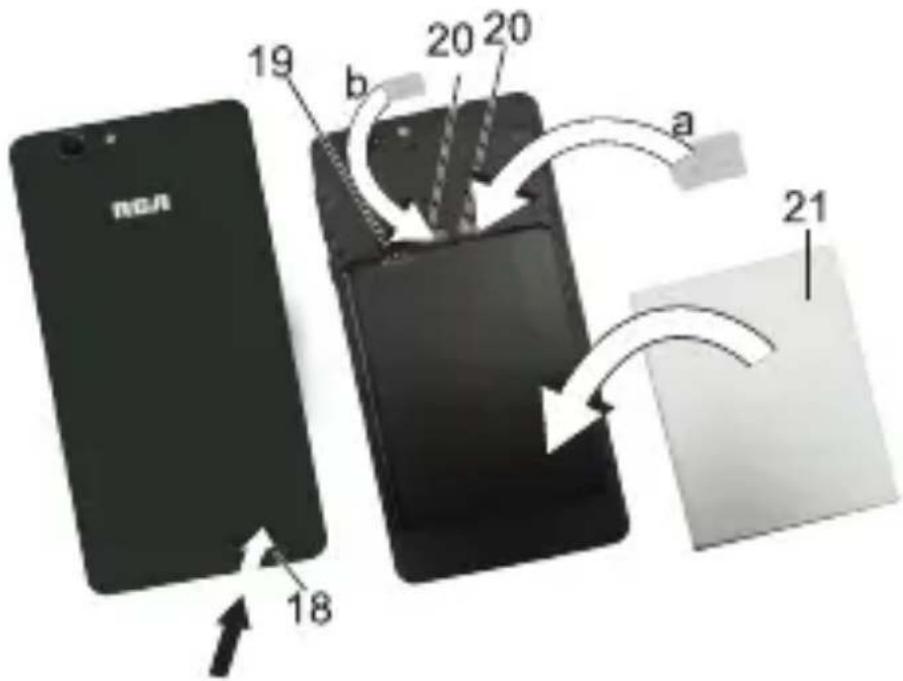
SIM Card and Micro SD memory Card Installation
- Before installing the battery, please insert the SIM card(s) and SD memory card with the label side up as illustrated.
Please note the corner cutout of the SIM cards when inserting.
• To install a nano SIM card, please use a SIM card adaptor by following the instructions on next page.

Installing a nano SIM card using a SIM card adaptor

flowchart
graph TD
    A["Component with striped pattern"] --> B["SIM card adaptor"]
    B --> C["Label side up"]
-
Put the nano SIM card on the SIM card adaptor.
-
Ensure the nano SIM card is properly sited during installation, hold the nano SIM card from the bottom with one hand, then push the edge of the SIM card into the slot carefully.
Charging the battery
i Charge the battery for at least 12 hours when
charging for the first time and
ensure they are subsequently discharged and charged fully. This aids a long service life of the battery. Charge the mobile phone directly via the Micro-USB port.
UNLOCK SCREEN
Hold symbol Ⓞ swipe up to unlock.
SETTING THE LANGUAGE
Touch symbol 📋 → Touch symbol 🖱 →
MAKE A PHONE CALL
Answering a call
Hold symbol 📞 and drag to symbol.
Rejecting a call
Hold symbol 📞 and drag to symbol.
Answer a call with text message
Hold symbol 📊 and drag to symbol 😂 to select text message.
TalkBack
Touch symbol 📋 → Touch symbol 🍴 → Touch Accessibility → select TalkBack → turn it on.
HOME SCREEN TIPS
Touch the desktop about 3 seconds → touch
Hold the symbol and drag it on one of the home screens.
Service hotline
Call 1-800-968-9853. Please have your unit's date of purchase and model/serial number ready. The model/serial number information can be found on the back of your unit.
• A representative will troubleshoot your problem over the phone.
Maintenance
Clean the surface of the housing with a soft, fluff-free cloth. Do not use any cleaning agents or solvents.
Guarantee
RCA equipment is produced and tested according to the latest production methods. The implementation of carefully chosen materials and highly developed technologies ensure trouble-free functioning and a long service life. The
terms of guarantee do not apply when a device malfunction was caused by the mobile telecommunications network operator/provider. The terms of guarantee do not apply to the batteries or power packs used in the products. The period of guarantee is 12 months from the date of purchase.
All deficiencies related to material or manufacturing errors within the period of guarantee will be redressed free of charge. Rights to claims under the terms of guarantee are annulled following tampering by the purchaser or third parties. Damage caused as the result of improper handling or operation, normal wear and tear, incorrect positioning or storage, improper connection or installation or Acts of God and other external influences are excluded from the terms of guarantee. In the case of complaints, we reserve the right to repair defective parts, replace them or replace the entire device. Replaced parts or devices become our property. Rights to compensation in the case of damage are excluded where there is no evidence of intent or gross negligence by the manufacturer. If your device does show signs of a defect within the period of guarantee, please contact the sales outlet where you purchased the RCA device, producing the purchase receipt as evidence. All claims under the terms of guarantee in accordance with this agreement can only be asserted at the sales outlet. No claims under the terms of guarantee can be asserted after a period of two years from the date of purchase and hand-over of the product.
Disposal
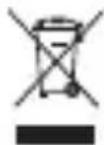
In order to dispose of your device, take it to a collection point provided by your local public waste authorities (e.g. recycling centre). According to the laws on the disposal of electronic and electrical devices, owners are obliged to dispose of old electronic and electrical devices in a separate waste container. The adjacent symbol indicates that the device must not be disposed of in normal domestic waste!

You are legally obliged to dispose of power packs and batteries at the point of sale or in the corresponding containers provided at collection points by local public waste authorities. Disposal is free of charge. The symbols indicate that the batteries must not be disposed of in normal

domestic waste and that they must be brought to collection points provi- y local public waste authorities. Packaging materials must be disposed of ding to local regulations.
Technical data (All rights reserved)
| Feature | Value |
| WxHxD | 77.5x153.5x9.5mm |
| Weight | 150g |
| CPU | MTK6580 Quad core |
| Operating system | Android 6.0 |
| Display | 5.5inch |
| Resolution | 720x1280 |
| Memory(intern) | 8GB Flash, 1GB RAM |
| Front Camera | 2.0 Megapixel |
| Rear Camera | 5.0 Megapixel |
| GSM | 850/900/1800/1900 |
| WCDMA | 850/1700/1900 |
| Battery | Li-ion 2300 mAh |
| Talking time | 3~5Hours |
| Standby | One Week |
| Mediaplayer | MP4,MOV,3GP,AVI |
| Others | MP3,AAC,M4A,WAV,FLAC,APEBluetooth/GPS/WIFI/FM Radio |
SSSAAARRR IIInnnfffooorrrmmmaaatttiiooonnn SSStttaaattteeemmeeennnttt Your smart phone is a radio transmitter and receiver. It is designed and manufactured not to exceed the emission limits for exposure to radiofrequency (RF) energy set by the Federal Communications Commission of the U.S. Government. These limits are part of comprehensive guidelines and establish permitted levels of RF energy for the general population. The guidelines are based on standards that were developed by independent scientific organizations through periodic and thorough evaluation of scientific studies. The standards include a substantial safety margin designed to
The exposure standard for wireless mobile phones employs a unit of measurement known as the Specific Absorption Rate, or SAR. The SAR limit set by the FCC is 1.6 W/kg. * Tests for SAR are conducted with the phone transmitting at its highest certified power level in all tested frequency bands. Although the SAR is determined at the highest certified power level, the actual SAR level of the phone while operating can be well below the maximum value. This is because the phone is designed to operate at multiple power levels so as to use only the power required to reach the network. In general, the closer you are to a wireless base station antenna, the lower the power output. Before a phone model is available for sale to the public, it must be tested and certified to the FCC that it does not exceed the limit established by the government adopted requirement for safe exposure. The tests are performed in positions and locations (e.g., at the ear and worn on the body) as required by the FCC for each model. The highest SAR value for this model phone when tested for use at the ear is 0.59 W/Kg and when worn on the body, as described in this user guide, is 0.78 W/Kg (Body-worn measurements differ among phone models, depending upon available accessories and FCC requirements). The maximum scaled SAR in hotspot mode is 1.16 W/Kg. While there may be differences between the SAR levels of various phones and at various positions, they all meet the government requirement for safe exposure. The FCC has granted an Equipment Authorization for this model phone with all reported SAR levels evaluated as in compliance with the FCC RF exposure guidelines. SAR information on this model phone is on file with the FCC and can be found under the Display Grant section of http://www.fcc.gov/oet/fccid after searching on
FCC ID: 2AKSDMP5X6X Additional information on Specific Absorption Rates (SAR) can be found on the Cellular Telecommunications Industry Association (CTIA) web-site at http://www.wow-com.com. * In the United States and Canada, the SAR limit for mobile phones used by the public is 1.6 watts/kg (W/kg) averaged over one gram of tissue. The standard incorporates a substantial margin of safety to give additional protection for the public and to account for any variations in measurements.
- WARNING!
- Safety information
- CAUTION!
- ATTENTION!
- SAFETY WARNING
- INTENDED USE
- PACKAGE CONTENTS
- OPERATING ELEMENTS
- STARTING UP
- Inserting the SIM / microSD card and battery ATTENTION!
- SIM Card and Micro SD memory Card Installation
- Charging the battery
- UNLOCK SCREEN
- SETTING THE LANGUAGE
- MAKE A PHONE CALL
- Answering a call
- Rejecting a call
- Answer a call with text message
- TalkBack
- HOME SCREEN TIPS
- Service hotline
- Maintenance
- Guarantee
- Disposal
Brand : RCA
Model : RLTP5567
Category : Smartphone