
Power Station 200W - Battery charger COBRA - Free user manual and instructions
Find the device manual for free Power Station 200W COBRA in PDF.


| Product Type | Portable Power Station / Battery Charger |
| Brand | Cobra |
| Model | Power Station 200W |
| Power Output (Continuous) | 200 W |
| Peak Power Output | 400 W |
| Battery Type | Lithium-ion |
| Battery Capacity | 155 Wh (typical) |
| AC Output | 1 x 120 V, 200 W (modified sine wave) |
| USB Output | 2 x USB-A (5 V, 2.4 A each) |
| DC Output | 1 x 12 V/10 A (cigarette lighter port) |
| Input Charging | AC 120 V / 60 Hz, 1.5 A; also DC from solar or car (optional) |
| Charge Time | Approx. 4-6 hours from wall outlet |
| Weight | 2.5 kg (5.5 lbs) |
| Dimensions (W x D x H) | 20 x 15 x 10 cm (7.9 x 5.9 x 3.9 in) |
| Operating Temperature | 0°C to 40°C (32°F to 104°F) |
| Display | LED indicator for battery level and status |
| Protection Features | Overload, short circuit, over-temperature, over-discharge |
| Cooling | Passive cooling (fanless) |
| Maintenance & Cleaning | Wipe with a dry, soft cloth. Do not use liquids or abrasives. |
| Safety Precautions | Do not expose to water, fire, or extreme temperatures. Use only approved adapters. |
| Repairability & Spare Parts | Contact Cobra support for service. No user-serviceable parts inside. |
| Certifications | FCC, RoHS |
| Included Accessories | AC charging cable, car charging cable, user manual |
Frequently Asked Questions - Power Station 200W COBRA
User questions about Power Station 200W COBRA
0 question about this device. Answer the ones you know or ask your own.
Ask a new question about this device
Download the instructions for your Battery charger in PDF format for free! Find your manual Power Station 200W - COBRA and take your electronic device back in hand. On this page are published all the documents necessary for the use of your device. Power Station 200W by COBRA.
USER MANUAL Power Station 200W COBRA
Charges and powers portable devices, electronics, and small appliances
CHARGE FIRST!
Before using your new Cobra Power Station, plug it into a suitable power outlet until it is fully charged.
Table of Contents
Important Safety Information....2
Power Station 200W Features....4
Quick Start Section 5
Recharging your Power Station 5
Connecting Devices to the Power Station 6
Using the Flashlights....6
Specifications 7
Frequently Asked Questions 8
Troubleshooting....9
Limited 2-Year Warranty ...... 10
Product Service 11
Ordering Info....12
IMPORTANT SAFETY INSTRUCTIONS
Precautions when working with the Power Station:

WARNING: Keep the unit clear of fire and water.

WARNING: Shock Hazard. Keep away from children. Do not insert foreign objects into any of the Power Ports. Do not submerge this product in water, expose to rain, snow, condensation, or spray. Do not open the Power Station to replace the internal battery. There are no user replaceable parts inside the Power Station.

WARNING: Explosion Hazard. Do not use this product where there are flammable fumes or gases, such as an inadequately vented bilge of a boat or near propane tanks. Do not use this product in an enclosure containing automotive-type lead-acid batteries.

WARNING: Fire Hazard
Do not crush or puncture.
Caution: Operating temperature
Do not expose to temperatures over +113^ F ( +45^ C) or under -14^ F ( -10^ C). Using at high or low temperatures may reduce the internal battery capacity and shorten the battery life.
Note: In extreme cold weather conditions, please store indoors for best results.

The Power Station is supplied with a rechargeable Lithium-ion battery pack.
This battery is self-contained and not consumer replaceable. The unit must be disposed of properly when it no longer holds a charge. Proper charging practices will increase the life of the batteries.
For information on battery recycling call toll free 800-822-8837.
Caution and Warning Statements
To make the most of the Power Station, it must be installed and used properly. Please read the installation and operating instructions carefully before installing and using it.

CAUTION: Statements specify conditions which could cause damage to the unit or other equipment.

WARNING: Statements identify conditions that could result in personal injury or loss of life.
General Precautions
- Never install the Power Station in a boat's engine compartment where gas and battery fumes are present.
- Do not operate the Power Station if it has been dropped or damaged in any way.
- Do not open the Power Station; it contains no user-serviceable parts. Attempting to service unit could cause electrical shock.

WARNING: Internal components remain charged after all power is disconnected.
- Do not expose the Power Station to rain, snow, bilge water or spray.
- Do not obstruct the ventilation openings.
- Do not install Power Station in a zero-clearance compartment.

WARNING: To prevent fire or explosion, do not install the Power Station in areas or compartments containing batteries or flammable materials or in locations that require ignition-protected equipment.

WARNING: To reduce the risk of fire, do not cover or obstruct the ventilation openings. Do not operate the Power Station in zero-clearance compartment.
Power Station 200W Features
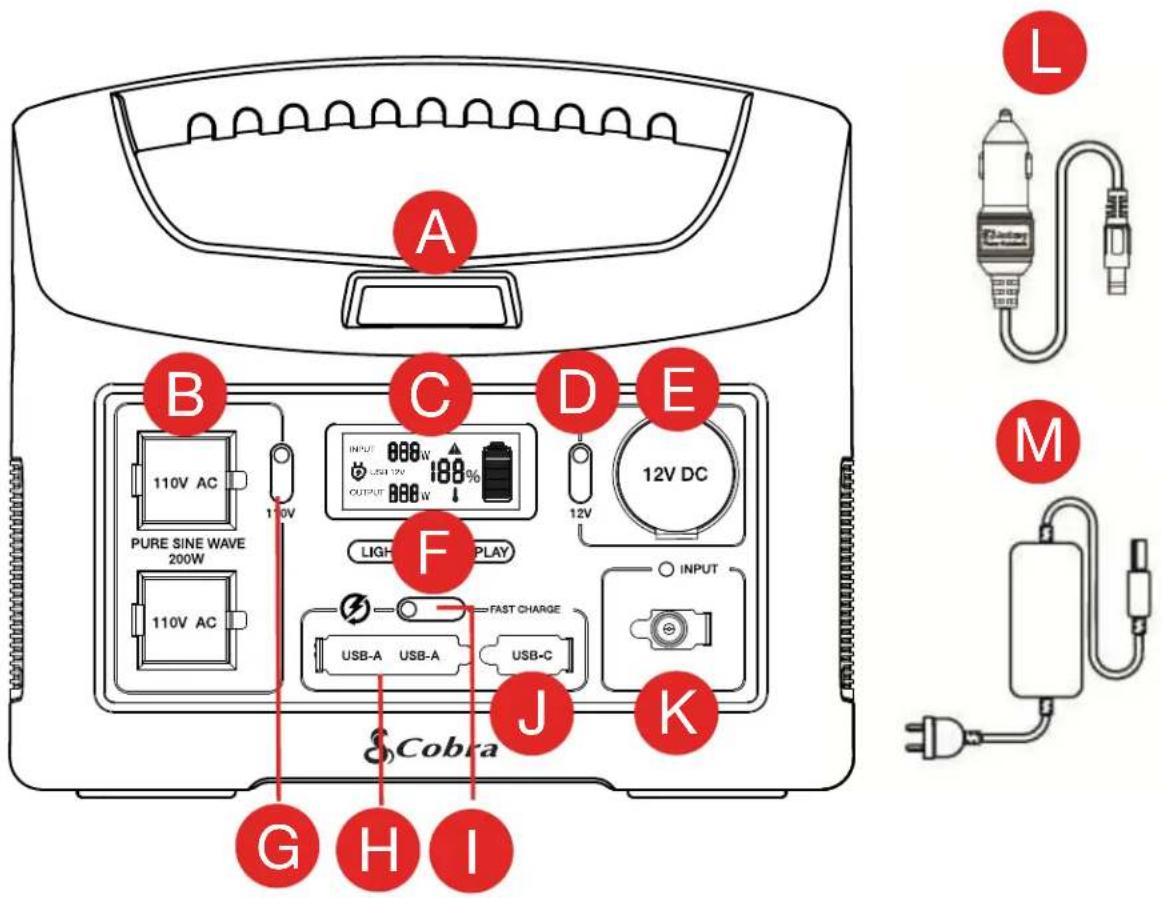
A. Area Work Light
B. (2) GFCI AC Outlets
C. LCD Display
D. DC Switch
E. 12V DC Port
F. LED Light/Display Switches
G. 110V Switch
H. (2) USB-A Outputs
I. Fast Charge Switch
J. USB-C Output
K. Input Charging Port
L. 12V Charger
M. AC Adapter and Cable (2 Parts)
Not Shown - LED Flashlight, Side Panel
Re-Charging Your Power Station
When first unboxing your power station, plug it into a suitable AC outlet until it is fully charged. After that, in order to get the most out of your power station's battery life, make sure to recharge your power station after using it or before putting it into storage.
Different Ways To Recharge Your Power Station
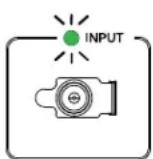
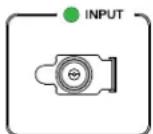
There are multiple ways to recharge your power station, but every method requires plugging into the power station's "INPUT" charging port. When your power station is charging you will see an input power value on the LCD display as well as the input LED light blinking green indicating that the power station is charging. When charging is complete the blinking green LED will turn solid green and your battery charge percentage on the LCD display will show 100%.
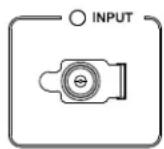
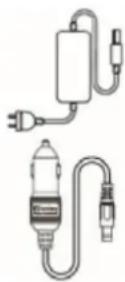
- AC Outlet: Using the included AC charging cable, plug the AC plug into any suitable electrical outlet and plug the other end of the cable into the power station's input charging port to begin charging.
- 12V DC: Using the included 12V charging adapter, connect the 12V end of the cable into any suitable 12V DC socket and plug the other end of the cable into the power station's input charging port to begin charging.
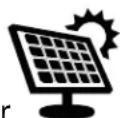
- Solar Charging: The Cobra Power Station can be recharged with any compatible solar panel. Connect the output power cable of a compatible solar panel to the input charging port to begin charging via solar. Charging times will vary for solar depending on current weather and time of day. Solar panels are not included with the Cobra Power Station.
When your power station is recharging, the battery status indicator on the LCD display will flash and the battery fill up with solid bars depending on how charged the power station battery is.
1 Flashing Bar: 0-20% Charge
1 Flashing Bar and 1 Solid Bar: 20-40% Charge
1 Flashing Bar and 2 Solid Bars: 40-60% Charge
1 Flashing Bar and 3 Solid Bars: 60-80% Charge
5 Solid Bars: 100% Charge
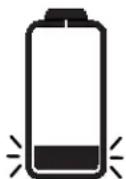
0-20%20-40%40-60%60-80%
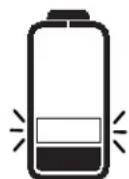
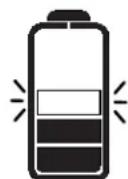
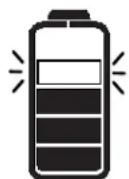
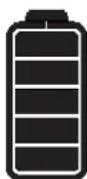
100%
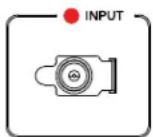
In addition to the LCD display on your power station, there is an input charging light above the input charging port to help provide additional feedback for when you should recharge your power station:
Blinking Green: When your power station is plugged in and recharging, the input charging light will blink green to indicate that the unit is actively charging.
Solid Green: When the power station is fully charged the input charging light will change from blinking green to solid green until the charging cable is removed.
Solid Red: When the battery charge drops below 20% the input charging light will illuminate solid red. Recharge your power station as soon as possible in order to keep the battery healthy.
Connecting Devices to the Power Station
The power station is divided into different power sections depending on the type of connection your devices requires. To properly connect and power/recharge a device with the power station, follow
these steps.
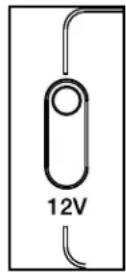
- Determine the connection type required for your device (AC Outlet, USB-A, USB-C, 12V DC).
- Press the switch associated with the power section you are looking to use in order to activate that section.
- Plug in your desired devices.
Using the Power Inverter
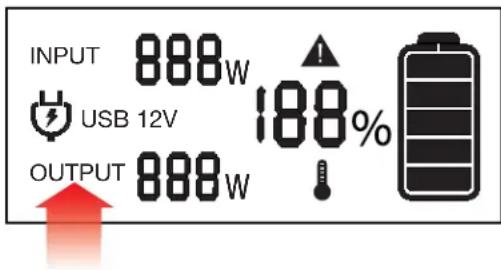
The power station is equipped with an internal 200W pure sine wave inverter, which allows you to connect devices to the two AC outlets just like you would at your home. However, there is a limit to how much power the power station can continuously output (200 Watts). If the output power to the AC outlets exceeds that limit for an extended period, the inverter will shutdown in order to protect from damaging itself or the power station.
- To see how much power your power station is currently outputting, look at the “Output” power value located on your power station’s LCD screen.
- Additionally, as a quick check to see what your device's power requirements are, multiply the expected current draw of your product by 110 to see what the expected power draw will be in Watts (W).
- When using the power station's inverter, the internal cooling fan will turn on once a certain temperature is detected. This will continue to run as long as the inverter is operating in order to cool internal components. Once the inverter has stopped being used or the 110V switch has been turned off, the fan will turn off.
Using the Power Station's Flashlights
LED Flashlight
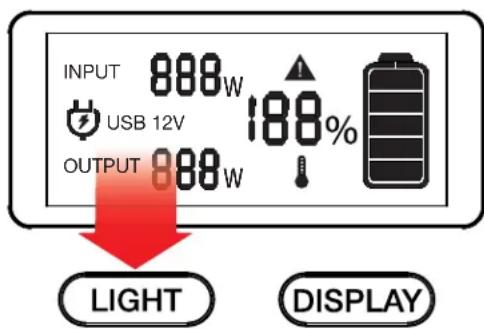
- To turn on the LED flashlight, press and release the LIGHT button on the control panel. After the flashlight has been on for more than two seconds, press and release the LIGHT button again to turn the LED flashlight off.
- To cycle between the three modes on the LED flashlight (solid, strobe, SOS), after turning on the flashlight, press and release the LIGHT button to cycle between each mode until the desired mode is selected.
Area Light
- To turn on the area light, press and hold the LIGHT button on the control panel until the area light turns on. To turn off this light press and hold the LIGHT button until the area light turns off.
Specifications
| Model CPPS244W |
| Battery LiFePO4 |
| Capacity 211.2Wh (16.5A/12.8V) |
| Input 12 to 40V DC |
| AC Output 110VAC, 60Hz200W Continuous400W Surge Peak |
| Output Type Pure Sine Wave |
| USB Output (Fast Charge) USB-A: 5V/2.4AUSB-C: 5V/3A, 9V/2A, 12V/1.5A |
| GFCI Outlets 2 |
| Operating Temperature 14° ~ 104° F (-10° ~ 40°C) |
| Recharging Temperature 32° ~ 104° F (0° ~ 40°C) |
| Dimensions 8.9" W x 5.9" D x 7.9" H(22.6cm W x 15cm D x 20cm H) |
| Weight 7.9 lbs. (3.6 kg) |
| MPPT Supports Solar Panel MMPT Charging |
| Warranty 2 Years |
Frequently Asked Questions
What type of battery is in the Cobra Power Station 200W?:
The Cobra Power Station 200W contains a battery pack which consists of an array of LiFePO4 cells with high energy density
How do I know if my power station is charged?
The power station's current battery charge percentage is shown on the LCD display. Additionally, if your power station drops below 20% charge the LED above the input charging port will illuminate red indicating that you should recharge your power station as soon as possible.
Can I charge my power station while also powering devices?
Yes, the power station can power other devices even while it is being recharged. However it is not recommended to use the power station while it is being recharged.
How many devices can be connected to the power station at once?
As long as you don't exceed the 200W continuous power limit of the power station inverter, all AC outlets, USB ports and 12V socket can be used simultaneously to charge and power devices. The more devices are being used at once though, the faster the battery will be drained on the power station.
Frequently Asked Questions continued
How do I turn the fan off?
The internal fan is an important part of keeping your power station cool when using the built in power inverter. The fan will turn on once a certain temperature threshold is reached and continue to run until the power station cools back down. However, when you are done using the power inverter, if you turn off the 110V switch on your power station control panel the fan will immediately stop running as the inverter has been shut off.
How do I know if my 110V device will work with my power station?
You will need to check the amount of power your device requires. To be compatible with this power station you should use devices that require less than 200W of power.
Can I run sensitive electronics and medical equipment with this device?
This power station has a pure sine wave inverter that is identical to the AC power you use inside your home. It is okay to run sensitive electronics on this power station.
Can this power station be used outdoors?
Yes, this power station is designed for both indoor and outdoor use. However, as stated earlier in the product manual, take care not to get the power station wet during use as it can cause harm to both you and the product.
Troubleshooting
Beeping noise coming from the power station: When the internal power inverter faults the power station will beep in warning and the LCD display will show a flashing black plug and warning triangle.


- Press the 110V switch to turn off the power inverter and silence the warning alert coming from your power station.
- Unplug all connected cables to the AC outlets.
- Verify that the battery has sufficient charge (>20%).
- Turn the inverter back on to see if the fault has been cleared.
USB ports are not properly charging when plugged in
USB
- Check that the “FAST CHARGE” switch has been turned on and that the LCD display shows a USB icon indicating that the USB port has been activated.
- If problem persists, check the connecting cables for damage or a poor connection.
12V socket is not properly charging when plugged in
12V
- Check that the "12V" switch has been turned on and that the LCD display shows a 12V icon indicating that the 12V socket has been activated.
- If the problem persists, check the connecting cables for damage or a poor connection.
No green input light after plugging in either the 12V or AC charging cables
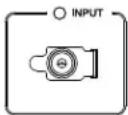
- Verify that the charging cables are plugged into a suitable power source.
- Unplug the charging cable from the INPUT charging port and plug it back into the power station.
- If using the AC charging cable, check that the AC power cord is properly connected to the AC power brick.
- If using the 12V charging cable, verify that the 12V source can support 100W output power delivery.
- If problem persists, try a different power source.
The green input light is on while charging but the LCD display shows 0W input power
- Check to see what the current charge percentage is of the power station. At 100% charge the input power will drop to 0W when the power station is fully charged.
- At full charge, the input light will show a solid green light.
Power inverter shutting down while in use.
- If the AC power load from the inverter exceeds 200W for an extended period, the inverter will shut down to prevent itself from being damaged. Should this occur, verify what devices you have connected to the power station and if they exceed the 200W limit of the inverter.
- Additionally, if the internal temperature of the power station is too high, the inverter will also shut off to prevent any damage from occurring. If that occurs the LCD display will show a temperature icon.
Low input charging power when using solar panels
- Solar charging times will vary depending on a couple of factors. Both the type and size of solar panels being used as well as the current weather conditions will affect how fast your power station can charge using solar power.
- For best results, make sure to properly align your solar panels towards the sun based on the current time of day.
- The most optimal charging time for solar is around 10am – 2pm.
Limited 2-Year Warranty
Warranty Terms:
Cobra warrants your product against all defects in materials and workmanship for a period of two (2) years from the date of original purchase.
Cobra, at our sole discretion, will repair or replace your product (with the same or comparable product) free of charge.
Cobra will not pay shipping charges that you incur for sending your product to us. Products received COD will be refused.
To make a warranty claim, we will require proof or purchase in the form of an invoice or receipt. No proof of purchase is required for factory direct purchases.
Warranty Exclusions: Warranty does not apply to your product under any of the following conditions: 1. The serial number has been removed or modified. 2. Your product has been subjected to misuse or damage (including water damage, physical abuse, and/or improper installation). 3. Your product has been modified in any way. 4. Your receipt or proof-of-purchase is from a non-authorized dealer or internet auction site including E-bay, U-bid, or other non-authorized resellers.
LIMITATION OF WARRANTY: EXCEPT AS EXPRESSLY PROVIDED HEREIN, YOU ARE ACQUIRING THE PRODUCT "AS IS" AND "WHERE IS", WITHOUT REPRESENTATION OR WARRANTY. COBRA SPECIFICALLY DISCLAIMS ANY REPRESENTATION OR WARRANTY INCLUDING, BUT NOT LIMITED TO THOSE CONCERNING THE MERCHANTABILITY AND SUITABILITY OF THE PRODUCT FOR A PARTICULAR PURPOSE. COBRA SHALL NOT BE LIABLE FOR CONSEQUENTIAL, SPECIAL OR INCIDENTAL DAMAGES INCLUDING, WITHOUT LIMITATION, DAMAGES ARISING OUT OF THE USE, MISUSE OR MOUNTING OF THE PRODUCT.
The above limitations or exclusions shall be limited to the extent they violate the laws of any particular state. Cobra is not responsible for products lost in shipment between the owner and our service center.
General Warranty Information
Each product we manufacture is covered by our factory warranty. While each product may have unique components and policy, the general guideline below will apply to most Cobra products.
All Cobra products purchased factory-direct or from our Authorized Resellers will come with a full one to three (1-3) year warranty from the date of the original retail purchase (see policy statement above for full warranty details and exclusions).
Standard accessories packaged with each model will have a one-year factory warranty.
Accessory items have a one-year factory warranty.
Shipping to our facility is not covered in our warranty. Return shipping is included within the US.
This warranty is non-transferrable.
For the sake of clarity, ‘repair or replace the Product or its defective part’ does not include removal or installation work, costs or expenses which include but are not limited to labor costs or expenses.
Cobra will not be responsible for lost packages.
Product Service
If you have any questions about operation or installing your new Cobra product, PLEASE CONTACT COBRA FIRST...do not return this product to any retail store.
The contact information for Cobra will vary depending on the country in which you purchased and utilize the product. For the latest contact information, please go to www.cobra.com/support
For products purchased in the U.S.A. you may call 800-543-1608.
For products purchased in the U.S.A., if your product should require factory service, please please go to www.cobra.com/support and follow the instructions for returning your product to the Cobra Factory Service Department for service.
Should there be any problems with this product or further information is needed on its features please visit www.cobra.com for support, frequently asked questions, Declarations of Conformity, and full manuals.
For Products Purchased Outside the U.S.A. or Canada
Please contact your local dealer for product service information.
This device complies with part 15 of the FCC Rules. Operation is subject to the following two conditions: 1) This device may not cause harmful interference, and 2) this device must accept any interference received, including interference that may cause undesired operation.
For Products Used in Canada
Industry Canada Notice
This device complies with Industry Canada license-exempt RSS standard(s). Operation is subject to the following two conditions:
1 this device may not cause interference, and
2 this device must accept any interference, including interference that may cause undesired operation of the device.
You can find quality Cobra products and accessories at your local Cobra dealer, or in the U.S.A., you can order directly from Cobra.
Please visit www.cobra.com
Web orders will normally ship the next business day if received by us before 2:00 PM Eastern Time. Orders do not ship on weekends or holidays. All standard deliveries are Monday-Friday only. Saturday delivery can be requested in certain areas of the country for an additional shipping fee by calling Sales at 800-543-1608.
Certain orders may require additional days to process prior to shipping. Holidays may also impact processing and shipping time frame. Occasionally, items may not ship due to inventory depletion. If you need your item to be expedited, we recommend calling Sales at 800-543-1608.
Order Acceptance
Once your order has been accepted and processed, you will receive an email that will include the shipping carrier and tracking information.
Shipping and Delivery
Free ground shipping is included to 48 states. Hawaii, Alaska and Puerto Rico ship based on assessed fee at checkout.
We require a physical address for shipping. Sorry, no P.O. Boxes or APO/FPO addresses. Please select 2-day or next day air for shipments to Hawaii or Alaska. Shipping charges are calculated on a per-product basis. Please make note of the shipping charges associated with each item.
** For safety reasons, we cannot ship power packs/Jumpacks via air delivery methods. These items are available to ship via ground service only.
**For your protection, some orders may require a signature for delivery.
Cobra® and the snake design are registered trademarks of Cobra Electronics Corporation, USA.
Cobra Electronics Corporation™ is a trademark of Cobra Electronics Corporation, USA.
Other trademarks and trade names are those of their respective owners.
- CHARGE FIRST!
- Table of Contents
- IMPORTANT SAFETY INSTRUCTIONS
- Precautions when working with the Power Station:
- Caution: Operating temperature
- Caution and Warning Statements
- General Precautions
- Power Station 200W Features
- Re-Charging Your Power Station
- Different Ways To Recharge Your Power Station
- Connecting Devices to the Power Station
- Using the Power Inverter
- Using the Power Station's Flashlights
- LED Flashlight
- Area Light
- Specifications
- Frequently Asked Questions
- What type of battery is in the Cobra Power Station 200W?:
- How do I know if my power station is charged?
- Can I charge my power station while also powering devices?
- How many devices can be connected to the power station at once?
- Frequently Asked Questions continued
- How do I turn the fan off?
- How do I know if my 110V device will work with my power station?
- Can I run sensitive electronics and medical equipment with this device?
- Can this power station be used outdoors?
- Troubleshooting
- USB ports are not properly charging when plugged in
- 12V socket is not properly charging when plugged in
- No green input light after plugging in either the 12V or AC charging cables
- The green input light is on while charging but the LCD display shows 0W input power
- Power inverter shutting down while in use.
- Low input charging power when using solar panels
- Limited 2-Year Warranty
- Warranty Terms:
- General Warranty Information
- Product Service
- For Products Purchased Outside the U.S.A. or Canada
- For Products Used in Canada
- Please visit www.cobra.com
- Order Acceptance
- Shipping and Delivery
Brand : COBRA
Model : Power Station 200W
Category : Battery charger