
VDB720P - Doorbell Mercury - Free user manual and instructions
Find the device manual for free VDB720P Mercury in PDF.


| Product Type | Door Chime |
| Brand | Mercury |
| Model | VDB720P |
| Power Source | Battery (2 x AA, not included) or plug-in adapter (DC 5V) |
| Dimensions (Receiver) | Approx. 8.5 x 6.0 x 2.5 cm |
| Weight (Receiver) | Approx. 100 g |
| Wireless Range | Up to 100 meters (open area) |
| Number of Melodies | 36 selectable chimes |
| Volume Levels | 4 adjustable levels (including mute) |
| LED Indicator | Flashing light on press |
| Operating Frequency | 433 MHz |
| Material | ABS plastic |
| Mounting | Wall mount with screws or adhesive tape |
| Water Resistance | Push button: IP44 (splash-proof) |
| Battery Life | Approx. 12 months with normal use |
| Compatibility | Up to 2 receivers per button |
| Included Accessories | 1 push button, 1 receiver, mounting hardware |
| Cleaning Instructions | Wipe with a soft, dry cloth. Do not use water or solvents. |
| Safety Notes | Low voltage device. Keep away from children. Do not disassemble. |
| Spare Parts Availability | Push button and receiver available separately |
| Warranty | 1 year limited warranty |
Frequently Asked Questions - VDB720P Mercury
User questions about VDB720P Mercury
0 question about this device. Answer the ones you know or ask your own.
Ask a new question about this device
Download the instructions for your Doorbell in PDF format for free! Find your manual VDB720P - Mercury and take your electronic device back in hand. On this page are published all the documents necessary for the use of your device. VDB720P by Mercury.
USER MANUAL VDB720P Mercury
natural_image
Two white electronic devices with circular buttons and perforated bases, no visible text or symbols2.4Ghz Wireless Digital Intercom
Order ref: 350.005UK
User Manual
A stylish and attractive wireless digital intercom that allows you to talk to your visitors before opening the door. No wires are required between the outdoor and indoor units making this system very simple to install. Both units are powered by a rechargeable battery with the indoor unit doubling as a battery charger when connected to a suitable USB power source using the charging lead provided. Its also possible to connect the outdoor unit to an electronic door lock, utilising the door release button on the indoor unit. Ideal for use in domestic and business applications and helpful for the elderly or less mobile.
Features:
- Simple wire free installation and setup
- Up to 500m transmission range
• 8 Ringtones and adjustable ring volume
• Recharge the batteries using the indoor unit and USB charging lead (supplied) - Weatherproof outdoor unit can be connected to an electronic lock (not supplied) when connected to mains power
• Outdoor unit can also be mains powered using additional 12V PSU 350.006UK (not supplied)
• LED indicators for low battery warning and battery charging status
In the box:
- Outdoor unit (IP44)
- Indoor unit
- Rain shade for outdoor unit
• 2pcs DC3.7V Rechargeable battery
• USB charging lead (1m)
• Electronic lock connecting wire
- Fixing kit
- User guide
Installation:
Outdoor unit
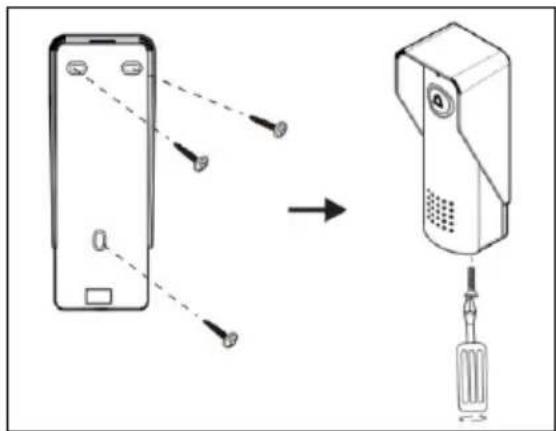
- Fasten the rain shade on the wall around 1.4\~1.7m above the ground using the screws and plugs provided in the fixing kit.
- Open the battery cover using a small Philips screwdriver and insert one of the DC3.7V rechargeable batteries ensuring the correct polarity.
- Replace the cover and screw then slot the unit into the rain shade.
- Secure the unit from underneath using the fixing screw provided in the fixing kit.
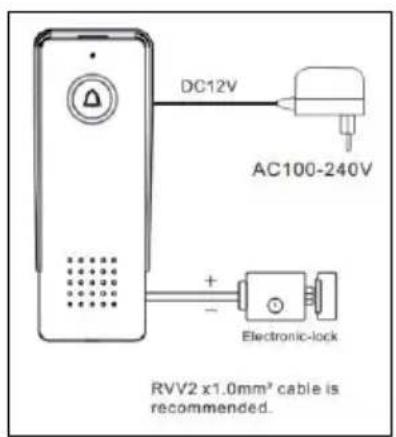
- Its also possible to power the outdoor unit using an additional DC12V mains power supply (350.006UK not
supplied). If mains installation is required, please use a qualified electrician and ensure the rechargeable battery is removed before installation.
Indoor unit
-
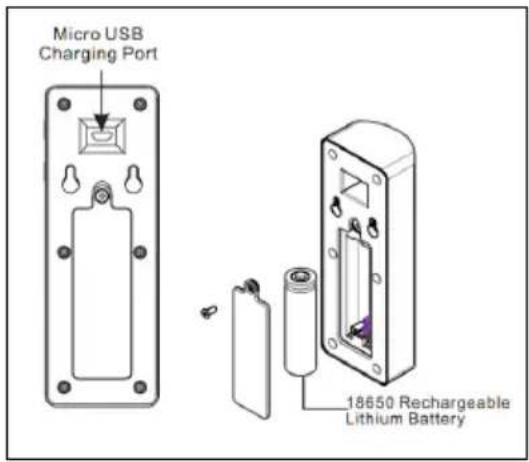
The indoor unit can simply be stood on a suitable flat surface or hung on a wall using the fixing screws provided and keyhole slots in the back of the unit.
-
Please ensure the unit is kept in a dry environment away from direct sunlight and any wireless items that may interfere with the signal such as cordless phones, indoor aerials or WiFi hubs and routers.
-
Open the battery cover using a small Philips screwdriver and insert one of the DC3.7V rechargeable batteries ensuring the correct polarity.
-
Replace the cover and screw to secure the unit.
-
There is also a USB charging port on the top of the indoor unit which can be used to charge up the batteries used in both units.
-
Simply insert the USB charging cable provided into the charging port and connect the cable to a suitable USB power source.
-
During charging the unlock button will flash, then go out once the battery is fully charged.
Electronic door lock
-
Its possible to connect the outdoor unit to an additional electronic door lock (not supplied) using the connecting wire provided.
-
This is only possible if the outdoor unit is connected to mains power using the additional 12V power supply mentioned above.
-
It is recommended to use RVV2 x 1.0mm ^4 cable to connect to the electronic door lock.
-
Once the door lock is connected correctly the unlock button will also be activated on the indoor unit.
NOTE: it is recommended that all wiring connections for both the electronic door lock and 12V DC power supply are undertaken by a qualified electrician.
Operation:
-
When the call button is pressed on the outdoor unit, the indoor unit chime will sound and the LED on the talk button will flash.
-
Press the talk button to speak to your visitor and press again to end the conversation.
-
If an electronic door lock is connected you can also press the unlock button to admit your visitor entry to your property.
-
It is possible to select a different chime on the indoor unit. Simply scroll through the 8 available melodies by pressing the chime selection button repeatedly.
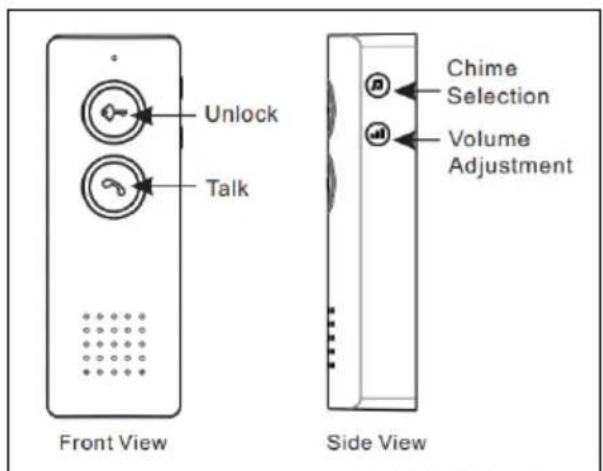
- To adjust the chime volume press the volume adjustment button repeatedly to select either high, medium or low volume setting accordingly.
System alerts:
-
The LED on the outdoor unit call button flashing slowly indicates the battery level is low and it should be recharged as soon as possible.
-
The LED on the indoor unit unlock button flashing slowly indicates the battery level is low and it should be recharged as soon as possible.
Specification:
| Frequency | 426~440 MHz |
| Range | Up to 500m (open area) |
| IP Rating | IP44 (External unit only) |
| Power supply: indoor unit | 18650 Lithium rechargeable battery (DC3.7V) |
| Power supply: outdoor unit | 18650 Lithium rechargeable battery (DC3.7V) or DC12V 1~2A Mains adaptor (not supplied) |
| Dimensions: indoor unit | 154 x 54 x 36mm |
| Dimensions: outdoor unit | 158 x 62 x 50.5mm |
| Weight: indoor unit | 165g (including battery) |
| Weight: outdoor unit | 220g (including rain shade & battery) |
Warning:
- For reasons of electrical safety, this device must never be immersed in water, exposed to damp conditions or excessive force.
- Do not use this device if you find that it is damaged in any way.
- Do not attempt to repair this device or take apart under any circumstances, as this will invalidate your warranty.

This product is classed as Electrical or Electronic equipment and should not be disposed with other household or commercial waste at the end of its useful life. The goods must be disposed of according to your local council guidelines.
Hereby, AVSL Group Ltd. declares that the radio equipment type: 350.005UK complies with Directive 2014/53/EU The full text of the EU declaration of conformity for 350.005UK is available at the following internet address: http://www.avsl.com/assets/exportdoc/3/5/350005UK%20CE.pdf
Errors and omissions excepted.
Copyright© 2021 AVSL Group Ltd, Unit 2 Bridgewater Park, Taylor Road, Trafford Park, Manchester. M41 7JQ.
AVSL (Europe) Ltd, Unit 3D North Point House, North Point Bus. Park, New Mallow Road, Cork, Ireland.
Brand : Mercury
Model : VDB720P
Category : Doorbell