PMP23SL - Megaphone Pyle - Free user manual and instructions
Find the device manual for free PMP23SL Pyle in PDF.


| Product Type | Portable Megaphone |
| Brand | Pyle |
| Model | PMP23SL |
| Power Output | 30 Watts RMS |
| Range | Up to 800 yards |
| Power Source | 8 x C batteries (not included) |
| Dimensions (L x W x H) | 10.5 x 8.5 x 4.5 inches |
| Weight | 2.5 lbs (without batteries) |
| Material | High-impact ABS plastic |
| Microphone | Built-in dynamic microphone with push-to-talk |
| Sound Features | Volume control, siren mode, voice projection |
| Protection | Rugged construction, suitable for outdoor use |
| Cleaning Instructions | Wipe with a dry cloth; do not use water or solvents |
| Safety Warning | Do not point directly at ears to avoid hearing damage |
| Battery Replacement | User-replaceable; open compartment at the bottom |
| Spare Parts Availability | Battery compartment cover, screws available from Pyle |
| Repairability | Designed for basic user maintenance; professional repair for electronics |
| General Information | Suitable for crowd control, coaching, emergency announcements |
Frequently Asked Questions - PMP23SL Pyle
User questions about PMP23SL Pyle
0 question about this device. Answer the ones you know or ask your own.
Ask a new question about this device
Download the instructions for your Megaphone in PDF format for free! Find your manual PMP23SL - Pyle and take your electronic device back in hand. On this page are published all the documents necessary for the use of your device. PMP23SL by Pyle.
USER MANUAL PMP23SL Pyle
natural_image
Decorative line art with geometric star-like patterns (no text or symbols)


PYLE
PyleUSA.com

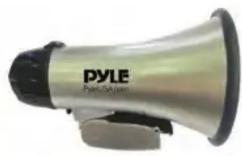
Compact Megaphone Speaker with Siren Alarm Mode
This user manual contains important information for safe operation and optimal megaphone performance.
Please carefully read and follow safety notes and instructions. Save this manual for future reference.
Make sure that it is available to all persons using this device.
SAFETY
This megaphone is intended to be used only as described in this user manual. Any other use or use under other operating conditions is considered to be improper and may result in personal injury or device damage. Please use the megaphone as described and under supervision if used by children or minors.
- Ensure that plastic bags, packaging, etc.
- Never let children unattended use electrical devices.
- Use proper polarity is observed when inserting batteries. Incorrectly inserted batteries may cause damage and risk of fire.
- Leaking batteries can cause permanent damage to the device.
- Remove batteries if the megaphone will not be used for long periods of time.
OPERATING INSTRUCTIONS
Voice Mode:
• (1) Slide the switch on the rear of the megaphone to voice
• (2) Adjust the desired volume level using the rear of the megaphone
Siren Mode:
• (1) Slide the switch on the rear of the megaphone to siren
• (2) Adjust the desired volume level using the rear slider switch
BATTERY INSERTION
Press the button located near the back, underside of the megaphone. The button will release the lid to reveal the battery compartment. Please see correct battery direction placement on the top side of the opening battery compartment lid. Insert batteries, close the cover and fasten clip until locked.
NOTE: Make sure the batteries are inserted correctly observing correct polarity.
Features:
- Compact Megaphone Speaker
• (2) Audio Projection Modes: Voice Talking & Siren Alert
• Voice Mode: Amplifies Your Voice as Spoken into the Microphone - Siren Alert Mode: Amplifies an Emergency tone through the Megaphone Speaker
- Battery Operated, Requires (4) x 'C' Batteries, Not Included
- Ergonomic Pistol Grip and Light-Weight Chassis
- Quick Folding Handle for Portability
- Adjustable Volume Control
• Power Saving OFF Switch
• For Indoor/Outdoor Use
Technical Specs:
• Power Output: 20 Watt MAX
• Audio Projection Range: Up to 400+ Yards
- Battery Operated: Requires (4) x 'C' Batteries, Not Included
• Dimensions (D x H): 5.40" x 8.60" -inches
• Weight: 0.96 lbs.

natural_image
Illustration of a laptop with a red checkmark on screen, next to partial text 'V H N W' (no readable document content)VISIT US ONLINE:
Have a question?
Need service or repair?
Want to leave a comment?
PyleUSA.com/ContactUs

Brand : Pyle
Model : PMP23SL
Category : Megaphone