
SOSP-8MOBC - Hi-Fi System GEMINI - Free user manual and instructions
Find the device manual for free SOSP-8MOBC GEMINI in PDF.


| Product Type | Hi-Fi System |
| Brand | Gemini |
| Model | SOSP-8MOBC |
| Dimensions (approx.) | 200 mm x 150 mm x 300 mm |
| Weight (approx.) | 3 kg |
| Power Supply | AC 230V, 50Hz |
| Power Consumption | 40 W |
| Supported Discs | CD, CD-R, CD-RW |
| Radio Bands | FM, AM |
| USB Playback | Yes (MP3) |
| Bluetooth | Yes |
| Speaker System | 2.0 Stereo |
| Remote Control | Included |
| Display | LCD |
| Audio Output | 2 x 20W RMS |
| Headphone Jack | 3.5 mm |
| Cleaning Instructions | Wipe with a soft, dry cloth. Do not use solvents. |
| Safety | Keep away from water and moisture. Do not open the device. |
| Spare Parts & Repairability | Contact authorized service center for repairs. |
| Manual Language | English |
Frequently Asked Questions - SOSP-8MOBC GEMINI
User questions about SOSP-8MOBC GEMINI
0 question about this device. Answer the ones you know or ask your own.
Ask a new question about this device
Download the instructions for your Hi-Fi System in PDF format for free! Find your manual SOSP-8MOBC - GEMINI and take your electronic device back in hand. On this page are published all the documents necessary for the use of your device. SOSP-8MOBC by GEMINI.
USER MANUAL SOSP-8MOBC GEMINI
natural_image
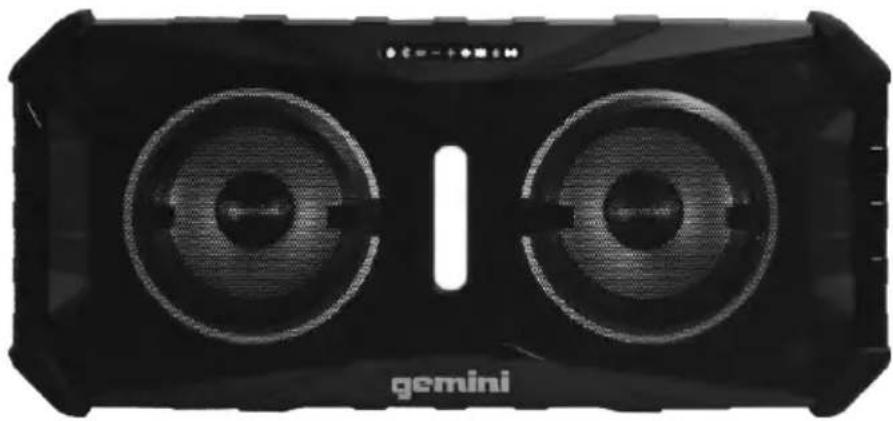
Black gemini-branded electronic device with two dual speakers (no visible text or symbols on body)SOSP-8BLK

1-732-346-0061
| 2 | gemini® SOSP-8 | ||
| This page intentionally left blank | |||
| gemini® SOSP-8 | 3 | ||
| Index | |||
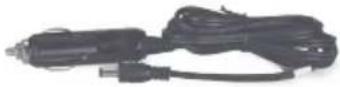
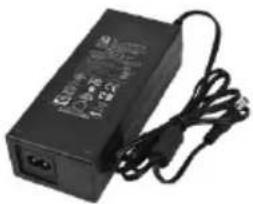
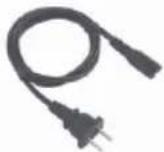
| What's Included 3Warning 4Product Diagram 6Power On 7Bluetooth® Pairing & Link 7Volume Adjust 7Lighting Control 8Voice Command 8Bass Mode 8AUX Input 8Recharge Your Speaker 8Charging External Devices 9Weather Resistance (IP67 Rating) 9Limited Warranty 10Return/Repair 10Legality & Safety 11 | |||
 | |||
 |  |  | |
4
gemini®
SOSP-8
WARNING

This lightning flash with arrowhead symbol, within an equilateral triangle, is intended to alert the user to the presence of uninsulated "dangerous voltage" within the product's enclosure that may be of sufficient magnitude to constitute a risk of electric shock to persons.
CAUTION
RISK OF ELECTRIC SHOCK DO NOT OPEN
Warning: To reduce the risk of electric shock, do not remove cover (or back) no user-serviceable parts inside. Refer servicing to qualified service personnel.

The exclamation point within an equilateral triangle is intended to alert the user to the presence of important operating and maintenance(servicing) instructions in the literature accompanying the appliance.
IMPORTANT SAFETY INSTRUCTIONS
1) Read these instructions.
2) Keep these instructions.
3) Heed all warnings.
4) Follow all instructions.
5) Clean only with dry cloth.
6) Do not block any ventilation openings. Install in accordance with the manufacturer's instructions.
7) Do not install near any heat sources such as radiators, heat registers, stoves, or other apparatus (including amplifiers) that produce heat.
8) Do not defeat the safety purpose of the polarized or grounding-type plug. A polarized plug has two blades with one wider than the other. A grounding type plug has two blades and a third grounding prong. The wide blade or the third prong are provided for your safety. If the provided plug does not fit into your outlet, consult an electrician for replacement of the obsolete outlet.
9) Protect the power cord from being walked on or pinched particularly at plugs, convenience receptacles, and the point where they exit from the apparatus.
10) Only use attachments/accessories specified by the manufacturer.
11) Use only with the cart, stand, tripod, bracket, or table specified by the manufacturer, or sold with the apparatus. When a cart is used, use caution when moving the cart/apparatus combination to avoid injury from tip-over.

gemini®
SOSP-8
5
12) Unplug this apparatus during lightning storms or when unused for long periods of time.
13) Refer all servicing to qualified service personnel. Servicing is required when the apparatus has been damaged in any way, such as power-supply cord or plug is damaged, liquid has been spilled or objects have fallen into the apparatus, the apparatus has been exposed to rain or moisture, does not operate normally, or has been dropped.
14) Grounding or Polarization – This product may be equipped with a polarized alternating-current line plug (a plug having one blade wider than the other). This plug will fit into the power outlet only one way. This is a safety feature. If you are unable to insert the plug fully into the outlet, try reversing the plug. If the plug should still fail to fit, contact your electrician to replace your obsolete outlet. Do not defeat the safety purpose of the polarized plug.
15) The MAINS plug or an appliance coupler is used as the disconnect device, the disconnect device shall remain readily operable
16) CLASS II apparatus with double insulation, and no protective earth provided.
17) "USE OF ANY CONTROLS, ADJUSTMENTS, OR PROCEDURES OTHER THAN THOSE SPECIFIED HEREIN MAY RESULT IN HAZARDOUS RADIATION EXPOSURE."
18) Invisible laser radiation when open. DO NOT STARE INTO BEAM.
19) To reduce the risk of electrical shock, do not open the unit. There are no user replaceable parts inside. Please refer servicing to a qualified Altec Lansing service technician. Do not attempt to return this equipment to your dealer.
20) Do not open the device or attempt to disassemble the internal parts or modify them in any way. The device contains no user-serviceable parts. If it should appear to be malfunctioning, discontinue use immediately and have it inspected by qualified Altec Lansing service personnel.
21) Replacement Parts: When replacement parts are required, be sure the service technician has used replacement parts specified by the manufacturer or have the same characteristics as the original part. Unauthorized substitutions may result in fire, electrical shock, or other hazards.
Responsible Party Name:
Innovative Concepts & Designs

Company address:
458 Florida Grove Rd.
Perth Amboy,NJ 08861,USA
FCC ID: 2AE6GSOSP-8
FCC Compliance Statement
This device complies with Part 15 of the FCC Rules. The operation is subject to the following two conditions:
(1) This device may not cause harmful interference, and
(2) This device must accept any interference received, including interference that may cause undesired operation.
Note: This equipment has been tested and found to comply with the limits for a class B digital device, pursuant to Part 15 of the FCC Rules. These equipment generates uses and can radiate radio frequency energy and if not installed and used in accordance with the instructions, may cause harmful interference to radio communications. However, there is no guarantee that interference will not occur in a particular installation. If this equipment does cause interference to radio or television reception, which can be determined by turning the equipment off and then on, the user is encouraged to try to correct the interference by one or more of the following measures:
• Reorient or relocate the receiving antenna.
- Increase the separation between the equipment and receiver.
- Connect the equipment to a different outlet so that the equipment and receiver are on different branch circuits.
- Consult the dealer or an experienced radio/TV technician for help.
6
gemini®
SOSP-8
Function keys
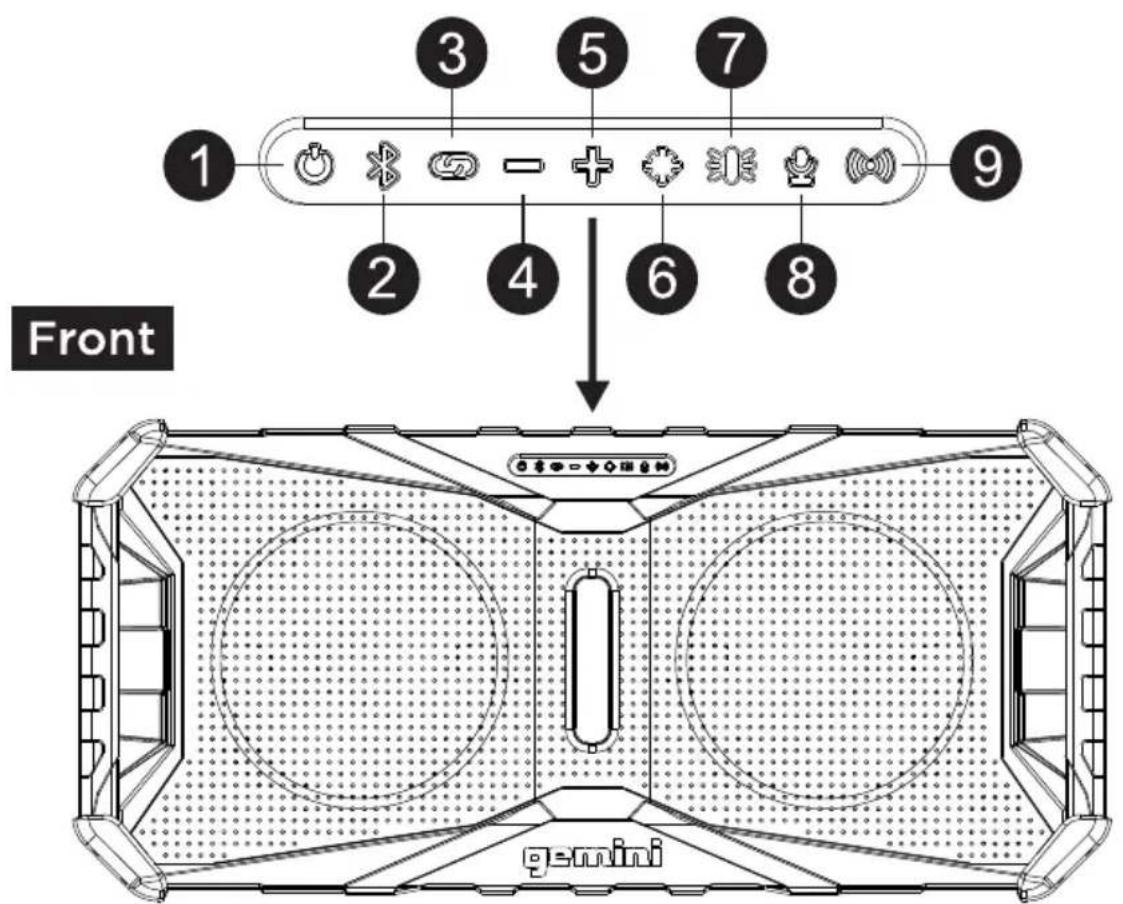
Back
 | SOSP-8 | 7 |
 Press the button 1, it will turn on and the button will light up, Press the button 1, it will turn on and the button will light up, Be sure to charge the battery fully before first use. Be sure to charge the battery fully before first use. This allows you to pair a portable device to the SOSP8 to play your favorite streaming music. This allows you to pair a portable device to the SOSP8 to play your favorite streaming music. To pair with Bluetooth, open Bluetooth settings on your mobile device and look in the device list for “GEMINI SOSP8”, select it and complete the pairing process.Once pairing is complete, the Bluetooth button will light solid blue, and you will be able to enjoy streaming music from your mobile device. Pressing and holding the BT button for 2 seconds will drop the current connection and into the unpaired state, long press 5 seconds to turnoff the Bluetooth. To pair with Bluetooth, open Bluetooth settings on your mobile device and look in the device list for “GEMINI SOSP8”, select it and complete the pairing process.Once pairing is complete, the Bluetooth button will light solid blue, and you will be able to enjoy streaming music from your mobile device. Pressing and holding the BT button for 2 seconds will drop the current connection and into the unpaired state, long press 5 seconds to turnoff the Bluetooth.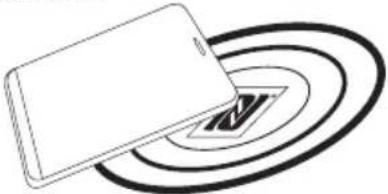 If your phone is NFC compatible, press the Bluetooth button and tap your phone against the NFC logo on the SOSP8 to pair (NFC must be turned on in your portable device settings). If your phone is NFC compatible, press the Bluetooth button and tap your phone against the NFC logo on the SOSP8 to pair (NFC must be turned on in your portable device settings). | Note: The N-Mark is a trademark or registered trademark of NFC Forum, Inc. in the United States and in other countries.3The SOSP-8 has the ability to link wirelessly with another SOSP-8 to create a stereo pair.The first step is to have a phone connected to a speaker (as a host)To connect, you need to press the Link key of another speaker (the unconnected device work as a slave)When the 2 speakers have paired, the Link button will light solid. Any music sent to the “master” speaker will play on both speakers. Long press the Link key on either speaker to disconnect the interconnectionNote: Many environmental factors can affect the range of Bluetooth devices. To achieve the best performance possible, place your product in the middle of the room and make sure it’s not blocked by walls, furniture, or other obstructions.4Short or long presses the button can lower the volume.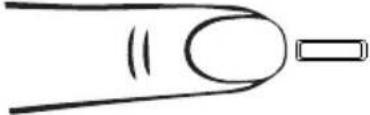 5Short or long presses the button can increase the volume. 5Short or long presses the button can increase the volume. | |
| 8 | gemini® | SOSP-8 |
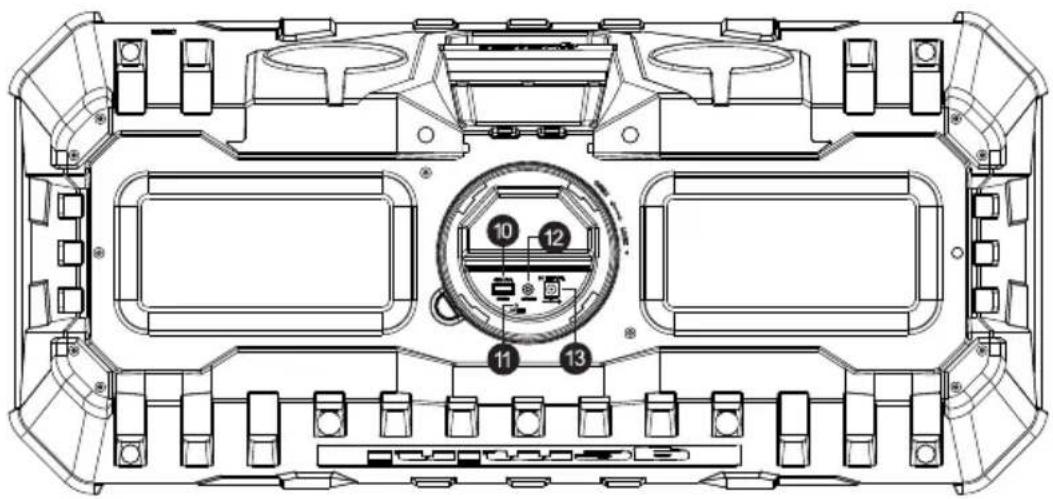
6The SOSP-8 has lights built into the front of the speakers. Press the "6" button to switch between the 5 lighting FX modes [FLASH | PARTY FX | COLOR STROBE | COLOR FADE | OFF]Color SelectLong press' - 'and '+' at the same time to make both keys bright.Then press' - 'or '+' when both keys are bright to select the color Press the "6" button to switch between the 5 lighting FX modes [FLASH | PARTY FX | COLOR STROBE | COLOR FADE | OFF]Color SelectLong press' - 'and '+' at the same time to make both keys bright.Then press' - 'or '+' when both keys are bright to select the color In the center of the SOSP-8 is a built-in strobe light. In the center of the SOSP-8 is a built-in strobe light. Press the '7' button to switch between the 3 strobe FX modes [ON | STROBE | OFF] Press the '7' button to switch between the 3 strobe FX modes [ON | STROBE | OFF] Voice ControlA short press opens a smart voice assistant on a device, such as Apple's Siri, to play music via voice control. Voice ControlA short press opens a smart voice assistant on a device, such as Apple's Siri, to play music via voice control. | 9Bass MODEShort press the "9" button to enhance the bass by adding more power.[IMAGE]AUX InputThe AUX input on the SOSP-8 allows you to connect a wired external source.[IMAGE]When a device is connected to the AUX IN jack, you will not be able to hear the Bluetooth source.Note: The AUX IN is located behind the waterproof cover on the back of the SOSP-8.Recharge Your SpeakerOn DC Power:The SOSP-8 is capable of operating and charging from a DC power source, like your car's battery.The power supply should provide 15VDC @ up to 5A (maximum).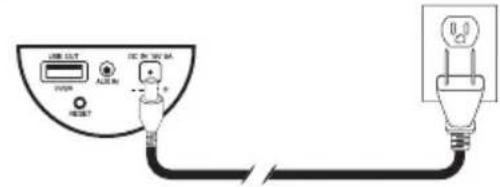 | |
Charging External Devices
•The SOSP-8 can charge your phone or other portable device.
- Using an approved USB charging cable for your device, connect to the USB type A port on the back of the SOSP-8 Connect the smaller end to your portable device.
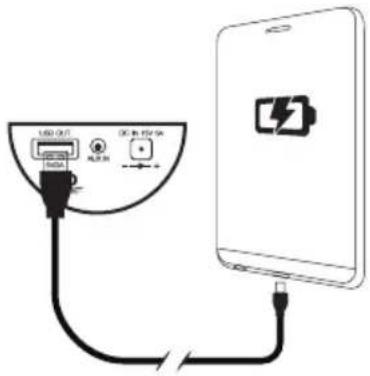
- Once connected, you should see the charging indicator activate on your portable device.
Note: Charging and power ports are located behind the waterproof cover on the back of the SOSP-8.
Weather Resistance (IP67 Rating)
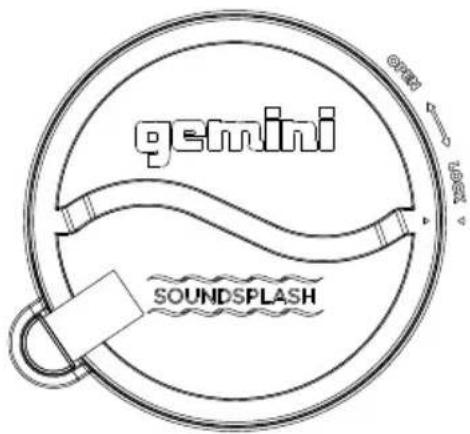
- The SOSP-8 is IP67 rated, meaning it is dust resistant and capable of being submerged for up to 30 minutes at a depth of 1 meter. However, that doesn't mean your new speaker is indestructible. Other factors – like the corrosiveness of the liquid due to it containing salt or chlorine – can affect the overall integrity of the enclosure. If your SOSP-8 is exposed to any substance other than clean water, it's a good idea to clean the unit with a clean, soft cloth. Give the unit time to dry completely before connecting it back to mains power.
- Note: The unit is only protected when the rear plastic port cover is properly in place, if not, the unit is not sealed from damage and care should be taken to protect it from any Exposure to liquids or dust.
Warranty and Repair
All Gemini products are designed and manufactured to the highest standards in the industry. With proper care and maintenance, your product will provide years of reliable service.
Limited Warranty
a. GEMINI guarantees its products to be free from defects in materials and workmanship for one (1) year from the original purchase date.
b. This limited warranty does not cover damage or failure caused by abuse, misuse, abnormal use, faulty installation, improper maintenance or any repairs other than those provided by an authorized INNOVATIVE CONCEPTS AND DESIGN LLC.
c. There are no obligations of liability on the part of GEMINI for consequential damages arising out of or in connection with the use or performance of the product or other indirect damages with respect to loss of property, revenues, of profit, or costs of removal, installation, or reinstallation. All implied warranties for GEMINI, including implied warranties for fitness, are limited in duration to one (1) year from the original date of purchase, unless otherwise mandated by local statutes.
Return/Repair
a. Please call our helpful Customer Service Representatives at 732-346-0061, and they will be happy to give you a Return Authorization Number (RMA) and the address of an authorized service center closest to you.
b. After receiving an RMA, include a copy of the original sales receipt, with defective product and a description of the defect. Send by insured freight to: Gemini and use the address provided by your customer service representative. Your RMA must be written on the outside of the package, or processing will be delayed indefinitely!
c. Service covered under warranty will be paid for by Gemini and returned to you. For non-warrantied products, Gemini will repair your unit after payment is received. Repair charges do not include return freight. Freight charges will be added to the repair charges.
d. On warranty service, you pay for shipping to Gemini, we pay for return shipping within the continental United States. Alaska, Hawaii, Puerto Rico, Canada, Bahamas, and the Virgin Islands will be charged for freight.
c. Please allow 2-3 weeks for return of your product. Under normal circumstances your product will spend no more than 10 working days at Gemini. We are not responsible for shipping times.
LEGALITY & SAFETY
The device is not intended for use by people (including children) with reduced physical, sensory or mental capacity. People who have not read the manual, unless they have received an explanation by someone responsible for their safety, should not use this unit. Children should be monitored to ensure that they do not play with the device. The device should always be readily accessible. The device should not be exposed to water. No objects filled with liquids, such as vases, shall be placed on the device. Always leave a minimum distance of 10 cm around the unit to ensure sufficient ventilation. Open flame sources, such as candles, should not be placed on top of the device. The device is intended for use only in a temperate climate. At full volume, prolonged listening may damage your hearing and cause temporary or permanent deafness, hearing drone, tinnitus, or hyperacusis. Listening at high volume is not recommended. One hour per day is not recommend either. Switch the device off where the use of the device is not allowed or where there is a risk of causing interference or danger - for examples: on an aircraft, or near medical equipment, fuel, chemicals or blasting sites. Check the current laws and regulations regarding the use of this device in the areas where you drive. Do not handle the device when driving. Concentrate fully on driving. All wireless devices are susceptible to interference which may affect their performance. All our devices conform to international/national standards and regulations, and we aim to limit user exposure to electromagnetic fields. These standards and regulations were adopted after the completion of extensive scientific research. This research established no link between the use of the mobile headset and any adverse effects on health if the device is used in accordance with standard practices. Only qualified people are authorized to install or repair this product. Only use batteries, chargers and other accessories which are compatible with this equipment. Do not connect incompatible products. This equipment is not waterproof. Keep it dry. Keep your device in a safe place, out of the reach of young children. The device contains small parts which may present a choking hazard to kids.
| 12 | gemini®SOSP-8 |
458 Florida Grove Rd.
gemini®
SOSP-8
1
natural_image
Simple line drawing of a finger pressing a button with a power symbol (no text or labels)natural_image
Simple line drawing of a finger with a triangular connector (no text or symbols)natural_image
Diagram of a rectangular object partially submerged in concentric circular patterns, with no visible text or symbols.natural_image
Simple line drawing of a finger with a circular connector and spiral pattern (no text or symbols)natural_image
Simple line drawing of a finger with a circular body and a rectangular end, no text or symbols present.18
gemini®
SOSP-8


natural_image
Simple line drawing of a finger pointing to a gear-like symbol (no text or labels)natural_image
Simple line drawing of a finger pointing to a small object with a handle (no text or symbols)natural_image
Simple line drawing of a finger with a circular connector and a triangular head (no text or symbols)Entrada auxiliar
If you experience problems with this unit, call 732-346-0061 for Gemini customer service. Do not attempt to return this equipment to your dealer.
Parts of the design of this product may be protected by worldwide patents. Information in this manual is subject to change without notice and does not represent a commitment on the part of the vendor. Gemini shall not be liable for any loss or damage whatsoever arising from the use of information or any error contained in this manual. No part of this manual may be reproduced, stored in a retrieval system or transmitted, in any form or by any means, electronic, recommended that all maintenance and service on this product is performed by Gemini or its authorized agents. Gemini will not accept liability for loss or damage caused by maintenance or repair performed by unauthorized personnel.
WWW.GEMINISOUND.COM
REV 2020-12/19
Brand : GEMINI
Model : SOSP-8MOBC
Category : Hi-Fi System