
Sat-Go - Television DirecTV - Free user manual and instructions
Find the device manual for free Sat-Go DirecTV in PDF.


| Product Type | Portable Satellite TV |
| Brand | DirecTV |
| Model | Sat-Go |
| Screen Size | 7 inches |
| Display Resolution | 480 x 234 pixels |
| Tuner Type | DirecTV satellite receiver |
| Battery Type | Rechargeable lithium-ion |
| Battery Life | Up to 3 hours |
| Power Input | AC adapter (100-240V, 50/60Hz) |
| Inputs | AV input, RF input |
| Outputs | Headphone jack |
| Weight | Approximately 2.3 kg (5 lbs) |
| Dimensions (H x W x D) | 20.3 x 30.5 x 5.1 cm (8 x 12 x 2 inches) |
| Power Consumption | 15 W typical |
| Operating Temperature | 0°C to 40°C (32°F to 104°F) |
| Storage Temperature | -20°C to 60°C (-4°F to 140°F) |
| Warranty | 1 year limited |
| Included Accessories | AC adapter, car charger, remote control, built-in antenna |
| Cleaning Instructions | Wipe with a dry, soft cloth. Do not use liquid cleaners. |
| Safety Warnings | Do not expose to moisture or extreme temperatures. Use only specified charger. |
| Spare Parts Availability | Remote control and AC adapter available separately. |
| Repairability | Not user-serviceable. Contact DirecTV support for repairs. |
Frequently Asked Questions - Sat-Go DirecTV
User questions about Sat-Go DirecTV
0 question about this device. Answer the ones you know or ask your own.
Ask a new question about this device
Download the instructions for your Television in PDF format for free! Find your manual Sat-Go - DirecTV and take your electronic device back in hand. On this page are published all the documents necessary for the use of your device. Sat-Go by DirecTV.
USER MANUAL Sat-Go DirecTV
natural_image
Abstract black curved shape on a light gray background (no text or symbols)DIRECTV
Owner's Manual
WARNING:
To reduce the risk of fire or electric shock, do not expose this product to rain or moisture. The apparatus shall not be exposed to dripping or splashing and that no objects filled with liquids, such as vases, shall be placed on the apparatus.

CAUTION
RISK OF ELECTRIC SHOCK DO NOT OPEN

CAUTION:
TO REDUCE THE RISK OF ELECTRIC SHOCK, DO NOT REMOVE COVER (OR BACK). NO USER-SERVICEABLE PARTS INSIDE. REFER SERVICING TO QUALIFIED SERVICE PERSONNEL.
IMPORTANT:
Be sure not to place your DIRECTV Sat-Go system near anything WET or HOT!
CAUTION:
There is a danger of explosion if batteries are incorrectly replaced. Replace only with same or equivalent type.
TIP:
We highly recommend plugging the DIRECTV Sat-Go system into a surge protector to prevent damage from fluctuations in your power supply.

natural_image
Black and white icon depicting a person pushing a cart through a wheel, enclosed in a circle (no text or symbols)Safety and Care
Your DIRECTV® Sat-Go system has been designed and manufactured to stringent quality and safety standards. You should, however, be aware of the following important precautions for safe and optimal use of the equipment.
Meaning of symbols printed on the rear panel of the product:
The "bolt of lightning" indicates un-insulated material within your unit may cause an electrical shock. For the safety of everyone in your household, please do not remove product covering.
The “exclamation point” calls attention to features for which you should read the enclosed literature closely to prevent operating and maintenance problems.
Important Safety Instructions
1) Read these instructions.
2) Keep these instructions.
3) Heed all warnings.
4) Follow all instructions.
5) Do not use this apparatus near water.
6) Clean only with dry cloth.
7) Do not block any ventilation openings. Install in accordance with the manufacturer's instructions.
8) Do not install near any heat sources such as radiators, heat registers, stoves, or other apparatus (including amplifiers) that produce heat.
9) Do not defeat the safety purpose of the polarized or grounding-type plug. A polarized plug has two blades with one wider than the other. A grounding type plug has two blades and a third grounding prong. The wide blade or the third prong are provided for your safety. If the provided plug does not fit into your outlet, consult an electrician for replacement of the obsolete outlet.
10) Protect the power cords from being walked on or pinched, particularly at plugs, convenience receptacles, and the point where they exit from the apparatus.
11) Only use attachments/accessories specified by the manufacturer.
12) Use only with the cart, stand, tripod, bracket, or table specified by the manufacturer, or sold with the apparatus. When a cart is used, use caution when moving the cart/ apparatus combination to avoid injury from tip-over.
13) Unplug this apparatus during lightning storms or when unused for long periods of time.
14) Refer all servicing to qualified service personnel. Servicing is required when the apparatus has been damaged in any way, such as power-supply cord or plug is damaged, liquid has been spilled or objects have fallen into the apparatus, the apparatus has been exposed to rain or moisture, does not operate normally, or has been dropped.
15) Do not place anything heavy, wet or magnetic on the TV or the power cord. Never cover the ventilation openings with any material and never touch them with metallic or inflammable objects.
16) Avoid operating the TV in extreme heat, humidity or areas affected by dust. The operating temperature range is 0\~50°C (32\~122°F). The operating humidity range is 20\~90%.
17) Do not use sharp tools such as a pin or a pencil near the TV, as they may scratch the LCD.
18) Do not use a solvent, such as benzene, to clean the TV, as it will damage the LCD surface.
19) The acrylic exterior surface of the TV can become rough or even sharp as it is exposed to wear. Exercise caution when handling the unit to avoid scratches or minor cuts.
- CAUTION: Avoid moisture to reduce the risk of fire or electric shock. The DIRECTV® Sat-Go system should not be used near water (for example, kitchen sink, bathtub, pool, damp basement). Also, never spill liquid on the receiver, and do not place vases or other vessels containing liquid on top of it.
- Ensure proper ventilation — the vent slots on the DIRECTV Sat-Go system must be left uncovered to allow proper airflow to the unit. Blocking the airflow to the unit could impair performance or damage your receiver and other components.
- Do not stack electronic components or other objects on top of the DIRECTV Sat-Go system. Also, do not stack the receiver on top of a "hot component" such as an audio power amplifier.
- Protect your components from power surges by connecting all the components before plugging any power cords into the wall outlet. Use of a surge protector is also recommended.
- Don't overload power outlets or extension cords, which can result in the risk of fire or shock. It's also important to use only the type of power source indicated on the marking label or in this manual.
- Avoid audio hum or interference by inserting all cable plugs firmly into their jacks. Also, place Audio/Video (A/V) cables to the sides of the TV back panel rather than down the middle once connected. Try not to coil any twin-lead cables and keep them away from A/V cables as much as possible.
- Never insert objects of any kind into any openings in the DIRECTV Sat-Go system (other than the DIRECTV access card as detailed in this manual).
- Place it on a flat, hard surface — do not operate the DIRECTV Sat-Go system on a carpet or other padded surface.
• Always unplug your DIRECTV Sat-Go system before moving it.
- Always unplug the DIRECTV Sat-Go system, TV and other equipment before you connect or disconnect any cables.
- CAUTION: Electric Shock — never attempt to disassemble the DIRECTV Sat-Go system yourself; always take it to a qualified service person when repair is required. Opening or removing covers may expose dangerous voltage or other risks, and incorrect reassembly can cause shock when receiver is subsequently used. Attempted self-repair may also void your warranty. Changes or modifications not expressly approved by the party responsible for compliance (by the warranty or by the manufacturer) could void the user's authority to operate the equipment.
- Do not drop your DIRECTV Sat-Go system, or expose to sudden or jarring movements, and always move it with care. Protect the LCD screen from impact.
- Have your DIRECTV Sat-Go system professionally serviced (do not attempt to service it yourself).
- Any changes or modifications in construction of this device which are not expressly approved by the party responsible for compliance could void the user's authority to operate the equipment.
- The DIRECTV Sat-Go system should be stored between -20^ and 60^ (-4°F to 140°F).
For your information:
The identification sticker can be located underneath your DIRECTV Sat-Go system.
The telecommunication network voltage used is the category number 3.
Recommendation to Avoid or Minimize Phosphor Burn-in:
Like all phosphor-based display devices and all TFT LCD Displays, LCDs can be susceptible to phosphor burn under certain circumstances. Certain operating conditions, such as the continuous display of a static image over a prolonged period of time, can result in phosphor burn if proper precautions are not taken. To protect your investment in this LCD, please adhere to the following guidelines and recommendations for minimizing the occurrence of image burn.
- Display a moving image whenever possible.
- Always power down the LCD when you are finished using it.
- Lower the brightness and contrast levels as much as possible without impairing image readability.
Burn-in is not covered by the warranty.
The LCD Panel consists of 3 million cells. It is therefore possible that a few cells might be flawed. We allow a maximum of 6 defective cells for the device to be in proper running order. Please recognize that a device with 6 or fewer defective cells cannot be exchanged or refunded.
IMPORTANT:
This device incorporates an anticopy process technology that is protected by U.S. patents and other intellectual property rights. The anticopy process is licensed for non-commercial, home use only. Reverse engineering or disassembly is prohibited. Unauthorized changes or modifications to this equipment may void the user's authority to operate it.
Notices. 2
Safety and Care. 2
Important Safety Instructions 2
Recommendation to Avoid or Minimize Phosphor Burn-in: 4
Before Using Your DIRECTV® Sat-Go 8
Package Contents 8
Inside the DIRECTV Sat-Go Case 9
TV Display Panel 11
TV Receiver Panel 12
TV Rear Connector Panel. 13
Before Using Your DIRECTV® Sat-Go . . . . . . . . . . . . . . . . . . . . . . . . . . . . . . . . . . . . . . . . . . . . . . . . . . . . . . . . . 14
Remote Control 14
Inserting Battery into the TV . . . . . . . . . . . . . . . . . . . . . . . . . . . . . . . . . . . . . . . . . . . . . . . . . . . . . . . . . . . . . . . . 17
Setting Up Your DIRECTV® Sat-Go. .18
Finding a Suitable Antenna Site. 18
Setting Up the DIRECTV Sat-Go TV and Antenna . . . . . . . . . . . . . . . . . . . . . . . . . . . . . . . . . . . . . . . . . . . . 19
Connecting the DIRECTV Sat-Go TV to the Antenna. . . . . . . . . . . . . . . . . . . . . . . . . . . . . . . . . . . . . . . . . . . . . . 20
Connecting the DIRECTV Sat-Go to Power . . . . . . . . . . . . . . . . . . . . . . . . . . . . . . . . . . . . . . . . . . . . . . . . . . . . . . . . . . . 21
Guided Setup and Activation . . . . . . . . . . . . . . . . . . . . . . . . . . . . . . . . . . . . . . . . . . . . . . . . . . . . . . . . . . . . . . . . 22
After Guided Setup: Getting a Satellite Signal . . . . . . . . . . . . . . . . . . . . . . . . . . . . . . . . . . . . . . . . . . . . . . . . . . . . . . . . . . . . 23
Connecting DIRECTV Sat-Go to a VCR, DVD player or PMP (personal media player) . .27
Setting Up Your DIRECTV® Sat-Go. .29
Connecting your DIRECTV Sat-Go to a Telephone Line (when used in the home). . . . .29
Connecting your DIRECTV Sat-Go system to a second TV or Monitor. . . . . . . . . . . . . . .30
Completing the Connections . . . . . . . . . . . . . . . . . . . . . . . . . . . . . . . . . . . . . . . . . . . . . . . . . . . . . . . . . . . . . . . . 31
Installing the DIRECTV Access Card . . . . . . . . . . . . . . . . . . . . . . . . . . . . . . . . . . . . . . . . . . . . . . . . . . . . . . . . . . . . 32
Guided Setup for DIRECTV® Service . . . . . . . . . . . . . . . . . . . . . . . . . . . . . . . . . . . . . . . . . . . . . . . . . . . . . . . . . . . . 33
Activating Your DIRECTV® Service . . . . . . . . . . . . . . . . . . . . . . . . . . . . . . . . . . . . . . . . . . . . . . . . . . . . . . . . . . . . . . . . . . 34
Basic Operation....35
Watching TV . . . . . . . . . . . . . . . . . . . . . . . . . . . . . . . . . . . . . . . . . . . . . . . . . . . . . . . . . . . . . . . . . 35
The Guide. 36
Autotune 37
Pay Per View . . . . . . . . . . . . . . . . . . . . . . . . . . . . . . . . . . . . . . . . . . . . . . . . . . . . . . . . . . . . . . . . . . 38
Using the TV Menu . . . . . . . . . . . . . . . . . . . . . . . . . . . . . . . . . . . . . . . . . . . . . . . . . . . . . . . . . . . . . . . . . . . . . . 39
Picture. 39
Sound . . . . . . . . . . . . . . . . . . . . . . . . . . . . . . . . . . . . . . . . . . . . . . . . . . . . . . . . . . 40
Settings . . . . . . . . . . . . . . . . . . . . . . . . . . . . . . . . . . . . . . . . . . . . . . . . . . . . . . . . . . . . . . . . . . . . . 41
Parental Controls . . . . . . . . . . . . . . . . . . . . . . . . . . . . . . . . . . . . . . . . . . . . . . . . . . . . . . . . . . . . . . . 42
Using the Menu . . . . . . . . . . . . . . . . . . . . . . . . . . . . . . . . . . . . . . . . . . . . . . . . . . . . . . . . . . . 44
Settings 44
Audio Options....45
Category Sort . . . . . . . . . . . . . . . . . . . . . . . . . . . . . . . . . . . . . . . . . . . . . . . . . . . . . . . . . . . . . . . 45
Pay Per View . . . . . . . . . . . . . . . . . . . . . . . . . . . . . . . . . . . . . . . . . . . . . . . . . . . . . . . . . . . . . . . . 46
Search 46
Date & Time....47
Favorites 47
Caller ID & Messages....48
Parental Controls . . . . . . . . . . . . . . . . . . . . . . . . . . . . . . . . . . . . . . . . . . . . . . . . . . . . . . . . . . . 49
Menu Map . . . . . . . . . . . . . . . . . . . . . . . . . . . . . . . . . . . . . . . . . . . . . . . . . . . . . . . . . . . . . . . . . . . . . . . . 51
Troubleshooting .53
TV Problems .53
Remote Control Problems 55
Signal Problems. 55
Running the System Test . . . . . . . . . . . . . . . . . . . . . . . . . . . . . . . . . . . . . . . . . . . . . . . . . . . . . . . . . . . . . . . . . . . . . 56
System Errors....57
Warranty....58
Who is Covered? 58
What is Covered?....58
What is Excluded? 59
To Get Warranty Service.... .60
DIRECTV Protection Plan. . . . . . . . . . . . . . . . . . . . . . . . . . . . . . . . . . . . . . . . . . . . . . . . . . . . . . . . . . . . . . . . . . . . . . . . . . . 61
DIRECTV PROTECTION PLAN Benefits . . . . . . . . . . . . . . . . . . . . . . . . . . . . . . . . . . . . . . . . . . . . . . . . . . . . . . . . . . . . . . . . . . . . . . . . . . . . . . . 61
Sign up for the DIRECTV PROTECTION PLAN Today. . . . . . . . . . . . . . . . . . . . . . . . . . . . . . . . . . . . . . . . . . . . . . . . . . . . . . . . . . . . . . . . . . 62
FCC Customer Information. .63
Other Information . . . . . . . . . . . . . . . . . . . . . . . . . . . . . . . . . . . . . . . . . . . . . . . . . . . . . . . . . . . . . . . . . . . . . 63
Specifications....65
Dish-Pointing Coordinates....67
Package Contents
The following items are included with your Sat-Go portable TV and antenna:

natural_image
Front view of a silver tablet device with a black screen and control panel (no visible text or symbols)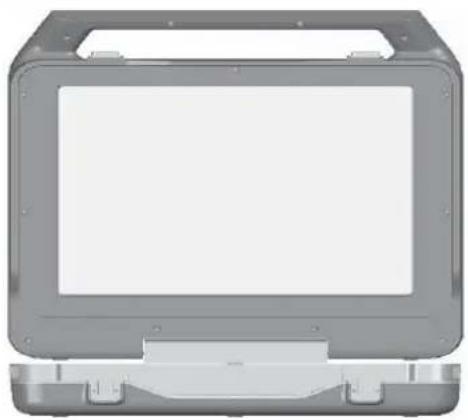
natural_image
Front view of a gray electronic device casing with mounting base (no visible text or symbols)TV and Receiver Antenna / DIRECTV Sat-Go Case

natural_image
Coiled black cable with connector (no visible text or symbols)DC Cable Phone Cable


natural_image
Pure diagram of a circular mechanical or electrical component with two ports and connectors (no text or symbols)RG-179 (15') Satellite/Antenna Cable

Screwdriver

DIRECTV Access Card
(Pre-installed in Access
Card Compartment)

natural_image
Blank white rectangle with a thin gray border (no text or symbols)Documentation: Quick Start Guide, User Guide and Compass labels

natural_image
Simple line drawing of a rectangular object with a small square mark on top (no text or symbols)Rechargeable Battery Pack*
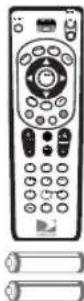
Remote Control and AAA Batteries (x2)
Inside the DIRECTV Sat-Go Case
When you open the case, you'll notice the DIRECTV Sat-Go case is the antenna and contains the easily removable TV.

DIRECTV Sat-Go Case Opened
1 DIRECTV Sat-Go TV Display
2 DIRECTV Sat-Go! TV Receiver
3. DIRECTV Sat-Go Case Cover / Antenna
Sat-Go Case / Antenna

- DIRECTV Sat-Go Case Cover / Antenna
- Antenna Connector
- Compass, which also shows elevations
Sat-Go TV
An integrated TV receiver is stored inside the DIRECTV Sat-Go case.

TV Rear View TV Front View
- Cable Compartment
The Cable compartment stores the AC power cable (permanently attached).
-
Remote Control
-
Access Card Slot
The DIRECTV access card is pre-installed. The access card allows you to view DIRECTV® programming. The slot also contains a RESET button.
-
TV Connector Panel
-
DC Power Connector
-
DIRECTV Receiver Panel
-
TV Display Panel
TV Display Panel

flowchart
graph TD
    A["Computer monitor"] --> B["TV INPUT/SELECT"]
    B --> C["VOL -"]
    C --> D["VOL +"]
    D --> E["Power Button"]
    style A fill:#f9f,stroke:#333
    style B fill:#ccf,stroke:#333
    style C fill:#cfc,stroke:#333
    style D fill:#fcc,stroke:#333
    style E fill:#ffc,stroke:#333
1. TV MENU
Displays the TV Menu to adjust TV settings. This menu automatically times out after a few seconds.
2. TV INPUT / SELECT
Changes the input source, or selects the highlighted TV MENU item when the TV MENU is on.
3. VOL -
- Decreases volume.
- Moves the highlight bar up or down to move through menu items when the TV MENU is on.
4. VOL +
- Increases volume.
- Moves the highlight bar up or down to move through menu items when the TV MENU is on.
5. ⏻ (POWER)
Turns the TV on or off.
TV Receiver Panel

1. (Earphones)
Connects personal earphones to the TV for personal listening.
2. SIGNAL
Displays the Signal Strength Meter. This is used for pointing the antenna for the strongest possible signal. Press and hold this key for 1 second to exit the Signal Strength Meter display.
3. GUIDE
Displays the onscreen program guide.
4. MENU
Displays the DIRECTV Menu, a compact menu of settings and services.
5. ▼ ARROW ▲ / - CH +
Moves the highlight bar up or down to move through the onscreen menus.
In live TV, changes the channel up or down; in the Menu or Guide, scrolls up or down.
6. SELECT
Selects the item highlighted.
7. ARROW
Moves the highlight bar left or right to move through the onscreen menus.
8. ACTIVE
Displays the DIRECTV Interactive Home Page—local weather and more!
9. INFO
Displays the channel banner or info to a highlighted program or channel cell.
TV Rear Connector Panel

1. SAT
Connects the DIRECTV Sat-Go TV to the DIRECTV Sat-Go antenna or a residential DIRECTV antenna.
2. PHONE JACK
Connects the TV to a telephone wall jack. We require a land-based telephone connection to communicate periodically with your TV.
3. ✉ (USB Port)
For future use.
4. SERVICE PORT (RS232)
Used as a service port for upgrading the DIRECTV Sat-Go software.
5 AV OUT (Composite video and audio output)
Connects the TV to equipment with a composite AV input, such as a VCR or DVD player.
6. AV IN 1 (Composite video and audio input)
Connects the TV to equipment with a composite AV output, such as a VCR or DVD player.
7. COMPONENT AV IN 2 (Component video and audio input)
Connects the TV to equipment with a component AV output, such as a DVD player.
Remote Control
1) Remote Control in DIRECTV Mode
All the functions for DIRECTV® service can be controlled with the Remote control. Some function can also be adjusted with the buttons on the TV display panel.
NOTE: To use your remote control in DIRECTV mode, the MODE switch on the remote control should be set to the DIRECTV logo.

NOTE: Don't worry about getting stuck in a menu. You can always press EXIT to return to video.
2) Remote Control in TV Mode
All the functions for TV mode can be controlled with the Remote control. Some function can also be adjusted with the buttons on the front panel of the LCD.
NOTE: To use your remote control in TV mode, the MODE switch on the remote control should be set to TV.
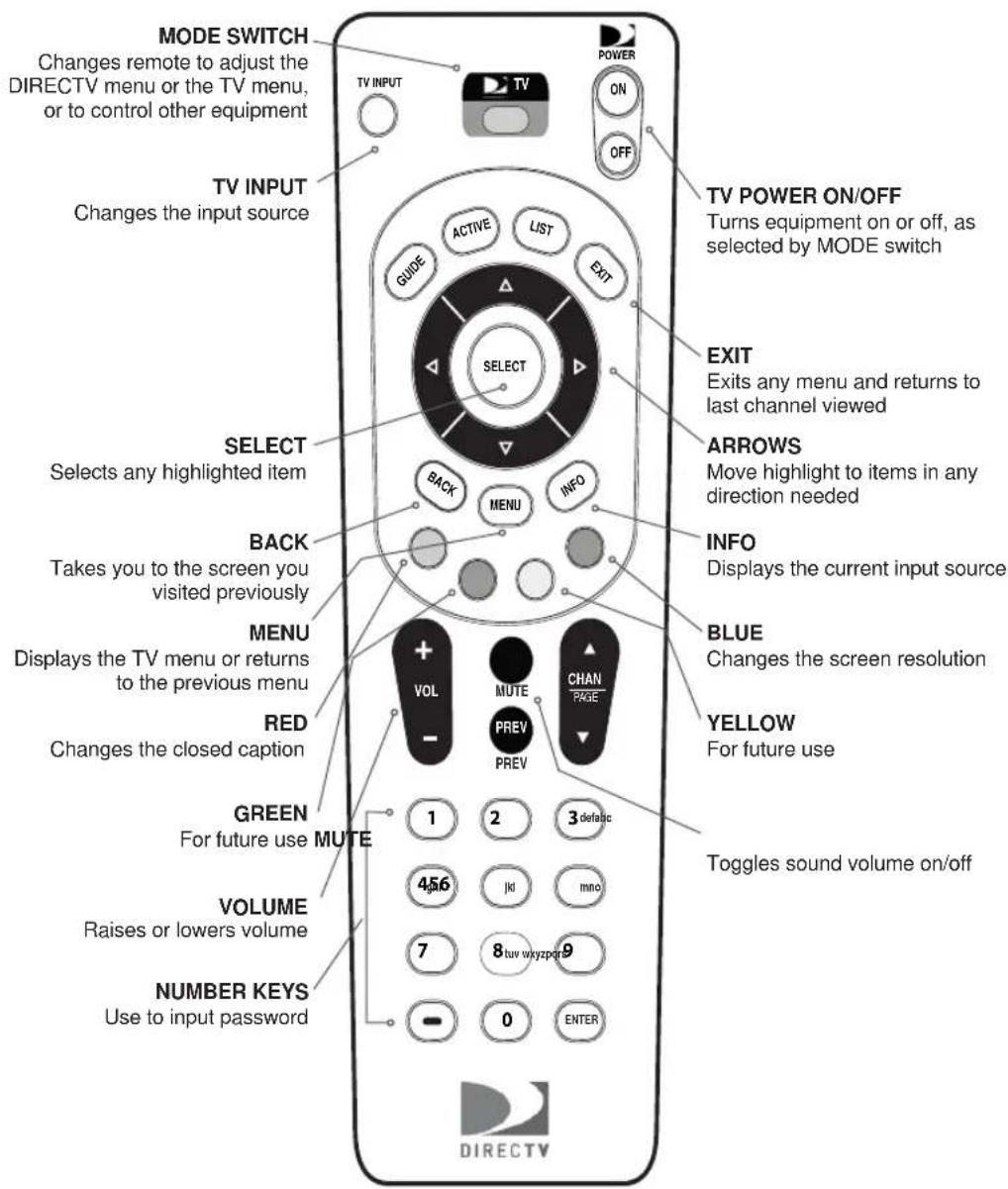
NOTE: Don't worry about getting stuck in a menu. You can always press EXIT to return to video.
Difference of key operation in TV mode and DIRECTV mode
- The following buttons are operated differently in TV mode and DIRECTV mode.
| Key In DIRECTV | Mode In TV Mode | ||
 | MENU | Displays the DIRECTV menu of settings and services | Displays the TV menu or returns to the previous menu |
 | INFO | Displays info for a highlighted or fullscreen program | Displays the current input source |
| RED | In Guide, jumps 12 hours back; other functions vary — look for onscreen hints | Changes the closed caption | |
| GREEN | In Guide, jumps 12 hours forward; other functions vary — look for onscreen hints | (For future use) | |
| YELLOW | In fullscreen TV, cycles through alternate audio tracks; other functions vary — look for onscreen hints | (For future use) | |
| BLUE | In live TV, displays the Mini Guide; other functions vary — look for onscreen hints | Changes the screen resolution | |
| NUMBER KEYS | Tune to a channel directly; also input numbers and letters when needed in onscreen menus | Use to input password | |
Inserting the Batteries
You must insert or replace the batteries in the remote control when you:
- Purchase the DIRECTV Sat-Go.
-
Find that the remote control is no longer operating correctly.
-
Remove cover from the battery compartment by sliding it downward.
- Insert 2 AAA batteries (supplied), matching the positive (+) and negative (−) at each end.
- Slide the cover back on to complete installation.
CAUTIONS:
- Insert two 1.5V AAA-type batteries. Don't mix used batteries with new batteries.
- Remove batteries when you don't use the remote control for long periods. Liquid leakage from old batteries may cause operation failure.
- Make sure there are no objects between the remote control and its sensor.
- Don't place the remote control near a heater or damp place. Strong impact on remote controller may cause operation failure.
- The signal from the remote control may be subjected to interference from sunlight or other strong light.
Inserting Battery into the TV
You must insert or replace the batteries in the DIRECTV Sat-Go system when you:
- Purchase the DIRECTV Sat-Go system.
- Find that the DIRECTV Sat-Go TV is no longer operating correctly.
TIP: The Low Portable Battery symbol displays onscreen when the portable battery is low. The power light will also blink every second for 10 minutes before switching the DIRECTV Sat-Go to standby mode automatically. (Battery usage time is about 1 hour; battery charging time is about 8 hours.)

natural_image
Diagram of a computer monitor with front and side views, showing internal components and an arrow indicating orientation (no text or symbols present)
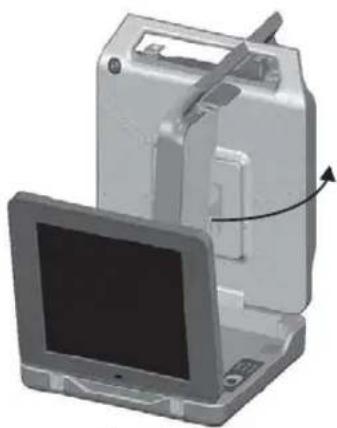
- Open the DIRECTV Sat-Go case and remove the TV by lifting the TV from the DIRECTV Sat-Go case.
- On the back of the TV, unscrew the two screws holding the battery cover in place.
- Remove the cover from the battery compartment by sliding it outward.
- Insert lithium battery pack (supplied).
- Slide the cover over the battery compartment to replace the battery cover.
- Replace the two screws to hold the battery cover in place and complete the installation.
A full charge can take as much as 8 hours. It is recommended that you charge the batteries overnight before the first use.
CAUTIONS:
- Remove batteries when you don't use the DIRECTV Sat-Go system for long periods. Liquid leakage from old batteries may cause operation failure.
- Don't place the TV near a heater or damp place. Strong impact on the TV may cause operation failure.
This section describes how to set up the DIRECTV Sat-Go TV and antenna. Select the most appropriate procedure depending on your requirements.
Finding a Suitable Antenna Site
When selecting a site to obtain a satellite signal, choose a location with an unobstructed view of the southern sky--no trees, leaves, or buildings can be in the line of sight between the antenna and the satellite. A suitable site requires the antenna have an unobstructed view of the southern sky and a fl at, stable surface.
The satellite is always located south of Texas. This means if you live in Miami, you must have a clear line of sight to the southwest; if you live in San Francisco, you must have a clear line to the southeast.
Depending on where you live, the antenna should be at an elevation angle between 30 and 60 degrees. Southern states point more toward 60 degrees; northern states point more toward 30 degrees.
Sat A, 101°

natural_image
Diagram showing a satellite connected to a laptop, no text or symbols presentTIP: The antenna case has an integrated compass to help you obtain the correct direction and angle based on your location.
Setting Up the DIRECTV Sat-Go TV and Antenna

natural_image
3D illustration of an open hard disk device with directional arrows indicating movement or rotation (no text or symbols)1

natural_image
3D illustration of a laptop with an open lid and a partially visible screen, showing no text or symbols.2
natural_image
3D rendering of a desktop computer with monitor and tower, showing internal components and a scroll arrow (no text or symbols)3
- Open the DIRECTV Sat-Go case and antenna by opening the latches and lifting the handle.
- Lift the TV display to an upright position allowing space to rotate the antenna. After rotating the antenna, you may remove the integrated TV/Receiver. (The antenna may fall over if not rotated prior to removing the TV/Receiver.) You may leave the TV in the case, or lift and remove it from the case, then move it a suitable viewing position.
- Rotate the antenna counter-clockwise toward satellites in the southern sky.
TIP: Use the compass on the outer antenna case to find the approximate antenna direction and to point the antenna towards the satellites in the southerly skies.
Connecting the DIRECTV Sat-Go TV to the Antenna
The DIRECTV Sat-Go comes pre-assembled with the Antenna cable connected to the SAT connector on the TV rear connector panel and to the SAT connector on the rear antenna base.

Note: You can place the antenna up to 15' from the DIRECTV Sat-Go TV for remote viewing, and up to a maximum of 100' with an optional RG-6 cable. A residential DIRECTV dish can also be connected via an optional RG-6 cable for in-home viewing.
Connecting the DIRECTV Sat-Go to Power

natural_image
Illustration of a laptop with an inset close-up showing its internal components (no text or symbols)
natural_image
Illustration of a laptop with a cable and attached power outlet (no text or symbols)For AC power
- Remove the cable cover from the cable compartment located in the TV receiver. The AC power cable is permanently connected to the receiver.
- Remove the soft plastic cover plug from the top of the case and lay the AC power cable into the provided groove.
- Plug the AC power cable into a grounded 3-prong outlet.
- Replace the cable cover.

natural_image
Illustration of a laptop with a D:\Users logo and cable (no text or symbols on the device itself)For DC power
- Remove the DC cable from the DIRECTV Sat-Go case.
- Remove the TV from the DIRECTV Sat-Go case.
- Connect the DC cable to the DC connector on the side of the receiver and to a DC power source such as a cigarette lighter in a car or boat. The DC power cable is not permanently connected to the TV.
Note: The AC and DC cables should never be plugged into a power source at the same time.
Hibernation Mode
If you fold down the Liquid Crystal Display (LCD) when TV power is on, the LCD and speakers are turned off automatically. (The power to the TV is not turned off.)
Guided Setup and Activation
Now that your DIRECTV Sat-Go is hooked up and plugged in, you're ready to finish all the details to begin receiving your DIRECTV® service.
1 Make sure the MODE SWITCH on the remote control is set to DIRECTV.
2 Press TV POWER ON. The DIRECTV Sat-Go TV will turn on.
3 Simply follow the onscreen directions to complete your setup functions. You'll be guided though various selections and functions for setting up and optimizing your antenna signal and setup — including positioning your antenna and a system test.
Throughout the remainder of the Guided Setup, use the arrow keys on the remote control to move to an option or desired selection and then press SELECT.
a Select the desired language and press SELECT.
b Select antenna type Round Dish and press SELECT.
c Enter the ZIP Code for your location and press SELECT.
d Align the antenna, see "Aligning the Antenna" on page 25.
e Select Continue and proceed through the remainder of the Guided Setup.
4 Once completed, you will see a Welcome screen and now you're ready to watch TV.
Important:
In order to protect your TV screen from burn-in (a side-effect caused when a stationary image is displayed for too long), the DIRECTV Sat-Go system interface automatically goes into screen saver mode, and displays a black screen with a moving logo when no key is pressed for 5 minutes or more while a stationary image is displayed on the TV. To dismiss the screen saver and return to what you were doing, press any key on the remote. Burn-in may cause permanent damage to your TV and DIRECTV is not liable for any damages that may be caused to your TV.
After Guided Setup: Getting a Satellite Signal
If the antenna is already aligned to the satellite, the TV automatically comes on when you press ⏻ (POWER). If the antenna is not aligned to the satellite, a message displays on the screen, "Searching for Satellite." You can easily realign the antenna using the Signal Strength Meter. If you need additional support, you can use antenna coordinates to help you point your antenna towards the satellites.
TIP: If you have already aligned the antenna using the coordinates for your region, you do not need to re-enter your ZIP code to get the coordinates for your location. Only if you leave the region would you have to re-enter your ZIP code to get the coordinates for the new location.
Determining Antenna Coordinates
Antenna coordinates (Direction and Angle numbers) are based on the ZIP code of your location. You can use these coordinates when aligning your antenna to the satellites.
- Turn on the DIRECTV Sat-Go, press the ⏻ (POWER) button on the TV display.
- Select Repeat Satellite Setup in the Satellite menu. The ANTENNA INSTALLATION screen menu appears.
- Select the antenna type Round (1 or 2 LNB).
- Enter the ZIP code of your location. Select Continue and then select Signal Meter. The appropriate direction (azimuth) and angle (elevation) display on the screen.
- Write down the antenna coordinates that display (Direction and Angle) on the line below each illustration.

natural_image
Illustration of a computer monitor with a curved arrow indicating rotation or compression (no text or symbols)Direction/Azimuth (horizontal, side-to-side)

natural_image
Diagram showing a mechanical component with an arrow indicating rotational motion (no text or symbols)Angle/Elevation (vertical up/down)
Note: Antenna coordinates will vary based on your location
- Now align the antenna using these coordinates; go to view the signal meter (see "Aligning the Antenna with the Satellite" on page 25.
Aligning the Antenna with the Satellite
- The Signal Strength Meter will help you to fine-tune the antenna signal. It is important to obtain the strongest (peak) signal possible.
- The higher the signal, the less likely you are to experience signal outages during adverse weather.
Good Signal Strength = 60%
Minimum Signal Strength = 50%

- Turn the DIRECTV Sat-Go on. Press ⏻ (POWER) button on the TV display panel.
- Press the Signal button on the receiver to display the Signal Strength Meter on the Test Signal Strength screen.
a. Point the antenna to the general southerly direction using the compass and/or use the Direction and Angle coordinates that display on the Signal Strength Meter screen to guide you as you rotate the antenna. Set the antenna to the angle/elevation for your ZIP code as noted on the previous page.
b. Very slowly move the antenna from side-to-side horizontally to get the highest number, then slightly tilt the antenna angle up and down to obtain the optimum signal strength.
c. Pause for 3-5 seconds during antenna rotation to allow the Signal Strength Meter to update, which will show your current Direction and Angle coordinates and signal strength. An audible beep sounds and the beeps become faster as your signal strength becomes stronger.
d. Once you scan and obtain the optimal signal strength (60-70%), stop. Write down the actual angle and duration from the compass on the compass label included with the DIRECTV Sat-Go.
TIP: You may want to rotate the antenna past the peak signal a couple of times to make sure you stop on the strongest signal.
e. Press and hold the Signal button on the receiver to exit and watch live TV.
You have now successfully set up the DIRECTV Sat-Go and are receiving the DIRECTV satellite signal.

- On the Signal Strength screen, Highlight Done and press SELECT.
Note: If this is a new setup, the Receiver will gather satellite information for a few minutes.
Moving the antenna after attaining signal lock may cause the antenna to lose signal lock and require you to realign the antenna.
Set Up Checklist
If the signal is not found, check the following to be sure the TV and antenna set-up have been properly followed:
- Verify all cable connections are correct and each connection is seated properly.
- Inspect the inside of each cable connector for dirt or damage to connector case/shield causing a possible short.
- Verify the antenna Direction and Angle coordinates for your location by ZIP code.
- Make sure there are no obstructions (trees, buildings, windows, corner or roof overhang, including your body or hands) – the signal does not pass through leaves, branches, glass, etc.
- Make sure the access card from your receiver is fully inserted into the access card slot and oriented correctly.
- Verify the antenna cable:
- Using the 15' cable (provided), connect the antenna and receiver
- To place the TV and Receiver more than 15' from the antenna RG-6 cable is highly recommended. Use of an RG-59 cable is not recommended and may cause performance problems.
- Some after-market, off-the shelf add-on components may not be as advertised. They might not work or could cause additional DC drops and signal amplitude attenuation. Remove such components, go back to the basic connections described in this manual and re-verify.
- If you've verified the above checklist items and the signal is still not found, change the Angle adjustment of the antenna slightly (+/-2 degrees, then +/- 4 degrees from the called-for coordinate setting) and repeat the antenna alignment procedure.
Connecting Your DIRECTV Sat-Go to other Equipment
There are several ways to connect your DIRECTV Sat-Go to match your particular equipment setup and to gain optimum signal quality. The basic steps are as follows:
- Connect your DIRECTV Sat-Go to your VCR or DVD player
- Connect your DIRECTV Sat-Go to a telephone line
- Connect your DIRECTV Sat-Go to your second TV or monitor
- Plug in all power cords.
The following pages give detailed instructions on the types of connections you can make, depending on the equipment you have, in order to get the best picture and sound quality. Note that the back panels of your equipment may not exactly match those illustrated.
NOTE: Not all cables come with your DIRECTV Sat-Go you may need to purchase additional cables depending on your setup.
TIP: When working with cables, be sure to connect corresponding outputs and inputs (Video OUT to Video IN, Right Audio OUT to Right Audio IN, etc.). Never connect an IN to an IN or an OUT to an OUT. All A/V jacks and inputs are color coded. Always match the color of the plug to the same color of the jack.
Connecting DIRECTV Sat-Go to a VCR, DVD player or PMP (personal media player)
Depending on the connections on the back of your VCR or DVD player, you have the following options:
• Component Connection (Best Quality)
• A/V Connection (Better Quality)
These connections are described on the following.
Component Connection (Best Quality)
- Connect the Component video cable to the component video output jacks (Y/Pb/Pr) on the VCR or DVD Player and to the component video input jacks (COMPONENT AV IN 2) on the DIRECTV Sat-Go TV rear connector panel.
- Connect the audio cable to the audio output jacks (L/R) on the VCR or DVD Player and to the COMPONENT AV IN 2 jacks (L/R) on the DIRECTV Sat-Go TV rear connector panel.
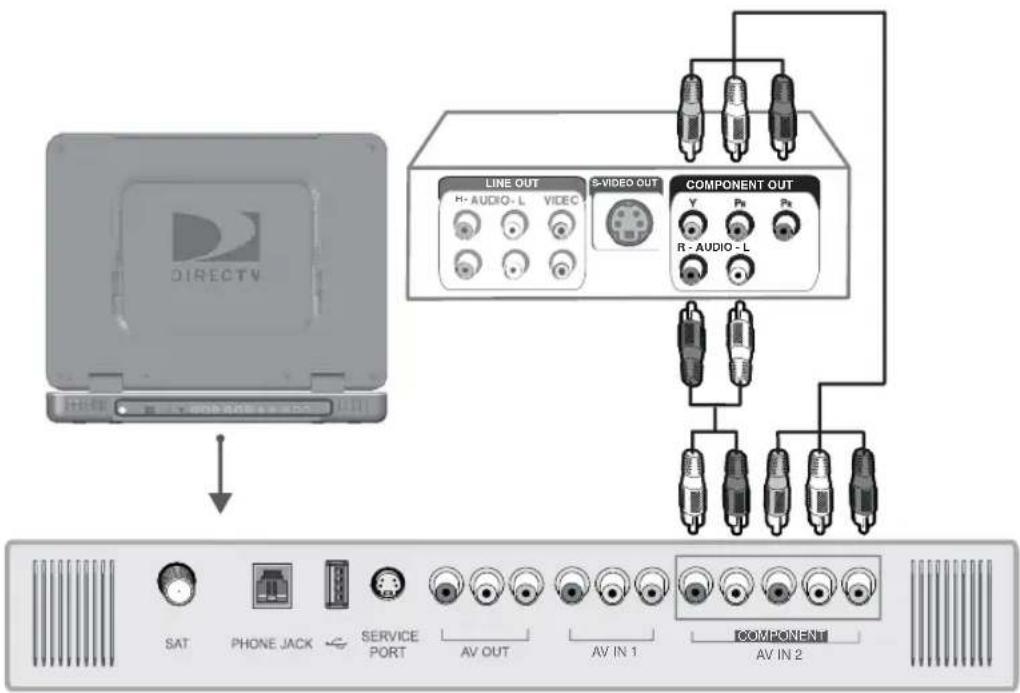
flowchart
graph TD
    A["DIRECTV"] --> B["LINE OUT"]
    A --> C["S-VIDEO OUT"]
    A --> D["COMPONENT OUT"]
    B --> E["SAT"]
    B --> F["PHONE JACK"]
    B --> G["SERVICE PORT"]
    C --> H["AV OUT"]
    C --> I["AV IN 1"]
    C --> J["AV IN 2"]
    D --> K["COMPONENT"]
    D --> L["R - AUDIO - L"]
NOTE: Depending on the manufacturer, the Y/Pb/Pr jacks may be identified as Y/PB/PR, Y/B-Y/R-Y, or Y/CB/CR.
A/V Connection (Better Quality)
- Connect the video cable to the video output jack on the VCR or DVD Player and to the video input jack (AV IN 1) on the DIRECTV Sat-Go TV rear connector panel.
- Connect the audio cable to the audio output jacks (L/R) on the VCR or DVD Player and to the audio input jacks (AV IN 1) on the DIRECTV Sat-Go TV rear connector panel.

flowchart
graph TD
    A["DIRECTV Device"] --> B["LINE OUT"]
    A --> C["VIDEO OUT"]
    A --> D["COMPONENT OUT"]
    B --> E["SAT"]
    B --> F["PHONE JACK"]
    B --> G["SERVICE PORT"]
    C --> H["AV OUT"]
    C --> I["AV IN 1"]
    D --> J["COMPONENT AV IN 2"]
Connecting your DIRECTV Sat-Go to a Telephone Line (when used in the home)
Plug one end of the telephone cord into a phone jack on your wall (or into a phone splitter that is plugged into a phone jack) and the other end into the PHONE JACK on the DIRECTV Sat-Go TV rear connector panel. A phone connection is not required for outdoor use, but you will need to connect to a phone line occasionally if you want to purchase pay per view movies.
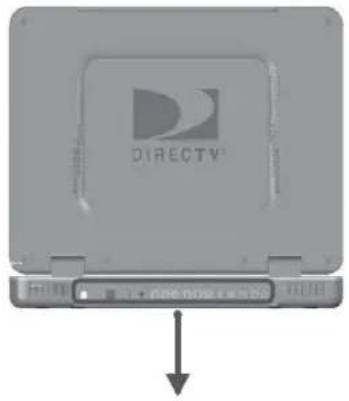

Connecting your DIRECTV Sat-Go system to a second TV or Monitor
The DIRECTV Sat-Go system has a special signal output capability that allows you to connect a second TV or monitor to your DIRECTV Sat-Go TV.
- Connect the video cable to the video input jack on the second TV or monitor and to the video output jack (AV OUT) on the DIRECTV Sat-Go TV rear connector panel.
- Connect the audio cable to the audio input jacks (L/R) on the second TV or monitor and to the audio output jacks (AV OUT) on the DIRECTV Sat-Go TV rear connector panel.

NOTES:
- Neither AV IN 1 nor AV IN 2 can be used for the second TV or monitor out.
- See the Operating Manual of the second TV or monitor for further details regarding that device's input settings.
Completing the Connections
Plug all power cords into electrical sockets.

Installing the DIRECTV Access Card
The DIRECTV access card is pre-installed in your DIRECTV Sat-Go TV. The DIRECTV access card provides the ability to view DIRECTV® programming. This card should not be removed unless Customer Service instructs you to do so and must be properly inserted to obtain DIRECTV programming. In the event you are directed to replace the access card, please follow the steps below:
- Locate the access card case below the remote control compartment in the receiver
- Remove the access card door and remove the pre-installed access card.
- Replace the access card with the new one provided by DIRECTV.
Make sure the side with the metal contact is facing toward the receiver when installed. You may get an onscreen message that says, "Please insert access card" if the card is not correctly inserted.
Note: The access card should only be removed when replacing the card with a new one provided by DIRECTV or your program provider.


TIP: You may decide to set up, change or adjust some of the settings later. When you're ready, press MENU on your remote control, press SELECT on Settings and then select Setup.
Guided Setup for DIRECTV® Service
Now that your DIRECTV Sat-Go equipment is all hooked up and plugged in, you're ready to finish all the details to begin receiving your DIRECTV service.
1) Make sure the MODE switch on the remote control is set to DIRECTV.
2) Press TV POWER ON. The TV will turn on.
3) The first screen will allow you to select a language. Using the arrow keys on the remote control, move to the language you prefer and press SELECT.
4) You will see a Welcome screen.
Now, let us lead the way...
Simply follow the onscreen directions to complete your setup functions. If you've set up your antenna, you'll be guided though various functions for optimizing your signal and setup — including positioning your antenna and a system test.
After these setup procedures are complete, you'll see the Satellite Data
Acquisition screen, as the receiver gathers information from the satellite for the onscreen program guide.
Next, you'll be given the opportunity to set up your phone connection, as well as program your remote to control other equipment, such as your DVD player. Just follow the screen instructions and you'll be ready to watch in no time!
IMPORTANT:
In order to protect your TV screen from burn-in (a side-effect caused when a stationary image is displayed for too long), the TV interface automatically goes into screen saver mode, and displays a black screen with a moving logo when no key is pressed for 5 minutes or more while a stationary image is displayed on the TV. To dismiss the screen saver and return to what you were doing, press any key on the remote. Burn-in may cause permanent damage to your TV.

natural_image
Black-and-white illustration of a smiling person holding a phone to their ear (no text or symbols visible)Activating Your DIRECTV® Service
Once all the setup processes are complete, all that's left to do is activate your DIRECTV service.
Before you make the call, be sure to:
- Tune to Channel 100 and be sure you're picking up a satellite signal (DIRECTV channel).
- Have on hand your service address, social security number and a valid major credit card.
- Note your access card and receiver ID numbers (find these by pressing MENU, then go to Settings and press SELECT. Then go to Setup and press SELECT. Highlight Info & Test and press SELECT.
When you're ready, just call 1-800-DIRECTV (1-800-494-4388) and pick the programming package that's right for you.

TIP: Use the Channel Lineup (included in your Welcome package) to get familiar with our channel numbers.
The channel banner gives you info on the channel and show you are currently watching.
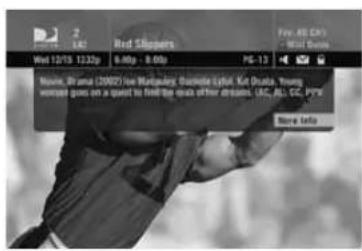
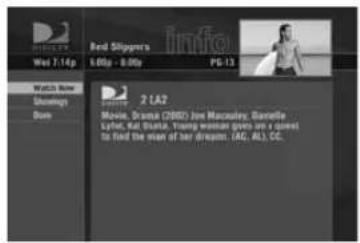
To see program details at any time press INFO on your remote control (press a second time to clear). Select More Info button to see additional options.
Watching TV
With the MODE switch to the left (under the DIRECTV logo), press TV POWER ON. To access the channel of your choice, simply key in its numbers on your remote control (the channel will appear in a few seconds, or press ENTER after the numbers and it will appear right away). You can also navigate to different channels through the Guide. Keep in mind, either way, you'll only be able to access those channels in your chosen DIRECTV® programming package.
Use the black keys on the left side of your remote control to adjust volume up or down (VOL) or mute the sound (MUTE). The black keys on the right side can take you to the next channel numerically up or down (CHAN), or jump to the previous channel you watched (PREV).
The Channel Banner
Any time you tune to a channel, you'll see the channel banner appear across the top of the screen. This banner displays the following useful information:
1) Current date & time

2) DIRECTV Channel – Channel logo, number and call letters of the station you're currently viewing.
3) Program – Program title, stop and start time and rating of the current program.
4) Current Favorites – Favorite Channels list currently in use.
5) Audio options – Two states: bright and dim. If displayed brightly, alternate audio options are available.
6) Messages – Two states: bright and dim. If displayed brightly, there are new DIRECTV messages in Caller ID & Messages.
7) Parental Controls – Parental Controls lock status. Three states: Locked, unlocked and temporarily unlocked.
Music Channels
Your DIRECTV service includes dozens of enjoyable, continuous, commercial-free music channels with something for every taste. Tune to these just as you would to any channel. You'll see a special Channel Banner that initially displays the channel description (for example, "Alternative," "Today's Country"). As each song is played, its info will appear in the banner, including song title, artist and record company.

TIP: Press the GUIDE key twice to skip the Category Sort screen.

flowchart
graph TD
    A["GUIDE"] --> B["SELECT"]
    C["ACTIVE"] --> B
    D["LIST"] --> B
    E["EXIT"] --> B
    F["BACK"] --> B
    G["MENU"] --> B
    H["INFO"] --> B
    B --> I["Select"]
Highlight an item by using the arrow keys to move LEFT, RIGHT, UP or DOWN. Press SELECT to access the information or channel.
The Guide
Overview of the DIRECTV Advanced Program Guide®
The Guide displays listings of current and upcoming programs for up to 3.5 days in advance. Find out what's on (now or later), change the channel, find and purchase a pay per view movie or event, or search for a program you're interested in.
Icons you may see in the Guide:
• LB - Broadcast in letterbox (16:9 or widescreen) format
- All Day Ticket Pay Per View showings (pay once, watch all day)
Getting Around in the Guide
Press the GUIDE key on your remote control, then choose how you want to filter the Guide. Select All Channels, or channels in a specific category.
Moving through the Guide is simple:
- The UP, DOWN, LEFT and RIGHT arrow keys move you through listings and time slots. Highlight a program or channel cell to view its description.
- Use the CHAN key up or down to scroll a full page.
- Press the RED or GREEN keys to move forward or back in time.
• To tune to a program that is on now, highlight the program and press SELECT. Selecting a future program displays program information. - Press INFO when you've highlighted a show in the Guide to view a more in-depth description and options. Pressing INFO when you've highlighted the channel name displays the channel's listing for up to 3.5 days.
- Press SELECT when you've highlighted a channel cell (far left) to view that channel in the TV window.
- Press MENU to see Guide options, change your Favorites list, or jump to a desired date and time.

flowchart
graph TD
    A["BACK"] --> B["MENU"]
    B --> C["INFO"]

Autotune
An even better way to catch all your favorites
Autotune is a great way to see your favorite programs on your schedule. You won't miss your favorite series because it moved to a different day or time, or miss your team's playoff game because you had to work late. Just set a program to autotune and your TV will tune to it automatically when it starts.
To schedule a program for autotuning with specific options:
1) Highlight a program that interests you and press INFO.
2) Highlight and select Autotune. A screen is displayed where you can set Autotune options for that program. Follow the onscreen instructions to set the program to autotune as you wish.
3) Select the Set Autotune button, then OK on the confirmation screen.
If a program you select to autotune conflicts with another program, you will be notified of the conflict at the time and given a choice of which autotune to cancel.
Changing Autotune Options/Canceling an Autotune
Once you have scheduled a program to autotune, you can change the autotune options or cancel the autotune by selecting the program in the Guide or the To Do List (press LIST); then, select the Autotune item in the left menu, and follow the onscreen instructions to change the program's options or cancel the Autotune completely.
You can change the following Autotune options:
- For all programs, you can extend Autotune start and stop times (for example, start 1 minute before the program; stop 5 minutes after the scheduled end of the program).
- For programs with multiple episodes, you can select whether to Autotune first run programs and repeats or just first runs.
Recording to VCR
To record a program on your VCR, make sure you've connected your VCR properly to your TV, then set up your VCR to record at the same time as a scheduled autotune and you're set. See your VCR User's Maunal for information on how to set it up for scheduled or manual recording.


flowchart
graph TD
    A["SELECT"] --> B["EXIT"]
    B --> C["LIST"]
    C --> D["CHANGE"]
    D --> E["CHANGE"]
    E --> F["CHANGE"]
    F --> G["CHANGE"]
    G --> H["CHANGE"]
    H --> I["CHANGE"]
    I --> J["CHANGE"]
    J --> K["CHANGE"]
    K --> L["CHANGE"]
    L --> M["CHANGE"]
    M --> N["CHANGE"]
    N --> O["CHANGE"]
    O --> P["CHANGE"]
    P --> Q["CHANGE"]
    Q --> R["CHANGE"]
    R --> S["CHANGE"]
    S --> T["CHANGE"]
    T --> U["CHANGE"]
    U --> V["CHANGE"]
    V --> W["CHANGE"]
    W --> X["CHANGE"]
    X --> Y["CHANGE"]
    Y --> Z["CHANGE"]
TIP: You can also order DIRECTV Pay Per View movies and events on the Internet at DIRECTV.com or over the phone at 1-800-531-5000. Keep in mind, though, there is an ordering fee for those purchases placed over the phone.
Pay Per View
The Latest Movies, 24 Hours a Day
You don't have to go out for the best and biggest movies and special events! Recent hits and events like sports, comedy and more are available 24 hours a day on DIRECTV® Pay Per View. You'll find them listed in the Guide in the 100s, with previews on channel 100.
Tune to a pay per view program or press INFO on a highlighted pay per view program. Select a Buy option and follow the onscreen instructions. As long as your TV has been connected to a land-based phone line, you can use your remote control to order. You'll get a reminder a few minutes before the pay per view's start time.
You can cancel your pay per view order for any reason as long as none of the program has been viewed. Press LIST to display the To Do List. Press SELECT on the Purchases item in the left menu.
Select the desired program and follow the onscreen instructions.
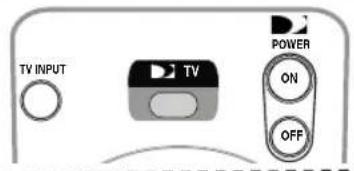
TIP: Make sure the MODE switch on the remote control is set to TV.
Set the MODE switch to TV and then press MENU on your remote control or you can press TV Menu on the TV Display Panel to easily access the TV Menu.
Once the TV Menu is displayed, use the UP and DOWN arrows on the remote control to highlight a desired menu item, then press SELECT to access that item. Some menu items will display a submenu. To exit the TV Menu at any time, press EXIT.
You can also navigate using the buttons on the TV Display Panel. Use the Vol- and Vol+ buttons to scroll up and down, and press TV Input/Select to highlight a desired menu or submenu item. The TV Menu mode will automatically time out, returning you to your program after several seconds.
Picture
Picture Mode
You can select the picture mode that best corresponds to your viewing requirements.

1) Press MENU to display the TV Menu.
2) Highlight Picture and press SELECT.
3) Highlight Picture Mode and press SELECT.
4) Press SELECT on a desired picture mode as followings.
Custom - Dynamic - Standard - Mild - Movie

Custom Picture
There are several setting options that allow you to control the picture quality.
1) Press MENU to display the TV Menu.
2) Highlight Picture and press SELECT.
3) Highlight Custom Picture and press SELECT.
4) Press SELECT on a desired option of the followings.
Contrast – Brightness – Sharpness – Color – Tint
5) The horizontal bar is displayed. Use the UP or DOWN arrow keys on your remote control to reach the optimal setting.
6) Press BACK or MENU to return to the previous menu.
Color Tone
You can change the color tone of the entire screen to suit your requirements.
1) Press MENU to display the TV Menu.
2) Highlight Picture and press SELECT.
3) Highlight Color Tone and press SELECT.
4) Press SELECT on a desired color tone of the followings.
Cool1 – Cool2 – Normal – Warm1 – Warm2

Size
You can change the size of the screen to that which best corresponds to your viewing requirements.
NOTE: This is typically used for content that is natively displayed in Widescreen format.
1) Press MENU to display the TV Menu.
2) Highlight Picture and press SELECT.
3) Highlight Size and press SELECT.
4) Press SELECT on a desired size of the followings.
Normal - Zoom - Wide
Sound
Sound Mode
You can select the sound mode to be used when watching a given broadcast.
1) Press MENU to display the TV Menu.
2) Highlight Sound and press SELECT.
3) Highlight Sound Mode and press SELECT.
4) Press SELECT on a desired picture mode of the followings.
Standard – Music – Movie – Speech



Settings
Language
To choose a language from the TV Menu, follow these steps:
1) Press MENU to display the TV Menu.
2) Highlight Settings and press SELECT.
3) Highlight Language and press SELECT.
4) Press SELECT on a desired language of the followings. English – Español
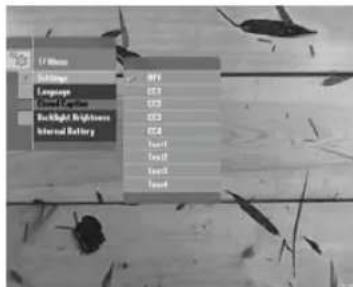
Closed Caption
Your TV decodes and displays the closed captions information that is broadcast along with some television shows. These captions are usually subtitles for the hearing impaired or translations into other languages. Check for the closed caption symbol [CC] on your TV program-schedule.
1) Press MENU to display the TV Menu.
2) Highlight Settings and press SELECT.
3) Highlight Closed Caption and press SELECT.
4) Press SELECT on a desired option of the followings.
Off - CC1 - CC2 - CC3 - CC4 - Text1 - Text2 - Text3 - Text4
NOTE: The options may change depending on the broadcasting service.
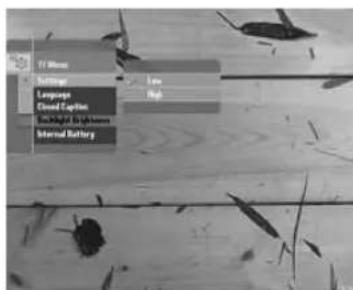
Backlight Brightness
You can easily adjust the brightness of the Liquid Crystal Display (LCD).
1) Press Menu to display the TV Menu.
2) Highlight Settings and press SELECT.
3) Highlight Backlight Brightness and press SELECT.
4) Press SELECT on a desired option:
- Low
- High
Internal Battery
You can check Internal Battery level.
1) Press Menu to display the TV Menu.
2) Highlight Settings and press SELECT.
3) Highlight Internal Battery and press SELECT.


Parental Controls
This feature allows you to block certain channels or programs so children cannot view programs that are not age appropriate.
NOTE: This Parental Controls menu is adapted to external input (AV IN 1). When the input is DIRECTV, this menu is deactivated. To adjust the Parental Controls of DIRECTV input, see the Menu-Parental Controls in page 50.
NOTE: To enter the Parental Controls menu, you need a password. The first time you enter, use password 0000.
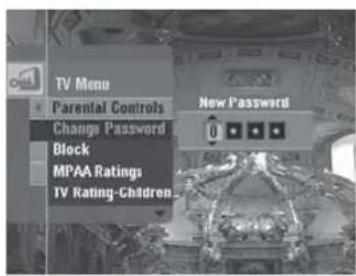
Change Password
After you enter the Parental Controls menu for the first time, you can set your own four-digit password.
1) Press MENU to display the TV Menu.
2) Highlight Parental Controls and press SELECT.
3) Enter your 4-digit password to access.
4) Highlight Change Password and press SELECT.
5) Enter your new password using the NUMBER and LEFT/RIGHT keys.
Block
Turns on or off all your parental control settings.
1) In the Parental Controls menu, select Block and press SELECT.
2) Press SELECT on a desired option of the followings.
On - Off
MPAA Rating
Blocks movies based on their rating.
1) In the Parental Controls menu, select MPAA Rating and press SELECT.
2) Press SELECT on a desired rating of the following ratings.
- G: All children and General audience.
- PG: Parental guidance suggested.
- PG-13: Parental guidance for children under 13.
- R: Restricted viewing, parental guidance is suggested for children under 17.
- NC-17: No children under age 17.
- X: Adults only.
- View: Not rated.


TV Rating - Children
Blocks TV shows based on children's age rating.
1) In the Parental Controls menu, select TV Rating-Children and press SELECT.
2) Highlight Age or Fantasy Violence and press SELECT.
3) Press SELECT on a desired rating of the followings.
- TV-Y: Young children.
- TV-Y7: Child 7 and over.
- View: Not rated
TV Rating - General
Blocks TV shows based on general's age rating.
1) In the Parental Controls menu, select TV Rating-General and press SELECT.
2) Press SELECT on a desired sub-rating of the followings.
Age – Dialogue – Language – Sex - Violence
3) Select a desired restriction rating of the followings in the each sub-rating and press SELECT.
- TV-G: General audience.
- TV-PG: Parental guidance suggested.
- TV-14: Parents strongly cautioned.
- TV-MA: Mature audience.
- View: Not rated.
No Rating Program
Blocks the TV signal or movies displayed without restriction ratings.
1) In the Parental Controls menu, select No Rating Program and press SELECT.
2) Press SELECT on a desired option of the followings.
- View: When TV signal or movies display without restriction ratings, All signals will be unblocked, and you can view any other program
- Block: When TV signal or movies display without restriction ratings, TV or Movies signal will be blocked, and a blank screen will be displayed.
TIP: Make sure the MODE switch on the remote control is set to DIRECTV logo.
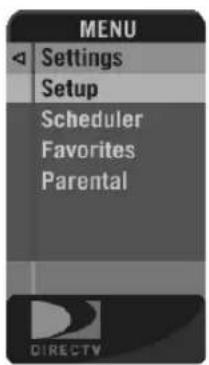

If the MODE switch is to the left (under the DIRECTV logo), press MENU on your remote control or MENU on the TV receiver panel to easily access the DIRECTV features (Menu).
Once the Menu is displayed, use the UP and DOWN arrows to highlight a desired menu item, then press SELECT to access that item. Some menu items will display a submenu, others will take you directly to a new screen. To remove the Menu at any time, press EXIT.
Settings
Selecting Settings in the Menu displays a submenu of items that lets you customize, adjust and keep track of your DIRECTV viewing experience.
Setup
The Setup item in the Menu displays the Setup screen, where you can access the Info & Test, Satellite Setup, Remote Setup, Audio Setup, Display Setup, TV Type, Access Card and System Reset screens.
- Info & Test - The System Info option lets you view the current system information. The System Test option lets you run a test on the tuner, access card, receiver ID and phone line.
- Sat & Ant. - This option is useful if your TV has lost signal strength, or you need to realign your satellite dish or antenna.
- Remote - This option is useful for programming your remote control.
- Audio - This option lets you to change the language for programs with multiple audio tracks.
- Display - This option lets you specify how long the Channel Banner displays.
- Access Card - Follow the onscreen directions to replace your access card. You will need your old and new access cards to complete this process. (Note: DIRECTV will provide new access cards and instructions when necessary.)
- Reset - From here you can restart the TV, reset to factory defaults, or reset everything.
• Done - Select to return to live TV.
Scheduler
This feature gives you an overview of and access to all the programs you've set to Autotune or purchase.
Favorites Channels
Check the current status of your Favorites list(s) by clicking here, and make changes if you like. See page 48 for more details.
Parental Controls
Check the current restrictions of your Parental Controls by clicking here, and make any adjustments. See page 50 for more details.
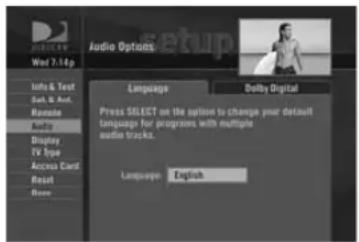

Audio Options
Some programs have alternate audio available (such as other language tracks or Dolby Digital). You can set the default so that whenever a program has alternate audio available, it automatically plays this audio, or you can change the alternate audio temporarily for the program you are watching. In either case, press MENU while in Live TV, then:
NOTE: This option only appears in the Menu over Live TV when the current program has alternate audio.
To change the default audio, from the Menu, select Settings, select Setup, then select Audio in the left menu and follow the onscreen instructions.
To temporarily change the audio, from the Menu, select Audio Options, then select the audio track you prefer. Once the program is over or you change the channel, the audio will change back to the default setting.
Category Sort
This feature lets you temporarily arrange the Guide to list only programs in a particular category such as Movies, Sports or News.
While in the Guide, from the Menu, select Category Sort. To further narrow your search, select the category you want, then select a subcategory if you wish. To quickly move through the Category Search results, use the RED or GREEN key on your remote control to advance or reverse in 90-minute increments.
Press GUIDE to return to the regular Guide, or EXIT to return to live TV.
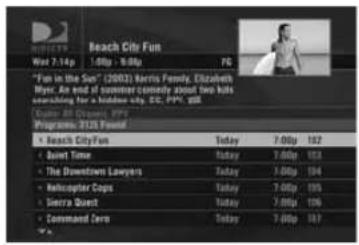


Pay Per View
This option enables you to check out DIRECTV® Pay Per View listings by category.
While in the Guide, press MENU, then select Pay Per View. You will see three choices for sorting the listings. Choose All to display all current pay per view programs. Movies will give you listings of all current movies available. Pick Special Events to see specific events such as sports, comedy specials and more. The Guide will update with matching programs.
Search
Would you like to locate a particular program, movie or sports event you want to see — even shows starring a favorite actor, or games with your favorite team? Search offers some easy ways to spot just what you want to watch.
Press MENU, then select Search. You can find a program by Title, Person, Keyword, Channel or News. Your search will be quicker if you narrow your search by selecting subcategories; just follow the onscreen instructions. Once you've found a program you're after, all you have to do is highlight and select the title to display when the program is on.
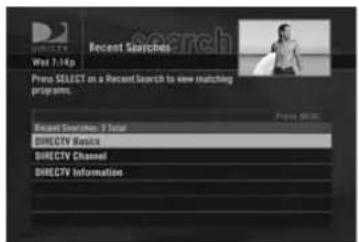
Recent Searches
If you'd like to repeat a previous search, select Recent Searches, then select your search to view matching programs.
NOTE: Keep in mind, when you do a Search, only those programs slated to air within the Guide's number of days of programming supported by your TV will appear on your list.


Date & Time
This option gives you a convenient way to look up to 3.5 days ahead in the Guide, without having to scroll through pages of programs.
Favorites
Favorites allows you to set up special, customized Guide that shows only those channels you choose. So you can have easy access to the channels you like best, or perhaps a grouping of family channels just for the kids.
When you're using a Favorites list, the Guide will only display those channels you've chosen — and you'll also only see those channels when you change channels using Chans / Get on your remote control.
Keep in mind, no matter what Favorites list you're currently using, you can still always access any channel you receive by keying in its channel number on your remote control. You can also edit or delete a list at any time.


Caller ID & Messages
This feature lets you get messages from DIRECTV. If you have Caller ID service, you can also view phone calls you've received or turn call notification on or off.* Press MENU to display the Menu, select Caller ID & Msgs, then select Edit Settings. Select either Caller ID or Messages from the left menu, as desired.
Caller ID
The Call Log tab displays up to 25 recent incoming calls. Highlight and select a name to delete that listing from your log.
The Notices tab lets you turn the notification feature on or off. When the Notices option is on, you'll see a notice on your TV screen whenever a call comes in.
NOTE: * You must subscribe to Caller ID service through your local telephone company, and your TV must be connected to a phone line.
DIRECTV Messages
This feature lets you view a listing of current DIRECTV messages waiting for you. Simply highlight and select a message in the list to read, then you'll have the choice to keep or delete it.
The messages icon will appear brightly on your channel banner whenever there's any new or unread message in your Inbox.


TIP: For ratings limits and channel blocks, as well as most other checkbox-type items, pressing SELECT toggles the item on and off when setting them up.

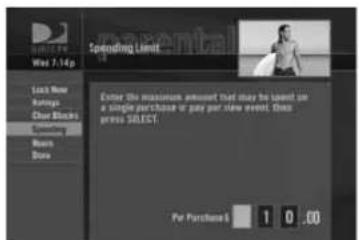
Parental Controls
NOTE: This Parental Controls menu in the Menu is adapted only to DIRECTV input. To adjust the Parental Controls of external input, see the TV Menu – Parental Controls on page 43.
Parental Controls enables parents to place certain restrictions on just who's watching what, and require a passcode to view restricted programming. Whether it's for mature content or spending amounts, you're always able to keep limitations where you want them for the whole family.
Press MENU to display the Menu, Select Parental Controls, then Edit Settings, and you'll see the current status showing any restrictions. The system default is "unlocked" for all categories.
Ratings
Here you can set rating limits for Movies and TV:
1) Select Ratings.
2) Move to the right to select the another tab. (Note: You can use RED or GREEN to cycle tabs.)
- Movies - Highlight and select the Movies tab, then set the overall rating limit you wish to impose Brief descriptions of the ratings appear for your guidance.
- TV (Programs) - Select the TV tab, then highlight and select the TV rating you desire. You can also set ratings for particular content (for example, Fantasy Violence, Dialogue), each of which is described when highlighted.
- Other (Shows) - Select the Other tab o block programming that has no rating — such as news and sports and shows with a rating of "None" — select the Other tab.
Channel Blocks
You can block viewing of a certain channel or channels from this menu.
Select Chan Blocks in the left menu, then scroll down the channel list to select those you wish to block, or key in channel numbers for quicker access. Use Block All or Allow All to save time if you wish to affect a large number of channels.
Spending
From the left menu, select Spending, then set your preferred spending limit for any single pay per view purchase. Simply key in the amount using the numbers on your remote control.
Hours
From the left menu, select Hours, then set your preferred hours during which TV can be viewed. You can set hours based on "school nights" and weekend nights—Monday-Thursday, Friday-Saturday, and Sunday.

TIP: The Parental Control icon in the Channel Banner will tell you if the receiver is locked, temporarily unlocked, or unlocked.

Locked

Unlocked

Temporarily Unlocked
Now, lock it
Once you've set the restrictions you want, choose Lock Now from the left menu. You'll be directed to create a passcode (which you'll want to make easy enough to remember, but hard enough that the little ones won't guess it!). This passcode will be your entry to unlocking and adjusting limitations in the future.
An onscreen message will appear whenever anyone tries to tune to a channel or program that has been restricted, or attempts to spend or watch beyond limitations set. He or she will not be allowed to proceed without the passcode. Using your passcode, you can easily override the limits.
Let me in...!
Temporarily or permanently unlocking a restriction is easy. To temporarily unlock a particular program:
1) When any controls are currently activated, Unlock Now will appear if you try to tune to a restricted program.
2) Select Unlock Now and enter the password.
For more unlock options:
1) Press MENU, then select Parental Controls.
2) Various options for removing restrictions temporarily or permanently will appear. Select one and enter your password.
Also note: If you have Parental Controls set and temporarily unlocked, turning the TV power off will relock the box. If anyone tries to unlock restrictions using an invalid passcode, there's a time delay that's added with each additional attempt to discourage them.
To change your passcode at any time:
1) Press MENU, select Parental Controls, then Edit Settings.
2) Scroll down to Passcode and press SELECT.
3) Enter your old password, then enter a new one twice to confirm.
TV Menu
| Picture | Picture Mode Custom, | Dynamic, Standard, Mild, Movie | |
| Custom Picture Contrast, Brightness, Sharpness, Color, Tint | |||
| Color Tone Cool1, Cool2, Normal, Warm1, Warm2 | |||
| Size Normal, Zoom, Wide | |||
| Sound Sound | Mode Standard, Music, Movie, Speech | ||
| Settings | Language English, Español | ||
| Closed Caption Off, CC1, CC2, CC3, CC4, Text1, Text2, Text3, Text4 | |||
| Backlight Brightness High, Low | |||
| Internal Battery 0 ~ 100% | |||
| Parental Controls | Change Password New Password, Confirm | ||
| Block On, Off | |||
| MPAA Ratings G, PG, | PG-13, R, NC-17, X, View | ||
| TV Rating – Children | Age TV-Y, TV-Y7, View | ||
| FantasyViolence | TV-Y7, View | ||
| TV Rating - General | Age TV-G, TV-PG, TV-14, TV-MA, View | ||
| Dialogue | TV-PG, TV-14, View | ||
| Language TV-PG, TV-14, TV-MA, View | |||
| Sex | TV-PG, TV-14, TV-MA, View | ||
| Violence | TV-PG, TV-14, TV-MA, View | ||
| No rating programs | View, Block | ||
Menu (for DIRECTV® Service)
| Settings | Setup | Info & Test, Sat. & Ant., Remote, Audio, Display, TV Type, Access Card, Reset, Done |
| Scheduler To Do List | History, Purchase, Manual | |
| Favorite Channels | --- (Moves to the Favorites - Editing Settings menu.) | |
| Parental Controls --- (Moves to the Parental Controls menu.) | ||
| Category Sort All, Movies, Sports, News, etc. ---- (Appears while in the Guide) | ||
| Pay Per View All, Movies, Special Events, etc. ---- (Appears while in the Guide) | ||
| Search | Recent Finds | |
| Title | ||
| Person | ||
| Keyword | ||
| Channel | ||
| Date & Time | ---- (Appears while in the Guide) | |
| Favorites | Editing Settings Set | Current, Custom 1, Custom 2 |
| All Channels | ||
| Setup Custom 1 | ||
| Setup Custom 2 | ||
| Previous Ch's Displays the last 4 channel searches | ||
| Calls & Msgs | Edit Settings Messages, Caller ID | |
| Turn Off Notices Turn On Notices | ||
| Parental Controls | Unlock Now | |
| Ratings | ||
| Chan Blocks | ||
| Spending | ||
| Hours | ||
Many problems can be corrected by performing a simple reset of the system.
If you experience image freezes, audio freezes or blank screen, or the system won't respond to the panel button or remote control, try one of these:
- Press the RESET button behind the access card door on the TV receiver base, then wait for the program guide information to be acquired.
- If the problems persist, try unplugging the TV power cord and wait for 15 seconds, then plug it in again.
- Running the System Test (later in this section) can also help you diagnose and solve many common problems.
TV Problems
Progress bar freezes during Satellite Data Acquisition
This is normal. The progress bar times out after two minutes. If your screen is still blank for a few minutes after the progress bar times out, press the RESET button on the TV and wait for program guide information to be acquired.
Wrong picture, blue screen, snow or black/blank picture
The TV lets you toggle between video sources. If you don't see the signal you think you should be seeing, try using these buttons to toggle between the signals:
- Press the TV INPUT/SELECT button on the TV display panel or the SELECT button on the remote control.
- If problems persist, turn off all equipment that is connected to your DIRECTV Sat-Go system, wait a few minutes.
Problems with Caller ID
- You must subscribe to Caller ID service through your local phone company. Also, check to be sure your Caller ID feature is turned on (see page 49).
- If you are plugging your TV to a wireless phone jack, note that it typically does not transmit Caller ID information and you may need a special wireless phone jack to use with Caller ID service. See the user's manual that came with the wireless phone jack to see if it transmits Caller ID information. If it doesn't, either connect the phone line directly to a standard wall-mount phone jack or install a wireless phone jack that transmits Caller ID information.
TV will not turn on
- Check to make sure the DIRECTV Sat-Go system is connected to power (either AC or DC power).
- Check the wall receptacle (or extension cord) to make sure it is "live" by plugging in something else.
- Check batteries in the DIRECTV Sat-Go system and in the remote control.
- Be sure remote control is pointed at remote sensor, and that the front of the TV display is not blocked.
• Unplug the DIRECTV Sat-Go system. Wait five minutes. Plug it in again.
Turns off while playing
- Electronic protection circuit may have been activated because of a power surge. Wait 30 seconds, then turn on again.
- Unplug the DIRECTV Sat-Go system for a few minutes, then plug back in. If this happens frequently, the voltage in your house may be abnormally high or low.
- Consider using a surge protector or line conditioner.
- If your TV turns off while playing, and other lights/appliances in your house do too, you may have blown a circuit breaker or be experiencing a power outage.
- Consult an electrician if the problem is frequent or severe, especially if other household appliances or electronics are affected.
DIRECTV Sat-Go system turns on or changes channels unexpectedly
- An Autotune may have been activated. See page 38.
Blank screen
- Check that all components connected to the input jacks are turned on.
- Try another channel.
- Press the TV INPUT key on the remote control to make sure that the TV input is set to DIRECTV.
- Press the POWER button on the front of the TV.
- Press the RESET button behind the access card door on the TV receiver base.
Temporary loss of the satellite signal or Searching for Satellite Signal message
- Your satellite system may be experiencing a temporary loss of the satellite signal due to unusually heavy rain clouds or rainfall. This is usually brief, lasting only as long as the heavy rain cloud condition persists.
- Your antenna may be blocked. Check that something is not blocking the antenna.
Partial programming loss/channels missing from the Guide/channel is in the Guide but can't tune to
- Your antenna may be incorrectly configured. Check the dish type set in your preferences and change if necessary. While in the DIRECTV input and the MODE switch is set to DIRECTV logo, press the MENU key on the remote control to display the Menu, then select Settings, then Setup. In the next menu, select Satellite, then Repeat Satellite Dish Setup. Follow the steps. From the Antenna Type screen, make sure the proper dish type (Round) is selected.
- The channels might be excluded from the Favorites list currently in use. Enter the Menu, select Favorites, then All Channels, or enter the channel number manually.
My video and audio are out of sync
- Try changing channels.
- Press LIST, then EXIT.
- If neither of those work, restart your TV. On the remote control, press MENU, press SELECT on Settings, then select Setup. Select the Reset item from the left menu and follow the onscreen instructions.
My video and audio are out of sync
- Try changing channels.
- Press LIST, then EXIT.
- If neither of those work, restart your TV. On the remote control, press MENU, press SELECT on Settings, then select Setup. Select the Reset item from the left menu and follow the onscreen instructions.
My TV is "frozen" on a single frame of a TV picture.
- If you are on a Pay Per View channel, watching the preview portion of a program, the preview portion may be completed. You must buy the program to continue watching.
- If that doesn't work, restart your TV. Enter the Menu, press SELECT on Settings, then select Setup. Select the Reset item from the left menu and follow the onscreen instructions.
Remote Control Problems
Problems with the remote control
- Check that nothing is between the remote control and the remote sensor.
- Make sure the mode switch on the remote control is set correctly to each mode. Slide the mode switch to the desired position so the remote control will control the TV.
- Check the batteries in the remote control. They may be weak, dead or installed incorrectly. Try replacing batteries.
- If you're entering a channel number that is less than four digits long, the TV might wait two seconds before tuning to the channel. Press ENTER after entering a channel number to tune immediately.
- If you are trying to operate a device other than the DIRECTV Sat-Go TV that you have programmed the remote to control, make sure you first slide the mode switch to the corresponding device (DVD player, VCR, etc.). The indicator light for the component you're trying to control should light up when you press a valid key for that component. If it doesn't, make sure the mode switch is clicked into the correct position.
A remote control indicator light starts fl ashing
The batteries in the remote control are running low and should be replaced soon. (Note that when you replace the batteries, you may have to reprogram your remote to control other devices.)
Signal Problems
If you already set up the antenna for the optimal signal strength, fine-tune the signal and run a system test. If you need to run the Guided Setup again, select Settings from the Menu, then select Guided Setup. Next, press SELECT on Satellite, then select Repeat Satellite Setup.
Running the System Test
The System Test allows you to run a basic diagnostics check on your DIRECTV Sat-Go system. If you are experiencing any trouble with your TV or antenna, run the system test. It will also allow you to get your access card and receiver ID numbers or to initiate diagnostic procedures on your TV.
First make sure that:
- All connections — jacks, cables, etc. — are in place correctly.
- There are batteries in the remote control and that they are working correctly.
- There is a battery in the DIRECTV Sat-Go System and that it is working correctly.
- The access card is installed properly in the DIRECTV Sat-Go System.
Follow these steps to run the diagnostics system test on your DIRECTV Sat-Go System
1) Turn on your TV.
2) Slide the mode switch to the DIRECTV position to put the remote control in satellite - controlling mode, then press MENU.
3) Select Settings.
4) Select Setup, then Info & Test.
5) Use arrow keys to highlight the System Test tab, then press SELECT on Run Test.
6) If your system does not pass the system test, check any of these potential trouble areas: cabling, pointing the satellite, phone connection and access card.
You should run a system test several times before concluding that there is a problem. Occasional fluctuations in the phone line or satellite signal can give temporary false readings.
System Errors
Temperature Error
When the TV temperature reaches a high level, the Temperature Error icon ( ) appears on the screen and the power light on the front of the TV display blinks 3 times per second to alert you that the system is in danger of overheating. After 1 minute, the TV will automatically switch into standby mode.
Low Portable Battery Level Alert
When the portable battery in the TV reaches a low level, the Low Portable Battery icon (☑) appears on the screen. The power light on the front of the TV display blinks every second for 10 minutes and will then automatically switch the TV into standby mode. (Battery usage time: about 1 hour, Battery charging time: about 10 hours.)
Low Vehicle Battery Level Alert
When using an external DC power source such as an automobile battery, the Low Vehicle Battery icon (☑) appears on the screen and the power light on the front of the TV display blinks every second, when it has been determined that the automobile battery voltage has been drained close to a point where the automobile could no longer be started. As this low automobile battery threshold may be different across the many types and brands of automobile batteries the “low battery warning” on the DIRECTV Sat-Go may be triggered some time before it is in fact near a critical point for any given automobile battery. DIRECTV has designed the DIRECTV Sat-Go system to adhere to industry standards for voltage tolerances and as a result each user should carefully monitor the automobile battery drain in this situation.
Note: Connecting to a vehicle battery can sometimes cause the electric discharge of your vehicle battery. Make sure your vehicle battery is fully charged.
Limited 90-Day Warranty
DIRECTV warrants your DIRECTV® Sat-Go system (Model Number: Z11-500) and any included accessories against defects in material or workmanship for a period of 90 days after the date of purchase.
Who is Covered?
You must have proof of purchase to receive warranty service. A sales receipt or other document showing that you purchased the product is considered proof of purchase. THIS LIMITED WARRANTY EXTENDS ONLY TO THE ORIGINAL CONSUMER PURCHASER OR ANY PERSON RECEIVING THE DIRECTV SAT-GO SYSTEM AS A GIFT FROM THE ORIGINAL CONSUMER PURCHASER AND TO NO OTHER PURCHASER OR TRANSFEREE. THIS WARRANTY DOES NOT EXTEND TO COMMERCIAL USERS. THIS PRODUCT IS NOT AUTHORIZED FOR USE OUTSIDE THE UNITED STATES AND ANY SUCH USE VOIDS THIS WARRANTY.
What is Covered?
Warranty coverage begins the day you purchase the product. For ninety (90) days from the purchase date, at the option of DIRECTV, the DIRECTV Sat-Go system will be repaired or replaced with a new, repaired, refurbished or comparable product (whichever is deemed necessary) if it becomes defective or inoperative. This exchange is done without charge to you for parts and labor. You will be responsible for the cost of shipping to and from the location designated by DIRECTV. If DIRECTV cannot reasonably repair or replace the system then DIRECTV may, at its sole discretion, refund the price you paid for the product or the current retail price of the product.
All products, including replacement products, are covered only for the original warranty period. When the warranty on the original product expires, the warranty on the replacement product also expires. After ninety (90) days from the date of purchase, you pay for the replacement of all parts, and for all labor charges. SOME STATES DO NOT ALLOW LIMITATIONS ON HOW LONG AN IMPLIED WARRANTY LASTS, SO THE ABOVE LIMITATION MAY NOT APPLY TO YOU.
What is Excluded?
Your warranty does NOT cover:
- Labor charges for installation or setup of the product.
- Installation, performance of, or repair of: audio/video cabling, telephone line, or accessory attachments used with the product.
- Product replacement because of misuse, accident, lightning damage, unauthorized repair, or other cause not within the control of DIRECTV.
- Incidental or consequential damages resulting from the product. SOME STATES DO NOT ALLOW THE EXCLUSION OF INCIDENTAL OR CONSEQUENTIAL DAMAGES, SO THE ABOVE EXCLUSION MAY NOT APPLY TO YOU.
Any modifications or other changes to the product, including but not limited to software or hardware modification in any way other than as expressly authorized by DIRECTV, will void this limited warranty.
Except in the case of hardware or software provided by DIRECTV, installing software modifications, "hacks" or utilizing service access or "back doors" will void this limited warranty. Reception transmission problems caused by signal conditions, telephone line, or cable or antenna systems outside the unit.
- A product that has been modified or adapted to enable it to operate in any country other than the country for which it was designed, manufactured, approved and/or authorized, or repair of products damaged by these modifications.
- A product used for commercial or institutional purposes. DIRECTV makes no warranty that the access connection will be a local (not long distance) phone call.
- The continued provisioning of any of the programming and other services delivered through the system including but not limited to television programming, show information, program guide data, and scheduling information.
Make Sure You Keep...
Please keep your sales receipt or other document showing proof of purchase. Attach it to this User Guide and keep both nearby. Also keep the original box and packing material in case you need to return your product.
Before Requesting Repair Service...
Please check the troubleshooting section of this guide. This may save you a call to DIRECTV Customer Care.
To Get Warranty Service...
Warranty service will be provided by DIRECTV. If you believe you need service for your system, contact DIRECTV at 1-800-DIRECTV. A representative will go through a diagnostic checklist with you. If it is determined that the product needs to be returned for service or exchanged, you will receive a return authorization number. The representative will give you complete shipping details.
To Get Out-of-Warranty Service...
To obtain out-of-warranty service contact DIRECTV at 1-800-DIRECTV for information on the possibility of and any costs for repair or replacement of out-of-warranty products. ALL WARRANTIES IMPLIED BY LAW, INCLUDING ANY IMPLIED WARRANTIES OF MERCHANTABILITY AND FITNESS FOR A PARTICULAR PURPOSE ARE EXPRESSLY LIMITED TO THE DURATION OF THIS EXPRESS LIMITED WARRANTY. WITH THE EXCEPTION OF ANY WARRANTIES IMPLIED BY THE LAW OF ANY STATE OF THE U.S.A., THIS EXPRESS LIMITED WARRANTY IS EXCLUSIVE AND IN LIEU OF ALL OTHER WARRANTIES, GUARANTEES, AGREEMENTS AND SIMILAR OBLIGATIONS OF DIRECTV. REPAIR OR REPLACEMENT AS PROVIDED IN THIS LIMITED WARRANTY IS THE EXCLUSIVE REMEDY UNDER THIS LIMITED WARRANTY. IN NO EVENT WILL DIRECTV BE LIABLE FOR ANY AMOUNT GREATER THAN THE RETAIL PRICE OF THE DIRECTV SAT-GO SYSTEM. DIRECTV SHALL NOT BE LIABLE FOR ANY INCIDENTAL OR CONSEQUENTIAL DAMAGES FOR BREACH OF ANY EXPRESS OR IMPLIED WARRANTY ON THE DIRECTV SYSTEM. SOME STATES DO NOT ALLOW LIMITATIONS ON WARRANTIES, SO THE ABOVE LIMITATIONS MAY NOT APPLY TO YOU. THIS WARRANTY GIVES YOU SPECIFIC LEGAL RIGHTS. YOU MAY HAVE OTHER RIGHTS WHICH VARY FROM STATE TO STATE.
DIRECTV, Inc.
2230 E. Imperial Hwy
Keep your sales receipt to obtain warranty parts and service and for proof of purchase. Attach it here and record the serial and model numbers in case you need them. These numbers are located on the product.
Model No. ____
Serial No. ____
Purchase Date: ____
Dealer/Address/Phone: ____
Access Card:
Receiver ID: ____
DIRECTV Protection Plan
The DIRECTV® Sat-Go system is not eligible for the Protection Plan.
This device complies with Part 15 of the FCC Rules. Operation is subject to the following two conditions: (1) this device may not cause harmful interference, and (2) this device must accept any interference received, including interference that may cause undesired operation.
Responsible Party:
DIRECTV, Inc.
2230 E. Imperial Hwy
- Trade Name: DIRECTV
- Type of Equipment: DIRECTV Satellite Receiver with LCD and built-in antenna
- Model Number: Z11-500
Federal Communications Commission (FCC): This equipment complies with both Part 15 and Part 68 of the FCC rules.
This equipment has been tested and found to comply with the limits of a Class B digital device, pursuant to part 15 of the FCC Rules. These limits are designed to provide reasonable protection against harmful interference in a residential installation.
Other Information
This equipment generates, uses, and can radiate radio frequency energy and, if not installed and used in accordance with the instructions, may cause harmful interference to radio communications. However there is no guarantee that interference will not occur in a particular installation. If this equipment does cause harmful interference to radio or television reception, which can be determined by removing and applying power to the equipment, the user is encouraged to try to correct the interference by one or more of the following measures:
- Reorient or relocate the receiving satellite antenna.
- Increase the separation between the equipment and the DIRECTV Sat-Go system.
- Connect the equipment into an outlet on a circuit different from that to which the DIRECTV Sat-Go system is connected.
- Consult the dealer or an experienced radio/TV technician for help.
- CAUTION: Changes or modifications not expressly approved by the manufacturer responsible for compliance could void the user's authority to operate the equipment.
The user may find the following booklet, prepared by the Federal Communications Commission, helpful: "How to Identify and Resolve Radio and TV Interference Problems." This booklet is available from the U.S. Government Printing Office, Washington, DC. To meet FCC requirements, only peripherals (computer input/output devices, terminals, printers, etc.) certified to comply with Class B limits may be attached to this device. Operation with non-certified peripherals is likely to result in interference to radio and TV reception. To meet FCC requirements, shielded cables are required to connect the device to a personal computer, peripheral, or other Class B certified device.
This equipment complies with Part 68 of the FCC Rules and the requirements adopted by ACTA. On the back of this equipment is a label that contains a product identifier in the format US:AAAEQ##TXXXX. If requested, this information must be provided to your telephone company. This equipment uses the following USOC Jack: RJ11C. A plug and jack used to connect this equipment to the premises wiring and telephone network must comply with the applicable FCC Part 68 rules and requirements adopted by ACTA. A compliant telephone cord and modular plug is provided with this product. It is designed to be connected to a compatible modular jack that is also compliant. See installation instructions for details.
The REN is used to determine the number of devices that may connect to a telephone line. Excessive RENs on a telephone line may result in the devices not ringing in response to an incoming call. In most but not all areas, the sum of the RENs should not exceed five (5.0).
To be certain of the number of devices that may be connected to a line, as determined by the total RENs, contact your local telephone company. The REN for this product is part of the product identifier that has the format US: AAAEQ##TXXXX. The digits represented by ## are the REN without the decimal point (e.g., 03 is a REN of 0.3).
If this DIRECTV Sat-Go system causes harm to the telephone network, the telephone company will notify you in advance that temporary discontinuance of service may be required. But if advance notice isn't practical, the telephone company will notify the customer as soon as possible. Also, you will be advised of your right to file a complaint with the FCC if you believe it is necessary.
The telephone company may make changes in its facilities, equipment, operations or procedures that could affect the proper functioning of your equipment. If they do, you will be notified in advance in order for you to make necessary modifications to maintain uninterrupted service. Connection to party line service is subject to state tariffs. Contact the state public utility commission, public service commission or corporation commission for information.
If trouble is experienced with this unit, for repair or warranty information, please contact DIRECTV Customer Care at the address and phone number listed below. If the equipment is causing harm to the network, the telephone company may request that you disconnect the equipment until the problem is resolved.
DIRECTV, Inc.
2230 E. Imperial Hwy
If your home has specially wired alarm equipment connected to the telephone line, ensure the installation of this DIRECTV® Sat-Go system does not disable your alarm equipment. If you have questions about what will disable alarm equipment, consult your alarm company, telephone company or a qualified installer.
DO NOT DISASSEMBLE THIS EQUIPMENT. It does not contain any user-serviceable components.
We recommend the installation of an AC surge arrester in the AC outlet to which this equipment is connected. Telephone companies report that electrical surges, typically lightning transients, are very destructive to customer terminal equipment connected to AC power sources.
| Item Specifi cation | ||
| DIRECTV Sat-Go unit | Dimensions 18.8" x 19.2" | x 4.8" |
| LCD Panel | Type A-Si Active Matrix | TFT-LCD |
| Display Area 13.3" x 10.6" | ||
| Max. Resolution SXGA | 1280 x 1024 pixels | |
| Viewing Angle | H (Left, Right): 80° x 80°V (Up, down): 80° x 80° | |
| Input / Output | Satellite In F-type RF Connector | |
| Phone Jack RJ-11 (2-wire) female modem connector | ||
| USB USB 2.0 - Type A | ||
| Service Port | RS-232 Serial Port for TV software upgrade | |
| AV Out Composite Audio/Video Output (RCA type) | ||
| AV In 1 Composite Audio/Video Input (RCA type) | ||
| AV In 2 | Component Audio/Video Input (RCA type):- Video: Y Pb Pr (480i/p, 720p, 1080i)- Audio: L/R | |
| Other | AC Power Input 120V AC, 60 Hz | |
| DC Power Input Vehicle harness: 12V, 5A | ||
| Optional LiPB battery | 12.6V, 5.5A | |
| Power Consumption | 70W(Max.) | |
| Speaker Output 3W x 2EA | ||
| Weight | NET: 26 lb | |
DIRECTV programming sold separately. Activate your DIRECTV programming today at 1-800-DIRECTV (1-800-347-3288). ACTIVATION OF PROGRAMMING MAY BE SUBJECT TO CREDIT APPROVAL. DEPOSIT OR PREPAYMENT MAY BE REQUIRED. Programming is subject to change at any time. ©2007 DIRECTV, Inc. DIRECTV, the Cyclone Design logo and ADVANCED PROGRAM GUIDE are registered trademarks of DIRECTV, Inc. This product incorporates copyright protection technology that is protected by U.S. patents and other intellectual property rights. Use of this copyright protection technology must be authorized by Macrovision Corporation, and is intended for home and other limited viewing uses only unless otherwise authorized by Macrovision. Reverse engineering or disassembly is prohibited.
Due to restrictions imposed by copyright holders, certain programming may include content protection measures that may restrict viewing and/or recording with certain consumer electronics equipment attached to the receiver. Please contact the manufacturer of such equipment for additional information. Rev. 1.0i — Z11-500.070302.
State City Direction Angle
| AL Birmingham 21 48 | ||
| AL Mobile 21 52 | ||
| AR Little Rock 19 49 | ||
| AZ Flagstaff 15 48 | ||
| AZ Phoenix 15 49 | ||
| AZ Tucson 15 51 | ||
| CA Fresno 14 43 | ||
| CA Los Angeles 14 46 | ||
| CA San Diego 14 48 | ||
| CA San Francisco 13 41 | ||
| CO Denver 16 44 | ||
| CO Grand Junction | 16 44 | |
| CT Hartford 23 34 | ||
| DC Washington | 23 39 | |
| FL Jacksonville | 22 49 | |
| FL Miami | 23 52 | |
| FL Orlando | 22 50 | |
| FL Tampa | 22 52 | |
| GA Atlanta 21 47 | ||
| GA Savannah | 22 47 | |
| IA Davenport | 20 41 | |
| IA Des Moines | 19 41 | |
| ID Boise | 14 37 | |
| IL Chicago | 20 40 | |
| IN Indianapolis 21 42 | ||
| KS Wichita | 18 46 | |
| KY Louisville | 21 43 | |
| LA Baton Rouge 20 53 | ||
| LA New Orleans 20 53 | ||
| LA Shreveport 19 51 | ||
| MA Boston 24 33 | ||
| MD Baltimore | 23 38 | |
| MD Hagerstown 23 38 | ||
| ME Bangor 24 29 | ||
| ME Portland | 24 31 | |
| MI Detroit 21 38 | ||
| MI Grand Rapids | 21 38 | |
| MI Marquette | 20 35 | |
| MN Duluth | 19 36 | |
| MN Int'l Falls | 19 34 | |
| MN Minneapolis 19 38 |
State City Direction Angle
| MO | Kansas City 19 44 | ||
| MO | Saint Louis | 20 44 | |
| MO | Springfield | 19 | 46 |
| MS | Jackson | 20 51 | |
| MT | Billings | 16 37 | |
| MT | Great Falls | 15 35 | |
| NC | Charlotte | 22 44 | |
| NC | Raleigh | 22 42 | |
| ND | Bismarck | 17 36 | |
| ND | Fargo | 18 36 | |
| NE North Platt | 17 43 | ||
| NE Omaha | 18 42 | ||
| NJ Atlantic City | 23 37 | ||
| NM | Albuquerque | 16 49 | |
| NV Las Vegas 14 45 | |||
| NV Reno | 14 40 | ||
| NY Albany | 23 34 | ||
| NY Buffalo 22 36 | |||
| NY New York | 23 36 | ||
| NY Syracuse | 23 34 | ||
| OH | Cincinnati | 21 42 | |
| OH | Cleveland | 22 38 | |
| OK | Oklahoma City | 18 49 | |
| OK | Tulsa | 18 48 | |
| OR | Medford | 13 36 | |
| OR | Portland | 13 33 | |
| PA Philadelphia 23 37 | |||
| PA Pittsburgh | 22 39 | ||
| RI | Providence | 24 33 | |
| SC Charleston | 22 46 | ||
| SD Rapid City | 17 39 | ||
| SD Sioux Falls | 18 40 | ||
| TN | Knoxville | 21 45 | |
| TN | Memphis | 20 48 | |
| TX Amarillo 17 49 | |||
| TX Dallas | 18 52 | ||
| TX El Paso | 16 53 | ||
| TX Houston | 19 55 | ||
| TX San Antonio | 18 56 | ||
| UT | Salt Lake City | 15 42 | |
| VA Richmond | 23 40 | ||
State City Direction Angle
| VA Roanoke 22 42 | ||
| VT Burlington 23 32 | ||
| WA Seattle 13 32 | ||
| WA Spokane 14 33 | ||
| WI Madison 20 39 | ||
| WI Milwaukee 20 39 | ||
| WV Charleston 22 41 | ||
| WY Cheyenne 16 42 |

- WARNING:
- CAUTION
- CAUTION:
- IMPORTANT:
- TIP:
- Safety and Care
- Important Safety Instructions
- For your information:
- Recommendation to Avoid or Minimize Phosphor Burn-in:
- Notices. 2
- Before Using Your DIRECTV® Sat-Go 8
- Setting Up Your DIRECTV® Sat-Go. .18
- Setting Up Your DIRECTV® Sat-Go. .29
- Basic Operation....35
- Using the TV Menu . . . . . . . . . . . . . . . . . . . . . . . . . . . . . . . . . . . . . . . . . . . . . . . . . . . . . . . . . . . . . . . . . . . . . . 39
- Using the Menu . . . . . . . . . . . . . . . . . . . . . . . . . . . . . . . . . . . . . . . . . . . . . . . . . . . . . . . . . . . 44
- Menu Map . . . . . . . . . . . . . . . . . . . . . . . . . . . . . . . . . . . . . . . . . . . . . . . . . . . . . . . . . . . . . . . . . . . . . . . . 51
- Troubleshooting .53
- Warranty....58
- FCC Customer Information. .63
- Specifications....65
- Dish-Pointing Coordinates....67
- Package Contents
- Inside the DIRECTV Sat-Go Case
- Sat-Go TV
- TV Rear View TV Front View
- TV MENU
- TV INPUT / SELECT
- VOL -
- VOL +
- ⏻ (POWER)
- (Earphones)
- SIGNAL
- GUIDE
- MENU
- ▼ ARROW ▲ / - CH +
- SELECT
- ARROW
- ACTIVE
- INFO
- SAT
- PHONE JACK
- ✉ (USB Port)
- SERVICE PORT (RS232)
- AV OUT (Composite video and audio output)
- AV IN 1 (Composite video and audio input)
- COMPONENT AV IN 2 (Component video and audio input)
- Remote Control
- 1) Remote Control in DIRECTV Mode
- 2) Remote Control in TV Mode
- Difference of key operation in TV mode and DIRECTV mode
- Inserting the Batteries
- CAUTIONS:
- Inserting Battery into the TV
- Finding a Suitable Antenna Site
- Setting Up the DIRECTV Sat-Go TV and Antenna
- Connecting the DIRECTV Sat-Go TV to the Antenna
- Connecting the DIRECTV Sat-Go to Power
- For AC power
- For DC power
- Hibernation Mode
- Guided Setup and Activation
- After Guided Setup: Getting a Satellite Signal
- Determining Antenna Coordinates
- Aligning the Antenna with the Satellite
- Set Up Checklist
- Connecting Your DIRECTV Sat-Go to other Equipment
- Connecting DIRECTV Sat-Go to a VCR, DVD player or PMP (personal media player)
- Component Connection (Best Quality)
- A/V Connection (Better Quality)
- Connecting your DIRECTV Sat-Go to a Telephone Line (when used in the home)
- Connecting your DIRECTV Sat-Go system to a second TV or Monitor
- NOTES:
- Completing the Connections
- Installing the DIRECTV Access Card
- Guided Setup for DIRECTV® Service
- Activating Your DIRECTV® Service
- Watching TV
- The Channel Banner
- Music Channels
- The Guide
- Overview of the DIRECTV Advanced Program Guide®
- Getting Around in the Guide
- Autotune
- An even better way to catch all your favorites
- Changing Autotune Options/Canceling an Autotune
- Recording to VCR
- Pay Per View
- The Latest Movies, 24 Hours a Day
- Picture
- Picture Mode
- Custom Picture
- Color Tone
- Size
- Sound
- Sound Mode
- Settings
- Language
- Closed Caption
- Backlight Brightness
- Internal Battery
- Parental Controls
- Change Password
- Block
- MPAA Rating
- TV Rating - Children
- TV Rating - General
- No Rating Program
- Setup
- Scheduler
- Favorites Channels
- Audio Options
- Category Sort
- Search
- Recent Searches
- Date & Time
- Favorites
- Caller ID & Messages
- Caller ID
- DIRECTV Messages
- Ratings
- Channel Blocks
- Spending
- Hours
- Now, lock it
- Let me in...!
- Many problems can be corrected by performing a simple reset of the system.
- TV Problems
- Progress bar freezes during Satellite Data Acquisition
- Wrong picture, blue screen, snow or black/blank picture
- Problems with Caller ID
- TV will not turn on
- Turns off while playing
- DIRECTV Sat-Go system turns on or changes channels unexpectedly
- Blank screen
- Temporary loss of the satellite signal or Searching for Satellite Signal message
- Partial programming loss/channels missing from the Guide/channel is in the Guide but can't tune to
- My video and audio are out of sync
- My TV is "frozen" on a single frame of a TV picture.
- Remote Control Problems
- Problems with the remote control
- A remote control indicator light starts fl ashing
- Signal Problems
- Running the System Test
- First make sure that:
- Follow these steps to run the diagnostics system test on your DIRECTV Sat-Go System
- System Errors
- Temperature Error
- Low Portable Battery Level Alert
- Low Vehicle Battery Level Alert
- Limited 90-Day Warranty
- Who is Covered?
- What is Covered?
- What is Excluded?
- Make Sure You Keep...
- Before Requesting Repair Service...
- To Get Warranty Service...
- To Get Out-of-Warranty Service...
- DIRECTV Protection Plan
- Other Information
Brand : DirecTV
Model : Sat-Go
Category : Television