WNS100 - Uncategorized Oricom - Free user manual and instructions
Find the device manual for free WNS100 Oricom in PDF.


| Product Type | Extra Loud Alarm Clock with Vibrating Shaker |
| Brand | Oricom |
| Model | WNS100 |
| Display Type | Large LED Screen with Red Digits |
| Time Format | 12 or 24 Hour Selectable |
| Alarm Sound Level | 95 dBA at 1 m (Extra Loud) |
| Alarm Duration | 1 hour or until manually stopped |
| Alarm Options | 4 modes: Audible + Flashing LED + Vibrating; Audible + Vibrating; Flashing LED + Vibrating; Vibrating only |
| Visual Alarm Indicator | Flashing LED light |
| Vibrating Shaker | Included (bed shaker) |
| USB Charging Port | Yes, for charging smartphones and other devices (cable not included) |
| Tone Control | Adjustable to suit hearing |
| Power Supply | Mains powered with optional battery backup (CR2032, not included) |
| Battery Backup Type | CR2032 lithium coin cell |
| Design | Sleek curved design |
| Dimensions (Approx.) | 20 x 10 x 10 cm (estimated) |
| Weight (Approx.) | 400 g (estimated) |
| Warranty | 1 month |
| Maintenance | Clean with a soft, dry cloth. Do not use liquids or solvents. |
| Safety Precautions | Keep away from water and moisture. Use only specified batteries. |
| Spare Parts / Repairability | Battery CR2032 replaceable. No other user-serviceable parts. |
Frequently Asked Questions - WNS100 Oricom
User questions about WNS100 Oricom
0 question about this device. Answer the ones you know or ask your own.
Ask a new question about this device
Download the instructions for your Uncategorized in PDF format for free! Find your manual WNS100 - Oricom and take your electronic device back in hand. On this page are published all the documents necessary for the use of your device. WNS100 by Oricom.
USER MANUAL WNS100 Oricom
ALARM CLOCK WITH SHAKER
FLASHING LED WITH VIBRATING SHAKER
Key Features
- USB port to recharge mobiles and other electronic devices. (USB charging cable not included)
- Extra loud alarm (95dBA at 1m)
- Alarm duration: 1 hour or until manually stopped
- Large LED screen
• Red digits for high contrast - Adjustable tone control to suit hearing
• LED visual alarm indicator
• 12 or 24 hour clock display options - Optional battery backup in case of power failure (Battery type required: CR2032. Battery not included)
The Wake 'n' Shake Curve is the latest extra loud vibrating alarm clock from Oricom. Including a new sleek curved design, the WNS100 also offers a handy USB port for you to charge your smart phone or other devices.
4 Alarm Options:
- Audible alarm with flashing LED light and vibrating shaker
• Audible alarm with vibrating shaker
• Vibrating shaker with flashing strobe
• Vibrating shaker only

MONTH
WARRANTY
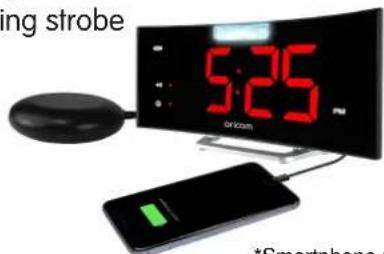
*Smartphone not included

Brand : Oricom
Model : WNS100
Category : Uncategorized