Palun - Network card / adapter EverFocus - Free user manual and instructions
Find the device manual for free Palun EverFocus in PDF.


| Product Type | PoE Video Balun |
| Brand | EverFocus |
| Model | Palun |
| Category | Network Adapter / Media Converter |
| Power Source | Power over Ethernet (PoE) |
| Self Power Consumption | 2W |
| PoE Standard | IEEE 802.3af (Type 1) and IEEE 802.3at (Type 2) |
| Compatible Camera PoE Class | Class 0, 1, 2, 3, 4 |
| Coaxial Cable Support | Yes (leverages existing coax infrastructure) |
| Connectors | RJ45 (Ethernet) and BNC (Coaxial) |
| Smart Switch | Yes (blue switch for class adjustment) |
| Switch Modes | C0 (for Class 0 cameras) and C1+ (for Class 1-4 cameras) |
| Function | Transmits digital IP video and PoE power over coaxial cable |
| Upgrade Capability | Upgrades analog surveillance system to IP without re-cabling |
| Installation | Plug and Play |
| Class Advertisement | In C1+ mode, Palun advertises the camera's class as one level higher to the PoE switch |
| Maximum Power Delivery to Camera | Up to 30W (Class 4) |
| Compliance | IEEE 802.3af/at |
Frequently Asked Questions - Palun EverFocus
User questions about Palun EverFocus
0 question about this device. Answer the ones you know or ask your own.
Ask a new question about this device
Download the instructions for your Network card / adapter in PDF format for free! Find your manual Palun - EverFocus and take your electronic device back in hand. On this page are published all the documents necessary for the use of your device. Palun by EverFocus.
USER MANUAL Palun EverFocus
Palun is a PoE-powered Video Balun which can transmit both power and digital IP video signal over coaxial cable. With Palun, you can easily upgrade the surveillance system from analog to IP, leveraging the existing coaxial infrastructure without re-cabling. Moreover, a smart switch design enables Palun to better accommodate cameras of different class levels. Please see all the detail information in this document.
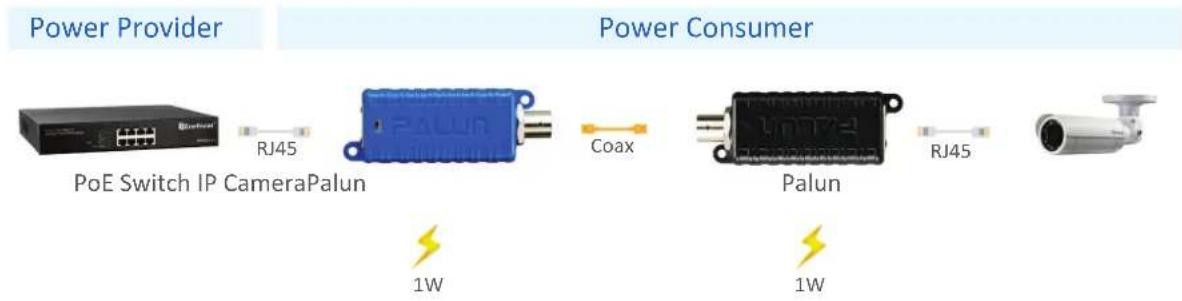
flowchart
graph LR
    A["Power Provider"] --> B["PoE Switch IP CameraPalun"]
    B --> C["RJ45"]
    C --> D["Coax"]
    D --> E["1W"]
    E --> F["1W"]
    F --> G["Palun"]
    G --> H["RJ45"]
    H --> I["Output"]
How to Use the Switch on Palun?
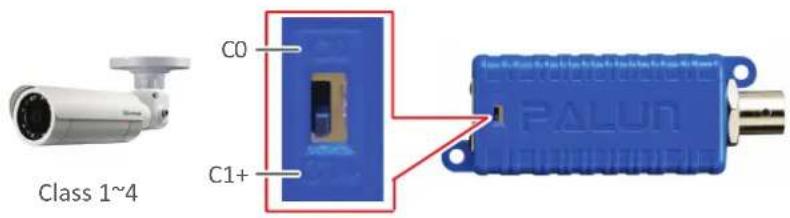
The switch on Palun (the blue one only) is designed for adjusting the power output from the PoE switch in order to better accommodate cameras of different class levels.
If the IP camera's PoE type is Class 1\~4, please switch it to C1+.
(If your IP camera's class level is 1, Palun will advertise it as Class 2 to the PoE switch; if the camera is Class 2, Palun will advertise it as Class 3 to the PoE switch, and so forth)
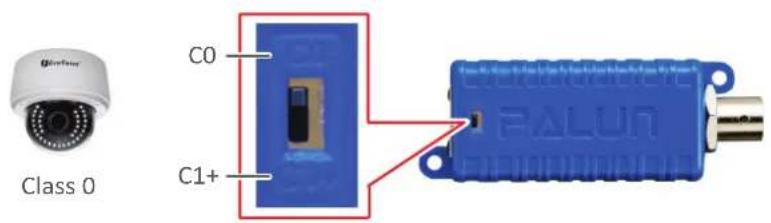
If the IP camera's PoE type is Class 0, please switch it to C0.
Why to Use the Switch on Palun?
Originally, if your camera is Class 1 and consumes 4W, the PoE switch detects the class level and sends Class 1 guaranteed maximum 4W of power which is sufficient to power up the camera. However, Palun also consumes 2 watts of power, so the total power consumption (6W) of both Palun and IP camera exceeds the power (4W) delivered by the PoE switch.
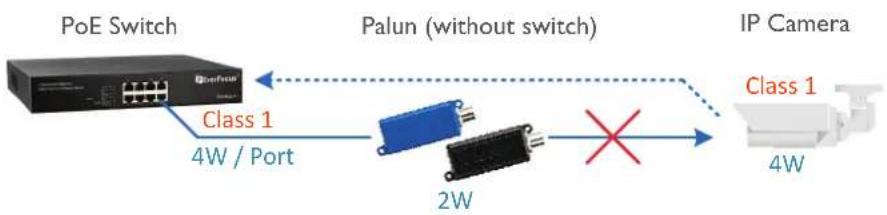
flowchart
graph LR
    A["PoE Switch"] -->|Class 1\n4W / Port| B["Palun (without switch)"]
    B --> C["IP Camera"]
    B --> D["Class 2W"]
    D -->|X| C
    style A fill:#f9f,stroke:#333
    style B fill:#ccf,stroke:#333
    style C fill:#cfc,stroke:#333
Now, if you switch Palun to C1+ (for Class 1\~4 IP camera only), it will help to increase the guaranteed power output from the PoE switch by advertising a higher class level. Therefore, in our example above, even though the IP camera is Class 1, Palun will advertise it as Class 2 to the PoE switch so that the PoE switch will reserve a Class 2 guaranteed power (7W) for devices connected to this port. Then, it is now sufficient to power up both camera and Palun.
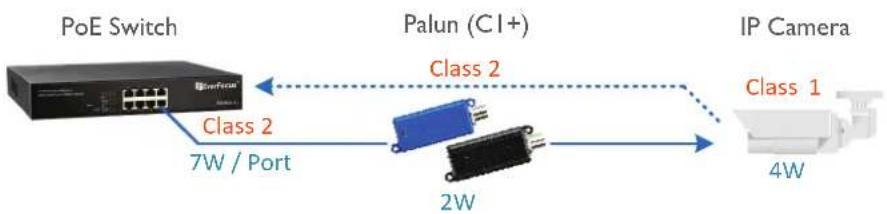
flowchart
graph LR
    A["PoE Switch"] -->|Class 2\n7W / Port| B["Palun (CI+)"]
    B -->|Class 2\n2W| C["IP Camera"]
    C -->|Class 1\n4W| D["Output"]
Guaranteed Power at EverFocus PoE Switch
| IEEE PoE Standard | Class | Guaranteed Power at PoE Switch |
| 0 15.4W | ||
| IEEE802.3af | 1 4W | |
| IEEE802.3at (Type 1) | 2 7W | |
| 3 15.4W | ||
| IEEE802.3at (Type 2) | 4* | 30W |
Table 1
* Class 4 can only be used by IEEE802.3at (Type 2) devices.
Brand : EverFocus
Model : Palun
Category : Network card / adapter