
GHDSW4K4 - Router IOGEAR - Free user manual and instructions
Find the device manual for free GHDSW4K4 IOGEAR in PDF.


| Product Type | Router |
| Model | GHDSW4K4 |
| Brand | IOGEAR |
| Dimensions (approx) | 200 x 150 x 30 mm (7.9 x 5.9 x 1.2 in) |
| Weight | 300 g (10.6 oz) |
| Power Input | 12V DC, 1A |
| Wireless Standard | 802.11ac (Wi-Fi 5) |
| Frequency Bands | 2.4 GHz and 5 GHz |
| Max Data Rate | Up to 1200 Mbps |
| Ethernet Ports | 4 x Gigabit LAN, 1 x Gigabit WAN |
| USB Ports | 1 x USB 2.0 |
| VPN Support | PPTP, L2TP, OpenVPN |
| IPv6 Support | Yes |
| Guest Network | Yes |
| Parental Controls | Yes |
| Security Encryption | WPA2-PSK, WPA3 |
| Antenna Type | 4 x External, detachable |
| Operating Temperature | 0°C to 40°C (32°F to 104°F) |
| Storage Temperature | -20°C to 60°C (-4°F to 140°F) |
| Device Management | Web interface, mobile app |
| Maintenance | Clean with dry soft cloth; avoid liquids |
| Safety | Place in well-ventilated area; do not cover |
| Spare Parts & Repairability | Not user-serviceable; contact support |
Frequently Asked Questions - GHDSW4K4 IOGEAR
User questions about GHDSW4K4 IOGEAR
0 question about this device. Answer the ones you know or ask your own.
Ask a new question about this device
Download the instructions for your Router in PDF format for free! Find your manual GHDSW4K4 - IOGEAR and take your electronic device back in hand. On this page are published all the documents necessary for the use of your device. GHDSW4K4 by IOGEAR.
USER MANUAL GHDSW4K4 IOGEAR
natural_image
Solid lime green vertical rectangle with dark border (no text or symbols)Quick Start Guide
4-Port 4Kx2K HDMI Switch with Remote
GHDSW4K4
PART NO. Q1326
Package Contents
1 x GHDSW4K4 4-Port HDMI Switch
1 x IR Remote
1 x Quick Start Guide
1 x Warranty Card
Requirements
Display:
HDMI HDTV, Display or Projector
Source:
Media source with HDMI Out
Overview
Remote:
- Select Next Port
- Port 1
- Port 2
- Port 3
- Port 4
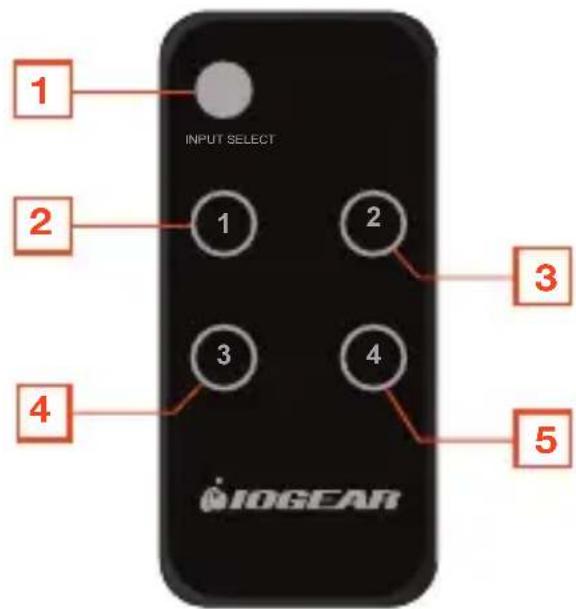
REMOTE
2
Switch:
- Input Port 1
- External IR
Receiver Port (Optional)
- IR Receiver
-
Port 1 LED
-
Port 2 LED
- Port 3 LED
- Port 4 LED
- Output Port LED
- Port Selection Button
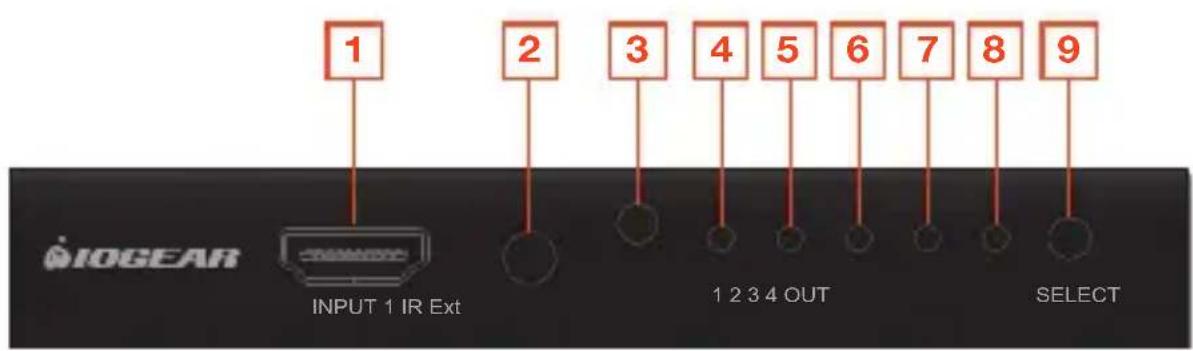
flowchart
graph TD
    A["1"] --> B["INPUT 1 IR Ext"]
    C["2"] --> D["1 2 3 4 OUT"]
    E["3"] --> F["SELECT"]
    G["4"] --> H["1 2 3 4 OUT"]
    I["5"] --> J["1 2 3 4 OUT"]
    K["6"] --> L["1 2 3 4 OUT"]
    M["7"] --> N["1 2 3 4 OUT"]
    O["8"] --> P["1 2 3 4 OUT"]
    Q["9"] --> R["1 2 3 4 OUT"]
FRONT VIEW
- Input Port 2
- Input Port 3
-
Input Port 4
-
Output Port
- USB Power Port (Optional)
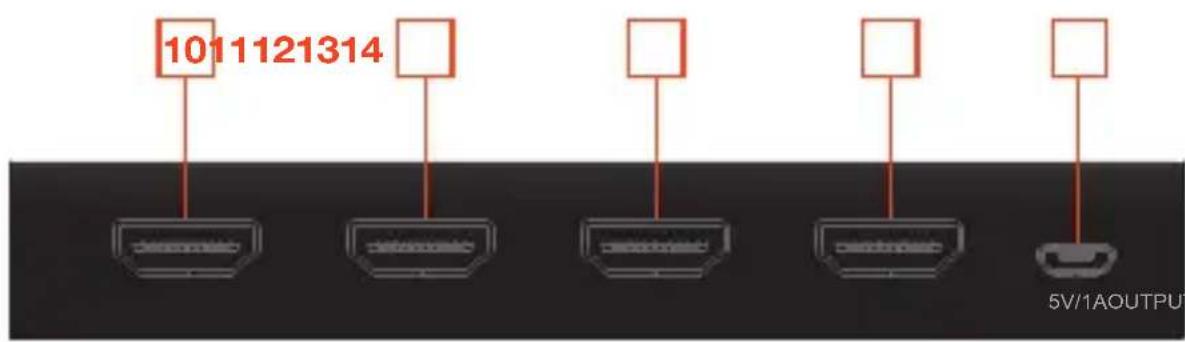
flowchart
graph TD
    A["Device 1011121314"] --> B["Device 1"]
    C["Device 1"] --> D["Device 2"]
    E["Device 2"] --> F["Device 3"]
    G["Device 3"] --> H["Device 4"]
    I["Device 4"] --> J["Device 5"]
5V/1A OUTPUT INPUT 2 INPUT 3
BACK VIEW
STEP 1
Connect an HDMI cable from the output port of the switch to any available HDMI input on your HDTV, HD projector or HDMI display.
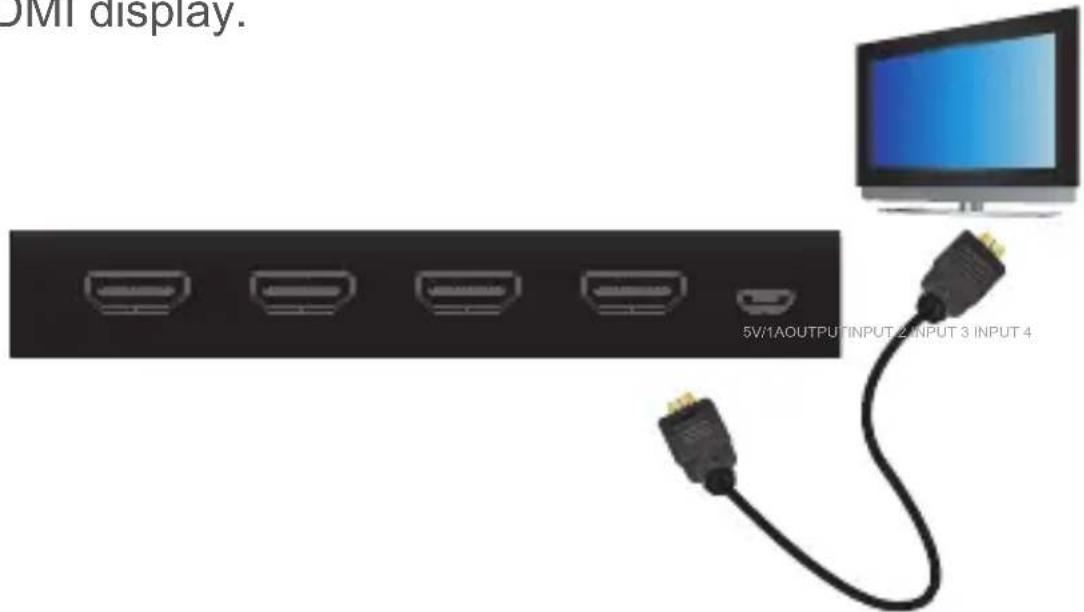
STEP 2
Connect any HDMI media devices to the input ports of the HDMI switch. The switch will automatically power on when a powered HDMI device is connected.
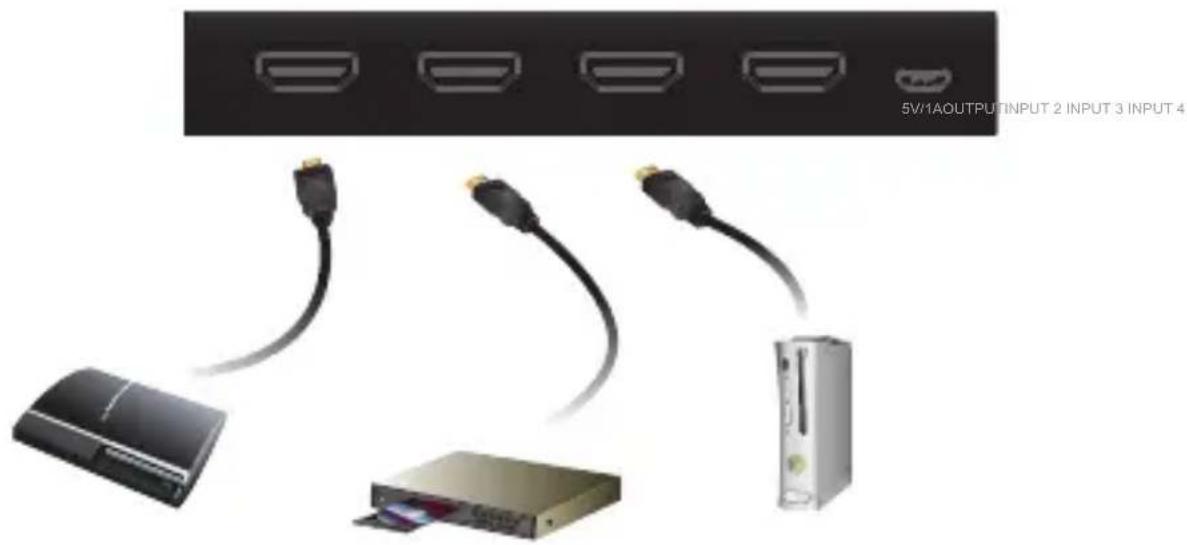
Note: The switch will automatically select the input that a powered HDMI device is connected to
STEP 3
Use the remote control or front panel selection button to switch to the desired port, then power on your HDTV or HD display and media source.
Compliance Information
FCC Statement
This equipment has been tested and found to comply with the limits for a Class B digital device, pursuant to Part 15 of the FCC Rules. These limits are designed to provide reasonable protection against harmful interference in a residential setting. This product generates, uses, and can radiate radio frequency energy and, if not installed and used as directed, it may cause harmful interference to radio communications. Although this product complies with the limits for a Class B digital device, there is no guarantee that interference will not occur in a particular installation.
CE Compliance
This device has been tested and found to comply with the following European Union directives: Electromagnetic Capability (2004/108/EC), Low Voltage (2006/95/EC) and R&TTED (1999/5/EC).
Limited Warranty
WE'RE HERE TO HELP YOU! NEED ASSISTANCE SETTING UP THIS PRODUCT?
Make sure you:
- Visit www.iogear.com for more product information.
- Visit www.iogear.com/support for live help and product support.
Warranty Information
This product carries a 1 Year Limited Warranty. For the terms and conditions of this warranty, please go to http://www.iogear.com/support/warranty.
Register online at http://www.iogear.com/register
Important Product Information
Product Model ____
Serial Number ____
Contact
iogear.custhelp.com
support@iogear.com
www.iogear.com
19641 Da Vinci, Foothill Ranch, CA 92610
Brand : IOGEAR
Model : GHDSW4K4
Category : Router