
Blue WDS200T2B0A - SSD Drive WESTERN DIGITAL - Free user manual and instructions
Find the device manual for free Blue WDS200T2B0A WESTERN DIGITAL in PDF.


| Product Type | SSD Drive |
| Brand | Western Digital |
| Model | Blue WDS200T2B0A |
| Capacity | 2TB |
| Form Factor | 2.5-inch |
| Interface | SATA III (6 Gb/s) |
| Sequential Read Speed | Up to 560 MB/s |
| Sequential Write Speed | Up to 530 MB/s |
| NAND Technology | 3D NAND |
| Cache | DRAM-less (HMB) |
| Dimensions (W x D x H) | 100.2 mm x 69.85 mm x 7 mm |
| Weight | 37 g |
| Operating Temperature | 0°C to 70°C |
| Storage Temperature | -40°C to 85°C |
| Power Consumption (Active) | 2.5W read / 3.0W write |
| Power Consumption (Idle) | 0.045W |
| Mean Time Between Failures (MTBF) | 1.75 million hours |
| Endurance (TBW) | 500 TBW |
| Supported Features | SMART, TRIM, SLC caching |
| Security Features | Software-based encryption (e.g., BitLocker) |
| Warranty | 5 years limited |
| Maintenance & Cleaning | Keep firmware updated via WD Dashboard; clean with dry cloth |
| Repairability | Not user-serviceable; replace if faulty |
Frequently Asked Questions - Blue WDS200T2B0A WESTERN DIGITAL
User questions about Blue WDS200T2B0A WESTERN DIGITAL
0 question about this device. Answer the ones you know or ask your own.
Ask a new question about this device
Download the instructions for your SSD Drive in PDF format for free! Find your manual Blue WDS200T2B0A - WESTERN DIGITAL and take your electronic device back in hand. On this page are published all the documents necessary for the use of your device. Blue WDS200T2B0A by WESTERN DIGITAL.
USER MANUAL Blue WDS200T2B0A WESTERN DIGITAL
Accessing Online Support
Visit our product support website at http://support.wdc.com and choose from these topics:
■ Downloads — Download software and updates for your WD product
■ Registration — Register your WD product to get the latest updates and special offers at http://register.wdc.com
■ Warranty & RMA Services — Get warranty, product replacement (RMA), RMA status, and data recovery information
■ Knowledge Base — Search by keyword, phrase, or Answer ID
■ Installation — Get online installation help for your WD product or software
■ WD Community — Share your thoughts and connect with other WD users at http://community.wdc.com
Table of Contents
Accessing Online Support......ii
1 Preface....1
Typographical Conventions Used....1
Glossary of Abbreviations and Acronyms....1
2 Introduction.... 2
General Description....2
Key Features....2
Functional Description....4
Advanced Flash Management....4
Defect and Error Management....4
Wear Leveling....4
Bad Block Management....5
Background Garbage Collection.... 5
Tiered Caching....5
Low-Density Parity-Check (LDPC)....5
Advanced Power Management....5
3 General Product Specifications....7
Interface....7
Hardware Configuration....7
Storage Capacity....7
4 Performance....9
WD Blue 3D NAND SATA SSD 2.5"/7mm Cased....9
WD Blue 3D NAND SATA SSD M.2 2280....9
5 Power Characteristics....10
Supply Voltage....10
Average Active Power Consumption.... 10
Average Maximum Operating Power Consumption.... 11
Peak Power and Maximum Current Consumption....11
Maximum In-Rush Current Power Consumption....12
Low Power Consumption Modes....12
Power Mode Transition Times.... 13
Graceful Power-off Requirements....13
6 Thermal Throttling....14
7 Endurance....15
8 Field Firmware Update (FFU)....16
9 Physical Specifications....17
SATA 2.5"/7mm Cased Form Factor....17
M.2 2280 Form Factor....18
10 Environmental Specifications....20
Temperature....20
Humidity....20
Vibration....20
Shock....20
Altitude....21
Electrostatic Discharge (ESD)....21
Acoustics....21
EMI/RFI Compliance....21
Chemical Restrictions.... 21
11 Regulatory Standards and Compliance....22
12 Windows Device Certifications.... 24
HCK Certification....24
HLK Certification....24
13 Reliability Characteristics....25
Uncorrectable Bit Error Rate (UBER)....25
Mean Time to Failure (MTTF)....25
14 Interface....26
Supported Standards....26
SATA Pin Assignments: Signal....26
SATA Pin Assignments: Power....26
M.2 Pin Assignments.... 27
15 Supported ATA Commands....30
Command Set....30
Identify Device Data.... 34
Log Pages....38
16 Ordering Information.... 39
1
Preface
Typographical Conventions Used
The following typographical conventions are used in this manual:
■ Italics - Used to indicate a technically defined term or state.
- Constant width - Used to show a literal technical command or response.
Glossary of Abbreviations and Acronyms
| DEVSLP | Device Sleep |
| DIPM Device Initiated Power Management | |
| ESD Electrostatic Discharge | |
| FFU Field Firmware Update | |
| HIPM Host Initiated Power Management | |
| IOPS Input/Output Operations Per Second | |
| LBA Logical Block Addressing | |
| LDPC Low-density Parity-check | |
| MTTF Mean Time to Failure | |
| NGFF Next Generation Form Factor | |
| SLC Single Level Cell | |
| SMART Self-Monitoring, Analysis, and Reporting | Technology |
| SSD Solid State Drive | |
| TBW Terabytes Written | |
| TLC Triple Level Cell |
Introduction
This product manual describes the functional, mechanical, and interface specifications for the WD Blue™ 3D NAND SATA SSD (solid-state drive).
General Description
The WD Blue 3D NAND SATA SSD delivers high performance and reliability with low power consumption in large capacities. It is based on state-of-the-art BiCS3 64L TLC (triple level cell) flash technology and incorporates the proven tiered caching architecture designed to improve responsiveness for corporate and consumer workloads.
The WD Blue 3D NAND SATA SSD is optimized for the demanding power management requirements of Ultrathin and small form factor products. It features Device Sleep (DEVSLP), more frequent use of low-power modes, and fast transitions between various power modes.
The WD Blue 3D NAND SATA SSD also features a robust error-handling mechanism technology which uses a page-level striping with distributed parity for an added layer of data protection. This mechanism thus recovers errors, without interrupting user data flow that other traditional error correction mechanisms cannot.
Available in either a SATA 2.5"/7mm cased or an M.2 2280 form factor, the WD Blue 3D NAND SATA SSD offers drive capacities of 250 gigabyte ^1 (GB), 500GB, 1 terabyte ^2 (TB), and 2TB.
Key Features
■ Flash Technology
•BiCS3 64L 3D TLC
■ Unformatted Capacities ^3
°250GB
500GB
°1TB
°2TB
■ Form Factors
°SATA 2.5"/7mm cased: complies with SFF-8223 and SFF-8201
^5 M.2 2280-S2-B-M ^4 : complies with PCI Express M.2 (NGFF) Electromechanical Specification, rev. 1.0
°M.2 2280 is single-sided for all capacities
■ Interface to Host
°SATA III 6Gb/s (rev. 3.2) compliant
- Backwards compatible with SATA II 3Gb/s and SATA I 1.5Gb/s
- ATA 8 command set ACS-4
- NCQ support up to queue depth of 32
•SMART support
■ High Performance 5
•Sequential read up to: 560 MB/s
°Sequential write up to: 530 MB/s
-4K random read up to: 95,000 IOPS
-4K random write up to: 84,000 IOPS
■ Low Power Consumption ^6
•Maximum active power: less than or equal to 7,900mW
°Average power: 60mW
- Slumber low-power mode: 49.9mW - 56.5mW
- DEVSLP low-power mode: 4.9mW - 11.9mW
■ Endurance ^7
°Up to 500 TBW
■ Advanced Flash Management
- Tiered caching architecture
- Error-management system
- TRIM command support
•Dynamic and static wear leveling
- Bad block management
•Background garbage collection
■ Dynamic Thermal Throttling
•Performance may be throttled in order to avoid cases where the temperature exceeds the product allowable temperature envelope
- Three modes dependent on thermal conditions
■ High Reliability
°Mean time to failure (MTTF): Up to 1,752,000 hours
°Uncorrectable bit error rate (UBER): 1 bit per 1016 bits read
^° Operational and non-operational shock: 1,500G, 0.5ms half sine
°Operational vibration: 5gRMS, 10-2000 Hz
°Non-operational vibration: 4.9gRMS, 7-800 Hz
°Operational temperature ^8 : 0°C to 70°C (32°F to 158°F)
°Non-operational temperature and storage ^8,9 : -55°C to +85°C (-67°F to 185°F)
Functional Description
The WD Blue 3D NAND SATA SSD supports the following features:
■ Support for multi-stream – improves user experience in multitasking systems
■ Support for TRIM command – sustains drive's high performance over time
- Minimal write amplification – increases endurance and performance
■ Tiered caching, including use of allocated SLC blocks
■ Support for ATA register and command set (ATA-8/ACS-4 standard)
■ SMART feature support
■ Error recovery using Error Correction Code (ECC)
■ Self-management of NAND memory defects
■ Advanced power management for low-power operation, including DEVSLP capability
■ Error-management system - provides a last line of data protection
■ Dynamic and static wear leveling to extend the life of the WD Blue 3D NAND SATA SSD
Advanced Flash Management
Defect and Error Management
The WD Blue 3D NAND SATA SSD contains an enhanced defect and error management system that is similar to systems found in hard disk drives (HDDs). If necessary, the device will rewrite data from a defective block to a good block. This action is completely transparent to the host and does not consume any user data space.
The WD Blue 3D NAND SATA SSD soft error rate specification is superior to the HDD specification. In the rare case when a read error occurs, the drive uses Error Detection Code (EDC) and Error Correction Code (ECC) algorithms to recover the data. These defect and error management systems give it unparalleled reliability.
The WD Blue 3D NAND SATA SSD also includes a robust error handling mechanism which can recover errors that other traditional error correction mechanisms cannot. This mechanism can leverage a hardware XOR core to calculate the extra parity on-the-fly with minimal impact in performance.
Wear Leveling
Wear leveling is an intrinsic part of the erase pooling functionality. NAND-based SSDs use dynamic and static wear leveling and automatic block management to ensure an even distribution of write/erase cycles throughout the entire device. These processes guarantee high data reliability and maximize flash life expectancy. Wear leveling is done between all TLC blocks and separately between all SLC blocks.
Bad Block Management
Bad blocks are occasionally created during the life cycle of a flash component. These bad blocks must be marked and replaced dynamically in order to prevent read/write failures. When a bad block is detected, the embedded Bad Block Mapping algorithm removes the block from future use.
Background Garbage Collection
The flash management firmware will perform internal housekeeping activities, such consolidating and flushing the SLC blocks to the TLC storage or reorganizing the data in the TLC array or SLC array. These activities are performed in the background and are transparent to the host, thus improving performance while providing a seamless user experience.
Tiered Caching
The WD Blue 3D NAND SATA SSD uses a tiered caching structure to improve write performance and endurance.
Modern operating systems typically access the storage device using small access blocks; the majority of these being 4KB. These access blocks are incongruent with the physical block size (less than 1MB) of the newer generation of flash memory technology, and writing directly to the TLC array is also slower than writing to SLC blocks. To overcome these hurdles, the WD Blue 3D NAND SATA SSD employs three storage layers:
■ Volatile cache — DDR DRAM cache
■ Tiered Caching structure — A non-volatile flash write cache
■ Mass storage — TLC NAND flash
The tiered caching structure is a pool of X1 blocks which are used as write cache to accumulate and consolidate all writes at high speed. It works in the background, then flushes them into the larger X3 storage blocks and uses optimized write transaction sizes to maximize endurance.
All host data is written to X1 blocks to achieve the highest performance. Three X1 blocks are copied sequentially into one X3 block during the flush to mass storage when exceeding their threshold.
Low-Density Parity-Check (LDPC)
An enhancement introduced with the WD Blue 3D NAND SATA SSD is the low-density parity-check (LDPC) error correction code (ECC) technology. LDPC significantly improves reliability over the previous generation of BCH code, supports progressive levels of error correction, and runs on-the-fly using a dedicated hardware core to minimize latency and impact on overall drive performance. Consequently, it uses less power than deeper dynamic read retries.
Advanced Power Management
The WD Blue 3D NAND SATA SSD includes an advanced power management system that supports Device Initiated Power Management (DIPM). Host Initiated Power Management (HIPM) has been disabled in the WD Blue 3D NAND SATA SSD.
The device can enter in to the SATA Partial and Slumber low-power modes through DIPM. In DIPM, the device sends a request to the host to enter into Slumber mode upon completion of any command.
The device also supports the SATA Device Sleep (DEVSLP) mode. For more information, refer to the SATA revision 3.2 specification available at www.t13.org
General Product Specifications
Interface
The device interface complies with the Serial ATA standard published by ANSI. It complies with the SATA 6Gb/s (rev. 3.2) specification and supports ATA-8 Command Set ACS-4. It is also backwards compatible with SATA 3Gb/s (rev. 2.0) and SATA 1.5Gb/s (rev. 1.0).
For more information, refer to the American National Standard X3.221: AT Attachment for Interface for Disk Drives document. Order this document from IHS by calling 1-800-854-7179 or by accessing their web site: http://global.ihs.com
Hardware Configuration
The following table provides the basic hardware configuration values for the WD Blue 3D NAND SATA SSD.
| Form Factor | NAND Capacity Memory | |
| 2.5"/7mm cased BiCS3 64L eX3 250GB 4 x 2D BGA | ||
| 2.5"/7mm cased BiCS3 64L eX3 500GB 4 x 4D BGA | ||
| 2.5"/7mm cased BiCS3 64L eX3 1TB 8 x 4D BGA | ||
| 2.5"/7mm cased BiCS3 64L eX3 2TB 8 x 8D BGA | ||
| M.2-2280 S2 BiCS3 64L eX3 250GB 4 x 2D BGA | ||
| M.2-2280 S2 BiCS3 64L eX3 500GB 4 x 4D BGA | ||
| M.2-2280 S2 BiCS3 64L eX3 1TB 4 x 8D BGA | ||
| M.2-2280 S3 BiCS3 64L eX3 2TB | ^10 | 4 x 16D BGA |
Storage Capacity
The following table provides the storage capacities for the WD Blue 3D NAND SATA SSD 2.5"/7mm cased and M.2 2280 form factors.
| Unformatted Capacity11 | Sectors in LBA Mode12 | Logical Cylinders Number of Logical Heads | Logical Sectors per Track | |
| 250GB 488,397,168 | 16,383 | 16 | 63 | |
| 500GB | 976,773,168 | 16,383 | 16 | 63 |
| 1TB | 1,953,525,168 | 16,383 | 16 | 63 |
| Unformatted Capacity11 | Sectors in LBA Mode12 | Logical Cylinders Number of Logical Heads | Logical Sectors per Track |
| 2TB 3,907,029,168 16,383 16 63 | |||
Performance
WD Blue 3D NAND SATA SSD 2.5"/7mm Cased
| Parameter Unit Queue | 250GB 500GB 1TB 2TB | |||||
| Depth | ||||||
| Sequential Read ^13 up to: | MB/s 32 550 560 560 560 | |||||
| Sequential Write ^13 up to: | MB/s 32 525 530 530 530 | |||||
| Random Read [4KB] ^13 up to: | IOPS 1 10,000 10,000 10,000 10,000 | |||||
| Random Read [4KB] ^13 up to: | IOPS 32 95,000 95,000 95,000 95,000 | |||||
| Random Write [4KB] ^13 up to: | IOPS 1 32,000 32,000 32,000 32,000 | |||||
| Random Write [4KB] ^13 up to: | IOPS 32 81,000 84,000 84,000 84,000 | |||||
| OFF to ON Resume Time ^14 | ms N/A | 100 | 100 | 100 | 100 | |
WD Blue 3D NAND SATA SSD M.2 2280
Performance values for the WD Blue 3D NAND SATA SSD M.2 2280 form factor are identical to the performance values for the WD Blue 3D NAND SATA SSD 2.5"/7mm cased form factor.
Power Characteristics
This section provides the measured voltage, power, and current consumed by the WD Blue 3D NAND SATA SSD. ^15
Supply Voltage
Parameter Specification
Input Voltage: 2.5"/7mm cased 5V ± 5%
Input Voltage: M.2 2280 3.3V ± 5%
Maximum Ripple 100mV (peak to peak), 0Hz to 30MHz
Maximum Supply Rise Time 100ms
Average Active Power Consumption
The average active power consumption ^16 is defined as the blended read/write/idle power used by the drive while in operation with a commonly used operating system. It is measured using the MobileMark ^® 2014 benchmark with DIPM (Device Initiated Power Management) enabled. When DIPM is enabled, the drive is allowed to enter low-power modes during host idle times. This benchmark simulates the typical usage of user applications in a Windows environment, providing a reproducible test for measuring average active power consumption.
The following table provides the average active power and average current values for all WD Blue 3D NAND SATA SSD storage capacities (250GB, 500GB, 1TB and 2TB).
| Form Factor | Input Voltage | Test 250GB 500GB 1TB 2TB | |
| 2.5"/7mm | 5V ± 5% Average | 52mW 54mW 66mW 60mW | |
| cased | Power | ||
| Average Current | 10.4mA 10.8mA 13.2mA 12mA | ||
| M.2 2280 | 3.3V ± 5% | Average Power | 51mW 49mW 58mW 60mW |
| Average Current | 15.4mA 14.8mA 17.5mA 18.1mA | ||
Average Maximum Operating Power Consumption
Average maximum operating power consumption ^17 is measured while the WD Blue 3D NAND SATA SSD is continuously processing sequential read and write commands (tested separately) for at least 1 minute, with a transfer size of 256 sectors per command (128KB). The sampling interval is 125 milliseconds. This benchmark is designed to test the worst-case scenario, i.e., when continuous power is required by the WD Blue 3D NAND SATA SSD during long read or write command sequences.
Note: The power and current values in the following table are average maximum with 20% margin.
| Form Factor Input Voltage | Test 250GB 500GB 1TB 2TB | ||
| 2.5"/7mm cased | 5V ± 5% Read: Power 2200mW 2050mW 2550mW 2650mW | ||
| Read: 440mA 410mA 510mA 530mACurrent | |||
| Write: Power 2250mW 3350mW 3750mW 3800mW | |||
| Write: 450mA 670mA 750mA 760mACurrent | |||
| M.2 2280 3.3V ± 5% Read: Power 2200mW 2050mW 2300mW 3000mW | |||
| Read: 667mA 621mA 697mA 909mACurrent | |||
| Write: Power 2200mW 3300mW 3750mW 3800mW | |||
| Write: 667mA 1000mA 1136mA 1152mACurrent | |||
Peak Power and Maximum Current Consumption
Peak power consumption ^17 is the maximum instantaneous power consumption measured while the WD Blue 3D NAND SATA SSD is continuously processing sequential read and write commands (tested separately) for at least one minute with a transfer size of 256 sectors per command (128KB). The sampling interval is 10 s (microseconds). This benchmark is designed to test the worst-case scenario, i.e., when continuous power is required by the WD Blue 3D NAND SATA SSD during long read or write command sequences.
Maximum current refers to the maximum operating power that can be applied continuously to the WD Blue 3D NAND SATA SSD drive without harming the drive.
Note: The power and current values in the following table are average maximum with 20% margin.
| Form Factor Input Voltage | Test 250GB 500GB 1TB 2TB | |||
| 2.5"/7mm cased | 5V ± 5% Peak Power 4300mW 5550mW 7600mW 7900mW | |||
| Maximum Current | 860mA 1110mA 1520mA 1580mA | |||
| M.2 2280 3.3V ± 5% Peak Power 4350mW 5650mW 7100mW 7350mW | ||||
| Maximum Current | 1318mA 1712mA | 2152mA | 2227mA | |
Maximum In-Rush Current Power Consumption
Maximum in-rush current refers to the maximum instantaneous power consumption of the WD Blue 3D NAND SATA SSD drive after a power cycle until all voltage rails required for operation are stabilized to their nominal values on the drive. The sampling interval is 10 s (microseconds).
| Form Factor | Input Voltage | Test Maximum In-Rush |
| 2.5"/7mm cased | 5V ± 5% | 1.5A |
| M.2 2280 | 3.3V ± 5% | 1.5A |
Low Power Consumption Modes
The WD Blue 3D NAND SATA SSD supports the Partial, Slumber, and DEVSLP low power consumption modes. ^17
Note: The power and current values in the following table are averages for a typical WD Blue 3D NAND SATA SSD drive.
| Form Factor Input Voltage | Power Mode | 250GB 500GB 1TB 2TB | ||||
| 2.5"/7mmcased | 5V ± 5% Slumber(Power) | 51.4mW | 55.4mW | 56.0mW | 54.5mW | |
| 2.5"/7mmcased | 5V ± 5% Slumber(Current) | 10.3mA | 11.1mA | 11.2mA | 10.9mA | |
| 2.5"/7mmcased | 5V ± 5% DEVSLP(Power) | 6.9mW | 5.7mW | 11.9mW | 11.9mW | |
| 2.5"/7mmcased | 5V ± 5% DEVSLP(Current) | 1.4mA | 1.1mA | 2.4mA | 2.4mA | |
| M.2 2280 3.3V ± 5% Slumber(Power) | 55.9mW | 54.7mW | 56.5mW | 54.7mW | ||
| M.2 2280 3.3V ± 5% Slumber(Current) | 16.9mA | 16.6mA | 17.1mA | 16.6mA | ||
| M.2 2280 3.3V ± 5% DEVSLP(Power) | 5.1mW | 4.9mW | 4.9mW | 4.9mW | ||
| Form Factor Input Voltage | Power Mode 250GB 500GB 1TB 2TB |
M.2 2280 3.3V ± 5% DEVSLP 1.6mA 1.5mA 1.5mA 1.5mA
(Current)
Power Mode Transition Times
The following table specifies the transition times between the DEVSLP and active power states.
Power Mode 250GB 500GB 1TB 2TB
DEVSLP (Resume) 72ms 79ms 104ms 131ms
Graceful Power-off Requirements
On most operating systems, Write Cache is enabled by default. This is a feature of the ATA standard and is not specific to WD Blue 3D NAND SATA SSDs. There may be data residing in the WD Blue 3D NAND cache that have not been written to the flash memory. To ensure that the data is properly committed to flash memory, the WD Blue 3D NAND requires a STANDBY IMMEDIATE command before power down. This command instructs the WD Blue 3D NAND SATA SSD to write all of its volatile data cache to flash memory and returns a GOOD status to the host after its successful completion. This command is handled transparently by most operating systems during the shutdown sequence (e.g., hibernation, shutdown, and standby).
However, if power is lost without warning – leading to an ungraceful shutdown – data loss may occur. This may also lead to a longer power-on time for the subsequent power-up.
Thermal Throttling
To protect the integrity of the data and prevent excessive heat dissipation, the X600 3D NAND SATA SSD uses an integrated thermal sensor in the NAND to monitor its critical component temperature. If the sensor temperature rises above the allowable limit, system performance is throttled until the temperature decreases to an acceptable level. The X600 returns to full performance when the temperature returns to a normal range. This performance throttling technique acts as a safety measure.
The X600 3D NAND SATA SSD reads temperature from the integrated thermal sensor every one second. The device then autonomously decides which throttling level is required and reduces performance appropriate to the state.
The following table details the thermal throttling behavior for both the X600 3D NAND SATA SSD 2.5"/7mm cased and M.2 2280 form factors.
| Thermal Band | ≤74°C ≥75°C ≥83°C ≥87°C | ||
| Thermal Throttle State | Normal Light (up to) Heavy (up to) Emergency | Shutdown | |
| 250GB Read Refer to | Performance Section | 250 150 No host I/O | available in this state |
| 250GB Write Refer to | Performance Section | 60 20 No host I/O | available in this state |
| 500GB Read Refer to | Performance Section | 250 140 No host I/O | available in this state |
| 500GB Write Refer to | Performance Section | 60 20 No host I/O | available in this state |
| 1TB Read Refer to | Performance Section | 250 140 No host I/O | available in this state |
| 1TB Write | Refer to Performance Section | 60 20 No host I/O | available in this state |
| 2TB Read | Refer to Performance Section | 240 150 No host I/O | available in this state |
| 2TB Write | Refer to Performance Section | 70 20 No host I/O | available in this state |
Light Thermal Throttle performance is defined has performance defined as 10% of Normal. Heavy Thermal Throttle has performance is defined as 650% of Normal. Emergency Shutdown is activated if device temperature is equal to or higher than 87°C for 20 seconds.
7
Endurance
The endurance (longevity) of the WD Blue 3D NAND SATA SSD is calculated using JEDEC client workload (JESD219). Endurance is a direct function of user workload and access pattern. Defined in terms of terabytes written (TBW), endurance represents the amount of data that can be written to the WD Blue 3D NAND SATA SSD during the WD Blue 3D NAND SATA SSD lifetime and varies by product capacity.
Refer to the table below.
Parameter 250GB 500GB 1TB 2TB
Endurance 100 TBW 200 TBW 400 TBW 500 TBW
Field Firmware Update (FFU)
Field firmware updates (FFUs) for the WD Blue 3D NAND SATA SSD, when available, are found at the following website (http://kb.sandisk.com). Download and activate these FFUs via the codes indicated in the following table.
| Code Subcommand Name | Phases Included: Download | Phases Included: Save | Phases Included: Activate |
| 01h Obsolete n/a n/a n/a | |||
| 03h Download with offsets, and save microcode for future use | One or more segments | Yes No | 18 |
| 07h Download and save microcode for future use | One segment only | Yes No | 18 |
| 0Eh Download with offsets, and save microcode for future use | One or more segments | Yes No | 19 |
| 0Fh Activate downloaded microcode | No No Yes | ||
| All others Reserved n/a n/a n/a |

Physical Specifications
SATA 2.5"/7mm Cased Form Factor
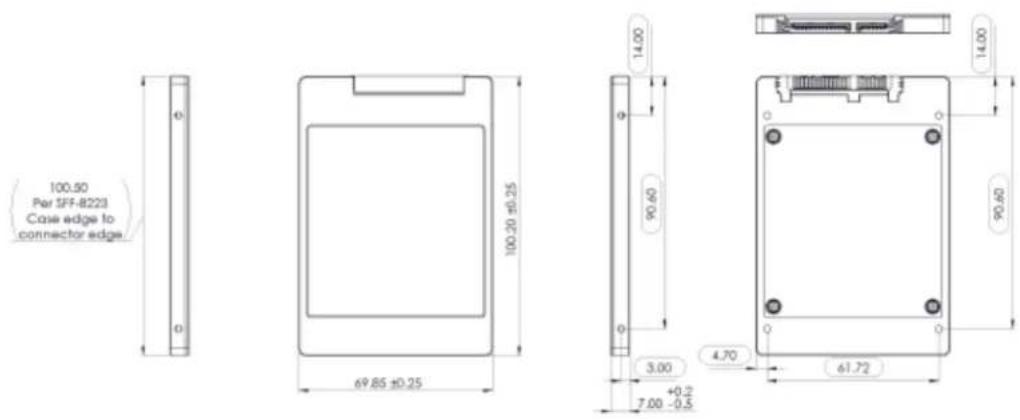
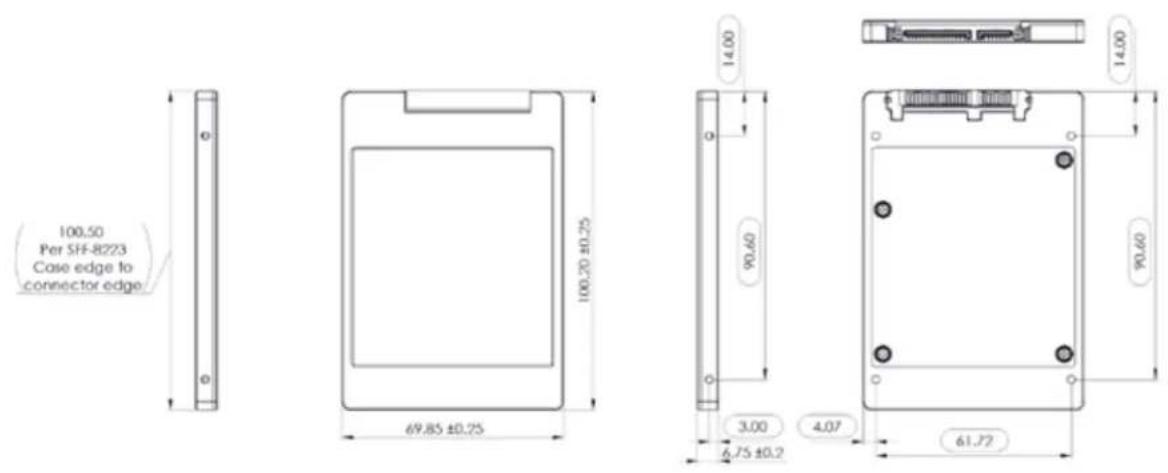
The SATA 2.5"/7mm cased form factor complies with the SFF-8201 and SFF-8223 specifications.
Parameter Specification
Width 69.85mm ± 0.25mm
Length 100.20mm ± 0.25mm
Thickness 7.0mm ± 0.2mm/-0.5mm
Typical Weight
■ 250GB: 37.4g
■ 500GB: 37.4g
■ 1TB: 37.4g
■ 2TB: 59.7g
Mounting Screws M3 x 0.5 non-self-tapping or thread forming
Maximum Screw Penetration 3.5mm (0.138")
Screw Torque (nominal/max) 4kgf-cm/7kgf-cm
The figure below is enlarged to show detail, but is not the actual size of the form factor. This figure shows 2.5"/7mm cased full form factor (for 1TB and 2TB capacities only).
The figure below is enlarged to show detail, but is not the actual size of the form factor. This figure shows 2.5"/7mm cased one-half form factor (for 250GB and 512GB capacities only).
M.2 2280 Form Factor
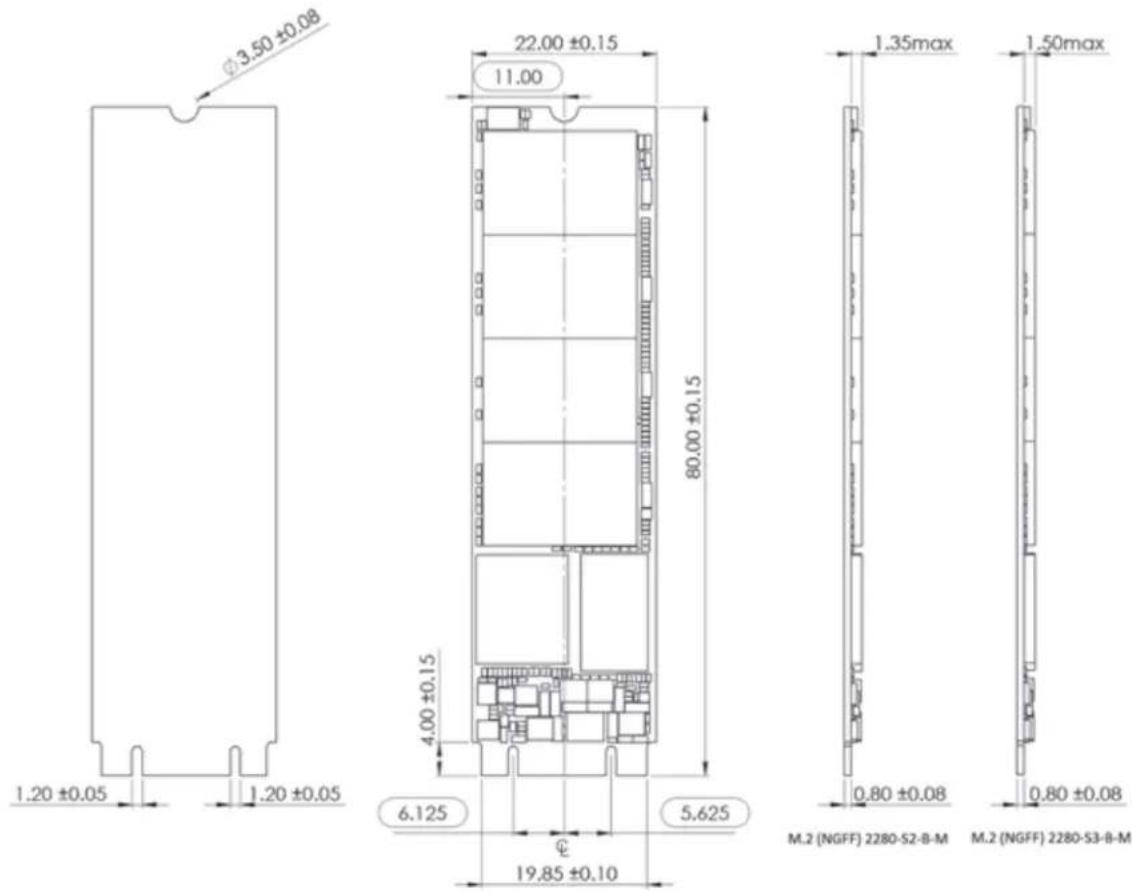
The M.2 2280 form factor complies with the PCI Express™ M.2 Specification, Revision 1.0. This specification is available at https://pcisig.com/specifications
| Parameter | Specifications |
| Type 250GB, 512GB and 1TB: M.2 2280-S2-B-M | 2TB: M.2 2280-S3-B-M |
| Width 22 ± 0.15mm | |
| Length 80 ± 0.15mm | |
| Thickness (max) 2.23mm: 250GB, 512GB, 1TB | 2.38mm: 2TB |
| Typical Weight 7g ± 1g |
The figure below is enlarged to show detail, but is not the actual size of the form factor.
Environmental Specifications
Temperature
| Parameter Specifications | |
| Operational^20 | 0°C to 70°C (32°F to 158°F) |
| Non-operational^21 | -55°C to 85°C (-67°F to 185°F) |
Humidity
| Parameter | Specifications |
| Operational | |
| Humidity (Non condensation) 5% to 95% | |
| Maximum wet bulb 30°C | |
| Non-operational | |
| Humidity (Non condensation) 5% to 95% | |
| Maximum wet bulb 40°C |
Vibration
| Parameter | Specifications |
| Operational 5gRMS, 10-2000 Hz, 3 axes | |
| Non-operational 4.9gRMS, 7-800 Hz, 3 axes | |
Shock
| Parameter | Acceleration Force Half Sine Pulse Duration |
| Operational/Non-operational 1,500G 0.5ms | |
Altitude
Parameter Specifications
Operational/Non-operational -1,500ft (-457m) to 40,000ft (12,192m)
Electrostatic Discharge (ESD)
Parameter ^22
Test Voltage
Contact ±4kV
Air 8kV
Acoustics
The WD Blue 3D NAND SATA SSD does not generate any acoustic noise (0dB).
EMI/RFI Compliance
Certified Standards Compliance
FCC Part 15 Class B
IECS-003 Class B
EN 55022 Class B
EN 55024
KN 32
KN 35
CNS 13438 2006 (full version)
VCCI: VCCI rules and regulations (latest rev)
AS/NZS CISPR 22: (latest rev)
Chemical Restrictions
The WD Blue 3D NAND SATA SSD complies with:
■ European Union's Restriction on Use of Hazardous Substances in Electrical and Electronic Equipment (EU RoHS) Directive 2011/65/EC
■ European Union's Registration, Evaluation, Authorization and Restriction of Chemicals (REACH), Regulation (EC) 1907/2006
It also complies with China's management methods for controlling pollution by electronic information products (China RoHS).
Regulatory Standards and Compliance
The WD Blue 3D NAND SATA SSD conforms to and complies with the directives, regulations, and standards specified in the table below. The WD Blue 3D NAND SATA SSD is certified to meet the qualification criteria of these standards and regulations.
Directives, Regulations and Standards Description or Regulatory Parties
2014/30/EU EMC Directive
2014/25/EU LVD Directive
EMI/EMC Testing Directives, Regulations and Standards Description or Regulatory Parties
FCC Part 15 Subpart B:2012 FCC (United States)
ICES-003 Issue 5 Canada
EN 55022:2010 Information Technology Equipment--Radio
Disturbances Characteristics-Limits and Methods of Measurement
EN61000-3-2:2006+A1:2009+A2:2009Power Harmonics
EN61000-3-3:2008 Voltage Fluctuation
EN 55024:2010 Information Technology Equipment--Immunity
Characteristics-Limits and Methods of Measurement
EN 61000-4-2:2009 Electrostatic Discharge Immunity (±8 kV Air
Discharge, ±4 kV Contact Discharge, VCP, HCP)
EN 61000-4-3:2006+A1:2008+A2:2010Radiated Electromagnetic Field Immunity
EN 61000-4-4:2004+A1:2010 Electrical Fast Transient/Burst Immunity
EN 61000-4-5:2006 Surge Immunity
EN 61000-4-6:2009Conducted Immunity
EN 61000-4-8:2010 Power Frequency Magnetic Field Immunity
EN 61000-4-11:2004 Voltage Dips Voltage Interruptions
VCCI V-3/2011.04 VCCI (Japan)
AS/NZS CISPR 22:2009 AUS/NZ
BSMI CNS 13438:2006 BSMI (Republic of China)
Safety Directives, Regulations and Standards Description or Regulatory Parties
UL 60950-1, 2nd Edition, 2007-03-27
N. America (Information Technology Equipment - Safety - Part 1: General Requirements)
CSA 22.2 No. 60950-1-07 2nd Edition, 2007-03 (Covered by CULus)
Canada (Information Technology Equipment - Safety - Part 1: General Requirements)
IEC 60950-1:2005 (Second Edition)
International Electrotechnical Commission
Safety Directives, Regulations and Standards Description or Regulatory Parties
EN 60950-1:2006 +A11 TUV Bauart (Germany) License ID number 1234500561
Windows Device Certifications
HCK Certification
The WD Blue 3D NAND SATA SSD is certified with Windows HCK (Hardware Certification Kit) for Windows 7.
| Category Device | |
| Product Type Hard Drive | |
| Qualification Level Logo - Device - Compatible with Windows 7 x32 | |
| Logo - Device - Compatible with Windows 7 x64 | |
| Logo - Device - Compatible with Windows 8.1 x32 | |
| Logo - Device - Compatible with Windows 8.1 x64 | |
HLK Certification
The WD Blue 3D NAND SATA SSD is also certified with Windows HLK (Hardware Lab Kit) for Windows 10.
| Category | Device |
| Product Type Hard Drive | |
| Qualification Level Logo - Device - Compatible with Windows 10 x32 | |
| Logo - Device - Compatible with Windows 10 x64 | |
Reliability Characteristics
Uncorrectable Bit Error Rate (UBER)
The uncorrectable bit error rate is one error per 10^16 bits read.
Mean Time to Failure (MTTF)
Mean Time to Failure (MTTF) ^23 is a reliability figure that indicates the expected time to failure of non-repairable electronic equipment. Estimates of MTTF made using a prediction methodology based in accordance with the Telcordia Special Report SR-332. The prediction is based on a Parts Stress Analysis.
Quality levels were defined as industrial grade (I) for all of the components. The detailed prediction for the system was performed at a temperature of 25^ C in a GB (ground, benign) environment.
The MTTF for all WD Blue 3D NAND SATA SSD form factors and storage capacities is 1,752,000 hours.
14
Interface
Supported Standards
The supported standards for the WD Blue 3D NAND SATA SSD are:
■ SATA 6Gb/s, Revision 3.2
■ ATA-8 Command Set ACS-4
SATA Pin Assignments: Signal
| Pin # | Assignment Description |
| S1 GND 2nd mate | |
| S2 A+ RxP | |
| S3 A- RxM | |
| S4 GND 2nd mate | |
| S5 B- TxM | |
| S6 B+ TxP | |
| S7 GND 2nd mate |
SATA Pin Assignments: Power
| Pin # | Assignment Description |
| P1 V33 Not connected | |
| P2 V33 Not connected | |
| P3 DEVSLP Device sleep, high signal driven | by the host to shut down the SATA interface completely. |
| P4 GND 1st mate | |
| P5 GND 2nd mate | |
| P6 GND 3rd mate | |
| P7 V5 5V power input, pre-charge, | 2nd mate |
| P8 V5 5V power input | |
| P9 V5 5V power input | |
| P10 GND 2nd mate | |
| P11 DAS Device Activity Signal | |
| P12 GND 1st mate |
Pin # Assignment Description
P13 V12 Not connected
P14 V12 Not connected
P15 V12 Not connected
M.2 Pin Assignments
| Pin # Assignment Description | ||
| 1 Presence Detection Pulled low by device | ||
| 2 +3.3V 3.3V Source | ||
| 3 GND Return Current Path | ||
| 4 +3.3V 3.3V Source | ||
| 5 No Connect | ||
| 6 No Connect | ||
| 7 No Connect | ||
| 8 No Connect | ||
| 9 No Connect | ||
| 10 DAS/DSS# Device Activity | ||
| 11 No Connect | ||
| 12 Mechanical Notch B | ||
| 13 Mechanical Notch B | ||
| 14 Mechanical Notch B | ||
| 15 Mechanical Notch B | ||
| 16 Mechanical Notch B | ||
| 17 | Mechanical Notch B | |
| 18 Mechanical Notch B | ||
| 19 Mechanical Notch B | ||
| 20 | No Connect | |
| 21 | OC SSD | GND = SSD |
| 22 | ||
| 23 | No Connect | |
| 24 | No Connect | |
| 25 | No Connect | |
| 26 | No Connect | |
| 27 | GND Return Current Path | |
| 28 | No Connect | |
| 29 | No Connect | |
Pin # Assignment Description
| 30 No Connect | |
| 31 No Connect | |
| 32 No Connect | |
| 33 GND Return Current Path | |
| 34 No Connect | |
| 35 No Connect | |
| 36 No Connect | |
| 37 No Connect | |
| 38 DEVSLP Device Sleep, High Signal driven by the host shuts down the SATA interface completely. | |
| 39 GND Return Current Path | |
| 40 No Connect | |
| 41 +B - TXP Transmitter Differential Signal Pair | |
| 42 No Connect | |
| 43 -B - TXN Transmitter Differential Signal Pair | |
| 44 No Connect | |
| 45 GND Return Current Path | |
| 46 No Connect | |
| 47 -A - RXN Receiver Differential Signal Pair | |
| 48 No Connect | |
| 49 +A - RXP Receiver Differential Signal Pair | |
| 50 No Connect | |
| 51 GND Return Current Path | |
| 52 No Connect | |
| 53 No Connect | |
| 54 No Connect | |
| 55 No Connect | |
| 56 No Connect | |
| 57 GND Return Current Path | |
| 58 No Connect | |
| 59 Mechanical Notch M | |
| 60 Mechanical Notch M | |
| 61 Mechanical Notch M | |
| 62 Mechanical Notch M | |
Pin # Assignment Description
| 63 Mechanical Notch M |
| 64 Mechanical Notch M |
| 65 Mechanical Notch M |
| 66 Mechanical Notch M |
| 67 No Connect |
| 68 No Connect |
| 69 PEDET Ground = SATA |
| 70 +3.3V 3.3V Source |
| 71 GND Return Current Path |
| 72 +3.3V 3.3V Source |
| 73 GND Return Current Path |
| 74 +3.3V 3.3V Source |
| 75 GND Return Current Path |
Supported ATA Commands
Command Set
The following table defines the common ATA commands supported by the WD Blue 3D NAND SATA SSD. Specifics of each ATA command's operation can be found in the ATA/ATAPI Command Set ACS-4 Specification which is available at: http://www.t13.org
Command Name ATA8 Code
| Check Power Mode Retired/M 98h/E5h | ||
| Data Set Management Obs/O 05h/06h | ||
| TRIM 01h | ||
| Accessible Max Address ConfigurationO 78h | ||
| Sub-command: Get Native Max Address EXT 0000h | ||
| Sub-command: Set Accessible Max Address EXT 0001h | ||
| Sub-command: Freeze Accessible Max Address EXT 0002h | ||
| Download Microcode/Download Microcode DMA | O/O | 92h/93h |
| Sub-command: Download with offsets and save microcode for immediate and future use | O 03h | |
| Sub-command: Download (without offsets) and save microcode for immediate and future use | 07h | |
| Sub-command: Download with offsets and save microcode for future use | 0Eh | |
| Sub-command: Activate downloaded microcode | 0Fh | |
| Execute Device Diagnostic | M 90h | |
| Flush Cache | O E7h | |
| Flush Cache Ext | O EAh | |
| Identify Device/Identify Device DMA | M/Obs | ECH/EEh |
| Idle | Retired/M 97h/E3h | |
| Idle Immediate | Retired/M 95h/E1h | |
| Initialize Drive Parameters | Obs | 91h |
| Read Buffer/Read Buffer DMA | O/O | E4h/E9h |
| Read DMA | O C8h | |
| Read DMA Ext | O 25h | |
| Read DMA w/o Retry | Obs | C9h |
| Read FPDMA Queued | O 60h | |
| Read Log Ext/Read Log DMA Ext | O/O | 2Fh/47h |
| Sub-command: Log Directory | 00h | |
Command Name ATA8 Code
| Sub-command: Extended Comprehensive SMART Error Log 03h | ||
| Sub-command: Device Statistics Logs 04h | ||
| Sub-command: List of supported log pages 00h | ||
| Sub-command: General Statistics 01h | ||
| Sub-command: SSD Statistics 07h | ||
| Sub-command: Extended SMART Self-test Log 07h | ||
| Sub-command: NCQ_Error Log 10h | ||
| Sub-command: SATA PHY Event Counters Log 11h | ||
| Sub-command: Identify Device Data Log 30h | ||
| Sub-command: List of Supported Pages 00h | ||
| Sub-command: Copy of IDENTIFY DEVICE Data 01h | ||
| Sub-command: Capacity 02h | ||
| Sub-command: Supported Capabilities 03h | ||
| Sub-command: Current Settings | 04h | |
| Sub-command: ATA Strings | 05h | |
| Sub-command: Security | 06h | |
| Sub-command: Serial ATA | 08h | |
| Sub-command: Thermal Throttling Log | DEh | |
| Read Multiple | Obs | C4h |
| Read Multiple Ext | Obs | 29h |
| Read Sectors | O | 20h |
| Read Sectors Ext | O | 24h |
| Read Sectors w/o Retry | Obs | 21h |
| Read Verify Sectors | O | 40h |
| Read Verify Sectors Ext | O | 42h |
| Read Verify Sectors w/o Retry | Obs | 41h |
| Recalibrate | Obs | 1Xh |
| Sanitize Device | O | B4h |
| Sub-command: Sanitize Status Ext | 00h | |
| Sub-command: Crypto Scramble Ext | SED Only | 11h |
| Block Erase Ext | 12h | |
| Sub-command: Sanitize Freeze Lock Ext 20h | ||
| Security Disable Password O | F6h | |
| Security Erase Prepare | O | F3h |
| Security Erase Unit | O | F4h |
| Security Freeze Lock | O | F5h |
Command Name ATA8 Code
| Security Set Password O F1h | ||
| Security Unlock O F2h | ||
| Seek Obs 7Xh | ||
| Set Features M EFh | ||
| Sub-command: Enable write cache 02h | ||
| Sub-command: Set transfer mode 03h | ||
| Sub-command: Enable Advanced Power Management (APM) | 05h | |
| Sub-command: Enable SATA features 10h | ||
| Sub-command: DMA Setup FIS Auto-Activate Optimization 02h | ||
| Sub-command: Device-initiated power state transitions 03h | ||
| Sub-command: Software Setting Preservation 06h | ||
| Sub-command: Device Sleep 09h | ||
| Sub-command: Disable read look-ahead | 55h | |
| Sub-command: Disable reverting to power-on defaults | 66h | |
| Sub-command: Disable write cache | 82h | |
| Sub-command: Disable Advanced Power Managment (APM) | 85h | |
| Sub-command: Disable SATA features | 90h | |
| Sub-command: DMA Setup FIS Auto-Activate Optimization 02h | ||
| Sub-command: Device-Initiated Interface Power Management | 03h | |
| Sub-command: Software Setting Preservation 06h | ||
| Sub-command: Device Automatic Partial-to-Slumber transitions | 07h | |
| Sub-command: Device Sleep 09h | ||
| Sub-command: Enable read look-ahead | AAh | |
| Sub-command: Enable reverting to power-on defaults | CCh | |
| Set Multiple Mode | Obs C6h | |
| Sleep | Retired/M | 99h/E6h |
| Smart | O B0h | |
| Sub-command: Read Attribute Values (Read Data) | D0h | |
| Sub-command: Read Attribute Thresholds | Obs D1h | |
| Sub-command: Enable/Disable Attribute Autosave | Obs D2h | |
| Sub-command: Save Attribute Values D3h | ||
| Sub-command: Execute Offline Immediate | D4h | |
| Sub-command: Execute Short Self-test routine (Offline) | 01h | |
| Sub-command: Execute Extended Self-test routine (Offline) | 02h | |
Command Name ATA8 Code
| Sub-command: Execute Selective Self-test routine (Offline)04h | ||
| Sub-command: Abort Offline Immediate routine 7Fh | ||
| Sub-command: Execute Short Self-test routine (Captive) 81h | ||
| Sub-command: Execute Extended Self-test routine (Captive) | 82h | |
| Sub-command: Read Log D5h | ||
| Sub-command: Write Log D6h | ||
| Sub-command: Enable Operations Obs D8h | ||
| Sub-command: Disable Operations Obs D9h | ||
| Sub-command: Return Status DAh | ||
| Sub-command: Enable/Disable Automatic OfflineObs D8h | ||
| Standby Retired/M 96h/E2h | ||
| Standby Immediate Retired/M 94h/E0h | ||
| Trusted Non-Data | O, SED Only | 5Bh |
| Trusted Receive | O, SED Only | 5Ch |
| Trusted Receive DMA | O, SED Only | 5Dh |
| Trusted Send | O, SED Only | 5Eh |
| Trusted Send DMA | O, SED Only | 5Fh |
| Write Buffer/Write Buffer DMA | O/O | E8h/EBh |
| Write DMA | M | CAh |
| Write DMA Ext | O | 35h |
| Write DMA FUA Ext | O | 3Dh |
| Write DMA w/o Retry | Obs 82h | |
| Write FPDMA Queued | O | 61h |
| Write Log Ext/Write Log DMA Ext O/O | 82h | |
| Write Multiple | M | C5h |
| Write Multiple Ext | O | 39h |
| Write Multiple FUA Ext | M | CEh |
| Write Sectors | M | 30h |
| Write Sectors Ext | O | 34h |
| Write Sectors w/o Retry | Obs 31h | |
| Write Uncorrectable Ext | O | 45h |
| Psuedo-UECC with Logging | 55h | |
| Flagged-UECC without Logging | AAh | |
Legend: M = Mandatory, O = Optional, Obs = Obsolete But Supported, Retired = Retired But Supported
Identify Device Data
The following table defines the specifics of the IDENTIFY DEVICE data returned by the WD Blue 3D NAND SATA SSD.
| Word Address Default Value Total Bytes Data Field Type | Information | ||
| 0 0040h 2 ATA General | configuration: bit-significant information | ||
| 1-6XXXXh 12 Obsolete/Retired/ | Specific | ||
| 7-80000h 4 Reserved | |||
| 9 0000h 2 Retired | |||
| 10-19ASCII 20 Serial number in ASCII | (left-justified) | ||
| 20-226 2 Retired/Obsolete | |||
| 23-26 | ASCII 8 Firmware revision in | ASCII (left-justified) | |
| 27-46 | WDC WDSxxxxxxxx-xxxxxx | 40 Model number in ASCII | (left-justified) for WDBlue 3D NAND SATASSD. SKU without dash;X depends on capacityand HW configuration |
| 47 | 8001h | 2 R/w Multiple Sector | Count |
| 48 4000h 2 Trusted Computing | feature set | ||
| 49 2F00h 2 LBA and MW DMA | modes supported | ||
| 50 | 4000h 2 Capabilities | ||
| 51-52 | XXXXh 4 Obsolete | ||
| 53 0007h | 2 Field validity | ||
| 54-58 | XXXXh | 10 | Obsolete |
| 59 D101h | 2 Sanitize and multiple | sector setting | |
| 60-61 | XXXXh | 4 | ATA total number ofsectors addressable inLBA mode |
| 62 0000h 2 Obsolete | |||
| 63 | 0007h | 2 MW DMA Transfer | Modes |
| 64 0003h 2 Advanced PIO transfer | modes supported | ||
| 65 0078h 2 Minimum MDMA | transfer cycle time per word in ns | ||
| 66 0078h 2 Recommended MDMA | transfer cycle time per word in ns | ||
| 67 0078h 2 Minimum PIO transfer | cycle without flow control | ||
| 68 0078h 2 Minimum PIO transfer | cycle with IORDY flow control | ||
| 69-70XXXXh 2 Reserved | |||
| 71-740000h 8 Reserved for IDENTIFY | PACKET DEVICE command | ||
| 75 001Fh 2 Queue Depth | |||
| 76 870Eh 2 SATA capabilities | |||
| 77 0084h 2 SATA Additional | capabilities(0002=1.5Gb/s,0004=3Gb/s,0006=6Gb/s) | ||
| 78 014Ch | 2 SATA Features | Supported | |
| 79 0040h 2 SATA Features Enabled | |||
| 80 | 03F0h 2 Major Version number | ||
| 81 | 0110h | 2 Minor Version number | |
| 82 346Bh 2 Command and features | sets supported #1 | ||
| 83 7D09h | 2 Command and features | sets supported #2 | |
| 84 4163h | 2 Command and features | sets supported #3 | |
| 85 3469h 2 Command and features | sets enabled #1 | ||
| 86 BC09h | 2 Command and features | sets enabled #2 | |
| 87 4163h | 2 Command and features | sets enabled #3 | |
| 88 207Fh 2 ATA - Ultra DMA modes | supported and selected | ||
| 89 0001h 2 Time required for | security erase-unit completion (all capacities complete less than 2 minutes) | ||
| 90 0032h 2 Time required for | enhanced security erase unit completion | ||
| 91 0080h 2 Current advanced | power management (APM) value | ||
| 92 FFFEh 2 Master Password | Identifier | ||
| 93 0000h 2 COMRESET Result | |||
| 94 0000h 2 Acoustic Management | Value | ||
| 95 0000h 2 Stream Min Request | Size | ||
| 96 0000h 2 Streaming Transfer | Time-DMA | ||
| 97 0000h 2 Streaming Access | Latency | ||
| 98-990000h 4 Streaming Performance | Granularity | ||
| 100-103XXXXh 8 48-bit # of LBAs | |||
| 104 | 0000h 2 Streaming Transfer | Time-PIO | |
| 105 | 0010h | 2 Max # 512-byte Blocks | in LBA Range Entries |
| 106 | 4000h 2 Physical Sector Size/ | Logical | |
| 107 | 0000h 2 Inter-Seek Delay for | ISO-7779 | |
| 108 | 0000h 2 WWN | ||
| 109 | 0000h 2 WWN | ||
| 110 | 0000h 2 WWN | ||
| 111 0000h 2 WWN | |||
| 112-115 | 0000h 2 Reserved | ||
| 116 | 0000h 2 Reserved for INCITS | TR-37-2004 | |
| 117-1180000h 4 Logical Sector Size | |||
| 119 401Ch 2 Command/Feature | Sets Supported #4 | ||
| 120 401Ch 2 Command/Feature | Sets Enabled | ||
| 121-1260000h 12 Reserved | |||
| 127 0000h 2 Obsolete | |||
| 128 0021h 2 Security Status | |||
| 129-1590000h 62 Reserved Vendor- | Unique Bytes | ||
| 160 0000h 2 CFA Power Mode 1 | |||
| 161-175 | XXXXh | 30 | Reserved |
| 176-205 | 2020h | 60 | Current Media Serial Number |
| 206 | 0000h 2 SCT Command | Transport | |
| 207-208 | 0000h 4 Reserved for CE-ATA | ||
| 209 | 4000h | 2 Alignment-logical | within Physical Block |
| 210-211 | 0000h 4 Wr/Rd/Vfy Sector | Count Mode 3 | |
| 212-2130000h 4 Wr/Rd/Vfy Sector | Count Mode 2 | ||
| 214 | 0000h 2 NV Cache Capabilities | ||
| 215 0000h 2 NV Cache Size in | Logical Blocks (LSW) | ||
| 216 0000h 2 NV Cache Size in | Logical Blocks (MSW) | ||
| 217 0001h | 2 NV Cache Read | Transfer Speed in MB/s | |
| 218 0000h 2 NV Cache Write | Transfer Speed in MB/s | ||
| 219 0000h 2 NV Cache Options | |||
| 220 | 0000h 2 Wr/Rd/Vfy Feature | Set-Current Mode | |
| 221 0000h 2 Reserved | |||
| 222 | 10FFh | 2 Transport Major Version | Number |
| 223 | 0000h 2 Transport Minor Version | Number | |
| Word Address Default Value Total Bytes Data Field Type | Information |
| 224-2330000h 20 Reserved for CE-ATA | |
| 234 0001h 2 Min Sector Count for | Download Microcode Mode 3 |
| 235 0080h 2 Max Sector Count for | Download Microcode Mode 3 |
| 236-2540000h 38 Reserved | |
| 255 3BA5h 2 Integrity Word- | Checksum |
Log Pages
The following table defines the list of supported Log Pages accessible through SMART WRITE LOG, SMART READ LOG, READ LOG EXT and WRITE LOG EXT commands.
| Log Address | Total Pages Log Address | Description | Access |
| 00h 1 | General Purpose Log | Directory | GPL, SMART Log |
| 01h | 1 | Summary SMART Error Log | SMART Log |
| 02h | 2 Comprehensive SMART | Error Log | SMART Log |
| 03h | 1 | Extended Comprehensive SMART Error Log | GPL |
| 04h | 8 Device Statistics Log | GPL, SMART Log | |
| 06h | 1 | SMART Self-Test Log | SMART Log |
| 07h | 1 | Extended SMART Self-Test Log | GPL |
| 10h | 1 | NCQ Error Log GPL | |
| 11h | 1 | SATA PHY Event Counters Log | GPL |
| 30h | 8 Identify Device Data | Log | GPL, SMART Log |
| 80-9Fh | 16 | Host Vendor-specific Logs | GPL, SMART Log |
| DEh | 1 | Thermal Throttling Logs | GPL |
16
Ordering Information
The following table uses a generic sample SKU to explain and describe the format of a WD Blue 3D NAND SATA SSD SKU.
SKU Details
| WDS250G1B0A-00H9H0 WD Blue 3D NAND SATA SSD 2.5" 7mm 250GB |
| WDS500G1B0A-00H9H0 WD Blue 3D NAND SATA SSD 2.5" 7mm 500GB |
| WDS100T1B0A-00H9H0 WD Blue 3D NAND SATA SSD 2.5" 7mm 1000GB |
| WDS200T1BOA-00H9H0 WD Blue 3D NAND SATA SSD 2.5" 7mm 2000GB |
| WDS250G1B0B-00AS40 WD Blue 3D NAND SATA SSD M.2 2280 250GB |
| WDS500G1B0B-00AS40 WD Blue 3D NAND SATA SSD M.2 2280 500GB |
| WDS100T1B0B-00AS40 WD Blue 3D NAND SATA SSD M.2 2280 1000GB |
| WDS200T1B0B-00AS40 WD Blue 3D NAND SATA SSD M.2 2280 2000GB |
WD, the WD logo, and WD Blue are registered trademarks or trademarks of Western Digital Corporation or its affiliates in the U.S. and/or other countries. All other marks are the property of their respective owners. Pictures shown may vary from actual product. Product specifications subject to change without notice.
© 2017 Western Digital Corporation or its affiliates. All rights reserved.
Western Digital
3355 Michelson Drive, Suite 100
Irvine, California 92612 U.S.A
4779-705170-A00 August 2017

- Accessing Online Support
- Table of Contents
- Interface....26
- Supported ATA Commands....30
- Ordering Information.... 39
- 1
- Preface
- Typographical Conventions Used
- Glossary of Abbreviations and Acronyms
- Introduction
- General Description
- Key Features
- Functional Description
- Advanced Flash Management
- Defect and Error Management
- Wear Leveling
- Bad Block Management
- Background Garbage Collection
- Tiered Caching
- Low-Density Parity-Check (LDPC)
- Advanced Power Management
- General Product Specifications
- Interface
- Hardware Configuration
- Storage Capacity
- Performance
- WD Blue 3D NAND SATA SSD M.2 2280
- Power Characteristics
- Supply Voltage
- Average Active Power Consumption
- Average Maximum Operating Power Consumption
- Peak Power and Maximum Current Consumption
- Maximum In-Rush Current Power Consumption
- Low Power Consumption Modes
- Power Mode Transition Times
- Graceful Power-off Requirements
- Thermal Throttling
- Endurance
- Field Firmware Update (FFU)
- Physical Specifications
- SATA 2.5"/7mm Cased Form Factor
- Parameter Specification
- M.2 2280 Form Factor
- Environmental Specifications
- Altitude
- Electrostatic Discharge (ESD)
- Acoustics
- EMI/RFI Compliance
- Chemical Restrictions
- Regulatory Standards and Compliance
- Windows Device Certifications
- HCK Certification
- HLK Certification
- Reliability Characteristics
- Uncorrectable Bit Error Rate (UBER)
- Mean Time to Failure (MTTF)
- 14
- Supported Standards
- Supported ATA Commands
- Command Set
- Identify Device Data
- Log Pages
- Ordering Information
- SKU Details
Brand : WESTERN DIGITAL
Model : Blue WDS200T2B0A
Category : SSD Drive