
MC600B - Loudspeaker BOSS - Free user manual and instructions
Find the device manual for free MC600B BOSS in PDF.


| Type | All-Terrain Bluetooth-Enabled Speaker and Amplifier System |
| Brand | BOSS Audio Systems |
| Model | MC600B |
| Max Power Output | 800W |
| Total Harmonic Distortion (THD) | < 1% |
| Signal-to-Noise Ratio (S/N) | 74 dB |
| Channel Separation | > 56 dB |
| Frequency Response | 250 Hz - 20 kHz |
| Sensitivity | 150 mV - 1V |
| Operation Voltage | 9-16 V DC (12V system) |
| Bluetooth Version | Standard (compatible with most devices) |
| Bluetooth Range | Up to 33 ft (10 m) typical |
| Audio Inputs | 3.5mm AUX, Bluetooth |
| Speaker Type | Weatherproof, High-Impact, High-Temp Enclosures |
| Brackets | Rust-Free, Adjustable Mounting Brackets |
| Control Box | Weatherproof Bluetooth Control Box with MFB, Previous/Next, Volume |
| Included Accessories | Amplifier (1), Weatherproof Speakers (2), Mounting Screws (4), Speaker Mounting Bolts (2), Rubber Mounting Shims (12), Fuse (1), Bluetooth Control Box (1), Power Cable (1), Power/Speaker Cable Adaptor (1), User Manual (1), Warranty Card (1) |
| Installation | Mounting on bars/roll cages; wiring to 12V switched power source |
| Water Resistance | Weatherproof (speakers and control box) |
Frequently Asked Questions - MC600B BOSS
User questions about MC600B BOSS
0 question about this device. Answer the ones you know or ask your own.
Ask a new question about this device
Download the instructions for your Loudspeaker in PDF format for free! Find your manual MC600B - BOSS and take your electronic device back in hand. On this page are published all the documents necessary for the use of your device. MC600B by BOSS.
USER MANUAL MC600B BOSS
www.bossaudio.com | 800.999.1236
tech support: www.bossaudio.com/support


1213
Iprod®/iPternet® are trademarks of Apple, Inc. registered in the U.S. and other countries. BOSS Audio Systems is not affiliated with Apple, Inc.
USER'S MANUAL
MC600B
BLUETOOTH*-ENABLED
ALL-TERRAIN SPEAKER AND
AMPLIFIER SYSTEM
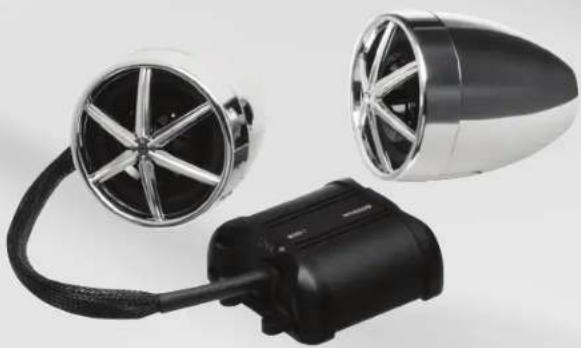
natural_image
Two car wheel hub designs with metallic and black components, no visible text or symbolsBOSS®
AUDIO SYSTEMS
MC600B BLUETOOTH-ENABLED
ALL-TERRAIN SPEAKER AND AMPLIFIER SYSTEM
Congratulations on your purchase of a BOSS Audio Systems Off-road amplified speaker system. It has been designed, engineered and manufactured to bring you the highest level of performance and quality, and will afford you years of listening pleasure.
Thank you for making BOSS AUDIO SYSTEMS your choice for entertainment!

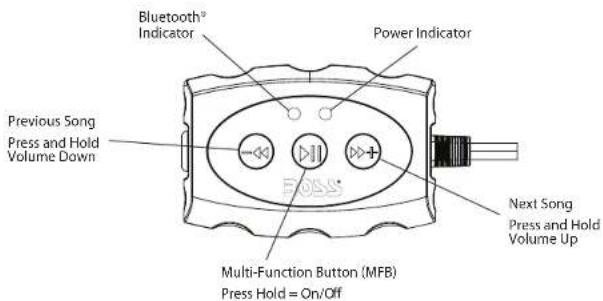
Playing Music
1) Press the "MFB" once to start playing music. The "MFB" during music playback serves as a "Play/Pause"
2) To skip songs or advance, press the ">>" button
3) To select the previous song, press the "<<" button
Volume Control
1) To raise the volume Press and Hold the ">>" button
2) To lower the volume Press and Hold the "<<" button
MC600B BLUETOOTH-ENABLED
ALL-TERRAIN SPEAKER AND AMPLIFIER SYSTEM
Specifications
Operation Voltage 9\~16 V
Max Power 800W
THD----< 1%
S/N→74 dB
Channel Separation---->56 dB
Frequency Response----250 Hz - 20 KHz
Sensitivity----150 mv -1v
Pairing & Connection
1) Power on the MC600B
a. Press and Hold the MFB for 3 sec.
2) The MC600B will automatically go into pairing mode.
The blue and red LEDs will flash alternately
a. Go into the Settings menu on your device
b. Enter the Bluetooth Menu
c. "MC600B" will display under devices to pair.
d. If prompted to enter a pass code: "0000"
e. If the unit is not seen, repeat the above steps to refresh Device"List"
3) If the connection is successful, you should now be paired and connected to the MC600B
Reconnection
1) Power on the MC600B.
2) The unit will reconnect to the last paired device.
3) If you have paired with the MC600B, but it wasn't the last paired device...
a. Enter the Bluetooth Menu on your device
b. "MC600B" will display under "Paired Devices"
c. Choose the "MC600B" to reconnect.
4) If the user is out of range from the MC600B, it will disconnect automatically...
a. To reconnect once device is back in range, press the "MFB" button once.
b. The MC600B will reconnect to the device.
MCGOOB BLUETOOTH-ENABLED
ALL-TERRAIN SPEAKER AND AMPLIFIER SYSTEM
Contents
Amplifier 1 PC
High-Performance, Weatherproof Speakers ---- 2 PCS
Amplifier Mounting Screws 4 PCS
Speaker Mounting Bolts 2 PCS
Rubber Mounting Shims 12 PCS
Fuse 1 PC
Bluetooth Control Box---- 1 PC
Power Cable 1 PC
Power and Speaker Cable Adaptor---- 1 PC (12V Direct Plug)
User's manual 1 PC
Warranty Card 1 PC
Features:
3.5mm Audio Inputs
Rust-Free Brackets
Weatherproof Bluetooth Control Box
High-Impact, High Temp Speaker Enclosures
Weatherproof Speakers
Bluetooth Audio Streaming
MC600B BLUETOOTH-ENABLED
ALL-TERRAIN SPEAKER AND AMPLIFIER SYSTEM
Connections
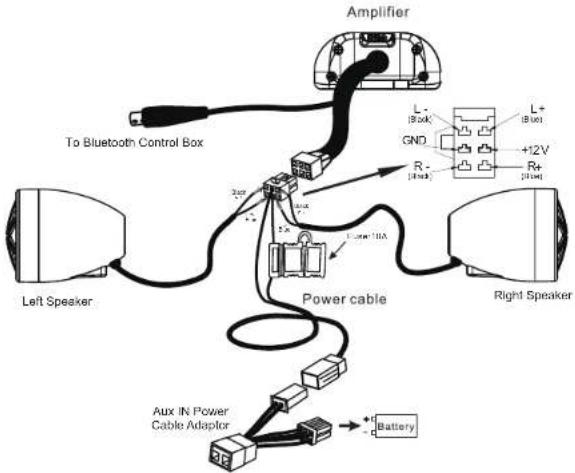
Loudspeaker Mounting Diagram
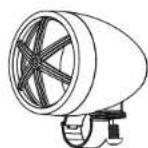
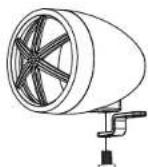
Loudspeaker mounting diagram
MC600B BLUETOOTH-ENABLED
ALL-TERRAIN SPEAKER AND AMPLIFIER SYSTEM
Installation
- Screw the brackets to the bottom of the speakers.
- Find a safe, ideal mounting location and fit the brackets over the chosen mounting bars.
- Fasten the mounting screws after you review the safety of the mounting location.
Wiring
- Be sure to run the wiring securely and far away from any moving components.
- Connecting the power cable to the power source: You will need to connect the 12V red wire to a (fused 10A) switched power source.
- Use the 3.5mm stereo jack to connect to your entertainment source(MP3 player, etc).
- Use your player device and wired remote bluetooth control box to control your level of loudness.
MC600B Multi-Function Controller
Brand : BOSS
Model : MC600B
Category : Loudspeaker