
MC500 - Loudspeaker BOSS - Free user manual and instructions
Find the device manual for free MC500 BOSS in PDF.


| Product Type | Motorcycle/UTV Amplified Speaker System |
| Brand | BOSS Audio Systems |
| Model | MC500 |
| Max Power Output | 600W |
| Operation Voltage | 10-16V DC |
| Frequency Response | 20Hz-20kHz |
| Total Harmonic Distortion (THD) | <0.1% |
| Signal-to-Noise Ratio (S/N) | >50dB |
| Channel Separation | >50dB |
| Channel Balance | <2dB |
| FM Frequency Range | 87.5-108.0 MHz |
| FM Sensitivity | 10μV @ S/N 30dB |
| USB Port | Supports USB 2.0 flash memory |
| SD Card Slot | Supports 128MB, 256MB, 512MB, 1GB, 2GB, 4GB SD cards |
| Audio Input | 3.5mm stereo input plug |
| Number of Speakers | 2 weatherproof speakers |
| Amplifier | Detachable |
| Display | Laminated LCD |
| Remote Control | Included |
| Mute Function | Yes |
| Auto Play (USB/SD) | Yes (MP3 format) |
| Mounting Hardware | Amplifier mounting screws (4), mounting hardware (2), rubber mounting shims (4) |
| Fuse | Included (1 PC) |
| Installation Warning | Keep away from moving parts, ignition, fuel lines, and hot exhaust |
Frequently Asked Questions - MC500 BOSS
User questions about MC500 BOSS
0 question about this device. Answer the ones you know or ask your own.
Ask a new question about this device
Download the instructions for your Loudspeaker in PDF format for free! Find your manual MC500 - BOSS and take your electronic device back in hand. On this page are published all the documents necessary for the use of your device. MC500 by BOSS.
USER MANUAL MC500 BOSS
natural_image
Exterior view of a modern audio speaker unit with two speakers and a control panel (no visible text or symbols)MC500 Motorcycle/UTV Amplified Speaker System
Congratulations on your purchase of a BOSS Audio Systems Off-road amplified speaker system. It has been designed, engineered and manufactured to bringyou the highest level of performance and quality, and will afford you years of listening pleasure.
Thank you for making BOSS AUDIO SYSTEMS your choice for entertainment!

MC500 Motorcycle/UTV Amplified Speaker System
Features
- Detachable amplifier
● Weatherproof loudspeakers with cable wire harness
● Laminated LCD display
● Built in FM radio with electronic auto-scan tuning - USB interface: support USB flash memory
- SD slot: support 128MB,256MB,512MB,1GB,2GB/4GB SD card
● Automatically playing function: play the music automatically when you insert USB device/SD card with Mp3 format songs - Remote controller
- Mute function
● 3.5mm stereo input plug
● Easy installation
● Suitable for 12V motorcycles, scooters and boats
Contents
| Amplifier | 1 PC |
| High-Performance, Weatherproof Speakers | 2 PCS |
| Amplifier Mounting Screws | 4 PCS |
| Mounting Hardware | 2 PCS |
| Rubber Mounting Shims | 4 PCS |
| Fuse | 1 PC |
| Remote controller | 1 PC |
| User's manual | 1 PC |
MC500 Motorcycle/UTV Amplified Speaker System
Connection Diagram
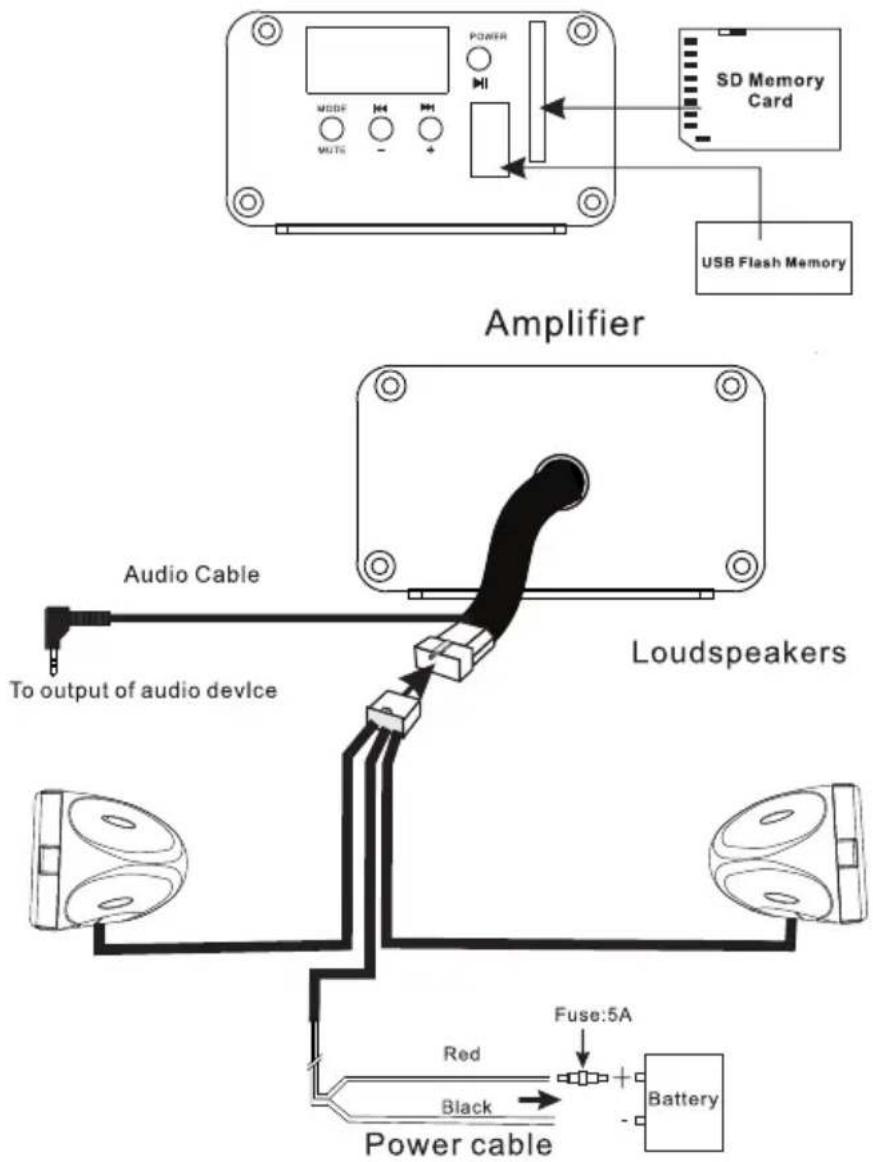
Amplifier and Loudspeaker Mounting
Install Reminder
These should not be installed around any moving parts, keep away from ignition parts, fuel lines, or any hot exhaust
Speakers should not be installed where they might inhibit safety features on the vehicle (i.e. lights, horns, brake levers, etc...)
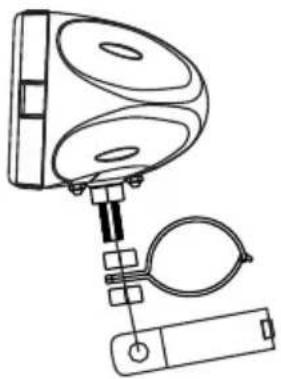
natural_image
Technical line drawing of a mechanical device with three circular components and a battery (no text or symbols)MC500 Motorcycle/UTV Amplified Speaker System
Operation Instruction
First Time to Use the System
Plug in the female connector loudspeakers to the male connector at amplifier
Connect an external source to the 3.5mm stereo input plug at loudspeaker wire harness
Connect the power cable to 12VDC power supply
Turn on/Turn off the system
Pressing the button POWER on the front panel for more than 2 seconds, the system will be turned on and ready for operation*. Pressing the button POWER again for more than 2 seconds will turn off the system.
*Note: The system will memorize and recall the last state of operating mode (FM radio /AUX/USB /SD).
Select an Operation Mode
Pressing the button MODE on the front panel can change the mode from one to other(FM Radio—AUX—USB--SD mode) and select one of the mode you like.
Note: USB and SD modes are active only when a device is connected to the USB port/SD slot.
Volume Control
Pressing the button + or – for more than 2 seconds at any state, the system will be ready for the volume control with the range of 0\~31 displayed on the screen. Adjust it to your desired setting without audio distortion.

Note: The worlds VOL will be displayed on LCD screen during adjusting system volume.
MC500 Motorcycle/UTV Amplified Speaker System
Mute Function
Pressing the button MUTE for more than 2 seconds will mute sounds from the outputs of the system at any state. disable it by pressing button MUTE again for more than 2 seconds.
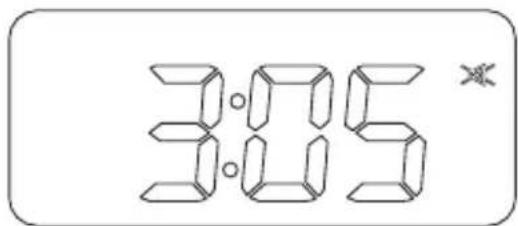
Note: ✗ will be blinking on the LCD when in MUTE state.
USB/SD Mp3 Automatically Playing Function
The system will play Mp3 format songs automatically when an USB flash memory/SD card is inserted to the USD port/ SD slot on the front panel at any state.
1) Pressing the button |◀/▶| to select last or next song.
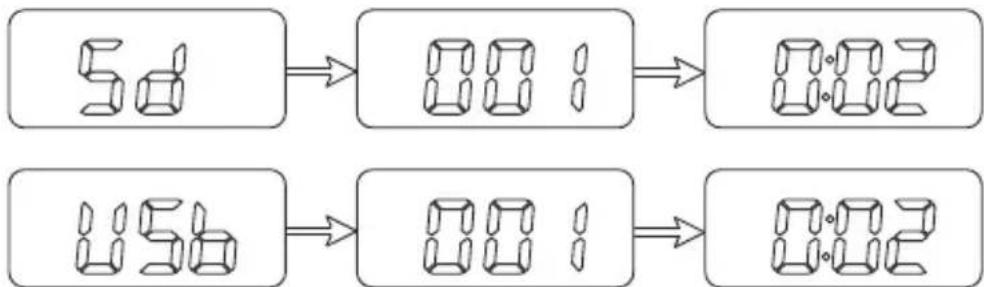
flowchart
graph LR
    A["5d"] --> B["88:1"]
    B --> C["88:2"]
    D["15s"] --> E["88:1"]
    E --> F["88:2"]
2) Pressing the button ▶|| will pause the music playing and disable it by pressing it again.
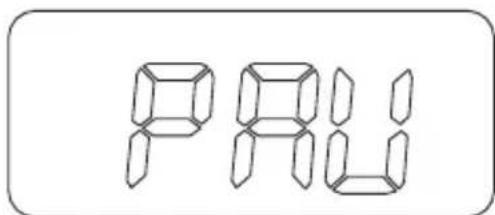
MC500 Motorcycle/UTV Amplified Speaker System
FM Radio Operation
1) Press the button MODE on the front panel to select FM Radio Mode.
2) Press button |◀◀/▶▶| to locate a radio station. The system will keep auto-scan tuning till catching one station.
Note: The letters 'ST' will be displayed on the LCD screen when tuned into a stereo station.

AUX Mode Operation
1) Press the button MODE to select AUX mode operation.
2) Adjust the volume control to a desired level.
Note: AUX will be displayed on LCD indicating the system works in AUX mode.
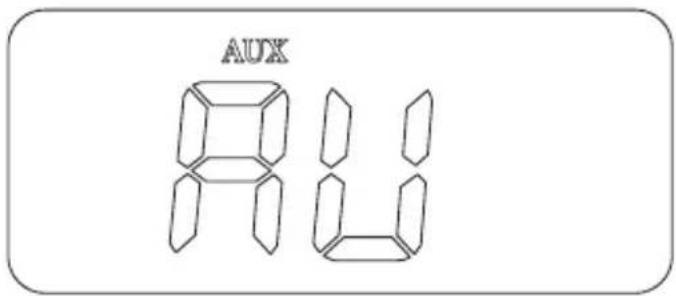
MC500 Motorcycle/UTV Amplified Speaker System
Remote Control
The remote control can take place of the 4 same buttons on the main unit*.
*Note: The key ⊕ (Power) on the remote control can't power up the system but it can power off the system.
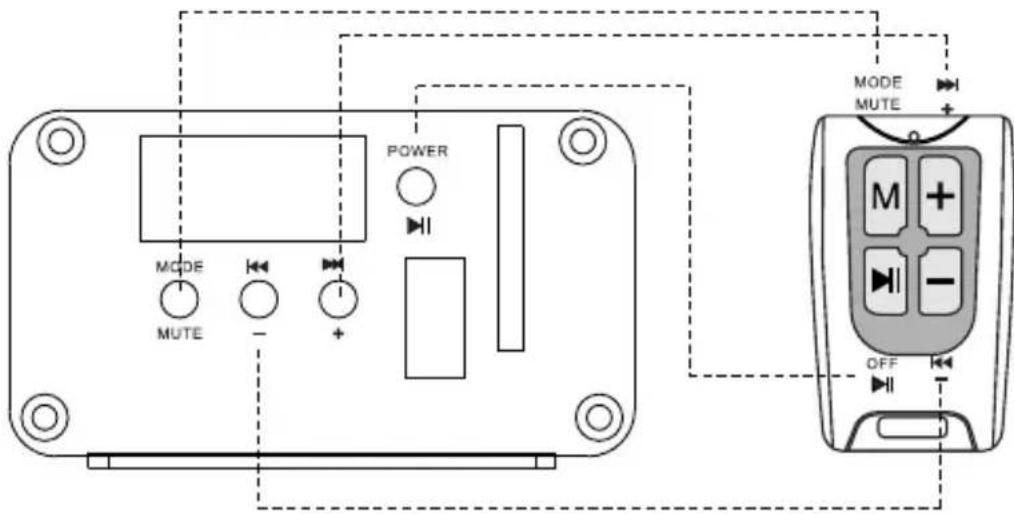
Remote controller function diagram
LCD Display
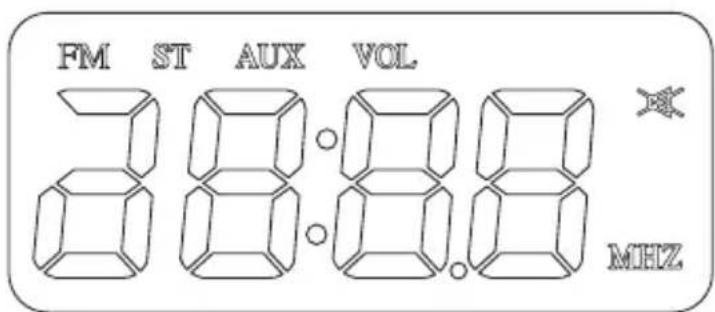
MC500 Motorcycle/UTV Amplified Speaker System
Specifications
Operation Voltage----10\~16V
Max Power----600W
THD----<0.1%
S/N---->50dB
Channel Separation---->50dB
Channel Balance----<2dB
Frequency Response----20Hz-20kHz
FM Frequency Range----87.5-108.0MHz
FM Sensitivity----10μ V@S/N 30dB
USB Port----Support USB 2.0
SD Slot——Support 128MB,256MB,512MB,1GB,2GB/4GB
USER'S MANUAL
MC500
ALL-TERRAIN SPEAKER AND AMPLIFIER SYSTEM
BOSS®
AUDIO SYSTEMS
BOSS Audio Systems
3451 Lunar Court • Oxnard, CA 93030
www.bossaudio.com | 800.999.1236
tech support: www.bossaudio.com/support



0714
- MC500 Motorcycle/UTV Amplified Speaker System
- Features
- Contents
- Connection Diagram
- Amplifier and Loudspeaker Mounting
- Install Reminder
- Operation Instruction
- First Time to Use the System
- Turn on/Turn off the system
- Select an Operation Mode
- Volume Control
- Mute Function
- USB/SD Mp3 Automatically Playing Function
- FM Radio Operation
- AUX Mode Operation
- Remote Control
- LCD Display
- Specifications
- USER'S MANUAL
- MC500
- ALL-TERRAIN SPEAKER AND AMPLIFIER SYSTEM
- BOSS®
- AUDIO SYSTEMS
Brand : BOSS
Model : MC500
Category : Loudspeaker