
CBTH2 - Earphones COBRA - Free user manual and instructions
Find the device manual for free CBTH2 COBRA in PDF.


| Product Type | Bluetooth Wireless Headset |
| Model | CBTH2 |
| Brand | Cobra |
| Bluetooth Version | V2.0 |
| Supported Profiles | Handsfree, Headset |
| Battery Type | 3.7V Li-Polymer |
| Talk Time | Up to 7 hours |
| Standby Time | Up to 150 hours |
| Charging Time | Less than 3 hours |
| Operating Temperature | 14°F to 122°F |
| Dimensions (W x L x H) | 0.67 in x 1.97 in x 0.38 in |
| Weight | 0.33 oz |
| Controls | Power/Call button, Volume +/-, Microphone |
| LED Indicators | Power, Pairing, Charging, Connection status |
| Pairing PIN Code | 0000 |
| Included Accessories | USB cable, Home charger, Vehicle charger, Ear cover, User manual |
| Warranty | 1 year |
| Usage | Handsfree calling, Voice dialing, Last number redial, Call waiting, Mute |
| Auto Reconnect | Yes (up to 33 feet range) |
| Cleaning Instructions | Do not wash with water, alcohol, or benzene; wipe with dry cloth |
| Safety Precautions | Do not disassemble, drop, expose to heat or moisture, use near microwave |
Frequently Asked Questions - CBTH2 COBRA
User questions about CBTH2 COBRA
0 question about this device. Answer the ones you know or ask your own.
Ask a new question about this device
Download the instructions for your Earphones in PDF format for free! Find your manual CBTH2 - COBRA and take your electronic device back in hand. On this page are published all the documents necessary for the use of your device. CBTH2 by COBRA.
USER MANUAL CBTH2 COBRA
 | |
 Premium Handsfree Headset Premium Handsfree Headset | |
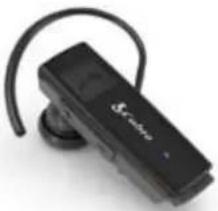 CBTH2 CBTH2 |
The Bluetooth ^® word mark and logos are registered trademarks owned by Bluetooth SIG, Inc. and any use of such marks by Cobra Electronics Corporation is under license. Other trademarks and trade names are those of their respective owners.
©2008 Cobra Electronics Corporation Cobra, Nothing Comes Close to a Cobra and the snake design are registered trademarks of Cobra Electronics Corporation, USA. Cobra Electronics Corporation is a trademark of Cobra Electronics Corporation, USA.
Aries 2001 West Kelley Court Libertyville, IL 60048 www.CobraHandsfree.c 866.610.9322 (USA only
MADE IN KOREA
2 COBRA OVER THE EAR BLUETOOTH
^® WIRELESS HEADSET COBRA OVER
Table of contents
■Included in package....4
■ Part description....5
■ Using the Bluetooth ^® Wireless Headset Part I......6
▶ Charging
▶ Low battery
▶ Power on
▶ Power off
■ Using the Bluetooth ^® Wireless Headset Part II......7
▶ Pairing
■ Using the Bluetooth® Wireless Headset Part III......8
▶ Connecting
- Call connection
- Auto reconnect
▶ Volume control
■ Using the Bluetooth® Wireless Headset Part IV......9
▶ Calling
- Answering a call
- Making a call
- Voice dialing
Ending a call
- Call waiting
- Standby
- Transferring a call
- Mic mute
■ Summary of button functions....10
▶ LED indication
■ Troubleshooting....11
■ Specification and features....12
■ Precautions ....13
■ Warranty....14
^® WIRELESS HEADSET 3
THE EAR BLUETOOTH
Included in package
The Cobra Over the Ear Bluetooth ^® Headset is a wireless headset that uses Bluetooth ^® wireless technology. This product supports a headset profile or handsfree profile.
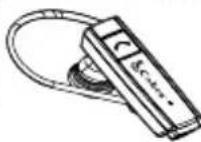
Bluetooth ^® Headset
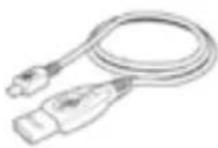
USB Cable
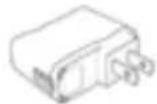
Home Charger
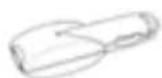
Vehicle Charger

Ear Cover
User Manual
4 COBRA OVER THE EAR BLUETOOTH ^® WIRELESS HEADSET
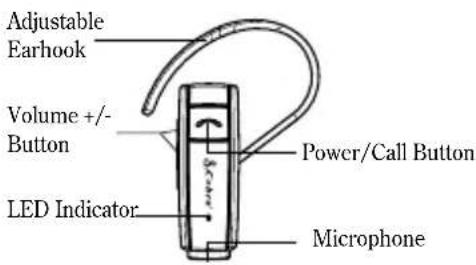
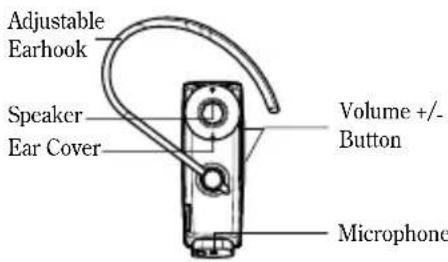
Parts description
Front View
Back View
COBRA OVER THE EAR BLUETOOTH ^® WIRELESS HEADSET
Using the Bluetooth ^® Wireless Headset Part I
▶ Charging
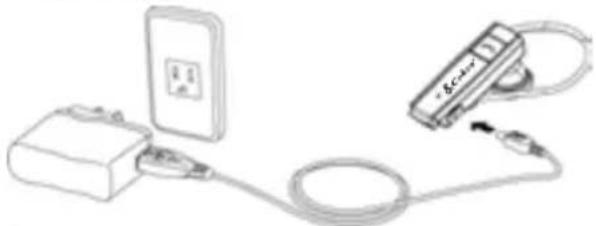
- Remove the cover on the charging port and connect the charger.
- When the charger is connected with power on, the Headset will turn off.
- The LED indicator will be on during charging. It indicates that your headset is being charged.
- Charging will be completed within three hours and the LED indicator will be turned off.
natural_image
Line drawing of a device connected to a power outlet and cable (no text or symbols)▶ Low battery
- When the battery power is low, you will hear the melody indicating the insufficient power. The LED indicator will be blinked and then turn off.
- In this case, please charge the battery again.
▶ Power on
- Press and hold the power/call button for 3 seconds.
- You will hear the melody as the power is turned on.
▶ Power off
- Press and hold the power/call button for 3 seconds.
- You will hear the melody as the power is turned off. At the same time, the Bluetooth link will be disconnected.
6 COBRA OVER THE EAR BLUETOOTH ^® WIRELESS HEADSET COBRA OVER THE EAR BLUETOOTH
Using the Bluetooth® Wireless Headset Part II
▶ Pairing
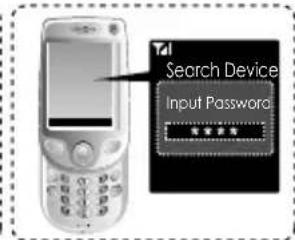
- While the power is turned off, press and hold the power/call button (continue to hold through out the pairing process).
- You will hear the melody indicating that the power is on. After that, you will hear the short beep.
The LED indicator will start blinking rapidly.
This indicates that the Headset has entered into pairing mode.
When turning on the power initially after purchase, the Headset will enter to the 'Pairing Mode' automatically.
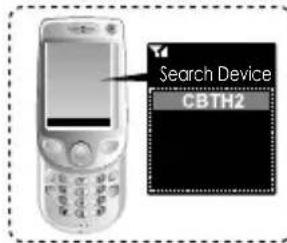
- Using your handset, find the 'Bluetooth' menu' and 'search for' or 'add' new devices.
- Select 'CBTH2' from the list of devices and pair it with your handset.
- When asked for the Pass/PIN code while pairing, enter '0000'.
- When the Pairing has completed, you will hear a beep.
- If you want to pair the Headset with another device, repeat the above steps.
- If it will be not connected the 'Pairing' for five minutes, the Headset will be turned off.
^® WIRELESS HEADSET
Using the Bluetooth® Wireless Headset Part III
▶ Connecting
Call Connection
- Briefly press the power/call button to activated 'Voice command'. (Your handset must support the 'voice dial' function)
- Press the power/call button for 1 second to activate last number redial. (Some handset will show the list of calls. At this point, briefly press the power/call button to activate last number.)
• To end a call, briefly press the power/call button.
Auto Reconnect
- When the Bluetooth wireless headset and your handset are separated by a distance of 33 feet or more, the Headset and handset will disconnect. (The actual distance may vary depending on the situation.)
*When the handset and Headset are brought back within the required distance, the Headset will automatically reconnect with the handset.
•If the Headset and handset do not automatically reconnect when they are back within the required range, briefly press the power/call button to reconnect manually.
▶ Volume control
- Briefly press the Volume + or Volume - button to adjust the speaker volume.
There are eight levels of speaker volume.
Using the Bluetooth ^® Wireless Headset Part IV
▶ Calling
Answering A Call
When there is an incoming call, the Headset will ring. Briefly press the power/call button to answer an incoming call.
Making A Call
Press the power/call button for 1 second to activate last number redial. (Some handset will show the list of calls.)
After entering the telephone number, press the power/call button briefly.
Voice Dialing
Briefly press the power/call button to activated 'Voice command'. (Your handset must support the 'voice dial' function)
Ending A Call
Briefly press the power/call button.
Call Waiting
Answer a second call without hanging up the first call by pressing the power/call button for 1 second.
Press the power/call button for 1 second to return to the original call.
Briefly press the power/call button to terminate both calls at once. (Your handset must support the "call waiting" function)
Transferring A Call
While on a call, briefly press the power/call button for transferring the audio to the headset.
Mute Microphone
To make mute microphone during an active call, press Volume+ and Volume- button simultaneously for 1 second.
When repeating again, mute function is just cancelled. (On mute microphone, you will hear a beep per 10 seconds.)
Summary of button functions
| Function | Status | Action |
| Power on | Powered off | Press and hold the power/call button for 3 seconds. |
| Power off | Powered on | Press and hold the power/call button for at least 3 seconds. |
| Volume + | Press the volume + button briefly. | |
| Volume - | Press the volume - button briefly. | |
| Transferring a call | Talking | Press the power/call button briefly. |
| Answering a call | Incoming call | Press the power/call button briefly. |
| Ending a call | Talking | Press the power/call button briefly. |
| Call waiting | Talking | Press the power/call button for 1 second. |
| Last number redialing | Ready | Press the power/call button for 1 second. |
| Voice dialing (Handset should support) | Start & Stop voice command | Press the power/call button briefly. |
| Pairing mode | Powered off | Press and hold the power/call button for 6 seconds. |
| Call reject | Incoming call | Press the power/call button for 1 second. |
▶ LED Indication
| Operating | Power on | The LED blinks 5 times |
| Power off | The LED is on for 2 seconds and then turns off. | |
| Pairing mode | The LED blinks quickly. | |
| Headsct/Handsfree Profile connected | The LED blinks 2 times every 5 seconds | |
| Charging | Charging | The LED on |
| Charging completed | The LED off |
Troubleshooting
| Does not turn on | Check whether the battery of the Headset is fully charged. | Recharge the battery. |
| Unable to communicate with Headset | Check to see if handset supports Bluetooth® wireless technology. | Check whether your handset supports Bluetooth® wireless technology or Handsfree Profiles. |
| Unable to pair the Headset with the Bluetooth wireless technology handset device | Check whether the battery of the Headset is low. | Charge the battery. |
| Check and make sure the Bluetooth® Headset is on. | Press and hold the power/call button for 3 seconds to turn on Bluetooth® Headset. | |
| Check and make sure the Headset is placed in pairing mode. | With the power off, press and hold the power/call button for 6 seconds to place Headset in pairing mode. | |
| When the volume of the headset is too small | Check the speaker volume. | Press the volume + button. |
Specification and features
| Specification for Bluetooth wireless technology | V2.0 (Handsfree / Headset Profiles) |
| Battery | 3.7V Li-Polymer |
| Standby time | Up to 150 hours |
| Talk time | Up to 7 hours |
| Charging time | < 3 hours |
| Temperature of use | 14^ 122^ |
| Size/weight | .67in(W) x 1.97in(L) x .38in(H)/.33oz |
Declaration of confirmation
FCC NOTICE TO USERS :
This device complies with part 15 of the FCC rules.
(1) This device may not cause harmful interference and
(2) This device must accept any interference received, including interference that may cause undesired operation.
Operation is subject to the following two conditions:
IMPORTANT NOTE: To comply with the FCC RF exposure compliance requirements, no change to the antenna or the device is permitted. Any change to the antenna or the device could result in the device exceeding the RF exposure requirements and void user's authority to operate the device.
Bluetooth FC
12 COBRA OVER THE EAR BLUETOOTH
^® WIRELESS HEADSET COBRA OVER THE EAR BLUETOOTH
Precautions
Do NOT drop the Headset or inflict impact.
Do NOT disassemble, repair modify the Headset on your own.
Do NOT wash Headset with water, alcohol or benzene.
Do NOT use Headset in prohibited places.
Do NOT make a contact with flammable substances.
During a call, do NOT grab this product or your Headset. It will] degrade the quality of your call.
Do NOT place Headset in fire because the battery may explode.
Do NOT store Headset in a place with high humidity or dust.
Do NOT place heavy objects on top of Headset.
Do NOT use near a microwave oven or wireless LAN products.
Do NOT expose Headset to the direct sunlight for long periods of time.
Any defects arising due to arbitrary modification or deformation of the product shall NOT be eligible for the coverage by the warranty.
Use of unauthorized batteries is strictly prohibited.
Please, dispose the battery pursuant to relevant laws and regulations.
® WIRELESS HEADSET
■ Limited Warranty ■
FREE OF CHARGE WARRANTY SERVICE:
- All defective units within the applicable Warranty period/s will be repaired or replaced, in the case those faulty goods were handled normally.
- If you use device commercially, the warranty period will be reduced by half.
FREE OF CHARGE WARRANTY DOES NOT APPLY TO:
- Defects or damage resulting from use of the unit in other than its normal and intended manner, eg, in excess of their maximum specifications or operating instructions.
- Defects or damage from misuse, accident, neglect, improper testing, installation, alteration, modification of any kind, and/or spillage of food or liquid.
- Faulty is caused by natural disaster.
- Capacity of expendables is exhausted.
| Products name Cobra Over the Ear Bluetooth * Headset | |
| Model number CBTH2 | |
| Purchased date | |
| Place of purchase | |
| Customer Name | |
| Customer Address | |
| Telephone # | |
| Warranty period | 1 year |
14 COBRA OVER THE EAR BLUETOOTH ^® WIRELESS HEADSET
The Bluetooth ^* word mark and logos are registered trademarks owned by Bluetooth SIG, Inc. and any use of such marks by Cobra Electronics Corporation is under license. Other trademarks and trade names are those of their respective owners.
©2008 Cobra Electronics Corporation Cobra, Nothing Comes Close to a Cobra and the snake design are registered trademarks of Cobra Electronics Corporation, USA. Cobra Electronics Corporation is a trademark of Cobra Electronics Corporation, USA.
Aries 2001 West Kelley Court Libertyville, IL 60048 www.CobraHandsfree.com 866.610.9322 (USA only)
MADE IN KOREA
- Table of contents
- Included in package
- Parts description
- Using the Bluetooth ® Wireless Headset Part I
- Using the Bluetooth® Wireless Headset Part II
- Using the Bluetooth® Wireless Headset Part III
- Call Connection
- Auto Reconnect
- Using the Bluetooth ® Wireless Headset Part IV
- Answering A Call
- Making A Call
- Voice Dialing
- Ending A Call
- Call Waiting
- Transferring A Call
- Mute Microphone
- Precautions
- ■ Limited Warranty ■
- FREE OF CHARGE WARRANTY SERVICE:
- FREE OF CHARGE WARRANTY DOES NOT APPLY TO:
Brand : COBRA
Model : CBTH2
Category : Earphones