KASBD16CA - Soundbar Kogan - Free user manual and instructions
Find the device manual for free KASBD16CA Kogan in PDF.


| Brand | Kogan |
| Model | KASBD16CA |
| Product Type | Soundbar |
| Dimensions (W x H x D) | Approx. 90 x 5.5 x 8 cm |
| Weight | Approx. 2.5 kg |
| Power Supply | AC 100-240V, 50/60Hz |
| Total Power Output | 40W RMS |
| Speaker Configuration | 2.0 channels |
| Connectivity | Bluetooth 5.0, Optical (Toslink), 3.5mm Aux, USB (playback only) |
| Bluetooth Version | 5.0 |
| Frequency Response | 50Hz - 20kHz |
| Remote Control | Included (CR2025 battery) |
| Wall Mountable | Yes (brackets and template included) |
| Subwoofer | Built-in (not separate) |
| Audio Decoding | Dolby Digital, DTS |
| Cleaning | Wipe with soft, dry cloth. Do not use solvents. |
| Safety | Do not expose to rain or moisture. Keep ventilation slots clear. |
| Spare Parts Availability | Contact Kogan support for remote control or power cable. |
| Repairability | Refer to service manual or contact qualified technician. |
| In the Box | Soundbar, remote control, batteries, optical cable, 3.5mm cable, power adapter, wall mount kit, user manual |
| Model Year | 2021 |
Frequently Asked Questions - KASBD16CA Kogan
User questions about KASBD16CA Kogan
0 question about this device. Answer the ones you know or ask your own.
Ask a new question about this device
Download the instructions for your Soundbar in PDF format for free! Find your manual KASBD16CA - Kogan and take your electronic device back in hand. On this page are published all the documents necessary for the use of your device. KASBD16CA by Kogan.
USER MANUAL KASBD16CA Kogan
natural_image
Line drawing of a cylindrical electronic device with a flat top and side panel (no text or symbols)2.1 DOLBY SOUNDBAR WITH WIRELESS SUBWOOFER
(160W RMS)
KASBD16CA
SAFETY & WARNINGS
 | CAUTION!Risk of electric shock, do not open |  |
| To reduce the risk of electric shock, do not remove the outer casing. | ||
To reduce the risk of electric shock, do not dismantle the product and do not expose the apparatus to rain or moisture. No user-serviceable parts inside. Refer servicing to Kogan.com only.
 | The lightning flash within an equilateral triangle is intended to alert you to the presence of uninsulated dangerous voltage within the product's enclosure that may be of sufficient magnitude to constitute an electric shock to a person or persons. |
 | Important! This symbol alerts you to read and observe important warnings and instructions on the unit or in this manual. |
Notice
This appliance is not intended for use by persons (including children) with reduced physical, sensory or mental capabilities or lack of experience and knowledge, unless they have been given supervision or instruction concerning use of the appliance by a person responsible for their safety. Children should be supervised to ensure that they do not play with the appliance.
- To prevent possible hearing damage, do not listen at high volume levels for long time periods and avoid sudden high volume levels.
- Children should never use the device unsupervised. Switch off the device whenever you are not using it, even if it is unused for only a short period.
- The appliance is not intended to be operated by means of an external timer or separate remote-control system.
- If the supply cord is damaged, it must be replaced by Kogan.com in order to avoid a hazard.
- Ensure the voltage of this system is identical to the voltage of your household power supply before use.
- Do not cover the ventilation opening with items such as newspaper, table-cloths, curtains etc. Make sure that there is at least 20cm of space above and at least 5cm of space on each side of the unit.
- The device must not be exposed to dripping or splashing. Any objects filled with liquids, such as vases, must not be placed on the unit.
- To prevent fire or shock hazard, do not expose this equipment to direct heat, rain, moisture or dust.
- Do not position the unit near any water sources e.g. taps, bathtubs, washing machines or swimming pools. Ensure that you place the unit on a dry, stable surface.
- Do not place this unit close to a strong magnetic field, or on an amplifier or receiver.
- Do not place this unit in a damp area as the moisture will affect the life of electric components.
- Do not attempt to clean the unit with chemical solvents as this may damage the finish. Wipe with a clean, dry or slightly damp cloth.
- When removing the power plug from the wall outlet, always pull directly on the plug. Never pull on the cord.
- Depending on the electromagnetic waves used by a television broadcast, if a TV is turned on near this unit while it is also on, lines might appear on the LED TV. Neither this unit nor the TV is malfunctioning. If you see such lines, keep this unit well away from the TV set.
Important safety instructions
- Clean only with dry or slightly damp cloth.
- Do not install near any heat sources such as radiators, heaters, stoves or other apparatus (including amplifiers) that produce heat.
- Do not circumvent the safety feature of the polarised or grounding-type plug. A polarised plug has two blades with one wider than the other.
- Protect the power cord from being stepped on or pinched, particularly at plugs or at the point where it exits from the unit.
• Only use attachments/accessories specified by Kogan.com. - Unplug this apparatus during lightning storms or when unused for long periods of time.
- Refer all servicing to Kogan.com. Servicing is required when the apparatus has been damaged in any way, for example, when the power supply cord or plug is damaged, liquid has been spilled or objects have fallen into the apparatus, the apparatus has been exposed to rain or moisture, does not operate normally or has been dropped.
Unpacking and setup
- Remove the soundbar from the carton and remove all packing material from the soundbar. Save the packing material, if possible, in case the soundbar ever needs to be serviced or transported. The original carton and packing material are the only safe way to pack your soundbar to protect it from damage in transit.
- Remove any descriptive labels or stickers on the front or top of the cabinet. Do not remove any labels or stickers from the back or bottom of the cabinet.
- Place your soundbar on a level surface such as a table, desk or shelf, close to an AC outlet, out of direct sunlight and away from sources of excess heat, dirt, dust, moisture, humidity or vibration.
• Unwind the line cord connecting the AC adapter and extend it to its full length
Protect your furniture
- This model is equipped with non-skid rubber feet to prevent the product from moving when you operate the controls. These feet are made from non-migrating rubber material specially formulated to avoid leaving any marks or stains on your furniture. However, certain types of oil-based furniture polishes, wood preservatives or cleaning sprays may cause the rubber feet to soften and leave marks or a rubber residue on the furniture. To prevent any damage to your furniture, it is strongly recommended that you purchase small self-adhesive felt pads, available at hardware stores and home improvement centres and apply these pads to the bottom of the rubber feet before you position the unit.
Power source
This soundbar is designed to operate on normal AC power source. For Australia and New Zealand, it operates only under SMPS 110V-240V\~50Hz/60Hz. Do not attempt to operate the soundbar on any other power source, as this may cause damage to the product that is not covered by your warranty.
Important notes
- This soundbar is especially developed for LED/LCD/Plasma TVs. It should not be used in combination with CRTTVs (Cathode Ray Tube TVs) in order to avoid image interference.
-
Do not install the product in the following areas:
-
On top of other stereo equipment that radiate heat.
○ Blocking ventilation or in a dusty area.
o Near candles or other flames. -
Before turning on the power for the first time, make sure the soundbar is plugged into a power outlet.
- For safety reasons, do not remove any covers or attempt to gain access to the inside of the product.
- Do not attempt to remove any screws or open the casing of the unit.
OVERVIEW
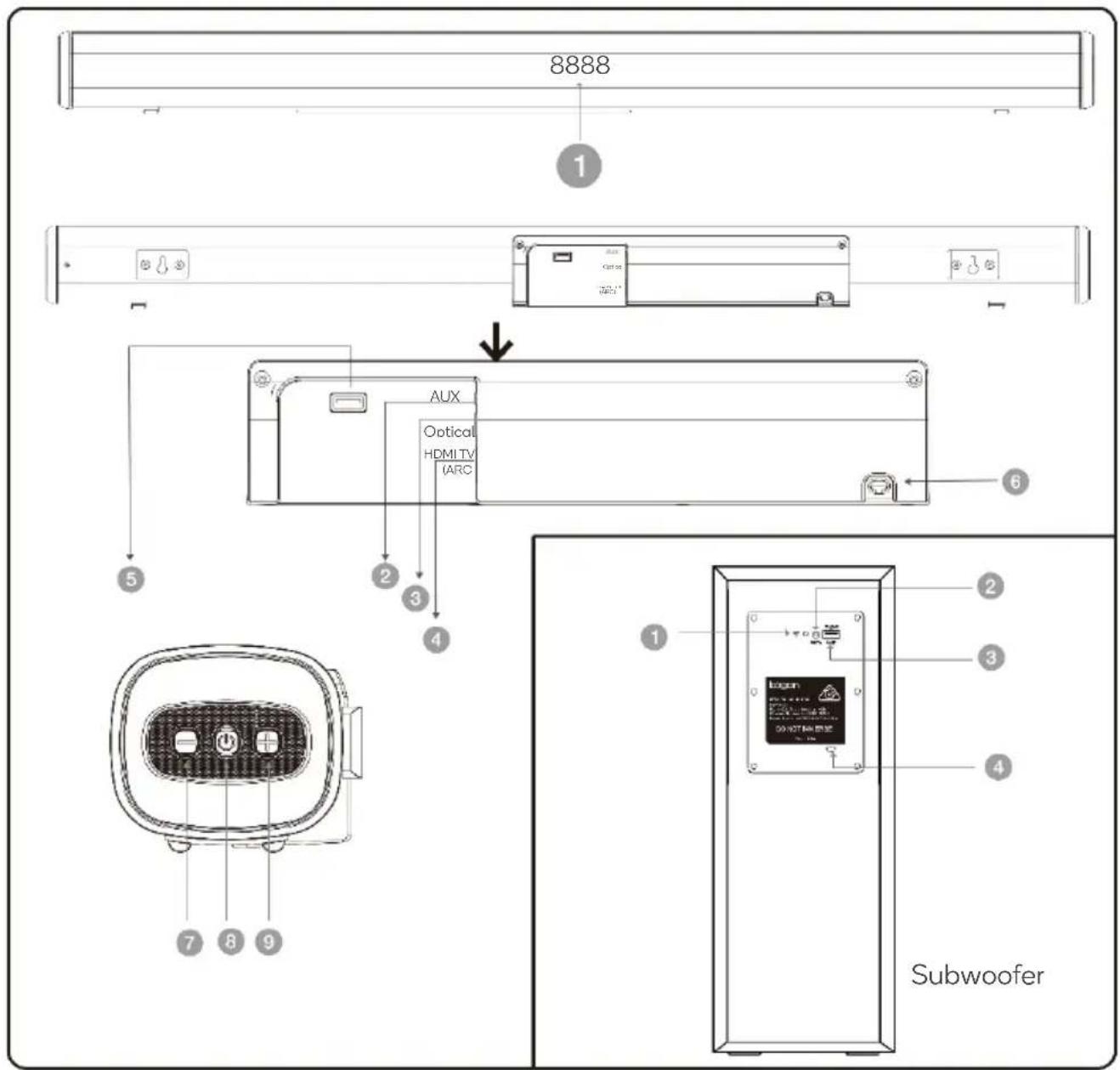
| 1 | LED display | 4 | HDMI TV(ARC) | 7 | VOL- |
| 2 | Aux | 5 | USB | 8 | Power/Standby |
| 3 | Optical | 6 | AC IN | 9 | VOL+ |
Subwoofer
| 1 | LED indicator for pairing | 2 | WPS auto pair button |
| 3 | USB (for updates only) | 4 | AC IN |
Remote control
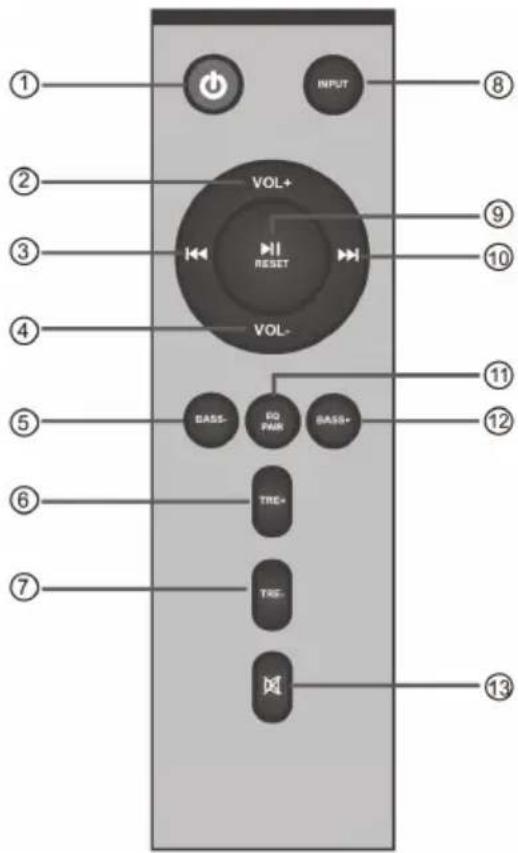
| 1 | Power | Switches the unit on/off (Standby) |
| 2 | VOL+ | Volume increase |
| 3 | Previous | Previous song (USB and B1 mode) |
| 4 | VOL- | Volume decrease |
| 5 | BASS- | Bass decrease |
| 6 | TRE+ | Treble increase |
| 7 | TRE- | Treble decrease |
| 8 | Input | Change input mode |
| 9 | Play/Pause/RESET | Play/Pause: Play or pause current program (USB and BT mode)Reset: Press and hold to restore manufacturer defaults |
| 10 | Next | Next song (USB and BT mode) |
| 11 | EQ/PAIR | EQ: Press to cycle through EQ settings:E1-Music / E2-Movie / EQ-News / E4-3DPair: Press and hold to disconnect/reconnect paired BT device |
| 12 | BASS+ | Bass+: Bass increase |
| 13 | MUTE | Mute: Mute mode |
ASSEMBLY
Positioning the soundbar
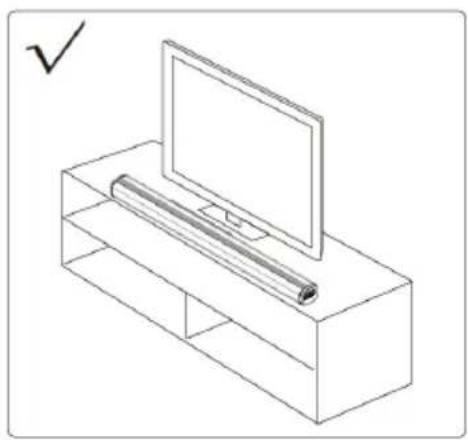
Place on a flat surface:
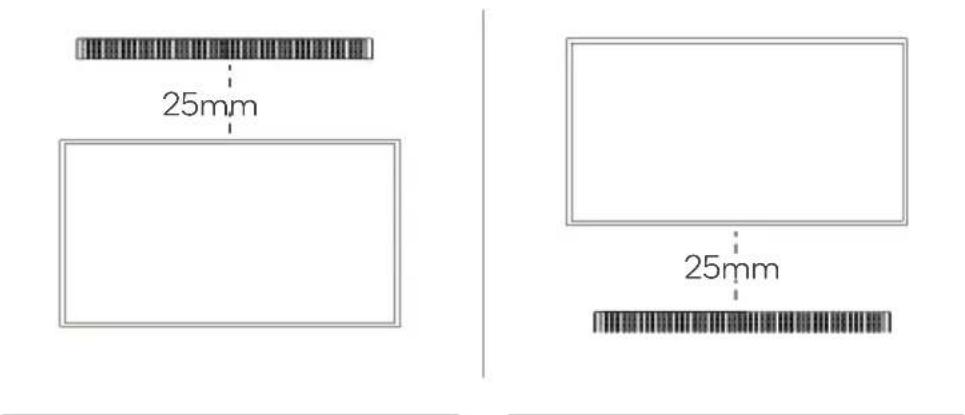
Place the soundbar horizontally on a flat surface such as a TV unit or shelves and align it centrally with the TV screen. Allow some space between the speaker and the wall. Don't place the soundbar inside a cabinet or on a walled shelf. This position will provide optimal sound output and good airflow around the soundbar.
natural_image
Line drawing of a TV set with a monitor and a rolled-up cable (no text or symbols)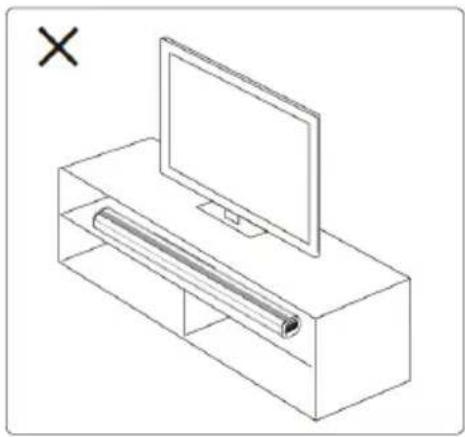
natural_image
Line drawing of a TV setup with a monitor and a rolled-up cable (no text or symbols)Wall mounting
WARNING: If you don't feel confident to correctly and securely mount the soundbar, seek the assistance of an experienced person of professional.
Install the speaker on a vertical, fastened, reinforced area of wall. For plaster walls, it is recommended to screw into wall studs for greater security. For optimal performance, allow at least 25mm distance between the soundbar and the TV.
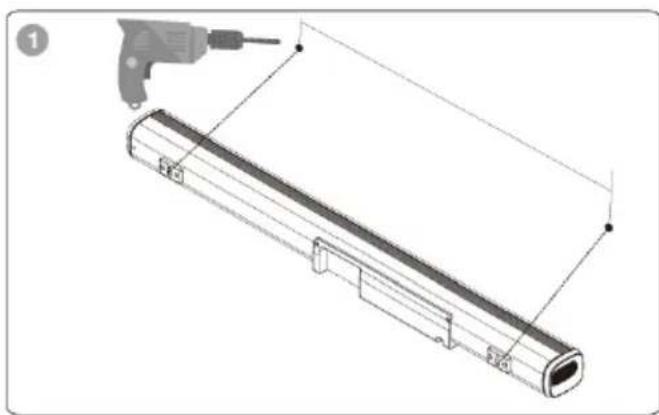
- Make 2 holes on the wall with the same distance as the wall bracket on the soundbar.
- Put the plastic anchors onto the wall and secure the screws to the plastic clip. Do not tighten the screws all the way; make sure to leave some space.
- Once the screws are securely fastened, hang the soundbar by placing the wall mount bracket over the screws.
natural_image
Technical line drawing of a cylindrical mechanical component with a tool inserted, no text or symbols present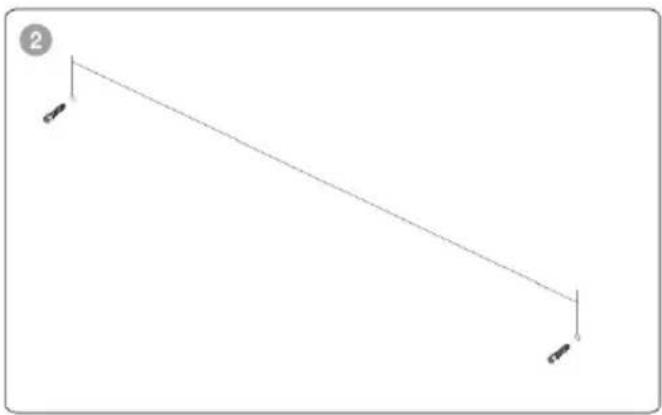
natural_image
Simple line diagram with two vertical supports and a diagonal line, no text or symbols present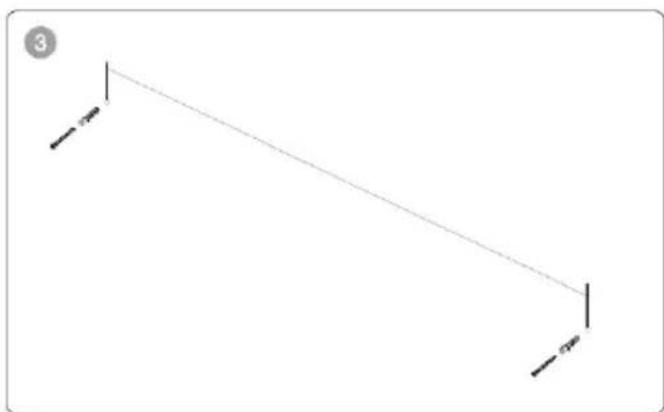
natural_image
Simple geometric diagram showing a diagonal line with two vertical lines and two horizontal lines, no text or symbols present.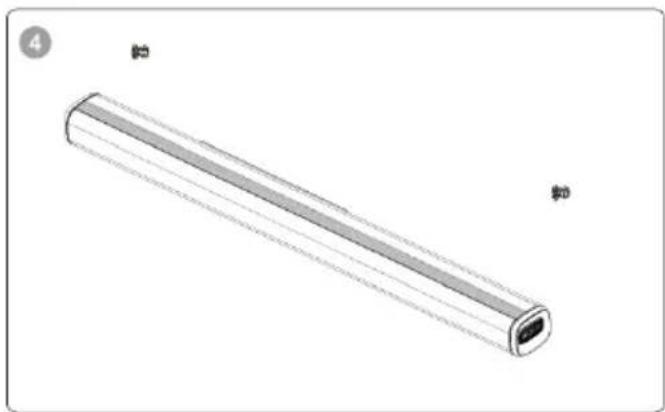
natural_image
3D rendering of a cylindrical electronic component with a flat top and side gap, shown without any text or symbols.OPERATION
Setting up the soundbar
-
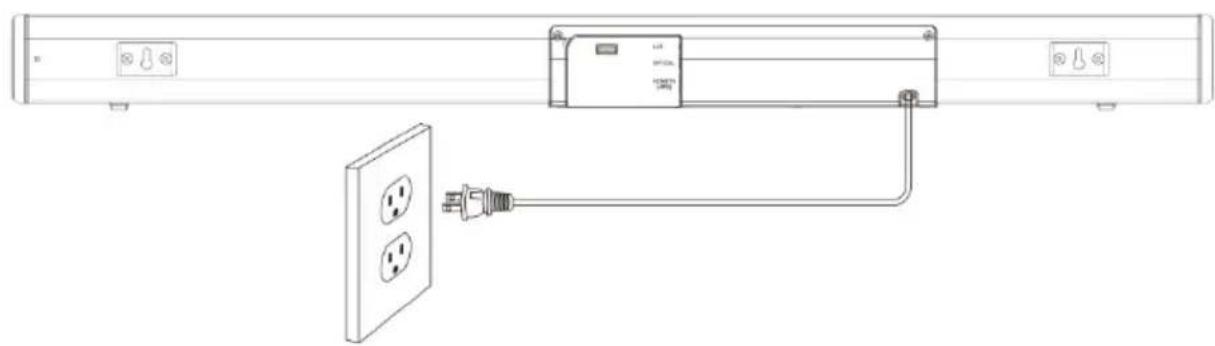
Plug in the power cord and the display will light up (standby mode).
-
Switch on the soundbar by using the power button on the soundbar or remote. After switching on, the default input mode will appear on display.
-
The input mode can be changed by pressing the power button again, or by using the INPUT button on remote.
-
The input modes will appear on the soundbar display as shown below:
a. Bt - Bluetooth pairing mode
b. AU - AUX mode
c. OPt - Optical mode
d. Hd - HDMI mode
e. USb - USB mode
Powering ON/OFF
-
Plug the soundbar into a wall outlet; it will automatically enter Standby mode.
-
Short-press the power button to turn on the soundbar.
-
Press the power button on the remote control or unplug the plug from the wall outlet to power the unit off.
natural_image
Line drawing of a wall-mounted electrical outlet connected to a power plug, showing wiring and socket placement (no text or symbols)Playing audio via BT connection
-
Turn on soundbar and then press the input button to switch to BT mode.
-
Activate the pairing function on your phone smart device and scan for "Device Name".
-
When successfully paired, you will hear a tone and the LED display will stay on.
-
Control media playback from the soundbar's remote control.
Notes:
- If your pairing device is switched off or manually disconnected, the soundbar will automatically enter pairing mode.
- The connection to the device will be re-established once you re-enter wireless range (10m). To connect to other devices, repeat the above pairing steps.
- There is no automatic shutdown in pairing mode. The soundbar will remain in pairing mode even if no device is paired, so switch off if not in use.
AUX mode
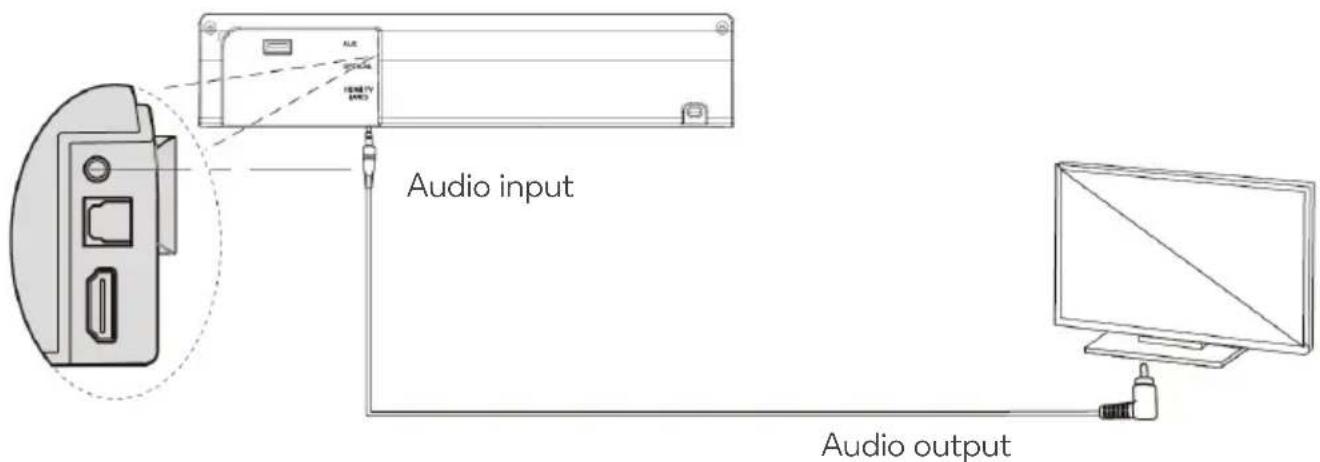
- Connect the soundbar to your PC, tablet, smartphone, TV or other device using a 3.5mm audio cable. Press the input button to switch to AUX input mode.
• In this mode, playback can only be controlled from your connected device.
Note: For some computers, you may need to access the audio control panel to manually set the soundbar as shown in the below picture.
Playing audio via USB port on soundbar
The soundbar automatically switches to USB input mode on the LED display when a USB flash drive is inserted. This mode isn't selectable on the soundbar or remote control unless a USB flash drive is connected.
- Ensure that your USB flash drive contains MP3 or WMA audio files (other file types not supported).
- Connect the USB flash drive to the USB port on the soundbar (or your own USB extension cable connected to the USB port); music will automatically play.
- Control media playback from the soundbar's remote control.
Optical mode
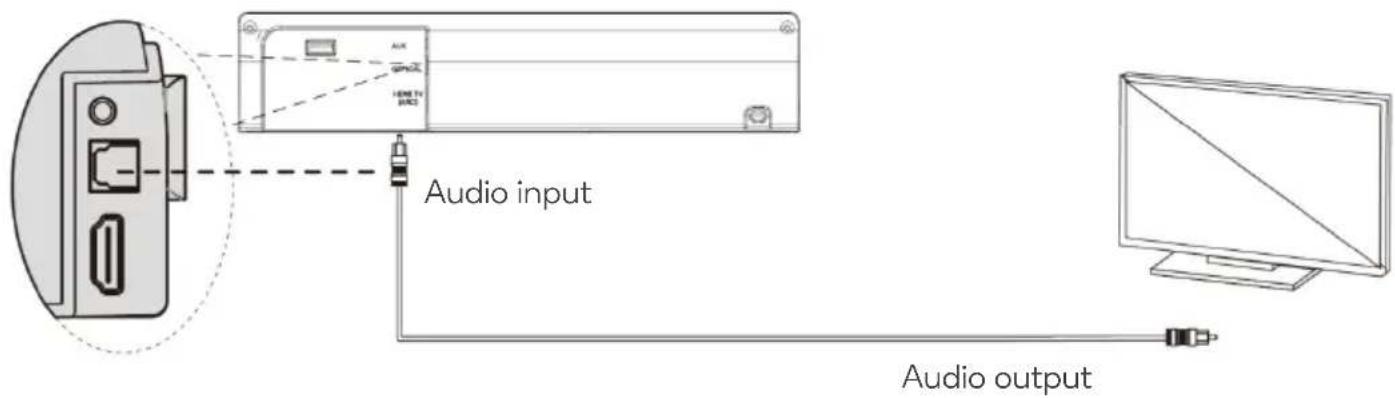
Use this mode to play music from the optical digital input, i.e. from a TV on your soundbar. The TV must have an optical digital output. Use the optical cable supplied to make this connection.
- Connect the optical cable to the optical digital output of your TV.
- Connect the other end of the optical cable to the optical digital input of your soundbar.
- Switch the TV and soundbar on. Set the connected TV to "PCM Stereo" or "Stereo 20".
• Commence media playback on the TV. - Switch to OPTICAL input mode by using remote control.
- Control media playback and audio settings from the soundbar's remote control.
HDMI mode
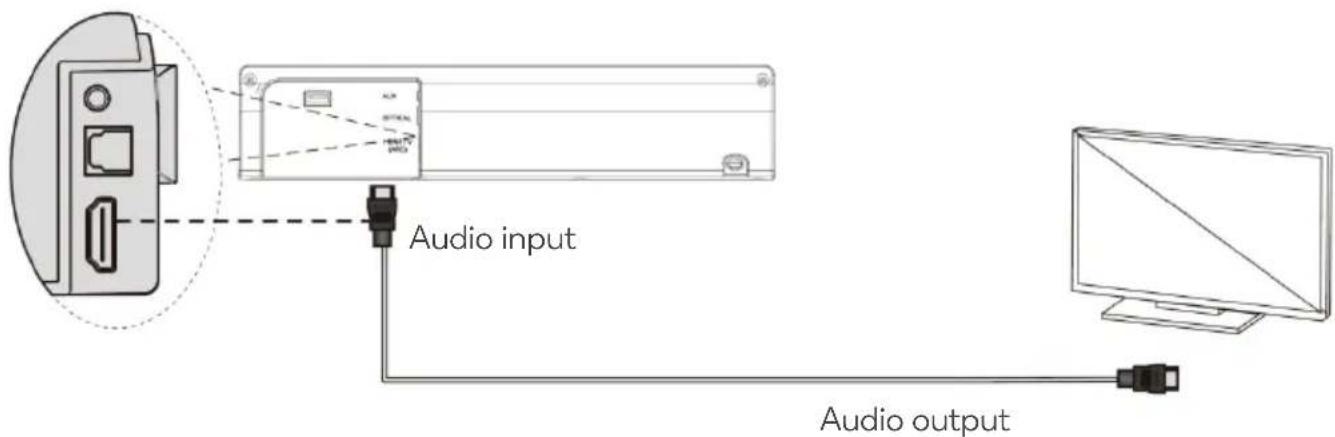
The soundbar supports HDMI with Audio Return Channel (ARC). If your TV is HDMI ARC compliant, you will be able to hear the TV audio through your soundbar by using a single HDMI cable.
- Using a high-speed HDMI cable, connect the HDMI TV (ARC) connector on the soundbar to the HDMI ARC connector on the TV. The HDMI ARC connector on the TV might be labelled differently, depending on the manufacturer.
Pairing the wireless subwoofer
-
Connect to AC power to turn ON the soundbar, press "STANDBY" and then press "INPUT" to enter Bluetooth (BT) input mode. Then soundbar is under paring mode with wireless subwoofer.
-
Meanwhile, connect to AC power to turn ON wireless subwoofer, blue LED indicator is slowly flashing. Long-press the WPS AUTO PAIR BUTTON on the rear of wireless subwoofer, then blue LED indicator becomes quick flashing. Now wireless subwoofer is under paring with soundbar.
-
After around 20-30 seconds, blue LED indicator of wireless subwoofer will become constant without flashing, means wireless subwoofer is successfully paired with soundbar. Now you can enjoy your music from this soundbar with wireless subwoofer system.
-
After 1st successful pairing, when you turn ON the soundbar and wireless subwoofer again, they will pair with each other automatically.
-
If you want to pair your wireless subwoofer with another soundbar, repeat step 1 to step 4 above and make sure only one soundbar, which you want to pair with that wireless subwoofer is turned ON. The other soundbars you don't want to pair with that wireless subwoofer should be turned off or in Standby status.
Notes on operation
- If the wireless subwoofer is turned on, but the soundbar is in standby or is turned off/not connected to AC power, the flashing blue LED indicator on the wireless subwoofer will turn a constant red after a few minutes to signify that the subwoofer has also entered standby.
- To avoid sound quality issues caused by wireless signal interference, keep the unit away from other Wi-Fi/2.4G wireless devices.
- The maximum connection range between the soundbar and wireless subwoofer is 10m in an open space.
Need more information?
We hope that this user guide has given you the assistance needed for a simple set-up.
For the most up-to-date guide for your product, as well as any additional assistance you may require, head online to help.kogan.com
kōgan
- DOLBY SOUNDBAR WITH WIRELESS SUBWOOFER
- SAFETY & WARNINGS
- Notice
- Important safety instructions
- Unpacking and setup
- Protect your furniture
- Power source
- Important notes
- OVERVIEW
- Subwoofer
- Remote control
- ASSEMBLY
- Positioning the soundbar
- Wall mounting
- OPERATION
- Setting up the soundbar
- Powering ON/OFF
- Playing audio via BT connection
- Notes:
- AUX mode
- Playing audio via USB port on soundbar
- Optical mode
- HDMI mode
- Pairing the wireless subwoofer
- Notes on operation
- Need more information?
Brand : Kogan
Model : KASBD16CA
Category : Soundbar