
CS-MP77 - Pregnant COBY - Free user manual and instructions
Find the device manual for free CS-MP77 COBY in PDF.


| Product Type | Portable Speaker |
| Brand | Coby |
| Model | CS-MP77 |
| Dimensions (W x H x D) | 4.5 x 4.5 x 4.5 inches |
| Weight | 0.5 lbs |
| Power Source | DC 5V via USB or 3x AAA batteries |
| Output Power | 3W RMS |
| Connectivity | AUX Input, FM Radio, USB Playback, microSD Card Slot |
| Controls | Play/Pause, Volume, Next/Previous Track, FM Tuner |
| Battery Type | Rechargeable lithium-ion (3.7V, 400mAh) or 3x AAA |
| Charging Time | 2-3 hours |
| Playback Time | 4-6 hours |
| Frequency Response | 100Hz - 20kHz |
| Impedance | 4 ohms |
| Driver | Single full-range driver |
| Material | Plastic |
| Color | Black |
| Accessories Included | USB charging cable, AUX cable, user manual |
| Maintenance | Clean with dry cloth, avoid liquids |
| Safety Warnings | Keep away from water, do not disassemble, use recommended voltage |
| Spare Parts Availability | Contact customer support; not sold separately |
| General Information | Compact and portable design; ideal for on-the-go use |
Frequently Asked Questions - CS-MP77 COBY
User questions about CS-MP77 COBY
0 question about this device. Answer the ones you know or ask your own.
Ask a new question about this device
Download the instructions for your Pregnant in PDF format for free! Find your manual CS-MP77 - COBY and take your electronic device back in hand. On this page are published all the documents necessary for the use of your device. CS-MP77 by COBY.
USER MANUAL CS-MP77 COBY
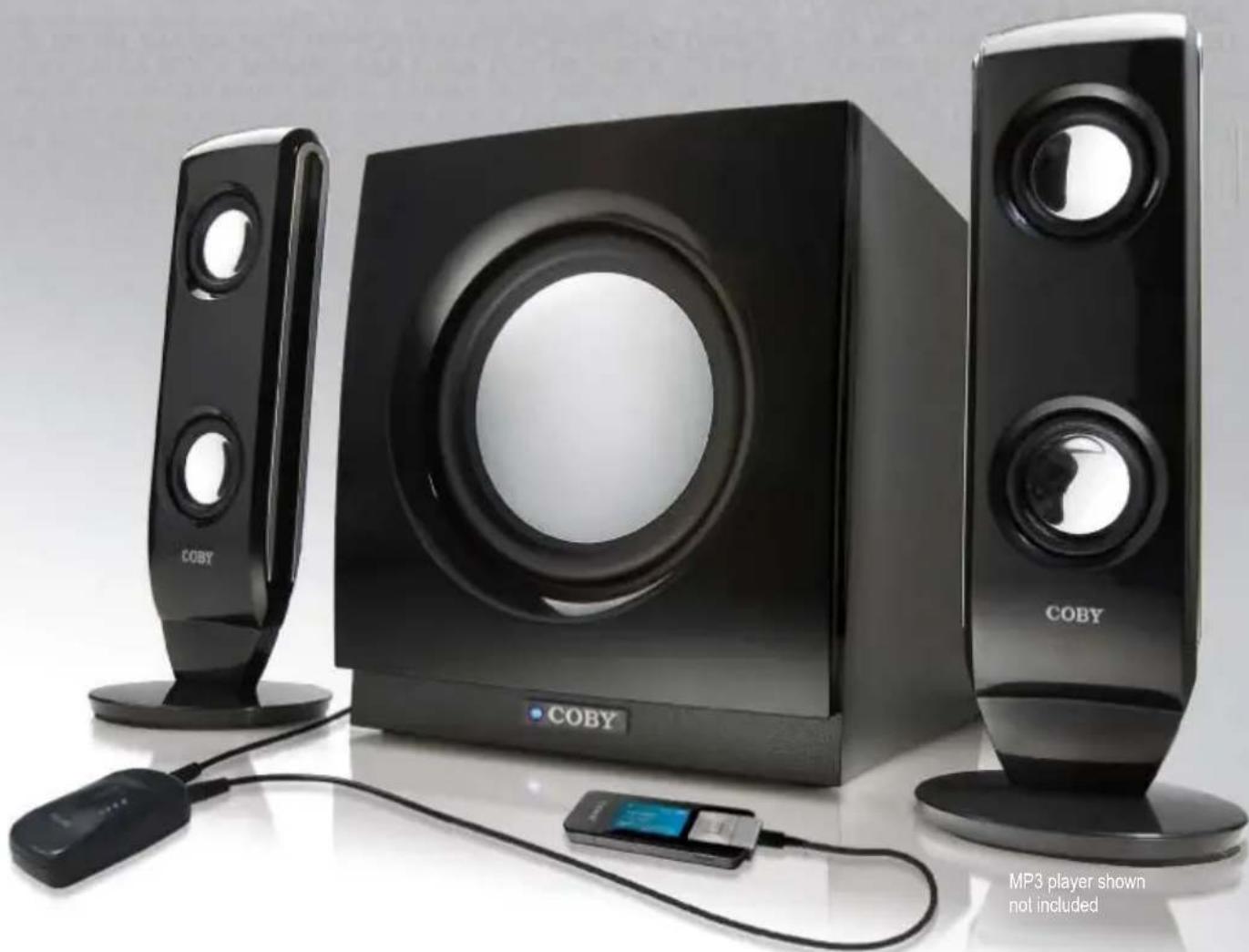
High Performance 2.1-Channel
MP3 Speaker System
natural_image
Exterior view of a modern MP3 audio workstation with three speakers and a CD, no visible text or symbols on the devices themselves.Instruction Manual
Please read this manual carefully before operation.
PRECAUTIONS
CAUTION
RISK OF ELECTRIC SHOCK DO NOT OPEN

CAUTION: TO REDUCE THE RISK OF FIRE AND ELECTRIC SHOCK, DO NOT REMOVE THE COVER (OR BACK) OF THE UNIT. REFER SERVICING ONLY TO QUALIFIED SERVICE PERSONNEL.
For Customer Use:
Enter below the serial number that is located on the unit. Retain this information for future reference.
Model No. CS-MP77
Serial No.
The lightning flash with arrowhead symbol within an equilateral triangle is intended to alert the user to the presence of uninsulated “dangerous voltage” within the product’s enclosure that may be of sufficient magnitude to constitute a risk of electric shock.

The exclamation point within an equilateral triangle is intended to alert the user to the presence of important operation and servicing instructions in the literature accompanying the appliance.
WARNING:
To prevent fire or shock hazard, do not expose this device to rain or moisture. Dangerous high voltage is present inside the enclosure. Do not open the cabinet.
CAUTION:
To prevent electric shock, match wide blade of plug to wide slot of outlet and fully insert.

For recycling or disposal information about this product, please contact your local authorities or the Electronics Industries Alliance: www.eiae.org.
IMPORTANT SAFETY INSTRUCTIONS
- Read Instructions: All the safety and operating instructions should be read before the product is operated.
- Retain Instructions: The safety and operating instructions should be retained for future reference.
- Heed Warnings: All warnings on the product and in the operating instructions should be adhered to.
- Follow Instructions: All operating and usage instructions should be followed.
- Cleaning: Unplug this product from the wall outlet before cleaning. Do not use liquid cleaners or aerosol cleaners. Use a damp cloth for cleaning.
- Attachments: Use only attachments recommended by the manufacturer. Use of other attachments may be hazardous.
- Water and Moisture: Do not use this product near water (e.g., near a bath tub, washbowl, kitchen sink, laundry tub, in wet basements, or near a swimming pool and the like).
- Accessories: Do not place this product on an unstable cart, stand, tripod, bracket, or table. Use only with carts, stands, tripods, brackets, or tables recommended by the manufacturer or sold with the product. Any mounting of the product should follow the manufacturer's instructions and should use a mounting accessory recommended by the manufacturer.
- A product and cart combination should be moved with care. Quick stops, excessive force, and uneven surfaces may cause the product and cart combination to overturn.
- Ventilation: Slots and openings in the cabinet are provided for ventilation to ensure reliable operation of the product and to protect it from overheating. These openings should never be blocked by placing the product on a bed, sofa, rug, or other similar surface. This product should not be placed in a built-in installation such as a bookcase or rack unless proper ventilation is provided or the manufacturer instructions have been adhered to.
- Power Sources: This product should be operated only from the type of power source indicated on the rating label. If you are not sure of the type of power supply to your home, consult your product dealer or local power company. For products intended to operate from battery power or other sources, refer to the operating instructions.
- Grounding or Polarization: This product may be equipped with a polarized alternating-current line plug that has one blade wider than the other. This plug will only fit into the power outlet in one direction. This is a safety feature. If you are unable to insert the plug fully into the outlet, try reversing the direction of the plug. If the plug should still fail to fit, contact an electrician to replace the obsolete outlet. Do not defeat the safety purpose of the polarized plug.
- Power-Cord Protection: Power supply cords should be routed so that they are not likely to be walked on or pinched by items placed upon or against them, paying particular attention to cords at plugs, convenience receptacles, and at the point which they exit from the product.
- Protective Attachment Plug: The product may be equipped with an attachment plug with overload protection. This is a safety feature. See the operating instructions for replacement or directions to reset the protective device. If replacement of the plug is required, be sure the service technician has used a replacement plug that has the same overload protection as the original plug as specified by the manufacturer.

natural_image
Symbolic icon of a person pushing a stack of books inside a circle (no text or symbols)IMPORTANT SAFETY INSTRUCTIONS
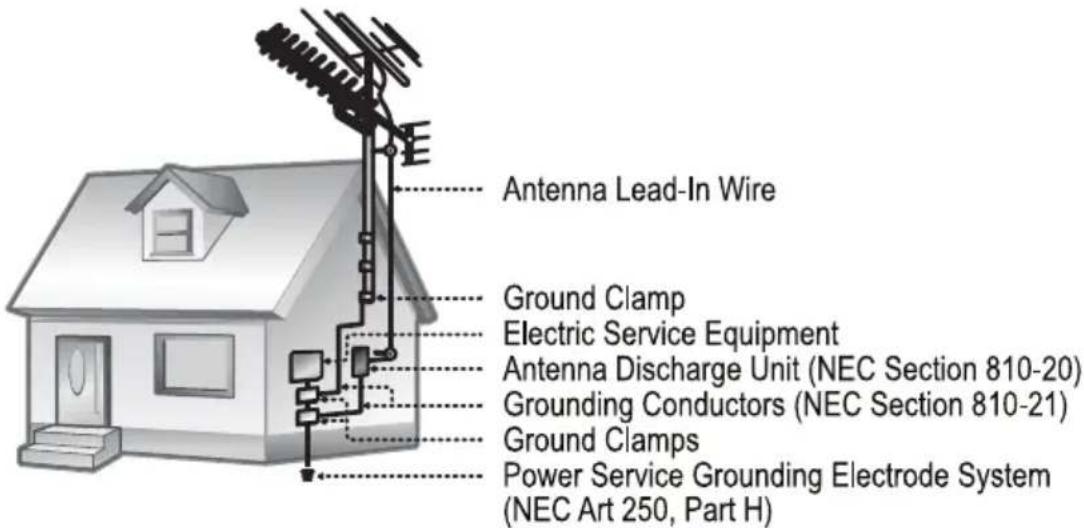
- Outdoor Antenna Grounding: If an outside antenna is connected to the product, be sure the antenna system is grounded so as to provide some protection against voltage surges and built-up static charges. Article 810 of the National Electrical Code, ANS/NFPA 70 provides information with regard to proper grounding of the mast and supporting structure, grounding of the lead-in wire to an antenna-discharge unit, size of grounding conductors, location of antenna-discharge unit, connection to grounding electrodes, and requirements for the grounding electrode (see figure).
- Lightning: For added protection for this product, unplug it from the wall outlet and disconnect the antenna or cable system during a lightning storm or when it is left unattended and unused for long periods of time. This will prevent damage to the product due to lightning or power-line surges.
- Power Lines: An outside antenna system should not be located in the vicinity of overhead power lines or other electric light or power circuits, or where it can fall into such power lines or circuits. When installing an outside antenna system, extreme care should be taken to keep from touching such power lines or circuits, as contact with them might be fatal.
- Overloading: Do not overload wall outlets, extension cords, or integral convenience receptacles as this can result in a risk of fire or electric shock.
- Object and Liquid Entry: Never push objects of any kind into this product through openings as they may touch dangerous voltage points or shout-out parts that could result in a fire or electric shock. Never spill liquid of any kind on the product.
- Servicing: Do not attempt to service this product yourself as opening or removing covers may expose you to dangerous voltage or other hazards. Refer all servicing to qualified service personnel.
- Damage Requiring Service: Unplug this product from the wall outlet and refer servicing to qualified service personnel under the following conditions: a) when the power-supply or plug is damaged; b) if liquid has been spilled or if objects have fallen into the product; c) if the product has been exposed to rain or water; d) if the product does not operate normally by following the operating instructions. Adjust only those controls that are covered by the operating instructions as improper adjustment of other controls may result in damage and will often require extensive work by a qualified technician to restore the product to its normal operation; e) if the product has been dropped or damaged in any way; f) when the product exhibits a distinct change in performance—this indicates a need for service.
IMPORTANT SAFETY INSTRUCTIONS
- Replacement Parts: When replacement parts are required, be sure that your service technician has used replacement parts specified by the manufacturer or have the same characteristics as the original part. Unauthorized substitutions may result in fire, electric shock, or other hazards.
- Safety Check: Upon completion of any service or repairs to this product, ask the service technician to perform safety checks to ensure that the product is in proper operating condition.
- Wall or Ceiling Mounting: The product should be mounted to a wall or ceiling only as recommended by the manufacturer.
- Heat: The product should be situated away from heat sources such as radiators, heat registers, stoves, or other products (including amplifiers) that produce heat. Read these instructions carefully. Keep these instructions for future reference.
TABLE OF CONTENTS
PRECAUTIONS....2
IMPORTANT SAFETY INSTRUCTIONS .... 3
TABLE OF CONTENTS 6
OVERVIEW....7
Features 7
Package Contents....7
Precautions 7
Specifications....7
INSTALLATION 8
OPERATION....9
SUPPORT....10
Features
• 2 Full-Range Satellite Speakers with Twin, High-Precision Micro Drivers
• Wooden Long-Throw Subwoofer with Tuned Port for Powerful Bass Response
• Volume Control Unit with 3.5mm Line-In Jack
• Magnetically Shielded to Minimize Interference
• Ideal for PC, DVD, Games, and Personal Audio Use
Package Contents
- Subwoofer (x 1)
• Satellite Speakers (x 2)
• Volume Control Unit (x 1)
• Instruction Manual (x 1)
Precautions
- To prevent fire or shock hazard, do not expose the speakers to rain or moisture.
- To avoid electric shock or other hazards, do not open the speaker cabinet.
- Cut off the power immediately if objects or liquids have spilled into the speakers.
- Unplug the system when the speakers are not in use.
- To avoid damage to the audio circuitry, do not connect the subwoofer to an external amplifier.
Specifications
Driver Units Twin 1.5" Aluminum Cone Drivers (x 2) 5" Subwoofer (x 1)
Output Power (PMPO) Satellites: 30W* (x 2) Subwoofer: 60W** (x 1)
Output Power (RMS) Satellites: 3W (x 2) Subwoofer: 6W (x 1)
Normal Impedance Satellites: 4 Ohms Subwoofer: 6 Ohms
Power Supply AC 120V, 60Hz
Unit Dimensions Subwoofer: 6.61" x 7.36" x 9.84" (WHD) Weight 8.05lbs
* 4 Ohms at 1kHz, THD 10%
** 6 Ohms at 100Hz, THD 10%
Design and specifications are subject to modification without prior notice.
INSTALLATION
- Connect the left satellite speaker to the Audio Output (L) jack of the subwoofer. Connect the right satellite speaker to the Audio Output (R) jack of the subwoofer.
- Use a 3.5mm male-to-male patch cable to connect the Audio Input jack of the subwoofer to the Volume Control Unit (out).
- Use a 3.5mm male-to-male patch cable to connect the Volume Control Unit (in) to an external audio output device (e.g., a computer, a DVD/CD player, an MP3/PMP player, etc.)
- AFTER ALL OTHER CONNECTIONS HAVE BEEN MADE, connect the AC power cord to an AC 120V power outlet.
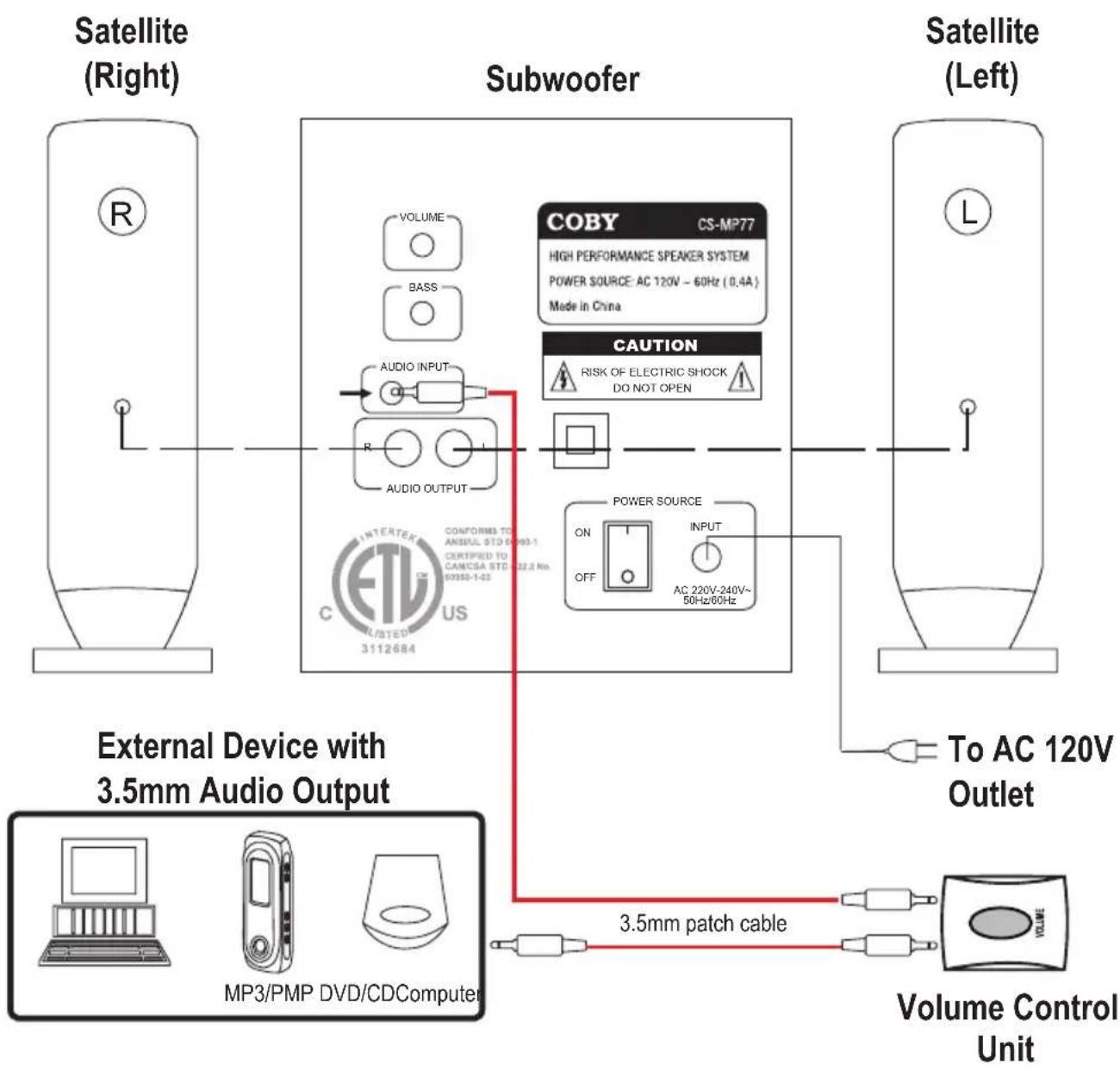
flowchart
graph TD
    A["Satellite (Right)"] --> B["Subwoofer"]
    B --> C["External Device with 3.5mm Audio Output"]
    C --> D["Volume Control Unit"]
    D --> E["To AC 120V Outlet"]
    B --> F["COBY CS-MP77 HIGH PERFORMANCE SPEAKER SYSTEM POWER SOURCE: AC 120V - 60Hz (0.4A) Made in China"]
    B --> G["CAUTION RISK OF ELECTRIC SHOCK DO NOT OPEN"]
    B --> H["POWER SOURCE ON OFF AC 220V-240V~50Hz/60Hz"]
    B --> I["3.5mm patch cable"]
    I --> J["MP3/PMP DVD/CDComputer"]
OPERATION
- After all the speaker, input/output, and power connections have been made, set the Main Power Switch to the ON position. The power switch is located on the rear panel of the subwoofer.
- Turn the Main Volume dial to adjust the audio output level of the speaker system. The Main Volume dial is located on the rear panel of the subwoofer.
• In addition to the Main Volume dial, you may use the convenient Volume Control Unit to adjust the volume level.
- Turn the Bass Level dial to adjust the bass output level of the speaker system. The Bass Level dial is located on the rear panel of the subwoofer.

Prior to turning on the speakers, turn the volume level down to avoid damaging your speakers or your hearing.
If the speakers will not be in use for an extended period of time, turn the system off and unplug it from the AC power source.
SUPPORT
If you have a problem with this device, please read the troubleshooting guide below and check our website at www.cobyusa.com for Frequently Asked Questions (FAQs) and firmware updates. If these resources do not resolve the problem, please contact Technical Support.
COBY Electronics Technical Support
56-65 Rust Street
Maspeth, NY 11378
Hours: 8:00 AM–11:00 PM EST, seven days a week.
Email: techsupport@cobyusa.com
Phone: 718-416-3197, 800-681-2629, or 800-727-3592
Web: www.cobyusa.com
NOTES
COBY Electronics Corp.
56-65 Rust Street
Maspeth, NY 11378
www.cobyusa.com
www.ecoby.com
Brand : COBY
Model : CS-MP77
Category : Pregnant