
SW8 - Subwoofer Niles - Free user manual and instructions
Find the device manual for free SW8 Niles in PDF.


| Product Type | Powered Subwoofer |
| Brand | Niles |
| Model | SW8 |
| Driver Size | 8 inches |
| Amplifier Power | 200 Watts RMS |
| Frequency Response | 30 Hz - 150 Hz |
| Impedance | 8 ohms |
| Input Connections | Line level (RCA) and speaker level |
| Controls | Volume, crossover frequency, phase switch |
| Auto On/Off | Yes |
| Cabinet Type | Bass reflex (ported) |
| Dimensions (H x W x D) | 14.5 x 14.5 x 16.5 inches (approx) |
| Weight | 32 lbs (approx) |
| Finish | Black matte |
| Power Supply | 120V AC, 60Hz |
| Power Consumption | 250W max |
| Protection Circuit | Overload and thermal protection |
| Maintenance | Clean with dry cloth; do not use solvents |
| Safety | Do not expose to water or extreme temperatures |
| Spare Parts | Contact Niles dealer or service center |
| Repairability | Service by qualified personnel only |
| General Information | High-performance subwoofer for home theater and music |
Frequently Asked Questions - SW8 Niles
User questions about SW8 Niles
0 question about this device. Answer the ones you know or ask your own.
Ask a new question about this device
Download the instructions for your Subwoofer in PDF format for free! Find your manual SW8 - Niles and take your electronic device back in hand. On this page are published all the documents necessary for the use of your device. SW8 by Niles.
USER MANUAL SW8 Niles
natural_image
Two black-framed audio/video speakers with sound waves, no visible text or symbols on the devices themselves.FOR USE IN MUSIC OR HOME THEATER SYSTEMS
6.5" & 8" COMPACT SUBWOOFERS
SW6.5 SW8
CONGRATULATIONS!
Thank you for choosing a Niles SW6.5 or SW8 High-Powered Compact Subwoofer from Niles Audio. With proper installation, configuration and operation you should enjoy years of trouble-free performance.
Niles Audio manufactures the A/V industry's most complete line of custom integration components and accessories for audio/video home theater and multi-room audio systems. To see the complete Niles product range, visit us at: www.nilesaudio.com
TABLE OF CONTENTS
| Introduction | 1 |
| Important Safety Instructions 2 | |
| Features and Benefits 3 | |
| Placement | 4 |
| Controls and Connectors 5 | |
| Finishing the Installation 8 | |
| Specifications | 9 |
| FCC Instructions to the User 10 | |
| Warranty 11 |
INTRODUCTION
The Niles SW8 and SW6.5 mini subwoofers provide outstanding deep bass performance for their size, and feature compact enclosures that provide virtually unlimited placement fl exibility. Their advanced technology components include high power, high effi ciency digital amplifi ers (SW8 – 1200W dynamic; SW6.5 – 800W dynamic) along with a black anodized aluminum cone bass driver and dual black anodized aluminum cone passive radiators.

natural_image
Two black square speakers with sound waves, one labeled 'SW8' (no other text or symbols visible)SW6.5
1-800-BUY-HIFI - www.nilesaudio.com 1
IMPORTANT SAFETY INSTRUCTIONS

CAUTION: TO REDUCE THE RISKOFELECTRICALSHOCK, DO NOT REMOVE COVER. NO USER SERVICEABLE PARTS INSIDE. REFER SERVICING TO QUALIFIED SERVICE PERSONNEL.
The lightning flash with arrowhead symbol, within an equilateral triangle, is intended to alert the user to the presence of uninsulated dangerous voltage within the product's enclosure that may be of sufficient magnitude to constitute a risk of electric shock to persons.
WARNING: To reduce the risk of fire or electric shock, do not expose this apparatus to rain or moisture
The exclamation point within an equivalent triangle is intended to alert the user to the presence of important operating and maintenance (servicing) instructions in the literature accompanying the appliance.
- Read these instructions.
- Keep these instructions.
- Heed all warnings.
- Follow all instructions.
- Do not use this apparatus near water.
- Clean only with a dry cloth.
- Do not block any ventilation openings. Install in according with the manufacturer's instructions.
- Do not install near any heat sources such as radiators, heat registers, stoves, or other apparatus (including amplifiers) that produce heat.
- Do not defeat the safety purpose of the polarized or ground plug. A polarized plug has two blades with one wider than the other. A grounding-type plug has two blades and a third grounding prong. The wide blade is provided for your safety. If the provided plug does not fit into your outlet, consult an electrician for replacement of the obsolete outlet.
- Protect the power cord from being walked on or pinched particularly at plug, convenience receptacles, and the point where they exit from the apparatus.
- Only use attachments/accessories specified by the manufacturer.
- Unplug this apparatus during lightning storms or when unused for long periods of time.
- Refer all servicing to qualified service personnel. Servicing is required when the apparatus has been damaged in any way, such as power-supply cord or plug is damaged, liquid has been spilled or objects have fallen into the apparatus, the apparatus has been exposed to rain or moisture, does not operate normally, or has been dropped.
- Do not expose this apparatus to dripping or splashing and ensure that no objects filled with liquids, such as vases, are placed on the apparatus.
- To completely disconnect this apparatus from the AC Mains, disconnect the power supply cord plug from the AC receptacle.
- The power supply cord (sometimes referred to as the “Mains Plug”) is used as the disconnect device and shall remain accessible and operable at all times.
- Do not expose batteries to excessive heat such as sunshine, fire or the like.
- Open flame sources, such as lighted candles, should NOT be placed on the apparatus.
FEATURES AND BENEFITS
High power, high efficiency digital amplifiers provide tremendous dynamic range for clear and defined deep bass response. The SW8 features a 1200W dynamic digital power amplifier and the SW6.5 features an 800W dynamic, digital power amplifier. Both provide high output and high efficiency, with less heat produced compared to conventional analog power amplifier designs.
High power, long throw active woofer drivers feature black anodized aluminum cones which provide superior rigidity compared to conventional paper cone designs. This ensures that during extended passages of high level deep bass output, the driver cone resists breakup, which provides clean, low distortion sound that brings your music and movies to life!
Dual anodized aluminum cone passive radiators provide additional driver pistonic area, and their combined output along with the main active driver equals that of a larger single active driver. In other words, these passive radiators allow them to move a lot more air, bringing more rich, deep bass to you from a smaller, more compact subwoofer that is easy to blend into your home's décor.
Installation flexibility includes the option for easy wall or ceiling mounting utilizing the OmniMount 30.0 ST-MP. This gives you the ultimate flexibility for installing this compact subwoofer.
Advanced configuration flexibility includes stereo (L/R) line inputs along with unbuffered stereo pass-through line outputs, which also allows you to cascade the output up to three additional subwoofers. The C5-A2 port (RJ-45 connector) provides the option of an easier and less expensive wire run using CAT-5 cable from the A/V receiver or processor to the subwoofer via an optional Niles CAT-5 Balun adapter using standard CAT-5 wiring. A wireless input port provides an additional input connection option via the available Niles FG01672 wireless transmitter/receiver system, eliminating the need for a wired signal connection to the subwoofer.
Adjustable low pass frequency, phase and level controls allow precise main speaker and subwoofer matching and blending. The adjustable frequency control (50 Hz\~150 Hz) features a bypass position, eliminating low pass filtering within the subwoofer. The variable phase control ( 0^ 180^ ) allows precise phase matching with the main speakers.
Auto Sense feature provides energy efficiency by putting the subwoofer into standby mode when no audio signals are input to the sub, and can be disabled for “always on” mode. An LED indicator provides confirmation of the subwoofer’s power state.
PLACEMENT
THE BOUNDARY EFFECT
With their compact dimensions, the Niles SW8 and SW6.5 subwoofers provide a wide range of placement options, including wall or ceiling mounting via an optional mount kit.
When considering where to place a subwoofer in a particular space, note that the “boundary effect” can provide increased acoustic output due to the reinforcement effects when the subwoofer is placed on the floor, by a wall or in a corner.
Generally, when placed in or near a corner, the acoustic output of the subwoofer is substantially greater due to the boundary effect's acoustic gain. This provides two benefits. First, as the acoustic output of the sub (as perceived at the prime listening position) is greater than in free-space (away from the walls, floor and ceiling), the subwoofer doesn't need to "work" as hard, which results in lower distortion. Second, the gain provided by the boundary effect serves to increase the subwoofer's available dynamic range, for increased deep bass output at elevated listening levels.
Generally, corner placement provides the greatest acoustic reinforcement. However, corner placement is not always optimum, and some experimentation may be necessary in any particular room.
If the subwoofer is placed far away from the main speakers, there may be an audible discontinuity between the low bass sound from the sub and the wider upper range sound from the main speakers. This becomes even more critical when using compact main speakers, where a higher crossover frequency is often necessary. At a high crossover frequency (150 Hz), there is a much greater chance of audible main speakers and subwoofer discontinuity, with the subwoofer's output becoming distinctly audible as a sound source.
Ideally, the best subwoofer placement in any given space will reward the listener with a high quality full range acoustic experience, with the subwoofer itself seamlessly blending in with the main speakers, and not audible as a sound source itself.
CONNECTION AND CONTROLS
OPERATION CONTROLS
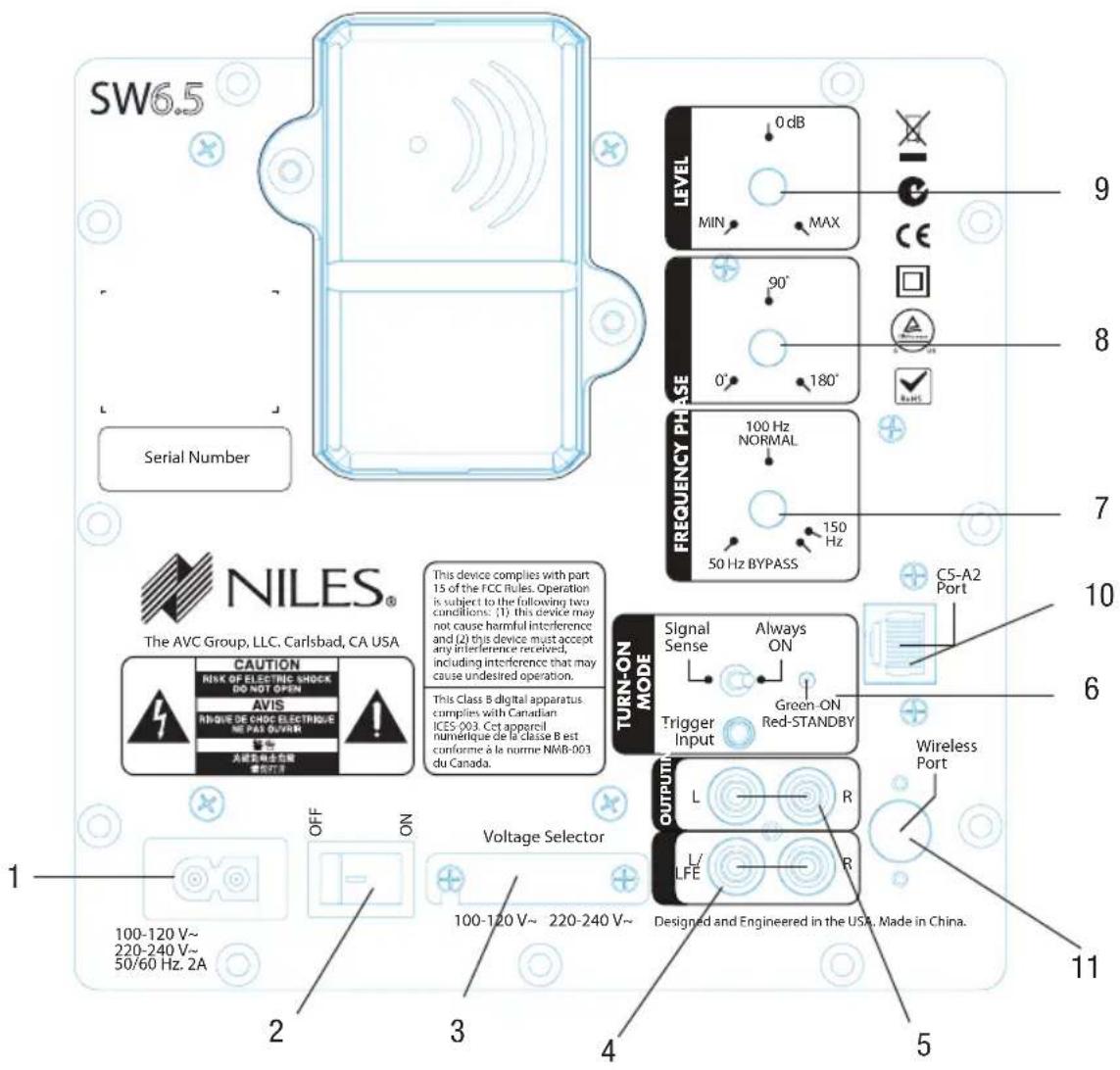
- AC input
- Main power on/off switch
- AC voltage selector (under protective cover)
- Pre-amp level sub/stereo audio inputs
- Pre-amp level sub/stereo audio pass-through outputs
-
Turn-on mode with LED status indicator
-
Frequency control, variable with bypass
- Phase control, variable 0°\~180°
- Level control
- C5-A2 port for optional CAT-5 Balun (balanced/unbalanced) connection
- Wireless port for optional Niles wireless receiver connection
CONNECTION AND CONTROLS (CONTINUED...)
AC VOLTAGE OPTION
The AC voltage option has been factory configured 100\~120 V\~.). Should the AC voltage need to be changed to 220\~240V\~ loosen the screw on the protective cover, slide the cover away and the slide switch can be adjusted. Make sure to replace the protective cover when done. Only make this adjustment if the subwoofer will be connected to a voltage supply of between 220-240 VAC @50Hz.
INPUT/OUTPUT CONNECTION OPTIONS
For most system configurations, connect the A/V surround receiver or processor's Sub output to the L/LFE input (3).
For a stereo music system where the stereo source features pre-amp level outputs, connect both L/LFE and R inputs (3).
The pass-through stereo outputs (4) can be connected to a stereo power amplifier if needed. The pass-through L/LFE output can be connected to another subwoofer if desired.
Niles offers a range of Balun adapters that allow audio signal transfer over standard Cat-5 network cabling. Compared to coaxial audio interconnect cable, which can be costly over long runs and more difficult to route through walls, Cat-5 cabling is usually less expensive on a per-foot basis, and is easier to route through walls. Connect a suitable Niles Balun receiver/adapter to (10) to use this option.
Niles also offers a wireless audio transmitter/receiver system, which eliminates the need for audio signal cable connection to the subwoofer. Connect the wireless receiver to the wireless port (11) to use this option. Refer to the wireless system's instruction manual for further instructions.
CONTROLS
Turn-on Mode (6)
The Turn-on Mode provides the option to have the subwoofer in “always on” mode or to have the subwoofer ordinarily in standby mode unless an audio input signal is present. The Signal Sense mode automatically detects the presence of an audio input signal and brings the subwoofer out of standby mode. This is the most energy efficient mode. With either mode, the main Power switch (2) must be set to On. The default position from the factory is “Signal Sense”.
CONNECTION AND CONTROLS (CONTINUED...)
CONTROLS (CONTINUED...)
Frequency (7)
Adjust this control to match the characteristics of the main speakers. For applications where full-range signals are sent to the subwoofer, the 100 Hz Normal setting will usually produce the best results. If the main speakers are compact, their more limited lower frequency range may necessitate a higher subwoofer frequency setting. For systems with large, full range main speakers that can reproduce deep bass, lowering the frequency setting may be desirable. If the audio source (A/V surround pre-amp, processor or receiver) is equipped with a bass management/bass re-direction function that includes low pass filtering for the Sub output (which is almost always the case), set the Frequency control on the Niles Subwoofer to Bypass to prevent cascaded low pass filtering.
Phase (8)
Depending on the subwoofer's physical placement and the acoustical characteristics of the main speakers, achieving optimal blend may necessitate phase adjustment. Upon initial installation and setup, set the control to the 0^ (in-phase) position, and listen to a variety of program material, including music selections as well as movie soundtracks. Experiment by adjusting the Phase control in small increments until the best combination of low bass sound quality and matching (blending) with the main speakers is achieved.
Level (9)
Initially set the control to the lowest position, and while listening to music and film content, slowly adjust the control upward until an even bass response is achieved. Many A/V receivers and surround processors include a built-in noise generator for channel level balancing, and by using a sound pressure level meter, it's possible to quickly find the optimum subwoofer level setting. When using an SPL meter to match subwoofer output level with the main speakers, it's important to make measurements at the principal listening position. The 0dB setting (mid-point) is often the best setting, and further subwoofer channel level fine-tuning adjustments can be made via the A/V surround processor or receiver's channel level adjustment control.
FINISHING THE INSTALLATION
If the subwoofer is to be wall or ceiling mounted, the four cabinet feet can be removed if desired.
REMOVING AND INSTALLING THE GRILLE
Ordinarily, the grille need not be removed. However, some prefer the visual aesthetic achieved with the grille removed. Either way, the acoustic quality will be the same. To remove the grille, grasp the grille edges with both hands and gently pull outward. To re-install the grille, gently press on the grille corners to secure the grille to the cabinet.
CLEANING
Use a dampened soft cloth to clean the cabinet. If the grille becomes dusty or dirty, use a vacuum cleaner attachment with a soft brush head.
SPECIFICATIONS
Driver Complement
SW8: One 8" long-throw front-firing woofer; two 8" long-throw side-mounted passive radiators
SW6.5: One 6.5" long-throw front-firing woofer; two 6.5" long-throw side-mounted passive radiators
Amplifier Power
SW8: 1200W dynamic; 300W RMS
SW6.5: 800W dynamic; 200W RMS
Frequency Range
SW8: 36Hz-200Hz
SW6.5 42Hz-200Hz
Power Requirements
SW8 and SW6.5: (switchable) 100\~120V\~; 220\~240V\~; 50/60Hz, 2A
Overall Dimensions (with grille)
SW8: 10 3/4" H x 10 1/2" W x 12 1/8" D (27.3cm H x 26.7cm W x 30.8cm D)
SW6.5: 8 5/8" H x 8 3/8" W x 9 5/8" D (21.9cm H x 21.3cm W x 24.4cm D)
Weight
SW8: 16.5 lbs (7.5 kg)
SW6.5: 11 lbs (5.0 kg)
Certification
• Meets FCC Part 15 and ICES-003, Class B for USA and Canada
• CSA Listed and tested under UL/EN60065 standard
- CE compliant for the EU
• C-Tick compliant for Australia and New Zealand
FCC INSTRUCTIONS TO THE USER
This equipment has been tested and found to comply with the limits for a class B digital device, pursuant to part 15 of the FCC Rules. These limits are designed to provide reasonable protection against harmful interference in a residential installation. This equipment generates, uses and can radiate radio frequency energy and if not installed and used in accordance with the instructions, may cause harmful interference to radio communications. However, there is no guarantee that interference will not occur in a particular installation.
If this equipment does cause harmful interference to radio or television reception, which can be determined by turning the equipment off and on, the user is encouraged to try to correct the interference by one or more of the following measures:
• Reorient or relocate the receiving antenna.
- Increase the separation between the equipment and receiver.
- Connect the equipment into an outlet on a circuit different from that to which the receiver is connected.
- Consult the dealer or an experienced audio/video installer for help.
The user is cautioned that changes and modifications made to the equipment without the approval of manufacturer could void the user's authority to operate this equipment.
LIMITED WARRANTY
NILEs AuDIO ("NILEs") WARRANTS ITS LOuDSPeAkeR PRODuCTS TO THE ORIgINAL PuRCHASer TO be FRee OF MANuFACTuRINg DeFeCTS IN MATeRIAL AND WORkMANSHIP FOR A PeRIOD OF TWO yeARS FROM DATe OF PuRCHASe.
THIS WARRANTY IS Subject TO THE FOLLOWING ADDITIONAL CONDITIONS AND LIMITATIONS. THE WARRANTY IS VOID AND INAPPLICAbLe IF NILs DeeMS THAT THE PRODUCT HAS beeN uSeD OR HANDLED OTheR THAN IN ACCORDANCE WITH THE INSTRUCTIONS PROvIDeD by THE MANuFACTuReR, INCLuDINg but NOT LIMITeD TO DAMAGE CAuSeD by ACCIDeNT, MISHANDLINg, IMPROPeR INSTALLATION, AbuSe, NegLIgeNCe, OR NORMAL WeAR AND TeAR, OR ANy DeFeCT CAuSeD by RePAIR TO THE PRODUCT by ANyONe OTheR THAN NILs OR AN AuTHORIzeD NILs DeALer.
TO ObTAIN WARRANTY SeRvICe, TAke THE uNIT TO THE NeAReST AuTHORIzeD NILeS DeALeR, WHO WILL TeST THE PRODUCT AND IF NeCeSSARy, FORWARD IT TO NILeS FOR SeRvICe. IF THERe ARe NO AuTHORIzeD NILeS DeALeRS IN yOuR AReA, yOu MuST WRITe TO NILeS AND INCLuDe yOuR NAME, ADDReSS, MODEL AND SERIAL NuMbeR OF yOuR uNIT, ALONg WITH A bRIeF DeSCRIPTION OF THE PRObLeM. A FACTORY ReTuRN AuTHORIzATION NuMbeR WILL be SeNT TO yOu. DO NOT ReTuRN ANy uNIT WITHOuT FIRST ReCelvINg WRITTeN AuTHORIzATION AND SHIPPING INSTRuCTIONS FROM NILeS.
IF The AbOve CONDITIONS ARE MeT, THE PuRCHASer'S SOLe ReMeDy SHALL be TO ReTuRN THE PRODuCT TO NILeS, IN WHICH CASE NilcS WILL RePAIR OR RePLACe, AT ITS SOLe OPTION, THE DeFeCTIve PRODuCT WITHOuT CHARge FOR PARTS OR LAbOR. NILcS WILL ReTuRN A uNIT RePAIRd OR RePLACeD uNDeR WARRANTY by SHIPPINGSame by ITS uSuAL SHIPPINGMethod FROM THE FACTORY (ONLY) AT ITS exPeNSe WITHIN THE uNITeD STATeS OF AMeRICA. THERe ARE NO OTHeR WARRANTY, INCLuDING WITHOuT LIMITATION, eITHeR exPReSS OR IMPLIeD WARRANTY OF MERCHANTAbility OR FITNeSS FOR A PARTICuLAR PuRPOSe, WITH RESPeCT TO THE PRODuCT.
RePAIR OR RePLACeMeNT AS PROvIDeD uNDeR THIS WARRANTY IS THE exCLuSlve ReMeDy OF THE CONSuMeR/PuRCHASeR. NILs SHALL NOT be RESPONSIBLe FOR ANy INCIDeNTAL OR CONSeQueNTIAL DAMAgeS exCePT TO THE exTeNT PROvIDeD (OR PROHIBITeD) by APPLICAbLe LAW.
SOMe STATeS DO NOT ALLOW THE exCLuSION OR LIMITATION OF INCIDeNTAL OR CONSeQueNTIAL DAMAgeS, SO THE AbOve LIMITATION MAy NOT APPLY TO yOu. THIS WARRANTY glveS yOu SPcCIFIC LegAL RlgHTS, AND yOu MAy ALSO HAve OTHeR RlgHTS WHICH vARy FROM STATe TO STATe.
FOR THE NAME OF yOuR NeAReST AuTHORlZeD NILEs DeALeR CONTACT:
NILeS AuDIO, THE AvC gROuP, LLC, 1969 keLLOgg Ave, CARLSbAD, CA 92008
Please fill in your product information and retain for your records.
Model ____ Serial No. ____ Purchase Date ____
1-800-BUY-HIFI - www.nilesaudio.com

NILES®
BLENDING HIGH FIDELITY AND ARCHITECTURE®
1969 Kellogg Ave, Carlsbad CA 92008
1-800-BUY-HIFI - www.nilesaudio.com
©2011 The AVC Group, LLC. All rights reserved. Niles, the Niles logos and
Blending High Fidelity and Architecture are registered trademarks of The AVC Group, LLC.
All other trademarks are the property of their respective owners. 9901212 Rev A


- CONGRATULATIONS!
- INTRODUCTION
- IMPORTANT SAFETY INSTRUCTIONS
- FEATURES AND BENEFITS
- PLACEMENT
- THE BOUNDARY EFFECT
- CONNECTION AND CONTROLS
- OPERATION CONTROLS
- CONNECTION AND CONTROLS (CONTINUED...)
- AC VOLTAGE OPTION
- INPUT/OUTPUT CONNECTION OPTIONS
- CONTROLS
- Turn-on Mode (6)
- CONTROLS (CONTINUED...)
- Frequency (7)
- Phase (8)
- Level (9)
- FINISHING THE INSTALLATION
- REMOVING AND INSTALLING THE GRILLE
- CLEANING
- SPECIFICATIONS
- Driver Complement
- Amplifier Power
- Frequency Range
- Power Requirements
- Overall Dimensions (with grille)
- Weight
- Certification
- FCC INSTRUCTIONS TO THE USER
- LIMITED WARRANTY
- NILES®
- BLENDING HIGH FIDELITY AND ARCHITECTURE®
Brand : Niles
Model : SW8
Category : Subwoofer