
ViewMate W2201 - Webcam VIEWSONIC - Free user manual and instructions
Find the device manual for free ViewMate W2201 VIEWSONIC in PDF.


| Product Type | Webcam |
| Brand | ViewSonic |
| Model | ViewMate W2201 |
| Resolution | Full HD 1080p (1920 x 1080) |
| Frame Rate | 30 fps |
| Field of View | 90° |
| Microphone | Built-in dual stereo |
| Connection | USB 2.0 (plug-and-play) |
| Cable Length | 1.5 m |
| Dimensions (L x W x H) | 80 x 50 x 40 mm |
| Weight | 100 g |
| Power Source | USB powered (5V) |
| Compatibility | Windows 10/11, macOS 10.12+, Chrome OS |
| Focus Type | Autofocus |
| Low Light Correction | Yes |
| Privacy Shutter | Yes (physical cover) |
| Mounting Options | Clip-on monitor or tripod mount |
| LED Indicator | Yes (on when active) |
| Cleaning | Wipe lens with microfiber cloth |
| Safety | Keep away from liquids and extreme temperatures |
| Repairability | Contact ViewSonic support for service |
Frequently Asked Questions - ViewMate W2201 VIEWSONIC
User questions about ViewMate W2201 VIEWSONIC
0 question about this device. Answer the ones you know or ask your own.
Ask a new question about this device
Download the instructions for your Webcam in PDF format for free! Find your manual ViewMate W2201 - VIEWSONIC and take your electronic device back in hand. On this page are published all the documents necessary for the use of your device. ViewMate W2201 by VIEWSONIC.
USER MANUAL ViewMate W2201 VIEWSONIC
Product Registration 2
Getting Started
Package Contents 3
Power Source Adjustment 3
Software Installation
System Requirements 5
W2201 Installation 5
VP-EYE Installation 7
Hardware Installation
Other Information
Specifications 9
Customer Support 10
Limited Warranty 11
Compliance Information
For U.S.A.
This equipment has been tested and found to comply with the limits for a Class B digital device, pursuant to part 15 of the FCC Rules. These limits are designed to provide reasonable protection against harmful interference in a residential installation. This equipment generates, uses, and can radiate radio frequency energy, and if not installed and used in accordance with the instructions, may cause harmful interference to radio communications. However, there is no guarantee that interference will not occur in a particular installation. If this equipment does cause harmful interference to radio or television reception, which can be determined by turning the equipment off and on, the user is encouraged to try to correct the interference by one or more of the following measures:
• Reorient or relocate the receiving antenna.
- Increase the separation between the equipment and receiver.
- Connect the equipment into an outlet on a circuit different from that to which the receiver is connected.
- Consult the dealer or an experienced radio/TV technician for help.
For Canada
This Class B digital apparatus meets all requirements of the Canadian Interference-Causing Equipment Regulations.
CE Conformity for European Countries
CE Conformity

The device complies with the requirements of the EEC directive 89/336/EEC as amended by 92/31/EEC and 93/68/EEC Art.5 with regard to “Electromagnetic compatibil
Warning:
- You are cautioned that changes or modification not expressly approved by the party responsible for compliance could void your authority to operate the equipment.
- Avoid prolonged use of the webcam without breaks.
Copyright Information
Copyright © ViewSonic® Corporation, 2005. All rights reserved.
Macintosh and Power Macintosh are registered trademarks of Apple Computers, Inc.
Microsoft, Window, Window XP and the Window logo are registered trademarks of Microsoft Corporation in the United States and other counteires.
ViewSonic, the three birds logo, OnView, ViewMatch, and ViewMeter are registered trademarks of ViewSonic Corporation.
Disclaimer: ViewSonic Corporation shall not be liable for technical or editorial errors or omissions contained herein; nor for incidental or consequential damages resulting from furnishing this material, or the performance or use of this product.
In the interest of continuing product improvement, ViewSonic Corporation reserves the right to change product specifications without notice. Information in this document may change without notice.
No part of this document may be copied, reproduced, or transmitted by any means, for any purpose without prior written permission from ViewSonic Corporation.
Product Registration
To meet your future needs, and to receive any additional product information as it becomes available, please register your product on the Internet at:www.viewsonic.com. The ViewSonic ^® Wizard CD-ROM also provides an opportunity for you to print the registration form, which you may mail or fax to ViewSonic ^® .
For Your Records
Product Name: W2201
ViewMate™ 330K WebCam
Model Number: VS10639
Document Number: W2201_UG_ENG Rev. 1A 02-21-05
Serial Number:
Purchase Date:
Getting Started
Congratulations on your purchase of a ViewMate™ 330K Webcam.
Important! Save the original box and all packing material for future shipping needs.
Note : The word “Window” in this user guide refers to the following Microsoft operating systems: Window 98SE, Window ME, Window 2000 and Window XP.
Package Contents
Your package includes:
- WebCam
• USB 1.1 type A to mini USB Cable - User guide and driver (ViewSonic Wizard CD)
• VP-EYE (V4.0) Software
Note: The CD includes the User Guide PDF files.
Power Source Adjustment
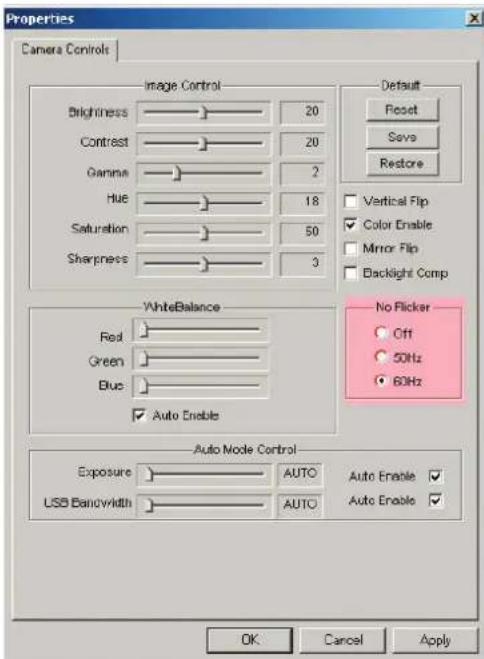
Choose either “50Hz” or “60Hz” mode depending on your power source environment or video signal requirements, to avoid producing a blurry image.
Amcap → Option → Video Capture Fliter → OK
Software Installation
System Requirements
• OS:Window 98SE, Window Me, Window 2000, Window XP
Attention:
Make sure to install the driver and software BEFORE plugging the camera into a USB port.
- Insert the "ViewMate Wizard" software CD into the CD-ROM drive of your computer.
- The installation program will run automatically. If the installation does not auto play, please run "Setup.exe" from the CD-ROM's root directory to install.
W2201 Installation
Attention:
Make sure to install the driver and software BEFORE plugging the camera into a USB port.
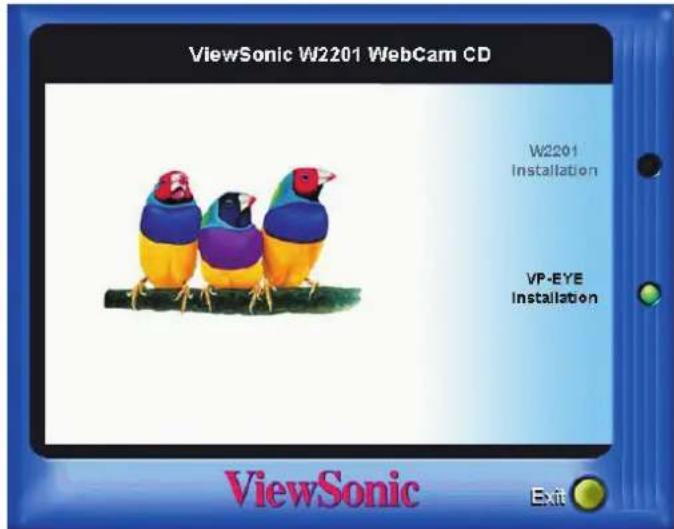
- Click the "W2201 Installation" icon to install device drivers and then follow the on-screen instructions to install the driver.
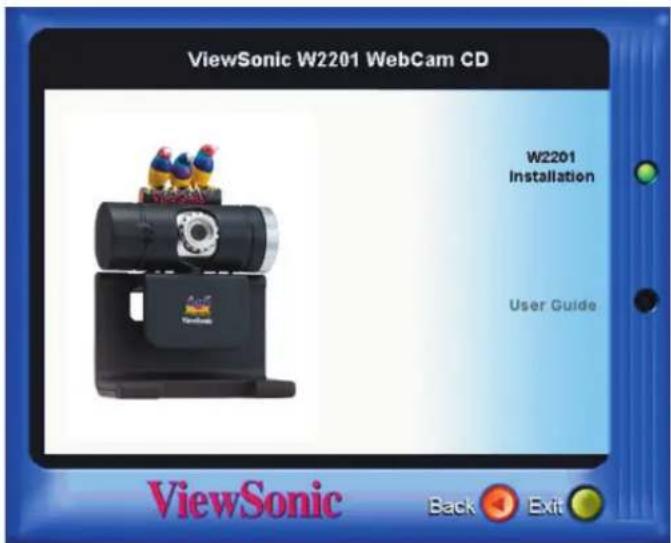
- Click "Next" to continue.
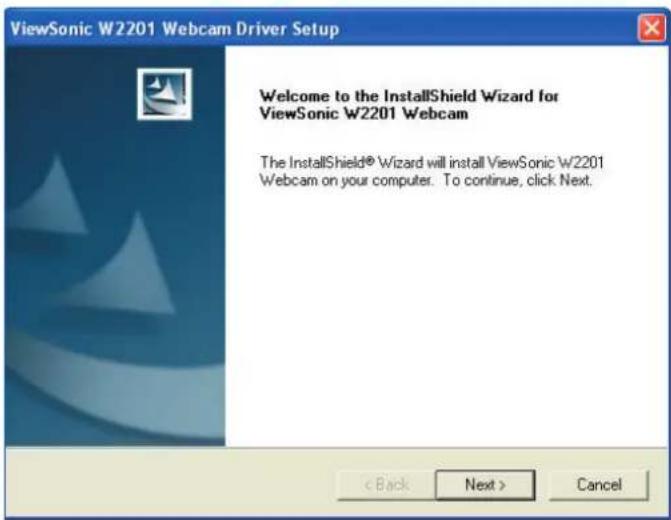
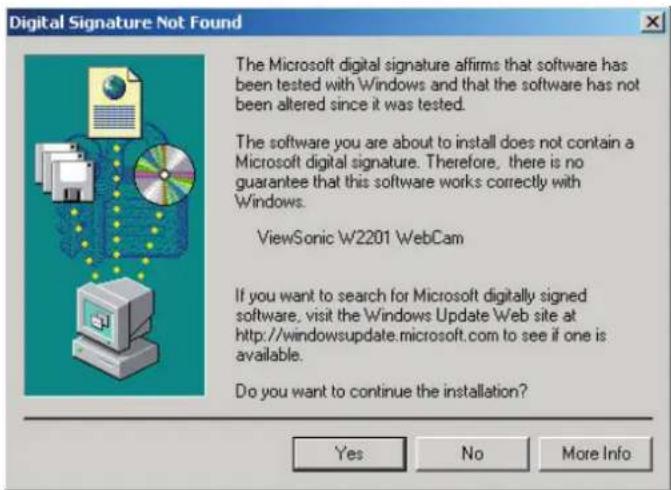
- If the "Hardware Installation" dialogue box appears, click "Continue Anyway". (OS 98SE/ME/2000)
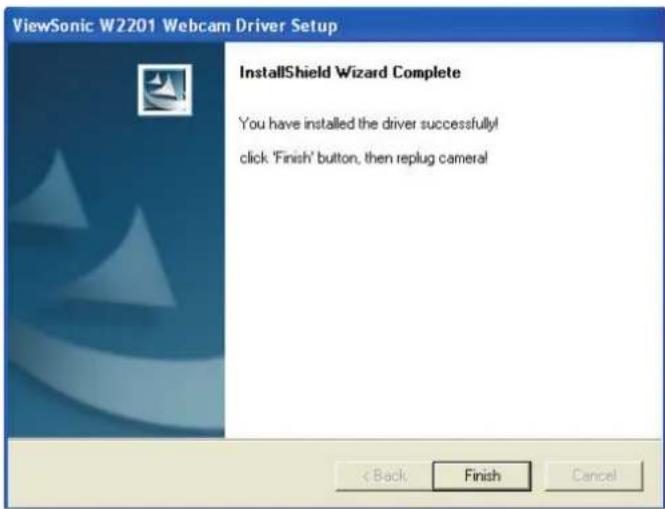
- Click "Finish" once driver installation is complete.
VP-EYE Installation
Attention:
Make sure to install the driver and software BEFORE plugging the camera into a USB port.
- Please click "VP-EYE Installation" and then follow the on-screen instructions to install the software applications.
- For Window 2000/ME/98SE systems:
When all setup procedures are finished, please restart the operating system.
Caution: Window XP system
When all setup procedures are finished, you must install hardware directly, don't restart the operating system manually before plugging the USB cable into camera and USB port.
Hardware Installation
- Plug the enclosed USB cable into the camera and the USB port on the PC separately. (To avoid low voltage, it is recommended to plug the cable connector to USB port on PC directly)
- The camera LED indicator will light up upon successful installation.
Notice:
Please download the latest update of “Service Pack” (from Start → Window Update) to keep the camera running smoothly.
Attention:
If you have more than one image device in your system, please select the ViewSonic W2201 Webcam as the PC Camera device. In this way, you can use this camera to capture images.
Other Information
Specifications
| Sensor Type | CMOS color sensor |
| Resolution | 640 x 480 (VGA) 330K Pixels |
| Frame rate | Up to 30 frames per second (CIF mode) |
| Audio interface Built-in 16 bit mono audio ADC for audio recording through microphone ( Sensitivity:45 dB) | |
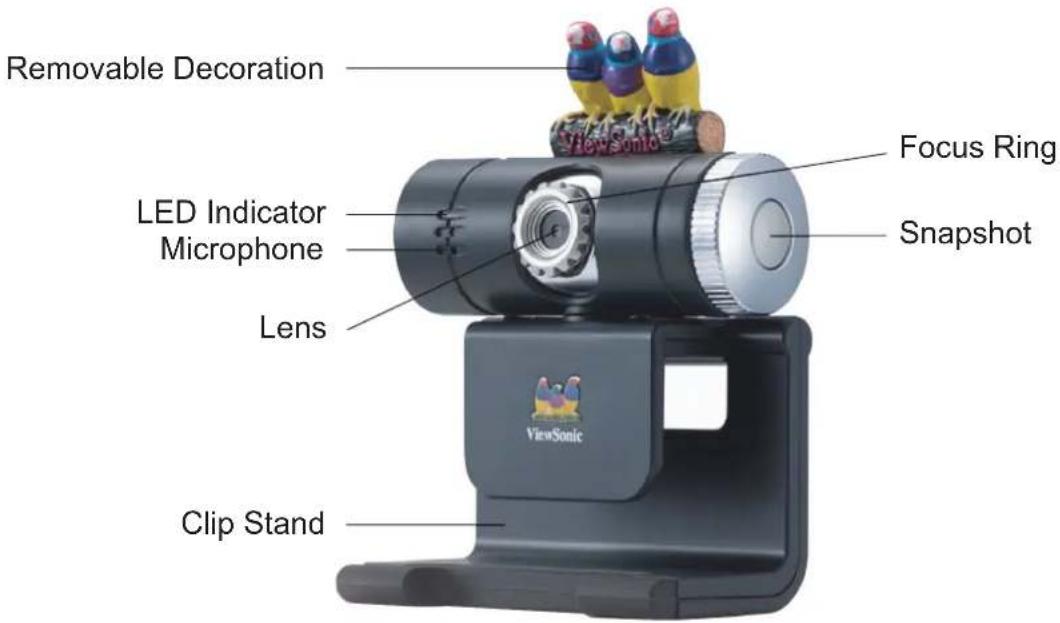
| Focus 10 cm to infinity | |
| Lens Manual focus lens | |
| Interface USB 1.1 type to Mini-USB cable | |
| Application software | VP-EYE 4.0 |
| OS support | Window 98SE, ME, 2000 & XP |
| Power consumptioin Voltage | USB bus powered, full operation < 0.75W |
| Operation condition Temperature | 0°C ~40°C |
| Humidity | Less than 85% |
| Storage conodition Temperature | -20°C ~60°C |
| Humidity | Less than 85% |
| ESD Air / Contact | 8 / 4 kv |
| Dimension Physical | 71(W) x 98.7(H) x 47 (D) mm |
| (carema + Finch logo) | |
| Gift box | 195 (w) x 230 (h) x 110 (d) mm |
| Weight Net | 70 g (w/o cable) |
| Gross (Gift box) | 450 g |
| Regulations | FCC, CE, C-Tick |
| Power saving function Active | Blue LED shine |
Customer Support
For technical support or product service, see the table below or contact your reseller.
Note: You will need the product serial number.
| Country Office name Address Phone | Web Site / serviceE-mail | |||
| Australia ViewSonic Australia | Unit 3, 44 Dickson Ave., Artarmon, NSW 2064, Australia | 1-800-880-818 (Australia)1-866-463-4775 (New Zealand) | www.viewsonic.com.auservice@au.viewsonic.com | |
| Canada ViewSonic Corporation | 381 Brea Canyon Rd., Walnut, CA 91789, USA | T:(800) 688 6688F:(909) 468 1202 | www.viewsonic.com/contactus | |
| Chile / Mexico ViewSonic Corporation | 381 Brea Canyon Rd., Walnut, CA 91789, USA | 1230-020-3464 (Chile)866-823-2004 (Mexico) | www.viewsonic.com/contactus | |
| 中国China | 优派显示设备国际贸易(上海)有限公司ViewSonic China Limited | 中国上海市静安区南京西路1468号中欣大厦36楼3608室邮编:200040 | 联系电话:0086-021-62375252技术支持:800-8820-38700086-021-62473182 | www.viewsonic.com.cn |
| Europe, Middle East, Baltic countries, and North Africa | Contact your reseller | ViewSonic HouseFleming Way, Crawley West Sussex RH10 9GA, United Kingdom | T:+44(0)1293 643-900F:+44(0)1293 643-910 | www.viewsoniceurope.comservice-eu@viewsoniceurope.com |
| Hong Kong ViewSonic Hong Kong Ltd | Suite 811, East Wing, Tsimshatsui Centre, 66 Mody Road, TST East Kowloon, Hong Kong | T:852 2268-6878 www.hk.viewsonic.com | ||
| Singapore ViewSonic Singapore Pte Ltd | 221 Henderson Road, #04-08Henderson Building. Singapore 159557 | T:65 6273-4018 | www.viewsonic.com.sgservice@sg.viewsonic.com | |
| 台灣Taiwan | 優派國際股份有限公司ViewSonic International Corporation | 台北縣中和市連城路192號9F | T:0800-061-198 | www.viewsonic.com.twservice@tw.viewsonic.com |
| UK | ViewSonic Europe Limited / UK | ViewSonic HouseFleming Way, Crawley West Sussex RH10 9GA, United Kingdom | T:886 2 2246 3456F:886 2 8242 3668 | www.viewsonic.co.ukservice-eu@viewsoniceurope.com |
| USA ViewSonic Corporation | 381 Brea Canyon Rd., Walnut, CA 91789, USA | T:886 2 2246 3456F:886 2 8242 3668 | www.viewsonic.com/contactus | |
Limited Warranty
ViewSonic® WebCam
What the warranty covers:
ViewSonic ^® warrants its products to be free from defects in material and workmanship, under normal use, during the warranty period. If a product proves to be defective in material or workmanship during the warranty period, ViewSonic ^® will at its sole option repair or replace the product with a like product. Replacement product or parts may include remanufactured or refurbished parts or components.
How long the warranty is effective:
ViewSonic® WebCam products are warranted for one (1) year for all parts, and one (1) year for labor from the date of the first consumer purchase.
Who the warranty protects:
This warranty is valid only for the first consumer purchaser.
What the warranty does not cover:
- Any product on which the serial number has been defaced, modified or removed.
- Damage, deterioration or malfunction resulting from:
a. Accident, misuse, neglect, fire, water, lightning, or other acts of nature, unauthorized product modification, or failure to follow instructions supplied with the product.
b. Repair or attempted repair by anyone not authorized by ViewSonic ^® .
c. Any damage of the product due to shipment.
d. Removal or installation of the product.
e. Causes external to the product, such as electric power fluctuations or failure.
f. Use of supplies or parts not meeting ViewSonic's specifications.
g. Normal wear and tear.
h. Any other cause which does not relate to a product defect.
-
Removal, installation, transportation, insurance, and set-up service charges.
-
Software.
How to get service:
- For information about receiving service under warranty, contact ViewSonic® Customer Support at 800-888-8583. You will need to provide your product's serial number.
- To obtain warranted service, you will be required to provide (a) the original dated sales slip, (b) your name, (c) your address, (d) a description of the problem, and (e) the serial number of the product.
- Take or ship the product freight prepaid in the original container to an authorized ViewSonic ^® service center or ViewSonic ^® .
- For additional information or the name of the nearest ViewSonic® service center, contact ViewSonic®.
Limitation of implied warranties:
There are no warranties, express or implied, which extend beyond the description contained herein including the implied warranty of merchantability and fitness for a particular purpose.
Exclusion of damages:
ViewSonic's liability is limited to the cost of repair or replacement of the product. ViewSonic ^® shall not be liable for:
- Damage to other property caused by any defects in the product, damages based upon inconvenience, loss of use of the product, loss of time, loss of profits, loss of business opportunity, loss of goodwill, interference with business relationships, or other commercial loss, even if advised of the possibility of such damages.
- Any other damages, whether incidental, consequential or otherwise.
- Any claim against the customer by any other party.
Effect of state law:
This warranty gives you specific legal rights, and you may also have other rights which vary from state to state. Some states do not allow limitations on implied warranties and/or do not allow the exclusion of incidental or consequential damages, so the above limitations and exclusions may not apply to you.
Sales outside the U.S.A. and Canada:
For warranty information and service on ViewSonic ^® products sold outside of the U.S.A. and Canada, contact ViewSonic ^® or your local ViewSonic ^® dealer.
ViewSonic® WebCam Warranty (W2201)
- Getting Started
- Software Installation
- Hardware Installation
- Other Information
- Compliance Information
- For U.S.A.
- For Canada
- CE Conformity for European Countries
- CE Conformity
- Warning:
- Copyright Information
- Product Registration
- For Your Records
- Package Contents
- Power Source Adjustment
- System Requirements
- Attention:
- W2201 Installation
- VP-EYE Installation
- Notice:
- Customer Support
- Limited Warranty
- ViewSonic® WebCam
- What the warranty covers:
- How long the warranty is effective:
- Who the warranty protects:
- What the warranty does not cover:
- How to get service:
- Limitation of implied warranties:
- Exclusion of damages:
- Effect of state law:
- Sales outside the U.S.A. and Canada:
Brand : VIEWSONIC
Model : ViewMate W2201
Category : Webcam