
XL-PV400 - CD Player JVC - Free user manual and instructions
Find the device manual for free XL-PV400 JVC in PDF.


| Product Type | Portable CD Player |
| Brand | JVC |
| Model | XL-PV400 |
| Dimensions (approx.) | 130 x 130 x 30 mm |
| Weight (approx.) | 250 g (without batteries) |
| Power Supply | DC 4.5V (3x AA batteries) or AC adaptor |
| Battery Life | Approx. 10 hours (alkaline) |
| Audio Output | Earphone jack (3.5mm), Line out |
| Playback Modes | Normal, Repeat, Random, Program |
| Skip / Search | Forward/Backward skip, music search |
| Hold Function | Accidental operation prevention |
| Backlight | Yes (XL-PV400 only) |
| Auto Power Off | After 15 minutes of inactivity |
| Remote Control | Wired remote control included |
| Sound Enhancement | 3 preset EQ modes |
| Maintenance | Clean lens with soft cloth; avoid moisture |
| Safety Precautions | Do not disassemble; keep away from water |
| Accessories | AC adaptor, wired remote, earphones |
| Repairability | Contact JVC service center for repairs |
Frequently Asked Questions - XL-PV400 JVC
User questions about XL-PV400 JVC
0 question about this device. Answer the ones you know or ask your own.
Ask a new question about this device
Download the instructions for your CD Player in PDF format for free! Find your manual XL-PV400 - JVC and take your electronic device back in hand. On this page are published all the documents necessary for the use of your device. XL-PV400 by JVC.
USER MANUAL XL-PV400 JVC
Using the Wired Remote Control XL-PG5 ONLY
The remote control can be operated regardless of the bold mode
of the unit.
Preparation Release the pa

■ Operation confirmation tones
When an operation button is pressed, a confirmation lone sounds. Refer to the parentheses in the illustration for the different means of confirmation rules.
CHI types of commissioners

optional Accessories Maintenance
Using the unit with a car audio
system
XL-P5640L comes with the car adaptor and car audio cassette
Adaptor.
- Car adaptor (CA-RC5) - Car audio cassette adaptor (CA-RC4/CA-RC5)
For connection to the car audio system:
For connection to the car body system
Connect the car audio cassette adaptor to the unit's headphone jack. (When doing this, keep the unit's
VOLUME control at a setting between 4 and 6.)
If there is an Axn jack in the car audio system, connect the OUT jack of the CD plates with the Axn jack using a 3.5 mm diameter
pick of the CD player with the first pick using a 5.5 mini-noise/ stereo mini-plag signal cord (optional).
Depending on the automobile used, noise may occur, and in that case, it is recommended that a KS-L32 noise filter (optional) be used.
Mota:
It may re
sco dwaia audio ca
For further
- In particular, there is an additional or all-pull described
[Non-Text]

Sound quality changes when HB6 is selected, but volume is reduced by approximately 500 gm.
Accidental Operation Prevention Function (Hold Mode)

The Ground Truth image displays a single, solid horizontal line. According to Rule 2 (UNDERSCORE & LINE RULES), this is a stylistic or background line, not a placeholder underscore. Therefore, the OCR result must ignore it. The provided OCR content is "____", which consists of four underscores. This is an incorrect interpretation of the line as a placeholder, violating the rule that stylistic lines must be ignored. The OCR has hallucinated text (underscores) where none should exist, violating the rule to ignore such lines. Hence, the OCR result is inconsistent with the Ground Truth.
Hertuke_E(J)
This function causes the unit to ignore short, accidental button * Modification
Presses. When the unit is in hold mode, pressing any operation button in line, then the IEEE button is a terminal button.
The misoperation prevention function pre-
vents the following: • Powering on the unit accidentally (which can cause the butter-
ies to go dead).
- Play being cut off unexpectedly in the middle of a selection.
The unit and wired remote control have HOLD switches, each of
which works independently.
To use the accidental operation prevention function
function • To prevent the unit from powering up accidentally, set the
HOLD switch to the HOLD position. • To prevent the unit from unexpected operation during play.
set the HOLD switch to the HOLD position after playing the
125.
OPEN button operation
Data which the data is in hard mode, the (C,D) so can be open or closed by pressing the OPEN button.
[Non-Text]
* Nondication
When the unit is in hold mode, pressing any operation button
(other than the OPEN button) causes the indication h_effg appear on the display.
When the unit is powered off
The Likelihood group only when the . B_i is given is
the "Mainstance appear only when do it" is outside is proceed.
To release the function
To release the function Move back the HOLD switch.
[Non-Text]
[Non-Text]
[Non-Text]
Specifications
Portable CD player
Type : Compact disc player Signal detection system : Non-contact optical pickup (semiconductor laser)
Pickup system: 3 beam laser Number of channels: 2 channels (stereo)
Power & marker: Univariable Output : Headphone (3.5
9 mW/ch at 10% THD/16 ohms matching impedance (16 ohms to 1 kohm) Out (3.2 mm dilu, alvera - 3) 0.6 V/28 kohms
Duration of battery : Approx. 6 hours
(WB E.S.F.CX) When using NiO rechargeable batteries (IN-R122) or equivalent) changed for 3 hours
Approx. 21 hours when using two alkaline (LR6-Panasonic)
Approx. 46 hours when using four alkaline batteries (XL-PG5)
DC 2.4 V (rechargeable battery - 2)
DC IN 4.5 V Dimensions (W·H·D) : 128.5-28.9·144 mm (5-1/16"·1-3)
(Excluding buttons and controls) More: Average 720 x (1.48 lbs)
(without batteries)
AC adaptor
Input power near
Output voltage : DC 4.5 V, 600 hA
- Design and specifications are subject to change without notice
Troubleshooting Guide
Before requesting service for this unit, check the chart below for a possible cause of the problem.
you are experiencing. Some simple checks or a minor adjustment on your pace may encourage the problem and restore proper operation.
If you are in doubt about some of the check points, or if the remedies indicated in the chart do not solve the problem, refer to the directory of Authorized Service Centers (enclosed with this unit) to
locate a convenient service center, as consult your dealer for instructions.
Problem Check this
For most class cases, Is the day properly secreted in place?
Cannot close cover.
Cannot play discs. - Is the unit in HOLD status? - Is the disc people saved in place?
- Is the time properly located in place. - Is there moisture condensation on the lens?
(Wait for about an hour and then try again.)
Cannot remove disc. Did you press the PUSH button to release the disc?
7.12.3.2014
Tracks on disc do not play in order, starting with the Is the RESUME, NORMAL, RANDOM (play mode) selector is for NORMAL position?
first track.
Cannot hear music—too. 4 is the headphones plug inserted all the size?
Noisy. • Is the plug dirty? (Wipe away dirt on the plug,)
I am you wing the unit healthy one. That is very? If the
TV picture is distorted. Radio reception is snowy.
Radio reception is noisy. connect it to an outdoor antenna.)
Concerning Compact Discs
Only compact discs bearing this mark can be used with this unit.
However, continued use of irregular shape CDs (heart-shape, octagonal, etc.) can damage
the unit.
×() ×
(1) (2)
How to remove a disc from its case How to store the disc in its case
Label side up
| 10→|D| | 72
The image contains two horizontal lines, each containing a small sketch of a figure or symbol. According to Rule 2 (Stylistic/Background Lines), such lines must be ignored by the OCR result. Therefore, the corrected OCR text is:
[No text detected]
How to hold a disc
○ ×
If the surface is dirty.
Wipe it with a damp cloth and then wipe dry.
Page from the table about the table circumference.
O 05F X 05F
U
If moisture has formed on a disc
When moisture has formed because the die was brought suddenly into a ramp. On the label side (the side with writing) Do not write confirming using a pencil
One, still brought slowly into a wash room from a cold environment, wipe it off using a soft-day cloth. Do not wish anything, using a point, ball-point pen, etc. Do not stick on paper
Using a set of CDs When storing discs ■ On the else (shiny) side Where this disc was made by the two pieces
• Exposed to direct sunlight. Habute this side carefully to keep it free from fingerprints or scratches. Do not
- Susceptible to high levels of humidity or dust. - Use record cleaners, solvents, etc. - Do not attach labels or stickers to CDs.
- Directly exposed to heat from a heating appliance. Do not use CDs with exposed adhesive from tape or left over peeled off stickers.
- On top of a car dashboard or near the rear window. - Do not use scratch-proof protectors or covers other than those specified for use
with this unit.

JVC
PORTABLE CD PLAYER
XL-PG4/XL-PG5/
XL-PV400
For Customer Use:
Enter below the Model No. and Serial No. which are located either on the rear,
bottom or side of the cabinet. Retain this information for future relevance:
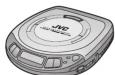

INSTRUCTIONS
Supplied Accessories
Check the packing carton for these accessories.
AC adaptor (RFEA 417C) 1 pc.
Car adaptor (CA-R455) (XL-PV400) 1 pc
Car audio cassette adapter (CA-RC4/CA-RC5) (XL-PV400) 1 pc. Wired remote control (XL-PGSI) 1 pc.
Rechargeable Ni-Cd batteries (BN-R122J) with carrying case XL-FG51.
Remove the rechargeable batteries from their case before use. Use numbers indicated in parentheses when making for replacement parts
- The results of the difference in performance are based on the differences between
Thank you for purchasing this JVC product. Please read these instructions carefully before starting operation to be sure to obtain optimum performance and a longer service life from the unit.
Precautions
Before using this unit, be sure to read the applicable items of the Maintenance
operating instructions and these safety-suggestions carefully. Afterwards keep them handy for future reference. Take special
care to follow the warnings indicated on the unit itself as well as in the operating instructions.
_1f_2
Safety
- Care of AC adaptor - Take care that the cord of the AC adap-
for should be routed so that they are not likely to be walked on or pinched by items placed upon or against them. Never take
hold of the AC adaptor if your hand is wet, and always grasp the plus body who connecting or disconnecting it.
- Nourse Periods - When not in use, he says to disconnect the
AC adaptor from the AC power outlet.
- Batteries - If the set is not used for a long period of time or in
used only from an AC power source, remove all the batteries to prevent potential damage due to possible battery leakage. De
not mix batteries (old and new) or different types of batteries.
Installation
(1)
■ Environment
- Condensation - Moisture may form on the lens in the following conditions...
- immediately after a heater has been turned on. - in a steeper or very humid room.
- when the unit is suddenly moved from a cold environment to a spring one. If resistors form inside this unit, it may not
is a transit line. It is necessary to enter into and, it is easy and operate properly. To correct this problem wait about one
hour for the moisture to evaporate.
■ Placement
- Foreign Material - Case should be taken so that objects do not fall into and liquids are not spilled into the unit. Do not subject
this unit to excessive smoke, dust, mechanical vibration, or shock.
- Nomination: The unit should be situated now from origin.
Lmaytoam - The data would be confined easily from equipment or devices that generate strong magnetic fields.
- Stacking - Do not place any objects, on top of the unit.
POWERED BY NICKEL/CADMIUM BATTERY. MUST BE RECYCLED OR DISPOSED OF PROPERLY
MOST BE HESOLES ON DISSED OF THOPHEN? ATTENTION:
The product that you have purchased is powered by a re-changable battery. The battery is receivable. At the end of
Charged out Ostely. The Ostely is responsible for the third of it's useful life, under various state and local laws, it may be
legal to dispose of this battery into the municipal waste steam. God with new load will vary officials to handle in
Check with your local small waste officials for details in your area for recycling options or proper disposal.


CAUTION This assignment has
the limits for a Class B digital device, pursuant to Part 15 of the PCC Rules.
These limits are designed to provide reasonable protection.
against harmful interference in a residential installation. This equipment generates, uses and can sodiate radio fre-
query energy and, if not installed and used in accordance with the instructions, may cause harmful interference to ta-
dio communications. However, there is no guarantee that interference will not occur in a particular installation. If this
equipment does cause harmful interference to radio or tele- vision repetition, which can be determined by using the
Firmal receptor, which can be determined by dating the equipment off and on, the user is encouraged to try to co-
rect the interference by one of the following measures: ■ Reorient or relocate the receiving antenna.
- Increase the separation between the equipment and re-
■ Connect the equipment into an outlet on a circuit different
- In this case, to which the receiver is connected. - Consult the dealer or an experienced radio/TV technician
for help.
Any unauthorized changes or modifications to this equip-
self would visit the user's authority to operate this device.
LVT0231-001A [J]
RQ14851-P

E7

5Vc Printed 0199IV
STOCKMARKET

1/26/20, 6:35 PM
[Non-Text]
Cautions


Do not play your headphones or earphones at a high volume. Hearing spectra advice against contensors extended play.
Holding experts advise against common stockers pay.
If you experience a ringing in your ears, reduce volume or discontinue use.
I'm not use vehicle operating a motorized vehicle. It may create
Dry cell batteries / Rechargeable batteries
You should use extreme caution or temporarily discontinue us
in potentially hazardous situations. To prevent damage to the batteries and electrolyte leakage, heal the following points.
Even if your headphones or earphones is an open-air type de- • Align the ⊕ and ⊖ polarities properly when inserting the bat-
signed to let you hear outside sounds, don't turn up the volume so high that you can't hear what's around you. - Do not mix different types or makes of batteries or old and taries.
Sound can be slooving. Over time your bearing "comfort level" ■ Remove the batteries if you do not plan to use the wait for a
adapts to higher volumes of sound. So what sounds "normal" are actually loved and harmed to your housing.
Can easily be load and nulls in your mining. Guard against this by setting your equipment at a safe level BE- ■ Do not throw batteries into a fire, and do not store circuit, dis- assemble or subject them to excessive heat.
FORE your hearing adapts. To establish a safe level: • Do not attempt to recharge dry cell batteries.
- Start your volume control at a low setting. - Static increase the speed until you are have it comfortable. Carrying dry cell batteries /
- slowly increase the solar drain you can still in conformity and clearly, and without distortion. rechargeable batteries around
Once you have established a comfortable sound level:
- Set the dial and leave it there. When putting any cell or necrotective batteries in a pocket of bug, ensure that no other metal objects such as a necklace are
Rechargeable batteries placed together with them. Contact with metal may cause short-circuiting which, in turn, may cause a fire.
Rechargeable batteries Be absolutely sure to carry the rechargeable batteries in the but- any warning you
- Only the BN-R122J battery can be recharged. - If the project delivered by the batteries lasts for a very short
When purchasing rechargeable
batteries
As a setts revocation, the portable CD players made by DC
have a construction designed to make it impossible to recharge
To use rechargeable batteries, be absolutely sure to purchase the
necharguable Ni-
BN-R122J (set of 2)
For details, checked
Special rechargeable batteries
Bathenes
The Ground Truth image displays a single, solid horizontal line. According to Rule 2 (UNDERSCORE & LINE RULES), this is a stylistic or background line, not a placeholder underscore. Therefore, the OCR result must ignore it and output nothing or only meaningful text. The provided OCR content is "____", which consists of four underscores. This is an incorrect interpretation of the line as a placeholder, violating the rule that stylistic lines must be ignored. The OCR has hallucinated underscores where none should exist based on the GT's visual context. Hence, the OCR result is inconsistent with the Ground Truth.
Ordinary dr
batteries/re batteries
Galleries
(1)
When driving a car
In the interest of traffic safety, do not operate the unit while driv-
ing,
[Non-Text]
[Non-Text]
[Non-Text]
[Non-Text]
INFORMATIS
INFORMATION (For Canada) This digital apparatus does not exceed the Class B limits for
radio raise emissions from digital apparatus as set out in the interference-causing equipment standard entitled "Digital
Appunhas*, ICES-015 of the Department of Communications.

E7
5Vc Printed 0199IV
STOCKMARKET
[Non-Text]
2.2.1 陈志华 张志华
广力云智慧零售收银系统
[Non-Text]

|
[Non-Text]
[Non-Text]
[Non-Text]
[Non-Text]
[Non-Text]
[Non-Text]
[Non-Text]
[Non-Text]
[Non-Text]
[Non-Text]
[Non-Text]
[Non-Text]
[Non-Text]
[Non-Text]
[Non-Text]
[Non-Text]
[Non-Text]
[Non-Text]
[Non-Text]
[Non-Text]
[Non-Text]
[Non-Text]
[Non-Text]
[Non-Text]
[Non-Text]
[Non-Text]
[Non-Text]
[Non-Text]
[Non-Text]
[Non-Text]
[Non-Text]
[Non-Text]
[Non-Text]
[Non-Text]
[Non-Text]
[Non-Text]
[Non-Text]
[Non-Text]
[Non-Text]
[Non-Text]


Power Supply Preparations
Refer to the specifications (page 6) for information on operating times when using rechargeable batteries or dry-cell batteries.
Using rechargeable batteries
Make sure to choose for better future choices. The next
cannot be used to charge rechargeable batteries other than those specifically designed for it.
specifically designed for it.
XL-PC5 comes with the rechargeable batteries. For XL-PCA/TV40, obtain the optional batteries as required.
- Rechargeable Ni-Cd batteries (BN-8122J) 2 pcs.
Recharging procedure
1 Insert the special rechargeable batteries
into the unit.
[Figure]
(1)
(1)
(1) 12 (2)
图 2
2 Connect the AC adapter
2 Connect the AC adaptor.
(1)
*Recharging will be com-
A G
N. power outlet | | | | The batteries' duration is sheet 4 hours
(2) 12 (3)
AC-adaptor
DC IN μgK [DC IN 43 VΦ Σ Φ]
[Figure]
1
(1) 88
Back panel of the unit
1
[Non-Text]
When recharging starts, the “Charging indicator flashes on
and off on the display.
3 When recharging is complete, unplug the
AC adaptor from the power outlet and the
DC IN jack.
DISEASE
140025
- In last approximately 5 hours to exchange the trigonadal batteries.
- Rechargeable batteries have a service life of approximately
300 charge-discharge cycles. If the operating time on one full charge becomes readily shorter than it used to buy, the lot
change becomes robustly more than it died to be, the battery has reached the end of its service life and should be re-
placed.
- Rechanging is made only when the unit is powered off. (It is not possible to reduce the bottoming while playing a CT).
• The AC adaptor and rechargeable batteries may become warm
while recharging is in progress. This is not a malfunction.
If the
If the battery is compartment. Removing batteries
compartment comes loose
Slide the lid back into place
horizontally.
(一) (二)
1
F
1
1
Using the AC adaptor
2019.10.16
Connect the AC adaptor supplied.
Refer to "Using rechargeable batteries" for connection instruc-
sorbis.
Moto:
The visit is in the standby condition when the AC adaptor is com
The design is to the standby condition which the AC adaptor is connected. The primary circuit is always "live" as long as the AC.
alaptor is connected to an electrical outlet.
Using the car adaptor
(二) 2017年1月1日
XL/PV400 comes with a car adaptor. For XL/PGI/PG5, obtain the
optional car adaptor as required. • Car adaptor (CA-R455)
The car adapter can be used to rechange the unit's batteries while
in the cat.
(1) 2017年1月1日
Using dry-cell batteries
(not included)
After disconnecting the At. adaptor, insert two "AA" (LRb) linear batteries
The procedure for inserting and removing dry-cell
batteries is identical to that for rechargeable bat-
teries.
(二) 2016
Battery indicator
- 14 Bottom-in-flexing
10 44.59
This indicator flashes on and off when the batteries are almost
out of power. Power is cut off completely a short while later.
Rechargeable batteries: Recharge batteries.
Dry-cell
Note:
- The length of time the unit will continue to operate after the
battery indicator starts flashing, and when the power is cut-off, differies depending on the type of batteries used.
- The battery indicator may not flash if rechargeable batteries,
other than those designated by JVC, are used.
If the unit malfunctions or freezes during use
then disconnect the power sources (the AC
adaptor and batteries).
Re-connect the power source and continue op-
eration.
[Non-Text]
Sequential Play Basic Play

Following steps 1–6.
In step 4, connect the stereo headphone to the ☐ jack. (Plug in firmly.)
- Play stops automatically when all the tracks have been played.
- If the unit has been connected to a car audio system, adjust the volume level between 4 and 6 on the unit, then adjust the volume
level on the system.
For your reference:
"no d150" indication
This indication appears for about 30 seconds if the ▶ II button is
pressed when no disc is loaded in the unit or if the disc is not completely rated.
-90 CO
This indication appears when the lid is認め. (Horseve, the
indication does not appear when the unit is powered off.)
Notes:
Never ops
Removing discs
After the disc has stopped rotating, press the PUSH button to re-
lease the

Backlight (XL-PV400 Only)
When using the AC adaptor or the car adaptor, the backlight of
the display
Auto
If the unit is left in stop or paused status for approximately
10 minutes, the unit powers itself off automatically in order to prevent the battery from running clean
(If no disc is loaded in the unit, it powers itself off in 30 sec
onds.)
Other Play Methods
The letters such as Ⓧ in the various illustrations refer to the descriptions in the “Location of Controls” section. (See page 3.)
(No text)
Skip play
The disc plays from the specific track through to the last track
then play stops automatically.
Preparation: Put the unit in stop mode. (See page 3.)
1 (NORMAL)
RESUME TTRANGORI
[Unreadable]
.
- 2014年1月1日
For your reference: • Jobs RESUME NORMAL
put in the RESUME position, the all-repeat function will be ac-
tivated automatically as soon as the unit is powered on.
- If power is cut off near the end of a track (power on status), playback may return from the beginning of the next track in
NOTE CASES.
- If the unit is powered off while a disc was playing and then a more disc is invested, also will begin from the middle of the
new disc is inserted, play will begin from the middle of the new disc because the unit remembers the position where play
stopped on the previous disc.
BEETAT
⑥
(10%)
stopped on the previous disc.
[EMPTY]
Program play
Up to 24 tracks can be entered in the programmed sequence. Preparation: Put for unit in plan mode (Sec page 3).
(3)
The setting is switched in the sequence indicated below each time RESET AT is required.
1
C
[Non-Text]
[Non-Text]
A
4
-
[Non-Text]
。
F
1
programmed sequence are repeated.
(The indication "ALL" is not displayed.)
The following table is provided in the image.
Changing the sound quality
+
S
[Non-Text]
[Non-Text]
ing to boost the low-range response.
HGG 140%
①
←
ing to turn off the HBS function.
179
①
□□□□
Using the battery case (XL-PG5 ONLY)
(1) 本说明仅供参考。
The facility is also you to choose the minimum paying unit of the unit by leading an additional two LR6 (UM3) alkaline but-
terio.
Notes:
- When using the battery case, always insert batteries in the unit
body as well. (The unit cannot be operated on the batteries in the external battery case alone.)
- Though you can use rechargeable batteries in the battery case,
it does not rechange them. (Use dry cell batteries if possible.)
- When using rechargeable batteries in the unit body, and dry-cell batteries in the battery case, he uses to use fully charged re-
The exercise of the battery has been made to reduce the chargeable batteries and new dry-cell batteries.
- When using four dry-cell batteries, do not mix new and old batteries.
表决结果:
1 Open the cover of the battery case and in-
sert the batteries.

Insert the end marked (−) t

[Non-Text]

[Non-Text]

Insert fix protrusions

on the battery case into

- Secure in place with the screw
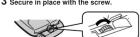
Reverse the above procedure to remove the external battery
case.
For your reference: The minimum playing time
The bacterial paying tube with dehydrating in the type of batteries (rechargeable/dry-cell) loaded in the unit body.
If the series of the b
in the cover of the battery case comes loose

Insert the protrusions into th
holes on either end of the lid.

If the unit malfunctions or freezes during use,
then disconnect the power sources (the AC
adaptor and batteries). Re-occept the power course and continue on:
He-connect the power source and continue operation.
2.1.1.1
[Non-Text]
[Non-Text]
[Non-Text]
[Non-Text]
[Non-Text]
[Non-Text]
[Non-Text]
[Non-Text]
[Non-Text]
Location of Controls
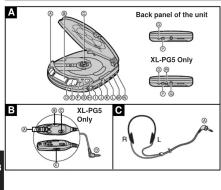
Portable CD player A DC in jack (DC IN 4.5 V ◇-◆)
Portable CD player ☐ Hole for battery case (XL-PG5
④Skip / search buttons (←←, ►→) only)
⑤ Connection terminal for battery
①Display
Case (XL-PG5 only)
① Push Button (PUSH)
② Play (severe button (s, ll))
Mixed remote control
① Play / pause button (▶ II)
② Stop / power off button (■)
Wired remote control □
Program button (PROGRAM) Skip / search buttons (+, -)
②Repeat button (REPEAT) ③HOLD switch (HOLD)
①Open button (OPEN) ②Play / stop / off button ③Load/hange volume control ④Play
① Headphones volume control (VOLUME) ② V-12g ③ Volume control (VOL)
(VOLUME)
④HRS switch
④Headphones jack ( ☐) Stereo headphone
Play mode selector Stereo headphone
(RESUME, NORMAL, RANDOM) △Plug
(√)HOLD SWITCH (√)Triple shock protection (T S R.)
① triple silicon protection (H2V) switch
⑤Out jack (OUT)
[Non-Text]
1/26/20, 6:36 PM
Triple Shock Protection (T.S.P.) Function
This function minimizes sound interruption when vibrations are
encountered by utilizing audio data that has been stored ahead at time (up to the following seconds' worth):
(40): approx. 40 seo
TSP
01101
10 00
←
[Non-Text]
(No text)
/▶II
C
The Ground Truth image displays a single, solid horizontal line. According to Rule 2 (UNDERSCORE & LINE RULES), this is a stylistic or background line, not a placeholder underscore. Therefore, the OCR result must ignore it and output nothing or only meaningful text. The provided OCR content is "____", which consists of four underscores. This is an incorrect interpretation of the line as a placeholder, violating the rule that stylistic lines must be ignored. The OCR has hallucinated underscores where none should exist based on the GT's visual context. Hence, the OCR result is inconsistent with the Ground Truth.
The function starts to store the play data, and the MRESERVE in
Indicator on the display shows how much data is stored.
| M.RESERVE indicator status | Unit body status | Play status (audio data status) |
| Stable | Normal [plenty of data is stored] | |
| Bumping encountered | Normal (stored data is unused) | |
| Bumping stops | Normal (data again starts to be stored) | |
| S_car r^2 | Bumps continue repeatedly | Sound in interrupted (data buffer empty) |
Notes:
The position of the T.S.P. switch can be changed during play, Using the unit with an audio system
but this may cause a slight interruption in the sound because The T.5.P. uses digital signal compression technology. It is rec-
the disc's rotational speed changes. Recommended that the T.S.P. be kept in the OFF position if the unit is connected to a home and its system. During T.S.P. operation, the disc rotates at a higher rate than
usual in order to collect extra audio data. This may cause the
batteries to run out faster and could result in a slight increase
in disc rotation house.
[Non-Text]
[Non-Text]
[Non-Text]
[Non-Text]
[Non-Text]
[Non-Text]
[Non-Text]
[Non-Text]
[Non-Text]
[Non-Text]
[Non-Text]
[Non-Text]
[Non-Text]
[Non-Text]
[Non-Text]
[Non-Text]
[Non-Text]
[Non-Text]
[Non-Text]
[Non-Text]
[Non-Text]
[Non-Text]
[Non-Text]
[Non-Text]
[Non-Text]
[Non-Text]
- Using the Wired Remote Control XL-PG5 ONLY
- optional Accessories Maintenance
- Accidental Operation Prevention Function (Hold Mode)
- Specifications
- Troubleshooting Guide
- Concerning Compact Discs
- JVC
- PORTABLE CD PLAYER
- XL-PG4/XL-PG5/
- XL-PV400
- INSTRUCTIONS
- Precautions
- CAUTION This assignment has
- Cautions
- Power Supply Preparations
- Sequential Play Basic Play
- Other Play Methods
- Location of Controls
- Triple Shock Protection (T.S.P.) Function
Brand : JVC
Model : XL-PV400
Category : CD Player