
the Quick Cook LIC400 - Cooker BREVILLE - Free user manual and instructions
Find the device manual for free the Quick Cook LIC400 BREVILLE in PDF.


| Product Type | Induction Cooker |
| Brand | Breville |
| Model | Quick Cook LIC400 |
| Power Supply | 230-240V ~ 50/60Hz |
| Maximum Power Output | 2100W |
| Power Range | 200W - 2100W (adjustable per mode) |
| Cooking Modes | 8 Modes: Sear, Sauté, Medium, Simmer, Water Boil, Steam, Slow Cook, Milk |
| Additional Functions | Keep Warm, Child Lock, Timer (up to 10 hours), LED Screen |
| Cooktop Surface | Ceramic Glass |
| Compatible Cookware | Induction-compatible (magnetic bottom), flat bottom, diameter 12-23cm |
| Control Panel | Touch buttons with LED indicators |
| Timer Range | 1 minute to 10 hours (depending on mode) |
| Safety Features | Overheat protection, auto shut-off, child lock, surface hot indicator, error code diagnostics |
| Dimensions (Approx.) | 36 x 28 x 6 cm (estimated) |
| Weight (Approx.) | 2.5 kg (estimated) |
| Power Cord Length | 1.2 m (estimated) |
| Maximum Cookware Weight | 6 kg |
| Cleaning Method | Wipe with damp cloth and mild detergent; do not immerse in water |
| Storage | Store flat on bench or cupboard; do not place objects on top |
| Spare Parts & Repair | Contact authorized Breville Service Centre; no user-serviceable parts |
| Country of Origin | Not specified |
Frequently Asked Questions - the Quick Cook LIC400 BREVILLE
User questions about the Quick Cook LIC400 BREVILLE
0 question about this device. Answer the ones you know or ask your own.
Ask a new question about this device
Download the instructions for your Cooker in PDF format for free! Find your manual the Quick Cook LIC400 - BREVILLE and take your electronic device back in hand. On this page are published all the documents necessary for the use of your device. the Quick Cook LIC400 by BREVILLE.
USER MANUAL the Quick Cook LIC400 BREVILLE
2 Breville Recommends Safety First
8 Components
9 Operation
14 Care & Cleaning & Storage
15 Troubleshooting
BREVILLE RECOMMENDS SAFETY FIRST
At Breville we are very safety conscious. We design and manufacture consumer products with the safety of you, our valued customer, foremost in mind. In addition we ask that you exercise a degree of care when using any electrical appliance and adhere to the following precautions.
IMPORTANT SAFEGUARDS
READ ALL INSTRUCTIONS BEFORE USE AND SAVE FOR FUTURE REFERENCE
- Carefully read all instructions before operating the induction cooker for the first time and save for future reference.
- Remove and safely discard any packaging material and promotional labels before using the induction cooker for the first time.
• To eliminate a choking hazard for young children, remove and safely discard the protective cover fitted to the power plug of this appliance. - Do not place the induction cooker near the edge of a bench top, counter or table during operation.
- Ensure that the surface is level, clean and free of water and other substances.
- Do not place the induction cooker on any metal surface, a hot gas or electric burner, or where it could touch a heated oven.
• Always operate the induction cooker on a dry, stable and heat resistant surface. Do not use on
a cloth-covered surface, near curtains or other flammable materials.
- Position the induction cooker with at least 10cm free space around the induction cooker to prevent overheating.
- Position the induction cooker at a minimum distance of 20cm away from curtains, cloths and other heat sensitive materials when in use. This will allow for adequate air circulation and also help prevent the possibility of curtains and cloths discoloration due to radiated heat.
- Do not use the induction cooker on a sink drain board.
- Do not leave the induction cooker unattended when in use.
-
If the induction cooker is not in use for an extended period, disconnect from the power outlet.
-
Use only induction compatible cooking saucepans and pots suitable for use with the induction cooker.
• Extreme caution must be used when the induction cooker is in use with an induction compatible saucepans and pots. Do not move the induction cooker during cooking or while the saucepan or pot remains on the induction cooker. - Do not operate the induction cooker in the vicinity of magnetically sensitive objects (e.g. magnetic cards).
• The induction cooker is not intended to be operated by means of an external timer or separate remote-control system. -
The temperature of accessible surfaces will be high when the induction cooker is operating and for some time after use.
-
Do not place anything on top of the induction cooker surface (except induction cooker pot or saucepan) when in use.
- Do not place metallic utensils, non-compatible induction cookware, lids, knives, forks, spoons or other metallic objects on the induction cooker glass ceramic plate, as these may be heated and become hot when the induction cooker is switched on.
- Do not insert sharp objects into the ventilation system.
• To avoid overheating, do not place any aluminium foil or metal plates on the induction cooker. -
Do not touch the hot surface of the glass ceramic plate. The induction cooker does not heat up itself during cooking, but the temperature of the cookware heats up the glass ceramic plate.
-
Do not heat any opened or unopened cans on the induction cooker.
• Always switch off the induction cooker at the power outlet, then unplug the power cord and cool completely, if the induction cooker is not in use, before cleaning, before attempting to move the induction cooker, and when storing the appliance. - Do not place anything between the cookware and the induction cooker cooking plate.
- Do not put heavy objects on the induction cooker. Maximum weight of cookware and content should not exceed 6kg.
- Beware of hot steam that comes out of the cookware during cooking or when you remove the lid.
-
Do not lift and move the induction cooker while it is operating.
-
Never put empty cookware on the switched-on induction cooker, as this could cause the cookware to become distorted or the heating coil to become damaged.
- Do not store flammable materials and liquids near or on the induction cooker.
- Avoid hard contact between the cookware or other objects and the ceramic glass cooking plate.
• Always place the cookware on the cooking zone during cooking. - Only use flat bottom cookware to provide full contact with the cooking zone glass surface during cooking to avoid the heating coil becoming damaged.
• Always use cookware with a bottom diameter from 12cm to 23cm during cooking.
- Keep the appliance clean. Follow cleaning instructions provided in this book.
WARNING
- Fully unwind the power cord from the storage facility before use.
- Before use, people with electronic implants such as pacemakers, etc., and or other health issues should consult their doctor, as the induction cooker generates a magnetic field.
- If the glass ceramic plate surface is cracked, switch off the appliance to avoid the possibility of electric shock. Return the appliance to the nearest authorised Breville Service Centre for repair.
• Always keep in mind that the induction cooker, after being switched off, will continue to radiate residual heat on the glass ceramic plate heating surface. - Do not use this induction cooker within reach of young children.
IMPORTANT SAFEGUARDS FOR ALL ELECTRICAL APPLIANCES
- Fully unwind the power cord before use.
- Connect only to 230V or 240V power outlet.
- Do not let the power cord hang over the edge of a table or counter, or touch hot surfaces, or become knotted.
• To protect against electric shock do not immerse the induction cooker, power cord or power plug in water or any other liquid, unless it is recommended in the cleaning instructions.
• This appliance is not intended for use by persons (including children) with reduced physical, sensory or mental capabilities, or lack of experience and
knowledge, unless they have been given supervision or instruction concerning use of the appliance by a person responsible for their safety.
• Children should be supervised to ensure that they do not play with the appliance.
• This appliance is recommended for household use only.
- Do not use this appliance for other than its intended use. Do not use in moving vehicles or boats. Do not use outdoors. Misuse may cause injury.
- It is recommended to regularly inspect the appliance. Do not use the appliance if power cord, power plug or appliance becomes damaged in any way. Return the entire appliance to the nearest authorised Breville service centre for examination and/or repair.
- Any maintenance, other than cleaning, should be performed at an authorised Breville Service Centre.
- The installation of a residual current device (safety switch) is recommended to provide additional safety protection when using electrical appliances. It is advisable that a safety switch with a rated residual operating current not exceeding 30mA be installed in the electrical circuit supplying the appliance.
See your electrician for professional advice.
• Always turn the appliance to the OFF position, switch off at the power outlet and unplug at the power outlet when the appliance is not in use.
- Before cleaning, always turn the appliance to the OFF position, switch off at the power outlet, unplug at the power outlet and remove the power cord, if detachable, from the appliance and allow all parts to cool.
- Do not place this appliance on or near a heat source, such as hot plate, oven or heaters.
- Position the appliance at a minimum distance of 20cm away from walls, curtains and other heat or steam sensitive materials and provide adequate space above and on all sides for air circulation.
FOR HOUSEHOLD USE ONLY SAVE THESE INSTRUCTIONS
Components
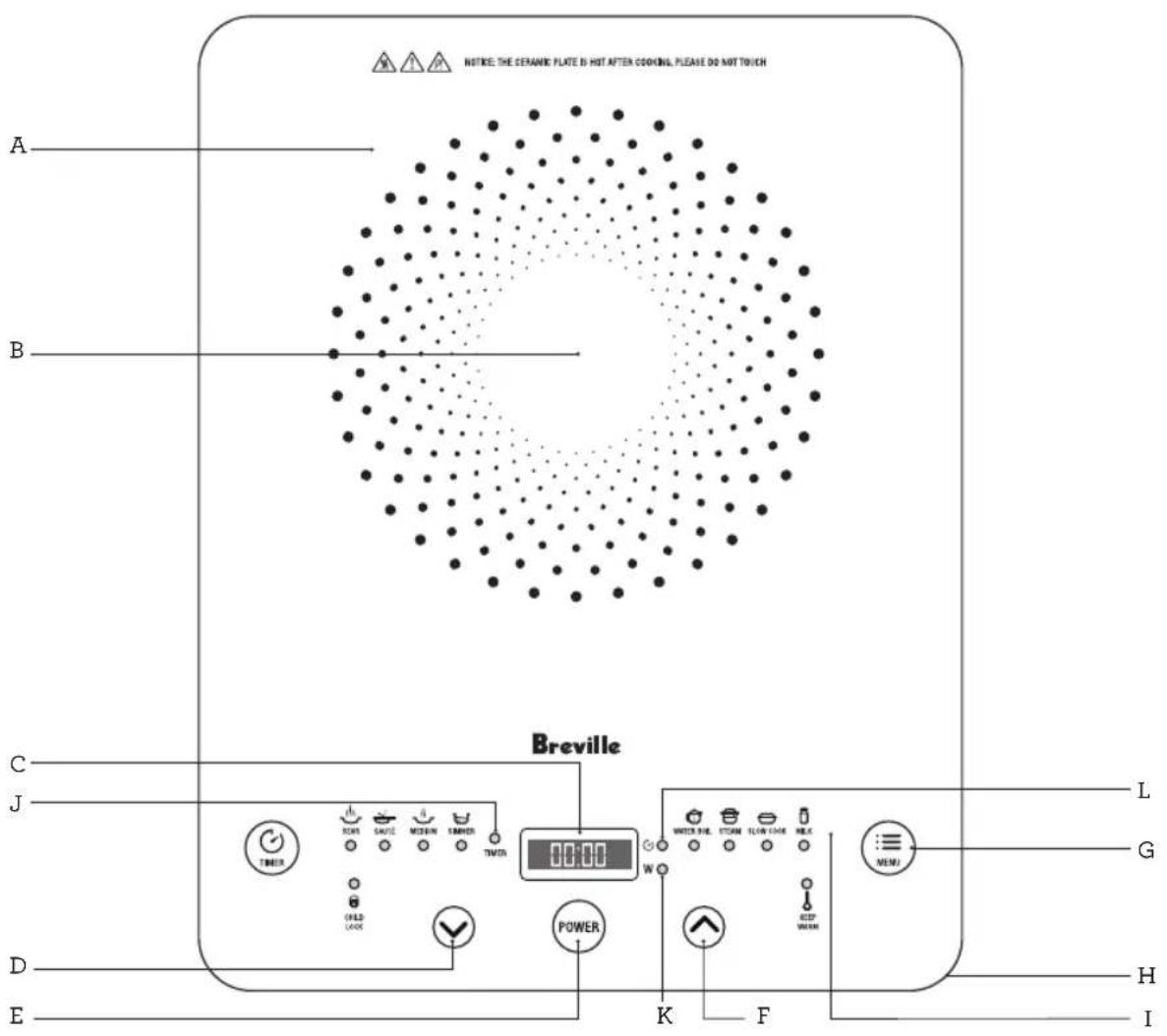
A. Ceramic glass cooktop
B. Cooking zone (glass ceramic plate surface)
C. LED screen
D. Decrease time/power button
E. Power On/Off
F. Increase time/power button
G. Menu button
H. Non-slip feet under base (not shown)
I. Control Panel with 8 cooking modes, keep warm and child lock
J. Timer indicator light when timer function is chosen
K. Wattage indicator light
L. Time remaining indicator light

Operation
WHAT IS INDUCTION COOKING?
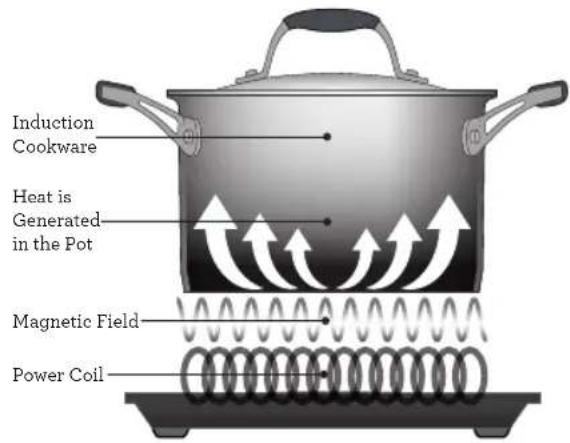
An induction cooker creates an electromagnetic field to heat the induction compatible cooking saucepan/pot. Very little energy is wasted heating the glass ceramic plate, as most of the heat is transferred directly to the food. As the majority of the heat is absorbed by the saucepan/pot, the cooking surface remains cooler to the touch than most traditional cooktops making cooking fast, safe and energy efficient.
BEFORE FIRST USE
Before using your Breville induction cooker become familiar with all the parts.
Remove and safely discard all packaging materials and promotional labels.
Wipe the glass ceramic plate surface with a soft damp cloth and dry thoroughly.

WARNING
Do not immerse the power cord, power plug and any other part of the induction cooker in water or any other liquid.
HOW TO USE YOUR QUICK COOK™
- Place the induction cooker on a dry, stable and level surface.
- Make sure there is at least 10cm free space around the induction cooker to prevent overheating.
- Position an induction compatible saucepan/pot in the centre of the circular design on the glass ceramic plate surface, ensure liquid or food is inside the saucepan/pot.
- Insert the power plug into a 230V or 240V power outlet and switch power outlet 'On'.

NOTE
Ensure the saucepan/pot is positioned in the centre of the circular design on the glass ceramic plate surface.

WARNING
Never use the saucepan/pot when empty; ensure liquid or food is inside the saucepan/pot.
RECOMMENDED TYPES AND SIZES OF COOKWARE
| Material | Cookware with a bottom made of iron or magnetic stainless steel. |
| Shape | Cookware with a flat bottom. |
| Size | Cookware with a bottom diameter of 12-23cm depending on the cooking mode. |

NOTE
To achieve maximum efficiency, it is essential to use the correct type of saucepans/pot. Please refer to the cooking vessel manufacturer to confirm suitability for induction cooking.
COOKING MODES
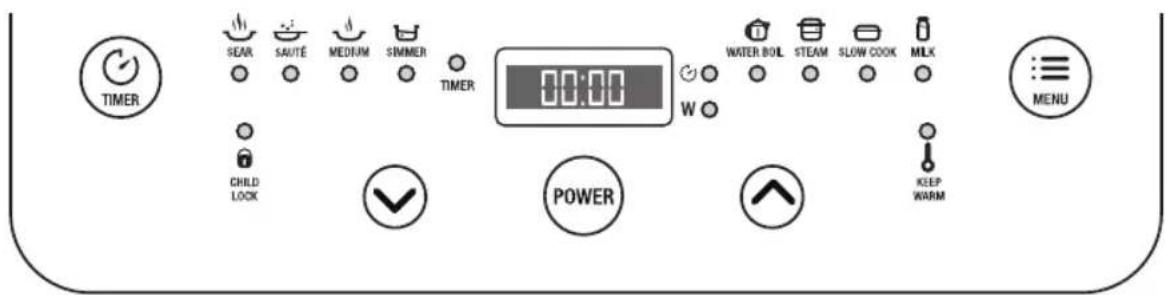
There are 8 cooking modes: Sear, Sauté, Medium, Sinner, Water Boil, Steam, Slow Cook and Milk.

- Insert the power plug into a 230V or 240V power outlet and switch power outlet 'On'. The LED screen will continuously flash displaying '-' on the screen.
- Press the Power On/Off POWER button, 'ON' will illuminate on the LED screen.
-
Press the Menu button to choose the desired cooking mode. The corresponding indicator lights up and the induction cooker starts working in the selected mode. The LED screen will alternate between displaying the power level and cooking time remaining.
-
When the cooking time has elapsed, the induction cooker will beep once and go into standby mode. The LED screen will continuously flash displaying ‘--’ on the screen. The fan will continue to run for about 30 seconds after the time has elapsed before turning the fan off.
- Switch off at the power outlet and unplug the induction cooker.

NOTE
Before and during cooking, you can change the cooking power by pressing the Increase 🔒 or Decrease ⏻ button in each cooking mode.
DEFAULT COOKING TIME AND TEMPERATURE
Refer to the below table for the default cooking time and cooking power of the different cooking modes.
| Cooking mode | Default Cooking Time (min/hrs) | Cooking Time Range (min/hrs) | Default cooking power | cooking power range |
| Sear 🚗 | 10 mins 1 - 20 mins 1800W | 1000 - 1800W | ||
| Sauté 🚗 | 20 mins 1 - 60 mins 1600W | 1000 - 1600W | ||
| Medium 🚗 | 30 mins 1 - 60 mins 1000W | 600 - 1400W | ||
| Simmer 🚗 | 2 hrs 30 mins - 6 hrs | 1400W* | 200 - 1400W | |
| Water Boil 🚗 | 60 mins 1 min - 2 hrs | 2100W | 200 - 2100W | |
| Steam 🚗 | 20 mins 1 - 60 mins 2100W | 200 - 2100W | ||
| Slow Cook 🚗 | 6 hrs 4 - 10 hrs | 1800W* | 200 - 1800W | |
| Milk 🚗 | 20 mins 1 min - 1 hr | 800W | 200 - 800W | |
| Keep Warm 🚗 | 2 hrs 30 mins - 4 hrs | 400W | 400W |
*In the simmer and slow cooking modes the wattage is programmed to automatically drop to 200W after a set time. Refer to pages 12 and 13 for further details.

NOTE
It is recommended to operate the induction cooker at the default power setting and then adjust the cooking power if necessary to achieve different cooking results.
USING THE TIMER
You can use the Timer button to decide how much time you want the induction cooker to work at different cooking modes.
- Press the Power On/Off ⓦ button, 'ON' will illuminate on the LED screen.
- Press the Menu button to choose the desired cooking mode. The corresponding indicator lights up and the induction cooker starts working in the selected mode. The LED screen will alternate between displaying the power level and cooking time remaining.
- Press the Timer ⏻ button, the timer indicator lights up.
- Press the Increase ⬆ or Decrease ⬇ button to adjust the hours.
- Press the Timer 🎨 button again and press the Increase 🔗 or Decrease 🔗 button to set the minutes.
- The LED screen will flash for about 5 seconds and displays the set time which indicates the time has been confirmed.
- When the cooking time has elapsed, the induction cooker will beep once and go into standby mode, the LED screen will continuously flash displaying ‘-’ on the screen and the fan will continue to run for about 30 seconds and then stop.
- Switch off on the power outlet and unplug the induction cooker.

NOTE
If you press and hold either the increase or decrease button on the timer setting, the display will scroll through the values more quickly, making it quicker to set the desired values.
COOKING MODES
Sear
This mode is intended for browning food stuffs very quickly by intense heat. This method develops flavour and improves appearance.
• To select the Sear mode, press the Menu button once and the light above the Sear icon illuminates.
- The default power is 1800W and default timer is 10 minutes.
- If you want to change this default power setting, press increase or decrease button to adjust the power. Power can be adjusted from 1000W to 1800W.
Timer can also be adjusted by pressing the TIMER button once and then press increase or decrease button to adjust the time. Timer can be adjusted from 1 minute to 20 minutes.
Sauté
This mode is intended for browning or cooking food stuffs quickly over medium to high heat.
• To select the Sauté mode, press the Menu button twice until the light above the Sauté icon illuminates.
- The default power is 1600W and default timer is 20 minutes.
- If you want to change this default power setting, press increase or decrease button to adjust the power. Power can be adjusted from 1000W to 1600W.
Timer can also be adjusted by pressing the TIMER button once and then press increase
or decrease button to adjust the time.
Timer can be adjusted from 1 minute to 60 minutes.
Medium
This mode is intended for cooking food stuffs all the way through.
• To select the Medium mode, press the Menu button three times until the light above the Medium icon illuminates.
- The default power is 1000W and default timer is 30 minutes.
- If you want to change the default setting, press increase 🔗 or decrease ⬇ button to adjust the power. Power can be adjusted from 600W to 1400W.
Timer can also be adjusted by pressing the TIMER button once and then press increase
or decrease button to adjust the time.
Timer can be adjusted from 1 minute to 60 minutes.
Simmer
This mode is intended for cooking slowly in liquid over low heat. The surface of the liquid should be barely moving, broken from time to time by slowly rising bubbles.
• To select the Simmer mode, press the Menu button multiple times until the light above the Simmer icon illuminates.
- The default power is 1400W for about 10 minutes followed by 400W for about 7 minutes and then drops to 200W until the end of cooking. The default timer is 2 hours.
- If you want to change this default setting, press increase ▲ or decrease ▼ button to adjust the power. Power can be adjusted from 200W to 1400W.
- When you change the power setting during the simmer mode, the new power will operate for approximatively 10 minutes, followed by 400W for approximately 7 minutes and then drops to 200W until the end of cooking.
Timer can also be adjusted by pressing the TIMER button once and then press increase
or decrease button to adjust the time. Timer can be adjusted from 30 minutes to 6 hours.

NOTE
Always use the default power setting for the Simmer mode until the food begins to simmer. You may then adjust the power by increasing or decreasing as required to maintain the simmer.
Water Boil
This mode allows you to boil between 0.4 litres and 4 litres of water in a saucepan/pot.
• To select the Water Boil mode, press the Menu button multiple times until the light above the Water boil icon illuminates.
• The default power is 2100W and default timer is 60 minutes.
- If you want to change this default setting, press increase 🔗 or decrease ⏰ button to adjust the power. Power can be adjusted from 200W to 2100W.
Timer can also be adjusted by pressing the TIMER button once and then press increase
or decrease button to adjust the time.
Timer can be adjusted from 1 minute to 2 hours.
Steam
This mode is intended for cooking food stuffs by heating it in steam from boiling water.
• To select the Steam mode, press the Menu button multiple times until the light above the Steam icon illuminates.
- The default power is 2100W and default timer is 20 minutes.
- If you want to change this default setting, press increase or decrease button to adjust the power. Power can be adjusted from 200W to 2100W.
Timer can also be adjusted by pressing the TIMER button once and then press increase
or decrease button to adjust the time.
Timer can be adjusted from 1 minute to 60 minutes.
Slow Cook
This mode is intended for cooking food stuffs for several hours at relatively low temperatures.
- It is recommend to slow cook between 3-4 litres of food at 1800W default power setting and decrease the power to 200-400W for 1-2 litres of food.
- To select the Slow Cook mode, press the Menu button multiple times until the light above the Slow Cook icon illuminates.
- The default power is 1800W for about 3 minutes followed by 800W for about 7 minutes, 400W for up to about 2 hours and then drops to 200W until the end of cooking. The default timer is 6 hours.
- If you want to change this default setting, press increase ▲ or decrease ▼ button to adjust the power. Power can be adjusted from 200W to 1800W.
- When you change the power during the Slow Cook mode, the new power will operate for up to approximately 3 minutes, followed by 800W for approximately 7 minutes, 400W for approximately 2 hours and then drops to 200W until the end of cooking.
Timer can also be adjusted by pressing the TIMER button once and then press increase
or decrease button to adjust the time.
Timer can be adjusted from 4 hours to 10 hours.
Milk
This mode is intended for heating milk gently.
- To select the Milk mode, press the Menu button multiple times until the light above the Milk icon illuminates.
- The default power is 800W for some time and then drops to 200W until the end of cooking. The default time is 20 minutes.
- If you want to change this default setting, press increase 🔗 or decrease ⬇ button to adjust the power. Power can be adjusted from 200W to 800W.
Timer can also be adjusted by pressing the TIMER button once and then press increase
or decrease button to adjust the time.
Timer can be adjusted from 1 minute to 1 hour.
Keep Warm
Once cooking is finished, the induction cooker can be set to Keep Warm mode by pressing the Keep Warm button once.
The Timer can be adjusted by pressing the TIMER button once and then press increase
or decrease button to adjust the time. Timer can be adjusted from 30 minutes to 4 hours.

WARNING
Do not use the Keep Warm mode for cooking as it may result in food poisoning. This mode is intended for keeping cooked foods at serving temperature, not for normal cooking.
It is not recommended for food to remain on the induction cooker in Keep Warm mode for more than 4 hours.

NOTE
In this mode the power is set at 400W and cannot be adjusted.
Child Lock
When the induction cooker is working, press and hold the Child Lock button 🔒 for about 3 seconds to enter child lock mode. The light above the Child Lock icon illuminates. To unlock this mode, press and hold the Child Lock button 🔒 for about 3 seconds again. The light above the Child Lock icon turns off.

NOTE
In Child Lock mode, only the Child Lock button is responsive.

Care & Cleaning & Storage
Before cleaning, ensure the induction cooker goes to standby mode and the fan stops working.
The LED screen continuously flashes displaying ‘-’ on the screen. Switch power off at the power outlet and unplug the power cord from the power outlet.
Ensure the induction cooker has completely cooled down before cleaning and storage.
To clean the glass ceramic plate surface, wipe with a slightly damp cloth using a mild detergent, to remove any food residue. Dry thoroughly.
Do not place any part of the induction cooker in the dishwasher.

NOTE
Do not use abrasives, harsh cleaning solutions or metal scourer pads as these may scratch the glass ceramic plate surface and make subsequent cleaning more difficult.

WARNING
Do not immerse the induction cooker or power cord and power plug in water or any other liquid.

WARNING
To prevent damage to the appliance do not use alkaline cleaning agents when cleaning, use a soft cloth and mild detergent.
STORAGE
Before storage, ensure the induction cooker has gone into standby mode and the fan has stopped working. The LED screen continuously flashes displaying ‘-’ on the screen. Switch off at the power outlet and unplug power cord from the power outlet.
Ensure the appliance is completely cooled, clean and dry. Store the appliance flat on the bench or in a convenient cupboard.
Do not place anything on top of the appliance during storage.
Troubleshooting
Error Code
| Displayed On Screen | Possible Causes | What to Do |
| E0 | ·Non-compatible induction saucepan/pot has been used. | ·Use an induction compatible saucepan/pot. |
| ·Induction cooker has detected no pot on the glass ceramic plate. | ·Place an induction pot on the glass ceramic plate and switch on the induction cooker. | |
| E1 | ·Induction cooker does not work. | ·Take the induction cooker to an authorised Breville Service Centre for inspection, repair and/or replacement. |
| E2 | ·Induction cooker has overheated. | ·Allow the appliance to cool down. Press Power On/Off button once, remove saucepan/pot and allow the induction cooker to cool before switching the power on. |
| E3 | ·The voltage is too high. | ·Ensure the induction cooker is plugged into a 230V or 240V power outlet. |
| E4 | ·The voltage is too low. | ·Ensure the induction cooker is plugged into a 230V or 240V power outlet. |
| E5 | ·Ambient temperature of the environment is too low. | ·Ensure the induction cooker works in room temperature environment. |
| E6 | ·Induction cooker does not work. | ·Take the induction cooker to an authorised Breville Service Centre for inspection, repair and/or replacement. |
| Induction cooker does not function | ·Induction cooker is not plugged in. | ·Plug the power plug into the power outlet and switch on the power outlet. |
| ·Induction cooker is plugged in. | ·Take the induction cooker to an authorised Breville Service Centre for inspection, repair and/or replacement. | |
| Food is not heated | ·Non-compatible induction saucepan/pot has been used. | ·Use an induction compatible saucepan/pot. |
| ·Compatible induction saucepan/pot has been used. | ·Take the induction cooker to an authorised Breville Service Centre for inspection, repair and/or replacement. |
Breville Customer Service Centre
Australian Customers
Mail: Locked Bag 2000
Botany NSW 1455 AUSTRALIA
Phone: 1300 139 798
Fax: (02) 9700 1342
Email: Customer Service: askus@breville.com.au
Web: www.breville.com.au
New Zealand Customers
Mail: Private Bag 94411 Botany Manukau 2163 Auckland NEW ZEALAND
Phone: 0800 273 845
Fax: 0800 288 513
Email: Customer Service: askus@breville.co.nz
Web: www.breville.co.nz
Breville®
Thought for food
Breville is a registered trademark of Breville Pty. Ltd. A.B.N. 98 000 092 928. Copyright Breville Pty. Ltd. 2017.
Due to continued product improvement, the products illustrated/photographed in this brochure may vary slightly from the actual product.
LIC400-B17
- BREVILLE RECOMMENDS SAFETY FIRST
- IMPORTANT SAFEGUARDS
- WARNING
- IMPORTANT SAFEGUARDS FOR ALL ELECTRICAL APPLIANCES
- FOR HOUSEHOLD USE ONLY SAVE THESE INSTRUCTIONS
- Components
- Operation
- WHAT IS INDUCTION COOKING?
- BEFORE FIRST USE
- HOW TO USE YOUR QUICK COOK™
- NOTE
- COOKING MODES
- DEFAULT COOKING TIME AND TEMPERATURE
- USING THE TIMER
- Sear
- Sauté
- Medium
- Simmer
- Water Boil
- Steam
- Slow Cook
- Milk
- Keep Warm
- Child Lock
- Care & Cleaning & Storage
- STORAGE
- Troubleshooting
- Breville Customer Service Centre
- Breville®
- Thought for food
Brand : BREVILLE
Model : the Quick Cook LIC400
Category : Cooker