
Arena - Loudspeaker ION - Free user manual and instructions
Find the device manual for free Arena ION in PDF.


| Product Type | Portable Bluetooth Speaker with Rechargeable Battery |
| Brand | ION |
| Model | Arena |
| Dimensions (approx.) | 12 x 8 x 8 inches |
| Weight (approx.) | 10 lbs |
| Power Source | AC power (included cable) or internal rechargeable lead-acid battery |
| Battery Type | Rechargeable lead-acid (replaceable) |
| Battery Charging | Full charge before first use; charge fully before storage; can be left plugged in |
| Audio Inputs | 1/4\" microphone input with volume control, 1/8\" stereo auxiliary input |
| Bluetooth | Built-in Bluetooth for wireless streaming; supports NFC pairing |
| USB Charging Port | Yes (5V 1A) for charging external devices |
| Master Volume Control | Adjusts main mix (mic, aux, Bluetooth) |
| Track Buttons | Previous/Next track on Bluetooth device; press and hold both to toggle voice prompts |
| Voice Prompts | Enabled by default; can be disabled by holding both track buttons |
| Power Indicator LED | Green: on; off: unlit; yellow: charging while on; red: charging while off; flashing red: low battery |
| Bluetooth Version | Supports Bluetooth 4.0 for maximum range |
| Pairing Code | 0000 (if prompted) |
| Storage Temperature | 32°F to 90°F (0°C to 32°C) |
| Included Accessories | Power cable (2-pin IEC), Quickstart Guide, Safety & Warranty Manual |
| Warranty & Support | Visit ionaudio.com for warranty and parts; support at ionaudio.com/support |
| Disposal | Recycle or dispose per local ordinances; contains lead-acid battery |
Frequently Asked Questions - Arena ION
User questions about Arena ION
0 question about this device. Answer the ones you know or ask your own.
Ask a new question about this device
Download the instructions for your Loudspeaker in PDF format for free! Find your manual Arena - ION and take your electronic device back in hand. On this page are published all the documents necessary for the use of your device. Arena by ION.
USER MANUAL Arena ION
Quickstart Guide English (3-6)
Appendix English (27)
Quickstart Guide (English)
Introduction
Box Contents
Arena
Power Cable (2-pin IEC)
Quickstart Guide
Safety & Warranty Manual
Support
For the latest information about this product (documentation, technical specifications, system requirements, compatibility information, etc.) and product registration, visit ionaudio.com.
For additional product support, visit ionaudio.com/support.
Rechargeable Batteries
Rechargeable lead-acid batteries are the same type used in automobiles. As with your car battery, how you use this battery has a significant impact on its lifespan. With proper use and treatment, a lead-acid battery can last for years. Here are some recommendations for getting the longest life from the internal battery.
General Usage Charge fully before use.
Charge fully before storing.
Storage For best product longevity, do not store at exceedingly hot (greater than 90^ F / 32^ C) or exceedingly cold (less than 32^ F / 0^ C) temperatures.
It is acceptable to leave your sound system plugged in. This will not overcharge the battery.
If you leave the battery level low and do not charge it for 6 months, it may permanently lose capacity.
Repair The battery can be replaced (details in the Technical Specifications).
For Warranty and Parts, visit ionaudio.com.
Disposal Bring the unit to a recycling center or dispose of in accordance with local ordinances.
Quick Setup
Getting Started
- Make sure all items listed in the Box Contents are included in the box.
- READ THE SAFETY & WARRANTY MANUAL BEFORE USING THE PRODUCT.
- MAKE SURE THE BATTERY IS COMPLETELY CHARGED PRIOR TO FIRST USE FOR MAXIMUM BATTERY LIFE.
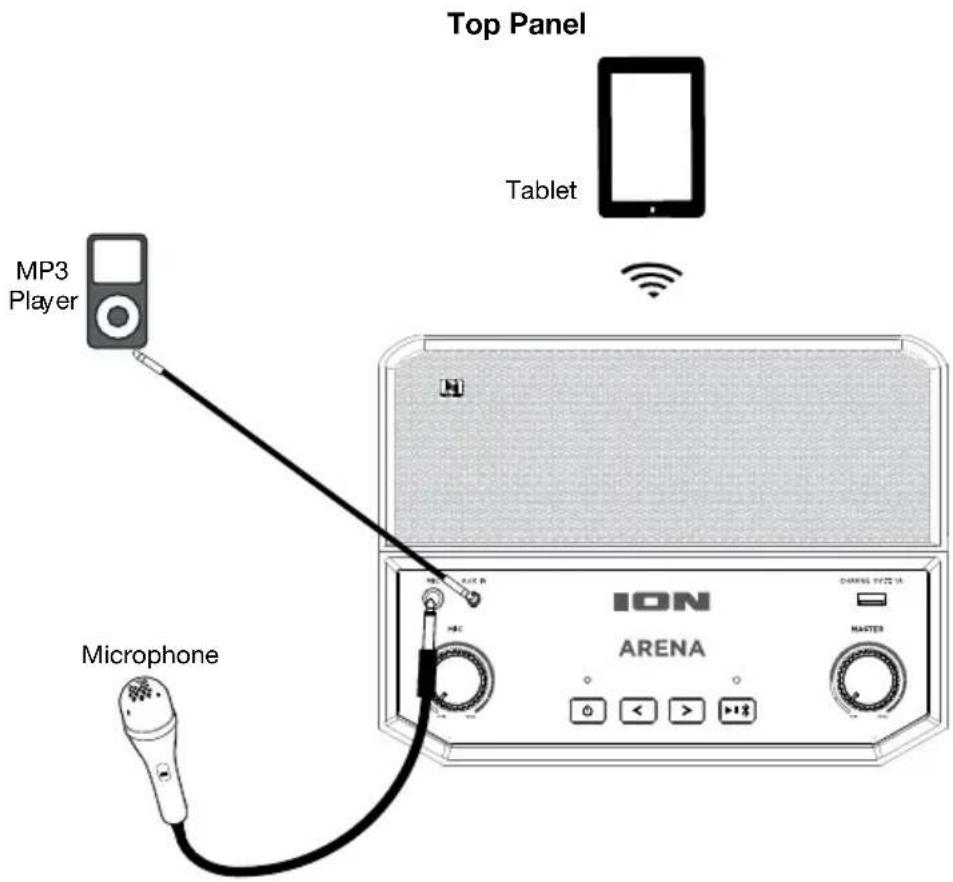
- Study the connection diagram.
- Ensure the Master Volume on Arena is at zero.
- Connect your devices.
- Raise the volume to a comfortable level.
- Return the Master Volume to zero when you are finished using Arena.
Connection Diagram
Items not listed under the Box Contents are sold separately.
Rear Panel

Features
Top Panel
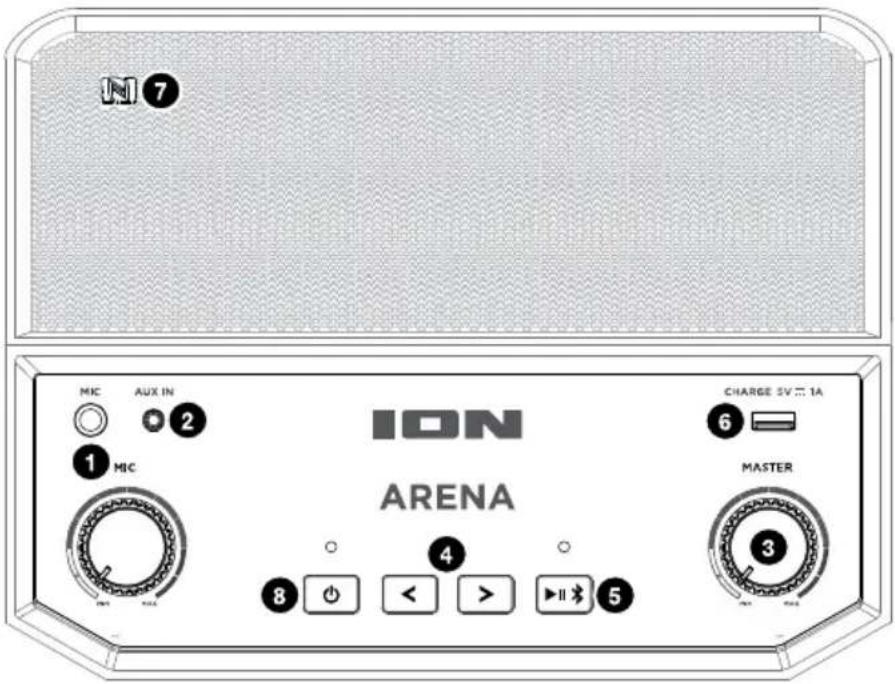
- Microphone Input with Volume Control (1/4"): This mono input accepts a 1/4" audio source such as a microphone, guitar, or other musical instrument. The volume knob controls the signal level of the device plugged into this input.
- Auxiliary Input (1/8"): This stereo 3.5 mm (1/8") input can be used to connect a CD player, MP3 player, or other audio source.
- Master Volume Control: This adjusts the speaker's main mix volume, which includes the Microphone Input, Auxiliary Input, and the audio of a paired Bluetooth device.
- Track Buttons: Use these buttons to go to the previous/next track on a Bluetooth-connected device. Press and hold both Track buttons at the same time to disable (or enable) voice prompts.
Note: With some apps, pressing the Track – button or Track + button may go to another playlist or music genre.
- Play/Pause/Bluetooth: Press this button to play or pause a track from a paired Bluetooth device. Press and hold this button to disconnect a paired Bluetooth device. If the Arena is paired with a device, the Bluetooth LED on this button will be lit. If not paired, the LED will be unlit.
- USB Charging Port: Connect your device's charge cable here to charge it. USB charging only functions when the unit's power is turned on.
Note: To charge smartphones and tablets faster, put the device's screen to sleep.
- NFC (near-field communication): Touch and briefly hold your supported and enabled device to the NFC logo to pair the device.
-
Power ON/OFF Switch: Press and hold this button for 1 second to power Arena on/off. Please note that while Arena is connected to a power source, it does not need to be powered on to charge the battery. The power symbol LED will be lit green when Arena is on and unlit when Arena is off. It will be lit yellow if Arena is charging while on and lit red if Arena is charging while off. If Arena is on and the battery is getting low, the LED will flash red to alert you that charging is needed.
-
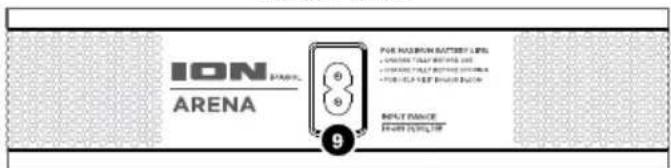
Power Cable Input: Insert the included power cable here to charge the unit. Note that the Arena can be used with the power cable while it simultaneously charges the battery.
Rear Panel
Pairing a Bluetooth Device
- Turn on your Bluetooth device.
- Power on Arena and it will automatically go into pairing mode to search for Bluetooth devices.
- Navigate to your Bluetooth device's setup screen, find "Arena" and connect. When connected, the Bluetooth LED on the Play/Pause/Bluetooth button will be lit.
Note: If your Bluetooth device prompts for a pairing code, enter "0000".
Note: Users should consider updating their Bluetooth device's OS if experiencing trouble with pairing or playing music. - Press and hold the Play/Pause/Bluetooth button to disconnect a paired Bluetooth device.
- To connect to another Bluetooth device, repeat step 3.
Note: Maximum range will be achieved when using devices with Bluetooth 4.0.
Tip: If you would like to disable (or enable) the voice prompts, press and hold both Track buttons at the same time.
Pairing a Bluetooth Device Using NFC
NFC (near-field communication) allows data exchange from devices, such as pairing, by gently bumping them together. Check in your device's manual to see if this feature is supported.
To use NFC to pair with Arena:
- In order to use NFC, your device must be turned on and unlocked.
- Enter your device's Settings menu and check that NFC is turned On (one time step).
- Power on Arena.
- Touch and briefly hold your device to the NFC logo.
- Follow the pairing instructions that appear on your device. If a passcode is required, enter "0000". When the device is paired with Arena, the Bluetooth LED on the Play/Pause/Bluetooth button will be lit.
- To unpair, gently bump your device against the NFC logo located on Arena's top panel.
Brand : ION
Model : Arena
Category : Loudspeaker