
46KRC12 - Cables for Computers and Peripherals KICKER - Free user manual and instructions
Find the device manual for free 46KRC12 KICKER in PDF.


| Product Type | Wired Media Center Remote Control |
| Brand | Kicker |
| Model | 46KRC12 (KRC12) |
| Category | Cables & Peripherals (Remote Control) |
| Dimensions (approx.) | 4.5 x 2.5 x 1.0 inches |
| Weight (approx.) | 0.2 lbs |
| Power Supply | 12V DC for backlight (orange wire) |
| Connection Cable Length | 25 feet (supplied) |
| Connection Type | Wired to stereo remote port |
| Multi-Remote Support | Yes (using SPY1MF Y-adapter, sold separately) |
| Button Backlighting | Yes (requires 12V connection to orange wire) |
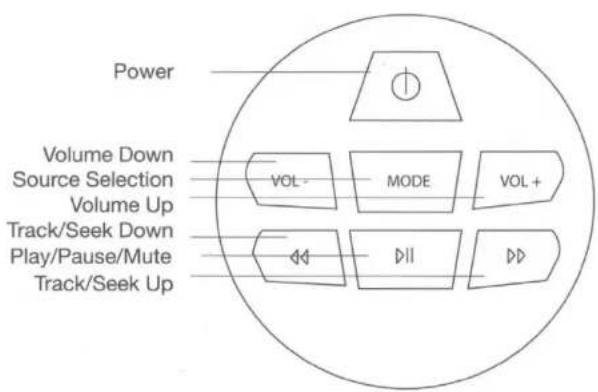
| Main Functions | Media playback control (play, pause, skip, volume), source selection, navigation |
| Compatibility | Compatible with Kicker stereos with remote port |
| Maintenance & Cleaning | Wipe with soft, dry cloth; avoid liquids and abrasives |
| Safety | Disconnect power before installation; avoid exposure to moisture |
| Spare Parts Included | 1x KRC12 remote, 1x 25' connection cable |
| Repairability | Non-user-serviceable; contact Kicker support for service |
| General Information | Owner's manual available in English; support: 1-800-844-2774 |
Frequently Asked Questions - 46KRC12 KICKER
User questions about 46KRC12 KICKER
0 question about this device. Answer the ones you know or ask your own.
Ask a new question about this device
Download the instructions for your Cables for Computers and Peripherals in PDF format for free! Find your manual 46KRC12 - KICKER and take your electronic device back in hand. On this page are published all the documents necessary for the use of your device. 46KRC12 by KICKER.
USER MANUAL 46KRC12 KICKER
KRC Media Center Remote
KRC12
Owner's Manual | English
KRC12
Owner's Manual
Media Center Remote
Wired Remote Control
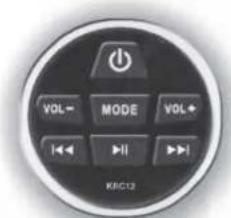
Thank you for purchasing the KRC12 Media Center Remote. For support please call: 1-800-844-2774
INSTALLATION OVERVIEW
Connection:
Connect the KRC12 using the supplied cable (25' connection cable) to the Remote Port of the stereo.
For multiple KRC12 Remotes, connect a SPY1MF Y-adapter cable. Connect the orange wire to 12v positive for button backlighting.
2
Brand : KICKER
Model : 46KRC12
Category : Cables for Computers and Peripherals