
YueMi Mechanical Keyboard - Keyboard Xiaomi - Free user manual and instructions
Find the device manual for free YueMi Mechanical Keyboard Xiaomi in PDF.


| Product Type | Mechanical Keyboard |
| Model | MK01 |
| Color | White |
| Dimensions (W x D x H) | 358 mm x 128 mm x 31.6 mm |
| Weight | 940 g |
| Material | Metal + PC / ABS |
| Number of Keys | 87 |
| Connection Interface | Micro USB |
| Data Transfer Method | Cable |
| Brightness Modes | 6 (0%, 10%, 25%, 50%, 75%, 100%) |
| Default Brightness Level | 25% |
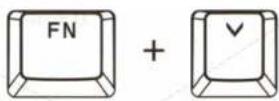
| Brightness Control | FN + Up/Down Arrow |
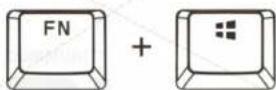
| Win Key Lock | FN + Win (toggle) |
| Caps Lock Indicator | Yellow LED |
| Scroll Lock Indicator | Yellow LED |
| Hot Swapping (Plug and Play) | Yes |
| Compatibility | Windows (driver auto-install) |
| Warranty Period | 12 months (with free repair) |
| Manufacturer | Beijing Yuemi Technology (Mi Ecosystem) |
Frequently Asked Questions - YueMi Mechanical Keyboard Xiaomi
User questions about YueMi Mechanical Keyboard Xiaomi
0 question about this device. Answer the ones you know or ask your own.
Ask a new question about this device
Download the instructions for your Keyboard in PDF format for free! Find your manual YueMi Mechanical Keyboard - Xiaomi and take your electronic device back in hand. On this page are published all the documents necessary for the use of your device. YueMi Mechanical Keyboard by Xiaomi.
USER MANUAL YueMi Mechanical Keyboard Xiaomi
YueMi Mechanical Keyboard
Accessories
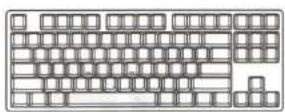
YueMi Mechanical Keyboard x1
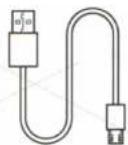
USB cable x1
Usage
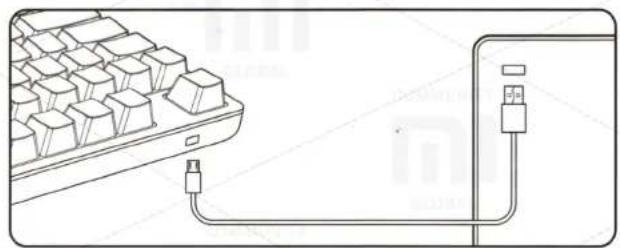
natural_image
Diagram showing a computer keyboard connected to a USB cable via a port (no text or symbols present)One end of the USB cable connect with Micro USB port of the keyboard. Note the direction of a port to avoid damage.
Then insert an end of a cable to the computer. A system automatically checks an USB device and performs an installation of drivers. After installation, a system notifies correct use of the device. USB device supports hot swapping (Plug and Play).
Specifications
Name: YueMi Mechanical Keyboard;
Model: MK01;
Color: white;
Standard: GB 4943.1-2011;
Material: Metal + PC / ABS;
Weight: 940 g;
Size: 358 mm x 128 mm x 31.6 mm;
The method of transferring data: cable;
Keyboard: mechanical keyboard, 87 keys;
Port: Micro USB.
Keys and keyboard brightness
This unit has 6 modes of brightness:
LED is off - brightness level 0;
LED is on - brightness level of 10% / 25% brightness level;
brightness level of 50% / 75% brightness level; brightness level of 100%;
Brightness level by default - 25%.
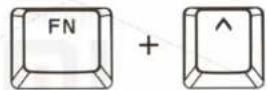
Control brightness level is done by pressing FN + direction keys to top.
To increase brightness
simultaneously press FN key +
Up arrow.
To reduce brightness
simultaneously press FN key +
Down Arrow.
Press simultaneously FN +
Win, Win key lights up in yellow, indicating its lock.
When you click on FN key + Win,
Win key unlocks.
Capslock
After pressing Capslock, key
lights up in yellow.
SL (Scroll lock)
After clicking on the SL, key lights up in yellow.

Manufacturer: «Beijing Yuemi Technology» (Mi Ecosystem)
Address: Beijing city, Haiding District, Cuiwei Road 2, Building 1, 2nd Floor, Office 2057.
Presence of toxic and hazardous substances
| Part name | Pb | Hg | Cd | Cr6+ | PBB | PBDE |
| Circuit board | X | O | O | O | O | O |
| Plastic housing | O | O | O | O | O | O |
| Metal housing | O | O | O | O | O | O |
| Additional accessories | O | O | O | O | O | O |
| The table provided in accordance with the provisions of the SJ / T 11364.O: toxic and harmful substances in all components of the device are contained in an amount below the limit value according to the standard GB / T 26572.X: presence of toxic and hazardous substances at least one of the components of the device in an amount that exceeds the threshold, according to GB / T 26572. | ||||||
Warranty
After-sales servicing is carried out according to the Law on «consumer rights» and «Law on product quality.» Warranty service includes:
- Within 7 days of purchase, in case of problems with the «List of faults» Xiaomi service center determines the cause of the problem, then you can choose a free replacement product or a refund.
- Within 8-15 days after the purchase, in the event of a problem with «List of faults» Xiaomi service center defines the problem, then you choose a free replacement product or repair.
- Within 12 months after the purchase, in the event of a problem with «List of faults» Xiaomi service center defines the problem, then you may have free repair.
List of faults
| List of faults | |
| YueMi | 1. When you connect a cable, keyboard is not defined. |
| Mechanical | 2. Problems with adjustable Keyboard brightness. |
| Keyboard | 3. Problems with typing of characters. |
Conditions, are not included in warranty
- Completion of maintenance, fall, neglect, abuse, water impact, accident, damage to labels and labeling devices;
- The warranty period has expired;
- Damage, arising under force majeure circumstances;
- Damage, that do not meet the «List of faults» of Xiaomi service center;
- Breakdown device or its components' list of faults have arisen due to the human factor and which prevent proper operation.
XIAOMI-MI.COM
Brand : Xiaomi
Model : YueMi Mechanical Keyboard
Category : Keyboard