ZWE23PSNSS - Refrigerator Monogram - Free user manual and instructions
Find the device manual for free ZWE23PSNSS Monogram in PDF.


| Product Type | Double-Door, Bottom-Drawer Free-Standing Refrigerator |
| Model | ZWE23PSNSS |
| Brand | Monogram |
| Electrical Requirements | 115 V AC, 60 Hz, 15- or 20-amp fused, grounded supply |
| Cooling System | Automatic defrost, sealed system with high-efficiency compressor |
| Water Filter | RPWFE cartridge, replace every 6 months or 170 gallons (643.5 L) |
| Automatic Icemaker | Produces 100–130 cubes per 24 hours; ice bucket located in freezer drawer |
| Internal Water Dispenser | Located on left wall of fresh food compartment; push-button activation |
| Temperature Controls | Digital display; adjustable for refrigerator and freezer; preset 37°F (2.77°C) and 0°F (-17.77°C) |
| Shelves | Adjustable spillproof glass shelves; QuickSpace™ split shelf (select models) |
| Drawers | Crispers with ClimateZone, temperature-controlled drawer (TempSelectZone), adjustable deli/produce drawer |
| Freezer Compartment | Bottom drawer with removable basket and ice bucket (select models) |
| Lighting | LED lights in fresh food compartment and bottom of doors; serviceable by authorized technician |
| Door Alarm | Sounds if either door is open for more than 2 minutes |
| Sabbath Mode | Press and hold lock & light buttons simultaneously for 3 seconds |
| Control Lock | Press and hold Lock Controls for 3 seconds |
| Stainless Steel Exterior | Clean with mild detergent and warm water; avoid abrasive cleaners or ammonia |
| Safety Features | 3-prong grounding plug; anti-tip floor bracket required for built-in models; child entrapment warnings |
| Warranty | 2 years parts and labor; 5 years sealed system; additional 6–12 years on sealed system parts |
| Water Filter Replacement | Remove old cartridge by twisting 1/4 turn counterclockwise; install new cartridge with "FRONT" facing outward |
Frequently Asked Questions - ZWE23PSNSS Monogram
User questions about ZWE23PSNSS Monogram
0 question about this device. Answer the ones you know or ask your own.
Ask a new question about this device
Download the instructions for your Refrigerator in PDF format for free! Find your manual ZWE23PSNSS - Monogram and take your electronic device back in hand. On this page are published all the documents necessary for the use of your device. ZWE23PSNSS by Monogram.
USER MANUAL ZWE23PSNSS Monogram
Double-Door, Bottom-Drawer Free-Standing Refrigerator
Consumer Information
Stainless Steel Refrigerator
Introduction
Your new Monogram refrigerator makes an eloquent statement of style, convenience and kitchen planning flexibility. Whether you chose it for its purity of design, practical storage arrangements or assiduous attention to detail—or for all of these reasons—you'll find that your Monogram refrigerator's superior blend of form and function will delight you for years to come.
The information on the following pages will help you operate and maintain your refrigerator properly.
If you have any other questions, visit our Website at: monogram.com
Contents
Consumer Services
Operating Instructions
Important Phone Numbers .... Back Cov Automatic Icemaker ....
Limited Warranty ...... Additional Features ...... 15
Model and Serial Numbers .... 3 Crispers .... 16
Performance Data Sheet 24 Internal Water Dispenser 11
Problem Solver 22–23 Other Controls 10
Product Registration 3 Shelves and Bins 14 - 15
Safety Instructions 4-7 Temperature Controls 10
Water Filter Warranty .....W.ate25Filter .....12-1;
Care and Cleaning
Cleaning—Outside and Inside ..... 2 0
Light Bulb Replacement 22
Moving 21
Vacation....21
Before using your refrigerator
Read this manual carefully. It is intended to help you operate and maintain your new refrigerator properly.
Keep it handy for answers to your questions.
If you don't understand something or need more help, there is a list of toll-free consumer service numbers included in the back section of this manual.
OR
Visit our Website at: monogram.com
Consumer Information
| Stainless Steel Refrigerator | ||
| Write down the model & serial numbers | You'll see them on a label inside the fresh food compartment at the top on the right side.Please write these numbers on the Consumer Product Ownership Registration Card included with the packing material. | Before sending in this card, please also write these numbers here: |
| Model Number | ||
| Serial NumberUse these numbers in any correspondence or service calls concerning your refrigerator. | ||
| If you received a damaged refrigerator | Immediately contact the dealer (or builder) that sold you the refrigerator. | |
| Save time & money | Before you request service, check the Problem Solver in the back of this manual. | It lists causes of minor operating problems that you can correct yourself. |
| If you need service | To obtain service, see the Consumer Services page in the back of this manual.We're proud of our service and want you to be pleased. If for some reason you are not happy with the service you receive, here are steps to follow for further help.For customers in the USA:FIRST, contact the people who serviced your appliance. Explain why you are not pleased. In most cases, this will solve the problem.NEXT, if you are still not pleased, contact Monogram.com or call 888.444.1875 during normal business hours | For customers in Canada:FIRST, contact the people who serviced your appliance. Explain why you are not pleased. In most cases, this will solve the problem.NEXT, if you are still not pleased, write all the details—including your phone number to:Director, Consumer RelationsMC Commercial Inc.1 Factory Lane, Suite 310Moncton, N.B. E1C 9M3 |
WARNING
To reduce the risk of fire, explosion, electric shock, or injury when using your refrigerator/freezer, follow these basic safety precautions:
This refrigerator/freezer must be properly installed and located in accordance with the Installation Instructions before it is used.
■ Unplug the refrigerator/freezer before making repairs, or cleaning.
NOTE: Power to the refrigerator/freezer cannot be disconnected by any setting on the control panel.
NOTE: Repairs must be performed by a qualified Service Professional.
■ Replace all parts and panels before operating.
■ Do not use an extension cord.
■ Do not store or use gasoline or other flammable vapors and liquids in the vicinity of this or any other appliance.
■ Do not store explosive substances such as aerosol cans with a flammable propellant in this appliance.
■ To prevent suffocation and entrapment hazards to children, remove the fresh food and freezer doors from any refrigerator/freezer before disposing of it or discontinuing its use.
■ To avoid serious injury or death, children should not stand on, or play in or with the appliance.
■ Children and persons with reduced physical, sensory or mental capabilities or lack of experience and knowledge can use this appliance only if they are supervised or have been given instructions on safe use and understand the hazards involved.
This appliance is intended to be used in household and similar applications such as: staff kitchen areas in shops, offices and other working environments; farm houses; by clients in hotels, motels, bed & breakfast and other residential environments; catering and similar non-retail applications.
■ Do not apply harsh cleaners to the refrigerator. Certain cleaners will damage plastic which may cause parts such as the door or door handles to detach unexpectedly. See the Care and Cleaning section for detailed instructions.
■ Connect to potable water supply only with water pressure maximum of 120 psi (827 kilopascals).
CAUTION
To reduce the risk of injury when using your refrigerator/freezer, follow these basic safety precautions.
- Do not clean glass shelves or covers with warm water when they are cold. Glass shelves and covers may break if exposed to sudden temperature changes or impact, such as bumping or dropping. Tempered glass is designed to shatter into many small pieces if it breaks.
- Keep fingers out of the "pinch point" areas; clearances between the doors and between the doors and cabinet are necessarily small. Be careful closing doors when children are in the area.
■ Do not touch the cold surfaces in the freezer compartment when hands are damp or wet, skin may stick to these extremely cold surfaces.
■ Do not refreeze frozen foods which have thawed completely.
In freezers with automatic icemakers, avoid contact with the moving parts of the ejector mechanism, or with the heating element that releases the cubes. Do not place fingers or hands on the automatic ice making mechanism while the freezer is plugged in.
PROPER DISPOSAL OF YOUR OLD REFRIGERATOR
WARNING
SUFFOCATION AND ENTRAPMENT HAZARD
Failure to follow these disposal instructions can result in death or serious injury
IMPORTANT: Child entrapment and suffocation are not problems of the past. Junked or abandoned refrigerators are still dangerous even if they will sit for "just a few days." If you are getting rid of your old refrigerator, please follow the instructions below to help prevent accidents.
Before You Throw Away Your Old Appliance
■ Take off the fresh food and freezer doors.
■ Leave the shelves in place so that children may not easily climb inside.
Refrigerant and Foam Disposal:
Dispose of appliance in accordance with Federal and Local Regulations. Flammable insulation material used requires special disposal procedures. Contact your local authorities for the environmentally safe disposal of your appliance.
READ AND SAVE THESE INSTRUCTIONS
AVERTISSEMENT
Keep flammable materials and vapors, such as gasoline, away from refrigerator. Failure to do so can result in fire, explosion, or death.
WARNING
er Hazard.
Built-in style models (models PYE, CYE, GYE, PWE, CWE, PYD, and ZWE) are top heavy, especially with any doors open. These models must be secured with the anti-tip floor bracket to prevent tipping forward, which could result in death or serious injury. Read and follow the entire installation instructions for installing the anti-tip floor bracket packed with your refrigerator.
WARNING

Electrical Shock Hazard.
Plug into a grounded 3-prong outlet.
Do not remove the ground prong.
Do not use an adapter.
Failure to follow these instructions can result in death, fire, or electrical shock.
CONNECTING ELECTRICITY
⚠ WARNING

LECTRICAL SHOCK HAZARD
Plug into a grounded 3-prong outlet
Do not remove the ground prong
Do not use an adapter
Do not use an extension cord.
Failure to follow these instructions can result in death, fire, or electrical shock.
Do not, under any circumstances, cut or remove the third (ground) prong from the power cord. For personal safety, this appliance must be properly grounded.
The power cord of this appliance is equipped with a 3-prong (grounding) plug which mates with a standard 3-prong (grounding) wall outlet to minimize the possibility of electric shock hazard from this appliance.
Have the wall outlet and circuit checked by a qualified electrician to make sure the outlet is properly grounded.
Where a standard 2-prong wall outlet is encountered, it is your personal responsibility and obligation to have it replaced with a properly grounded 3-prong wall outlet. Do not use an adapter.
The refrigerator should always be plugged into its own individual electrical outlet which has a voltage rating that matches the rating plate.
A 115 Volt AC, 60 Hz, 15- or 20-amp fused, grounded electrical supply is required. This provides the best performance and also prevents overloading house wiring circuits which could cause a fire hazard from overheated wires.
Never unplug your refrigerator by pulling on the power cord. Always grip plug firmly and pull straight out from the outlet.
Immediately discontinue use of a damaged supply cord. If the supply cord is damaged, it must be replaced by a qualified service professional with an authorized service part from the manufacturer.
When moving the refrigerator away from the wall, be careful not to roll over or damage the power cord.
READ AND SAVE THESE INSTRUCTIONS
AVERTISSEMENT

sque d'explosion.
Temperature controls
Changing Temperature Controls
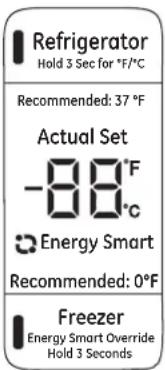
Temperature Display is located on inside of left-hand refrigerator door. To change the temperature, press and release the REFRIGERATOR or FREEZER pad. The ACTUAL TEMP light will come on and the display will show the actual temperature. To change the temperature, tap either the REFRIGERATOR or FREEZER pad until the desired temperature is displayed.
To turn OFF cooling system, press and hold the REFRIGERATOR and FREEZER pads simultaneously for 3 seconds. When the cooling system is OFF the display should read OFF.
To turn ON cooling system, press either REFRIGERATOR or FREEZER pad. The display will show the preset temperature settings of 37^ F ( 2.77^ C) for refrigerator and 0^ F (-17.77°C) for freezer. Turning the cooling system off stops the cooling to refrigerator, but it does not shut off the electrical power.
NOTE: The refrigerator is shipped with protective film covering the temperature controls. If this film was not removed during installation, remove it now.
NOTE: For optimal temperature performance, we recommend to avoid placing food items directly at the air flow vents of the fresh food air tower and thus blocking the air flow.
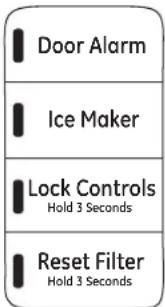
| Sabbath Mode | Press and hold lock & light (door alarm & icemaker buttons for non-dispense models) simultaneously for 3 seconds to enter/exit Sabbath mode. | Sabbath Mode will turn off or dim interior lights, temperature control and advanced features. Compressor will run on a timed defrost when in Sabbath mode. |
| Door alarm | The door alarm will sound if either door is open for more than 2 minutes. The beeping sound will stop when you close the door. | |
| Icemaker | Press to turn the icemaker on or off. | |
| Lock controls | Press and hold for 3 seconds to lock or unlock the refrigerator and freezer controls. | |
| Reset filter | Press and hold for 3 seconds after replacing the filter to reset the timer.We are continuously updating our software please reference online manual for latest functionality. | |
Internal water dispenser
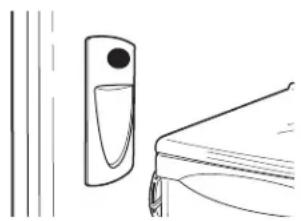
The water dispenser is located on the left wall inside the refrigerator compartment.
To dispense water:
1 Hold the glass against the recess.
2 Push the water dispenser button.
3 Hold the glass underneath the dispenser for 2–3 seconds after releasing the dispenser button. Water may continue to dispense after the button is released.
If no water is dispensed when the refrigerator is first installed, there may be air in the water line system. Press the dispenser button and run 1½ gallons (5.67 liters) to remove trapped air from the water line and to fill the water system. During this process, the dispenser noise may be loud as the air is purged from the water line system. To flush out impurities in the water line, throw away the first 6 glassfuls of water.
NOTE: To avoid water deposits, the dispenser should be cleaned periodically by wiping with a clean cloth or sponge.
natural_image
Simple line drawing of a door with a handle and adjacent wall, no text or symbols presentWater filter
Water Filter Cartridge
The water filter cartridge is located in the fresh food interior on the left side wall, near the top. Select models use radio frequency identification (RFID) to detect leaks and monitor filter status. The RFID technology is certified by the FCC.
FCCID: ZKJ-EBX1532P001 ICID: 10229A-EBX1532P001
"This device complies with part 15 of the FCC Rules. Operation is subject to the following two conditions: (1) This device may not cause harmful interference, and (2) this device must accept any interference received, including interference that may cause undesired operation."
"This device complies with Industry Canada licence-exempt RSS standard(s). Operation is subject to the following two conditions: (1) this device may not cause interference, and (2) this device must accept any interference, including interference that may cause undesired operation of the device."
When to Replace the Filter Cartridge
The filter cartridge should be replaced every six months or earlier if 170 gallons (643.52 liters) of water has been dispensed or the flow of water to the dispenser or icemaker decreases.
Touch Screen Models: A filter status message will appear on the screen when the water filter needs to be replaced. The filter status will automatically update when the filter is replaced.
Non-touch Screen Models: A filter indicator light will illuminate on the screen when the water filter needs to be replaced.
Removing the Filter Cartridge/Bypass Plug
- Remove the old cartridge or bypass plug by opening the filter door and pulling
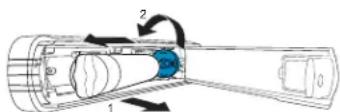
on the bottom of the cartridge/bypass plug to disengage it from the filter clips. Swing the cartridge/bypass plug outward until you hear the 'click' of the cartridge holder engaging with the bracket.
- Twist the cartridge/bypass plug one-quarter turn counter-clockwise. After twisting, remove the cartridge/bypass plug by pulling it away from the cartridge holder. A small amount of water may drip out.
Installing the Filter Cartridge/Bypass Plug
- Align the filter cartridge/bypass plug with the cartridge holder with the word "FRONT" facing the top of the unit. Push the cartridge/bypass plug toward the rear of the unit until it is fully seated. Twist the filter cartridge/bypass plug clockwise one-quarter turn, until the word "FRONT" is facing outward.
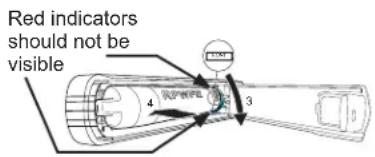
- While continuing to ensure cartridge/bypass plug is fully seated in the holder, gently swing the filter inward until it is in position. If filter will not swing easily, check to ensure filter is properly aligned and fully seated within the cartridge holder. The RED indicators should not be visible.
NOTE: It is normal for water to appear discolored during the initial system flush. Water color will return to normal after first few minutes of dispensing.
Filter Bypass Plug
To reduce the risk of property damage due to water leakage, you MUST use the filter bypass plug when a replacement filter cartridge is not available. Some models do not come equipped with the filter bypass plug. To obtain a free bypass plug, call 800-GECARES, in Canada call 888.880.3030. The dispenser and icemaker will not operate without either the filter or the bypass plug installed. The bypass plug is installed in the same way as a filter cartridge."
WARNING
To reduce the risk associated with choking, do not allow children under 3 years of age to have access to small parts during the installation of this product. The disposable filter cartridge should be replaced every 6 months at the rated capacity, or sooner if a noticeable reduction in flow rate occurs.
For the maximum benefit of your filtration system, GE Appliances recommends the use of GE Appliances-branded filters only. Using GE Appliances-branded filters in GE Appliances and Hotpoint® refrigerators provides optimal performance and reliability. GE Appliances filters meet rigorous industry NSF standards for safety and quality that are important for products that are filtering your water. GE Appliances has not qualified non-GE Appliances-branded filters for use in GE Appliances and Hotpoint refrigerators and there is no assurance that non-GE Appliances-branded filters meet GE Appliances standards for quality, performance and reliability.
If you have questions, or to order additional filter cartridges, visit our website at monogram.com or call Monogram Preferred Service, 800.444.1845. In Canada, call 888.880.3030.
AVERTISSEMENT
Rearranging the shelves
Shelves in the refrigerator compartment are adjustable.
Refrigerator Compartment
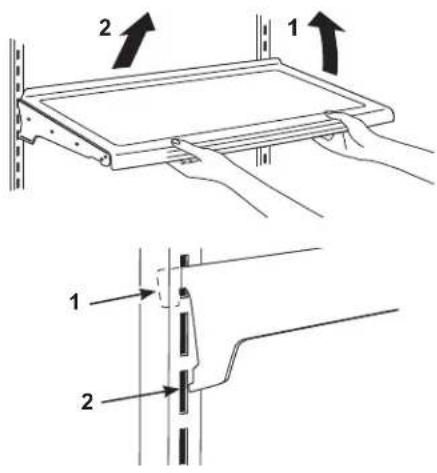
To remove:
- Remove all items from the shelf.
- Tilt the shelf up at the front.
- Lift the shelf up at the back and bring the shelf out.
To replace:
- While tilting the shelf up, insert the top hook at the back of the shelf in a slot on the track.
- Lower the front of the shelf until the bottom of the shelf locks into place.
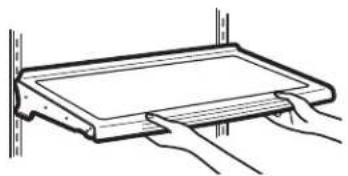
Spillproof shelves
Spillproof shelves have special edges to help prevent spills from dripping to lower shelves.
natural_image
Simple line drawing of a rectangular object with horizontal lines and vertical supports, no text or symbols present.QuickSpace™ shelf\*
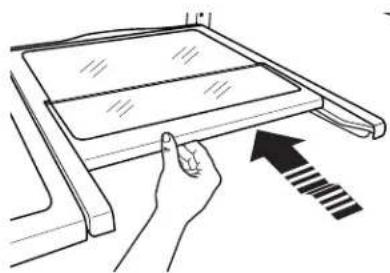
This shelf splits in half and slides under itself for storage of tall items on the shelf below. This shelf can be removed and replaced or relocated (just like spillproof shelves).
NOTE: The back half of the Quick Space Shelf is not adjustable.
*Select Models Only
natural_image
Line drawing of a hand pressing down on a laptop screen with an arrow indicating the next page (no text or symbols present)Non-adjustable dairy bin
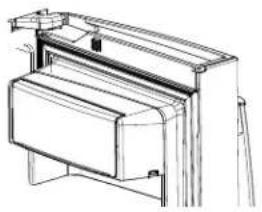
To remove: Lift the dairy bin straight up, then pull out.
To replace: Engage the bin in the molded door supports and push down. The bin will lock in place.
natural_image
Technical line drawing of a mechanical device with no visible text or symbolsAdjustable bins on doors
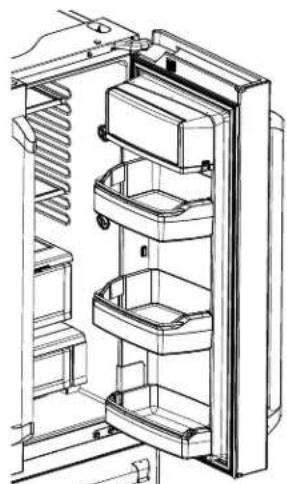
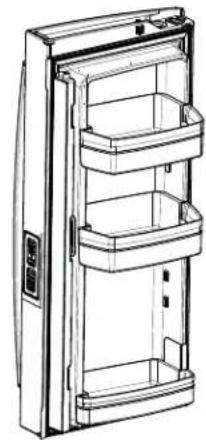
Adjustable bins can easily be carried from refrigerator to work area.
To remove: Lift bin straight up, then pull out.
To replace or relocate: Slide in the bin just above the molded door supports, and push down. The bin will lock in place.
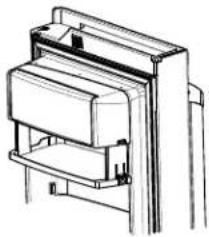
Drop down tray \*
(tray open)
-
Open right fresh food door
-
Depress both buttons on lower sides of bin and bin will drop down.
-
Reverse to reinstall.
*Select Models Only
natural_image
Technical line drawing of a refrigerator interior showing internal compartments and doorways (no text or labels)Dispense Models (Right Hand Door)
natural_image
Line drawing of a refrigerator with three compartments (no text or symbols)Non-Dispense Models (Left Hand Door)
natural_image
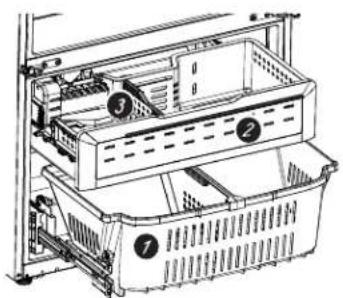
Technical line drawing of a mechanical assembly or bracket (no text or symbols)Freezer basket and drawer
- Basket.
- Drawer
- Ice Bucket*
*Select Models Only
natural_image
Technical line drawing of an appliance drawer with numbered components (no text or symbols)Shelves and Bins
| Stainless Steel Refrigerator | ||
| Basket removal(bottom drawer) | 1. Open fresh food doors.2. Open freezer door to the stop position.3. Remove freezer basket by lifting up the rear of the basket and rotate it upward.4. Lift it out to remove.To replace:Reverse step 1 thru 4 to replace. | 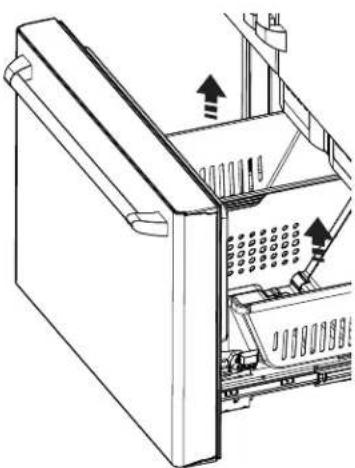 |
| Non-Adjustable bins onthe freezer door | To remove:push in plastic tab on either left or right sideTo replace:slide bin into location until it locks into place. | 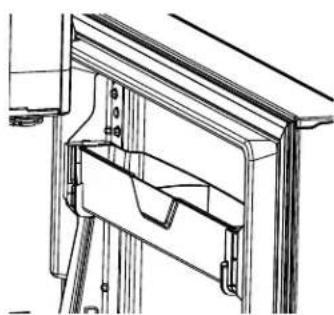 |
| Adjustable deli/produce drawer | To remove:pull the drawer out to the stop position. Lift the front of the drawer up and out.To replace:pull left and right slides until fully extended. Place drawer back in first and rotate drawer front down to seat on slides. Push the drawer in to closed position. | 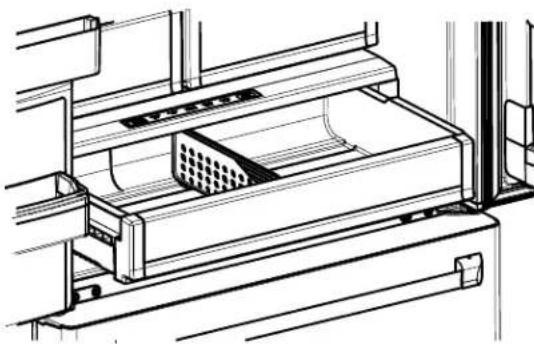 |
| Drawer divider* | To remove:pull the drawer out to the stop position. Slide pan divider to right to release it from the pan.To replace:place pan divider into the groove on the right and slide it to the left as needed.*Select Models Only | 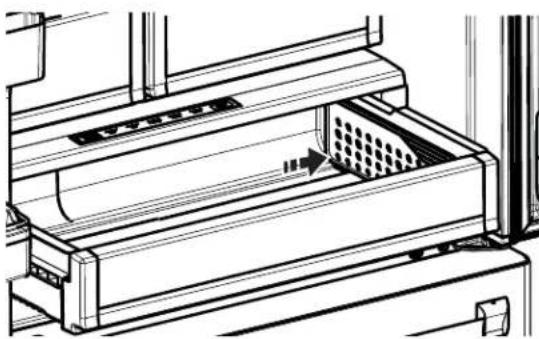 |
Climate Zone and Temperature Controlled Drawer
Stainless Steel Refrigerator
ClimateZone
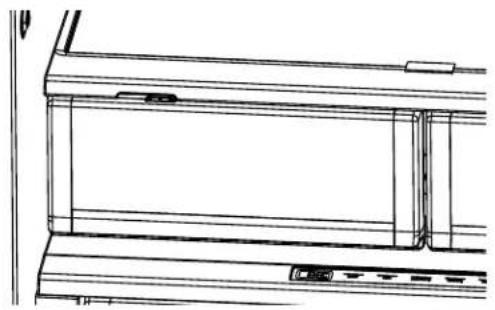
Keep fruits and vegetables organized in separate compartments for easy access.
Excess water that may accumulate in the bottom of the drawers or under the drawers should be wiped dry.
natural_image
Technical line drawing of a window frame structure (no text or symbols)Temperature controlled drawer
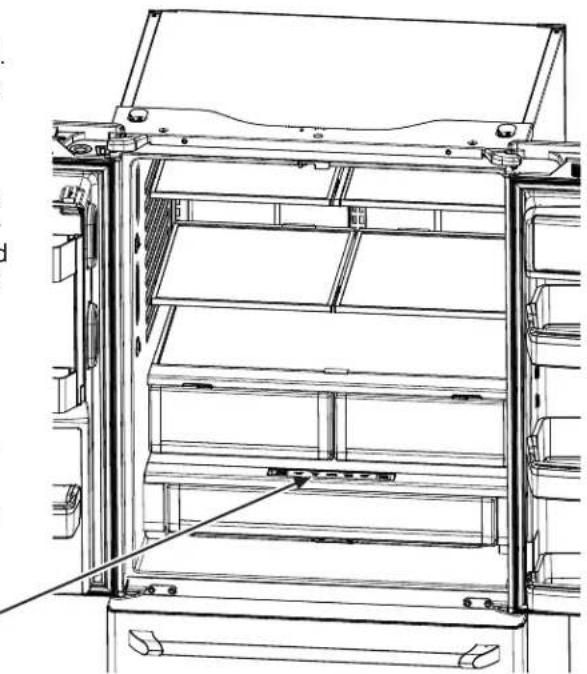
The Temperature Controlled Drawer is a full-width drawer with adjustable temperature control. This drawer can be used for large miscellaneous items.
To change setting, press select button.
NOTE: Temperatures indicate the appropriate temperatures for the food and actual temperatures may vary based on normal operation and other factors such as door openings and fresh food set point.

natural_image
Technical line drawing of a refrigerator interior showing structural panels and door frame (no text or symbols)CAUTION
Laceration Hazard.
Do not store glass bottles at this setting. If they are frozen, they can break and result in personal injury.
ATTENTION
Automatic icemaker\*
NOTE: A newly installed refrigerator may take 12 to 24 hours to begin making ice.
WARNING
Connect to potable water supply only. A cold water supply is required for automatic icemaker operation. The water pressure must be between 40 and 120 psi (275-827 kilopascals).
AVERTISSEMENT
The icemaker will produce seven cubes per cycle approximately 100–130 cubes in a 24-hour period, depending on freezer compartment temperature, room temperature, number of door openings and other use conditions.
The icemaker will fill with water when it cools to 15^ F ( -10^ C). A newly installed refrigerator may take 12 to 24 hours to begin making ice cubes.
If the refrigerator is operated before the water line connection is made to the unit or if the water supply to an operating refrigerator is turned off, make sure that the icemaker is turned off. Once the water has been connected to the refrigerator, the icemaker may be turned on. See the table below for details. You may hear a buzzing sound each time the icemaker fills with water.
Throw away the first few batches of ice to allow the water line to clear.
Be sure nothing interferes with the sweep of the feeler arm.
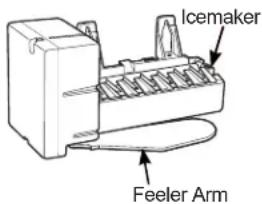
When the bin fills to the level of the feeler arm, the icemaker will stop producing ice. It is normal for several cubes to be joined together. If ice is not used frequently, old ice cubes will become cloudy, taste stale and shrink.
NOTE: In homes with lower-than-average water pressure, you may hear the icemaker cycle multiple times when making one batch of ice.
CAUTION
To minimize the risk of personal injury, avoid contact with the moving parts of the ejector mechanism, or with the heating element that releases the cubes. Do not place fingers or hands on the automatic ice making mechanism while the refrigerator is plugged in.
ATTENTION
To turn off the icemaker, use the "Icemaker" button on the controls.
Accessing ice
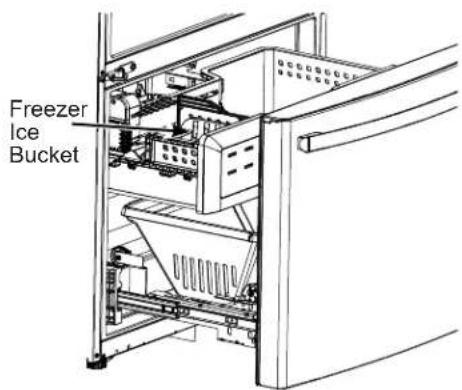
Freezer Ice Bucket\*
The ice storage is in the freezer compartment drawer.
- Open the freezer drawer.
- The ice bucket is located on the left side of the upper basket.
- Pull the upper basket forward to remove the ice bucket.
*Select Models Only
Cleaning the outside
Directions for Cleaning Outside Surfaces, Door Handles, and Trim
| DO USE DO NOT USE | |
| Soft, clean cloth or sponge Abrasive cloths, scrubbing sponges, scouring or steel wool pads | |
| Mild detergent mixed with warm water Approved stainless steel cleaners; Visit the Monogram Appliances parts store for approved stainless steel cleaners:Monogram.comor call888.444.1875Cleaners with oxalic acid such as Bar Keepers Friend Soft CleanserTMcan be used to remove surface rust, tarnish and small blemishes on stainless steel surfaces only. | Abrasive powders or spraysWindow Sprays or AmmoniaCitrus or plant oil-based cleanersAcidic or vinegar-based cleanersOven cleanersCleaners containing acetone (propanone)Any cleaner with WARNING about plastic contact |
NOTE: DO NOT allow stainless steel cleaner to come in contact with any plastic parts such as trim pieces, handle hardware and liners. If unintentional contact of cleaners with plastic parts does occur, clean plastic part with a sponge and mild detergent mixed with warm water.
Cleaning the inside
To help prevent odors, leave an open box of baking soda in the fresh food and freezer compartments.
Unplug the refrigerator before cleaning. If this is not practical, wring excess moisture out of sponge or cloth when cleaning around switches, lights or controls.
Use warm water and baking soda solution—about a tablespoon (15 ml) of baking soda to a quart (1 liter) of water. This both cleans and neutralizes odors. Rinse and wipe dry.
Use of any cleaning solution other than that which is recommended, especially those that contain petroleum distillates, can crack or damage the interior of the refrigerator.
Do not wash any plastic refrigerator parts in the dishwasher.
CAUTION
Do not clean glass shelves
or covers with warm water when they are cold. Glass shelves and covers may break if exposed to sudden temperature changes or impact, such as bumping or dropping. Tempered glass is designed to shatter into many small pieces if it breaks.
ATTENTION
Be careful when moving the refrigerator away from the wall. All types of floor coverings can be damaged, particularly cushioned coverings and those with embossed surfaces.
Raise the leveling legs located at the bottom front of the refrigerator.
Pull the refrigerator straight out and return it to position by pushing it straight in. Moving the refrigerator in a side direction may result in damage to the floor covering or refrigerator.
Lower the leveling legs until they touch the floor.
AVERTISSEMENT

ISQUE
SHOCK HAZARD When pushing the refrigerator back, make sure you don't roll over the power cord or icemaker supply line.
Preparing for vacation
For long vacations or absences, remove food and unplug the refrigerator. Clean the interior with a baking soda solution of one tablespoon (15 ml) of baking soda to one quart (1 liter) of water. Leave the doors open.
If the temperature can drop below freezing, have a qualified service technician drain the water supply system to prevent serious property damage due to flooding.
1) Turn refrigerator off (pg. 7) or unplug the refrigerator.
2) Empty ice bucket
3) Turn water supply off
If you cut the water supply off, turn off the icemaker (pg. 18).
Upon returning from vacation:
1) Replace the water filter.
2) Run 2 gallons (7.57 liters) of water through the cold water dispenser (about 5 minutes) to flush the system.
Preparing to move
Secure all loose items such as shelves and drawers by taping them securely in place to prevent damage.
When using a hand truck to move the refrigerator, do not rest the front or back of the refrigerator against the hand truck. This could damage the refrigerator. Handle only from the sides of the refrigerator.
Be sure the refrigerator stays in an upright position during moving.
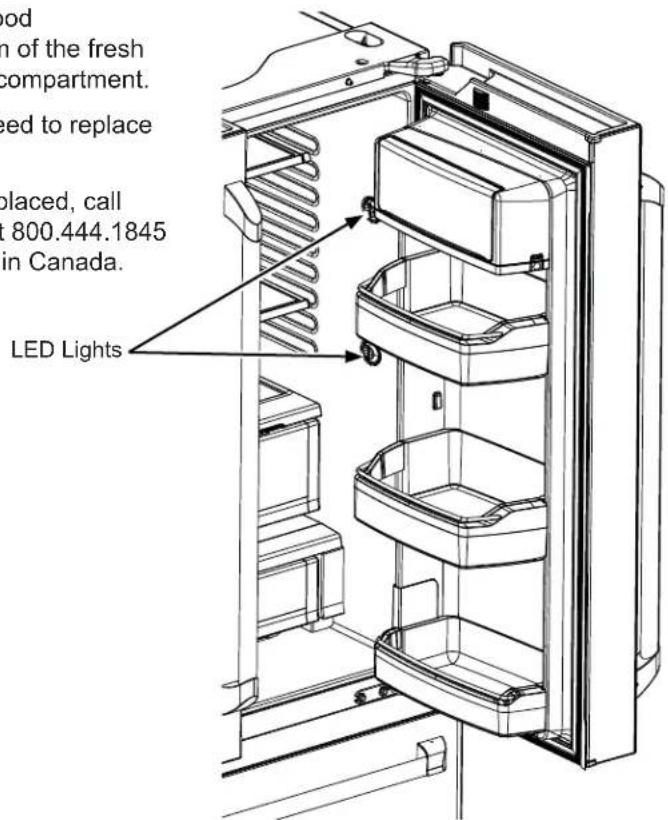
Fresh food compartment— upper light
There is LED lighting in fresh food compartment and on the bottom of the fresh food doors to light the freezer compartment.
An authorized technician will need to replace the LED light.
If this assembly needs to be replaced, call Monogram Preferred Service at 800.444.1845 United States or 888.880.3030 in Canada.
Normal operating sounds
Newer refrigerators sound different from older refrigerators. Modern refrigerators have more features and use newer technology.
Do you hear what I hear? These sounds are normal.
HUMMM... WHOOSH...
■ The new high efficiency compressor may run faster and longer than your old refrigerator and you may hear a high-pitched hum or pulsating sound while it is operating.
■ You may hear a whooshing sound when the doors close. This is due to pressure equalizing within the refrigerator.
■ After dispensing ice, a motor will close the ice chute to keep warn room air from entering the ice bucket, maintaining ice at a freezing temperature.
The hum of the motor closing the ice chute is normal, shortly after dispensing ice.
■ You may hear the fans spinning at high speeds. This happens when the refrigerator is first plugged in, when the doors are opened frequently or when a large amount of food is added to the refrigerator or freezer compartments. The fans are helping to maintain the correct temperatures.
■ The fans change speeds in order to provide optimal cooling and energy savings.
CLICKS, POPS, CRACKS and CHIRPS
■ You may hear cracking or popping sounds when the refrigerator is first plugged in. This happens as the refrigerator cools to the correct temperature.
■ Expansion and contraction of cooling coils during and after defrost can cause a cracking or popping sound.
■ On models with an icemaker, after an ice making cycle, you may hear the ice cubes dropping into the ice bucket.
■ On models with a dispenser, during water dispense, you may hear the water lines move at initial dispense and after dispenser button is released.
WATER SOUNDS
■ The flow of refrigerant through the cooling coils may make a gurgling noise like boiling water.
■ Water dropping on the defrost heater can cause a sizzling, popping or buzzing sound during the defrost cycle.
■ A water dripping noise may occur during the defrost cycle as ice melts from the evaporator and flows into the drain pan.
■ Closing the door may cause a gurgling sound due to pressure equalization.

For additional information on normal icemaker and dispenser operating sounds, see the Automatic Icemaker and Internal Water Dispenser sections.
Questions? Use this problem solver!
| Problem Possible Cause | |
| Handle is loose/handle has a gap. | · Handle needs adjusting. See Attach Fresh Food Handle and Attach the Freezer Handle sections for detailed instructions. |
| Refrigerator beeping · This is door alarm. Turn off or disable with door closed. If door open and alarm is sounding, you can only snooze the alarm. | |
| Not cooling · The cooling system is off. Turn cooling back on. See Operating Instructions.. | |
| Water has poor taste/odor · Water dispenser has not been used for a long time. Dispense water, until all water in system is replenished. | |
| Water in glass is warm · Normal when refrigerator is first installed. Wait 24 hours for the refrigerator to completely cool down. | |
| Water dispenser does not work · Water supply line turned off or not connected. See Installing the Water Line. | |
| Water spurting from dispenser · Newly installed filter cartridge. Run cold water from the dispenser for 2 gallons (7.57 liters). | |
| No water or ice cube produc-tion · Supply line or shutoff valve is clogged. Call a plumber. | |
| Water is leaking from dispens-er · Air may be present in the water line system, causing water to drip after being dispensed. Dispense water for at least 5 minutes to remove air from system. | |
| Freezer cooling, fresh food not cooling · Normal, when refrigerator first plugged in or after extended power outage. Wait 24 hours for temperature in both compartments to reach selected temperatures. | |
*Some models do not come equipped with the filter bypass plug. To obtain a free bypass plug, call 800-GECARES. In Canada, call 888.880.3030.
RPWFE Water Filter Cartridge Limited Warranty
Contact us at Monogram.com or call 800.444.1845.
| For the period of GE Appliances will replace | |
| Thirty DaysFrom the dateof the originalpurchase | Any part of the water filter cartridge which fails due to a defect in materialsor workmanship during this limited thirty-day warranty.* |
What GE Appliances will not cover:
■ Service trips to your home to teach you how to use the product.
■ Improper installation.
■ Failure of the product if it is abused, misused, used for other than the intended purpose or used commercially.
■ Replacement of house fuses or resetting of circuit breakers.
■ Replacement of the water filter cartridge due to water pressure that is outside the specified operating range or due to excessive sediment in the water supply.
■ Damage to the product caused by accident, fire, floods, or acts of God.
■ Incidental or consequential damage caused by possible defects with this appliance.
EXCLUSION OF IMPLIED WARRANTIES
Your sole and exclusive remedy is part exchange as provided in this Limited Warranty. Any implied warranties, including the implied warranties of merchantability or fitness for a particular purpose, are limited to six months or the shortest period allowed by law.
This warranty is extended to the original purchaser and any succeeding owner for products purchased for home use within the USA. In Alaska, the warranty excludes the cost of shipping or service calls to your home.
Some states do not allow the exclusion or limitation of incidental or consequential damages. This warranty gives you specific legal rights, and you may also have other rights which vary from state to state. To know what your legal rights are, consult your local or state consumer affairs office or your state's Attorney General.
For Purchases Made In Iowa: This form must be signed and dated by the buyer and seller prior to the consummation of this sale.
This form should be retained on file by the seller for a minimum of two years.
Buyer:
| Name |
| Address |
| City State Zip |
| Signature Date |
Seller:
| Name |
| Address |
| City State Zip |
| Signature Date |
*If your GE Appliances part fails because of a manufacturing defect within thirty days from the date of original purchase for use, we will give you a new or, at our option, a rebuilt part without charge. Return the defective part to the parts supplier from whom it was purchased together with a copy of the "proof of purchase" for the part. If the part is defective and shows no signs of abuse, it will be exchanged. The warranty does not cover the failure of parts which are damaged while in your possession, are abused, or have been installed improperly. It does not cover the cost of returning the part to the supplier from whom it was purchased nor does it cover the cost of labor to remove or install it to diagnose the fault. It does not cover parts used in products in commercial use except in the case of air conditioning equipment. In no event shall GE Appliances be liable for consequential damages.
Warrantor: GE Appliances, a Haier company
Louisville, KY 40225
Performance Data Sheet Model: RPWFE
■ System certified by IAPMO R&T against NSF/ANSI Standards 42, 53, 401, and P473 for the reduction of claims specified on the performance data sheet and at iapmort.org.
■ Actual performance may vary with local water conditions.
| Substance Tested for Reduction | Influent challenge concentration (mg/L) | Maximum permissible product water concentration (mg/L) | Avg % Reduction |
| Chlorine Taste and Odor 2.0 mg/L +/- 10% N/A > 99 | |||
| Chloramine Taste and Odor 3.0 mg/L +/- 10% 0.5 | > 99 | ||
| Particulate, Class I | At least 10,000/mL | N/A 91.4 | |
| Cysts | 50,000/L | N/A | > 99.99 |
| Lead | 0.15 | 0.01 | 98.85 |
| Mercury | 0.006 | 0.002 | 96.95 |
| Asbestos | 107 to 108 fibers/ L | N/A > 99 | |
| Toxaphene | 0.015 +/- 10% | 0.003 | 86.95 |
| VOC (Chloroform surrogate chemical) | 0.300 | 0.015 | > 99 |
| Alachlor | 0.050 | 0.001 | > 98 |
| Atrazine | 0.100 | 0.003 | > 97 |
| Benzene | 0.081 | 0.001 | > 99 |
| Carbofuran | 0.190 | 0.001 | > 99 |
| carbon tetrachloride 0.078 | 0.0018 98 | ||
| chlorobenzene | 0.077 | 0.001 | > 99 |
| chloropicrin | 0.015 | 0.0002 99 | |
| 2,4-D | 0.110 | 0.0017 98 | |
| dibromochloropropane (DBCP) | 0.052 | 0.00002 | > 99 |
| o-Dichlorobenzene | 0.08 | 0.001 | > 99 |
| p-Dichlorobenzene | 0.040 | 0.001 | > 98 |
| 1,2-dichloroethane | 0.088 | 0.0048 95 | |
| 1,1-dichloroethylene | 0.083 | 0.001 | > 99 |
| cis-1,2-dichloroethylene 0.170 | 0.0005 | > 99 | |
| trans-1,2-dichloroethylene | 0.086 | 0.001 | > 99 |
| 1,2-dichloropropane | 0.080 | 0.001 | > 99 |
| cis-1,3-dichloropropylene | 0.079 | 0.001 | > 99 |
| dinoseb | 0.170 | 0.0002 99 | |
| Endrin | 0.053 | 0.00059 99 | |
| Ethylbenzene | 0.088 | 0.001 | > 99 |
| ethylene dibromide (EDB) | 0.044 | 0.00002 | > 99 |
| bromochloroacetonitrile | 0.022 | 0.0005 98 | |
| dibromoacetonitrile | 0.024 | 0.0006 98 | |
| dichloroacetonitrile | 0.0096 | 0.0002 98 | |
| trichloroacetonitrile | 0.015 | 0.0003 98 | |
| 1,1-dichloro-2-propanone | 0.0072 | 0.0001 99 | |
| 1,1,1-trichloro-2-propanone | 0.0082 | 0.0003 96 | |
| heptachlor (H-34, Heptox) | 0.025 | 0.00001 | > 99 |
| heptachlor epoxide | 0.0107 | 0.0002 98 | |
| hexachlorobutadiene | 0.044 | 0.001 | > 98 |
| hexachlorocyclopentadiene | 0.060 | 0.000002 | > 99 |
| Lindane | 0.055 | 0.00001 | > 99 |
| methoxychlor | 0.050 | 0.0001 | > 99 |
| penlachlorophenol | 0.096 | 0.001 | > 99 |
| simazine | 0.120 | 0.004 | > 97 |
| Styrene | 0.150 | 0.0005 | > 99 |
| 1,1,2,2-tetrachloroethane | 0.081 | 0.001 | > 99 |
| Tetrachloroethylene | 0.081 | 0.001 | > 99 |
| Toluene | 0.078 | 0.001 | > 99 |
| 2,4,5-TP (silvex) | 0.270 | 0.0016 99 | |
| tribromoacetic acid | 0.042 | 0.001 | > 98 |
| 1,2,4-Trichlorobenzene | 0.160 | 0.0005 | > 99 |
| 1,1,1-trichloroethane | 0.084 | 0.0046 95 | |
| 1,1,2-trichloroethane | 0.150 | 0.0005 | > 99 |
| trichloroethylene | 0.180 | 0.0010 | > 99 |
| bromoform | 0.300 | 0.015 | 95 |
| bromodichloromethane | 0.300 | 0.015 95 | |
| chlorodibromomethane | 0.300 | 0.015 95 | |
| xylenes | 0.070 | 0.001 | > 99 |
| Meprobamate | 400 +/- 20% | 60 | > 99 |
| Atenolol | 200 +/- 20% | 30 | > 99 |
| Carbamazepine | 1400 +/- 20% | 200 > 99 | |
| DEET | 1400 +/- 20% | 200 > 99 | |
| Metolachlor | 1400 +/- 20% | 200 > 99 | |
| Trimethoprim | 140 +/- 20% | 20 | > 99 |
| Linuron | 140 +/- 20% | 20 | > 99 |
| TCEP | 5000 +/- 20% | 700 > 99 | |
| TCPP | 5000 +/- 20% | 700 > 99 | |
| Phenytoin | 200 +/- 20% | 30 | > 99 |
| Ibuprofen | 400 +/- 20% | 60 | > 99 |
| Naproxen | 140 +/- 20% | 20 | > 99 |
| Estrone | 140 +/- 20% | 20 | > 99 |
| Bisphenol A | 2000 +/- 20% | 300 > 99 | |
| Nonyl phenol | 1400 +/- 20% | 200 > 99 | |
| PFOA/PFOS | 1.5 mg/L +/- 10% 0.07 | 99.25 |
Application Guidelines/Water Supply Parameters
Service Flow 0.5 gpm (1.89 |pm)
Water Supply Potable Water
Water Pressure 25-120 psi (172-827 kPa)
Water Temperature 33°F-100°F (0.6°C-38°C)
Capacity 170 gallons (643.5 liters)
It is essential that the manufacturer's recommended installation, maintenance and filter replacement requirements be carried out for the product to perform as advertised. See Installation Manual for Warranty information.
NOTE: While the testing was performed under standard laboratory conditions, actual performance may vary. Replacement Cartridge: RPWFE. For estimated costs of replacement elements please call 1.877.959.8688 or visit our website at Monogram.com.
WARNING
To reduce the risk associated with ingestion of contaminants:
- Do not use with water that is microbiologically unsafe or of unknown quality without adequate disinfection before and after the system. Systems certified for cyst reduction may be used on disinfected water that may contain filterable cysts.
NOTICE
To reduce the risk of water leakage or flooding, and to ensure optimal filter performance:
- Read and follow use instructions before installation and use of this system.
- Installation and use MUST comply with all state and local plumbing codes.
- Do not install if water pressure exceeds 120 psi (827 kPa). If your water pressure exceeds 80 psi, you must install a pressure-limiting valve. Contact a plumbing professional if you are uncertain how to check your water pressure.
- Do not install where water hammer conditions may occur. If water hammer conditions exist you must install a water hammer arrester. Contact a plumbing professional if you are uncertain how to check for this condition.
- Do not install on hot water supply lines. The maximum operating water temperature of this filter system is 100^ (38°C).
- Protect filter from freezing. Drain filter when temperatures drop below 33^ (0.6°C).
- Change the disposable filter cartridge every six months or sooner if you observe a noticeable reduction in water flow rate.
- Failure to replace the disposable filter cartridge at recommended intervals may lead to reduced filter performance and cracks in the filter housing, causing water leakage or flooding.
- This System has been tested according to NSF/ANSI 42, 53, 401 and P473 for the reduction of the substances listed below. The concentration of the indicated substances in water entering the system was reduced to a concentration less than or equal to the permissible limit for water leaving the system, as specified in NSF/ANSI 42, 53, 401 and P473.

RPWFE System is certified by IAPMO R&T against NSF/ANSI Standards 42, 53, 401, and P473 for the reduction of claims specified on the performance data sheet and at iapmort.org.
YOUR MONOGRAM REFRIGERATOR AND FREEZER LIMITED WARRANTY
Staple sales slip or cancelled check here. Proof of original purchase date is needed to obtain service under limited warranty.
WHAT IS COVERED
From the Date of the Original Purchase
LIMITED TWO-YEAR WARRANTY
For two years from date of original purchase, we will provide, free of charge, parts and service labor in your home to repair or replace any part of the refrigerator or freezer that fails because of a manufacturing defect.
LIMITED FIVE-YEAR WARRANTY
For five years from date of original purchase, we will provide, free of charge, parts and service labor in your home to repair or replace any part of the sealed refrigerating system (the compressor, condenser, evaporator and all connecting tubing) that fails because of a manufacturing defect.
LIMITED ADDITIONAL SIXTH- THROUGH TWELFTH-YEAR WARRANTY ON THE SEALED SYSTEM
For the sixth through twelfth year from the date of the original purchase, we will provide, free of charge, replacement parts for any part of the sealed refrigerating system (the compressor, condenser, evaporator and all connecting tubing) that fails because of a manufacturing defect. You pay for the service trip to your home and for service labor charges.
LIMITED THIRTY-DAY WARRANTY ON WATER FILTER CARTRIDGE Appliances (Water filter, if included)
From the date of the original purchase we will provide, free of charge, replacement parts for any part of the water filter cartridge that fails because of a manufacturing defect. During this limited thirty-day warranty, we will also provide, free of charge, a replacement water filter cartridge.
This limited warranty is extended to the original purchaser and any succeeding owner for products purchased for ordinary home use in the 48 mainland states, Hawaii, Washington, D.C. or Canada. If the product is located in an area where service by a Monogram Authorized Servicer is not available, you may be responsible for a trip charge or you may be required to bring the product to an Authorized Monogram Service location for service. In Alaska the limited warranty is the same except that it is LIMITED because you must pay to ship the product to the service shop or for the service technician's travel costs to your home.
All warranty service will be provided by our Factory Service Centers or by our authorized Customer Care® servicers during normal working hours.
Should your appliance need service, during limited warranty period or beyond, in the USA call 800.444.1845. In Canada: 888.880.3030. Please have your serial number and model number available when calling for service.
WHAT IS NOT COVERED
• Service trips to your home to teach you how to use the product.
- Replacement of house fuses or resetting of circuit breakers.
- Damage to the product caused by accident, fire, floods or acts of God.
- Failure of the product if it is used for other than its intended purpose or used commercially.
• Damage caused after delivery.
- Improper installation, delivery or maintenance. If you have an installation problem, contact your dealer or installer. You are responsible for providing adequate electrical, plumbing and other connecting facilities.
- Replacement of the light bulbs, if included, or water filter cartridge, if included, other than as noted above.
- Replacement of the water filter cartridge, if included, due to water pressure that is outside the specified operating range or due to excessive sediment in the water supply.
- Loss of food due to spoilage (in the USA only).
- Incidental or consequential damage caused by possible defects with this appliance.
- Product not accessible to provide required service.
- Damage caused by a non-GE Appliances brand water filter.
EXCLUSION OF IMPLIED WARRANTIES—Your sole and exclusive remedy is product repair as provided in this Limited Warranty. Any implied warranties, including the implied warranties of merchantability or fitness for a particular purpose, are limited to one year or the shortest period allowed by law.
Some states/provinces do not allow the exclusion or limitation of incidental or consequential damages, so the above limitation or exclusion may not apply to you. This limited warranty gives you specific legal rights, and you may also have other rights which vary from state to state/province to province. To know what your legal rights are in your state/province, consult your local or state/provincial consumer affairs office or your state's Attorney General.
Warrantor in USA: GE Appliances, a Haier company, Louisville, KY 40225
Warrantor in Canada: MC Commercial, Inc., Burlington, ON, L7R 5B6
| With the purchase of your new Monogram appliance, receive the assurance that if you ever need information or assistance from Monogram, we will be there. All you have to do is call! | |
| Register Your Appliance | Register your new appliance on-line at your convenience! Timely product registration will allow for enhanced communication and prompt service under the terms of your warranty, should the need arise. You may also mail in the pre-printed registration card included in the packing material.In the US: Monogram.comIn Canada: Prodsupport.mabe.ca/crm/Products/ProductRegistration.aspx |
| Schedule Service | Expert Monogram repair service is only one step away from your door. Get on-line and schedule your service at your convenience any day of the year.In the US: Monogram.com or call 800.444.1845 during normal business hours.In Canada: Monogram.ca or call 888.880.3030 |
| Extended Warranties | Purchase a Monogram extended warranty and learn about special discounts that are available while your warranty is still in effect.In the US: Monogram.com or call 800.444.1845 during normal business hours.In Canada: Monogram.ca call 800.290.9029 |
| Remote Connectivity | For assistance with wireless network connectivity (for models with remote enable), visit our website at Monogram.com or call 800.444.1845 in the US only. |
| Parts and Accessories | Individuals qualified to service their own appliances can have parts or accessories sent directly to their homes (VISA, MasterCard and Discover cards are accepted). Order on-line today 24 hours every day.In the US: Monogram.com or by phone at 888.444.1875 during normal business hours.Instructions contained in this manual cover procedures to be performed by any user. Other servicing generally should be referred to qualified service personnel. Caution must be exercised, since improper servicing may cause unsafe operation.Customers in Canada should consult the nearest MC Commercial service center, visit our website at Monogram.ca or call 888.880.3030. |
- Introduction
- Contents
- Consumer Services
- Operating Instructions
- Care and Cleaning
- Before using your refrigerator
- OR
- WARNING
- CAUTION
- PROPER DISPOSAL OF YOUR OLD REFRIGERATOR
- SUFFOCATION AND ENTRAPMENT HAZARD
- Before You Throw Away Your Old Appliance
- Refrigerant and Foam Disposal:
- READ AND SAVE THESE INSTRUCTIONS
- AVERTISSEMENT
- er Hazard.
- Electrical Shock Hazard.
- CONNECTING ELECTRICITY
- ⚠ WARNING
- LECTRICAL SHOCK HAZARD
- Temperature controls
- Changing Temperature Controls
- Internal water dispenser
- To dispense water:
- Water filter
- Water Filter Cartridge
- FCCID: ZKJ-EBX1532P001 ICID: 10229A-EBX1532P001
- When to Replace the Filter Cartridge
- Removing the Filter Cartridge/Bypass Plug
- Installing the Filter Cartridge/Bypass Plug
- Filter Bypass Plug
- Rearranging the shelves
- Refrigerator Compartment
- To remove:
- To replace:
- Spillproof shelves
- QuickSpace™ shelf\*
- Non-adjustable dairy bin
- Adjustable bins on doors
- Drop down tray \*
- Freezer basket and drawer
- Climate Zone and Temperature Controlled Drawer
- ClimateZone
- Temperature controlled drawer
- Laceration Hazard.
- ATTENTION
- Automatic icemaker\*
- Accessing ice
- Freezer Ice Bucket\*
- Cleaning the outside
- Cleaning the inside
- Preparing for vacation
- Preparing to move
- Fresh food compartment— upper light
- Normal operating sounds
- Do you hear what I hear? These sounds are normal.
- HUMMM... WHOOSH...
- CLICKS, POPS, CRACKS and CHIRPS
- WATER SOUNDS
- RPWFE Water Filter Cartridge Limited Warranty
- What GE Appliances will not cover:
- EXCLUSION OF IMPLIED WARRANTIES
- Performance Data Sheet Model: RPWFE
- To reduce the risk associated with ingestion of contaminants:
- NOTICE
- To reduce the risk of water leakage or flooding, and to ensure optimal filter performance:
- YOUR MONOGRAM REFRIGERATOR AND FREEZER LIMITED WARRANTY
- Staple sales slip or cancelled check here. Proof of original purchase date is needed to obtain service under limited warranty.
- WHAT IS COVERED
- LIMITED TWO-YEAR WARRANTY
- LIMITED FIVE-YEAR WARRANTY
- LIMITED ADDITIONAL SIXTH- THROUGH TWELFTH-YEAR WARRANTY ON THE SEALED SYSTEM
- LIMITED THIRTY-DAY WARRANTY ON WATER FILTER CARTRIDGE Appliances (Water filter, if included)
- WHAT IS NOT COVERED
Brand : Monogram
Model : ZWE23PSNSS
Category : Refrigerator