
CC600 - Paper shredder BLACK & DECKER - Free user manual and instructions
Find the device manual for free CC600 BLACK & DECKER in PDF.


| Product Type | Paper Shredder |
| Brand | Black & Decker |
| Model | CC600 (also CC601, CC602) |
| Shredding Materials | Paper, staples, small paper clips |
| Forbidden Materials | Large paper clips, continuous forms, adhesive labels, transparencies, newspaper, cardboard, plastic |
| Power Switch Location | Back of shredder |
| Function Switch Positions | AUTO (I), REV (II), OFF (O) |
| Shredder Stops When Full | Yes, when basket is full |
| Self-Cleaning Function | Runs 2-4 seconds after shredding |
| Overheat Protection | Wait 30 minutes to cool down |
| Maintenance Interval | Oil cutting cylinder every few weeks |
| Basket Emptying | Regularly, when full |
| Warranty - Cutters | Lifetime |
| Warranty - Other Parts | 1 year |
| Customer Service | 1-800-297-5028 |
Frequently Asked Questions - CC600 BLACK & DECKER
User questions about CC600 BLACK & DECKER
0 question about this device. Answer the ones you know or ask your own.
Ask a new question about this device
Download the instructions for your Paper shredder in PDF format for free! Find your manual CC600 - BLACK & DECKER and take your electronic device back in hand. On this page are published all the documents necessary for the use of your device. CC600 by BLACK & DECKER.
USER MANUAL CC600 BLACK & DECKER
Limited Lifetime Warranty
WHO IS COVERED:
This warranty covers only the original retail purchaser of the Black & Decker Paper
Shredder who submits the warranty registration card within 90 days after purchase.
This warranty is not transferable.
HOW LONG DOES COVERAGE LAST:
For cutter blades: Lifetime – as long as you own the product
For all other parts: One year from the date of original purchase
WHAT IS COVERED:
Any defect in material or workmanship of your Black & Decker Paper Shredder
WHAT IS NOT COVERED:
This warranty does not cover damage due to misuse, abuse or accident such as:
- failure to maintain the product as provided in the Black & Decker
Paper Shredder Instruction Manual
• commercial use
• improper or unauthorized repair or service - fire, flood, "acts of God" or other contingencies beyond the control of
HoMedics, Inc.
WHAT HOMEDICS WILL DO:
Repair, and if not possible, replace your Black & Decker Paper Shredder with a new or reconditioned model of the same type. If the model has been revised, you will receive the most current model.
HOW TO GET SERVICE:
Visit our website at www.blackanddeckershredders.com or call the toll free customer service line at 1-800-297-5028.
THE DURATION OF ANY IMPLIED WARRANTY OF MERCHANTABILITY IS LIMITED TO ONE YEAR. HOMEDICS SHALL NOT BE RESPONSIBLE FOR INCIDENTAL OR CONSEQUENTIAL DAMAGES ARISING OUT OF THE PURCHASE OR USE OF THE PAPER
SHREDDER. Some states do not allow limitations on how long an implied warranty lasts, or the exclusion or limitation of incidental or consequential damages, so the above limitations may not apply to you. This warranty gives you specific legal rights, and you may also have other rights which vary from state to state.
Distributed by
HOMEDICS
HoMedics, Inc.
3000 Pontiac Trail, Commerce Twp, MI 48390
visionworks-us.com
Black & Decker and the Black & Decker logo
are trademarks of The Black & Decker Corporation
and are used under license. All rights reserved.

PROTECT YOUR IDENTITY WITH THE BRAND YOU TRUST™
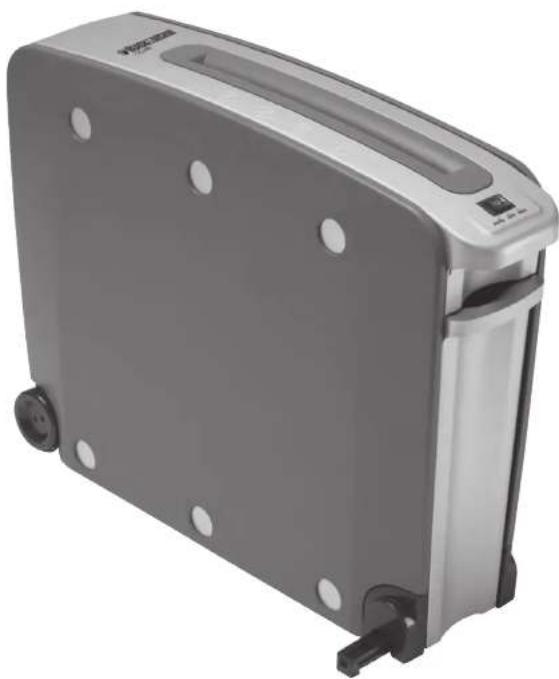
natural_image
Exterior view of a gray portable refrigerator with black wheels and a silver casing (no visible text or symbols)SKU #CC600/601/602
Please read these instructions before use

BLACK&DECKER
SKU #CC600/601/602
Thank you for buying a Black & Decker paper shredder. Black & Decker paper shredders have become the benchmark for innovation, performance and quality to protect against identity theft. We have taken great care in designing and engineering a product to meet and exceed your needs.
To ensure years of safe, efficient performance, please read these important product usage and safety instructions.
If you have any questions regarding the product, please feel free to call toll-free 1-800-297-5028.
Product Information
This product is built to shred paper, staples, and small paper clips. It is not built to shred large paper clips, continuous forms, adhesive labels, transparencies, newspaper, cardboard or other plastic. Using it for these purposes is likely to cause irreparable damage.
The Following are Important Safety Instructions. Read All Instructions Before Using.

WARNING
KEEP OUT OF REACH OF CHILDREN
WARNING: Hazardous moving parts. Keep fingers and other body parts away.
WARNING: To reduce risk of fire, electrical shock or injury:
NEVER allow children to operate a paper shredder, even
under adult supervision. A paper shredder is NOT a toy.
DO NOT use flammable synthetic oil, petroleum-based
products or aerosols of any kind on or near product at any time.
DO NOT operate any electrical product with a damaged cord.
AVOID getting jewelry, hair or loose clothing too close to feed slot as serious injury can occur.
DO NOT handle plug or product with wet hands.
KEEP children and pets away from the shredder.
UNPLUG shredder when not in use.
DO NOT attempt to feed more sheets of paper than specified on the feeder.
DO NOT open shredder head to attempt repair: It could expose you to electric shock and will void your warranty.
DO NOT attempt to shred materials other than paper. The socket-outlet shall be installed near the equipment and shall be easily accessible.
ALWAYS empty the wastebasket prior to becoming full.
DO NOT place shredder near heat or water source.

WARNING ICONS: The icons on top of the shredder warn the user of the potential dangers
if the shredder is used improperly.
KEEP
CHILDREN
NO FLAMMABLE
AWAY

NO LOOSE


NO PAPER
NO HANDS
CLIPS
OR FINGERS
NO HAIR


BLACK&DECKER
SKU #CC600/601/602
Setup
- Check shredder for damage or defects; some particles of paper are normal due to product testing.
- Plug the power cord into any easily reached standard outlet.
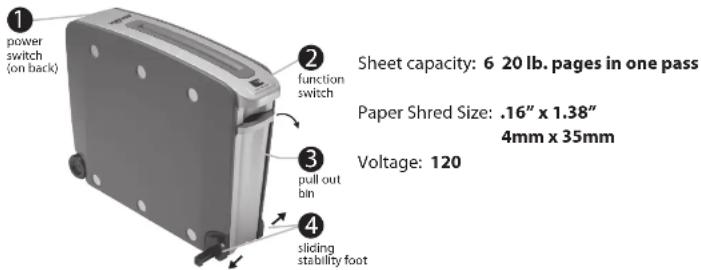
• To use, have the Power Switch (1), located on the back of the shredder, in the ON (-) position. - Place allotted amount of paper into the shredder.
- Press the Function Switch (2) to the AUTO (I) position.
• (I) indicates Forward, (II) indicates Reverse, (O) indicates the Off position.
Customer Service
Black & Decker has a toll-free help line for customers living in the United States and Canada. Our customer service phone number is 1-800-297-5028 or visit our website at www.blackanddeckershredders.com.
Maintenance
Regular emptying of the basket is important to ensure the smooth operation of the cutting cylinders. The shredder will not operate when the basket is full. Regular oiling is also necessary for proper performance. It is recommended to use shredder oil every few weeks.
Troubleshooting
If you have a problem with your shredder, check the symptoms and remedies below. If you cannot solve the problem this way, contact Black & Decker paper shredders Customer Service. Do not open shredder head to attempt repair: It could expose you to electric shock and will void your warranty.
| Symptom | Remedy |
| Shredder does not start or stops while shredding. | - Make sure shredder is plugged in and Power Switch (1) is in the ON (-) position.- Wait 30 minutes for shredder to cool down before trying again. |
| Paper jam. | In case of a paper jam, which may occur if the sheet capacity is exceeded or if the paper is not put in straight. To clear a jam:1. Move the Function Switch (2) to the REV (II) position.The shredder will reverse to clear the jam.2. If the shredder jams in reverse, move the Function Switch (2) to the AUTO (I) and allow it to run for about 5 seconds.3. If the jam still does not clear, unplug shredder and carefully grasp the paper and pull out slowly.4. Once the jam is cleared, plug in and move the Function Switch to AUTO (I) for continued shredding or OFF (O) if shredding is complete. |
| Shredder squeaks, grinds or runs below capacity. | - Check to see if bin is full. If bin is full, follow instructions under maintenance.- Oil cutting cylinder. |
| Shredder continues to run for 2 or 4 seconds after shredding has been completed. | - No action required.This is a self-cleaning function. |
- Limited Lifetime Warranty
- WHO IS COVERED:
- HOW LONG DOES COVERAGE LAST:
- WHAT IS COVERED:
- WHAT IS NOT COVERED:
- WHAT HOMEDICS WILL DO:
- HOW TO GET SERVICE:
- THE DURATION OF ANY IMPLIED WARRANTY OF MERCHANTABILITY IS LIMITED TO ONE YEAR. HOMEDICS SHALL NOT BE RESPONSIBLE FOR INCIDENTAL OR CONSEQUENTIAL DAMAGES ARISING OUT OF THE PURCHASE OR USE OF THE PAPER
- Distributed by
- HOMEDICS
- BLACK&DECKER
- SKU #CC600/601/602
- Product Information
- WARNING
- KEEP OUT OF REACH OF CHILDREN
- KEEP
- CHILDREN
- NO FLAMMABLE
- AWAY
- NO LOOSE
- NO PAPER
- NO HANDS
- CLIPS
- OR FINGERS
- NO HAIR
- Setup
- Customer Service
- Maintenance
- Troubleshooting
Brand : BLACK & DECKER
Model : CC600
Category : Paper shredder