
B942W - Clavier à écran tactile BOSCH - Free user manual and instructions
Find the device manual for free B942W BOSCH in PDF.


| Product Type | Touchscreen Keypad |
| Brand | Bosch |
| Model | B942W |
| Dimensions (W x H x D) | 150 mm x 100 mm x 20 mm |
| Weight | 200 g |
| Power Supply | 12 V DC (via control panel or transformer) |
| Display | Color touchscreen, 4.3 inch |
| Key Functions | Arm, disarm, panic, fire, medical, status |
| Communication | RS-485 bus connection to control panel |
| Compatibility | Bosch alarm control panels (e.g., B5512, B6512) |
| User Profiles | Up to 100 user codes |
| Languages | Multiple languages supported |
| Backlight | Automatic brightness adjustment |
| Tamper Protection | Tamper switch against removal |
| Mounting | Surface mount or flush mount with optional back box |
| Operating Temperature | 0°C to 50°C |
| Humidity | Up to 90% non-condensing |
| Maintenance | Clean with soft, dry cloth; avoid solvents |
| Safety | Low voltage operation; EN 50131-2-3 compliant |
| Spare Parts | Contact Bosch or authorized distributor |
| Repairability | Replaceable keypad only; internal repair by qualified technician |
| General Information | Part of Bosch security systems; designed for indoor use |
Frequently Asked Questions - B942W BOSCH
User questions about B942W BOSCH
0 question about this device. Answer the ones you know or ask your own.
Ask a new question about this device
Download the instructions for your Clavier à écran tactile in PDF format for free! Find your manual B942W - BOSCH and take your electronic device back in hand. On this page are published all the documents necessary for the use of your device. B942W by BOSCH.
USER MANUAL B942W BOSCH
B942 Touch Screen Keypad
www.boschsecurity.com

BOSCH
Invented for life
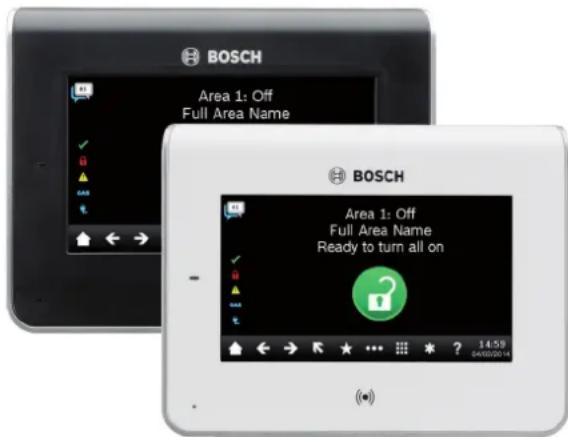
The keypad is an SDI2 bus compatible device. The keypad features an illuminated touch screen and graphical interface. With an elegant design and low profile, the keypad fits with any modern decor. Each keypad has user adjustable options such as volume and brightness. They have four inputs and one output. The keypad shows system messages for all areas.
Keypad languages
The following languages are available:
- English
- Chinese
• Dutch - French
- German
- Greek
- Italian
- Hungarian
- Polish
- Portuguese
- Spanish
-
Swedish
-
Color graphic touch screen display uses a combination of simple icons and text for easy operation
▶ Built-in presence detector lights the display when user approaches keypad
▶ Built-in proximity reader allows use of a token or card as replacement for a passcode, or for use with dual authentication for high security areas
▶ Four inputs and one output provide cost effective expansion
▶ Slim, modern design blends with any decor
System overview
- For commercial use, install the keypad in building entrances and areas with unrestricted access. Mounting a keypad near exterior doors in hotel or business lobbies allows people to identify the type and location of the emergency.
- For residential use, install the keypad near the front and rear entrances to the home. Install additional keypads in a kitchen or in a bedroom.
- Use multiple keypads in a large building with many separate areas of security. Program multiple keypads to control multiple areas.
- Audible tones from the keypad sounder alert personnel to fire events and assist fire fighters in locating the keypad.
Functions
Display
The touch screen display uses icons, words, numbers, and symbols to show the status of the security system and for interacting with the security system. When several events occur, the keypad shows each event in order of priority. The keypad detects when a user approaches and automatically activates the display.
User icons and keys
The keypad greets the user with a home screen that shows the system status at one glance using a large icon. The user can change the system status by simply touching this home screen icon. The touch screen display also offers icons on the ribbon bar. These visually pleasing graphical icons are easy to use for accessing menus and other options. The keypad has a variety of keyboards for entering alphanumeric characters. The keypad screen has numeric keys and one function [CMD] key. When pressed, keys emit a muted beep. Use the keyboards for entering passcodes, activating commands, and entering alphanumeric characters.
Audible tones
The keypad has a built-in speaker that produces several distinct warning tones. The tones are differentiated so that the user can recognize an event simply by hearing its associated tone. The keypad backlight illuminates when it emits an audible tone. Users can use a passcode or credential to silence the tone.
Status indicators
The status indicators on the keypad provide a quick visual reference for system status.
| √ | The indicator lights when the system is ready to turn on (arm). |
| The indicator lights when the system is on (armed). | |
| The indicator lights when there is a trouble condition. | |
| gas | The indicator lights when dangerous gases are present including carbon monoxide (NFPA 720). |
| The indicator lights when the system has power. |
Proximity reader
The proximity reader allows users to use a token or card in place of a passcode to turn on or off the security system. The proximity reader supports EM4102 (125 kHz) credentials. The Bosch ACA-ATR13-RFID tag and Bosch ACD-ATR11ISO-RFID card are examples.
Certifications and approvals
| Region Regulatory compliance/quality marks | |
| Australia RCM ACMA | |
| Europe CE RED, EMC, LVD, RoHS [B942 B942W] | |
| USA UL UL 365 - Police Station Connected Bur-glar Alarm Units | |
| UL UL 609 - Standard for Local Burglar Alarm Units and Systems | |
| UL UL 636 - Holdup Alarm Units and Sys-tems | |
| UL UL 1023 - Household Burglar Alarm Sys-tem Units | |
| Region Regulatory compliance/quality marks | |
| UL UL 1076 - Proprietary Burglar Alarm Units and Systems | |
| UL UL 1610 - Central Station Burglar Alarm Units | |
| UL UL 985 - Household Fire Warning System Units (6th edition) | |
| CSFM California State Fire Marshal | |
| FCC Part 15 Class B | |
| Canada ULC CAN/ULC S303 - Local Burglar Alarm Units and Systems | |
| ULC CAN/ULC S304 - Standard for Signal Receiving Center and Premise Burglar Alarm | |
| ULC CAN/ULC S545 - Residential Fire Warning System Control Units | |
| ULC ULC-ORD C1023 - Household Burglar Alarm System Units | |
| ULC ULC-ORD C1076 - Proprietary Burglar Alarm Units and Systems | |
| ULC Underwriters Laboratories of Canada S1871-20121210 | |
| IC ICES-003 - Information Technology Equipment (ITE) | |
Installation/configuration notes
Power supply
A compatible control panel supplies the power and data requirements to the keypad through a four-wire connection.
Mounting and wiring
Mount in dry indoor locations.
Includes a slim mounting plate for recessing wiring, and a surface mounting plate for surface mounting and wiring.
Compatible control panels
B9512G/B9512G-E
B8512G/B8512G-E
B6512
B5512/B5512E firmware v2.03 and higher
B4512/B4512E firmware v2.03 and higher
B3512/B3512E firmware v2.03 and higher
D9412GV4/D7412GV4 v2.03 and higher
Technical specifications
Properties
| Dimensions | 158 mm x 120 mm x 16.5 mm (6.2 in x 4.7 in x 0.65 in) |
| Weight 0.32 kg (11.3 oz) | |
| Material Acrylonitrile butadiene styrene (ABS)Poly(methyl methacrylate) (PMMA) | |
| Display window Touch screen | Multi-line messages |
| Indicators Power indicator LED | Status indicatorsMain iconWarning and indicating tones |
| Inputs 4 (four) 1k Ω supervised inputs | |
| Output 1 (one) NO (normally open) contact | |
Environmental considerations
| Relative humidity 5% to 93% at +32°C (+90°F) non-condensing |
| Temperature (operating) 0°C to +50°C (+32°F to +122°F) |
Power requirements
| Current with proximity reader disabled | Standby: 200 mAAlarm: 300 mA |
| Current with proximity reader enabled | Standby: 300 mAAlarm: 400 mA |
| Voltage (input) 12 VDC nominal | |
Wiring
| Terminal wire size 18 AWG to 22 AWG (1.02 mm to 0.65 mm) | |
| SDI2 wiring with prox detector disabled | Maximum distance - wire size (unshielded wire only): 200 ft (61 m) - 22 AWG (0.65 mm) 520 ft (159 m) - 18 AWG (1.02 mm) |
| SDI2 wiring with prox detector enabled | Maximum distance - wire size (unshielded wire only): 150 ft (46 m) - 22 AWG (0.65 mm) 390 ft (119 m) - 18 AWG (1.02 mm) |
Inputs and output
| On-board points voltage ranges | Open: 2.2 to 5.0 VDCNormal: 1.4 to 1.8 VDCShort: 0.0 to 1.0 VDC |
Short circuit current: 2.3 mA
Relay contact rating 24 VDC, 1 A, power factor: 1
Ordering information
B942 Touch Screen KP Prox/Input/Output, black
Black SDI2 touch screen keypad with inputs and one output.
Available languages: English, Chinese, Dutch, French, German, Greek, Italian, Hungarian, Polish, Portuguese, Spanish, Swedish.
Order number B942
B942W Touch screen KP, prox/input/output, white
White SDI2 touch screen keypad with inputs and one output.
Available languages: English, Chinese, Dutch, French, German, Greek, Italian, Hungarian, Polish, Portuguese, Spanish, Swedish.
Order number B942W
B942-CHI Touch Screen KP Prox/Input/Output, black Black SDI2 touch screen keypad with inputs and one output.
Available language: Chinese.
Order number B942-CHI
B942W-CHI Touch Screen KP Prox/Input/Output, white
White SDI2 touch screen keypad with inputs and one output.
Available language: Chinese.
Order number B942W·CHI
Accessories
B56 Keypad surface mount box
Surface mount box for mounting a keypad to concrete or block.
Order number B56
B96 Trim plate for keypad
Cover the wall footprint of previous keypads when replacing them with the new, slim design of B Series keypads. The white trim bezel is 8.6 in x 6.3 in x 0.12 in (22 mm x 16 mm x 3 mm).
Order number B96
GV4-ROM-KEY Kit for GV4 version 2.x ROM
Firmware updates current D9412GV4/D7412GV4 v1.xx control panels to GV4 v2.xx.
Order number GV4-ROM-KEY
Represented by:
Europe, Middle East, Africa:
Bosch Security Systems B.V.
P.O. Box 80002
5600 JB Eindhoven, The Netherlands
Phone: +31 40 2577 284
emea.securitysystems@bosch.com
emea.boschsecurity.com
Germany:
Bosch Security Systems, Inc.
130 Perinton Parkway
Fairport, New York, 14450, USA
Robert Bosch (SEA) Pte Ltd, Security Systems
11 Bishan Street 21
Singapore 573943
Phone: +65 6571 2808
Fax: +65 6571 2699
apr.securitysystems@bosch.com
www.boschsecurity.asla
- B942 Touch Screen Keypad
- BOSCH
- Invented for life
- Keypad languages
- System overview
- Functions
- Display
- User icons and keys
- Audible tones
- Status indicators
- Proximity reader
- Installation/configuration notes
- Power supply
- Mounting and wiring
- Compatible control panels
- Ordering information
- B942 Touch Screen KP Prox/Input/Output, black
- B942W Touch screen KP, prox/input/output, white
- B942-CHI Touch Screen KP Prox/Input/Output, black Black SDI2 touch screen keypad with inputs and one output.
- B942W-CHI Touch Screen KP Prox/Input/Output, white
- Accessories
- B56 Keypad surface mount box
- B96 Trim plate for keypad
- GV4-ROM-KEY Kit for GV4 version 2.x ROM
- Represented by:
- Europe, Middle East, Africa:
- Germany:
Brand : BOSCH
Model : B942W
Category : Clavier à écran tactile