Daniel Steiger

Atlantic Sport - Wristwatch Daniel Steiger - Free user manual and instructions

Find the device manual for free Atlantic Sport Daniel Steiger in PDF.

📄 4 pages English EN Download 💬 AI Question 10 questions ⚙️ Specs
Notice Daniel Steiger Atlantic Sport - page 1
Pick your language and provide your email: we'll send you a specifically translated version.
Product Type Analog Quartz Watch
Brand Daniel Steiger
Model Atlantic Sport
Movement Type Quartz (S. EPSON YM92 caliber)
Movement Size (12H-6H) 27.60 mm
Movement Size (3H-9H) 24.00 mm
Casing Diameter (12H-6H) 27.00 mm
Total Height (incl. battery) 3.70 mm
Battery Type SR927SW
Battery Life Approx. 3 years
Display Functions Hour, Minute, Small Second (1-second intervals); Date
Stopwatch Yes, up to 11:59'59"95 in 1/20 sec increments
Stopwatch Hands 1/20-second, Second, Minute, Hour
Split Time Measurement Yes
Battery Life Indicator Small second hand moves at 2-second intervals when battery low
Date Setting Restriction Avoid setting date between 9:00 PM and 1:00 AM
Stopwatch Hand Adjustment Manual procedure via crown and pushers if hands not at zero
Care & Maintenance Keep crown pushed in; avoid strong magnetic fields; service every 3-5 years
Warranty Check with retailer for details

Frequently Asked Questions - Atlantic Sport Daniel Steiger

How do I set the time and date on my Daniel Steiger Atlantic Sport watch?
Pull the crown out to the 2nd click position when the second hand is at 12 o'clock. Turn the crown clockwise to set the hour and minute hands, advancing past 12:00 AM to change the date. Push the crown back to normal. For date only, pull to 1st click and turn clockwise until previous day's date appears.
How do I use the stopwatch?
Ensure crown is in normal position and stopwatch hands are at zero. Press button A to start/stop, button B to reset. For split time, press button B while measuring. The stopwatch can measure up to 11 hours, 59 minutes, 59.95 seconds.
Why is the small second hand moving every 2 seconds instead of 1?
This is the battery life indicator. It means the battery is low and should be replaced soon. The watch remains accurate in this mode.
How do I replace the battery?
Take the watch to a professional watchmaker or jeweler. The battery type is SR927SW. Do not attempt to replace it yourself to avoid damaging the movement.
My stopwatch hands are not resetting to zero. How can I adjust them?
Pull crown to 2nd click. Press and hold button A for 2 seconds until the 1/20-second hand rotates fully. Use button B to set it to zero. Repeat for second hand, then hour/minute hands by pressing A each time. Push crown back.
Can I set the date quickly by turning the crown?
Yes, but avoid setting the date between 9:00 PM and 1:00 AM to prevent damage. Turn the crown clockwise in the 1st click position.
What is the 1/20-second hand for?
It measures 1/20 second intervals and automatically stops at zero after about 10 minutes of running. It only moves when stopwatch is stopped or split time is measured.
How long does the battery last?
Approximately 3 years under normal use. When the small second hand moves at 2-second intervals, replace it soon.
Is the watch water-resistant?
The manual does not specify water resistance. To be safe, avoid exposing the watch to water and remove it before swimming or showering.
How do I maintain the watch?
Keep the crown pushed in to prevent dust and moisture entry. Clean with a soft cloth. Avoid strong magnetic fields and extreme temperatures. Have it serviced every 3-5 years.

User questions about Atlantic Sport Daniel Steiger

0 question about this device. Answer the ones you know or ask your own.

Ask a new question about this device

The email remains private: it is only used to notify you if someone responds to your question.

No questions yet. Be the first to ask one.

Download the instructions for your Wristwatch in PDF format for free! Find your manual Atlantic Sport - Daniel Steiger and take your electronic device back in hand. On this page are published all the documents necessary for the use of your device. Atlantic Sport by Daniel Steiger.

USER MANUAL Atlantic Sport Daniel Steiger

◆ Hour, Minute and Small second hands
◆ Date
◆ Stopwatch

  • 4 Stopwatch hands: 1/20-second, Second, Minute and Hour hand.
  • The stopwatch can measure up to 11:59' 59" 95.
  • Sprit time measurement.

STOPWATCH 1/20-second hand STOPWATCH Second hand Minute hand A Date YM92 S.E.PSON 31 60 55 1/20 Sec. 12 9 3 6 40 30 Hour hand STOPWATCH Hour hand STOPWATCH Minute hand B Crown N : Normal position 1 : First click position 2 : Second click position

Movement Size 12"
Outside Diameter 27.60 mm(12H-6H) x 24.00 mm (3H-9H)
Casing Diameter 27.00 mm(12H-6H)
Height 3.70 mm (Include battery)
Battery SR927SW
Battery Life Approx. 3 years

◆ Battery Life Indicator

When the battery nears its end, the small second hand moves at two-second intervals instead of normal one-second intervals. In that case, have the battery replaced with a new one as soon as possible.

Note: The watch remains accurate while the small second hand is moving at two-second intervals.

How to Set Time and Date:

1
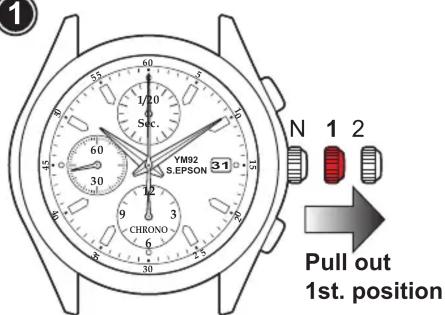
1/20 Sec. YM92 S.EPSON 31 CHRONO 6 5 4 3 2 1 N 1 2 Pull out 1st. position

2
YM92 S.EPSON 1 CHRONO

- Pull crown out to 1st. click position. • Turn the crown clockwise until the previous day's date appears.

Note: Do not set the date between 9:00 PM and 1:00 AM Otherwise, the date may not change properly.

3
3 1/10 Sec. YM92 S.E.PSON 1 N 1 2 CHRONO 6 9 30 6 75 70 60 55 50 45 40 35 30 25 20 15 10 5 Pull out 2nd. position

4
YM92 S.E.PSON CHRONO

- Pull crown out to the 2nd click position when the second hand is at the 12 o'clock position.

Note: When the stopwatch is or has been measuring or is stopped, if the crown is pulled out to the 2nd. click position, it will automatically reset the Stopwatch hands to "0".

  • Turn to set the Hour and Minute hands.
  • Turn clockwise to advance the Hour and Minute hands past 12:00 AM. Doing so will advance the date to the current date.
  • Set the Hour and Minute hands to the desired time taking AM or PM into consideration.

5
5 YM92 S.E.PSON 1 N 1 2 CHRONO 6 Push back Normal position

- Push crown back to normal position.

Recommend:

- When setting the Minute hand, first advance it 4 to 5 minutes ahead of the desired time and then turn it back to the exact minute.

How to Use Stopwatch Functions:

The stopwatch can measure up to 11:59' 59" 95 in 1/20 second increments.

When the measurement reaches 12 hours, the stopwatch automatically stops counting.

STOPWATCH 1/20-second dial STOPWATCH 1/20-second hand STOPWATCH Second hand YM92 S.E.PSON 1/20 Sec 12 3 6 9 30 55 70 85 100 120 145 160 185 200 225 240 265 280 305 330 355 380 405 430 455 480 505 530 555 580 605 630 655 680 705 730 755 780 805 830 855 880 905 930 955 980 1005 1030 1055 1080 1105 1130 1155 1180 1205 1230 1255 1280 1305 1330 1355 1380 1405 1430 1455 1480 1505 1530

Standard Measurement
Daniel Steiger Atlantic Sport - How to Use Stopwatch Functions: - 2

Daniel Steiger Atlantic Sport - How to Use Stopwatch Functions: - 3

Daniel Steiger Atlantic Sport - How to Use Stopwatch Functions: - 4

Daniel Steiger Atlantic Sport - How to Use Stopwatch Functions: - 5

Daniel Steiger Atlantic Sport - How to Use Stopwatch Functions: - 6

Start Stop Reset
Accumulated Elapsed Time Measurement
Daniel Steiger Atlantic Sport - How to Use Stopwatch Functions: - 7

Daniel Steiger Atlantic Sport - How to Use Stopwatch Functions: - 8

Daniel Steiger Atlantic Sport - How to Use Stopwatch Functions: - 9

Daniel Steiger Atlantic Sport - How to Use Stopwatch Functions: - 10

Daniel Steiger Atlantic Sport - How to Use Stopwatch Functions: - 11

Daniel Steiger Atlantic Sport - How to Use Stopwatch Functions: - 12

Daniel Steiger Atlantic Sport - How to Use Stopwatch Functions: - 13

Daniel Steiger Atlantic Sport - How to Use Stopwatch Functions: - 14

Daniel Steiger Atlantic Sport - How to Use Stopwatch Functions: - 15
Stop Reset
Note: Restart and stop of the stopwatch can be repeated by pressing button A.

Start Stop Restart
Sprit Time Measurement
Daniel Steiger Atlantic Sport - How to Use Stopwatch Functions: - 16

Daniel Steiger Atlantic Sport - How to Use Stopwatch Functions: - 17

Daniel Steiger Atlantic Sport - How to Use Stopwatch Functions: - 18

Daniel Steiger Atlantic Sport - How to Use Stopwatch Functions: - 19

Daniel Steiger Atlantic Sport - How to Use Stopwatch Functions: - 20

Daniel Steiger Atlantic Sport - How to Use Stopwatch Functions: - 21

Daniel Steiger Atlantic Sport - How to Use Stopwatch Functions: - 22

Daniel Steiger Atlantic Sport - How to Use Stopwatch Functions: - 23

Daniel Steiger Atlantic Sport - How to Use Stopwatch Functions: - 24

Start
Daniel Steiger Atlantic Sport - How to Use Stopwatch Functions: - 25

Daniel Steiger Atlantic Sport - How to Use Stopwatch Functions: - 26

Daniel Steiger Atlantic Sport - How to Use Stopwatch Functions: - 27

Daniel Steiger Atlantic Sport - How to Use Stopwatch Functions: - 28

Daniel Steiger Atlantic Sport - How to Use Stopwatch Functions: - 29

Daniel Steiger Atlantic Sport - How to Use Stopwatch Functions: - 30

Daniel Steiger Atlantic Sport - How to Use Stopwatch Functions: - 31
Note: Measurement and release of sprit time can be repeated by pressing button B.

Measurement of Two Competitors
Daniel Steiger Atlantic Sport - How to Use Stopwatch Functions: - 32

Daniel Steiger Atlantic Sport - How to Use Stopwatch Functions: - 33

Daniel Steiger Atlantic Sport - How to Use Stopwatch Functions: - 34

Daniel Steiger Atlantic Sport - How to Use Stopwatch Functions: - 35

Daniel Steiger Atlantic Sport - How to Use Stopwatch Functions: - 36

Daniel Steiger Atlantic Sport - How to Use Stopwatch Functions: - 37

Daniel Steiger Atlantic Sport - How to Use Stopwatch Functions: - 38

Daniel Steiger Atlantic Sport - How to Use Stopwatch Functions: - 39

Daniel Steiger Atlantic Sport - How to Use Stopwatch Functions: - 40
Start ResetFinish Time
of 1st
Competitor
2nd
Competitor
Finishes
Finish Time
of 2nd
Competitor

  • 1/20-second hand is capable of timing 12 minutes. (1 second x 43,200 times)
  • Second hand is capable of timing 12 hours. (60 seconds x 720 times)

◆ Movement of Stopwatch 1/20-second hand

- After the stopwatch is started, Stopwatch 1/20-second hand moves for about 10 minutes and automatically stops at the "0" position.

- When the measurement is stopped or split time is measured, it moves to indicate the elapsed 1/20 seconds.

- After the stopwatch is restarted or split time is released, Stopwatch 1/20-second hand moves for about 10 minutes and stops automatically.

- In the same manner, if the stopwatch is stopped and restarted repeatedly or split time is measured and released repeatedly, Stopwatch 1/20-second hand moves for about 10 minutes and stops automatically.

* Before using the stopwatch, be sure to check that the crown is set at the normal position and that the Stopwatch hands are reset to the "0" position.

Note: If the Stopwatch hands do not return to the "0" position when the stopwatch is reset to "0", follow the procedure in "Stopwatch Hand Position Adjustment".

Stopwatch Hand Position Adjustment:

If the Stopwatch hands are not in "0" position, follow the procedures below to set them.

① YM92 S.E.PSON 31 N 1 2 CHRONO Pull out 2nd. position

- Pull the crown out to 2nd. click position.

Note: When the stopwatch is or has been measuring or is stopped, if the crown is pulled out to the 2nd. click position, it will automatically reset.
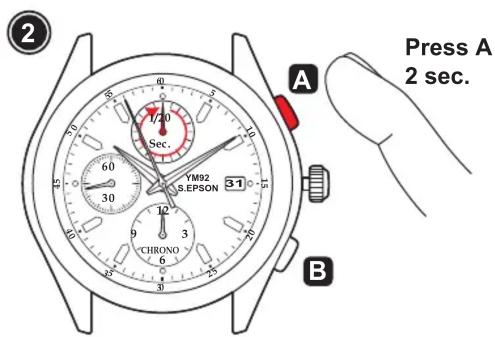
Press A 2 sec. A YM92 S.EPSON 3:1 B CHRONO

  • Press button "A" for 2 seconds.
  • Stopwatch 1/20-second hand turns a full round and can now be set to correct position.
  • Press button "B" repeatedly to set it to "0" position.

Note: Stopwatch 1/20-second hand moves quickly if button "B" is kept pressed.

Press A 2 sec. A B

  • Press button "A" for 2 seconds.
  • Stopwatch Second hand turns a full round and can now be set to correct position.
  • Press button "B" repeatedly to set it to "0" position.

Note: Stopwatch Second hand moves quickly if button "B" is kept pressed.

4 A Press A 2 sec. 60 30 YM92 S.EPSON 31 B

  • Press button "A" for 2 seconds.
  • Stopwatch Hour and Minute hands turn and can now be set to correct position.
  • Press button "B" repeatedly to set it to "0" position.

Note: Stopwatch Hour and Minute hands move quickly if button "B" is kept pressed.

5 YM92 S.EPSON 31 1/20 S.E.PSON 60 30 12 9 3 6 30 5 7 9 11 N 1 2 Push back Normal position

- Push crown back to normal position.

Daniel Steiger Atlantic Sport - Stopwatch Hand Position Adjustment: - 6

flowchart
graph TD
    A["Stopwatch 1/20-second hand"] --> B["Stopwatch second hand"]
    B --> C["Stopwatch hour and minute hands"]
    C --> D["Stopwatch 1/20-second hand"]
    D --> A

Daniel Steiger Atlantic Sport - Stopwatch Hand Position Adjustment: - 7

Manual assistant
Powered by Anthropic
Waiting for your message
Product information

Brand : Daniel Steiger

Model : Atlantic Sport

Category : Wristwatch