EHP-E1882G(OR) - Egg cooker Elba - Free user manual and instructions
Find the device manual for free EHP-E1882G(OR) Elba in PDF.


| Product Type | Multi-function Health Pot / Egg Cooker |
| Brand | Elba |
| Model | EHP-E1882G(OR) |
| Color | Orange |
| Material | Glass body, plastic handle and lid |
| Functions | 18 pre-programmed: Hot Pot, Water, Tea, Noodle, Egg, Steam Egg, Porridge, Medicated Diet, Yogurt, Baby Water, Disinfection, Soup, Coffee, Herbal Tea, Wine, Baby Milk, Milk, Keep Warm |
| Control | Digital touch panel with LED display |
| Timer | Automatic shut-off (5-120 min) and preset timer (30 min - 24 hr) |
| Power | Variable power level (adjustable); default 800W for Hot Pot, 100W for Keep Warm |
| Safety Features | Child lock, overheat protection (E8 code), dry-boil protection, automatic shut-off |
| Capacity | Approximately 1.5 liters (estimated) |
| Voltage | 220-240V |
| Frequency | 50/60Hz |
| Power Consumption | Max 800W |
| Accessories | Egg tray, detachable power base, user manual |
| Cleaning | Hand wash glass body with damp cloth; base station wipe with dry cloth; do not immerse |
| Dishwasher Safe | No |
| Usage | Domestic use only |
| Warranty | Not specified |
Frequently Asked Questions - EHP-E1882G(OR) Elba
User questions about EHP-E1882G(OR) Elba
0 question about this device. Answer the ones you know or ask your own.
Ask a new question about this device
Download the instructions for your Egg cooker in PDF format for free! Find your manual EHP-E1882G(OR) - Elba and take your electronic device back in hand. On this page are published all the documents necessary for the use of your device. EHP-E1882G(OR) by Elba.
USER MANUAL EHP-E1882G(OR) Elba
natural_image
White digital water heater with steaming eggs inside, placed on a digital counter (no visible text or symbols)MODEL: EHP-E1881G(WH)
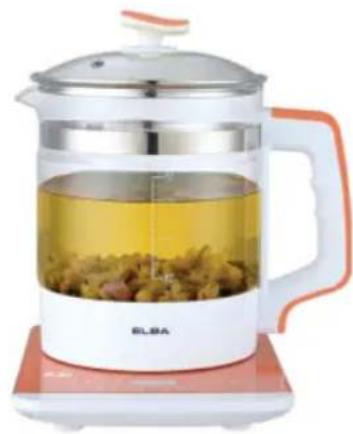
natural_image
White ELBA water heater with clear glass and orange handle, placed on a red digital scale (no text or symbols visible)MODEL: EHP-E1882G(OR)
ELBA
HEALTH POT
MODEL: EHP-E1881G(WH)
EHP-E1882G(OR)
IMPORTANT SAFEGUARDS
When using this appliance, basic precautions should always be followed, including the following:
- Read all instructions before using.
- Do not operate the appliance with a damaged power cord or plug or after the appliance malfunctions, or it is dropped or damaged in any manner. Return the appliance to the nearest authorized dealer or after-sales service centre for examination, repair or mechanical adjustment.
- Do not let the power cord hang over edge of table or hot surface.
-
To protect against electric shock, do not immerse power cord, plug, or the product body of the appliance in water or any other liquids.
-
Unplug the plug from wall outlet when not in use.
-
Do not place the appliance on or near the gas or electric burner, or in a heated oven.
-
Never use any accessories or parts that ELBA does not specifically recommend.
-
Should the base station become moist or wet, remove the plug from the wall outlet immediately.
-
Never immerse the health pot and base station in water or any other liquids not rinse it under the tap. Use only a moist cloth to clean the exterior health pot and dry cloth to wipe the base station.
-
This appliance is only be used with the base station provided.
-
Warning: if the health pot is overfilled, boiling water may be ejected.
-
Do not cook without load or with overloaded food. Otherwise it will cause deformation of the pot and appliance.
-
The content of the food loaded in the pot should not be exceeding the level indicator on the pot. Otherwise it will cause damage and malfunction of the appliance.
-
Do not carry the appliance during operation.
-
Do no drop objects onto the base. In case it cracks, immediately turn off the power supply and unplug the plug from wall outlet and send it for repair.
-
This appliance is not intended for used by person (including children) with reduced physical, sensory or mental capabilities, or lack of experience and knowledge, unless they have been given supervision or instruction concerning use of appliances by a person responsible for their safety.
-
Children should be supervised to ensure that they do not play with the appliance.
-
Close supervision is necessary when your appliance is being used near children or infirm persons.
-
Do not operate the appliance for other than its intended use.
-
Do not use this health pot outdoors.
-
This appliance is for domestic use only.
-
Save these instructions for future reference.
SPECIAL SAFETY INSTRUCTION FOR USING THIS HEALTH POT
- Use only cold water to boil water.
- Water level must be filled above the MIN line and below the MAX line.
- Always power off the base station before removing the health pot.
- Always ensure that the cover is tightly closed.
- Never immerse the base station in water or any other liquids.
- The base station must not become wet.
PRODUCT DESCRIPTION (MODEL: EHP-E1881G(WH))
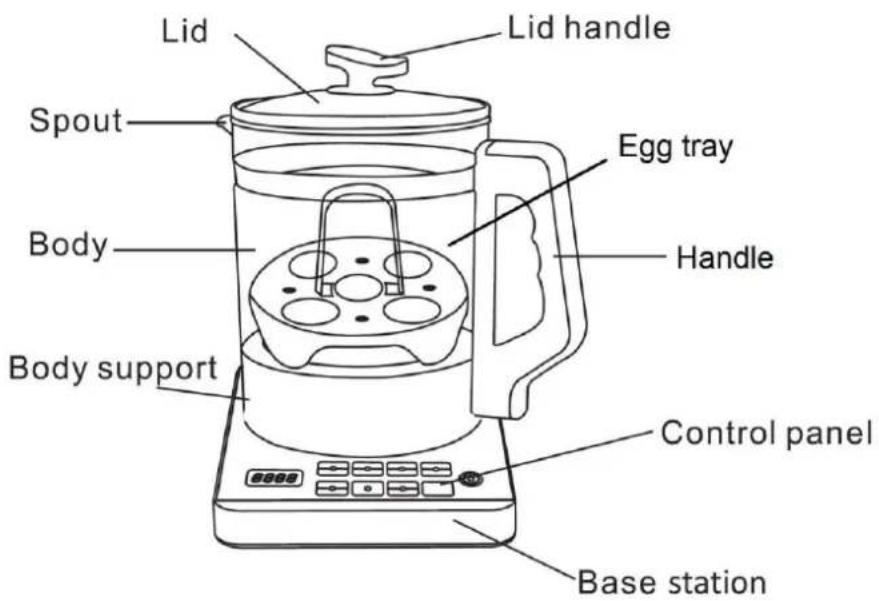
CONTROL PANEL
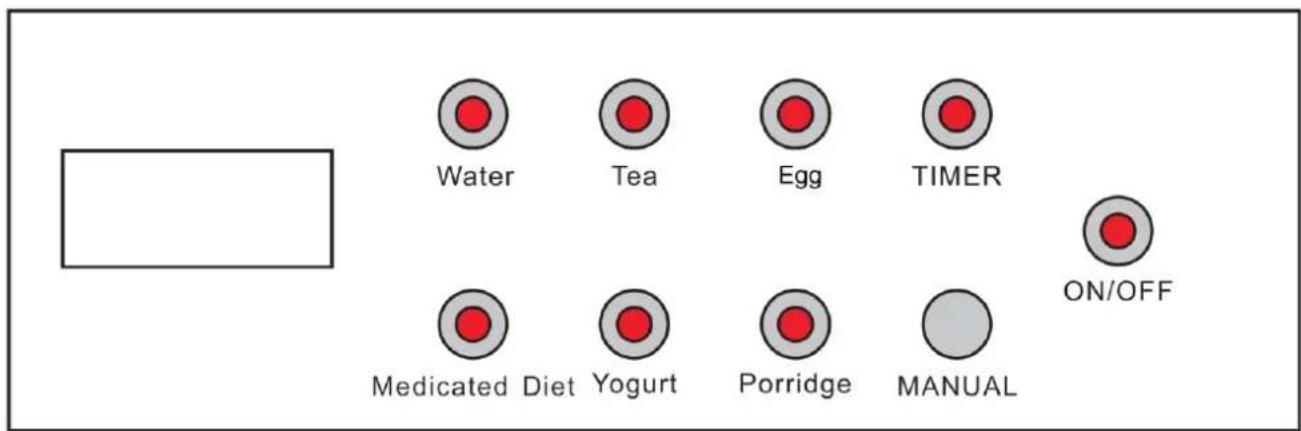
OPERATING THE APPLIANCE
- Place the health pot at the center of the base station. Warning: Please do not power on the appliance with an empty pot as this will cause damage and deformation to the health pot. Power on the appliance and you will hear a "beeping" sound. The display screen will show "----". The display screen will show water temperature when the power is on without operating.
- Touch the "ON/OFF" icon ⏻ and then followed by the cooking function key to select desired cooking functions.
- Touch the cooking function key, the display screen will show the default operating temperature level. After setting the cooking function, the display screen will flash five times and start cooking.
- To cancel any of the selected cooking function, touch the "ON/OFF" icon.
- When the cooking cycle of the selected function is end, the buzzer will ring 3 times and the display screen will show "End". The display will disappear after 1 minute.
- After the cooking has finished, power off and unplug the appliance.
OPERATING THE APPLIANCE – (FUNCTION MODE)
1. Water
Touch the “Water” key, the display screen will show the current water temperature and heat up with full power to 100^ C. After boiling, you will hear the “beeping” sound. The base station will shut off automatically with “beeping” sound after another 40 seconds of heating.
2. Tea
Touch the “Tea” key, the display screen will show the current water temperature and heat up with full power to 80^ C before turning down to half power until boiling. After boiling, you will hear the “beeping” sound, the base station will automatically turn to low power and continue to heat for 15 minutes before shutting off automatically with “beeping” sound.
3. Egg
Touch the “Egg” key, the display screen will show the current water temperature and heat up with full power to 100^ C. After boiling, you will hear the “beeping” sound, the base station will automatically turn to half power and continue to heat for 10 minutes before shutting off automatically with “beeping” sound.
(Note: Recommend to fill with enough water to cover up to half eggs in egg tray)
4. Medicated Diet
Touch the “Medicated Diet” key, the display screen will show the current water temperature and heat up with full power to 80^ C before turning down to half power until boiling. After boiling, you will hear the “beeping” sound, the base station will automatically turn to low power to heat for 60 minutes and switch to keep warm for 2 hours before shutting off automatically with “beeping” sound.
5. Yogurt
Touch the “Yogurt” key, the display screen will show the current water temperature and heat intermittently at low power to maintain the temperature between 35^ C \~ 40^ C for 12 hours before shutting off automatically with “beeping” sound.
6. Porridge
Touch the “Porridge” key, the display screen will show the current water temperature and heat up with full power to 80^ C before turning down to half power until boiling. After boiling, you will hear the “beeping” sound, the base station will be automatically turn to low power to heat intermittently for 30 minutes and switch to keep warm for 2 hours before shutting off automatically with “beeping” sound.
7. Manual Mode
Touch the “MANUAL” key, the display screen will show 400. The default operating power level is 400W and the default time is 10 minutes. The power level can be adjusted by touching the “Manual” key to increase or decrease the power level. After 10 minutes of cooking, the appliance will shut off automatically with “beeping” sound.
OPERATING THE APPLIANCE – (TIMER MODE)
1. Automatic Shut-off Function
- This function is only available for "MANUAL" mode.
- Touch the “MANUAL” key and set the desired power level. After selecting the power level, touch the “TIMER” key and the display screen will flash and show “00:10” (minutes). To set the desired shut-off time, press the timer key and select between the range of 5 to 120 minutes. The timer can be adjusted at the interval of 5 minutes each time the key is pressed. After setting the timer, the display screen will flash 5 times and start to count down by showing the remaining time.
2. Automatic Start Function (Preset Timer)
- This function is available for all functions except "MANUAL" mode.
- After selecting the desired cooking functions, while the display screen is still flashing, touch the "TIMER" key to adjust the desired starting time. When the "Timer" key is pressed, the display screen will flash and show "00:30" (minutes). Press the timer key and select between the range of 30 minutes to 24 hours. The timer can be adjusted at the interval of 30 minutes each time the key is pressed. After setting the timer, the display screen will flash 5 times and start to count down by showing the remaining time.
PRODUCT DESCRIPTION (MODEL: EHP-E1882G(OR))
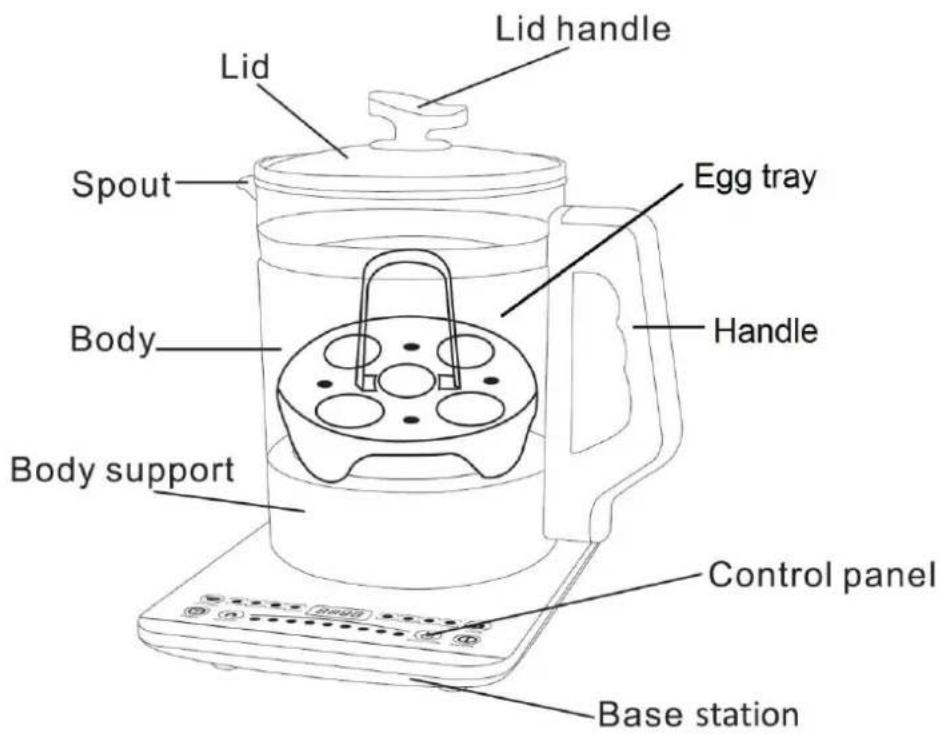
CONTROL PANEL
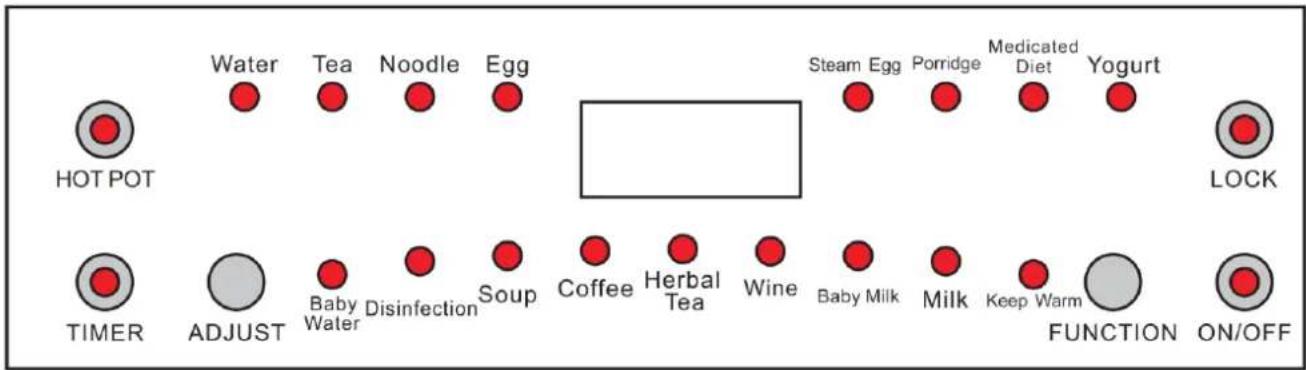
OPERATING THE APPLIANCE
- Place the health pot at the center of the base station. Warning: Please do not power on the appliance with an empty pot as this will cause damage and deformation to the health pot. Power on the appliance and you will hear a "beeping" sound. The display screen will show "----". The display screen will show water temperature when the power is on without operating.
- Touch the "ON/OFF" icon ⏻ and then followed by the cooking function key to select desired cooking functions.
- Touch the cooking function key, the display screen will show the default operating temperature level. After setting the cooking function, the display screen will flash five times and start cooking.
- The sequence of function menu is Water, Tea, Noodle, Egg, Steam Egg, Porridge, Medicated Diet, Yogurt, Baby Water, Disinfection, Soup, Coffee, Herbal Tea, Wine, Baby Milk, Milk, and Keep Warm.
- During the cooking cycle, the power level can be changed by pressing the "ADJUST" icon. The display screen will flash by showing the power level. After setting the power level, the display screen will flash 5 times and then show the water temperature. The appliance will start to heat up with power level newly set.
- To prevent children from adjusting or changing the cooking settings accidentally, all function keys except "ON/OFF" can be locked by pressing the "LOCK" key after a cooking function is set. To turn off the "LOCK" function, press the key once again.
- To cancel any of the selected cooking function, touch the "ON/OFF" icon.
- When the cooking cycle of the selected function is end, the buzzer will ring 3 times and the display screen will show "End". The display will disappear after 1 minute.
- After the cooking has finished, power off and unplug the appliance.
OPERATING THE APPLIANCE – (FUNCTION MODE)
1. Hot Pot
This is a manual function. Touch the "HOT POT" icon, the display screen will show 800. The default operating power level is at 800W. The power level can be adjusted by touching the "ADJUST" icon to increase or decrease the power level.
2. Water
Touch the "FUNCTION" icon and select "Water", the red light indicator for "Water" will light up.
The display screen will show the current water temperature and heat up with full power to 100^ C. After boiling, you will hear the “beeping” sound. The base station will shut off automatically with “beeping” sound after another 40 seconds of heating.
3. Tea
Touch the “FUNCTION” icon and select “Tea”, the red light indicator for “Tea” will light up. The display screen will show the current water temperature and heat up with full power to 80^ C before turning down to half power until boiling. After boiling, you will hear the “beeping” sound, the base station will automatically turn to low power and continue to heat for 15 minutes before shutting off automatically with “beeping” sound.
4. Noodle
Touch the “FUNCTION” icon and select “Noodle”, the red light indicator for “Noodle” will light up. The display screen will show the current water temperature and heat up with full power to 100^ C. After boiling, you will hear the “beeping” sound, the base station will automatically turn to half power and continue to heat for 10 minutes before shutting off automatically with “beeping” sound.
5. Egg
Touch the “FUNCTION” icon and select “Egg”, the red light indicator for “Egg” will light up. The display screen will show the current water temperature and heat up with full power to 100^ C. After boiling, you will hear the “beeping” sound. The base station will shut off automatically with “beeping” sound after another 8 minutes of heating.
(Note: Recommend to fill with enough water to cover up to half eggs in egg tray)
6. Steam Egg
Touch the “FUNCTION” icon and select “Steam Egg”, the red light indicator for “Steam Egg” will light up. The display screen will show the current water temperature and heat up with full power to 100^ C. After boiling, you will hear the “beeping” sound, the base station will automatically turn to half power to heat for 8 minutes before shutting off automatically with “beeping” sound.
(Note: Recommend to fill with enough water to cover up to half eggs in egg tray)
7. Porridge
Touch the “FUNCTION” icon and select “Porridge”, the red light indicator for “Porridge” will light up. The display screen will show the current water temperature and heat up with full power to 80^ C before turning down to half power until boiling. After boiling, you will hear the “beeping” sound, the base station will automatically turn to low power to heat intermittently for 2 hours before shutting off automatically with “beeping” sound.
8. Medicated Diet
Touch the “FUNCTION” icon and select “Medicated Diet”, the red light indicator for “Medicated Diet” will light up. The display screen will show the current water temperature and heat up with full power to 80^ C before turning down to half power until boiling. After boiling, you will hear the “beeping” sound, the base station will automatically turn to low power to heat for 60 minutes and switch to keep warm for 2 hours before shutting off automatically with “beeping” sound.
9. Yogurt
Touch the "FUNCTION" icon and select "Yogurt", the red light indicator for "Yogurt" will light up.
The display screen will show the current water temperature and heat intermittently at low power to maintain the temperature between 35^ C \~ 40^ C for 12 hours before shutting off automatically with “beeping” sound.
10. Baby Water
Touch the "FUNCTION" icon and select "Baby Water", the red light indicator for "Baby Water" will light up. The display screen will show the current water temperature and heat up with full power to 100°C. After boiling, you will hear the "beeping" sound and the heating stops. When the boiled water temperature drops, the function will switch to keep warm mode by maintaining the water temperature between 38°C \~ 42°C. The base station will shut off automatically with "beeping" sound after 2 hours.
11. Disinfection
Touch the “FUNCTION” icon and select “Disinfection”, the red light indicator for “Disinfection” will light up. The display screen will show the current water temperature and heat up with full power to 80^ C before turning down to half power until boiling. After boiling, you will hear the “beeping” sound, the base station will automatically turn to low power to heat for 30 minutes intermittently and switch to keep warm for 2 hours before shutting off automatically with “beeping” sound.
12. Soup
Touch the “FUNCTION” icon and select “Soup”, the red light indicator for “Soup” will light up. The display screen will show the current water temperature and heat up with full power to 100^ C. After boiling, you will hear the “beeping” sound, the base station will be automatically turn to half power to heat for 2 minutes and then low power to continue to heat for 2 hours before shutting off automatically with “beeping” sound.
13. Coffee
Touch the “FUNCTION” icon and select “Coffee”, the red light indicator for “Coffee” will light up. The display screen will show the current water temperature and heat up with full power to 100^ C. After boiling, you will hear the “beeping” sound, the base station will automatically turn to low power and keep the water temperature between 87^ C \~ 93^ C. The base station will shut off automatically with “beeping” sound after 2 hours.
14. Herbal Tea
Touch the “FUNCTION” icon and select “Herbal Tea”, the red light indicator for “Herbal Tea” will light up. The display screen will show the current water temperature and heat up with full power to 100^ C. After boiling, you will hear the “beeping” sound, the base station will automatically turn to half power to heat for 5 minutes and then keep the water temperature between 60^ C \~ 70^ C. The base station will shut off automatically with “beeping” sound after 2 hours.
15. Wine
Touch the “FUNCTION” icon and select “Wine”, the red light indicator for “Wine” will light up. The display screen will show the current water temperature and heat at low power to maintain the temperature between 35^ C \~ 36^ C for 2 hours before shutting off automatically with “beeping” sound.
16. Baby Milk
Touch the “FUNCTION” icon and select “Baby Milk”, the red light indicator for “Baby Milk” will light up. The display screen will show the current water temperature and heat up with full power to 100^ C. After boiling, you will hear the “beeping” sound, the base station will automatically turn to low power to maintain the temperature between 63^ C \~ 65^ C for 2 hours before shutting off automatically with “beeping” sound.
17. Milk
Touch the “FUNCTION” icon and select “Milk”, the red light indicator for “Milk” will light up. The display screen will show the current water temperature and heat at low power to maintain the temperature between 45^ C \~ 46^ C for 2 hours before shutting off automatically with “beeping” sound.
18. Keep Warm
Touch the “FUNCTION” icon and select “Keep Warm”, the red light indicator for “Keep Warm” will light up. The display screen will show 100. The default operating power level is at 100W. The water temperature will be maintained between 57°C \~ 60°C and automatically shut off after 2 hours with a “beep” sound.
OPERATING THE APPLIANCE – (TIMER MODE)
1. Automatic Shut-off Function
- This function is only available for "HOT POT" mode.
- Touch the "HOT POT" icon and set the desired power level by using the "ADJUST" icon. After selecting the power level, touch the "TIMER" icon and the display screen will flash and show "00:10" (minutes). To set the desired shut-off time, press the timer key and select between the range of 5 to 120 minutes. The timer can be adjusted at the interval of 5 minutes each time the key is pressed. After setting the timer, the display screen will flash 5 times and start to count down by showing the remaining time.
2. Automatic Start Function (Preset Timer)
- This function is available for all functions except "HOT POT" mode.
- After selecting the desired cooking functions, while the display screen is still flashing, touch the "Timer" icon to adjust the desired starting time. When the "Timer" key is pressed, the display screen will flash and show "00:30" (minutes). Press the timer key and select between the range of 30 minutes to 24 hours. The timer can be adjusted at the interval of 30 minutes each time the key is pressed. After setting the timer, the display screen will flash 5 times and start to count down by showing the remaining time.
TROUBLESHOOTING GUIDE- (FAULTY CODE)
| Screen Display | Fault Detected |
| E4 | Heat sensor open circuit or short circuitNo pot is detected |
| E5 | IC errorPCB error |
| E8 | Top plate overheatedDry-boiled |
ELBA
- ELBA
- IMPORTANT SAFEGUARDS
- SPECIAL SAFETY INSTRUCTION FOR USING THIS HEALTH POT
- PRODUCT DESCRIPTION (MODEL: EHP-E1881G(WH))
- CONTROL PANEL
- OPERATING THE APPLIANCE
- OPERATING THE APPLIANCE – (FUNCTION MODE)
- Water
- Tea
- Egg
- Medicated Diet
- Yogurt
- Porridge
- Manual Mode
- OPERATING THE APPLIANCE – (TIMER MODE)
- Automatic Shut-off Function
- Automatic Start Function (Preset Timer)
- PRODUCT DESCRIPTION (MODEL: EHP-E1882G(OR))
- Hot Pot
- Water
- Tea
- Noodle
- Egg
- Steam Egg
- Porridge
- Medicated Diet
- Yogurt
- Baby Water
- Disinfection
- Soup
- Coffee
- Herbal Tea
- Wine
- Baby Milk
- Milk
- Keep Warm
Brand : Elba
Model : EHP-E1882G(OR)
Category : Egg cooker