
169159 - Iron GE - Free user manual and instructions
Find the device manual for free 169159 GE in PDF.


| Product Type | Steam Iron |
| Brand | GE |
| Model | 169159 |
| Power Consumption | 1500 Watts |
| Voltage | 120V |
| Cord Length | 8 feet |
| Water Tank Capacity | 300 ml |
| Soleplate Material | Stainless Steel |
| Continuous Steam Output | 30 g/min |
| Steam Shot Output | 100 g/min |
| Spray Function | Yes |
| Self-Clean Function | Yes |
| Anti-Drip System | Yes |
| Auto Shut-Off | Yes |
| Auto Shut-Off Timing | 30 seconds horizontal, 8 minutes vertical |
| Weight | 2.5 lbs (1130 g) |
| Dimensions (L x W x H) | 12 x 6 x 5 inches |
| Temperature Settings | Adjustable thermostat |
| Maintenance | Descaling recommended |
| Warranty | 1 year limited |
Frequently Asked Questions - 169159 GE
User questions about 169159 GE
0 question about this device. Answer the ones you know or ask your own.
Ask a new question about this device
Download the instructions for your Iron in PDF format for free! Find your manual 169159 - GE and take your electronic device back in hand. On this page are published all the documents necessary for the use of your device. 169159 by GE.
USER MANUAL 169159 GE
natural_image
Line drawing of two iron steamers, one upright and one closed, shown in line style (no text or symbols)READ BEFORE USE
LIRE AVANT L'UTILISATION
LEA ANTES DE USAR
840165700
106671R, 169153, 106822R, 106820,
169133, 169134, 169159
For Customer Assistance, call Customer Service at
1-877-207-0923 (US) or 1-877-556-0973 (Canada)
IMPORTANT SAFETY INSTRUCTIONS
When using your flatiron, basic safety precautions should always be followed, including the following:
READ ALL INSTRUCTIONS BEFORE USING
- Use iron only for its intended use.
- To protect against risk of electric shock, do not immerse the iron in water or other liquids.
- The iron should always be turned to OFF (O) before plugging or unplugging from outlet. Never yank cord to disconnect from outlet; instead, grasp plug and pull to disconnect.
- Do not allow cord to touch hot surfaces. Let iron cool completely before putting away. Fully retract cord within unit or loop cord loosely around iron, as applicable, when storing.
- Always disconnect iron from electrical outlet when filling with water or emptying and when not in use.
- Do not operate iron with a damaged cord or if the iron has been dropped or damaged. To avoid the risk of electric shock, do not disassemble the iron. Call our toll-free customer assistance number for information on examination and repair. Incorrect reassembly can cause a risk of electric shock when the iron is used.
- Close supervision is necessary for any appliance being used by or near children. Do not leave iron unattended while connected or on an ironing board.
- Burns can occur from touching hot metal parts, hot water, or steam. Use caution when you turn a steam iron upside down – there may be hot water in the reservoir.
SPECIAL INSTRUCTIONS
- To avoid a circuit overload, do not operate another high wattage appliance on the same circuit.
- If an extension cord is absolutely necessary, a 10-ampere cord should be used. Cords rated for less amperage may overheat. Care should be taken to arrange the cord so that it cannot be pulled or tripped over.
SAVE THESE INSTRUCTIONS!
OTHER CONSUMER SAFETY INFORMATION
This product is intended for household use only.
This appliance has a polarized plug (one blade is wider than the other). To reduce the risk of electric shock, this plug is intended to fit into a polarized outlet only one way. If the plug does not fit fully into the outlet, reverse the plug. If it still does not fit, contact a qualified electrician. Do not attempt to modify the plug in any way.
Use the iron on an ironing board. Ironing on any other surface may damage that surface.
Do not iron or vertical steam clothes that are being worn.
Do not use vertical steam in the direction of people or pets.
PARTS AND FEATURES
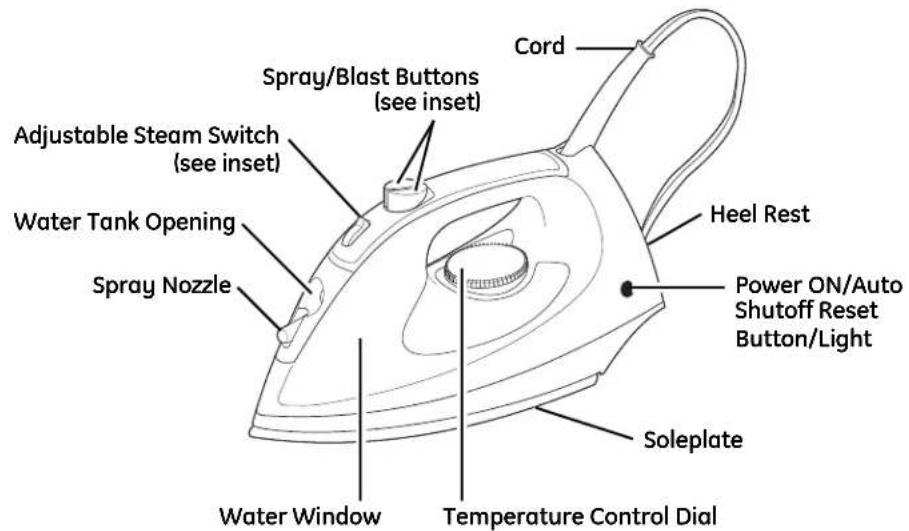
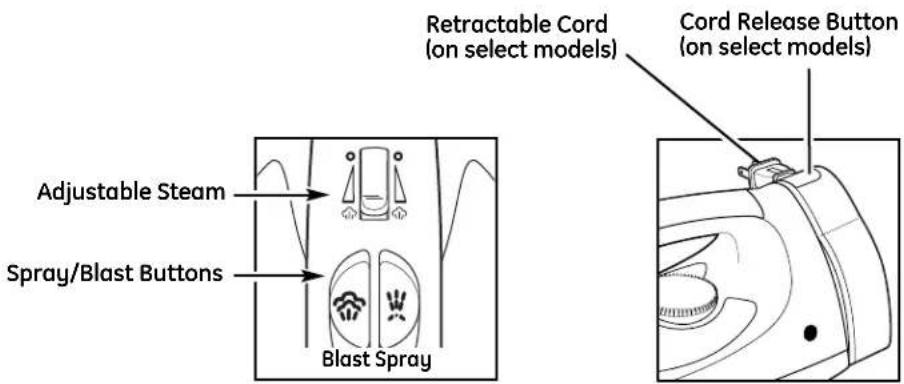
BEFORE FIRST USE
- Steam vents should be cleaned before first use.
- During the first use of the iron, it may appear to smoke. This will stop and does not indicate a defect or hazard.
- To clean steam vents before first use, prepare iron for steam ironing, then iron over an old cloth for a few minutes while letting the iron steam. Press the Blast button several times to clean the vents. Then follow the Self-Cleaning instructions.
- Many irons spit or sputter during the first few uses with tap water. This happens as the steam chamber becomes conditioned. This will stop after a few uses.
TO DRY IRON
- Plug iron into outlet.
- Turn Adjustable Steam Switch to Dry Iron O.
- Turn Temperature Control Dial to desired temperature. Allow two minutes for iron to reach desired temperature.
- To turn iron OFF (O), turn Temperature Control Dial to OFF (O) and unplug iron.
TO STEAM IRON
- Unplug iron. Turn Adjustable Steam Switch to Dry Iron O. Set iron upright on heel rest.
- Using a cup, slowly pour tap water into water tank opening until MAX fill line has been reached. Do not fill iron directly from the faucet.
- Plug iron into outlet.
- Turn the Temperature Control Dial to desired fabric setting in the steam range.
- Allow two minutes for the iron to reach desired temperature.
- Set Adjustable Steam Switch to the recommended steam level. See the "Fabric Setting Chart."
- To turn iron off, set Adjustable Steam Switch to Dry Iron O. Turn the Temperature Control Dial to OFF (O). Unplug iron.
- Empty water from the iron following directions in "Caring for Your Iron."
Water
Please use ordinary tap water. If you have extremely hard water, alternate between tap water and distilled water for use in the iron.
FABRIC SETTING CHART
| Steam Setting | Temperature Setting | Ironing Instructions | ||
 | Dry Iron | Off | ||
| Nylon, Acrylic | ● | Dry iron using spray if necessary. | ||
| Silk | ● | Dry iron on the wrong side of the fabric. | ||
| Polyester | ●● | Iron while fabric is still damp. | ||
| [GST7] | Steam Range | Wool | ●● | Use a press cloth and steam iron on the wrong side of fabric. |
| Rayon | ●●● | Iron using spray if necessary. | ||
| Cotton, Linen | ●●● | For cotton, iron while still damp or use spray. For linen, iron fabric on wrong side. | ||
CARING FOR YOUR IRON
Iron
- The water tank of your iron should be emptied after each use. Turn Temperature Control Dial to OFF (O). Unplug the iron and hold over a sink. Slowly tilt pointed end of iron down over sink. Water will run out of water tank opening.
- After iron has completely cooled, fully retract cord into iron or loop cord loosely around iron, as applicable, and store in an upright position. NOTICE: Do not store iron laying flat on soleplate.
Soleplate
- Never iron over zippers, pins, metal rivets, or snaps, as these may scratch the soleplate.
- To clean occasional build-up on the soleplate, wipe with a sudsy cloth. Do not use abrasive cleansers or metal scouring pads.
- Always store iron upright in the heel rest position.
Self-Clean (on selected models)
To keep the steam vents clear of any build-up, follow these instructions each time you iron using steam.
- Turn Temperature Control Dial to OFF (O) and set Adjustable Steam Switch to Dry Iron O. Fill iron with water to 12 of its maximum capacity.
- Turn Temperature Control Dial to Linen setting and let iron heat for 2 minutes. Keep Adjustable Steam Switch on Dry Iron O.
- Turn Temperature Control Dial to OFF (O). Unplug iron and hold over a sink with soleplate facing down.
- Turn Adjustable Steam Switch to MAX, while pressing Blast of Steam button often. Boiling water and steam will flow out of steam vents. Allow all water to drain from iron.
- Gently move iron front to back to allow water to clean entire soleplate area.
- If water still remains inside of soleplate, reheat iron as indicated in Step 2. Boiling water and steam could still flow out of steam vents.
FEATURES (on selected models)
Adjustable Steam Switch
This knob provides steam for fabrics such as wool and linen. See the "Fabric Setting Chart" for details. Set the switch to Dry Iron O to iron without steam.
Spray and Blast of Steam Buttons
Push Blast Button for an extra blast of steam. Push Spray Button to release a fine spray of water for difficult wrinkles in cotton or linen.
Power ON/ Auto Shutoff Reset Button/Light
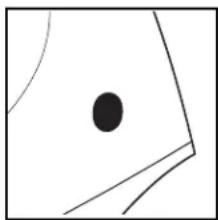
This light comes on when the iron is first plugged in. After one hour, the iron will shut off and the light will go out. Push the Reset Button/Light to turn the iron back on.
natural_image
Abstract geometric diagram with a black dot and curved lines inside a square (no text or symbols)Power On Light
On units not provided with Auto Shutoff, this light comes on when the iron is plugged in and remains on until the iron is unplugged. The light stays on even if Temperature Control Dial is turned to OFF (O).
Retractable Cord
- Pull cord to desired length. Do not unwind cord beyond colored tape indicator on cord.
natural_image
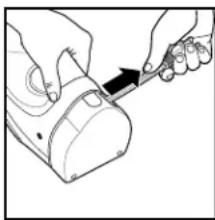
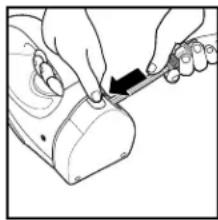
Line drawing of hands using a tool to cut or mark a mechanical component (no text or symbols)- To store cord, press and hold the Cord Release Button while guiding the cord into the storage area.
natural_image
Line drawing of hands using a tool to adjust or install a mechanical component (no text or symbols visible)⚠ WARNING: To reduce the risk of an eye injury, hold the plug while retracting the cord.
TROUBLESHOOTING
| PROBLEM | Things TO CHECK |
| Iron won't heat. | Is the iron plugged in and the outlet working?Check the outlet by plugging in a lamp.Is the Temperature Control Dial turned to a fabric setting?If auto shutoff model, is the Reset Light illuminated? If not, push to reset. |
| Water is leaking out of the iron. | Do not overfill the water tank.If steam ironing, is Adjustable Steam Switch in a steam position and the Temperature Control Dial in the steam range? Did the iron have enough time to preheat?If dry ironing, make sure the Adjustable Steam Switch is in the DRY IRON position. |
| Iron won't steam. | Check the water level.Is the Adjustable Steam Switch in the STEAM position?Has the iron had enough time to preheat? |
| Iron leaves spots on clothing. | ALWAYS empty the water tank of the iron after using.Water left in the tank may discolor clothing and soleplate. |
| Wrinkles not removed. | Check Temperature Control Dial is set to correct fabric. |
| Fabric/clothing scorched. | Check Temperature Control Dial and set to lower setting.Allow iron to cool down 5 minutes before continuing. |
| Twisted cord. | If the iron cord should become twisted, turn iron OFF (O), turn Control Dial to OFF (O) and unplug iron. Let cool. Empty water from iron.Hold iron cord in the middle of entire length.Let plug and iron dangle freely until cord uncoils. This will extend the life of your iron cord. |
| Retractable cord will not unwind (on select models). | Rewind a small amount of cord then fully depress the Cord Release Button and pull the cord to desired length. |
CUSTOMER SERVICE
If you have a claim under this warranty, please call our Customer Assistance Number. For faster service please have model, series, and type numbers ready for operator to assist you. These numbers can be found on the bottom of your appliance.
MODEL: ____ TYPE: ____ SERIES: ____
Customer Assistance Number 1-877-207-0923 (US) or 1-877-556-0973 (Canada)
Keep these numbers for future reference!
For more information, please visit us at www.walmart.com
Two-Year Limited Warranty
What does your warranty cover?
- Any defect in material or workmanship.
For how long after the original purchase?
- Two years.
What will we do?
- Provide you with a new one.
- For those items still under warranty but no longer available, WAL-MART reserves the right to replace with a similar GE branded product of equal or greater value.
How do you make a warranty claim?
- Save your receipt.
- Properly pack your unit. We recommend using the original carton and packing materials.
- Return the product to your nearest WAL-MART store or call Customer Assistance at 1-877-207-0923 (US) or 1-877-556-0973 (Canada).
What does your warranty not cover?
- Parts subject to wear, including, without limitation, glass parts, glass containers, cutter/strainer, blades, seals, gaskets, clutches, motor brushes, and/or agitators, etc.
- Commercial use or any other use not found in printed directions.
- Damage from misuse, abuse, or neglect, including failure to clean product regularly in accordance with manufacturer's instructions.
How does state law relate to this warranty?
- This warranty gives you specific legal rights, and you may also have other rights which vary from state to state or province to province.
- THIS WARRANTY IS IN LIEU OF ANY OTHER WARRANTY OR CONDITION, WHETHER EXPRESS OR IMPLIED, WRITTEN OR ORAL, INCLUDING, WITHOUT LIMITATION, ANY STATUTORY WARRANTY OR CONDITION OF MERCHANTABILITY OR FITNESS FOR A PARTICULAR PURPOSE.
- WAL-MART, GE, AND THE PRODUCT MANUFACTURER EXPRESSLY DISCLAIM ALL RESPONSIBILITY FOR SPECIAL, INCIDENTAL, AND CONSEQUENTIAL DAMAGES OR LOSSES CAUSED BY USE OF THIS APPLIANCE. ANY LIABILITY IS EXPRESSLY LIMITED TO AN AMOUNT EQUAL TO THE PURCHASE PRICE PAID WHETHER A CLAIM, HOWEVER INSTITUTED, IS BASED ON CONTRACT, INDEMNITY, WARRANTY, TORT (INCLUDING NEGLIGENCE), STRICT LIABILITY, OR OTHERWISE. SOME STATES OR PROVINCES DO NOT ALLOW THIS EXCLUSION OR LIMITATION OF INCIDENTAL OR CONSEQUENTIAL LOSSES SO THE FOREGOING DISCLAIMER MAY NOT APPLY TO YOU.
What if you encounter a problem with this product while using it outside the country of purchase?
- The warranty is valid only in the country of purchase and you follow the warranty claim procedure as noted.

is a trademark of General Electric Company and is used under license by WAL-MART Stores, Inc., Bentonville, AR 72716
Marketed in Canada by:
Wal-Mart Canada Corp.
1940 Argentina Road, Mississauga, Ontario L5N 1P9
- IMPORTANT SAFETY INSTRUCTIONS
- READ ALL INSTRUCTIONS BEFORE USING
- SPECIAL INSTRUCTIONS
- SAVE THESE INSTRUCTIONS!
- OTHER CONSUMER SAFETY INFORMATION
- This product is intended for household use only.
- BEFORE FIRST USE
- TO DRY IRON
- TO STEAM IRON
- Water
- CARING FOR YOUR IRON
- Iron
- Soleplate
- Self-Clean (on selected models)
- FEATURES (on selected models)
- Adjustable Steam Switch
- Spray and Blast of Steam Buttons
- Power ON/ Auto Shutoff Reset Button/Light
- Power On Light
- Retractable Cord
- CUSTOMER SERVICE
- Two-Year Limited Warranty
Brand : GE
Model : 169159
Category : Iron